



openGauss 6.0 LTS 如期发布,是三年支持版本,相比以前版本功能上性能上都有很大提升,安装也全程支持普通用户,不再需要root用户预安装。PTK安装工具是云和恩墨为mogdb数据研发的安装管理工具,简化了安装管理过程,对集群进行扩缩容、主备切换、安装插件等功能 ,同时也适用opengauss。下面记录一下用PTK安装openGauss 6.0 LTS。
本次安装所用虚拟机操作系统为openEuler 22.03 SP3,已关闭防火墙和selinux。两个虚拟机组成一主一备模式,资源情况如下:
[root@db1 ~]# cat /etc/os-release
NAME="openEuler"
VERSION="22.03 (LTS-SP3)"
ID="openEuler"
VERSION_ID="22.03"
PRETTY_NAME="openEuler 22.03 (LTS-SP3)"
ANSI_COLOR="0;31"

[root@db1 ~]# free -h
total used free shared buff/cache available
Mem: 3.3Gi 575Mi 2.9Gi 8.6Mi 275Mi 2.8Gi
Swap: 4.0Gi 0B 4.0Gi
ptk工具在线安装
curl --proto '=https' --tlsv1.2 -sSf https://cdn-mogdb.enmotech.com/ptk/install.sh | sh
交互生成安装模板文件
[root@db1 srv]# ptk template create
✔ Please enter cluster name (default: bell): openguass
✔ Please enter system username (default: omm):
✔ Please enter group of user (default: omm): dbgrp
✔ Please enter db password (8~15 characters, 3 classes): *********
✔ Retype db password: *********
✔ Please enter db port (range 1024~65535) (default: 26000):
✔ Please enter mogdb base dir (which should be empty) (default: /opt/mogdb): /opt/huawei
✔ Do you want to intall cm component (default=n) [y/n]: y
And then, let's add some db servers
================db server 1================
✔ Please enter server ip (IPv4 only): 192.168.56.11
✔ Please choose db role: primary
✔ Please enter available zone name (default: AZ1):
✔ Please enter zone("AZ1") priority (default: 1):
================ end ================
✔ Do you want to add another db server (default=n) [y/n]: y
================db server 2================
✔ Please enter server ip (IPv4 only): 192.168.56.13
✔ Please choose db role: standby
✔ Please enter available zone name (default: AZ1):
✔ [SSH] Please enter ssh user (default: root): root
✔ [SSH] Please enter ssh port (default: 22):
✔ [SSH] Please choice an auth method: : Password
✔ [SSH] Please enter ssh password: *********
================ end ================
✔ Do you want to add another db server (default=n) [y/n]:
Generate /srv/config.2024-10-01T13_46_00.yaml successfully
生成的模板文件内容
[root@db1 srv]# cat config.2024-10-01T13_46_00.yaml
global:
    cluster_name: openguass
    user: omm
    group: dbgrp
    db_password: pTk6YWE4MWEzZjc9PDw9PT9AQnk5bGRsbkFsb3NqaG5TMkJvTmZYQmhScm9TblVEb1ZkcGtMS1E3bjVwQ2M=
    db_port: 26000
    base_dir: /opt/huawei
    cm_option:
        dir: /opt/huawei/cm
        cm_server_port: 15300
db_servers:
    - host: 192.168.56.11
      role: primary
      az_name: AZ1
      az_priority: 1
    - host: 192.168.56.13
      role: standby
      az_name: AZ1
      az_priority: 1
      ssh_option:
        port: 22
        user: root
        password: pTk6YmU1NGZkYTQ9PDw9PT9AQ0ZBX1ltTTR3blZKcnk1VnYwRTRmN21Jemh2OGV4VTNvS2VJbkFKNDBWZlk=
检查操作系统,检查是否缺少必须的依赖包
[root@db1 srv]# ptk checkos -f config.2024-10-02T11_34_39.yaml --detail
INFO[2024-10-02T13:31:35.033] prechecking dependent tools...
INFO[2024-10-02T13:31:35.673] [192.168.56.11][omm] kernel version: 5.10.0-230.0.0.132.oe2203sp3.x86_64
INFO[2024-10-02T13:31:35.728] [192.168.56.13][omm] kernel version: 5.10.0-230.0.0.132.oe2203sp3.x86_64
INFO[2024-10-02T13:31:35.731] [192.168.56.11][omm] swap memory 0kB, total memory 3490312kB
INFO[2024-10-02T13:31:35.789] [192.168.56.13][omm] swap memory 0kB, total memory 3490316kB
WARN[2024-10-02T13:31:35.797] [192.168.56.11][omm] device(sda) 'IO Request'=64, expect 256
WARN[2024-10-02T13:31:35.908] [192.168.56.13][omm] device(sda) 'IO Request'=64, expect 256
INFO[2024-10-02T13:31:36.368] [192.168.56.11][omm] check kernel.core_pattern
INFO[2024-10-02T13:31:36.372] [192.168.56.11][omm] check RemoveIPC value
INFO[2024-10-02T13:31:36.379] [192.168.56.11][omm] check KillUserProcesses value
INFO[2024-10-02T13:31:38.017] [192.168.56.13][omm] check kernel.core_pattern
INFO[2024-10-02T13:31:38.134] [192.168.56.13][omm] check RemoveIPC value
INFO[2024-10-02T13:31:38.252] [192.168.56.13][omm] check KillUserProcesses value
WARN[2024-10-02T13:31:41.362] [192.168.56.11][omm] device(/dev/sda) readahead value=8192, expect 16384.
WARN[2024-10-02T13:31:41.417] [192.168.56.13][omm] device(/dev/sda) readahead value=8192, expect 16384.
INFO[2024-10-02T13:31:41.946] [192.168.56.13][omm] check port 26000
INFO[2024-10-02T13:31:41.946] [192.168.56.11][omm] check port 26000
INFO[2024-10-02T13:31:41.951] [192.168.56.11][omm] port 26000 is free
INFO[2024-10-02T13:31:42.221] [192.168.56.13][omm] port 26000 is free
INFO[2024-10-02T13:31:42.221] [192.168.56.13][omm] platform: openEuler_22.03_64bit
INFO[2024-10-02T13:31:42.221] [192.168.56.11][omm] platform: openEuler_22.03_64bit
INFO[2024-10-02T13:31:42.226] [192.168.56.11][omm] timezone: +0800
INFO[2024-10-02T13:31:42.282] [192.168.56.13][omm] timezone: +0800
INFO[2024-10-02T13:31:42.282] all checkers finished
INFO[2024-10-02T13:31:42.282] time elapsed: 7s
# Check Results
                Item                |  Level  |                       Message
------------------------------------+---------+-------------------------------------------------------
  A1.Check_OS_Version               | OK      |
  A2.Check_Kernel_Version           | OK      |
  A3.Check_Unicode                  | OK      |
  A4.Check_TimeZone                 | OK      |
  A5.Check_Swap_Memory_Configure    | OK      |
  A6.Check_SysCtl_Parameter         | OK      |
  A7.Check_FileSystem_Configure     | OK      |
  A8.Check_Disk_Configure           | OK      |
  A9.Check_BlockDev_Configure       | Warning | [192.168.56.13]:
                                    |         | device(/dev/sda) readahead value=8192, expect 16384.
                                    |         | [192.168.56.11]:
                                    |         | device(/dev/sda) readahead value=8192, expect 16384.
  A9.Check_Logical_Block            | OK      |
  A10.Check_NR_Request              | Warning | [192.168.56.11]:
                                    |         | device(sda) 'IO Request'=64, expect 256
                                    |         | [192.168.56.13]:
                                    |         | device(sda) 'IO Request'=64, expect 256
  A10.Check_Asynchronous_IO_Request | OK      |
  A10.Check_IO_Configure            | OK      |
  A11.Check_Network_Configure       | OK      |
  A12.Check_Time_Consistency        | OK      |
  A13.Check_Firewall_Status         | OK      |
  A14.Check_THP_Status              | OK      |
  A15.Check_Dependent_Package       | OK      |
  A16.Check_CPU_Instruction_Set     | OK      |
  A17.Check_Port                    | OK      |
  A18.Check_Selinux                 | OK      |
  A19.Check_User_Ulimit             | OK      |
  A20.Check_Directory               | OK      |
Total count 23, abnormal count 0, warning count 2
检查通过,如有不通过项目,会有明细提示,同时生成.sh结尾的文件,直接执行自动补全缺少的软件包。
下载企业版opengauss到本地,文件名已按新的命名规则命名。
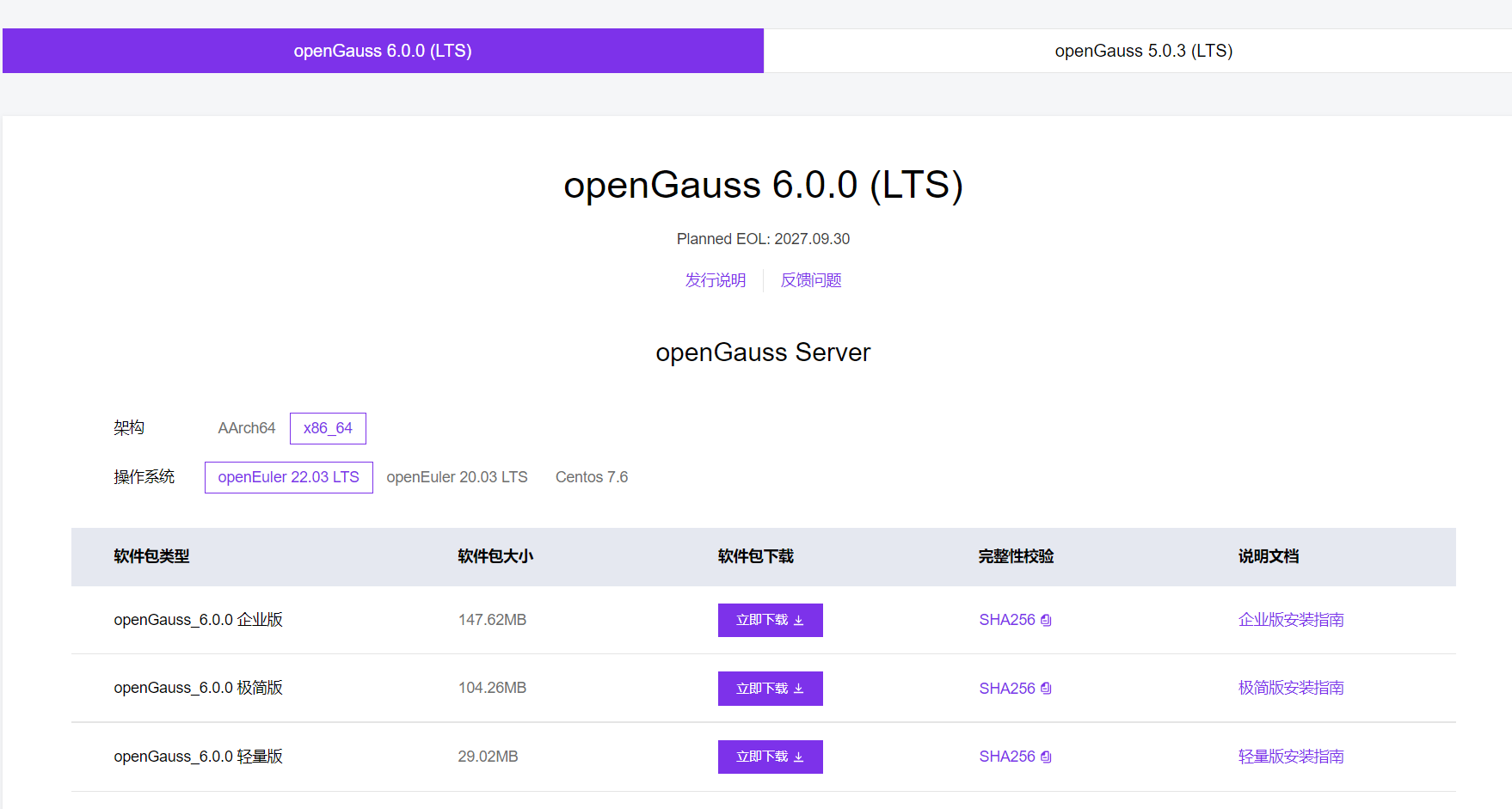
wget https://opengauss.obs.cn-south-1.myhuaweicloud.com/6.0.0/openEuler22.03/x86/openGauss-All-6.0.0-openEuler22.03-x86_64.tar.gz
启动安装,–install-cm安装CM组件
[root@db1 srv]# ptk install -f config.2024-10-02T11_34_39.yaml --install-cm --pkg openGauss-All-6.0.0-openEuler22.03-x86_64.tar.gz
INFO[2024-10-02T13:33:00.988] PTK Version: 1.7.2 release
INFO[2024-10-02T13:33:00.989] load config from config.2024-10-02T11_34_39.yaml
If you continue to install the software,
you are accepting the license agreement of the software.

  [Y]: Accept and continue
  [C]: Show content of licence agreement
  [N]: Abort installation and exit

✔ Please enter (default: Y): Y
INFO[2024-10-02T13:33:03.685] cm enabled but cm_servers is empty, use db servers as cm servers
The cluster will contains 2 cm nodes, so please confirm following cms configs:
- (Optional) db_service_vip=""
- (Required) third_party_gateway_ip=""
- (Optional) cms_enable_failover_on2nodes="True"
- (Optional) cms_enable_db_crash_recovery="False"
✔ The 'third_party_gateway_ip' is not configed, please enter: 192.168.56.16
Now, these configs are:
- db_service_vip=""
- third_party_gateway_ip="192.168.56.16"
- cms_enable_failover_on2nodes="True"
- cms_enable_db_crash_recovery="False"
✔ Do you want to modify them (default=n) [y/n]:
INFO[2024-10-02T13:33:24.439] not mogdb package, auto add --not-limit-cm-nodes flag
Cluster Name: "chaum"
+--------------+---------------+-------------+----------+------------+---------------------+----------+
| az(priority) |      ip       | user(group) |   port   |    role    |      data dir       | upstream |
+--------------+---------------+-------------+----------+------------+---------------------+----------+
| AZ1(1)       | 192.168.56.13 | omm(dbgrp)  | db:26000 | db:standby | db:/opt/huawei/data | -        |
|              |               |             | cm:15300 |            | cm:/opt/huawei/cm   |          |
|              | 192.168.56.11 | omm(dbgrp)  | db:26000 | db:primary | db:/opt/huawei/data | -        |
|              |               |             | cm:15300 |            | cm:/opt/huawei/cm   |          |
+--------------+---------------+-------------+----------+------------+---------------------+----------+
✔ Is cluster config correct (default=n) [y/n]: Y
INFO[2024-10-02T13:33:34.113] start check hostname ...
INFO[2024-10-02T13:33:34.270] check hostname success
INFO[2024-10-02T13:33:34.270] start check os ...
INFO[2024-10-02T13:33:34.271] prechecking dependent tools...
INFO[2024-10-02T13:33:34.852] [192.168.56.11][omm] kernel version: 5.10.0-230.0.0.132.oe2203sp3.x86_64
INFO[2024-10-02T13:33:34.907] [192.168.56.13][omm] kernel version: 5.10.0-230.0.0.132.oe2203sp3.x86_64
WARN[2024-10-02T13:33:35.081] [192.168.56.11][omm] device(sda) 'IO Request'=64, expect 256
WARN[2024-10-02T13:33:35.136] [192.168.56.13][omm] device(sda) 'IO Request'=64, expect 256
INFO[2024-10-02T13:33:37.793] [192.168.56.11][omm] check kernel.core_pattern
INFO[2024-10-02T13:33:37.797] [192.168.56.11][omm] check RemoveIPC value
INFO[2024-10-02T13:33:37.804] [192.168.56.11][omm] check KillUserProcesses value
INFO[2024-10-02T13:33:39.443] [192.168.56.13][omm] check kernel.core_pattern
INFO[2024-10-02T13:33:39.556] [192.168.56.13][omm] check RemoveIPC value
INFO[2024-10-02T13:33:39.672] [192.168.56.13][omm] check KillUserProcesses value
INFO[2024-10-02T13:33:40.332] [192.168.56.11][omm] timezone: +0800
INFO[2024-10-02T13:33:40.388] [192.168.56.13][omm] timezone: +0800
INFO[2024-10-02T13:33:40.391] [192.168.56.11][omm] swap memory 0kB, total memory 3490312kB
INFO[2024-10-02T13:33:40.448] [192.168.56.13][omm] swap memory 0kB, total memory 3490316kB
WARN[2024-10-02T13:33:40.451] [192.168.56.11][omm] device(/dev/sda) readahead value=8192, expect 16384.
WARN[2024-10-02T13:33:40.508] [192.168.56.13][omm] device(/dev/sda) readahead value=8192, expect 16384.
INFO[2024-10-02T13:33:40.807] [192.168.56.13][omm] platform: openEuler_22.03_64bit
INFO[2024-10-02T13:33:40.807] [192.168.56.11][omm] platform: openEuler_22.03_64bit
INFO[2024-10-02T13:33:41.219] [192.168.56.13][omm] check port 26000
INFO[2024-10-02T13:33:41.219] [192.168.56.11][omm] check port 26000
INFO[2024-10-02T13:33:41.224] [192.168.56.11][omm] port 26000 is free
INFO[2024-10-02T13:33:41.482] [192.168.56.13][omm] port 26000 is free
INFO[2024-10-02T13:33:41.482] all checkers finished
INFO[2024-10-02T13:33:41.482] time elapsed: 7s
INFO[2024-10-02T13:33:41.482] check os success
INFO[2024-10-02T13:33:41.482] start check distro ...
INFO[2024-10-02T13:33:41.482] check distro success
INFO[2024-10-02T13:33:41.482] start check user ...
INFO[2024-10-02T13:33:41.644] check user success
INFO[2024-10-02T13:33:41.644] start check port ...
INFO[2024-10-02T13:33:41.644] checking port 26000 on host 192.168.56.11 (db listen port) ...
INFO[2024-10-02T13:33:41.644] checking port 15300 on host 192.168.56.13 (cm listen port) ...
INFO[2024-10-02T13:33:41.649] checking port 26001 on host 192.168.56.11 (db HA port) ...
INFO[2024-10-02T13:33:41.653] checking port 15300 on host 192.168.56.11 (cm listen port) ...
INFO[2024-10-02T13:33:41.918] checking port 26000 on host 192.168.56.13 (db listen port) ...
INFO[2024-10-02T13:33:42.185] checking port 26001 on host 192.168.56.13 (db HA port) ...
INFO[2024-10-02T13:33:42.452] check port success
INFO[2024-10-02T13:33:43.599] start prepare installation package ...
INFO[2024-10-02T13:33:43.599] installation package is ready
INFO[2024-10-02T13:33:43.599] parse installation package ...
INFO[2024-10-02T13:34:34.502] db product: openGauss, version: Server, number: 92.954, commit_id: aee4abd5
INFO[2024-10-02T13:34:34.894] extract openGauss-Server-6.0.0-openEuler22.03-x86_64.tar.bz2 to dir /tmp/ptk_tmp_462330969
INFO[2024-10-02T13:34:43.982] execute command: gaussdb --version
INFO[2024-10-02T13:34:44.042] parse installation package success
INFO[2024-10-02T13:34:44.042] start complete the configuration ...
WARN[2024-10-02T13:34:44.042] Not MogDB, skip check db version for installing CM
INFO[2024-10-02T13:34:44.042] complete the configuration success
INFO[2024-10-02T13:34:44.042] save the topology to metadata
INFO[2024-10-02T13:34:44.043] start distribute installation package ...
INFO[2024-10-02T13:34:45.973] distrubite packages success
INFO[2024-10-02T13:34:45.973] start install logic nodes ...
INFO[2024-10-02T13:34:45.973] deploy db to omm@192.168.56.11
INFO[2024-10-02T13:34:45.973] deploy db to omm@192.168.56.13
INFO[2024-10-02T13:34:45.973] [192.168.56.11][omm] make user omm's dir(s): /opt/huawei
INFO[2024-10-02T13:34:45.973] [192.168.56.13][omm] make user omm's dir(s): /opt/huawei
INFO[2024-10-02T13:34:46.076] [192.168.56.11][omm] clean user omm's ipc resource
INFO[2024-10-02T13:34:46.183] [192.168.56.11][omm] make user omm's dir(s): /opt/huawei/tool,/opt/huawei/tool/ptk_tool/bin
INFO[2024-10-02T13:34:46.272] [192.168.56.13][omm] clean user omm's ipc resource
INFO[2024-10-02T13:34:46.388] [192.168.56.13][omm] make user omm's dir(s): /opt/huawei/tool,/opt/huawei/tool/ptk_tool/bin
INFO[2024-10-02T13:34:49.950] [192.168.56.11][omm] extract openGauss-All-6.0.0-openEuler22.03-x86_64.tar.gz to dir /opt/huawei/tool
INFO[2024-10-02T13:34:50.705] [192.168.56.13][omm] extract openGauss-All-6.0.0-openEuler22.03-x86_64.tar.gz to dir /opt/huawei/tool
INFO[2024-10-02T13:34:50.813] [192.168.56.11][omm] extract openGauss-OM-6.0.0-openEuler22.03-x86_64.tar.gz to dir /opt/huawei/tool
INFO[2024-10-02T13:34:51.414] [192.168.56.11][omm] try to fix psutil python lib
WARN[2024-10-02T13:34:51.610] [192.168.56.11][omm] Not found python3.6 or 3.7, skip fix psutil dynamic lib,
please install proper python and fix it manually or reinstall by ptk
if you don't fix this, it will cause that gs_om and cm_ctl cannot run properly, but not ptk and database
INFO[2024-10-02T13:34:51.611] [192.168.56.11][omm] write file /opt/huawei/tool/script/py_pstree.py
INFO[2024-10-02T13:34:51.613] [192.168.56.13][omm] extract openGauss-OM-6.0.0-openEuler22.03-x86_64.tar.gz to dir /opt/huawei/tool
INFO[2024-10-02T13:34:51.715] [192.168.56.11][omm] write file /opt/huawei/tool/ptk_tool/bin/README.md
INFO[2024-10-02T13:34:51.887] [192.168.56.11][omm] write file /opt/huawei/tool/ptk_tool/bin/pscp
INFO[2024-10-02T13:34:52.072] [192.168.56.11][omm] write file /opt/huawei/tool/ptk_tool/bin/pssh
INFO[2024-10-02T13:34:52.235] [192.168.56.11][omm] write file /opt/huawei/tool/ptk_tool/bin/task_pool.py
INFO[2024-10-02T13:34:52.268] [192.168.56.13][omm] try to fix psutil python lib
INFO[2024-10-02T13:34:52.407] [192.168.56.11][omm] make user omm's dir(s): /opt/huawei/app
WARN[2024-10-02T13:34:52.477] [192.168.56.13][omm] Not found python3.6 or 3.7, skip fix psutil dynamic lib,
please install proper python and fix it manually or reinstall by ptk
if you don't fix this, it will cause that gs_om and cm_ctl cannot run properly, but not ptk and database
INFO[2024-10-02T13:34:52.477] [192.168.56.13][omm] write file /opt/huawei/tool/script/py_pstree.py
INFO[2024-10-02T13:34:52.588] [192.168.56.13][omm] write file /opt/huawei/tool/ptk_tool/bin/README.md
INFO[2024-10-02T13:34:52.627] [192.168.56.11][omm] extract openGauss-Server-6.0.0-openEuler22.03-x86_64.tar.bz2 to dir /opt/huawei/app
INFO[2024-10-02T13:34:52.752] [192.168.56.13][omm] write file /opt/huawei/tool/ptk_tool/bin/pscp
INFO[2024-10-02T13:34:52.917] [192.168.56.13][omm] write file /opt/huawei/tool/ptk_tool/bin/pssh
INFO[2024-10-02T13:34:53.098] [192.168.56.13][omm] write file /opt/huawei/tool/ptk_tool/bin/task_pool.py
INFO[2024-10-02T13:34:53.281] [192.168.56.13][omm] make user omm's dir(s): /opt/huawei/app
INFO[2024-10-02T13:34:53.477] [192.168.56.13][omm] extract openGauss-Server-6.0.0-openEuler22.03-x86_64.tar.bz2 to dir /opt/huawei/app
INFO[2024-10-02T13:35:02.234] [192.168.56.11][omm] change mode of /opt/huawei/app to 700
INFO[2024-10-02T13:35:02.302] [192.168.56.11][omm] make user omm's dir(s): /opt/huawei/app/share/postgresql
INFO[2024-10-02T13:35:02.615] [192.168.56.11][omm] copy /opt/huawei/tool/script/gspylib/etc/sql/pmk_schema.sql to /opt/huawei/app/share/postgresql
INFO[2024-10-02T13:35:02.680] [192.168.56.11][omm] copy /opt/huawei/tool/script/gspylib/etc/sql/pmk_schema_single_inst.sql to /opt/huawei/app/share/postgresql
INFO[2024-10-02T13:35:02.748] [192.168.56.11][omm] write file /opt/huawei/app/bin/transfer.py
INFO[2024-10-02T13:35:02.850] [192.168.56.11][omm] set user omm profiles
INFO[2024-10-02T13:35:03.167] [192.168.56.13][omm] change mode of /opt/huawei/app to 700
INFO[2024-10-02T13:35:03.237] [192.168.56.13][omm] make user omm's dir(s): /opt/huawei/app/share/postgresql
INFO[2024-10-02T13:35:03.275] [192.168.56.11][omm] validate and try to fix ld library for gs_initdb
INFO[2024-10-02T13:35:03.347] [192.168.56.11][omm] validate and try to fix ld library for gaussdb
INFO[2024-10-02T13:35:03.420] [192.168.56.11][omm] make user omm's dir(s): /opt/huawei/log/gs_profile,/opt/huawei/log/pg_log,/opt/huawei/log/pg_audit,/opt/huawei/log/bin,/opt/huawei/log/pg_log/dn_6001,/opt/huawei/log/pg_audit/dn_6001
INFO[2024-10-02T13:35:03.562] [192.168.56.13][omm] copy /opt/huawei/tool/script/gspylib/etc/sql/pmk_schema.sql to /opt/huawei/app/share/postgresql
INFO[2024-10-02T13:35:03.630] [192.168.56.13][omm] copy /opt/huawei/tool/script/gspylib/etc/sql/pmk_schema_single_inst.sql to /opt/huawei/app/share/postgresql
INFO[2024-10-02T13:35:03.701] [192.168.56.13][omm] write file /opt/huawei/app/bin/transfer.py
INFO[2024-10-02T13:35:03.802] [192.168.56.13][omm] set user omm profiles
INFO[2024-10-02T13:35:04.222] [192.168.56.13][omm] validate and try to fix ld library for gs_initdb
INFO[2024-10-02T13:35:04.291] [192.168.56.13][omm] validate and try to fix ld library for gaussdb
INFO[2024-10-02T13:35:04.363] [192.168.56.13][omm] make user omm's dir(s): /opt/huawei/log/gs_profile,/opt/huawei/log/pg_log,/opt/huawei/log/pg_audit,/opt/huawei/log/bin,/opt/huawei/log/pg_log/dn_6002,/opt/huawei/log/pg_audit/dn_6002
INFO[2024-10-02T13:35:05.186] [192.168.56.11][omm] make user omm's dir(s): /opt/huawei/tmp
INFO[2024-10-02T13:35:05.441] [192.168.56.11][omm] save version to upgrade_version
INFO[2024-10-02T13:35:05.764] [192.168.56.11][omm] create file cluster_manual_start
INFO[2024-10-02T13:35:05.833] [192.168.56.11][omm] generate cluster_static_config file
INFO[2024-10-02T13:35:05.936] [192.168.56.11][omm] make user omm's dir(s): /opt/huawei/data
INFO[2024-10-02T13:35:06.120] [192.168.56.13][omm] make user omm's dir(s): /opt/huawei/tmp
INFO[2024-10-02T13:35:06.141] [192.168.56.11][omm] write file /opt/huawei/tool/.ptk_deployer
INFO[2024-10-02T13:35:06.322] [192.168.56.13][omm] save version to upgrade_version
INFO[2024-10-02T13:35:06.610] [192.168.56.13][omm] create file cluster_manual_start
INFO[2024-10-02T13:35:06.675] [192.168.56.13][omm] generate cluster_static_config file
INFO[2024-10-02T13:35:06.774] [192.168.56.13][omm] make user omm's dir(s): /opt/huawei/data
INFO[2024-10-02T13:35:06.968] [192.168.56.13][omm] write file /opt/huawei/tool/.ptk_deployer
INFO[2024-10-02T13:35:07.064] generate certification files
INFO[2024-10-02T13:35:08.051] download certification files
INFO[2024-10-02T13:35:08.692] upload certification files to omm@192.168.56.13
INFO[2024-10-02T13:35:09.473] generate ssl files for cm
INFO[2024-10-02T13:35:11.711] certification files setup success
INFO[2024-10-02T13:35:11.711] deploy CM to omm@192.168.56.11
INFO[2024-10-02T13:35:11.711] [192.168.56.11][omm] add user omm to cron.allow
INFO[2024-10-02T13:35:11.711] deploy CM to omm@192.168.56.13
INFO[2024-10-02T13:35:11.711] [192.168.56.13][omm] add user omm to cron.allow
INFO[2024-10-02T13:35:11.716] [192.168.56.11][omm] make user omm's dir(s): /opt/huawei/cm,/opt/huawei/cm/cm_server,/opt/huawei/cm/cm_agent,/opt/huawei/log/cm/om_monitor
INFO[2024-10-02T13:35:11.804] [192.168.56.13][omm] make user omm's dir(s): /opt/huawei/cm,/opt/huawei/cm/cm_server,/opt/huawei/cm/cm_agent,/opt/huawei/log/cm/om_monitor
INFO[2024-10-02T13:35:12.869] [192.168.56.11][omm] extract openGauss-CM-6.0.0-openEuler22.03-x86_64.tar.gz to dir /opt/huawei/app
INFO[2024-10-02T13:35:12.907] [192.168.56.13][omm] extract openGauss-CM-6.0.0-openEuler22.03-x86_64.tar.gz to dir /opt/huawei/app
INFO[2024-10-02T13:35:13.211] [192.168.56.11][omm] change /opt/huawei/app owner to omm
INFO[2024-10-02T13:35:13.211] [192.168.56.11][omm] copy /opt/huawei/app/share/config/cm_server.conf.sample to /opt/huawei/cm/cm_server/cm_server.conf
INFO[2024-10-02T13:35:13.248] [192.168.56.13][omm] change /opt/huawei/app owner to omm
INFO[2024-10-02T13:35:13.248] [192.168.56.13][omm] copy /opt/huawei/app/share/config/cm_server.conf.sample to /opt/huawei/cm/cm_server/cm_server.conf
INFO[2024-10-02T13:35:13.286] [192.168.56.11][omm] copy /opt/huawei/app/share/config/cm_agent.conf.sample to /opt/huawei/cm/cm_agent/cm_agent.conf
INFO[2024-10-02T13:35:13.331] [192.168.56.13][omm] copy /opt/huawei/app/share/config/cm_agent.conf.sample to /opt/huawei/cm/cm_agent/cm_agent.conf
INFO[2024-10-02T13:35:13.360] [192.168.56.11][omm] change /opt/huawei/cm owner to omm
INFO[2024-10-02T13:35:13.360] [192.168.56.11][omm] update cm config file: /opt/huawei/cm/cm_agent/cm_agent.conf
INFO[2024-10-02T13:35:13.403] [192.168.56.13][omm] change /opt/huawei/cm owner to omm
INFO[2024-10-02T13:35:13.403] [192.168.56.13][omm] update cm config file: /opt/huawei/cm/cm_agent/cm_agent.conf
INFO[2024-10-02T13:35:13.505] [192.168.56.11][omm] update cm config file: /opt/huawei/cm/cm_server/cm_server.conf
INFO[2024-10-02T13:35:13.546] [192.168.56.13][omm] update cm config file: /opt/huawei/cm/cm_server/cm_server.conf
INFO[2024-10-02T13:35:13.963] [192.168.56.11][omm] start om_monitor
INFO[2024-10-02T13:35:13.996] [192.168.56.13][omm] start om_monitor
INFO[2024-10-02T13:35:14.032] [192.168.56.11][omm] remove cron task: om_monitor
INFO[2024-10-02T13:35:14.065] [192.168.56.13][omm] remove cron task: om_monitor
INFO[2024-10-02T13:35:14.109] [192.168.56.11][omm] set omm cron task: om_monitor
INFO[2024-10-02T13:35:14.140] [192.168.56.13][omm] set omm cron task: om_monitor
INFO[2024-10-02T13:35:14.255] initialize db on omm@192.168.56.11
INFO[2024-10-02T13:35:14.255] [192.168.56.11][omm] the database is initializing, please wait a few minutes
INFO[2024-10-02T13:35:14.282] initialize db on omm@192.168.56.13
INFO[2024-10-02T13:35:14.282] [192.168.56.13][omm] the database is initializing, please wait a few minutes
INFO[2024-10-02T13:35:32.073] [192.168.56.13][omm] config postgresql.conf
INFO[2024-10-02T13:35:32.162] [192.168.56.13][omm] config pg_hba.conf
INFO[2024-10-02T13:35:32.242] [192.168.56.13][omm] copy ssl files to data dir
INFO[2024-10-02T13:35:34.156] [192.168.56.11][omm] config postgresql.conf
INFO[2024-10-02T13:35:34.239] [192.168.56.11][omm] config pg_hba.conf
INFO[2024-10-02T13:35:34.316] [192.168.56.11][omm] copy ssl files to data dir
ptk will add this config to /etc/sudoers on nodes [192.168.56.11,192.168.56.13]:
omm ALL=(ALL) NOPASSWD:/usr/sbin/ifconfig
✔ Are you sure and continue (default=n) [y/n]: y
INFO[2024-10-02T13:36:08.310] logic nodes installed success
INFO[2024-10-02T13:36:08.311] generating ptkc ...
INFO[2024-10-02T13:36:08.542] start build ssh trust ...
INFO[2024-10-02T13:36:09.322] ssh trust build success
INFO[2024-10-02T13:36:09.322] start launch db ...
INFO[2024-10-02T13:36:09.322] [192.168.56.11][omm] start cluster by cm_ctl ...
INFO[2024-10-02T13:36:09.322] [192.168.56.11][omm] the database is starting, please wait a few minutes
INFO[2024-10-02T13:35:14.282] initialize db on omm@192.168.56.13
INFO[2024-10-02T13:35:14.282] [192.168.56.13][omm] the database is initializing, please wait a few minutes
INFO[2024-10-02T13:35:32.073] [192.168.56.13][omm] config postgresql.conf
INFO[2024-10-02T13:35:32.162] [192.168.56.13][omm] config pg_hba.conf
INFO[2024-10-02T13:35:32.242] [192.168.56.13][omm] copy ssl files to data dir
INFO[2024-10-02T13:35:34.156] [192.168.56.11][omm] config postgresql.conf
INFO[2024-10-02T13:35:34.239] [192.168.56.11][omm] config pg_hba.conf
INFO[2024-10-02T13:35:34.316] [192.168.56.11][omm] copy ssl files to data dir
ptk will add this config to /etc/sudoers on nodes [192.168.56.11,192.168.56.13]:
omm ALL=(ALL) NOPASSWD:/usr/sbin/ifconfig
✔ Are you sure and continue (default=n) [y/n]: y
INFO[2024-10-02T13:36:08.310] logic nodes installed success
INFO[2024-10-02T13:36:08.311] generating ptkc ...
INFO[2024-10-02T13:36:08.542] start build ssh trust ...
INFO[2024-10-02T13:36:09.322] ssh trust build success
INFO[2024-10-02T13:36:09.322] start launch db ...
INFO[2024-10-02T13:36:09.322] [192.168.56.11][omm] start cluster by cm_ctl ...
INFO[2024-10-02T13:36:09.322] [192.168.56.11][omm] the database is starting, please wait a few minutes
INFO[2024-10-02T13:36:39.626] [192.168.56.11][omm] start cluster by cm_ctl success
INFO[2024-10-02T13:36:39.626] [192.168.56.11][omm] check dn state of 192.168.56.11:26000
INFO[2024-10-02T13:36:51.391] [192.168.56.11][omm] switchover success
INFO[2024-10-02T13:36:51.391] clear temp dirs ...
INFO[2024-10-02T13:36:51.469] clear temp dirs success
INFO[2024-10-02T13:36:51.469] time elapsed: 3m27s

  cluste_name |     host      | user | port  |    status     | message
--------------+---------------+------+-------+---------------+----------
  chaum       | 192.168.56.11 | omm  | 26000 | start_success | success
              | 192.168.56.13 | omm  | 26000 | start_success | success
[root@db1 srv]# ptk cluster status -n chaum
[   Cluster State   ]
cluster_name                   : chaum
cluster_state                  : Normal
database_version               : openGauss Server (build aee4abd5)
cm_version                     : 6.0.0 (build dfaa3703)

[  CMServer State   ]
  id |      ip       | port  | hostname |  role
-----+---------------+-------+----------+----------
  1  | 192.168.56.11 | 15300 | db1      | primary
  2  | 192.168.56.13 | 15300 | db3      | standby

[  Datanode State   ]
  cluster_name |  id  |      ip       | port  | user | nodename | db_role | state  |  uptime  | upstream
---------------+------+---------------+-------+------+----------+---------+--------+----------+-----------
  chaum        | 6001 | 192.168.56.11 | 26000 | omm  | dn_6001  | primary | Normal | 00:02:19 | -
               | 6002 | 192.168.56.13 | 26000 | omm  | dn_6002  | standby | Normal | 00:02:44 | -
用CM命令查询集群状态
[omm@db1 ~]$ cm_ctl query -Cv
[  CMServer State   ]

node   instance state
-----------------------
1  db1 1        Primary
2  db3 2        Standby

[   Cluster State   ]

cluster_state   : Normal
redistributing  : No
balanced        : Yes
current_az      : AZ_ALL

[  Datanode State   ]

node   instance state            | node   instance state
----------------------------------------------------------------------
1  db1 6001     P Primary Normal | 2  db3 6002     S Standby Normal
用PTK查询集群状态
[root@db1 srv]# ptk cluster -n chaum status
[   Cluster State   ]
cluster_name                   : chaum
cluster_state                  : Normal
database_version               : openGauss Server (build aee4abd5)
cm_version                     : 6.0.0 (build dfaa3703)

[  CMServer State   ]
  id |      ip       | port  | hostname |  role
-----+---------------+-------+----------+----------
  1  | 192.168.56.11 | 15300 | db1      | primary
  2  | 192.168.56.13 | 15300 | db3      | standby

[  Datanode State   ]
  cluster_name |  id  |      ip       | port  | user | nodename | db_role | state  |  uptime  | upstream
---------------+------+---------------+-------+------+----------+---------+--------+----------+-----------
  chaum        | 6001 | 192.168.56.11 | 26000 | omm  | dn_6001  | primary | Normal | 00:12:05 | -
               | 6002 | 192.168.56.13 | 26000 | omm  | dn_6002  | standby | Normal | 00:20:20 | -
用PTK改集群名称
[root@db1 srv]# ptk cluster -n chaum rename -N gdb
INFO[2024-11-12T20:55:40.161] rename cluster success
ptk切换主备角色有,用时13秒
[root@db1 srv]# ptk cluster -n gdb switchover -i 6002
INFO[2024-11-12T20:57:32.703] check cluster status
INFO[2024-11-12T20:57:34.418] do checkpoint
INFO[2024-11-12T20:57:34.828] start switchover, please wait a few moments ...
INFO[2024-11-12T20:57:46.389] switchover output:
.....
cm_ctl: switchover successfully.
INFO[2024-11-12T20:57:46.389] switchover successfully
INFO[2024-11-12T20:57:46.390] time elapsed: 13s
关集群用时11s
[root@db1 srv]# ptk cluster -n gdb stop
INFO[2024-11-12T20:59:31.263] operation: stop
INFO[2024-11-12T20:59:31.263] ========================================
INFO[2024-11-12T20:59:31.263] stop cluster by cm_ctl ...
INFO[2024-11-12T20:59:42.253] ========================================
INFO[2024-11-12T20:59:42.253] stop successfully
最后修改时间:2024-11-12 21:15:04
「喜欢这篇文章,您的关注和赞赏是给作者最好的鼓励」
关注作者
【版权声明】本文为墨天轮用户原创内容,转载时必须标注文章的来源(墨天轮),文章链接,文章作者等基本信息,否则作者和墨天轮有权追究责任。如果您发现墨天轮中有涉嫌抄袭或者侵权的内容,欢迎发送邮件至:contact@modb.pro进行举报,并提供相关证据,一经查实,墨天轮将立刻删除相关内容。
