



Tips:一些记录,一些笔记

2023/4/29
SATURDAY
Out with the old, in with the new.
旧的不去,新的不来。

01
Flask
| Flask | |
| 官方网站 | https://flask.palletsprojects.com/en/2.3.x/ |
| 官方Github | https://github.com/pallets/flask |
02
PIP:install flask
安装Flask模块:
adamhuan@leviathan ~ % sudo pip install --upgrade pipWARNING: The directory '/Users/adamhuan/Library/Caches/pip' or its parent directory is not owned or is not writable by the current user. The cache has been disabled. Check the permissions and owner of that directory. If executing pip with sudo, you should use sudo's -H flag.Looking in indexes: https://mirrors.aliyun.com/pypi/simple/Requirement already satisfied: pip in Library/Frameworks/Python.framework/Versions/3.10/lib/python3.10/site-packages (22.2.2)Collecting pipDownloading https://mirrors.aliyun.com/pypi/packages/08/e3/57d4c24a050aa0bcca46b2920bff40847db79535dc78141eb83581a52eb8/pip-23.1.2-py3-none-any.whl (2.1 MB)━━━━━━━━━━━━━━━━━━━━━━━━━━━━━━━━━━━━━━━━ 2.1/2.1 MB 7.2 MB/s eta 0:00:00Installing collected packages: pipAttempting uninstall: pipFound existing installation: pip 22.2.2Uninstalling pip-22.2.2:Successfully uninstalled pip-22.2.2Successfully installed pip-23.1.2WARNING: Running pip as the 'root' user can result in broken permissions and conflicting behaviour with the system package manager. It is recommended to use a virtual environment instead: https://pip.pypa.io/warnings/venvadamhuan@leviathan ~ %adamhuan@leviathan ~ % sudo pip install flaskPassword:WARNING: The directory '/Users/adamhuan/Library/Caches/pip' or its parent directory is not owned or is not writable by the current user. The cache has been disabled. Check the permissions and owner of that directory. If executing pip with sudo, you should use sudo's -H flag.Looking in indexes: https://mirrors.aliyun.com/pypi/simple/Collecting flaskDownloading https://mirrors.aliyun.com/pypi/packages/9f/27/fc83394961f97e74c860d05f9bc848af00259b8c84ca021ab31250b9915e/Flask-2.3.1-py3-none-any.whl (96 kB)━━━━━━━━━━━━━━━━━━━━━━━━━━━━━━━━━━━━━━━━ 97.0/97.0 kB 1.9 MB/s eta 0:00:00Collecting blinker>=1.6.2Downloading https://mirrors.aliyun.com/pypi/packages/0d/f1/5f39e771cd730d347539bb74c6d496737b9d5f0a53bc9fdbf3e170f1ee48/blinker-1.6.2-py3-none-any.whl (13 kB)Requirement already satisfied: Jinja2>=3.1.2 in Library/Frameworks/Python.framework/Versions/3.10/lib/python3.10/site-packages (from flask) (3.1.2)Collecting Werkzeug>=2.3.0Downloading https://mirrors.aliyun.com/pypi/packages/80/b2/7b7467a8c766121d061bae61f378fc62726c49511c5c8ae435a76d146361/Werkzeug-2.3.2-py3-none-any.whl (242 kB)━━━━━━━━━━━━━━━━━━━━━━━━━━━━━━━━━━━━━━━ 242.2/242.2 kB 1.9 MB/s eta 0:00:00Collecting click>=8.1.3Downloading https://mirrors.aliyun.com/pypi/packages/c2/f1/df59e28c642d583f7dacffb1e0965d0e00b218e0186d7858ac5233dce840/click-8.1.3-py3-none-any.whl (96 kB)━━━━━━━━━━━━━━━━━━━━━━━━━━━━━━━━━━━━━━━━ 96.6/96.6 kB 8.3 MB/s eta 0:00:00Collecting itsdangerous>=2.1.2Downloading https://mirrors.aliyun.com/pypi/packages/68/5f/447e04e828f47465eeab35b5d408b7ebaaaee207f48b7136c5a7267a30ae/itsdangerous-2.1.2-py3-none-any.whl (15 kB)Requirement already satisfied: MarkupSafe>=2.0 in Library/Frameworks/Python.framework/Versions/3.10/lib/python3.10/site-packages (from Jinja2>=3.1.2->flask) (2.1.1)Installing collected packages: Werkzeug, itsdangerous, click, blinker, flaskSuccessfully installed Werkzeug-2.3.2 blinker-1.6.2 click-8.1.3 flask-2.3.1 itsdangerous-2.1.2WARNING: Running pip as the 'root' user can result in broken permissions and conflicting behaviour with the system package manager. It is recommended to use a virtual environment instead: https://pip.pypa.io/warnings/venv[notice] A new release of pip available: 22.2.2 -> 23.1.2[notice] To update, run: pip install --upgrade pipadamhuan@leviathan ~ %adamhuan@leviathan ~ % pip listPackage Version-------------------- -----------appdirs 1.4.4Appium-Python-Client 2.7.1APScheduler 3.7.0aria2p 0.11.2async-generator 1.10async-timeout 4.0.2attrs 22.1.0Automat 20.2.0beautifulsoup4 4.11.1blinker 1.6.2certifi 2022.9.24cffi 1.15.1charset-normalizer 2.1.1click 8.1.3constantly 15.1.0coverage 6.5.0cryptography 38.0.1cssselect 1.1.0Deprecated 1.2.13distlib 0.3.6Django 2.2.28django-apscheduler 0.6.0django-cors-headers 3.7.0djangorestframework 3.13.1exceptiongroup 1.0.4filelock 3.8.0fire 0.4.0flake8 5.0.4Flask 2.3.1furl 2.1.3gerapy 0.9.11gevent 21.12.0greenlet 1.1.3h11 0.14.0hyperlink 21.0.0idna 3.4importlib-metadata 5.0.0incremental 21.3.0iniconfig 1.1.1itemadapter 0.7.0itemloaders 1.0.6itsdangerous 2.1.2Jinja2 3.1.2jmespath 1.0.1loguru 0.6.0lxml 4.9.1MarkupSafe 2.1.1mccabe 0.7.0mock 4.0.3orderedmultidict 1.0.1outcome 1.2.0packaging 21.3parsel 1.6.0pip 23.1.2platformdirs 2.5.2pluggy 1.0.0Protego 0.2.1py 1.11.0pyasn1 0.4.8pyasn1-modules 0.2.8pycodestyle 2.9.1pycparser 2.21PyDispatcher 2.0.6pyee 8.2.2pyflakes 2.5.0pymongo 4.2.0PyMySQL 1.0.2pyOpenSSL 22.1.0pyparsing 3.0.9pyppeteer 1.0.2pyquery 1.4.3PySocks 1.7.1pytest 7.1.3pytest-cov 4.0.0python-scrapyd-api 2.1.2pytz 2022.4queuelib 1.6.2redis 4.3.4requests 2.28.1requests-file 1.5.1Scrapy 2.6.3scrapy-redis 0.7.3scrapy-splash 0.8.0selenium 4.6.1service-identity 21.1.0setuptools 58.1.0six 1.16.0sniffio 1.3.0sortedcontainers 2.4.0soupsieve 2.3.2.post1sqlparse 0.4.3superset 0.30.1termcolor 2.1.1tldextract 3.4.0toml 0.10.2tomli 2.0.1tox 3.26.0tqdm 4.64.1trio 0.22.0trio-websocket 0.9.2Twisted 22.8.0typing_extensions 4.4.0tzlocal 2.1urllib3 1.26.12virtualenv 20.16.5w3lib 2.0.1websocket 0.2.1websocket-client 1.4.2websockets 10.3Werkzeug 2.3.2wrapt 1.14.1wsproto 1.2.0zipp 3.8.1zope.event 4.5.0zope.interface 5.4.0adamhuan@leviathan ~ %adamhuan@leviathan ~ % pip list | grep "Flask"Flask 2.3.1adamhuan@leviathan ~ %
可以看到,Flask的模块包已经安装成功。
03
编写Flask代码
创建相关文件:
adamhuan@leviathan ~ % cd flask_projectadamhuan@leviathan flask_project %adamhuan@leviathan flask_project % mkdir hello_worldadamhuan@leviathan flask_project % cd hello_worldadamhuan@leviathan hello_world %adamhuan@leviathan hello_world % touch app.pyadamhuan@leviathan hello_world %adamhuan@leviathan hello_world % pwd/Users/adamhuan/flask_project/hello_worldadamhuan@leviathan hello_world %adamhuan@leviathan hello_world % ls -ltrtotal 0-rw-r--r-- 1 adamhuan staff 0 4 29 22:16 app.pyadamhuan@leviathan hello_world %
代码【app.py】具体内容如下:
adamhuan@leviathan hello_world % vi app.pyadamhuan@leviathan hello_world %adamhuan@leviathan hello_world % cat app.pyfrom flask import Flaskapp = Flask(__name__)@app.route('/')def hello_world(): # put application's code herereturn 'Hello World!'if __name__ == '__main__':app.run()adamhuan@leviathan hello_world %
04
运行Flask
运行Flask:
adamhuan@leviathan hello_world % python3 app.py* Serving Flask app 'app'* Debug mode: offWARNING: This is a development server. Do not use it in a production deployment. Use a production WSGI server instead.* Running on http://127.0.0.1:5000Press CTRL+C to quit
05
访问网站
访问地址:http://127.0.0.1:5000/
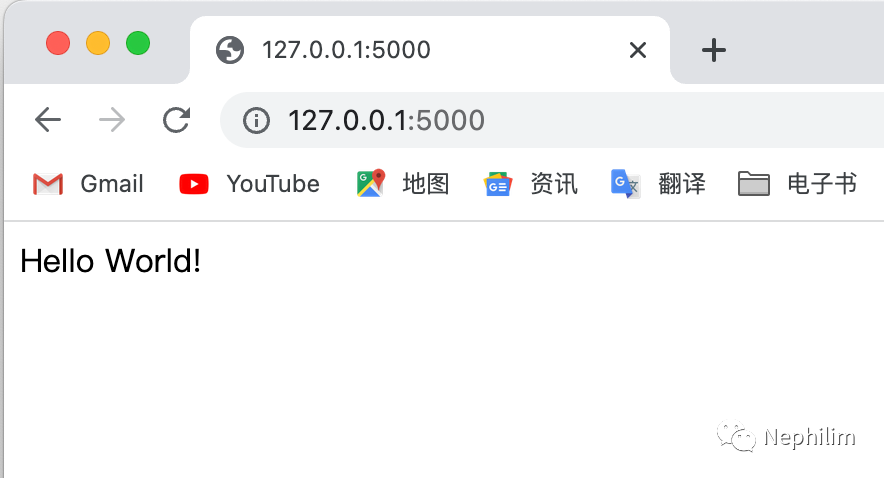
这样,一个简单的Flask的「Hello World」就写完了。
END
温馨提示
如果你喜欢本文,请分享到朋友圈,想要获得更多信息,请关注我。
文章转载自Nephilim,如果涉嫌侵权,请发送邮件至:contact@modb.pro进行举报,并提供相关证据,一经查实,墨天轮将立刻删除相关内容。
