



Tips:一些记录,一些笔记

2024/9/12
THURSDAY
Persistence of the self, the mind will be disturbed, Everywhere people only consider self, will bring sorrow to yourself.
执着自我的人,心智将会受到干扰;处处只考虑自我的人,将给自己带来忧愁。

01
错误描述
该错误发生在 DBCA以静默方式建库的时候,具体报错如下所示:
[oracle@node1 ~]$ dbca -silent -ignorePrereqFailure -createDatabase -responseFile upload/oracle/oracle_19c_install_dbca.rsp[WARNING] [DBT-06208] The 'SYS' password entered does not conform to the Oracle recommended standards.CAUSE:a. Oracle recommends that the password entered should be at least 8 characters in length, contain at least 1 uppercase character, 1 lower case character and 1 digit [0-9].b.The password entered is a keyword that Oracle does not recommend to be used as passwordACTION: Specify a strong password. If required refer Oracle documentation for guidelines.[WARNING] [DBT-06208] The 'SYSTEM' password entered does not conform to the Oracle recommended standards.CAUSE:a. Oracle recommends that the password entered should be at least 8 characters in length, contain at least 1 uppercase character, 1 lower case character and 1 digit [0-9].b.The password entered is a keyword that Oracle does not recommend to be used as passwordACTION: Specify a strong password. If required refer Oracle documentation for guidelines.Prepare for db operation8% completeCreating and starting Oracle instance11% complete[WARNING] ORA-27104: system-defined limits for shared memory was misconfigured12% complete[FATAL] ORA-01034: ORACLE not available17% complete100% complete[FATAL] ORA-01034: ORACLE not available8% complete0% completeLook at the log file "/u01/app/oracle/cfgtoollogs/dbca/mes/mes1.log" for further details.[oracle@node1 ~]$
响应文件的内容:
[oracle@node1 ~]$ cat upload/oracle/oracle_19c_install_dbca.rsp# %%%%%%%%%%%%%%%%%%%%%%%%%%%%# Oracle database 19c RAC 数据库 建库# %%%%%%%%%%%%%%%%%%%%%%%%%%%%responseFileVersion=/oracle/assistants/rspfmt_dbca_response_schema_v19.0.0templateName=/upload/oracle/oracle_19c_install_dbca.dbtgdbName=messid=messysPassword=oraclesystemPassword=oraclenodelist=node1,node2databaseConfigType=RACdatabaseType=MULTIPURPOSEpolicyManaged=falseautomaticMemoryManagement=falseinitParams=sga_target=9643MB,pga_aggregate_target=2410MB,db_recovery_file_dest_size=40000MB,audit_trail=none,recyclebin=offlisteners=LISTENERcharacterSet=AL32UTF8nationalCharacterSet=AL16UTF16createServerPool=falsecreateAsContainerDatabase=falsestorageType=ASMdatafileDestination=+DATA/{DB_UNIQUE_NAME}/recoveryAreaDestination=+ARCH# diskGroupName=+DATA[oracle@node1 ~]$
可以从其中「initParams」的设置看到:
| SGA | 9643 MB |
| PGA | 2410 MB |
| 归档 | 40000 MB |
02
错误分析
发生该错误的时候,Alert日志的内容如下所示:
[root@node1 trace]# pwd/u01/app/oracle/diag/rdbms/mes/mes1/trace[root@node1 trace]#[root@node1 trace]# ls -ltrtotal 28-rw-r----- 1 oracle asmadmin 1861 Sep 12 12:49 mes1_ora_32326.trm-rw-r----- 1 oracle asmadmin 1624 Sep 12 12:49 mes1_ora_32326.trc-rw-r----- 1 oracle asmadmin 1858 Sep 12 13:45 mes1_ora_8689.trm-rw-r----- 1 oracle asmadmin 1622 Sep 12 13:45 mes1_ora_8689.trc-rw-r----- 1 oracle asmadmin 998 Sep 12 14:09 alert_mes1.log-rw-r----- 1 oracle asmadmin 1860 Sep 12 14:09 mes1_ora_28788.trm-rw-r----- 1 oracle asmadmin 1624 Sep 12 14:09 mes1_ora_28788.trc[root@node1 trace]#[root@node1 trace]# cat alert_mes1.log2024-09-12T12:49:09.190546+08:00Starting ORACLE instance (normal) (OS id: 32326)2024-09-12T12:49:09.453852+08:00System cannot support SGA size of 9664 MB.2024-09-12T12:49:09.453920+08:00Current maximum shared memory configured 9644 MB.2024-09-12T12:49:09.453980+08:00Increase the system shared memory size to atleast 9664 MB.2024-09-12T13:45:45.591258+08:00Starting ORACLE instance (normal) (OS id: 8689)2024-09-12T13:45:45.820170+08:00System cannot support SGA size of 9664 MB.2024-09-12T13:45:45.820268+08:00Current maximum shared memory configured 9644 MB.2024-09-12T13:45:45.820345+08:00Increase the system shared memory size to atleast 9664 MB.2024-09-12T14:09:26.734491+08:00Starting ORACLE instance (normal) (OS id: 28788)2024-09-12T14:09:26.966366+08:00System cannot support SGA size of 9664 MB.2024-09-12T14:09:26.966437+08:00Current maximum shared memory configured 9644 MB.2024-09-12T14:09:26.966498+08:00Increase the system shared memory size to atleast 9664 MB.[root@node1 trace]#
可以从这一段看到原因:
System cannot support SGA size of 9664 MB.Current maximum shared memory configured 9644 MB.Increase the system shared memory size to atleast 9664 MB.
从这里看到的错误原因很明显,是因为SGA设置的过大。
系统资源:
[oracle@node1 ~]$ df -h dev/shmFilesystem Size Used Avail Use% Mounted ontmpfs 12G 641M 12G 6% /dev/shm[oracle@node1 ~]$
文件「/etc/sysctl.conf」
[oracle@node1 trace]$ more etc/sysctl.conf# sysctl settings are defined through files in# usr/lib/sysctl.d/, run/sysctl.d/, and etc/sysctl.d/.## Vendors settings live in usr/lib/sysctl.d/.# To override a whole file, create a new file with the same in# etc/sysctl.d/ and put new settings there. To override# only specific settings, add a file with a lexically later# name in etc/sysctl.d/ and put new settings there.## For more information, see sysctl.conf(5) and sysctl.d(5).vm.nr_hugepages=4821vm.swappiness=5kernel.shmall=2468860kernel.shmmax=10112453836kernel.shmmni=4096kernel.sem=1024 70000 1024 256net.core.rmem_default=262144net.core.rmem_max=4194304net.core.wmem_default=262144net.core.wmem_max=1048576net.ipv4.ip_local_port_range=9000 65500net.ipv4.ipfrag_high_thresh=41943040net.ipv4.ipfrag_low_thresh=40894464net.ipv4.ipfrag_max_dist=1024net.ipv4.ipfrag_secret_interval=600net.ipv4.ipfrag_time=120fs.file-max=6815744fs.aio-max-nr=1048576net.ipv4.conf.ens192.rp_filter=2net.ipv4.conf.ens224.rp_filter=2net.ipv4.conf.ens256.rp_filter=2[oracle@node1 trace]$
主要看这三个参数:
kernel.shmall=2468860kernel.shmmax=10112453836kernel.shmmni=4096
它们之间的关系:
| shmmni(通常是固定的) | 4096 |
| shmall | shmmax shmni |
| shmmax | shmmax 1024 1024 1024 = XXX GB |
因此,此时的 shmmax 是:9643.987499237060547 MB
需要将它扩大,并同时增大 shmall 的值。
03
问题解决
在Oracle的报错中,看到:
Increase the system shared memory size to atleast 9664 MB.
因此我们将 shmmax 提升到 9670 MB = 10139729920
[root@node1 tmp]# cat /etc/sysctl.conf | grep shmkernel.shmall=2475520kernel.shmmax=10139729920kernel.shmmni=4096[root@node1 tmp]#
应用:
[root@node1 tmp]# sysctl -pvm.nr_hugepages = 4821vm.swappiness = 5kernel.shmall = 2475520kernel.shmmax = 10139729920kernel.shmmni = 4096kernel.sem = 1024 70000 1024 256net.core.rmem_default = 262144net.core.rmem_max = 4194304net.core.wmem_default = 262144net.core.wmem_max = 1048576net.ipv4.ip_local_port_range = 9000 65500net.ipv4.ipfrag_high_thresh = 41943040net.ipv4.ipfrag_low_thresh = 40894464net.ipv4.ipfrag_max_dist = 1024net.ipv4.ipfrag_secret_interval = 600net.ipv4.ipfrag_time = 120fs.file-max = 6815744fs.aio-max-nr = 1048576net.ipv4.conf.ens192.rp_filter = 2net.ipv4.conf.ens224.rp_filter = 2net.ipv4.conf.ens256.rp_filter = 2[root@node1 tmp]#
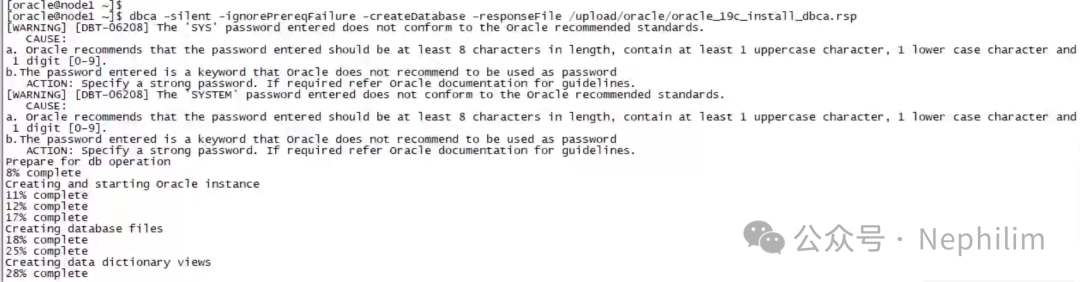
再次运行DBCA,就没问题了:
END
温馨提示
如果你喜欢本文,请分享到朋友圈,想要获得更多信息,请关注我。
文章转载自Nephilim,如果涉嫌侵权,请发送邮件至:contact@modb.pro进行举报,并提供相关证据,一经查实,墨天轮将立刻删除相关内容。
