



Tips:一些记录,一些笔记

2024/07/17
WEDNESDAY
To be both a speaker of words and a doer of deeds.
既当演说家,又做实干家。

01
阿里云:购买云服务器(ECS)
首先,在阿里云上申请(或购买)云服务器(ECS)
阿里云官方网址:https://www.aliyun.com/
找到「云服务器 ECS」
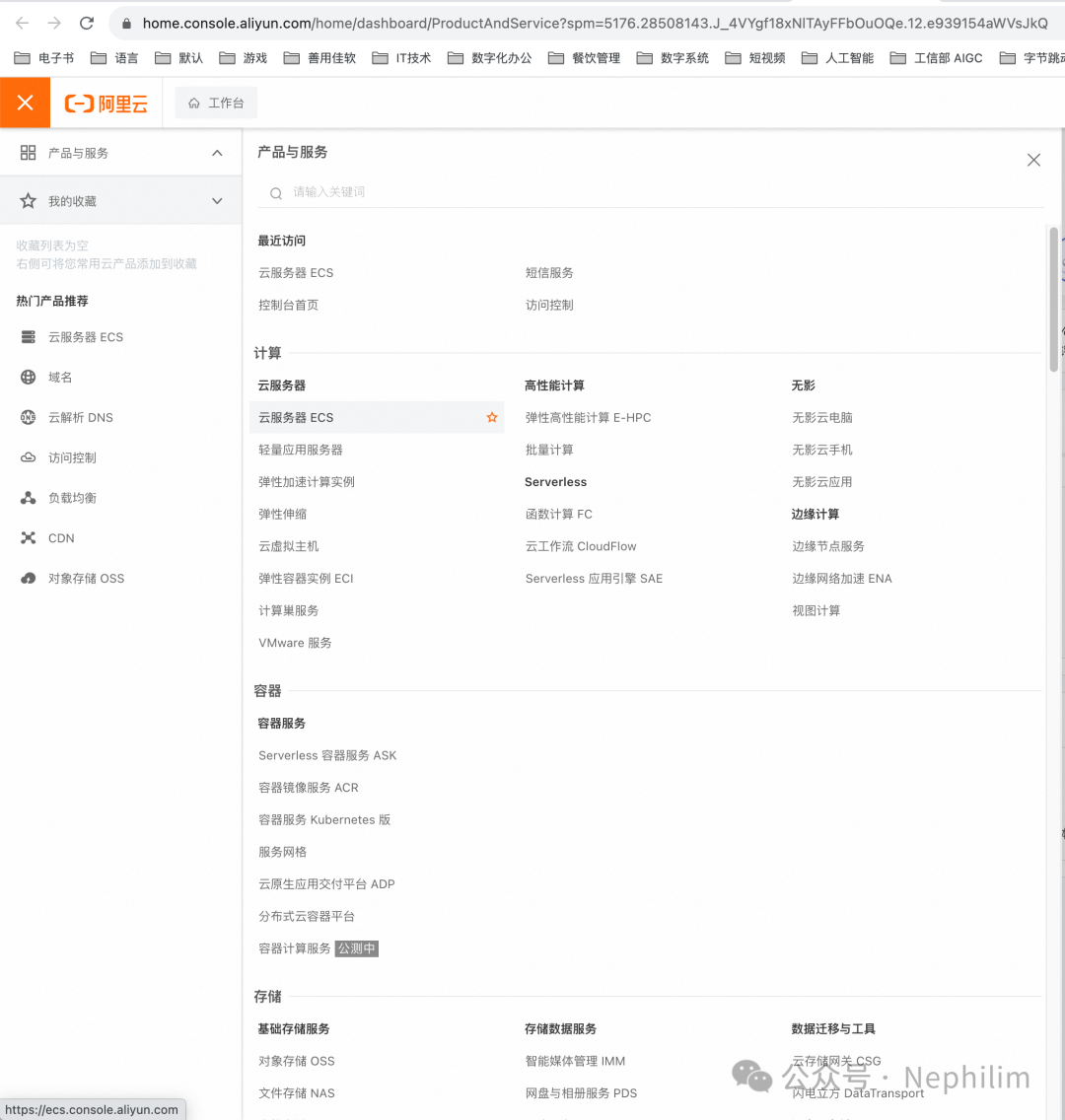
进入ECS的主页(https://www.aliyun.com/product/ecs),可以看到ECS现在在做活动:
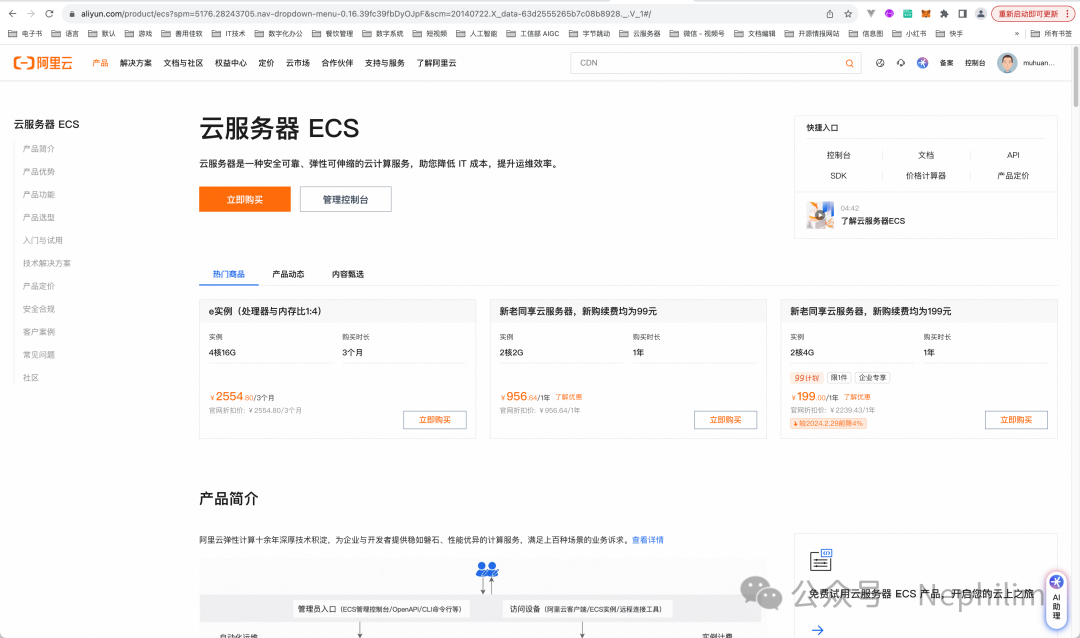
优惠力度还是很大的,上方三种配置方案三选一,售价大概不到原价的十分之一。
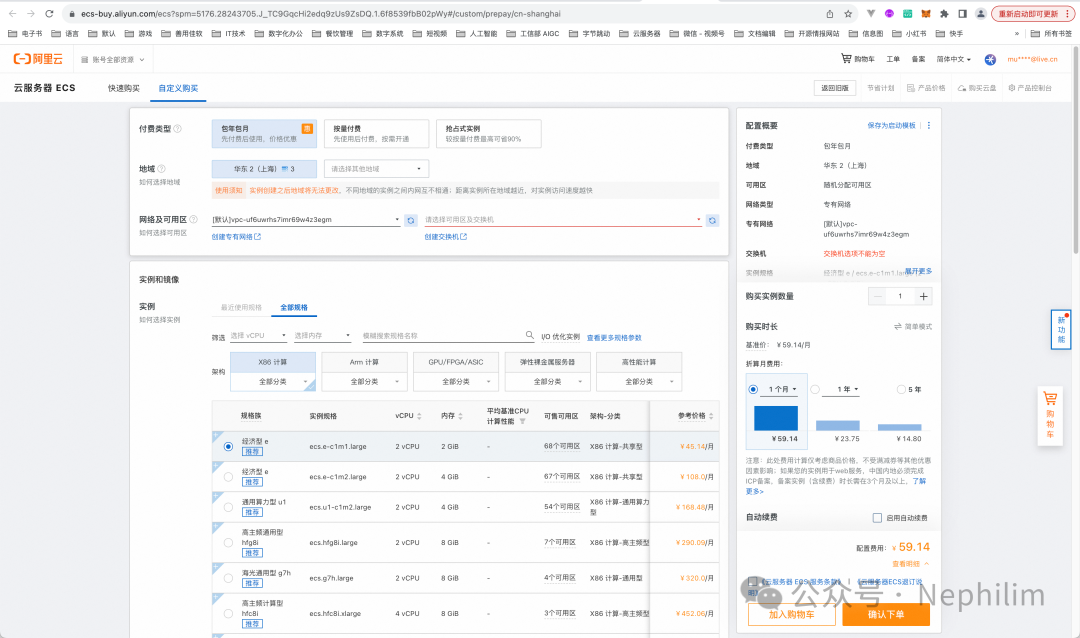
选择了你喜欢的配置后,就可以购买了:
如果购买成功,你可以在自己的控制台中,找到你购买的机器:
https://ecs.console.aliyun.com/home
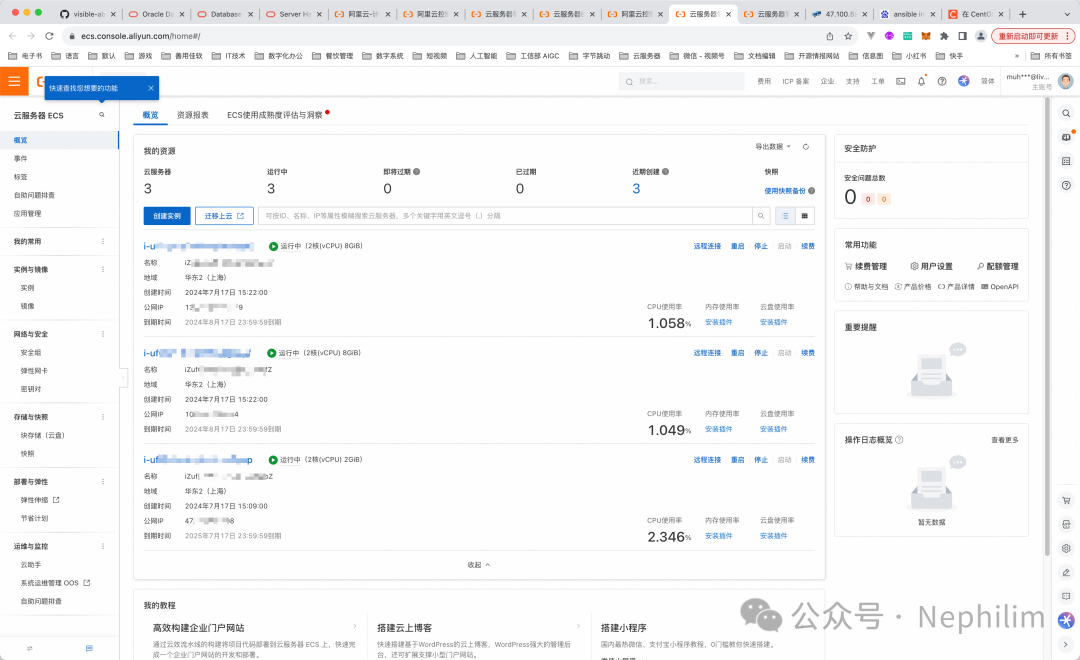
这样,云服务器的资源就准备好了。
02
ECS的基础配置
一、修改登录密码
首先是远程连接ECS的密码口令。
密码口令,可以在下面的界面中找到修改功能:
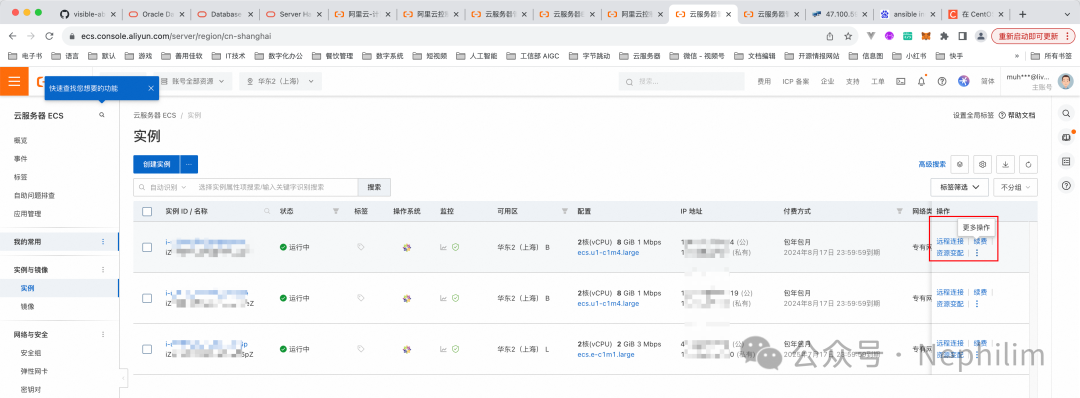
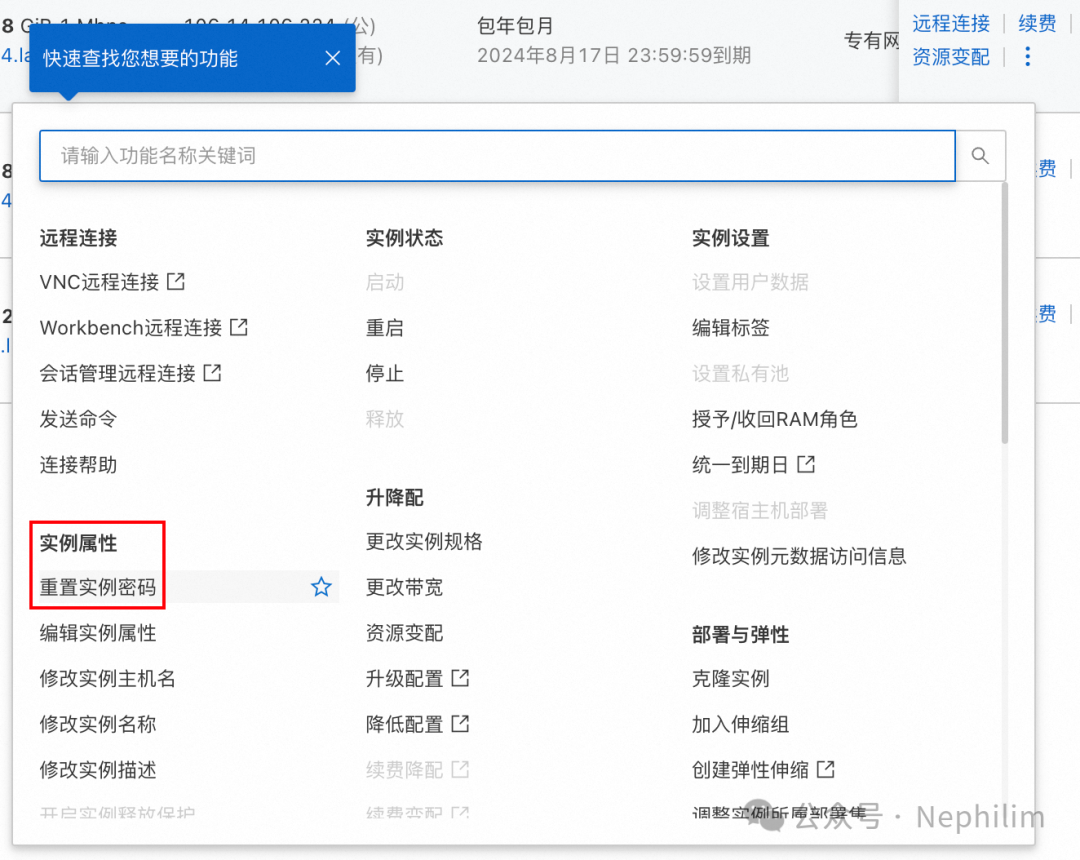
修改界面如下所示:
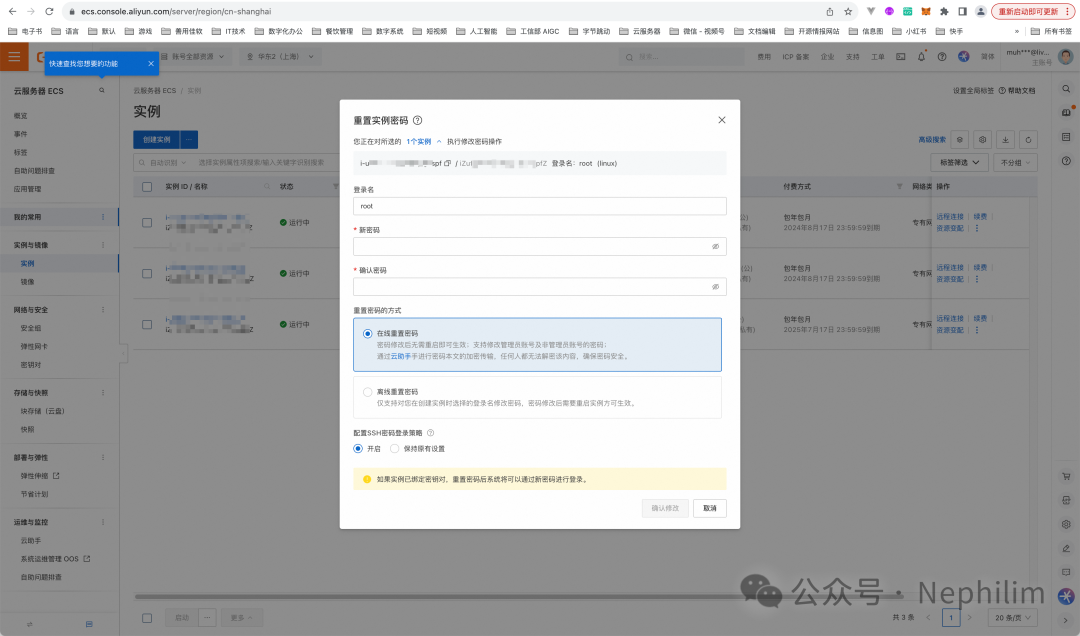
我之前已经修改过,这里我就不修改了。
二、远程连接
接下来是「远程连接」
在前面的「实例」界面中,找到「远程连接」,点击后,你会看到如下的界面:
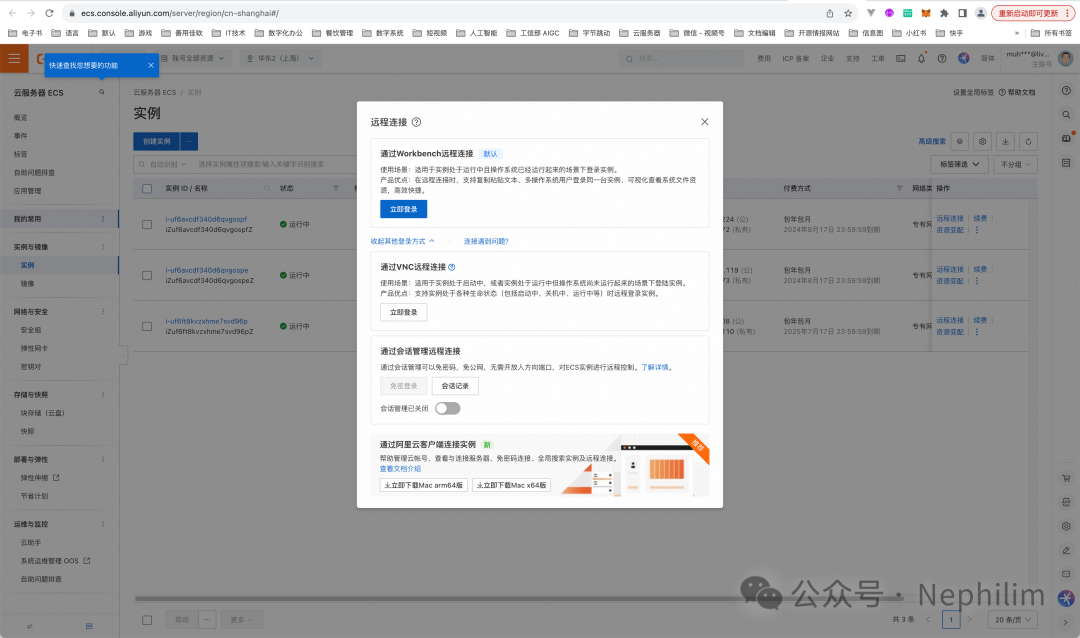
官方提供了以下几种远程连接的方式:
Workbench(默认方式)
VNC
会话管理
阿里云客户端
(一)Workbench:
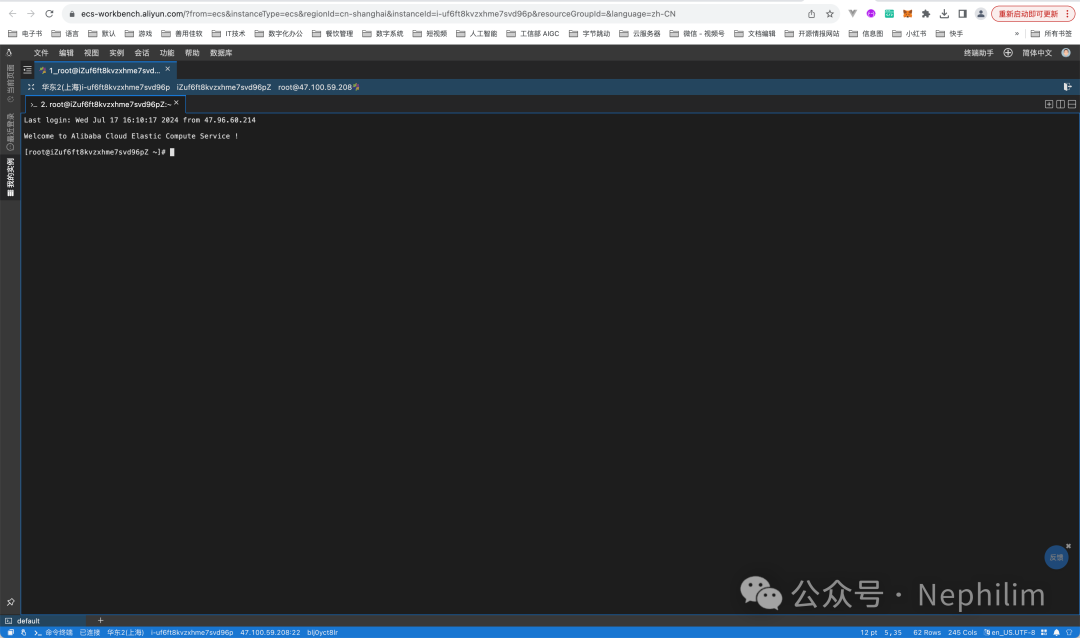
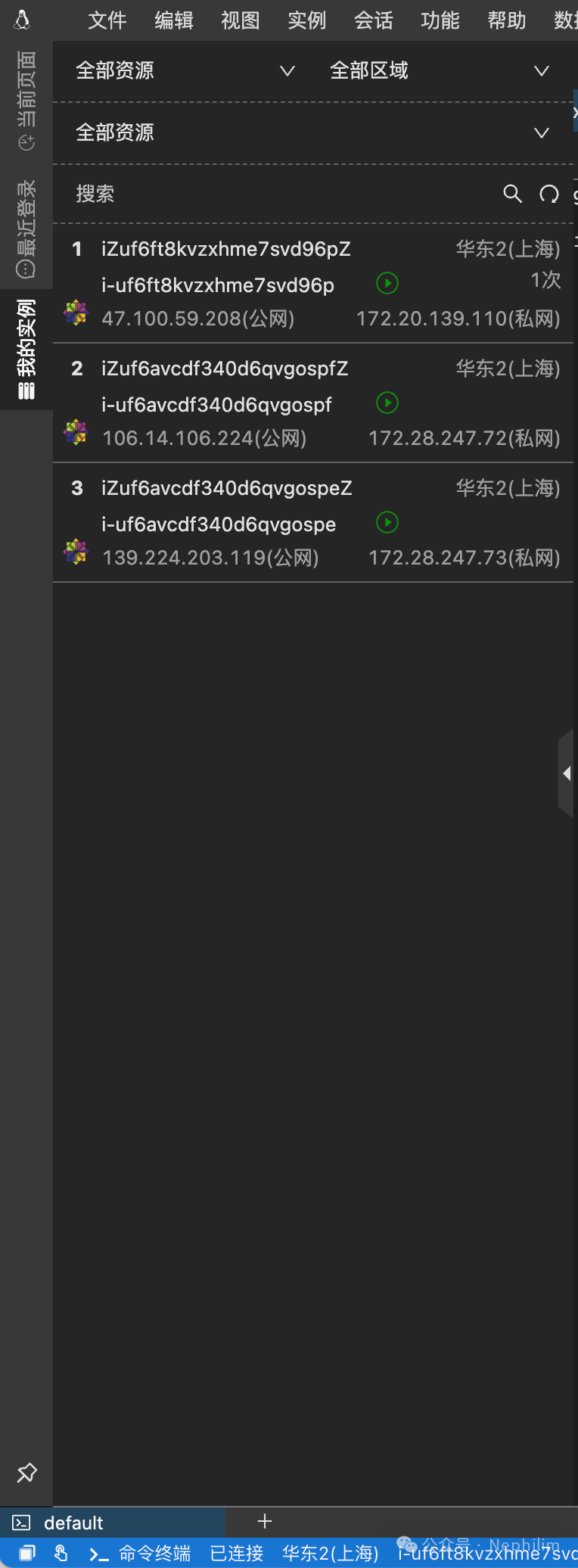
可以看到,这时候,就已经可以在页面的命令行终端中进行操作了。
(二)、阿里巴巴客户端(Alibaba Cloud Client)

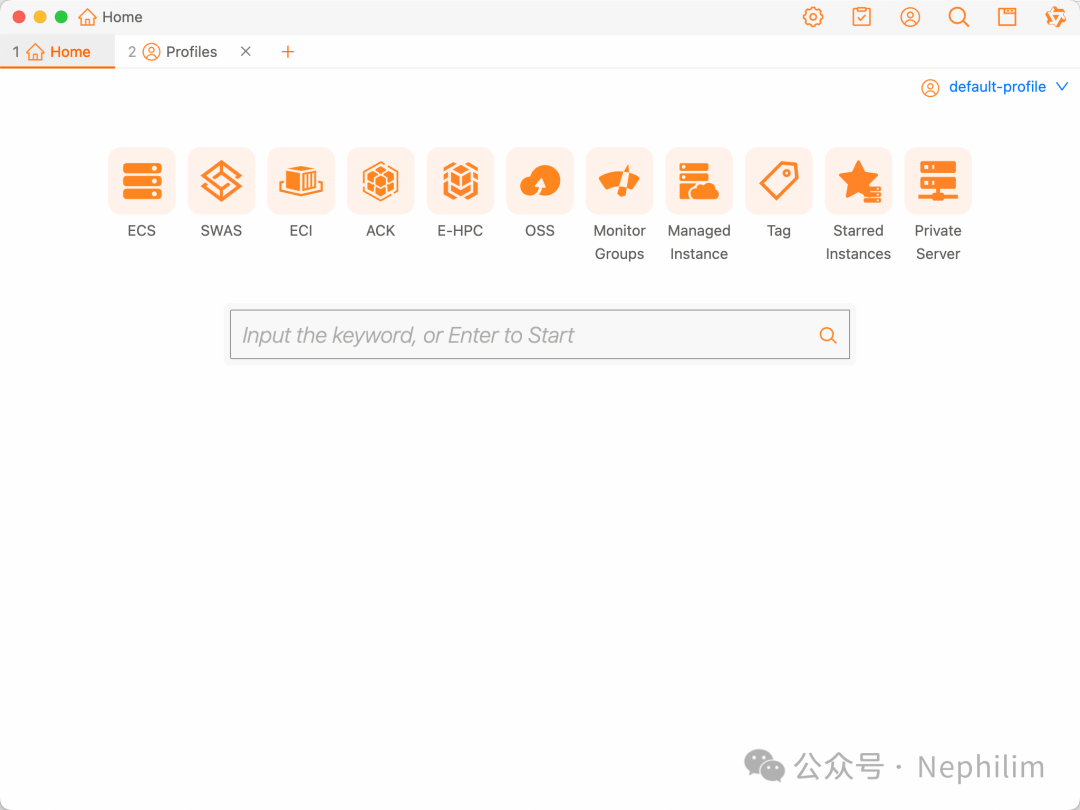
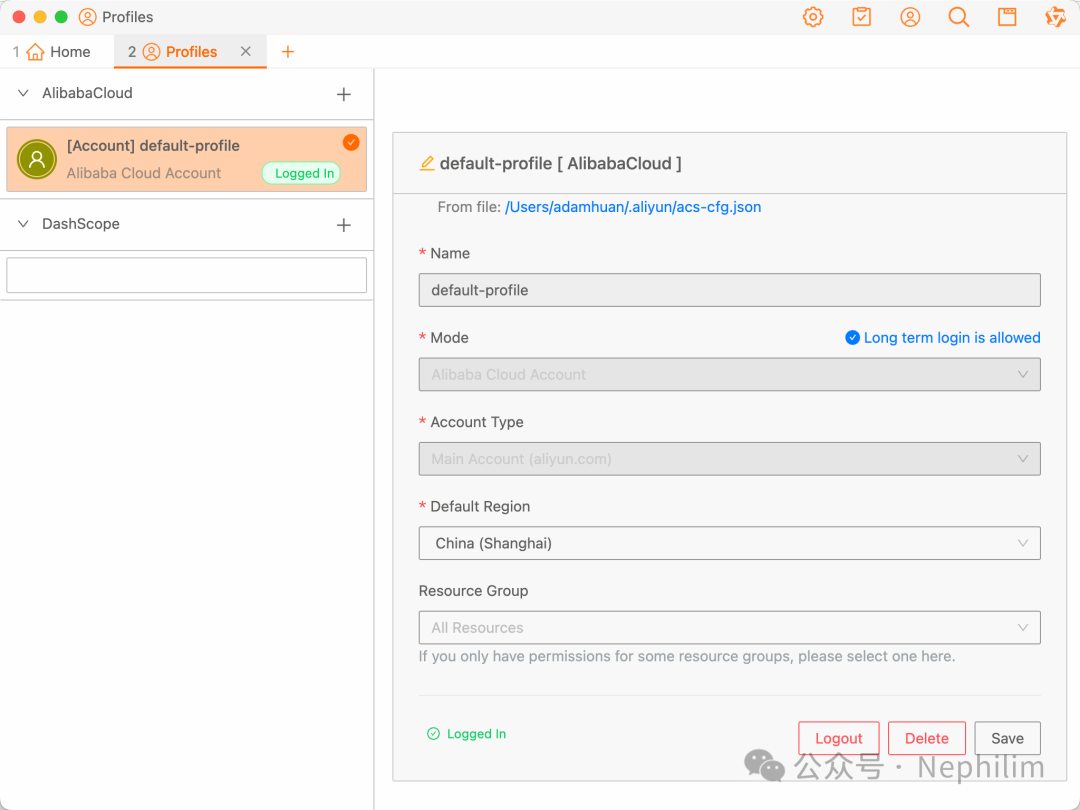
首先,登录你的阿里云(Profile)
然后,点击「Home」中的「ECS」,就可以看到你的账号中的ECS的资源:
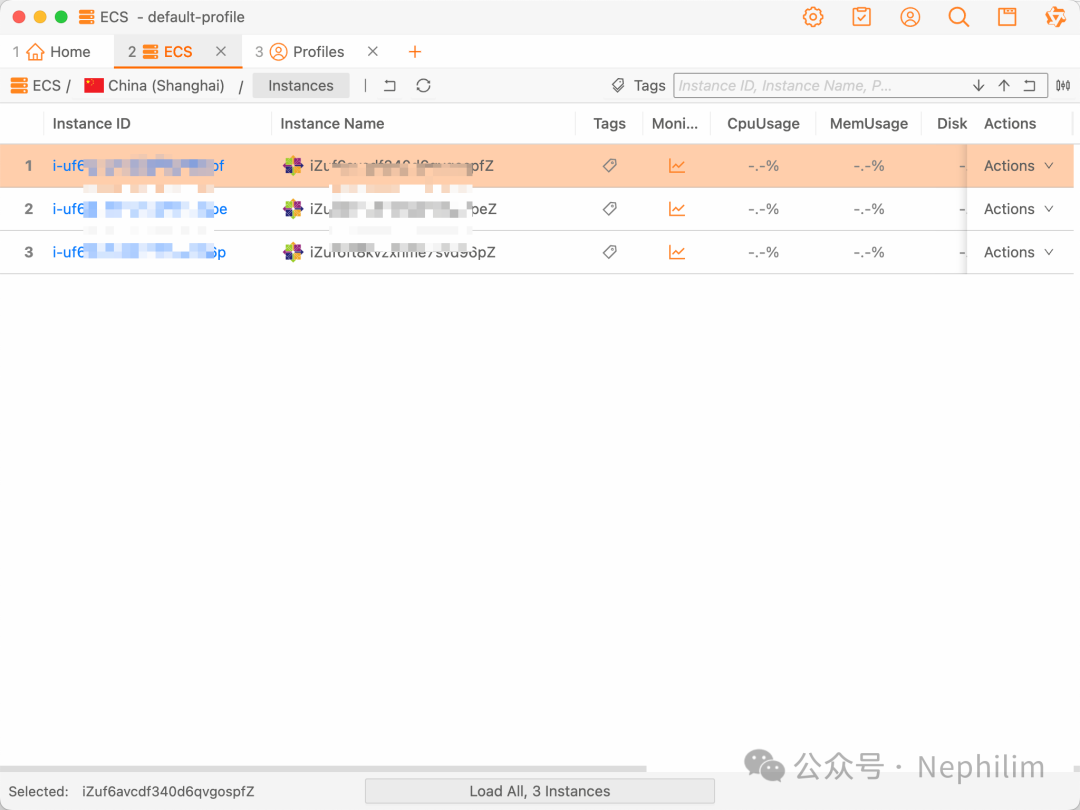
然后,点击后面的「Action」就可以很方便的直接连接到目标的ECS主机了:
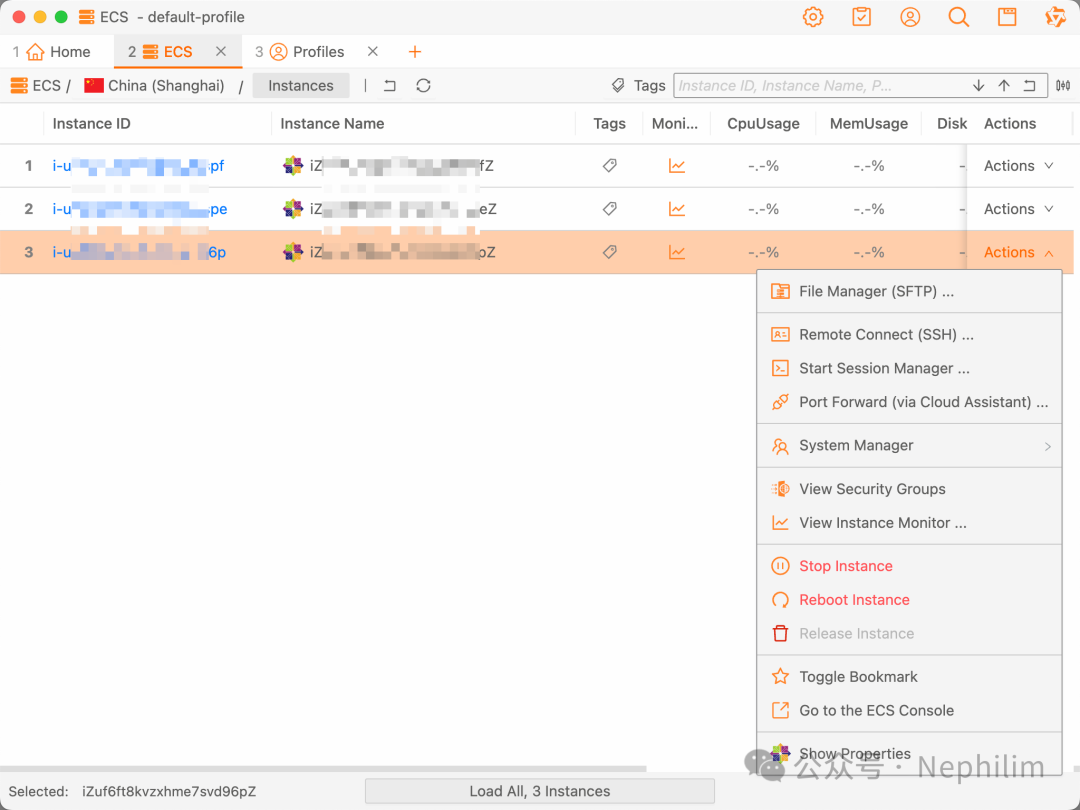
然后:
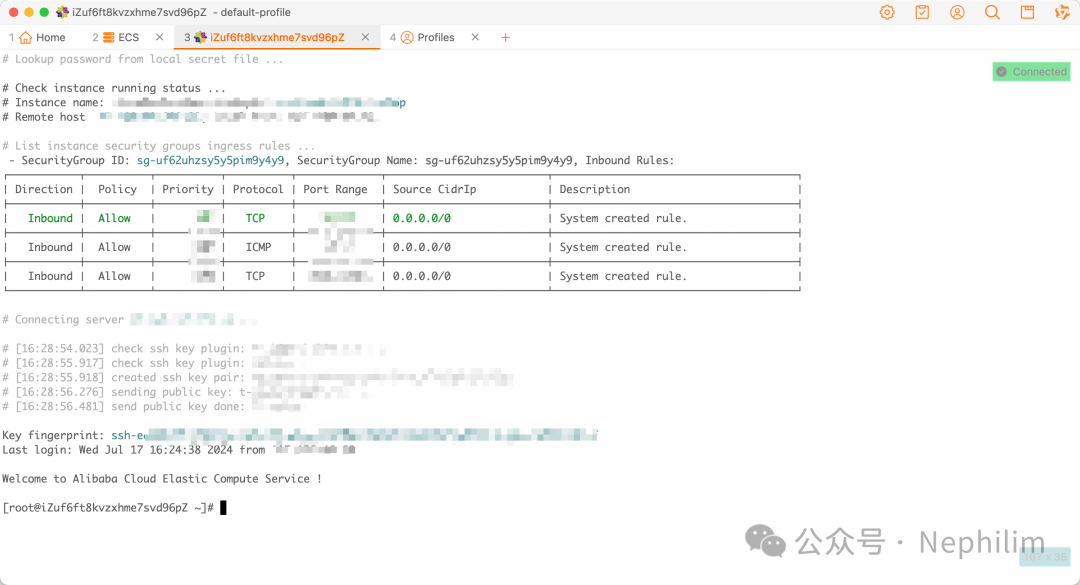
可以看到,已经成功的登录到了ECS的命令行界面中了。
03
Linux「环境检查 巡检」
接下来是对Linux操作系统基础的环境检查(巡检)
Linux系统信息展示:
[root@iZuf6ft8kvzxhme7svd96pZ ~]# uname -aLinux iZuf6ft8kvzxhme7svd96pZ 3.10.0-1160.119.1.el7.x86_64 #1 SMP Tue Jun 4 14:43:51 UTC 2024 x86_64 x86_64 x86_64 GNU/Linux[root@iZuf6ft8kvzxhme7svd96pZ ~]#
它打印出来的信息,依次是:
操作系统类型(Operating System Type)
主机名(Hostname)
内核版本(Kernel Version)
操作系统发行版版本号(OS Distribution Version)
操作系统发行版(OS Distribution)
操作系统架构(Architecture)
操作系统发行版检查:
[root@iZuf6ft8kvzxhme7svd96pZ ~]# ls -ltr etc/ | grep release-rw-r--r-- 1 root root 23 May 21 22:48 system-release-cpe-rw-r--r-- 1 root root 51 May 21 22:48 centos-release-upstream-rw-r--r-- 1 root root 37 May 21 22:48 centos-releasedrwxr-xr-x 2 root root 4096 Jun 28 12:25 lsb-release.dlrwxrwxrwx 1 root root 14 Jun 28 12:29 redhat-release -> centos-releaselrwxrwxrwx 1 root root 21 Jun 28 12:29 os-release -> ../usr/lib/os-releaselrwxrwxrwx 1 root root 14 Jun 28 12:29 system-release -> centos-release[root@iZuf6ft8kvzxhme7svd96pZ ~]#[root@iZuf6ft8kvzxhme7svd96pZ ~]# cat etc/redhat-releaseCentOS Linux release 7.9.2009 (Core)[root@iZuf6ft8kvzxhme7svd96pZ ~]#[root@iZuf6ft8kvzxhme7svd96pZ ~]# cat etc/os-releaseNAME="CentOS Linux"VERSION="7 (Core)"ID="centos"ID_LIKE="rhel fedora"VERSION_ID="7"PRETTY_NAME="CentOS Linux 7 (Core)"ANSI_COLOR="0;31"CPE_NAME="cpe:/o:centos:centos:7"HOME_URL="https://www.centos.org/"BUG_REPORT_URL="https://bugs.centos.org/"CENTOS_MANTISBT_PROJECT="CentOS-7"CENTOS_MANTISBT_PROJECT_VERSION="7"REDHAT_SUPPORT_PRODUCT="centos"REDHAT_SUPPORT_PRODUCT_VERSION="7"[root@iZuf6ft8kvzxhme7svd96pZ ~]#[root@iZuf6ft8kvzxhme7svd96pZ ~]# cat etc/centos-releaseCentOS Linux release 7.9.2009 (Core)[root@iZuf6ft8kvzxhme7svd96pZ ~]#
「lsb_release」是一个「Linux Standard Base LSB」的工具,用于显示Linux发行版的信息。
它通常用于查询和显示Linux发行版的版本号、发行版代号、描述等信息。
[root@iZuf6ft8kvzxhme7svd96pZ ~]# whereis lsb_releaselsb_release: usr/bin/lsb_release usr/share/man/man1/lsb_release.1.gz[root@iZuf6ft8kvzxhme7svd96pZ ~]#[root@iZuf6ft8kvzxhme7svd96pZ ~]# lsb_releaseLSB Version: :core-4.1-amd64:core-4.1-noarch[root@iZuf6ft8kvzxhme7svd96pZ ~]#[root@iZuf6ft8kvzxhme7svd96pZ ~]# lsb_release -aLSB Version: :core-4.1-amd64:core-4.1-noarchDistributor ID: CentOSDescription: CentOS Linux release 7.9.2009 (Core)Release: 7.9.2009Codename: Core[root@iZuf6ft8kvzxhme7svd96pZ ~]#
通过「hostnamectl」查询Linux系统信息
「hostnamectl」是一个用于管理系统主机名(hostname)的命令行工具。
它通常在Linux系统中提供,用来查询、设置和管理系统的主机名及其相关的信息。
[root@iZuf6ft8kvzxhme7svd96pZ ~]# whereis hostnamectlhostnamectl: /usr/bin/hostnamectl usr/share/man/man1/hostnamectl.1.gz[root@iZuf6ft8kvzxhme7svd96pZ ~]#[root@iZuf6ft8kvzxhme7svd96pZ ~]# hostnamectlStatic hostname: iZuf6ft8kvzxhme7svd96pZIcon name: computer-vmChassis: vmMachine ID: 88b247814be64fbf8fa045566b89ce3eBoot ID: f7f682ca743140fda4a323b4db152112Virtualization: kvmOperating System: CentOS Linux 7 (Core)CPE OS Name: cpe:/o:centos:centos:7Kernel: Linux 3.10.0-1160.119.1.el7.x86_64Architecture: x86-64[root@iZuf6ft8kvzxhme7svd96pZ ~]#
显示系统运行时间、负载情况
[root@iZuf6ft8kvzxhme7svd96pZ ~]# whereis uptimeuptime: usr/bin/uptime usr/share/man/man1/uptime.1.gz[root@iZuf6ft8kvzxhme7svd96pZ ~]#[root@iZuf6ft8kvzxhme7svd96pZ ~]# uptime16:47:59 up 1:38, 1 user, load average: 0.00, 0.01, 0.05[root@iZuf6ft8kvzxhme7svd96pZ ~]#
反馈信息的意义依次如下所示:
当前时间:显示当前系统时间
系统运行时间:显示系统自上次启动以来的运行时间,通常以天、时、分的格式显示
当前用户数:当前登录系统的用户个数
平均负载(load average):显示系统在过去1分钟、5分钟、15分钟内的平均负载;负载指的是系统处于运行和等待状态的进程数的平均值
查看系统负载:
[root@iZuf6ft8kvzxhme7svd96pZ ~]# cat proc/loadavg0.00 0.03 0.05 1/157 12231[root@iZuf6ft8kvzxhme7svd96pZ ~]#
内存使用:
[root@iZuf6ft8kvzxhme7svd96pZ ~]# free -htotal used free shared buff/cache availableMem: 1.7G 132M 877M 512K 746M 1.4GSwap: 0B 0B 0B[root@iZuf6ft8kvzxhme7svd96pZ ~]#
获得内存总量与空闲内存量:
[root@iZuf6ft8kvzxhme7svd96pZ ~]# grep MemTotal proc/meminfoMemTotal: 1798504 kB[root@iZuf6ft8kvzxhme7svd96pZ ~]#[root@iZuf6ft8kvzxhme7svd96pZ ~]# grep MemFree proc/meminfoMemFree: 893728 kB[root@iZuf6ft8kvzxhme7svd96pZ ~]#
列出已经加载的内核模块:
[root@iZuf6ft8kvzxhme7svd96pZ ~]# lsmodModule Size Used bynfit 59735 0libnvdimm 163620 1 nfitiosf_mbi 15582 0crc32_pclmul 13133 0sunrpc 366617 1ghash_clmulni_intel 13273 0ppdev 17671 0aesni_intel 189456 0lrw 13286 1 aesni_intelgf128mul 15139 1 lrwglue_helper 13990 1 aesni_intelablk_helper 13597 1 aesni_intelcryptd 21190 3 ghash_clmulni_intel,aesni_intel,ablk_helperjoydev 17389 0parport_pc 28205 0virtio_balloon 18015 0pcspkr 12718 0parport 46395 2 ppdev,parport_pci2c_piix4 22401 0ip_tables 27126 0ext4 592325 1mbcache 14958 1 ext4jbd2 107486 1 ext4ata_generic 12923 0pata_acpi 13053 0cirrus 24171 1virtio_net 27994 0net_failover 18147 1 virtio_netdrm_kms_helper 186531 1 cirrusvirtio_blk 18472 2virtio_console 28076 1failover 13374 1 net_failoversyscopyarea 12529 1 drm_kms_helpersysfillrect 12701 1 drm_kms_helpersysimgblt 12640 1 drm_kms_helperfb_sys_fops 12703 1 drm_kms_helperttm 100769 1 cirrusdrm 468454 4 ttm,drm_kms_helper,cirrusata_piix 35052 0libata 247190 3 pata_acpi,ata_generic,ata_piixcrct10dif_pclmul 14307 0crct10dif_common 12595 1 crct10dif_pclmulcrc32c_intel 22094 0floppy 73520 0serio_raw 13434 0virtio_pci 22985 0virtio_ring 22991 5 virtio_blk,virtio_net,virtio_pci,virtio_balloon,virtio_consolevirtio 14959 5 virtio_blk,virtio_net,virtio_pci,virtio_balloon,virtio_consoledrm_panel_orientation_quirks 17180 1 drm[root@iZuf6ft8kvzxhme7svd96pZ ~]#
查看CPU状态:
[root@iZuf6ft8kvzxhme7svd96pZ ~]# lscpuArchitecture: x86_64CPU op-mode(s): 32-bit, 64-bitByte Order: Little EndianCPU(s): 2On-line CPU(s) list: 0,1Thread(s) per core: 2Core(s) per socket: 1Socket(s): 1NUMA node(s): 1Vendor ID: GenuineIntelCPU family: 6Model: 85Model name: Intel(R) Xeon(R) PlatinumStepping: 4CPU MHz: 2499.998BogoMIPS: 4999.99Hypervisor vendor: KVMVirtualization type: fullL1d cache: 32KL1i cache: 32KL2 cache: 1024KL3 cache: 33792KNUMA node0 CPU(s): 0,1Flags: fpu vme de pse tsc msr pae mce cx8 apic sep mtrr pge mca cmov pat pse36 clflush mmx fxsr sse sse2 ss ht syscall nx pdpe1gb rdtscp lm constant_tsc rep_good nopl xtopology nonstop_tsc eagerfpu pni pclmulqdq ssse3 fma cx16 pcid sse4_1 sse4_2 x2apic movbe popcnt tsc_deadline_timer aes xsave avx f16c rdrand hypervisor lahf_lm abm 3dnowprefetch invpcid_single rsb_ctxsw fsgsbase tsc_adjust bmi1 hle avx2 smep bmi2 erms invpcid rtm mpx avx512f avx512dq rdseed adx smap clflushopt clwb avx512cd avx512bw avx512vl xsaveopt xsavec xgetbv1 arat[root@iZuf6ft8kvzxhme7svd96pZ ~]#
也可以通过「/proc/cpuinfo」获得CPU的状态信息:
[root@iZuf6ft8kvzxhme7svd96pZ ~]# cat proc/cpuinfoprocessor : 0vendor_id : GenuineIntelcpu family : 6model : 85model name : Intel(R) Xeon(R) Platinumstepping : 4microcode : 0x1cpu MHz : 2499.998cache size : 33792 KBphysical id : 0siblings : 2core id : 0cpu cores : 1apicid : 0initial apicid : 0fpu : yesfpu_exception : yescpuid level : 22wp : yesflags : fpu vme de pse tsc msr pae mce cx8 apic sep mtrr pge mca cmov pat pse36 clflush mmx fxsr sse sse2 ss ht syscall nx pdpe1gb rdtscp lm constant_tsc rep_good nopl xtopology nonstop_tsc eagerfpu pni pclmulqdq ssse3 fma cx16 pcid sse4_1 sse4_2 x2apic movbe popcnt tsc_deadline_timer aes xsave avx f16c rdrand hypervisor lahf_lm abm 3dnowprefetch invpcid_single rsb_ctxsw fsgsbase tsc_adjust bmi1 hle avx2 smep bmi2 erms invpcid rtm mpx avx512f avx512dq rdseed adx smap clflushopt clwb avx512cd avx512bw avx512vl xsaveopt xsavec xgetbv1 aratbogomips : 4999.99clflush size : 64cache_alignment : 64address sizes : 46 bits physical, 48 bits virtualpower management:processor : 1vendor_id : GenuineIntelcpu family : 6model : 85model name : Intel(R) Xeon(R) Platinumstepping : 4microcode : 0x1cpu MHz : 2499.998cache size : 33792 KBphysical id : 0siblings : 2core id : 0cpu cores : 1apicid : 1initial apicid : 1fpu : yesfpu_exception : yescpuid level : 22wp : yesflags : fpu vme de pse tsc msr pae mce cx8 apic sep mtrr pge mca cmov pat pse36 clflush mmx fxsr sse sse2 ss ht syscall nx pdpe1gb rdtscp lm constant_tsc rep_good nopl xtopology nonstop_tsc eagerfpu pni pclmulqdq ssse3 fma cx16 pcid sse4_1 sse4_2 x2apic movbe popcnt tsc_deadline_timer aes xsave avx f16c rdrand hypervisor lahf_lm abm 3dnowprefetch invpcid_single rsb_ctxsw fsgsbase tsc_adjust bmi1 hle avx2 smep bmi2 erms invpcid rtm mpx avx512f avx512dq rdseed adx smap clflushopt clwb avx512cd avx512bw avx512vl xsaveopt xsavec xgetbv1 aratbogomips : 4999.99clflush size : 64cache_alignment : 64address sizes : 46 bits physical, 48 bits virtualpower management:[root@iZuf6ft8kvzxhme7svd96pZ ~]#
磁盘挂载:
[root@iZuf6ft8kvzxhme7svd96pZ ~]# df -hFilesystem Size Used Avail Use% Mounted ondevtmpfs 868M 0 868M 0% devtmpfs 879M 0 879M 0% dev/shmtmpfs 879M 512K 878M 1% runtmpfs 879M 0 879M 0% sys/fs/cgroup/dev/vda1 40G 2.5G 35G 7%tmpfs 176M 0 176M 0% run/user/0[root@iZuf6ft8kvzxhme7svd96pZ ~]#
网卡:
[root@iZuf6ft8kvzxhme7svd96pZ ~]# ifconfigeth0: flags=4163<UP,BROADCAST,RUNNING,MULTICAST> mtu 1500inet 172.90.169.140 netmask 255.255.240.0 broadcast 172.20.143.255inet6 fe80::216:3eff:fe3f:1299 prefixlen 64 scopeid 0x20<link>ether 00:16:3e:3f:12:99 txqueuelen 1000 (Ethernet)RX packets 77025 bytes 106254434 (101.3 MiB)RX errors 0 dropped 0 overruns 0 frame 0TX packets 13369 bytes 1625575 (1.5 MiB)TX errors 0 dropped 0 overruns 0 carrier 0 collisions 0lo: flags=73<UP,LOOPBACK,RUNNING> mtu 65536inet 127.0.0.1 netmask 255.0.0.0inet6 ::1 prefixlen 128 scopeid 0x10<host>loop txqueuelen 1000 (Local Loopback)RX packets 112 bytes 9038 (8.8 KiB)RX errors 0 dropped 0 overruns 0 frame 0TX packets 112 bytes 9038 (8.8 KiB)TX errors 0 dropped 0 overruns 0 carrier 0 collisions 0[root@iZuf6ft8kvzxhme7svd96pZ ~]#
路由:
[root@iZuf6ft8kvzxhme7svd96pZ ~]# route -nKernel IP routing tableDestination Gateway Genmask Flags Metric Ref Use Iface0.0.0.0 172.20.143.253 0.0.0.0 UG 0 0 0 eth0169.254.0.0 0.0.0.0 255.255.0.0 U 1002 0 0 eth0172.20.128.0 0.0.0.0 255.255.240.0 U 0 0 0 eth0[root@iZuf6ft8kvzxhme7svd96pZ ~]#
网络统计信息:
[root@iZuf6ft8kvzxhme7svd96pZ ~]# netstat -sIp:15937 total packets received0 forwarded0 incoming packets discarded15933 incoming packets delivered14118 requests sent out1 dropped because of missing routeIcmp:62 ICMP messages received0 input ICMP message failed.ICMP input histogram:destination unreachable: 56echo requests: 4echo replies: 267 ICMP messages sent0 ICMP messages failedICMP output histogram:destination unreachable: 61echo request: 2echo replies: 4IcmpMsg:InType0: 2InType3: 56InType8: 4OutType0: 4OutType3: 61OutType8: 2Tcp:352 active connections openings38 passive connection openings15 failed connection attempts1 connection resets received2 connections established15006 segments received13302 segments send out31 segments retransmited0 bad segments received.26 resets sentUdp:797 packets received61 packets to unknown port received.0 packet receive errors906 packets sent0 receive buffer errors0 send buffer errorsUdpLite:TcpExt:16 invalid SYN cookies received15 resets received for embryonic SYN_RECV sockets49 packets pruned from receive queue because of socket buffer overrun343 TCP sockets finished time wait in fast timer804 delayed acks sent1 delayed acks further delayed because of locked socketQuick ack mode was activated 8 times7 packets directly queued to recvmsg prequeue.3 bytes directly received in process context from prequeue8446 packet headers predicted1663 acknowledgments not containing data payload received1181 predicted acknowledgments2 timeouts in loss state2 retransmits in slow start9 other TCP timeoutsTCPLossProbes: 5TCPLossProbeRecovery: 1552 packets collapsed in receive queue due to low socket buffer9 DSACKs sent for old packets3 DSACKs received1 connections reset due to early user close1 connections aborted due to timeoutTCPDSACKIgnoredNoUndo: 3TCPRcvCoalesce: 1755TCPOFOQueue: 44TCPWantZeroWindowAdv: 6TCPSynRetrans: 12TCPOrigDataSent: 3566IpExt:InNoRoutes: 4InOctets: 102826007OutOctets: 1654678InNoECTPkts: 77816[root@iZuf6ft8kvzxhme7svd96pZ ~]#
YUM:配置
[root@iZuf6ft8kvzxhme7svd96pZ ~]# ls -ltr /etc/ | grep yum-rw-r--r--. 1 root root 970 Oct 2 2020 yum.confdrwxr-xr-x. 6 root root 4096 Jun 28 12:17 yumdrwxr-xr-x. 2 root root 4096 Jun 28 12:38 yum.repos.d[root@iZuf6ft8kvzxhme7svd96pZ ~]#[root@iZuf6ft8kvzxhme7svd96pZ ~]# cat /etc/yum.conf[main]cachedir=/var/cache/yum/$basearch/$releaseverkeepcache=0debuglevel=2logfile=/var/log/yum.logexactarch=1obsoletes=1gpgcheck=1plugins=1installonly_limit=5bugtracker_url=http://bugs.centos.org/set_project.php?project_id=23&ref=http://bugs.centos.org/bug_report_page.php?category=yumdistroverpkg=centos-release# This is the default, if you make this bigger yum won't see if the metadata# is newer on the remote and so you'll "gain" the bandwidth of not having to# download the new metadata and "pay" for it by yum not having correct# information.# It is esp. important, to have correct metadata, for distributions like# Fedora which don't keep old packages around. If you don't like this checking# interupting your command line usage, it's much better to have something# manually check the metadata once an hour (yum-updatesd will do this).# metadata_expire=90m# PUT YOUR REPOS HERE OR IN separate files named file.repo# in /etc/yum.repos.d[root@iZuf6ft8kvzxhme7svd96pZ ~]#[root@iZuf6ft8kvzxhme7svd96pZ ~]# cd /etc/yum.repos.d/[root@iZuf6ft8kvzxhme7svd96pZ yum.repos.d]# ls -ltrtotal 8-rw-r--r-- 1 root root 675 Jul 17 15:09 CentOS-Base.repo-rw-r--r-- 1 root root 230 Jul 17 15:09 epel.repo[root@iZuf6ft8kvzxhme7svd96pZ yum.repos.d]#[root@iZuf6ft8kvzxhme7svd96pZ yum.repos.d]# cat /etc/yum.repos.d/CentOS-Base.repo[base]name=CentOS-$releaseverenabled=1failovermethod=prioritybaseurl=http://mirrors.cloud.aliyuncs.com/centos/$releasever/os/$basearch/gpgcheck=1gpgkey=http://mirrors.cloud.aliyuncs.com/centos/RPM-GPG-KEY-CentOS-7[updates]name=CentOS-$releaseverenabled=1failovermethod=prioritybaseurl=http://mirrors.cloud.aliyuncs.com/centos/$releasever/updates/$basearch/gpgcheck=1gpgkey=http://mirrors.cloud.aliyuncs.com/centos/RPM-GPG-KEY-CentOS-7[extras]name=CentOS-$releaseverenabled=1failovermethod=prioritybaseurl=http://mirrors.cloud.aliyuncs.com/centos/$releasever/extras/$basearch/gpgcheck=1gpgkey=http://mirrors.cloud.aliyuncs.com/centos/RPM-GPG-KEY-CentOS-7[root@iZuf6ft8kvzxhme7svd96pZ yum.repos.d]#[root@iZuf6ft8kvzxhme7svd96pZ yum.repos.d]# cat /etc/yum.repos.d/epel.repo[epel]name=Extra Packages for Enterprise Linux 7 - $basearchenabled=1failovermethod=prioritybaseurl=http://mirrors.cloud.aliyuncs.com/epel/7/$basearchgpgcheck=0gpgkey=http://mirrors.cloud.aliyuncs.com/epel/RPM-GPG-KEY-EPEL-7[root@iZuf6ft8kvzxhme7svd96pZ yum.repos.d]#[root@iZuf6ft8kvzxhme7svd96pZ yum.repos.d]#
YUM:仓库状态
[root@iZuf6ft8kvzxhme7svd96pZ ~]# yum repolistLoaded plugins: fastestmirrorLoading mirror speeds from cached hostfilerepo id repo name statusbase/7/x86_64 CentOS-7 10,072epel/x86_64 Extra Packages for Enterprise Linux 7 - x86_64 13,791extras/7/x86_64 CentOS-7 526updates/7/x86_64 CentOS-7 6,173repolist: 30,562[root@iZuf6ft8kvzxhme7svd96pZ ~]#
获得所有PCI设备:
[root@iZuf6ft8kvzxhme7svd96pZ ~]# lspci -tv-[0000:00]-+-00.0 Intel Corporation 440FX - 82441FX PMC [Natoma]+-01.0 Intel Corporation 82371SB PIIX3 ISA [Natoma/Triton II]+-01.1 Intel Corporation 82371SB PIIX3 IDE [Natoma/Triton II]+-01.2 Intel Corporation 82371SB PIIX3 USB [Natoma/Triton II]+-01.3 Intel Corporation 82371AB/EB/MB PIIX4 ACPI+-02.0 Cirrus Logic GD 5446+-03.0 Red Hat, Inc. Virtio console+-04.0 Red Hat, Inc. Virtio block device+-05.0 Red Hat, Inc. Virtio network device\-06.0 Red Hat, Inc. Virtio memory balloon[root@iZuf6ft8kvzxhme7svd96pZ ~]#
获得所有环境变量:
[root@iZuf6ft8kvzxhme7svd96pZ ~]# envXDG_SESSION_ID=39HOSTNAME=iZuf6ft8kvzxhme7svd96pZTERM=xterm-256colorSHELL=/bin/bashHISTSIZE=1000SSH_CLIENT=117.136.46.68 63449 22SSH_TTY=/dev/pts/1USER=rootLS_COLORS=rs=0:di=38;5;27:ln=38;5;51:mh=44;38;5;15:pi=40;38;5;11:so=38;5;13:do=38;5;5:bd=48;5;232;38;5;11:cd=48;5;232;38;5;3:or=48;5;232;38;5;9:mi=05;48;5;232;38;5;15:su=48;5;196;38;5;15:sg=48;5;11;38;5;16:ca=48;5;196;38;5;226:tw=48;5;10;38;5;16:ow=48;5;10;38;5;21:st=48;5;21;38;5;15:ex=38;5;34:*.tar=38;5;9:*.tgz=38;5;9:*.arc=38;5;9:*.arj=38;5;9:*.taz=38;5;9:*.lha=38;5;9:*.lz4=38;5;9:*.lzh=38;5;9:*.lzma=38;5;9:*.tlz=38;5;9:*.txz=38;5;9:*.tzo=38;5;9:*.t7z=38;5;9:*.zip=38;5;9:*.z=38;5;9:*.Z=38;5;9:*.dz=38;5;9:*.gz=38;5;9:*.lrz=38;5;9:*.lz=38;5;9:*.lzo=38;5;9:*.xz=38;5;9:*.bz2=38;5;9:*.bz=38;5;9:*.tbz=38;5;9:*.tbz2=38;5;9:*.tz=38;5;9:*.deb=38;5;9:*.rpm=38;5;9:*.jar=38;5;9:*.war=38;5;9:*.ear=38;5;9:*.sar=38;5;9:*.rar=38;5;9:*.alz=38;5;9:*.ace=38;5;9:*.zoo=38;5;9:*.cpio=38;5;9:*.7z=38;5;9:*.rz=38;5;9:*.cab=38;5;9:*.jpg=38;5;13:*.jpeg=38;5;13:*.gif=38;5;13:*.bmp=38;5;13:*.pbm=38;5;13:*.pgm=38;5;13:*.ppm=38;5;13:*.tga=38;5;13:*.xbm=38;5;13:*.xpm=38;5;13:*.tif=38;5;13:*.tiff=38;5;13:*.png=38;5;13:*.svg=38;5;13:*.svgz=38;5;13:*.mng=38;5;13:*.pcx=38;5;13:*.mov=38;5;13:*.mpg=38;5;13:*.mpeg=38;5;13:*.m2v=38;5;13:*.mkv=38;5;13:*.webm=38;5;13:*.ogm=38;5;13:*.mp4=38;5;13:*.m4v=38;5;13:*.mp4v=38;5;13:*.vob=38;5;13:*.qt=38;5;13:*.nuv=38;5;13:*.wmv=38;5;13:*.asf=38;5;13:*.rm=38;5;13:*.rmvb=38;5;13:*.flc=38;5;13:*.avi=38;5;13:*.fli=38;5;13:*.flv=38;5;13:*.gl=38;5;13:*.dl=38;5;13:*.xcf=38;5;13:*.xwd=38;5;13:*.yuv=38;5;13:*.cgm=38;5;13:*.emf=38;5;13:*.axv=38;5;13:*.anx=38;5;13:*.ogv=38;5;13:*.ogx=38;5;13:*.aac=38;5;45:*.au=38;5;45:*.flac=38;5;45:*.mid=38;5;45:*.midi=38;5;45:*.mka=38;5;45:*.mp3=38;5;45:*.mpc=38;5;45:*.ogg=38;5;45:*.ra=38;5;45:*.wav=38;5;45:*.axa=38;5;45:*.oga=38;5;45:*.spx=38;5;45:*.xspf=38;5;45:MAIL=/var/spool/mail/rootPATH=/usr/local/sbin:/usr/local/bin:/usr/sbin:/usr/bin:/root/binPWD=/rootLANG=en_US.UTF-8HISTCONTROL=ignoredupsSHLVL=1HOME=/rootLOGNAME=rootSSH_CONNECTION=117.136.46.68 63449 172.20.139.110 22LESSOPEN=||/usr/bin/lesspipe.sh %sXDG_RUNTIME_DIR=/run/user/0_=/usr/bin/envOLDPWD=/etc/yum.repos.d[root@iZuf6ft8kvzxhme7svd96pZ ~]#
查看所有磁盘:
[root@iZuf6ft8kvzxhme7svd96pZ ~]# fdisk -lDisk /dev/vda: 42.9 GB, 42949672960 bytes, 83886080 sectorsUnits = sectors of 1 * 512 = 512 bytesSector size (logical/physical): 512 bytes / 512 bytesI/O size (minimum/optimal): 512 bytes / 512 bytesDisk label type: dosDisk identifier: 0x000edc45Device Boot Start End Blocks Id System/dev/vda1 * 2048 83886046 41941999+ 83 Linux[root@iZuf6ft8kvzxhme7svd96pZ ~]#
END
温馨提示
如果你喜欢本文,请分享到朋友圈,想要获得更多信息,请关注我。
