



Tips:一些记录,一些笔记

2024/10/11
FRIDAY
「How can I reach the top of the mountain smoothly?」
Give up thinking one by one and focus on climbing.
「我该如何顺利到达山顶?」
一一放弃思考,专注攀登。
【尼采】

01
错误描述
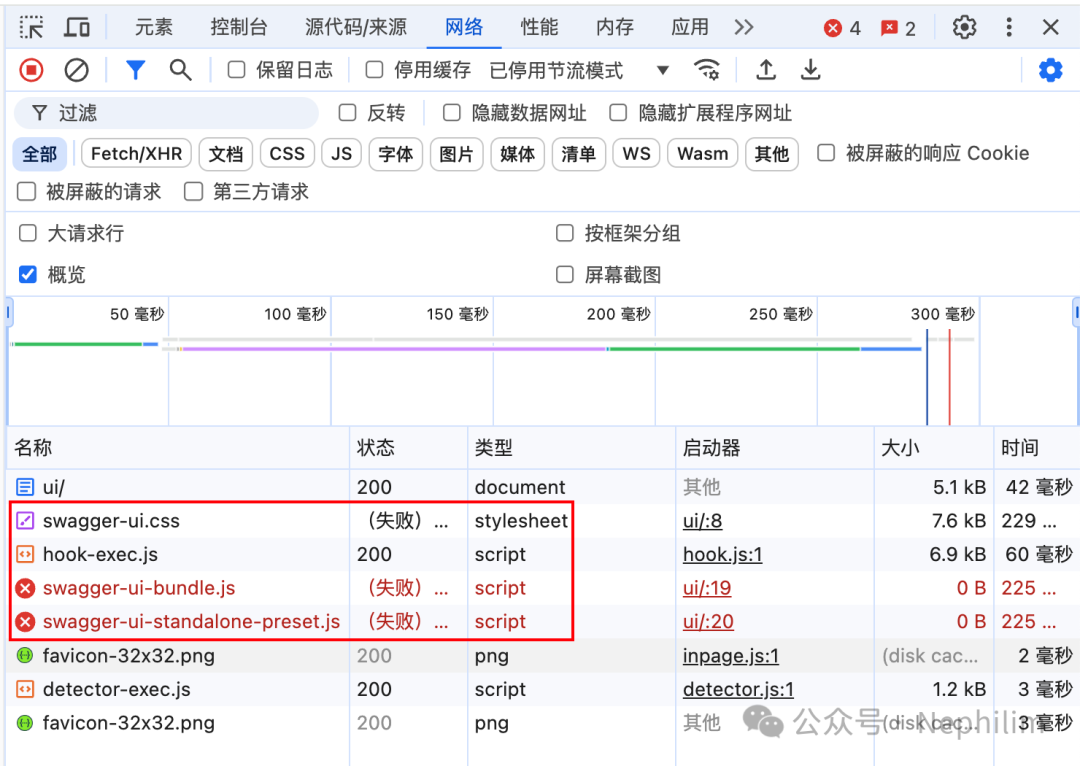
当你给自己的Django项目,安装了「drf_spectacular」并配置了Swagger后,你有可能会在访问网页的时候遇到如题所示的错误。
它的表现,具体如下所示:

02
问题原因
问题原因:
「drf-spectacular」默认不包含UI资源,采用CDN方式引入网络外部资源。
如果你无法访问CDN,则你的页面显示就会出现截图所示的空白。
03
解决方法:安装
安装:「drf-spectacular-sidecar」
首先,升级你的PIP:
(.venv) (base) adamhuan@Leviathan djangoProject_AdamhuanBase % python -VPython 3.12.3(.venv) (base) adamhuan@Leviathan djangoProject_AdamhuanBase % python -m pip install --upgrade pipLooking in indexes: https://mirrors.aliyun.com/pypi/simple/Requirement already satisfied: pip in ./.venv/lib/python3.12/site-packages (23.2.1)Collecting pipDownloading https://mirrors.aliyun.com/pypi/packages/d4/55/90db48d85f7689ec6f81c0db0622d704306c5284850383c090e6c7195a5c/pip-24.2-py3-none-any.whl (1.8 MB)━━━━━━━━━━━━━━━━━━━━━━━━━━━━━━━━━━━━━━━━ 1.8/1.8 MB 2.8 MB/s eta 0:00:00Installing collected packages: pipAttempting uninstall: pipFound existing installation: pip 23.2.1Uninstalling pip-23.2.1:Successfully uninstalled pip-23.2.1Successfully installed pip-24.2(.venv) (base) adamhuan@Leviathan djangoProject_AdamhuanBase %
安装「PIPENV」
(.venv) (base) adamhuan@Leviathan djangoProject_AdamhuanBase % pip list | grep env(.venv) (base) adamhuan@Leviathan djangoProject_AdamhuanBase %(.venv) (base) adamhuan@Leviathan djangoProject_AdamhuanBase % pip install pipenvLooking in indexes: https://mirrors.aliyun.com/pypi/simple/Collecting pipenvDownloading https://mirrors.aliyun.com/pypi/packages/fd/45/9441892f5e7380ec5db371bfbd1f2f1659fed9bf2ea122f1fc20798afda7/pipenv-2024.1.0-py3-none-any.whl (3.0 MB)━━━━━━━━━━━━━━━━━━━━━━━━━━━━━━━━━━━━━━━━ 3.0/3.0 MB 2.5 MB/s eta 0:00:00Collecting certifi (from pipenv)Downloading https://mirrors.aliyun.com/pypi/packages/12/90/3c9ff0512038035f59d279fddeb79f5f1eccd8859f06d6163c58798b9487/certifi-2024.8.30-py3-none-any.whl (167 kB)Collecting packaging>=22 (from pipenv)Downloading https://mirrors.aliyun.com/pypi/packages/08/aa/cc0199a5f0ad350994d660967a8efb233fe0416e4639146c089643407ce6/packaging-24.1-py3-none-any.whl (53 kB)Collecting setuptools>=67 (from pipenv)Downloading https://mirrors.aliyun.com/pypi/packages/ff/ae/f19306b5a221f6a436d8f2238d5b80925004093fa3edea59835b514d9057/setuptools-75.1.0-py3-none-any.whl (1.2 MB)━━━━━━━━━━━━━━━━━━━━━━━━━━━━━━━━━━━━━━━━ 1.2/1.2 MB 2.7 MB/s eta 0:00:00Collecting virtualenv>=20.24.2 (from pipenv)Downloading https://mirrors.aliyun.com/pypi/packages/59/90/57b8ac0c8a231545adc7698c64c5a36fa7cd8e376c691b9bde877269f2eb/virtualenv-20.26.6-py3-none-any.whl (6.0 MB)━━━━━━━━━━━━━━━━━━━━━━━━━━━━━━━━━━━━━━━━ 6.0/6.0 MB 2.5 MB/s eta 0:00:00Collecting distlib<1,>=0.3.7 (from virtualenv>=20.24.2->pipenv)Downloading https://mirrors.aliyun.com/pypi/packages/91/a1/cf2472db20f7ce4a6be1253a81cfdf85ad9c7885ffbed7047fb72c24cf87/distlib-0.3.9-py2.py3-none-any.whl (468 kB)Collecting filelock<4,>=3.12.2 (from virtualenv>=20.24.2->pipenv)Downloading https://mirrors.aliyun.com/pypi/packages/b9/f8/feced7779d755758a52d1f6635d990b8d98dc0a29fa568bbe0625f18fdf3/filelock-3.16.1-py3-none-any.whl (16 kB)Collecting platformdirs<5,>=3.9.1 (from virtualenv>=20.24.2->pipenv)Downloading https://mirrors.aliyun.com/pypi/packages/3c/a6/bc1012356d8ece4d66dd75c4b9fc6c1f6650ddd5991e421177d9f8f671be/platformdirs-4.3.6-py3-none-any.whl (18 kB)Installing collected packages: distlib, setuptools, platformdirs, packaging, filelock, certifi, virtualenv, pipenvSuccessfully installed certifi-2024.8.30 distlib-0.3.9 filelock-3.16.1 packaging-24.1 pipenv-2024.1.0 platformdirs-4.3.6 setuptools-75.1.0 virtualenv-20.26.6(.venv) (base) adamhuan@Leviathan djangoProject_AdamhuanBase %(.venv) (base) adamhuan@Leviathan djangoProject_AdamhuanBase %(.venv) (base) adamhuan@Leviathan djangoProject_AdamhuanBase % pip list | grep envpipenv 2024.1.0virtualenv 20.26.6(.venv) (base) adamhuan@Leviathan djangoProject_AdamhuanBase %(.venv) (base) adamhuan@Leviathan djangoProject_AdamhuanBase % pipenv --versionpipenv, version 2024.1.0(.venv) (base) adamhuan@Leviathan djangoProject_AdamhuanBase %(.venv) (base) adamhuan@Leviathan djangoProject_AdamhuanBase %(.venv) (base) adamhuan@Leviathan djangoProject_AdamhuanBase % pipenv -hUsage: pipenv [OPTIONS] COMMAND [ARGS]...Options:--where Output project home information.--venv Output virtualenv information.--py Output Python interpreter information.--envs Output Environment Variable options.--rm Remove the virtualenv.--bare Minimal output.--man Display manpage.--support Output diagnostic information for use inGitHub issues.--site-packages --no-site-packagesEnable site-packages for the virtualenv.--python TEXT Specify which version of Python virtualenvshould use.--clear Clears caches (pipenv, pip).-q, --quiet Quiet mode.-v, --verbose Verbose mode.--pypi-mirror TEXT Specify a PyPI mirror.--version Show the version and exit.-h, --help Show this message and exit.Usage Examples:Create a new project using Python 3.7, specifically:$ pipenv --python 3.7Remove project virtualenv (inferred from current directory):$ pipenv --rmInstall all dependencies for a project (including dev):$ pipenv install --devCreate a lockfile containing pre-releases:$ pipenv lock --preShow a graph of your installed dependencies:$ pipenv graphCheck your installed dependencies for security vulnerabilities:$ pipenv checkInstall a local setup.py into your virtual environment/Pipfile:$ pipenv install -e .Use a lower-level pip command:$ pipenv run pip freezeCommands:check Checks for PyUp Safety security vulnerabilities and againstPEP 508 markers provided in Pipfile.clean Uninstalls all packages not specified in Pipfile.lock.graph Displays currently-installed dependency graph information.install Installs provided packages and adds them to Pipfile, or (if nopackages are given), installs all packages from Pipfile.lock Generates Pipfile.lock.open View a given module in your editor.requirements Generate a requirements.txt from Pipfile.lock.run Spawns a command installed into the virtualenv.scripts Lists scripts in current environment config.shell Spawns a shell within the virtualenv.sync Installs all packages specified in Pipfile.lock.uninstall Uninstalls a provided package and removes it from Pipfile.update Runs lock, then sync.upgrade Resolves provided packages and adds them to Pipfile, or (if nopackages are given), merges results to Pipfile.lockverify Verify the hash in Pipfile.lock is up-to-date.(.venv) (base) adamhuan@Leviathan djangoProject_AdamhuanBase %
通过「PIPENV」安装「drf-spectacular-sidecar」
(.venv) (base) adamhuan@Leviathan djangoProject_AdamhuanBase % pipenv install drf-spectacular-sidecarCourtesy Notice:Pipenv found itself running within a virtual environment, so it will automatically use that environment, instead of creating its own for any project. You can setPIPENV_IGNORE_VIRTUALENVS=1 to force pipenv to ignore that environment and create its own instead.You can set PIPENV_VERBOSITY=-1 to suppress this warning.Creating a Pipfile for this project...Installing drf-spectacular-sidecar...Resolving drf-spectacular-sidecar...Added drf-spectacular-sidecar to Pipfile's [packages] ...✔ Installation SucceededPipfile.lock not found, creating...Locking [packages] dependencies...Building requirements...Resolving dependencies...✔ Success!Locking [dev-packages] dependencies...Updated Pipfile.lock (90d9173b40dc9a953ce7d397eb2d2276190aba65ddb0511a29283ba9085c1b69)!To activate this project's virtualenv, run pipenv shell.Alternatively, run a command inside the virtualenv with pipenv run.Installing dependencies from Pipfile.lock (5c1b69)...(.venv) (base) adamhuan@Leviathan djangoProject_AdamhuanBase %
04
解决方法:配置
文件「settings.py」
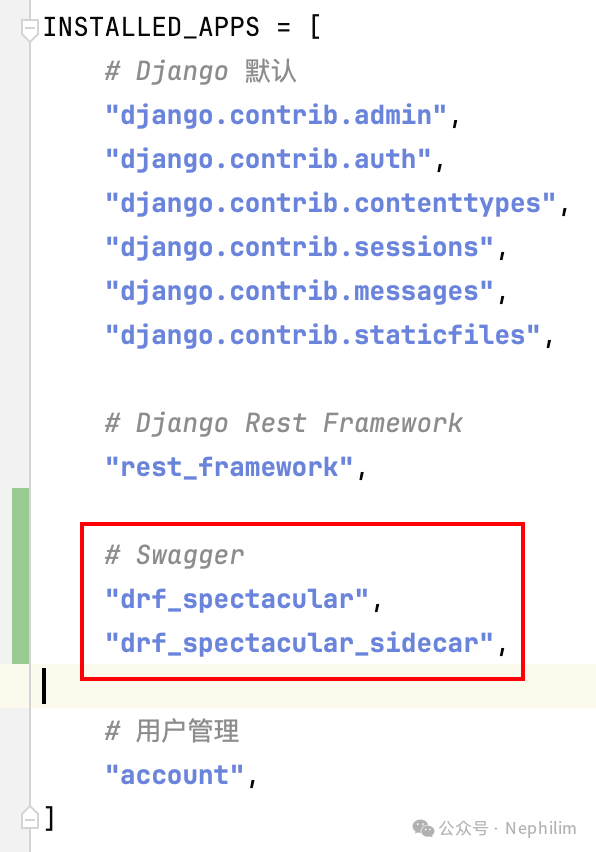
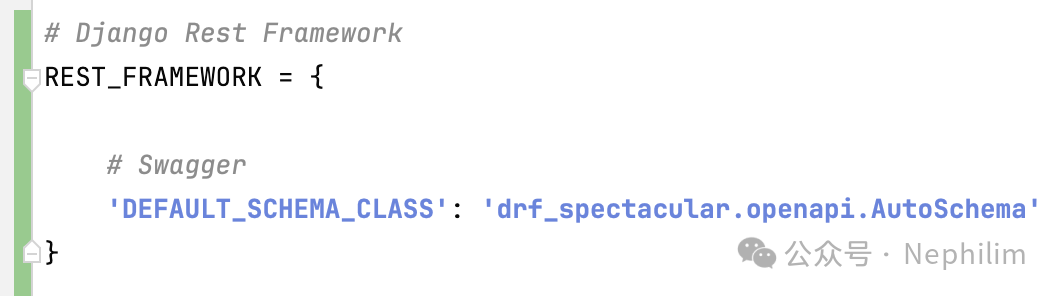

最终,该文件「settings.py」的完整内容如下:
"""Django settings for djangoProject_AdamhuanBase project.Generated by 'django-admin startproject' using Django 5.1.2.For more information on this file, seehttps://docs.djangoproject.com/en/5.1/topics/settings/For the full list of settings and their values, seehttps://docs.djangoproject.com/en/5.1/ref/settings/"""from pathlib import Path# Build paths inside the project like this: BASE_DIR 'subdir'.BASE_DIR = Path(__file__).resolve().parent.parent# Quick-start development settings - unsuitable for production# See https://docs.djangoproject.com/en/5.1/howto/deployment/checklist/# SECURITY WARNING: keep the secret key used in production secret!SECRET_KEY = "django-insecure-b!+z92+09x957wqzbl@&6z*k3eakn)g$0pg^2h0_quaoh)pd5v"# SECURITY WARNING: don't run with debug turned on in production!DEBUG = TrueALLOWED_HOSTS = []# Application definitionINSTALLED_APPS = [# Django 默认"django.contrib.admin","django.contrib.auth","django.contrib.contenttypes","django.contrib.sessions","django.contrib.messages","django.contrib.staticfiles",# Django Rest Framework"rest_framework",# Swagger"drf_spectacular","drf_spectacular_sidecar",# 用户管理"account",]MIDDLEWARE = ["django.middleware.security.SecurityMiddleware","django.contrib.sessions.middleware.SessionMiddleware","django.middleware.common.CommonMiddleware","django.middleware.csrf.CsrfViewMiddleware","django.contrib.auth.middleware.AuthenticationMiddleware","django.contrib.messages.middleware.MessageMiddleware","django.middleware.clickjacking.XFrameOptionsMiddleware",]ROOT_URLCONF = "djangoProject_AdamhuanBase.urls"TEMPLATES = [{"BACKEND": "django.template.backends.django.DjangoTemplates","DIRS": [BASE_DIR 'templates'],"APP_DIRS": True,"OPTIONS": {"context_processors": ["django.template.context_processors.debug","django.template.context_processors.request","django.contrib.auth.context_processors.auth","django.contrib.messages.context_processors.messages",],},},]WSGI_APPLICATION = "djangoProject_AdamhuanBase.wsgi.application"# Database# https://docs.djangoproject.com/en/5.1/ref/settings/#databasesDATABASES = {"default": {"ENGINE": "django.db.backends.sqlite3","NAME": BASE_DIR "db.sqlite3",}}# Password validation# https://docs.djangoproject.com/en/5.1/ref/settings/#auth-password-validatorsAUTH_PASSWORD_VALIDATORS = [{"NAME": "django.contrib.auth.password_validation.UserAttributeSimilarityValidator",},{"NAME": "django.contrib.auth.password_validation.MinimumLengthValidator",},{"NAME": "django.contrib.auth.password_validation.CommonPasswordValidator",},{"NAME": "django.contrib.auth.password_validation.NumericPasswordValidator",},]# Internationalization# https://docs.djangoproject.com/en/5.1/topics/i18n/# LANGUAGE_CODE = "en-us"LANGUAGE_CODE = "zh-hans"# TIME_ZONE = "UTC"TIME_ZONE = "Asia/Shanghai"USE_I18N = TrueUSE_TZ = True# Static files (CSS, JavaScript, Images)# https://docs.djangoproject.com/en/5.1/howto/static-files/STATIC_URL = "static/"# Default primary key field type# https://docs.djangoproject.com/en/5.1/ref/settings/#default-auto-fieldDEFAULT_AUTO_FIELD = "django.db.models.BigAutoField"# Django Rest FrameworkREST_FRAMEWORK = {# Swagger'DEFAULT_SCHEMA_CLASS': 'drf_spectacular.openapi.AutoSchema'}# SwaggerSPECTACULAR_SETTINGS = {# SIDECAR'SWAGGER_UI_DIST': 'SIDECAR','SWAGGER_UI_FAVICON_HREF': 'SIDECAR','REDOC_DIST': 'SIDECAR',# 自定义 OpenAPI 描述信息'TITLE': 'xxxxxxx','DESCRIPTION': 'xxxxxxx','VERSION': '1.0.0','SERVE_INCLUDE_SCHEMA': False,}
文件「urls.py」
"""URL configuration for djangoProject_AdamhuanBase project.The `urlpatterns` list routes URLs to views. For more information please see:https://docs.djangoproject.com/en/5.1/topics/http/urls/Examples:Function views1. Add an import: from my_app import views2. Add a URL to urlpatterns: path('', views.home, name='home')Class-based views1. Add an import: from other_app.views import Home2. Add a URL to urlpatterns: path('', Home.as_view(), name='home')Including another URLconf1. Import the include() function: from django.urls import include, path2. Add a URL to urlpatterns: path('blog/', include('blog.urls'))"""from django.contrib import adminfrom django.urls import path, include# Swaggerfrom drf_spectacular.views import SpectacularJSONAPIView, SpectacularRedocView, SpectacularSwaggerViewurlpatterns = [# Swaggerpath('swagger/json/', SpectacularJSONAPIView.as_view(), name='schema'),path('swagger/ui/', SpectacularSwaggerView.as_view(url_name='schema',), name='swagger-ui'),path('swagger/redoc/', SpectacularRedocView.as_view(url_name='schema',), name='redoc'),# Django 管理页面path("admin/", admin.site.urls),# 用户管理path("account/", include("account.urls")),]
然后,启动Django项目,再次访问的Swagger的时候,就没问题了:
根据上面「urls.py」的配置,我的Swagger地址是:
http://127.0.0.1:8000/swagger/ui/

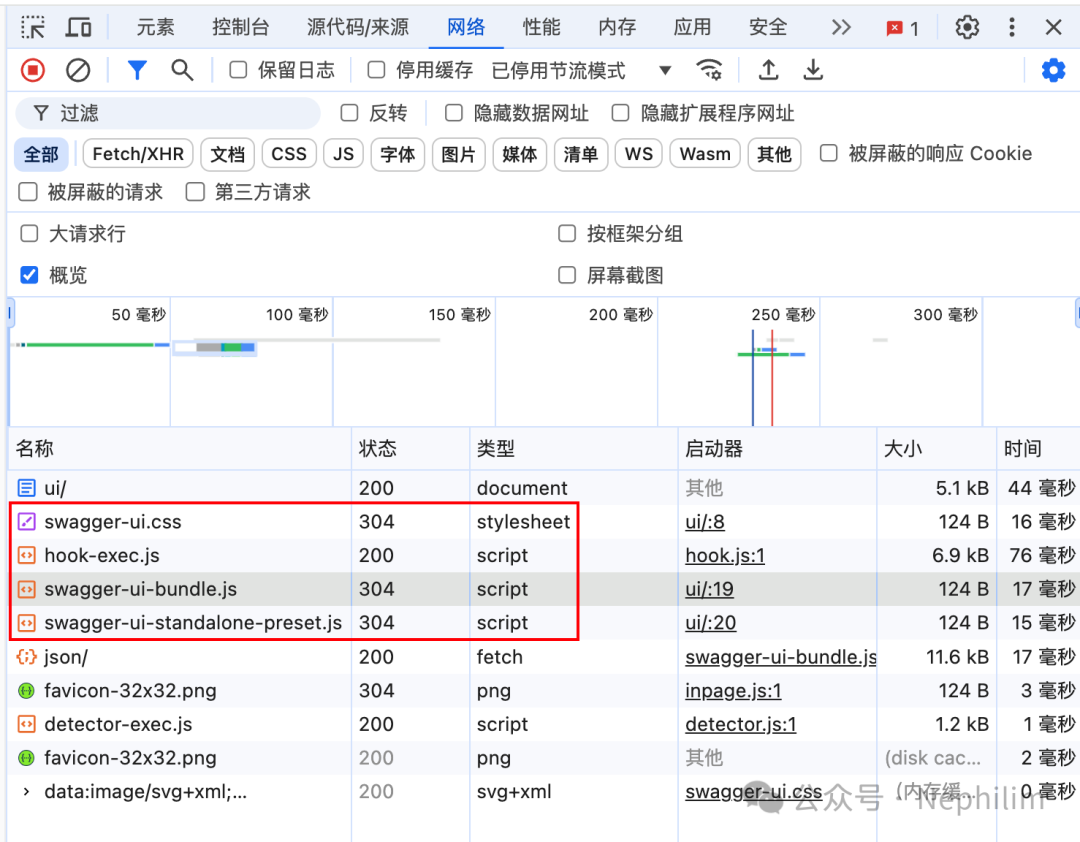
可以看到,现在访问UI的资源文件都没问题了。
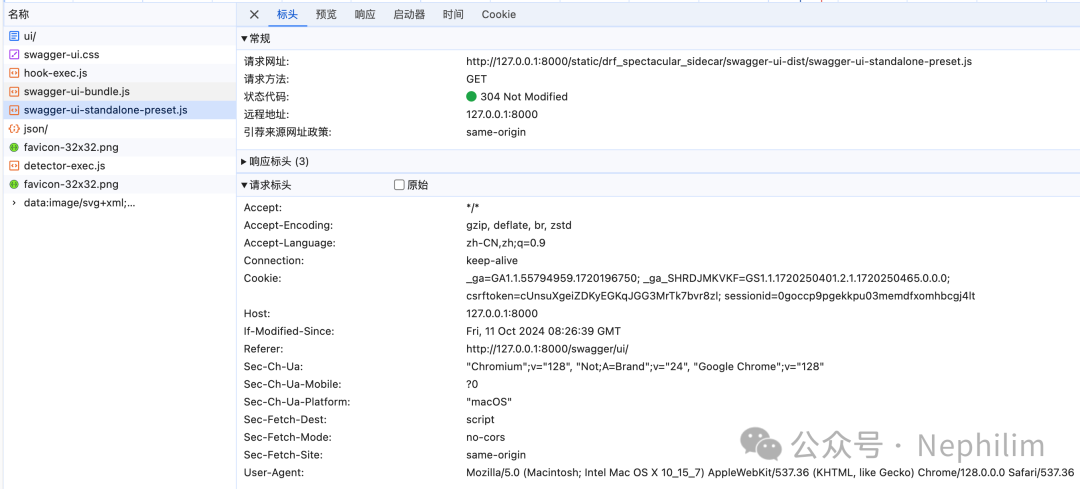
可以看到,现在,访问的都是本地的资源文件,而不是通过CDN去获取UI的资源文件。
至此,文首的问题已经解决了。
END
温馨提示
如果你喜欢本文,请分享到朋友圈,想要获得更多信息,请关注我。
文章转载自Nephilim,如果涉嫌侵权,请发送邮件至:contact@modb.pro进行举报,并提供相关证据,一经查实,墨天轮将立刻删除相关内容。
