



Tips:一些记录,一些笔记

2024/06/08
SATURDAY
There is a history in all men's life.
所有人的生活里都有一部历史。

01
添加「标签」效果之前的样子
直接看代码:
<template><div id="container" class="text-black text-sm bg-primary-300 min-h-screen pb-4"><div class="flex items-center justify-center"><div class="w-full px-2" style="max-width:1440px;"><div class="rounded bg-white mx-4 my-4 py-6 "><a-row class="flex items-center justify-center"><div><h1 class="font-semibold">表格组件</h1></div></a-row><a-table:columns="table_column":data-source="table_datasource"@change="handleTableChange"></a-table></div></div></div></div></template><script setup>// 表格:列const table_column = [{title: '昵称',dataIndex: 'name',key: 'name',},{title: '性别',dataIndex: 'sex',key: 'sex',},{title: '标签',dataIndex: 'tags',key: 'tags',},{title: '抖音号',dataIndex: 'douyin_account',key: 'douyin_account',},{title: '粉丝数(万)',dataIndex: 'follows_count',key: 'follows_count',// 排序// sorter: {// sortDirections: ['ascend','descend',],// },sorter: (a, b) => a.follows_count - b.follows_count,sortDirections: ['ascend','descend',],},{title: '备注',dataIndex: 'remarks',key: 'remarks',},]// 表格:数据const table_datasource = [{name: "你的欲梦",sex: "女",tags: ['颜值','顶流','无忧传媒',],follows_count: 1378.3,douyin_account: "YM09288",remarks: "能被大家喜欢真的很开心",},{name: "童锦程",sex: "男",tags: ['颜值','情感自媒体','浙江','顶流',],follows_count: 1036.9,douyin_account: "tong798798",},{name: "小仙儿",sex: "女",tags: ['颜值','舞蹈','浙江','甜妹',],follows_count: 417.1,douyin_account: "32101019",remarks: "♡ 谢谢你的关注 ♡",},{name: "晴二",sex: "女",tags: ['颜值','音乐','安徽','甜妹',],follows_count: 39.7,douyin_account: "errr2",},{name: "星狗",sex: "女",tags: ['颜值','COSer','四川','难搞',],follows_count: 832.7,douyin_account: "1848072894",},{name: "张雅倩",sex: "女",tags: ['颜值','COSer','浙江',],follows_count: 434.2,douyin_account: "zzai030",remarks: "我太脆弱了 我就是一片海苔",},]// 方法const handleTableChange = (pagination, filters, sorter) => {if (sorter.order === 'ascend') {this.data.sort((a, b) => a.follows_count - b.follows_count);} else if (sorter.order === 'descend') {this.data.sort((a, b) => b.follows_count - a.follows_count);}}</script>
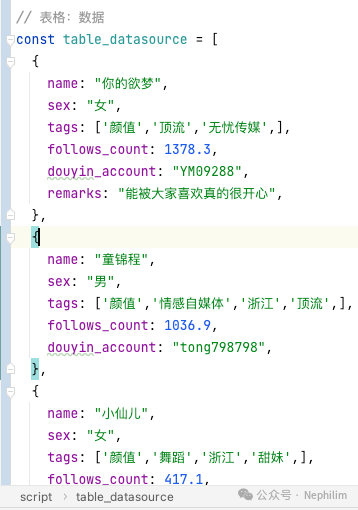
可以看到,数据源中的「tags」是以数组的形式组织数据的:
来看看页面上的效果:
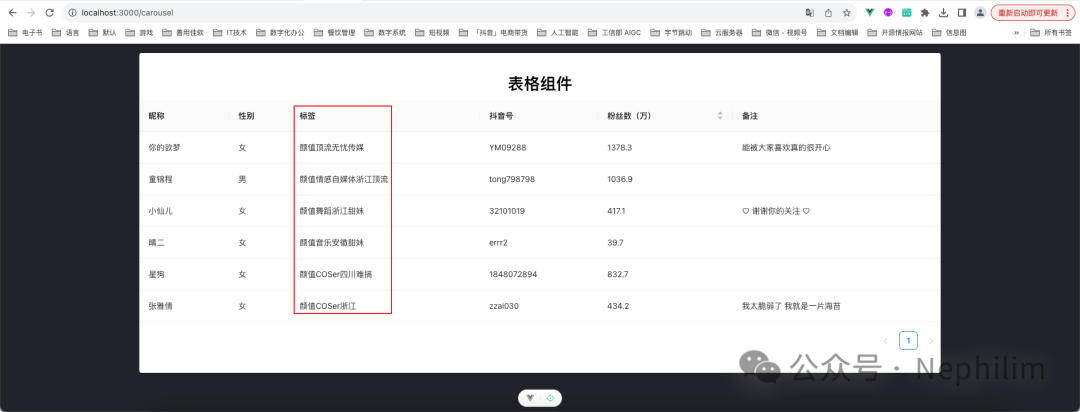
可以看到,这时候的标签并没有区分开来,都堆到了一起。
02
Ant Design Vue「表格」组件的「bodyCell」
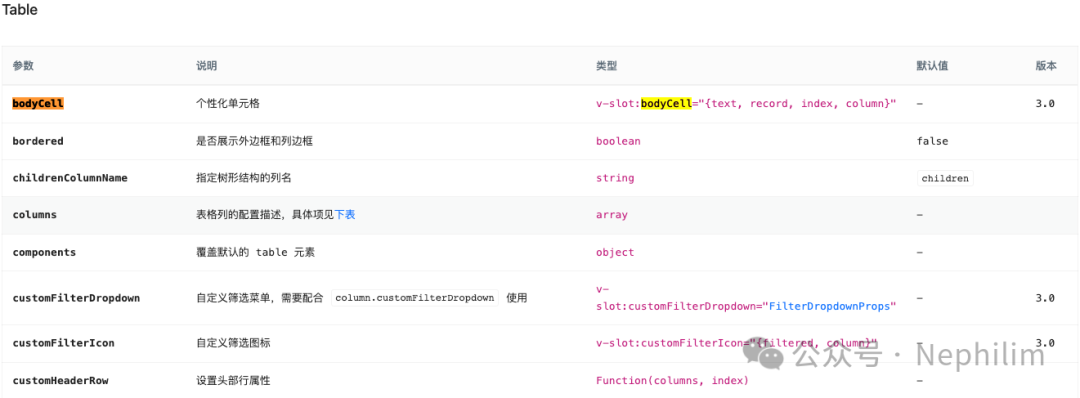
Ant Design Vue「表格」组件的官方API:
https://www.antdv.com/components/table-cn#api
要实现「标签效果」这个功能,需要借助「Table」的「bodyCell」个性化单元格实现。
下面来看看它的具体实现方法。
一、内置变量「column record」
关于「column」
先将代码写成这样,去看看「column」拿到的值到底是什么:
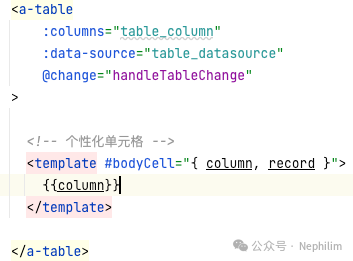
这时候,页面的呈现:
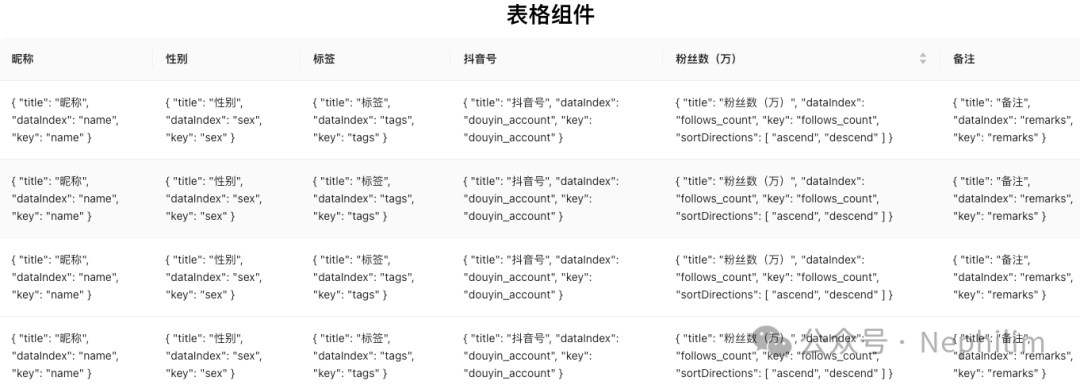
可以看到「column」拿到的就是我们定义的「columns」
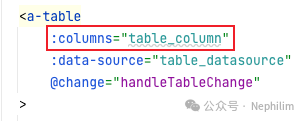
// 表格:列const table_column = [{title: '昵称',dataIndex: 'name',key: 'name',},{title: '性别',dataIndex: 'sex',key: 'sex',},{title: '标签',dataIndex: 'tags',key: 'tags',},{title: '抖音号',dataIndex: 'douyin_account',key: 'douyin_account',},{title: '粉丝数(万)',dataIndex: 'follows_count',key: 'follows_count',// 排序// sorter: {// sortDirections: ['ascend','descend',],// },sorter: (a, b) => a.follows_count - b.follows_count,sortDirections: ['ascend','descend',],},{title: '备注',dataIndex: 'remarks',key: 'remarks',},]
关于「record」
再来看看「record」拿到的是什么:
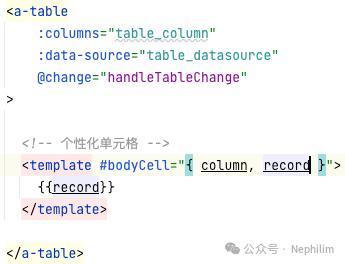
这时候页面效果的呈现:
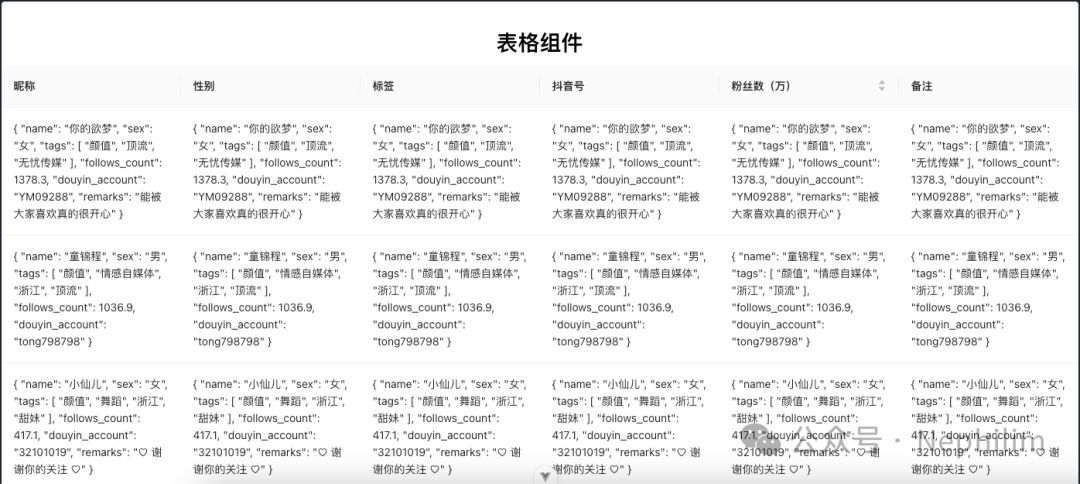
可以看到「record」拿到的是「数据源」遍历到每一行的时候的每一条数据。
二、「Table」的「bodyCell」属性
关于「bodyCell」
从上面代码的页面效果可以看出来,代码中的「bodyCell」
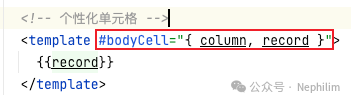
其实,对应的就是表格中的每一个单元格。
03
「标签」效果
通过上面的描述,我们知道了表格组件中的「bodyCell」的工作原理。
那么如果希望给「tags」列,增加「标签」效果,那么:
一、定位到目标列
首先,需要通过「column」确定当前修改的列是目标列,在我的这个例子中,也就是要判断它是「tags」
列的定义:
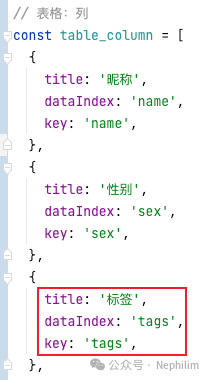
要确定当前列是不是标签列,可以通过「title dataIndex key」三个属性去判断。
因此,页面渲染的时候,代码可以这么写:
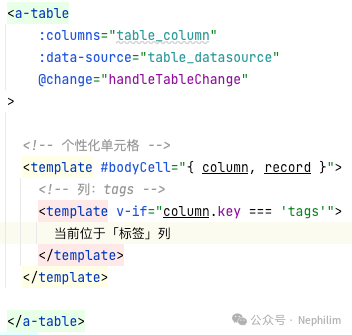
来看看页面效果:
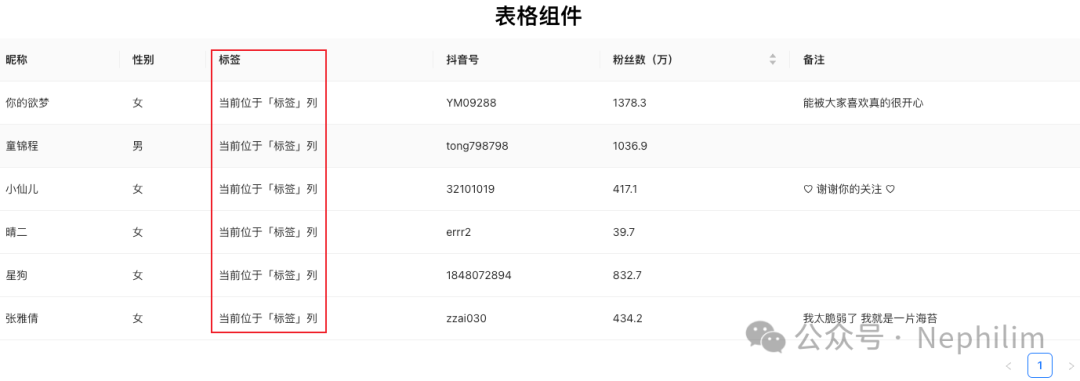
可以看到,已经正确的定位到了「标签」列。
二、定位到目标数据
来看看数据源中,我们目标列对应的数据:
在数据源中,通过「dataIndex」定位数据源中的属性:
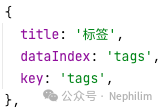
因此,我们在数据源中,应该找「tags」的属性:
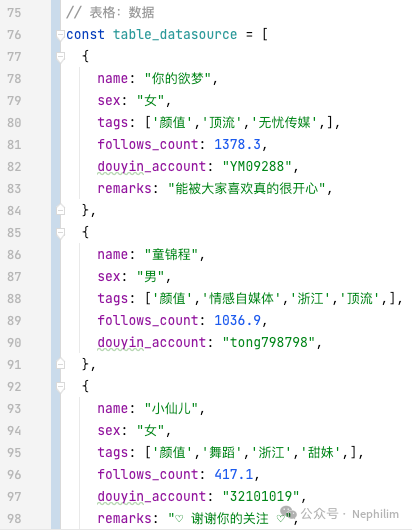
可以看到,数据源的「tags」确实是目标列的数据。
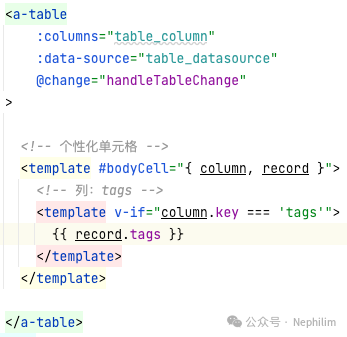
因此,这个时候,页面前端的代码可以这么写:
来看看这个时候的页面效果:
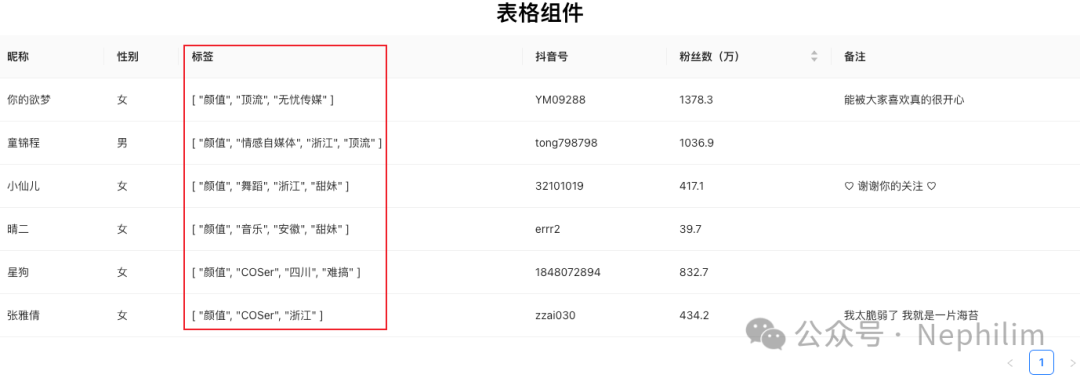
可以看到,已经拿到了「标签」数据。
三、使用Ant Design Vue的「标签」组件
Ant Design Vue的标签组件,官方文档:
https://www.antdv.com/components/tag-cn
上面拿到的标签数据是数组形式的,因此,可以通过「v-for」循环生成具体的标签。
具体代码如下:
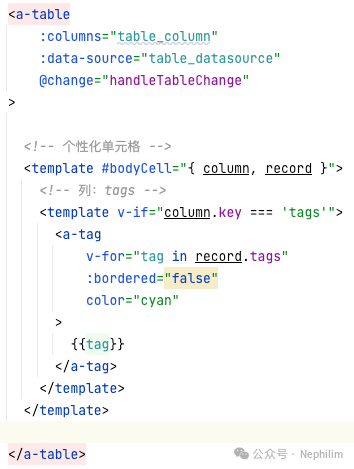
来看看这个时候的页面效果:
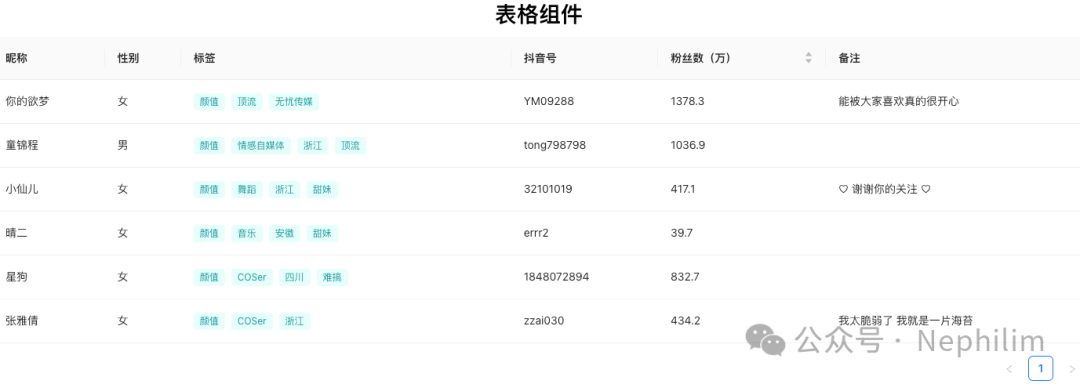
可以看到,我们期望的「标签」效果,已经添加到了「表格」组件上了。
04
完整的代码
最后,附上完整的代码:
<template><div id="container" class="text-black text-sm bg-primary-300 min-h-screen pb-4"><div class="flex items-center justify-center"><div class="w-full px-2" style="max-width:1440px;"><div class="rounded bg-white mx-4 my-4 py-6 "><a-row class="flex items-center justify-center"><div><h1 class="font-semibold">表格组件</h1></div></a-row><a-table:columns="table_column":data-source="table_datasource"@change="handleTableChange"><!-- 个性化单元格 --><template #bodyCell="{ column, record }"><!-- 列:tags --><template v-if="column.key === 'tags'"><a-tagv-for="tag in record.tags":bordered="false"color="cyan">{{tag}}</a-tag></template></template></a-table></div></div></div></div></template><script setup>// 表格:列const table_column = [{title: '昵称',dataIndex: 'name',key: 'name',},{title: '性别',dataIndex: 'sex',key: 'sex',},{title: '标签',dataIndex: 'tags',key: 'tags',},{title: '抖音号',dataIndex: 'douyin_account',key: 'douyin_account',},{title: '粉丝数(万)',dataIndex: 'follows_count',key: 'follows_count',// 排序// sorter: {// sortDirections: ['ascend','descend',],// },sorter: (a, b) => a.follows_count - b.follows_count,sortDirections: ['ascend','descend',],},{title: '备注',dataIndex: 'remarks',key: 'remarks',},]// 表格:数据const table_datasource = [{name: "你的欲梦",sex: "女",tags: ['颜值','顶流','无忧传媒',],follows_count: 1378.3,douyin_account: "YM09288",remarks: "能被大家喜欢真的很开心",},{name: "童锦程",sex: "男",tags: ['颜值','情感自媒体','浙江','顶流',],follows_count: 1036.9,douyin_account: "tong798798",},{name: "小仙儿",sex: "女",tags: ['颜值','舞蹈','浙江','甜妹',],follows_count: 417.1,douyin_account: "32101019",remarks: "♡ 谢谢你的关注 ♡",},{name: "晴二",sex: "女",tags: ['颜值','音乐','安徽','甜妹',],follows_count: 39.7,douyin_account: "errr2",},{name: "星狗",sex: "女",tags: ['颜值','COSer','四川','难搞',],follows_count: 832.7,douyin_account: "1848072894",},{name: "张雅倩",sex: "女",tags: ['颜值','COSer','浙江',],follows_count: 434.2,douyin_account: "zzai030",remarks: "我太脆弱了 我就是一片海苔",},]// 方法const handleTableChange = (pagination, filters, sorter) => {if (sorter.order === 'ascend') {this.data.sort((a, b) => a.follows_count - b.follows_count);} else if (sorter.order === 'descend') {this.data.sort((a, b) => b.follows_count - a.follows_count);}}</script>
END
温馨提示
如果你喜欢本文,请分享到朋友圈,想要获得更多信息,请关注我。
