



5.4.2 使用docker部署elasticsearch-head 7
介绍
ELK家族介绍
elasticsearch介绍
Elasticsearch 是一个实时的分布式搜索分析引擎, 它能让你以一个之前从未有过的速度和规模,去探索你的数据。 它被用作全文检索、结构化搜索、分析以及这三个功能的组合
Elasticsearch是一个基于Apache Lucene(TM)的开源搜索引擎。无论在开源还是专有领域,Lucene可
要使用它,你必须使用Java来作为开发语言并将其直接集成到你的应用中,更糟糕的是,Lucene非常复杂,你需要深入了解检索的相关知识来理解它是如何工作的。 Elasticsearch也使用Java开发并使用Lucene作为其核心来实现所有索引和搜索的功能,但是它的目的是通过简单的RESTful API来隐藏Lucene的复杂性,从而让全文搜索变得简单。
应用场景
mysql虽然也可以搜索,比如查询某个字符串%,需要全表扫描
es可以灵活的存储不同类型的数据
比如,商城的商品搜索
比如,所有产品的评论
数据格式
Elasticsearch 使用JavaScript Object Notation 或者JSON作为文档的序列化格式。JSON序列化被大多数编程语言所支持,并且已经成为 NoSQL领域的标准格式。 它简单、简洁、易于阅读。
考虑一下这个 JSON 文档,它代表了一个user对象:
{
"email": "john@smith.com", "first_name": "John",
"last_name": "Smith",
"info":
{ "bio": "Eco-warrior and defender of the weak",
"age": 25,
"interests": [ "dolphins", "whales" ]
},
"join_date": "2014/05/01"
}
安装
几种安装方式介绍
官方文档
https://www.elastic.co/guide/en/elasticsearch/reference/current/install-elasticsearch.html
java安装
yum install java
软件包安装
wget https://artifacts.elastic.co/downloads/elasticsearch/elasticsearch-6.4.2.rpm
rpm -ivh elasticsearch-6.4.2.rpm
systemctl daemon-reload
systemctl enable elasticsearch.service
systemctl start elasticsearch.service
systemctl status elasticsearch.service
ps -ef|grep elastic
lsof -i:9200
tar安装
docker安装
测试是否安装成功
[root@elk-75 elasticsearch]# curl 'http://localhost:9200/?pretty'
{
"name" : "KhcOKcU",
"cluster_name" : "elasticsearch",
"cluster_uuid" : "tTJ0Rmc0Qp6oB-Sx6euCIA",
"version" : {
"number" : "6.4.2",
"build_flavor" : "default",
"build_type" : "rpm",
"build_hash" : "04711c2",
"build_date" : "2018-09-26T13:34:09.098244Z",
"build_snapshot" : false,
"lucene_version" : "7.4.0",
"minimum_wire_compatibility_version" : "5.6.0",
"minimum_index_compatibility_version" : "5.0.0"
},
"tagline" : "You Know, for Search"
}
重要配置
相关配置目录以及配置文件
rpm -ql elasticsearch #查看elasticsearch软件安装了哪些目录
/etc/elasticsearch/elasticsearch.yml #配置文件
/etc/elasticsearch/jvm.options #jvm虚拟机配置文件
/etc/init.d/elasticsearch #init启动文件
/etc/sysconfig/elasticsearch #环境变量配置文件
/usr/lib/sysctl.d/elasticsearch.conf #sysctl变量文件,修改最大描述符
/usr/lib/systemd/system/elasticsearch.service #systemd启动文件
/var/lib/elasticsearch # 数据目录
/var/log/elasticsearch #日志目录
/var/run/elasticsearch #pid目录
elsticsrach配置文件解读
Elasticsearch 已经有了很好的默认值,特别是涉及到性能相关的配置或者选项,其它数据库可能需要调优,但总得来说,Elasticsearch不需要。如果你遇到了性能问题,解决方法通常是更好的数据布局或者更多的节点。
[root@elk-75 elasticsearch]# egrep -v "^#" elasticsearch.yml
node.name: node-1
path.data: /data/elasticsearch
path.logs: /var/log/elasticsearch
bootstrap.memory_lock: true
network.host: 192.168.56.99
http.port: 9200
discovery.zen.ping.unicast.hosts: ["192.168.56.99"]
discovery.zen.minimum_master_nodes: 2
修改配置重新启动
chown -R elasticsearch:elasticsearch /data/elasticsearch/
systemctl restart elasticsearch
systemctl status elasticsearch
锁定内存失败解决
https://www.elastic.co/guide/en/elasticsearch/reference/6.4/setup-configuration-memory.html
https://www.elastic.co/guide/en/elasticsearch/reference/6.4/setting-system-settings.html#sysconfig
### 修改启动配置文件
vim /usr/lib/systemd/system/elasticsearch.service
### 增加如下参数
LimitMEMLOCK=infinity
### 重新启动
systemctl restart elasticsearch
elasticseartch术语及概念
索引词
在elastiasearch中索引词(term)是一个能够被索引的精确值。foo,Foo,FOO几个单词是不同的索引词。索引词(term)是可以通过term查询进行准确的搜索。
文本(text)
文本是一段普通的非结构化文字。通常,文本会被分拆成一个个的索引词,存储在elasticsearch的索引库中。为了让文本能够进行搜索,文本字段需要事先进行分析了;当对文本中的关键词进行查询的时候,搜索引擎应该根据搜索条件搜索出原文本。
分析(analysis)
分析是将文本转换为索引词的过程,分析的结果依赖于分词器。比如:FOO BAR,Foo-Bar和foo bar这几个词有可能会被分析成相同的索引词foo和bar,这些索引词存储在Elasticsearch的索引库中。
集群(cluster)
集群由一个或多个节点组成,对外提供服务,对外提供索引和搜索功能。在所有节点,一个集群有一个唯一的名称默认为“elasticsearch”.此名称是很重要的,因为每个节点只能是集群的一部分,当该节点被设置为相同的集群名称时,就会自动加入集群。当需要有多个集群的时候,要确保每个集群的名称不能重复,,否则节点可能会加入到错误的集群。请注意,一个节点只能加入到一个集群。此外,你还可以拥有多个独立的集群,每个集群都有其不同的集群名称。
节点(node)
一个节点是一个逻辑上独立的服务,它是集群的一部分,可以存储数据,并参与集群的索引和搜索功能。就像集群一样,节点也有唯一的名字,在启动的时候分配。如果你不想要默认名称,你可以定义任何你想要的节点名.这个名字在理中很重要,在Elasticsearch集群通过节点名称进行管理和通信.一个节点可以被配置加入到一个特定的集群。默认情况下,每个节点会加人名为Elasticsearch 的集祥中,这意味着如果你在网热动多个节点,如果网络畅通,他们能彼此发现井自动加人名为Elasticsearch 的一个集群中,你可以拥有多个你想要的节点。当网络没有集祥运行的时候,只要启动一个节点,这个节点会默认生成一个新的集群,这个集群会有一个节点。
分片(shard)
分片是单个Lucene 实例,这是Elasticsearch管理的比较底层的功能。索引是指向主分片和副本分片的逻辑空间。 对于使用,只需要指定分片的数量,其他不需要做过多的事情。在开发使用的过程中,我们对应的对象都是索引,Elasticsearch 会自动管理集群中所有的分片,当发生故障的时候,Elasticsearch 会把分片移动到不同的节点或者添加新的节点。
一个索引可以存储很大的数据,这些空间可以超过一个节点的物理存储的限制。例如,十亿个文档占用磁盘空间为1TB。仅从单个节点搜索可能会很慢,还有一台物理机器也不一定能存储这么多的数据。为了解决这一问题,Elasticsearch将索引分解成多个分片。当你创建一个索引,你可以简单地定义你想要的分片数量。每个分片本身是一个全功能的、独立的单元,可以托管在集群中的任何节点。
主分片
每个文档都存储在一个分片中,当你存储一个文档的时候,系统会首先存储在主分片中,然后会复制到不同的副本中。默认情况下,一个索引有5个主分片。 你可以事先制定分片的数量,当分片一旦建立,则分片的数量不能修改。
副本分片
每一个分片有零个或多个副本。副本主要是主分片的复制,其中有两个目的:
- 增加高可用性:当主分片失败的时候,可以从副本分片中选择一个作为主分片。
- 提高性能:当查询的时候可以到主分片或者副本分片中进行查询。默认情況下,一个主分片配有一个副本,但副本的数量可以在后面动态地配置增加。副本分片必部署在不同的节点上,不能部署在和主分片相同的节点上。
分片主要有两个很重要的原因是:
- 允许水平分割扩展数据。
- 允许分配和井行操作(可能在多个节点上)从而提高性能和吞吐量。
这些很强大的功能对用户来说是透明的,你不需要做什么操作,系统会自动处理。
复制
复制是一个非常有用的功能,不然会有单点问题。 当网络中的某个节点出现问题的时
候,复制可以对故障进行转移,保证系统的高可用。因此,Elasticsearch 允许你创建一个或多个拷贝,你的索引分片就形成了所谓的副本或副本分片。
复制是重要的,主要的原因有:
- 它提供丁高可用性,当节点失败的时候不受影响。需要注意的是,一个复制的分片
不会存储在同一个节点中。
- 它允许你扩展搜索量,提高并发量,因为搜索可以在所有副本上并行执行。
每个索引可以拆分成多个分片。索引可以复制零个或者多个分片。一旦复制,每个索引就有了主分片和副本分片。分片的数量和副本的数量可以在创建索引时定义。 当创建索引后,你可以随时改变副本的数量,但你不能改变分片的数量。
默认情況下,每个索引分配5个分片和一个副本,这意味着你的集群节点至少要有两个节点,你将拥有5个主要的分片和5个副本分片共计10个分片.
每个Elasticsearch分片是一个Lucene 的索引。有文档存储数量限制,你可以在一个
单一的Lucene索引中存储的最大值为lucene-5843,极限是2147483519(=integer.max_value-128)个文档。你可以使用cat/shards API监控分片的大小。
索引
索引是具有相同结构的文档集合。例如,可以有一个客户信息的索引,包括一个产品目录的索引,一个订单数据的索引。 在系统上索引的名字全部小写,通过这个名字可以用来执行索引、搜索、更新和删除操作等。在单个集群中,可以定义多个你想要的索引。
类型
在索引中,可以定义一个或多个类型,类型是索引的逻辑分区。在一般情况下,一种类型被定义为具有一组公共字段的文档。例如,让我们假设你运行一个博客平台,并把所有的数据存储在一个索引中。在这个索引中,你可以定义一种类型为用户数据,一种类型为博客数据,另一种类型为评论数据。
文档
文档是存储在Elasticsearch中的一个JSON格式的字符串。它就像在关系数据库中表的
一行。每个存储在索引中的一个文档都有一个类型和一个ID,每个文档都是一个JSON对象,存储了零个或者多个字段,或者键值对。原始的JSON 文档假存储在一个叫作Sour的字段中。当搜索文档的时候默认返回的就是这个字段。
映射
映射像关系数据库中的表结构,每一个索引都有一个映射,它定义了索引中的每一个字段类型,以及一个索引范围内的设置。一个映射可以事先被定义,或者在第一次存储文档的时候自动识别。
字段
文档中包含零个或者多个字段,字段可以是一个简单的值(例如字符串、整数、日期),也可以是一个数组或对象的嵌套结构。字段类似于关系数据库中表的列。每个字段都对应一个字段类型,例如整数、字符串、对象等。字段还可以指定如何分析该字段的值。
主键
ID是一个文件的唯一标识,如果在存库的时候没有提供ID,系统会自动生成一个ID,文档的 index/type/id必须是唯一的。
elasticsearch和数据库的对应关系
Elasticsearch 数据库
------------------------------
Index 库
Type 表
Document 行
交互
交互方式
所有其他语言可以使用RESTful API通过端口9200和Elasticsearch进行通信,你可以用你最喜爱的web客户端访问Elasticsearch.事实上,正如你所看到的,你甚至可以使用curl命令来和Elasticsearch交互 。
一个 Elasticsearch 请求和任何 HTTP 请求一样由若干相同的部件组成:
curl -X<VERB> '<PROTOCOL>://<HOST>:<PORT>/<PATH>?<QUERY_STRING>' -d '<BODY>'
VERB 适当的 HTTP 方法 或 谓词 : GET`、 `POST`、 `PUT`、 `HEAD 或者 `DELETE`。 PROTOCOL http 或者 https`(如果你在 Elasticsearch 前面有一个 `https 代理)
HOST Elasticsearch 集群中任意节点的主机名,或者用 localhost 代表本地机器上的节点。
PORT 运行 Elasticsearch HTTP 服务的端口号,默认是 9200 。
PATH API 的终端路径(例如 _count 将返回集群中文档数量)。Path 可能包含多个组件,例如: _cluster/stats 和 _nodes/stats/jvm 。
QUERY_STRING 任意可选的查询字符串参数 (例如 ?pretty 将格式化地输出 JSON 返回值,使其更容易 阅读)
BODY 一个 JSON 格式的请求体 (如果请求需要的话)
通用参数
pretty参数
当你在任何请求中添加了参数?pretty=true时,请求的返回值是经过格式化后的JSON数据,这样阅读起来更加方便。
系统还提供了另一种格式的格式化,?format=yaml,YAML格式,这将导致返回的结果具有可读的YAML格式。
human参数
对于统计数据,系统支持计算机数据,同时也支持比较适合人类阅读的数据。?human=true,默认是false
响应过滤filter_path
所有的返回值通过filter_path减少返回值的内容,多个值可以用逗号分开。也可以使用通配符*
curl命令行交互
计算文档数量
[root@elk-75 ~]# curl -XGET 'http://192.168.56.99:9200/_count?pretty' -H 'Content-Type: application/json' -d '
{
"query": { "match_all": {}
}
}
'
{
"count" : 0,
"_shards" : {
"total" : 0,
"successful" : 0,
"skipped" : 0,
"failed" : 0
}
}
es-head插件交互
插件官方地址
https://github.com/mobz/elasticsearch-head
使用docker部署elasticsearch-head
docker pull alivv/elasticsearch-head
docker run --name es-head -p 9100:9100 -dit alivv/elasticsearch-head
使用nodejs编译安装
官网地址
https://nodejs.org/en/download/package-manager/
https://nodejs.org/dist/latest-v10.x/
http://npm.taobao.org
下载安装
yum install nodejs npm openssl screen -y
node -v
npm -v
npm install -g cnpm --registry=https://registry.npm.taobao.org
cd /opt/
git clone git://github.com/mobz/elasticsearch-head.git
cnpm install
screen -S es-head
cnpm run start
Ctrl+A+D
修改ES配置文件支持跨域
http.cors.allow-origin: "*"
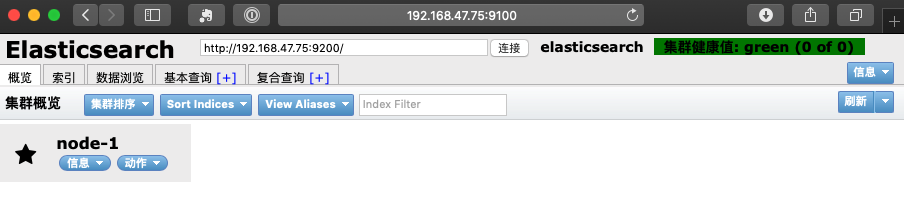
网页访问
IP地址:9100
kibana交互
安装配置kibana
wget https://artifacts.elastic.co/downloads/kibana/kibana-6.4.2-x86_64.rpm
rpm -ivh kibana-6.4.2-x86_64.rpm
[root@elk-75 soft]# grep "^[a-Z]" /etc/kibana/kibana.yml
server.port: 5601
server.host: "192.168.47.75"
elasticsearch.url: "http://192.168.47.75:9200"
kibana.index: ".kibana"
[root@elk-75 soft]# systemctl start kibana
[root@elk-75 soft]# systemctl status kibana
[root@elk-75 soft]# lsof -i:5601
COMMAND PID USER FD TYPE DEVICE SIZE/OFF NODE NAME
node 44667 kibana 12u IPv4 72918 0t0 TCP 192.168.47.75:esmagent (LISTEN)
创建索引
过滤查询数据
相关操作API
文档相关的API
官网地址:
https://www.elastic.co/guide/en/elasticsearch/reference/current/indices.html
创建索引文档
插入数据
[root@elk-75 scripts]# cat input_elk.sh
#!/bin/bash
curl -XPUT '192.168.47.75:9200/megacorp/employee/1?pretty' -H 'Content-Type: application/json' -d'
{
"first_name" : "John",
"last_name": "Smith",
"age" : 25,
"about" : "I love to go rock climbing", "interests": [ "sports", "music" ]
}
'
curl -XPUT '192.168.47.75:9200/megacorp/employee/2?pretty' -H 'Content-Type: application/json' -d' {
"first_name": "Jane",
"last_name" : "Smith",
"age" : 32,
"about" : "I like to collect rock albums", "interests": [ "music" ]
}
'
curl -XPUT '192.168.47.75:9200/megacorp/employee/3?pretty' -H 'Content-Type: application/json' -d' {
"first_name": "Douglas", "last_name" : "Fir",
"age" : 35,
"about": "I like to build cabinets", "interests": [ "forestry" ]
} '
[root@elk-75 scripts]# bash input_elk.sh
{
"_index" : "megacorp",
"_type" : "employee",
"_id" : "1",
"_version" : 2,
"result" : "updated",
"_shards" : {
"total" : 2,
"successful" : 2,
"failed" : 0
},
"_seq_no" : 1,
"_primary_term" : 1
}
{
"_index" : "megacorp",
"_type" : "employee",
"_id" : "2",
"_version" : 1,
"result" : "created",
"_shards" : {
"total" : 2,
"successful" : 2,
"failed" : 0
},
"_seq_no" : 0,
"_primary_term" : 1
}
{
"_index" : "megacorp",
"_type" : "employee",
"_id" : "3",
"_version" : 1,
"result" : "created",
"_shards" : {
"total" : 2,
"successful" : 2,
"failed" : 0
},
"_seq_no" : 0,
"_primary_term" : 1
}
查询文档
#查询某一条数据
[root@elk-75 scripts]# curl -XGET '192.168.47.75:9200/megacorp/employee/1?pretty'
{
"_index" : "megacorp",
"_type" : "employee",
"_id" : "1",
"_version" : 1,
"found" : true,
"_source" : {
"first_name" : "John",
"last_name" : "Smith",
"age" : 25,
"about" : "I love to go rock climbing",
"interests" : [
"sports",
"music"
]
}
}
删除文档
[root@elk-75 scripts]# curl -XDELETE '192.168.47.75:9200/megacorp/employee/1?pretty'
"_index" : "megacorp",
"_type" : "employee",
"_id" : "1",
"_version" : 3,
"result" : "deleted",
"_shards" : {
"total" : 2,
"successful" : 2,
"failed" : 0
},
"_seq_no" : 2,
"_primary_term" : 1
}
索引相关API
创建索引
[root@elk-75 scripts]# curl -XPUT '192.168.47.75:9200/megacorp?pretty'
"acknowledged" : true,
"shards_acknowledged" : true,
"index" : "megacorp"
}
查询索引信息
curl -XGET '192.168.47.75:9200/megacorp/employee/_search?pretty'
#查询索引符合条件的信息:搜索姓名为:Smith的员工
curl -XGET '192.168.47.75:9200/megacorp/employee/_search?q=last_name:Smith&pretty'
curl -XGET '192.168.47.75:9200/megacorp/employee/_search?pretty' -H 'Content-Type: application/json' -d'
{
"query" : { "match" : {
"last_name" : "Smith" }
} }
'
#使用过滤器
curl -XGET '192.168.47.75:9200/megacorp/employee/_search?pretty' -H 'Content-Type: application/json' -d'
{
"query" : { "bool": {
"must": { "match" : {
"last_name" : "smith" }
}, "filter": {
"range" : {
"age" : { "gt" : 30 }
} }
} }
}
'
删除索引
#删除整个索引
[root@elk-75 scripts]# curl -XDELETE '192.168.47.75:9200/megacorp?pretty'
{
"acknowledged" : true
}
集群管理
集群配置文件解读
[root@elk-75 ~]# grep -v "^#" /etc/elasticsearch/elasticsearch.yml
cluster.name: dba5
node.name: node-1
path.data: /data/elasticsearch
path.logs: /var/log/elasticsearch
bootstrap.memory_lock: true
network.host: 192.168.47.75
http.port: 9200
discovery.zen.ping.unicast.hosts: ["192.168.47.75","192.168.47.76","192.168.47.77"]
discovery.zen.minimum_master_nodes: 1
http.cors.enabled: true
http.cors.allow-origin: "*"
集群的相关API
查看集群健康状况
查看集群健康状况:
https://www.elastic.co/guide/en/elasticsearch/reference/current/cluster-health.html
操作命令:
[root@elk-75 ~]# curl -XGET 'http://192.168.47.75:9200/_cluster/health?pretty'
{
"cluster_name" : "dba5",
"status" : "green",
"timed_out" : false,
"number_of_nodes" : 3,
"number_of_data_nodes" : 3,
"active_primary_shards" : 0,
"active_shards" : 0,
"relocating_shards" : 0,
"initializing_shards" : 0,
"unassigned_shards" : 0,
"delayed_unassigned_shards" : 0,
"number_of_pending_tasks" : 0,
"number_of_in_flight_fetch" : 0,
"task_max_waiting_in_queue_millis" : 0,
"active_shards_percent_as_number" : 100.0
}
查看系统检索信息
Cluster Stats API允许从群集范围的角度检索统计信息。
官网地址:
https://www.elastic.co/guide/en/elasticsearch/reference/current/cluster-stats.html
操作命令:
[root@elk-75 ~]# curl -XGET 'http://192.168.47.75:9200/_cluster/stats?human&pretty'
查看集群的设置
官方地址:
https://www.elastic.co/guide/en/elasticsearch/reference/current/cluster-get-settings.html
操作命令:
curl -XGET 'http://192.168.47.75:9200/_cluster/settings?include_defaults=true&human&pretty'
查询节点的状态
官网地址:
https://www.elastic.co/guide/en/elasticsearch/reference/current/cluster-nodes-info.html
操作命令:
curl -XGET 'http://192.168.47.75:9200/_nodes/procese?human&pretty'
curl -XGET 'http://192.168.47.75:9200/_nodes/_all/info/jvm,process?human&pretty'
[root@elk-75 ~]# curl -XGET 'http://192.168.47.75:9200/_cat/nodes?human&pretty'
192.168.47.76 21 96 0 0.02 0.04 0.05 mdi - node-2
192.168.47.77 19 95 0 0.00 0.01 0.05 mdi * node-3
192.168.47.75 36 85 0 0.07 0.06 0.19 mdi - node-1
索引分片
curl -XPUT '192.168.47.75:9200/blogs?pretty' -H 'Content-Type: application/json' -d'
{
"settings" : {
"number_of_shards" : 3,
}
}'
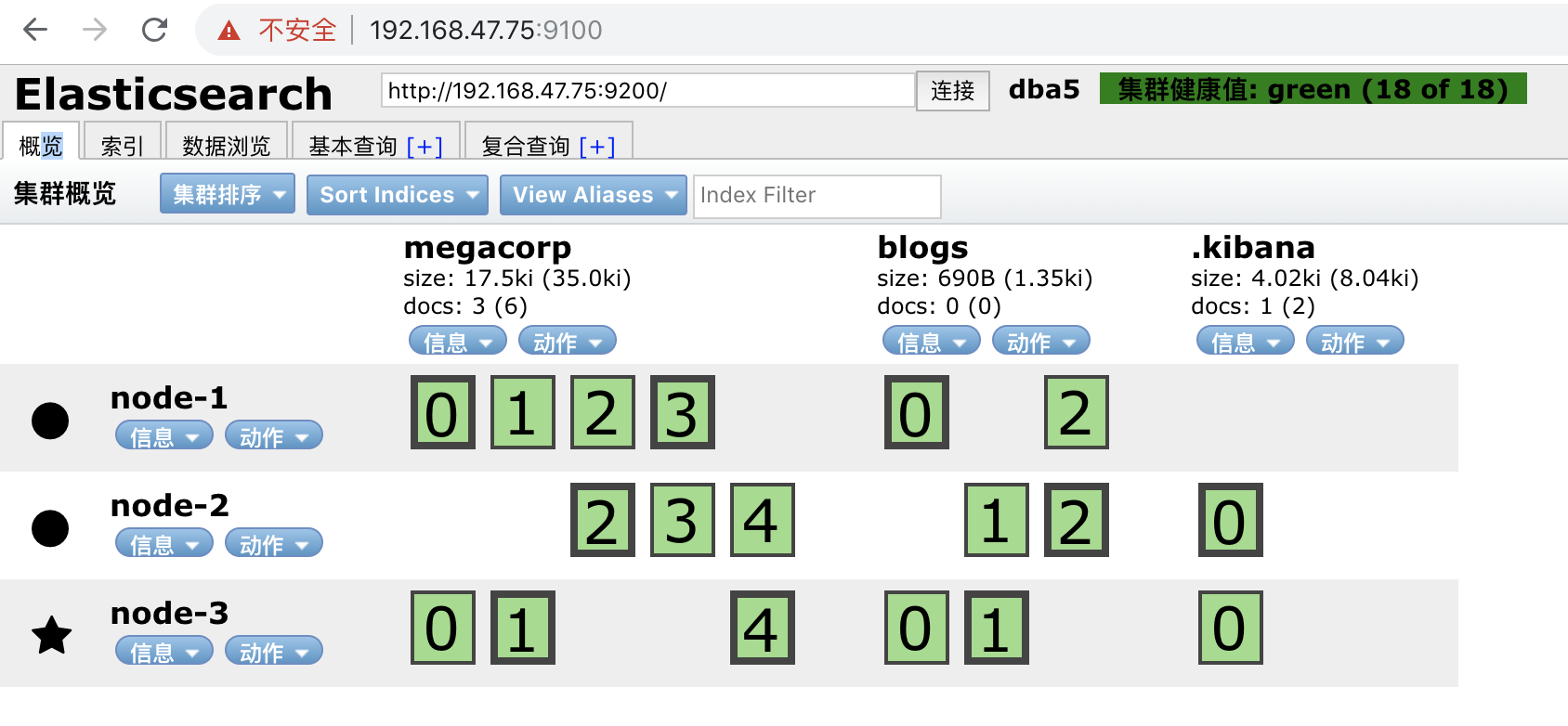
调整副本数
分片数一旦创建就不能再更改了,但是我们可以调整副本数
curl -XPUT '192.168.47.75:9200/index2/_settings?pretty' -H 'Content-Type: application/json' -d'
{
"settings" : {
"number_of_replicas" : 2
}
}
负载均衡与高可用
监控
x-pack
search guard权限管理
集群运维
滚动升级
备份与恢复
项目分享
中文分词器
官方地址
https://github.com/medcl/elasticsearch-analysis-ik
分词器安装
cd /usr/share/elasticsearch/bin
./elasticsearch-plugin install https://github.com/medcl/elasticsearch-analysis-ik/releases/download/v6.4.2/elasticsearch-analysis-ik-6.4.2.zip
分词器测试
curl -XPUT http://192.168.47.75:9200/index
创建映射
curl -XPOST http://192.168.47.75:9200/index/fulltext/_mapping -H 'Content-Type:application/json' -d'
{
"properties": {
"content": {
"type": "text",
"analyzer": "ik_max_word",
"search_analyzer": "ik_max_word"
}
}
}'
curl -XPOST http:// 192.168.47.75:9200/index/fulltext/1 -H 'Content-Type:application/json' -d'
{"content":"美国留给伊拉克的是个烂摊子吗"}
'
curl -XPOST http:// 192.168.47.75:9200/index/fulltext/2 -H 'Content-Type:application/json' -d'
{"content":"公安部:各地校车将享最高路权"}
'
curl -XPOST http:// 192.168.47.75:9200/index/fulltext/3 -H 'Content-Type:application/json' -d'
{"content":"中韩渔警冲突调查:韩警平均每天扣1艘中国渔船"}
'
curl -XPOST http://192.168.47.75:9200/index/fulltext/4 -H 'Content-Type:application/json' -d'
{"content":"中国驻洛杉矶领事馆遭亚裔男子枪击 嫌犯已自首"}
'
查询
curl -XPOST http:// 192.168.47.75:9200/index/fulltext/_search?pretty -H 'Content-Type:application/json' -d'
{
"query" : { "match" : { "content" : "中国" }},
"highlight" : {
"pre_tags" : ["<tag1>", "<tag2>"],
"post_tags" : ["</tag1>", "</tag2>"],
"fields" : {
"content" : {}
}
}
}
'
更新字典
日志收集展示
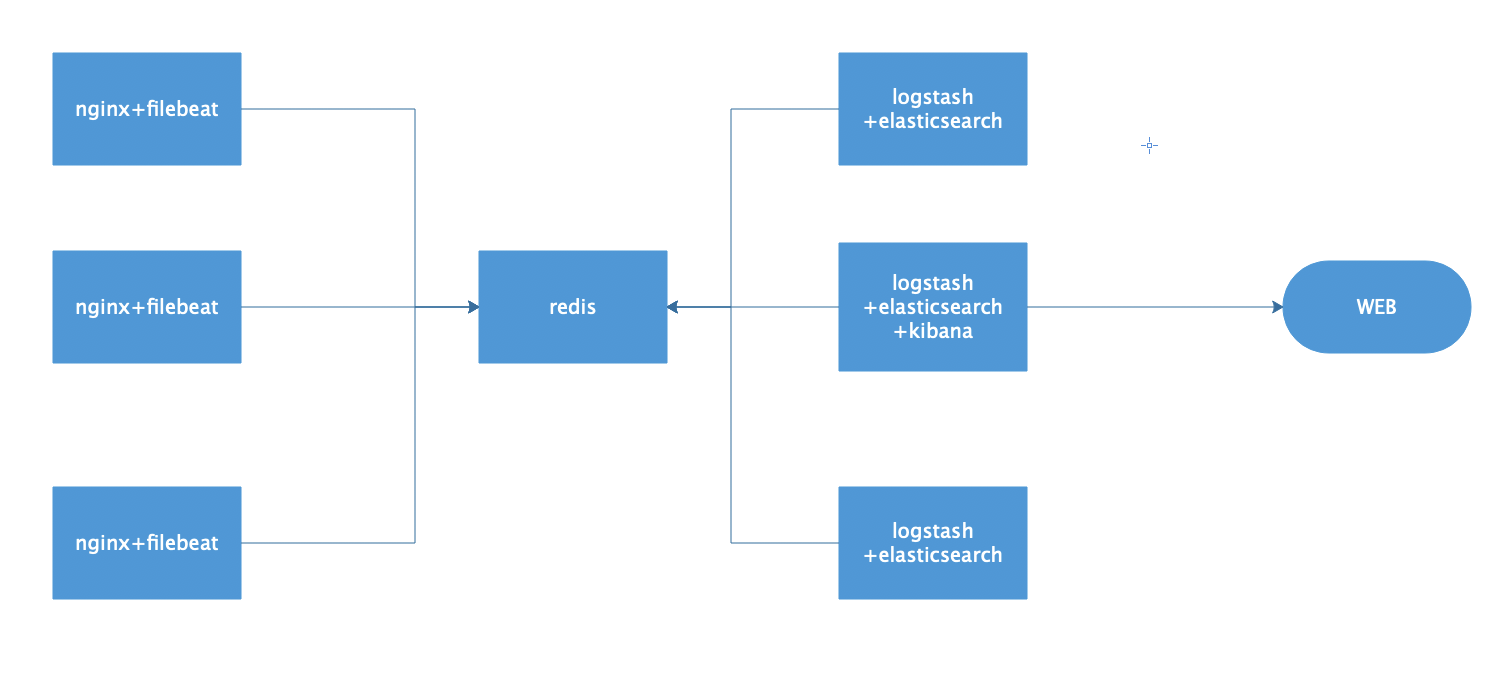
架构图
nginx修改日志格式
log_format access_json '{"@timestamp":"$time_iso8601",'
'"host":"$server_addr",'
'"clientip":"$remote_addr",'
'"size":$body_bytes_sent,'
'"responsetime":$request_time,'
'"upstreamtime":"$upstream_response_time",'
'"upstreamhost":"$upstream_addr",'
'"http_host":"$host",'
'"url":"$uri",'
'"domain":"$host",'
'"xff":"$http_x_forwarded_for",'
'"referer":"$http_referer",'
'"status":"$status"}';
redis配置
### 以守护进程模式启动
daemonize yes
### 绑定的主机地址
bind 192.168.47.75
### 监听端口
port 6380
### pid文件和log文件的保存地址
pidfile /opt/redis_cluster/redis_6380/pid/redis_6380.pid
logfile /opt/redis_cluster/redis_6380/logs/redis_6380.log
### 设置数据库的数量,默认数据库为0
databases 16
### 指定本地持久化文件的文件名,默认是dump.rdb
dbfilename redis_6380.rdb
### 本地数据库的目录
dir /data/redis_cluster/redis_6380
filebeat配置
filebeat.prospectors:
- type: log
enabled: true
paths:
- /usr/local/nginx/logs/*access.log
json.keys_under_root: true
json.overwrite_keys: true
output.redis:
hosts: ["192.168.47.75"]
key: "filebeat"
db: 0
timeout: 5
logstash配置
root@docker-elk-135:~/docker_compose# cat logstash.conf
input {
redis {
host => "192.168.47.75"
port => "6380"
db => "0"
key => "filebeat"
data_type => "list"
}
}
filter {
mutate {
convert => ["upstream_time", "float"]
convert => ["request_time", "float"]
}
}
output {
if [source] == "/usr/local/nginx/logs/act.goumin.com_access.log" {
elasticsearch {
hosts => "http://192.168.47.75:9200"
manage_template => false
index => "act-%{+YYYY.MM}"
}
}
if [source] == "/usr/local/nginx/logs/app.goumin.com_access.log" {
elasticsearch {
hosts => "http:// 192.168.47.75:9200"
manage_template => false
index => "app-%{+YYYY.MM}"
}
}
redis验证数据
keys *
LLEN filebeat
RPOP filebeat
提取es存储的日志IP并添加防火墙
架构图
功能实现
1.提取录入到es里nginx日志中的一定时间内的所有域名的访问IP最大的前10个
2.过滤后提取结果保存到文本中
3.判断提取的IP是否白名单里的爬虫
4.如果不是就添加到iptables防火墙里,每1小时恢复防火墙一次
5.将封禁结果通过邮件发送给运维
脚本解读
mysql-76:~/elk_ip# tree -L 2
.
├── ip_log
│ ├── act.log
│ ├── ask.log
│ ├── att.log
│ ├── bbs.log
│ ├── c.log
│ ├── dog.log
│ ├── i.log
│ ├── mall.log
│ ├── m.log
│ ├── www.log
│ └── zhidao.log
├── iptables_log
├── mail_log
│ ├── all_ip.txt
│ ├── mail_all.txt
│ ├── mail_log.txt
│ └── mail_status.txt
├── scripts
│ ├── disable_ip.sh
│ ├── elk_topip.sh
│ ├── mail.sh
│ └── url_list.txt
└── spider_log
提取IP脚本内容
mysql-76:~/elk_ip/scripts# cat elk_topip.sh
#!/bin/bash
###脚本说明###
#脚本功能:从elasticsearch提取10分钟内访问IP次数最多的IP,然后存入日志中
begin_time="$[$(date -d "-10 min" +%s)*1000]"
end_time="$[$(date +%s)*1000]"
url_date=$(date +%Y.%m)
for url in $(cat /root/elk_ip/scripts/url_list.txt)
do
curl -s -XPOST http://192.168.47.135:19200/${url}-${url_date}/_search?pretty -H 'Content-Type: application/json' -d '{"size":0,"_source":{"excludes":[]},"aggs":{"2":{"terms":{"field":"remote_addr.keyword","size":10,"order":{"_count":"desc"}}}},"stored_fields":["*"],"script_fields":{},"docvalue_fields":["@timestamp"],"query":{"bool":{"must":[{"match_all":{}},{"range":{"@timestamp":{"gte":'"${begin_time}"',"lte":'"${end_time}"',"format":"epoch_millis"}}}],"filter":[],"should":[],"must_not":[{"match_phrase":{"host.name":{"query":"lingdang-196"}}},{"match_phrase":{"remote_addr.keyword":{"query":"119.61.26.157"}}}]}}}'|egrep "key|\"doc_count\""|xargs -n 6|awk -F"[ ,]" '{print $3":"$7}'|egrep -v "192.168.5|210.14.154" >/root/elk_ip/ip_log/${url}.log
done
封锁脚本
mysql-76:~/elk_ip/scripts# cat disable_ip.sh
#!/bin/bash
###脚本说明###
#当提取IP的脚本执行完毕后,此脚本进行筛选和过滤
#如果IP访问不足100次,过滤
#如果来自196,过滤
#如果是爬虫,过滤
#其他情况加入加入防火墙阻止列表并调用发送邮件脚本发送邮件
time=$(date +%F-%H:%M)
mkdir -p /root/elk_ip/iptables_log/${time}
mkdir -p /root/elk_ip/spider_log/${time}
path_mail_log=/root/elk_ip/mail_log/mail_log.txt
path_mail_all=/root/elk_ip/mail_log/mail_all.txt
path_mail_status=/root/elk_ip/mail_log/mail_status.txt
>${path_mail_log}
for url in $(cat /root/elk_ip/scripts/url_list.txt)
do
path_ip_log="/root/elk_ip/ip_log/${url}.log"
path_iptables_log="/root/elk_ip/iptables_log/${time}/${url}.log"
path_spider_log="/root/elk_ip/spider_log/${time}/${url}.log"
for i in $(cat ${path_ip_log})
do
ip=$(echo ${i}|sed -rn 's/(.*):(.*)/\1/p')
num=$(echo ${i}|sed -rn 's/(.*):(.*)/\2/p')
if [ "${num}" -gt "100" ]
then
cmd=$(/usr/bin/host ${ip}|egrep 'not found|no servers'|wc -l)
if [ "${cmd}" == 1 ]
then
if [ "$(/sbin/iptables -nL|grep "${ip}"|wc -l)" == "0" ]
then
/sbin/iptables -I INPUT 6 -s ${ip} -j DROP
echo "$(date +%F-%H:%M) ${num}:${ip}" >> ${path_iptables_log}
/bin/bash /root/elk_ip/scripts/mail.sh ${url} ${ip} ${num} ${time} >> ${path_mail_log}
else
echo "already exists $(date +%F-%H:%M) ${num}:${ip}" >> ${path_iptables_log}
fi
else
echo "$(date +%F-%H:%M) ${num}:${ip}" >> ${path_spider_log}
echo "$(/usr/bin/host ${ip})" >> ${path_spider_log}
fi
fi
done
done
if [ -s ${path_mail_log} ]
then
cat ${path_mail_log} >> ${path_mail_all}
cat ${path_mail_log}|mail -s 查封IP信息 zhangya@goumin.com,wangwangqi@goumin.com >> ${path_mail_status} 2>&1
fi
邮件脚本
mysql-76:~/elk_ip/scripts# cat mail.sh
#!/bin/bash
echo -e "
访问域名: $1
访问IP:$2
访问次数:$3
访问时间:$4
处理结果:添加防火墙成功
========================
"
故障分享
滚动升级关闭自动分片导致的故障
内存分配不足导致GC问题
