“生意场上没有永远的敌人”,Oracle CloudWorld 2024 那些事
某领域统计与监测平台核心数据库XuguDB虚谷数据库适配之旅
某市驾驶培训监管服务平台GreatSQL分布式数据库适配之旅
中间件应用程序连接数据库scan ip用于业务是否合适,这是什么个说法?
1.1、瀚高数据库(HighgoDatabase)是一款对象-关系型数据库
它拥有丰富的数据库基本功能,并涵盖了所有主流数据库的核心特性,能够满足企业级应用需求。
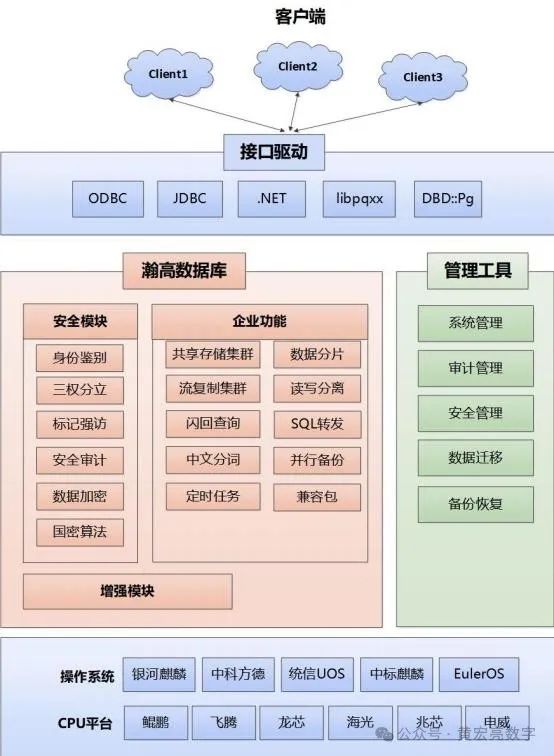
它引进了国际上最先进的开源数据库PostgreSQL内核技术,并在此基础上进行了一系列的研发和优化。瀚高软件是中国最早致力于PostgreSQL数据库商业推广使用的专业化公司,具有丰富的数据库开发、管理和培训经验。
兼容性:瀚高数据库与PostgreSQL高度兼容,并深度优化,性能提升显著。同时,它还支持多种数据库开发接口与框架,如JDBC、ODBC、.NET等,降低了开发成本。
企业级功能:瀚高数据库全面拓展了丰富的企业级功能,在业务处理性能、高可用性、安全性及易用性方面均有不同程度的增强。
图形化管理:瀚高数据库提供图形化的管理界面,便于用户进行数据库的管理和维护。用户可以通过图形化界面直观地展示整个数据库系统结构,监控服务器运行,并生成树状SQL查询计划。
数据迁移与集成:瀚高数据库提供强大的数据迁移工具,支持从其他数据库(如Oracle、SQL Server、DB2、MySQL、达梦等国产数据库)迁移到瀚高数据库。同时,它还支持与大数据平台(如Hadoop、Spark)的集成,以便处理海量数据。
高可用性与容灾:瀚高数据库支持高可用集群和多种容灾方案,确保在出现故障时能够迅速恢复服务。它还支持主从复制和故障转移功能,进一步提高系统的可用性和稳定性。
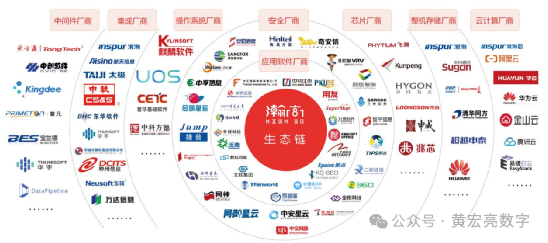
瀚高数据库支持国际国内主流CPU及操作系统版本,与国内几千家应用开发商取得适配认证,拥有丰富的生态体系。
1.2、某省交通数据平台数据存储情况
随着某省交通的高速发展,机动车事故、违章逃逸、假牌假证、机动车盗抢以及各类涉车犯罪等案件也大量涌现,如何利用现代科技手段遏制交通违章,打击涉车犯罪,保证交通安全,创建平安交通,从而提高交通运行管理的现代化水平和社会治安“打、防、控、管”能力是各级党委、政府和社会各界对公安部门提出的新需求。另一方面,随着机动车的增加,居民的出行也呈现出多样化的形式,如何利用科技手段更好的为人们的出行服务,也成为现阶段科技强警的主要目标之一。
某省公安厅、交通厅通过建立信息快速查询协作执法机制,以强化路面动态管控为切入点和突破口,按照“依托路面,科技支撑,立足常态,平战结合,动态管控,全警应用”的建设思路,建设车辆号牌信息共享系统,通过共享高速公路管理局号牌识别系统数据可用来加大交通监控力度、遏制车辆违章或事故逃逸问题、加强道路收费站区的治安管理、尽可能消除交通安全隐患等。全面提升公安机关驾驭社会稳定大局的能力和水平,更好地服务于建设经济强省、和谐某省的现实需求。
信息系统定级为第三级。
二、系统数据库情况
硬件情况,某省交管核心数据库项目建设时采购的数据库服务器,型号H3C服务器,操作平台linux 系统,IP地址192.168.*.*,部署*******,版本为****2 集群数据库软件,服务器从购置到目前已运行11年,硬件运行故障风险极高,升级的硬件为浪潮服务器,数据库软件升级为瀚高数据库,信息系统定级为第三级。
三、服务器原数据库实例及安全
3.1、数据库的相关情况
用户名 | 密码 | SID | 用途 |
WL_LaneInfo | | | 车道编码表 |
WL_VehicleKind | | | 车种编码表 |
WL_VehicleType | | | 车型编码表 |
WL_OwnerInof | | | 路段编码表 |
WL_Nodeinfo | | | 收费站编码表 |
WL_PicRecord | | | 待查询图片交互表 |
WL_LaneRecord | | | 车辆通行数据表 |
WL_guest | | | 服务测试 |
WL_mrep | jnjp2_mrep | | 时间中间库 |
WL_wrep | jnjp2_wrep | | 数据中间库 |
WL_prep | jnjp2_prep | | 交换中间库 |
WL_tocc | jnjp2_tocc | | TOCC中间库 |
WL_run | jnjp_run | | RUN应用二包 |
WL_ing | jnjp_huanjing | | ING监测数据 |
WL_dip2 | Jnjp_2013 | | dip业务数据 |
WL_ip2_mrep | jnjp2_mrep | | Ip2中间库 |
WL_ip2_wrep | jnjp2_wrep | | WY务中间库 |
WL_ip2_prep | jnjp2_prep | | PR中间库 |
WL_ip2_tocc | jnjp2_tocc | | TO中间库 |
WL_ip2_run | jnjp_run | | 应用数据包 |
原服务器数据库实例及用户
3.2、解决ssl的问题
安装:openssh-9.8p1-1.el7.x86_64.rpm、
openssh-clients-9.8p1-1.el7.x86_64.rpm、
openssh-debuginfo-9.8p1-1.el7.x86_64.rpm、
openssh-server-9.8p1-1.el7.x86_64.rpm
openssl-1.1.1h.tar,zlib-1.2.11的相关包
3.3、系统加固
修改系统的启动模式
编号 | Linux-03001 |
名称 | 修改系统的启动模式 |
系统当前状态 | 未禁用系统X11程序 |
实施方案 | 实施方法如下,进入Linux系统,执行如下命令: Vi etc/inittab 更改为3模式 然后保存 |
实施目的 | 加固前创建备份目录,按照日期命名:(不用重复创建) mkdir root/backup2024 将需要修改的配置文件复制保存在备份目录: cp etc/inittab root/backup2024/ 需要回退的时候将修改前的备份文件覆盖回配置文件即可: cp root/backup2024/inittab etc/inittab |
实施风险 | 无风险 |
防止IP欺骗
编号 | Linux-03002 |
名称 | 防止IP欺骗 |
系统当前状态 | 未进行防止IP欺骗 |
实施方案 | 实施方法如下,编辑/etc/host.conf文件并增加如下几行来防止IP欺骗攻击。 order bind,hosts multi off nospoof on |
实施目的 | 加强Linux系统自身的安全 |
回退方案 | 加固前创建备份目录,按照日期命名:(不用重复创建) mkdir root/backup2024 将需要修改的配置文件复制保存在备份目录: cp etc/host.conf root/backup2024/ 需要回退的时候将修改前的备份文件覆盖回配置文件即可: cp root/backup2024/host.conf etc/host.conf |
修改Linux旗标信息
编号 | Linux-03003 |
名称 | 修改Linux旗标信息 |
系统当前状态 | 系统当前的旗标信息不含警示信息,暴露版本信息 |
实施方案 | 实施方法如下,进入Linux系统当中,执行如下命令: vi /etc/issue 将其中内容更改为: ONLY Authorized users only! All accesses logged vi /etc/issue.net 将其中内容更改为: ONLY Authorized users only! All accesses logged vi /etc/motd 将其中内容更改为: ONLY Authorized users only! All accesses logged |
实施目的 | 增加登陆系统的警示提示信息,保护Linux服务器安全 |
回滚方案 | 加固前创建备份目录,按照日期命名:(不用重复创建) mkdir root/backup2024 将需要修改的配置文件复制保存在备份目录: cp etc/issue etc/issue.net etc/motd /root/backup2024/ 需要回退的时候将修改前的备份文件覆盖回配置文件即可: cp /root/backup2024/issue /etc/issue cp /root/backup2024/issue.net /etc/issue.net cp /root/backup2024/motd /etc/motd |
四、操作系统CentOS 7.6及数据库软件安装规划表
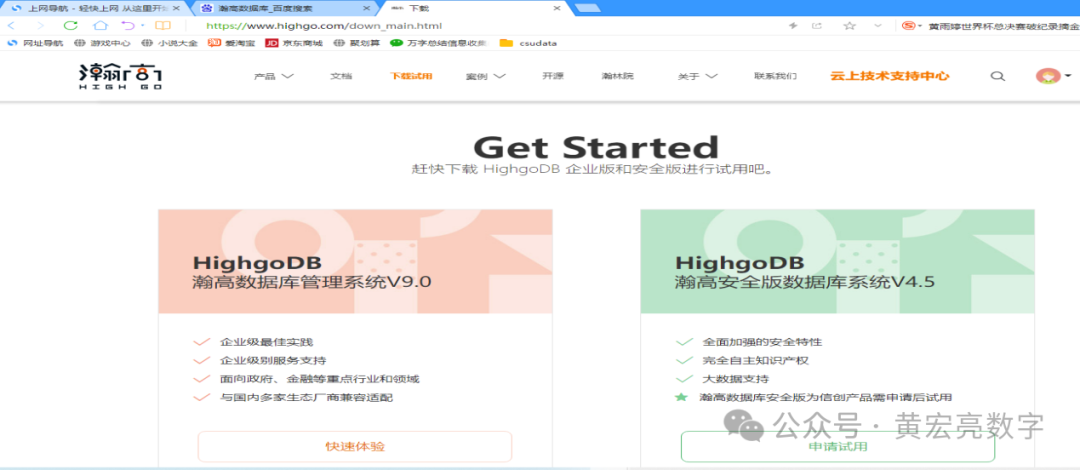
4.1、下载介质地址
https://www.highgo.com/down_main.html
4.2、信息列表
类型 | 相关信息 | 备注 |
安装包 | gis340-hgdb-see-4.5.10-a64a611-20240426.x86_64.rpm hgdb-see-4.5.10-a64a611-20240426.x86_64.rpm hgdb-see-4.5.10-a64a611-20240426.x86_64.rpm.md5 | 瀚高数据库软件: |
操作系统 | CentOS-7.6-x86_64-DVD-1810 | X86 CentOS7 |
瀚高数据库工具: | hgdbdeveloper-6.0.7-20230731.zip | |
数据库编码格式 | UTF8 | / |
lcense | licenseR6_20241201.dat | |
迁移工具 | migration-4.1.4-2024-09-12.zip | |
测试环境,如上表是一些安装要求及明细信息,有了这些信息也方便以后的运维,为以后的日常运维减少一些不必要的麻烦。
五、操作系统适配情况
5.1、准备一台PC服务器
要安装一台瀚高数据库服务器,首先需要准备一台PC服务器,本次安装实例中,PC服务器有4个CPU核心、8GB内存、多块的硬盘。
如果手头上没有这种配置的的服务器,可以考虑使用Vmware Workstation虚拟机软件,仿真出一台这种配置的PC服务器。
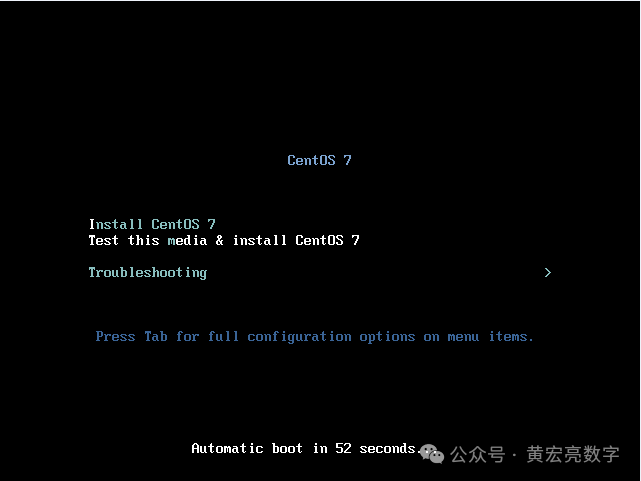
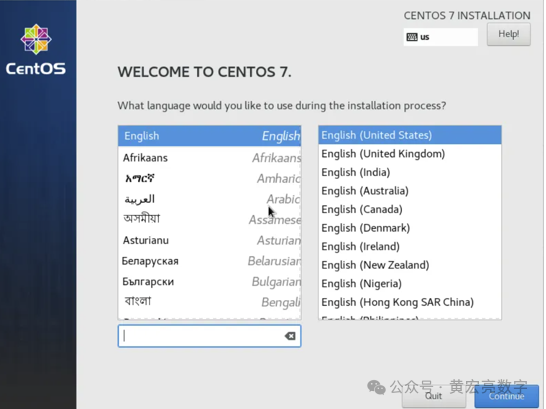
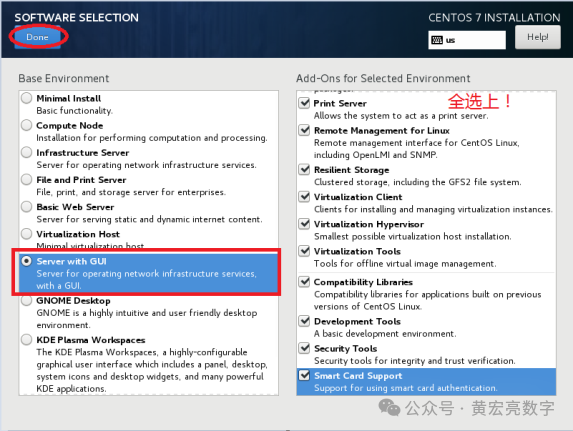
5.2、开始系统安装
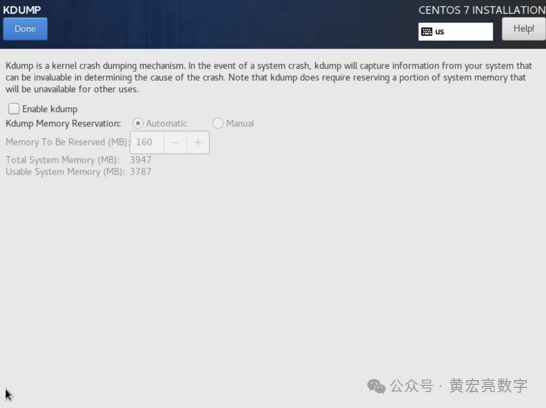
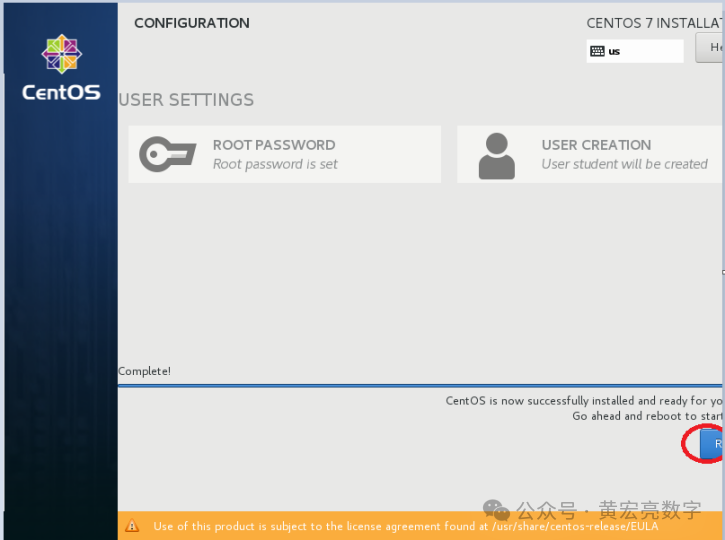
5.4、配置主机名
/etc/hosts配置(可选)
如果采用默认主机名,可忽略该步骤,预安装会自动追加127.0.0.1 localhost #Gauss OM IP Hosts Mapping
cp /etc/hosts /etc/hosts.bak
cat >>/etc/hosts< <EOF< span> </EOF<>
192.168.58.133 vastbase
EOF
5.5、优化参数
limits.conf
不用配置该文件,会自动追加如下内容:
cp /etc/security/limits.conf /etc/security/limits.conf_bak_`date +%F`
cat >> /etc/security/limits.conf << "EOF"
root soft as unlimited
root hard as unlimited
root soft nproc unlimited
root hard nproc unlimited
EOF
5.6、防火墙配置
systemctl stop firewalld.service
systemctl disable firewalld.service
如果启用防火墙需进行如下配置:
selinux配置
sed -i "s/SELINUX=enforcing/SELINUX=disabled/g" /etc/selinux/config
setenforce 0
5.7、检查时区和时间
请确保操作系统时间无误,且时区为上海时区(或者香港时区)。
//检查时区
timedatectl
//修改时区为上海
timedatectl set-timezone Asia/Shanghai
六、开始highgo DB 的适配
6.1、md5sum验证
[root@vastbase hg]# ll
total 639444
-rw-r--r-- 1 root root 11076810 Oct 15 19:19 gis340-hgdb-see-4.5.10-a64a611-20240426.x86_64.rpm
-rw-r--r-- 1 root root 643701236 Oct 15 19:20 hgdb-see-4.5.10-a64a611-20240426.x86_64.rpm
-rw-r--r-- 1 root root 80 Oct 15 19:19 hgdb-see-4.5.10-a64a611-20240426.x86_64.rpm.md5
-rw-r--r-- 1 root root 3676 Oct 15 19:19 licenseR6_20241201.dat
[root@vastbase hg]# md5sum hgdb-see-4.5.10-2becefa-20240416.x86_64.rpm
md5sum: hgdb-see-4.5.10-2becefa-20240416.x86_64.rpm: No such file or directory
[root@vastbase hg]#
[root@vastbase hg]# md5sum hgdb-see-4.5.10-a64a611-20240426.x86_64.rpm
a415e39dd1451c6683d95d0ad78b87a9 hgdb-see-4.5.10-a64a611-20240426.x86_64.rpm
[root@vastbase hg]#
total 639444
-rw-r--r-- 1 root root 11076810 Oct 15 19:19 gis340-hgdb-see-4.5.10-a64a611-20240426.x86_64.rpm
-rw-r--r-- 1 root root 643701236 Oct 15 19:20 hgdb-see-4.5.10-a64a611-20240426.x86_64.rpm
-rw-r--r-- 1 root root 80 Oct 15 19:19 hgdb-see-4.5.10-a64a611-20240426.x86_64.rpm.md5
-rw-r--r-- 1 root root 3676 Oct 15 19:19 licenseR6_20241201.dat
6.2、软件安装
[root@vastbase hg]# ll
total 639444
-rw-r--r-- 1 root root 11076810 Oct 15 19:19 gis340-hgdb-see-4.5.10-a64a611-20240426.x86_64.rpm
-rw-r--r-- 1 root root 643701236 Oct 15 19:20 hgdb-see-4.5.10-a64a611-20240426.x86_64.rpm
-rw-r--r-- 1 root root 80 Oct 15 19:19 hgdb-see-4.5.10-a64a611-20240426.x86_64.rpm.md5
[root@vastbase hg]# rpm -ivh hgdb-see-4.5.10-a64a611-20240426.x86_64.rpm
Preparing... ################################# [100%]
Updating / installing...
1:hgdb-see-4.5.10-a64a611 ################################# [100%]
Created symlink from /etc/systemd/system/multi-user.target.wants/hgdb-see-4.5.10.service to /usr/lib/systemd/system/hgdb-see-4.5.10.service.
Created symlink from /etc/systemd/system/graphical.target.wants/hgdb-see-4.5.10.service to /usr/lib/systemd/system/hgdb-see-4.5.10.service.
Created symlink from /etc/systemd/system/multi-user.target.wants/hgproxy.service to /usr/lib/systemd/system/hgproxy.service.
Created symlink from /etc/systemd/system/graphical.target.wants/hgproxy.service to /usr/lib/systemd/system/hgproxy.service.
Created symlink from /etc/systemd/system/multi-user.target.wants/hghac.service to /usr/lib/systemd/system/hghac.service.
Created symlink from /etc/systemd/system/multi-user.target.wants/db_ha-agent.service to /usr/lib/systemd/system/db_ha-agent.service.
[root@vastbase hg]#

[root@vastbase etc]# more hgdbenv.sample
#WARNING! This is a template file, please modify it as needed
export HG_BASE=/opt/highgo
export HGDB_HOME=/opt/highgo/hgdb-see-4.5.10
export PGPORT=5866
export PGDATABASE=highgo
export PGDATA=$HGDB_HOME/data
export PATH=$HGDB_HOME/bin:$PATH
export GDAL_DATA=$HGDB_HOME/share/gdal
export PROJ_LIB=$HGDB_HOME/share/proj
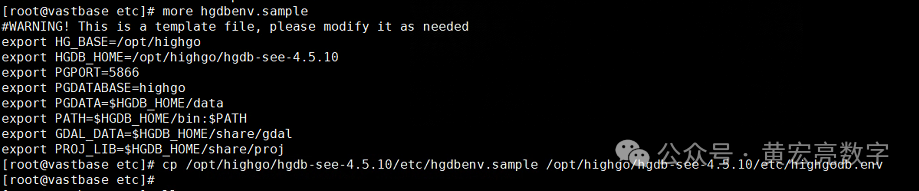
[root@vastbase etc]# cp /opt/highgo/hgdb-see-4.5.10/etc/hgdbenv.sample /opt/highgo/hgdb-see-4.5.10/etc/highgodb.env
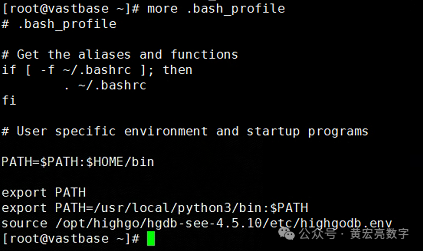
vi ~/.bash_profile (添加source /opt/highgo/hgdb-see-4.5.10/etc/highgodb.env)
[root@vastbase ~]# more .bash_profile
# .bash_profile
# Get the aliases and functions
if [ -f ~/.bashrc ]; then
. ~/.bashrc
fi
# User specific environment and startup programs
PATH=$PATH:$HOME/bin
export PATH
export PATH=/usr/local/python3/bin:$PATH
source /opt/highgo/hgdb-see-4.5.10/etc/highgodb.env
[root@vastbase ~]#
6.3、初始化
[root@vastbase bin]# initdb -A md5 > /opt/highgo/hgdb-see-4.5.10/initdb.log
Enter new syssao password: Hello@12345
Enter it again: Hello@12345
Passwords didn't match.
Enter it again: Enter new syssao password:
Enter it again:
Enter new syssso password:
Enter it again:
2024-10-15 22:32:34.665 CST [13391] LOG: Switchover the SSHA Role. Current is NONE
2024-10-15 22:32:34.799 CST [13393] LOG: Switchover the SSHA Role. Current is NONE
[root@vastbase bin]#
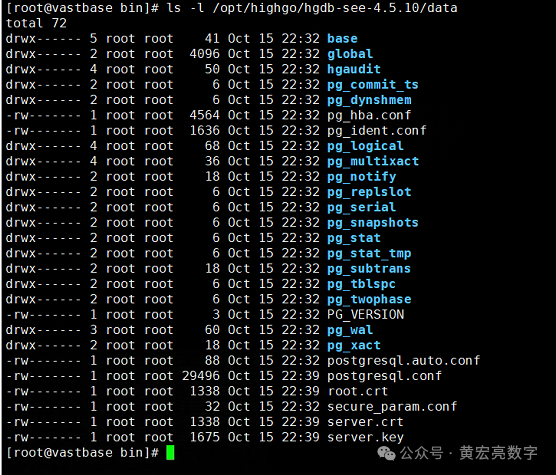
6.4、生成SSL证书
hg_sslkeygen.sh /opt/highgo/hgdb-see-4.5.10/data
[root@vastbase bin]# hg_sslkeygen.sh /opt/highgo/hgdb-see-4.5.10/data
Setting the ssl configuration to /opt/highgo/hgdb-see-4.5.10/data
Generating RSA private key, 2048 bit long modulus
...........................................+++
............................+++
e is 65537 (0x10001)
[root@vastbase bin]#
6.5、配置pg_hba.conf
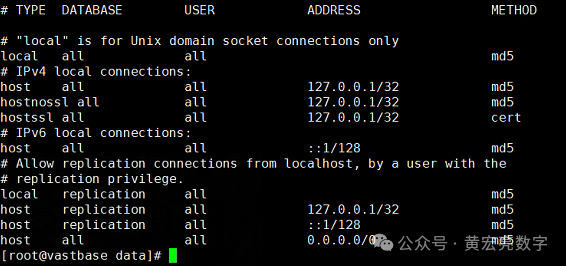
修改pg_hba.conf文件
vi /opt/highgo/hgdb-see-4.5.10/data/pg_hba.conf
# IPv4 local connections:
host all all 0.0.0.0/0 md5
cat /opt/highgo/hgdb-see-4.5.10/data/pg_hba.conf
6.6、启动数据库
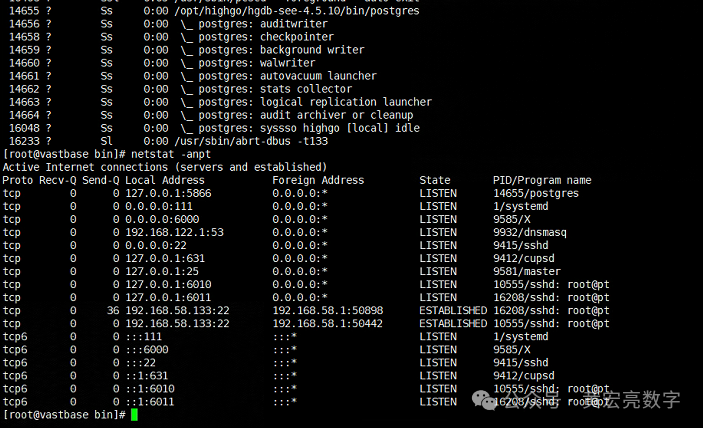
[root@vastbase bin]# pg_ctl start
waiting for server to start....2024-10-15 22:47:51.359 CST [14655] LOG: starting HighGo Security Enterprise Edition Database System 4.5.10 on x86_64,build on 20240426
2024-10-15 22:47:51.359 CST [14655] LOG: listening on IPv4 address "127.0.0.1", port 5866
2024-10-15 22:47:51.362 CST [14655] LOG: listening on Unix socket "/tmp/.s.PGSQL.5866"
2024-10-15 22:47:51.454 CST [14655] LOG: This is a trial HighGo Security Enterprise Edition Database, valid until 2024-11-14 23:59:59. Pre-sale service hotline: 400-708-8006. Online technical support platform: https://support.highgo.com/.
2024-10-15 22:47:51.457 CST [14657] LOG: database system was shut down at 2024-10-15 22:32:37 CST
2024-10-15 22:47:51.457 CST [14657] LOG: Switchover the SSHA Role. Current is NONE
2024-10-15 22:47:51.490 CST [14655] LOG: database system is ready to accept connections
done
server started
[root@vastbase bin]#

七、开始highgo DB 的测试
7.1、参数配置
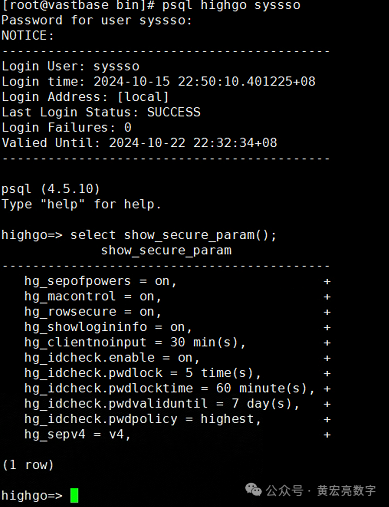
psql highgo syssso
select show_secure_param();
[root@vastbase bin]# psql highgo syssso
Password for user syssso: Hello@12345
NOTICE:
-------------------------------------------
Login User: syssso
Login time: 2024-10-15 22:50:10.401225+08
Login Address: [local]
Last Login Status: SUCCESS
Login Failures: 0
Valied Until: 2024-10-22 22:32:34+08
-------------------------------------------
psql (4.5.10)
Type "help" for help.
highgo=>
highgo=> select show_secure_param();
show_secure_param
-------------------------------------------
hg_sepofpowers = on, +
hg_macontrol = on, +
hg_rowsecure = on, +
hg_showlogininfo = on, +
hg_clientnoinput = 30 min(s), +
hg_idcheck.enable = on, +
hg_idcheck.pwdlock = 5 time(s), +
hg_idcheck.pwdlocktime = 60 minute(s), +
hg_idcheck.pwdvaliduntil = 7 day(s), +
hg_idcheck.pwdpolicy = highest, +
hg_sepv4 = v4, +
(1 row)
highgo=> select set_secure_param('hg_macontrol','min');
set_secure_param
---------------------------------
set configuration successfully.
(1 row)
highgo=> select set_secure_param('hg_rowsecure','off');
set_secure_param
---------------------------------
set configuration successfully.
(1 row)
highgo=> select set_secure_param('hg_showlogininfo','off');
set_secure_param
---------------------------------
set configuration successfully.
(1 row)
highgo=> select set_secure_param('hg_clientnoinput','0');
set_secure_param
---------------------------------
set configuration successfully.
(1 row)
highgo=> select set_secure_param('hg_idcheck.pwdpolicy','high');
set_secure_param
---------------------------------
set configuration successfully.
(1 row)
highgo=> select set_secure_param('hg_idcheck.pwdvaliduntil','0');
set_secure_param
---------------------------------
set configuration successfully.
(1 row)
highgo=> select set_secure_param('hg_idcheck.pwdlock','10');
set_secure_param
---------------------------------
set configuration successfully.
(1 row)
highgo=>
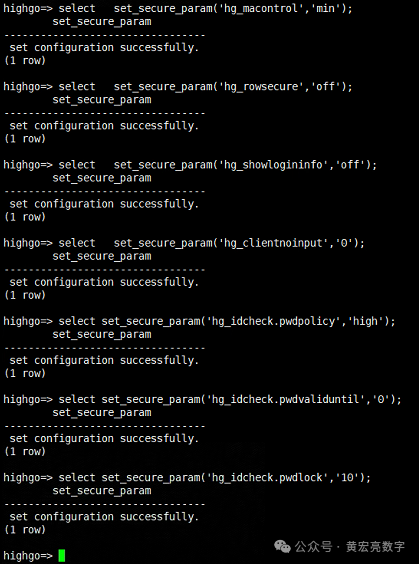
设定完有效期之后,需要修改sysdba密码才可以是新的有效期
highgo=> alter user syssso with password 'Hg@12345678';
ALTER ROLE
highgo=>
highgo=> \c highgo syssao
Password for user syssao: Hello@12345
highgo=>
highgo=> select show_audit_param();
show_audit_param
------------------------------------
hg_audit = on, +
hg_audit_analyze = off, +
hg_audit_alarm = email, +
hg_audit_alarm_email = +
hg_audit_logsize = 16MB, +
hg_audit_keep_days = 7, +
hg_audit_full_mode = 1 +
hg_audit_file_archive_mode = off, +
hg_audit_file_archive_dest = +
(1 row)
highgo=>
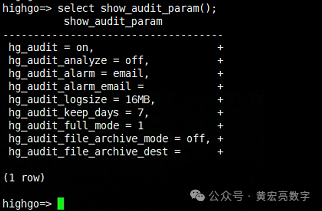
highgo=> select set_audit_param('hg_audit','off');
set_audit_param
---------------------------------
set configuration successfully.
(1 row)
highgo=> alter user syssao with password 'Hg@12345678';
ALTER ROLE
highgo=> \c highgo sysdba
Password for user sysdba: Hello@12345
You are now connected to database "highgo" as user "sysdba".
highgo=#
highgo=#
highgo=#
highgo=# alter system set listen_addresses = '*';
ALTER SYSTEM
highgo=# alter user sysdba with password 'Hg@12345678';
ALTER ROLE
highgo=# alter system set max_connections = 2000;
m set log_statement = 'ddl';
ALTER SYSTEM
highgo=# alter system set shared_buffers = '2GB';
ALTER SYSTEM
highgo=# alter system set checkpoint_timeout = '30min';
ALTER SYSTEM
highgo=# alter system set checkpoint_completion_target = 0.8;
ALTER SYSTEM
highgo=# alter system set log_destination = 'csvlog';
ALTER SYSTEM
highgo=# alter system set logging_collector = on;
ALTER SYSTEM
highgo=# alter system set log_directory = 'hgdb_log';
ALTER SYSTEM
highgo=# alter system set log_filename = 'highgodb-%a.log';
ALTER SYSTEM
highgo=# alter system set log_rotation_age = '1d';
ALTER SYSTEM
highgo=# alter system set log_rotation_size = 0;
ALTER SYSTEM
highgo=# alter system set log_truncate_on_rotation = on;
ALTER SYSTEM
highgo=# alter system set log_statement = 'ddl';
ALTER SYSTEM
highgo=#
highgo=#
highgo=# \q
7.2、重启数据库 pg_ctl restart
[root@vastbase hgdb-see-4.5.10]# pg_ctl restart
waiting for server to shut down....2024-10-16 09:56:54.072 CST [13776] LOG: received fast shutdown request
2024-10-16 09:56:54.075 CST [13776] LOG: aborting any active transactions
2024-10-16 09:56:54.077 CST [13776] LOG: background worker "logical replication launcher" (PID 13784) exited with exit code 1
2024-10-16 09:56:54.077 CST [13779] LOG: shutting down
2024-10-16 09:56:54.087 CST [13776] LOG: database system is shut down
done
server stopped
waiting for server to start....2024-10-16 09:56:54.182 CST [14053] LOG: starting HighGo Security Enterprise Edition Database System 4.5.10 on x86_64,build on 20240426
2024-10-16 09:56:54.182 CST [14053] LOG: listening on IPv4 address "0.0.0.0", port 5866
2024-10-16 09:56:54.182 CST [14053] LOG: listening on IPv6 address "::", port 5866
2024-10-16 09:56:54.186 CST [14053] LOG: listening on Unix socket "/tmp/.s.PGSQL.5866"
.2024-10-16 09:56:55.279 CST [14053] LOG: redirecting log output to logging collector process
2024-10-16 09:56:55.279 CST [14053] HINT: Future log output will appear in directory "hgdb_log".
done
server started
7.3、检查防火墙
[root@vastbase hgdb-see-4.5.10]# firewall-cmd --permanent --add-port=5866/tcp
FirewallD is not running
7.4、配置密码文件
[root@vastbase hgdb-see-4.5.10]# vim ~/.pgpass
#hostname:port:database:username:password
localhost:5866:highgo:sysdba:Hg@12345678
127.0.0.1:5866:highgo:sysdba:Hg@12345678
[root@vastbase hgdb-see-4.5.10]# chmod 600 ~/.pgpass
[root@vastbase hgdb-see-4.5.10]#
7.5、license文件
lic文件放置
lic文件放在数据库安装目录etc/lic下,且文件权限必须为0600,检查命令为hg_lic
chmod 600 hgdb.lic
注意不给600权限 数据库启动报错
7.6、测试登录
[root@vastbase hgdb-see-4.5.10]#
[root@vastbase hgdb-see-4.5.10]# psql highgo sysdba
psql (4.5.10)
Type "help" for help.
highgo=# \c - syssao
Password for user syssao:
You are now connected to database "highgo" as user "syssao".
highgo=> \c - syssso
Password for user syssso:
You are now connected to database "highgo" as user "syssso".
highgo=>
highgo=> \q
7.7、测试验证远程登录
[root@vastbase hgdb-see-4.5.10]# ip a
1: lo:
link/loopback 00:00:00:00:00:00 brd 00:00:00:00:00:00
inet 127.0.0.1/8 scope host lo
valid_lft forever preferred_lft forever
inet6 ::1/128 scope host
valid_lft forever preferred_lft forever
2: ens33:
link/ether 00:0c:29:17:c1:1d brd ff:ff:ff:ff:ff:ff
3: ens34:
link/ether 00:0c:29:17:c1:27 brd ff:ff:ff:ff:ff:ff
inet 192.168.58.133/24 brd 192.168.58.255 scope global noprefixroute dynamic ens34
valid_lft 1109sec preferred_lft 1109sec
inet6 fe80::8be7:b57b:7431:e50d/64 scope link noprefixroute
valid_lft forever preferred_lft forever
4: virbr0: <NO-CARRIER,BROADCAST,MULTICAST,UP> mtu 1500 qdisc noqueue state DOWN group default qlen 1000 </NO-CARRIER,BROADCAST,MULTICAST,UP>
link/ether 52:54:00:c8:64:19 brd ff:ff:ff:ff:ff:ff
inet 192.168.122.1/24 brd 192.168.122.255 scope global virbr0
valid_lft forever preferred_lft forever
5: virbr0-nic:
link/ether 52:54:00:c8:64:19 brd ff:ff:ff:ff:ff:ff
[root@vastbase hgdb-see-4.5.10]# psql -h 192.168.58.133 highgo sysdba
Password for user sysdba:
psql (4.5.10)
SSL connection (protocol: TLSv1.3, cipher: TLS_AES_256_GCM_SHA384, bits: 256, compression: off)
Type "help" for help.
highgo=#
highgo=#
highgo=# \q
7.8、测试数据库数据
[root@vastbase hgdb-see-4.5.10]# psql highgo sysdba
psql (4.5.10)
Type "help" for help.
highgo=# create user hgtest with password 'Hg@12345678';
CREATE ROLE
highgo=# create database hgtest owner hgtest;
CREATE DATABASE
highgo=# \q
[root@vastbase hgdb-see-4.5.10]# psql hgtest hgtest
Password for user hgtest:
psql (4.5.10)
Type "help" for help.
hgtest=>
hgtest=> create schema hgtest;
CREATE SCHEMA
hgtest=> set search_path to hgtest ;
SET
hgtest=> CREATE TABLE mytabletbpc (name varchar(16), age int);
CREATE TABLE
hgtest=> SELECT * FROM mytabletbpc;
name | age
------+-----
(0 行记录) ^
hgtest=> insert into mytabletbpc values('张三',20);
INSERT 0 1
hgtest=> insert into mytabletbpc values('李四',18);
INSERT 0 1
hgtest=> insert into mytabletbpc values('王五',35);
INSERT 0 1
hgtest=> SELECT * FROM mytabletbpc;
name | age
------+-----
张三 | 20
李四 | 18
王五 | 35
(3 行记录)
hgtest=>
八、hgdbdevelop工具+本机数据到瀚高
8.1、hgdbdevelop工具+本数据导入到瀚高数据库
为了实现将hgdbdevelop工具+本机命令中数据导入到瀚高数据库下面是整个流程的步骤表格:
接下来,我将逐步解释每个步骤需要做什么,并提供相应的代码以及其注释。
步骤 | 描述 |
步骤1 | 连接到老数据库 |
步骤2 | 创建一个老表并插入数据 |
步骤3 | 使用hgdbdevelop进行数据处理到瀚高 |
8.2、本机SQL操作
因为有了环境变量,可以直接psql口令登录,不知道命令可以help求助,可以直接各种SQL操作,select、create、alter、delete等,忘记了SQL语法可以看这里。
复制代码
psql -h 192.168.58.133 hgtest hgtest
[root@vastbase hgdb-see-4.5.10]# psql -h 192.168.58.133 hgtest hgtest
Password for user hgtest:
psql (4.5.10)
SSL connection (protocol: TLSv1.3, cipher: TLS_AES_256_GCM_SHA384, bits: 256, compression: off)
Type "help" for help.
hgtest=> \d hgtest.mytabletbpc
数据表 "hgtest.mytabletbpc"
栏位 | 类型 | 校对规则 | 可空的 | 预设
------+-----------------------+----------+--------+------
name | character varying(16) | | |
age | integer | | |
hgtest=>
hgtest=> select * from hgtest.mytabletbpc;
name | age
------+-----
张三 | 20
李四 | 18
王五 | 35
(3 行记录)
hgtest=>
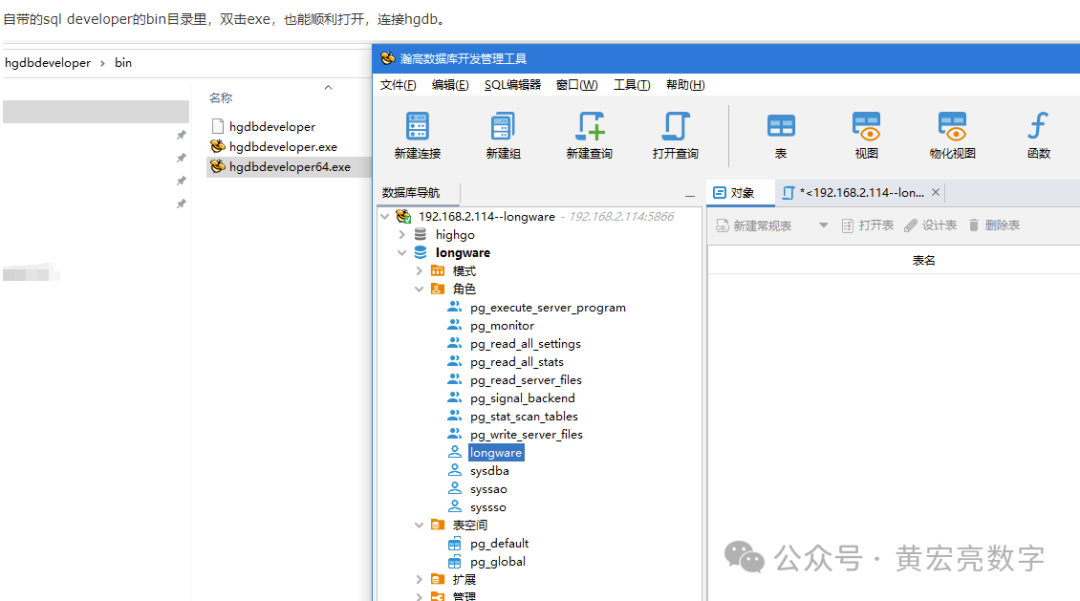
8.3、hgdbdevelop操作
1.迁移工具使用
o使用HGDB提供的迁移工具(如migration.rar),解压并运行。
o新建迁移组和服务,配置源数据库和目标数据库(HGDB)的连接。
2.迁移操作
o在迁移工具中,选择需要迁移的数据库对象(如表、视图等)和迁移方式
o执行迁移任务,等待迁移完成
3.验证与测试
o登录HGDB目标库,检查迁移的数据是否完整、准确1
o进行必要的系统测试和性能调优。
4.后续步骤
o更新应用配置,指向新的HGDB数据库。
o监控数据库运行状况,确保迁移后的系统稳定运行
以上,既然看到这里了,如果觉得不错,随手点个赞,下次再见。
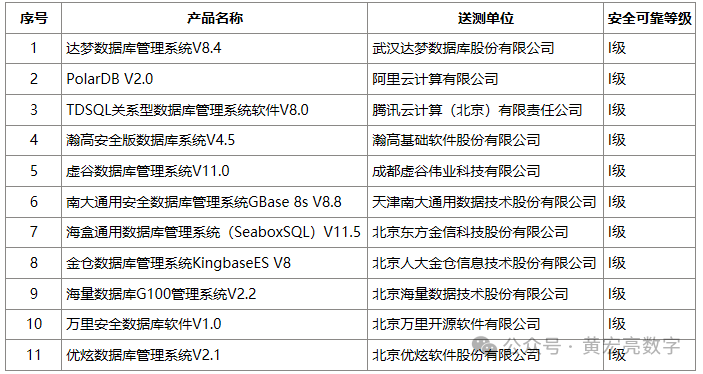
1、信创名单查询:
http://www.itsec.gov.cn/aqkkcp/cpgg/202409/t20240930_194299.html
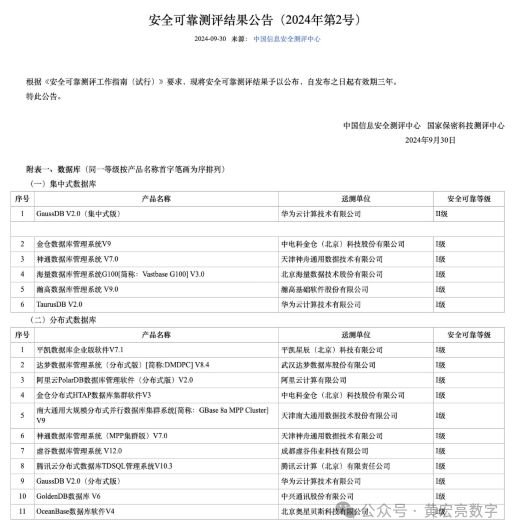
http://www.itsec.gov.cn/aqkkcp/cpgg/202312/t20231226_162074.html