



一、PolarDB 数据库版-产品介绍
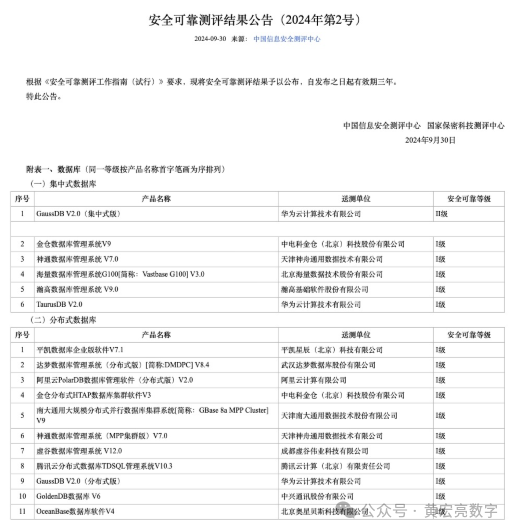
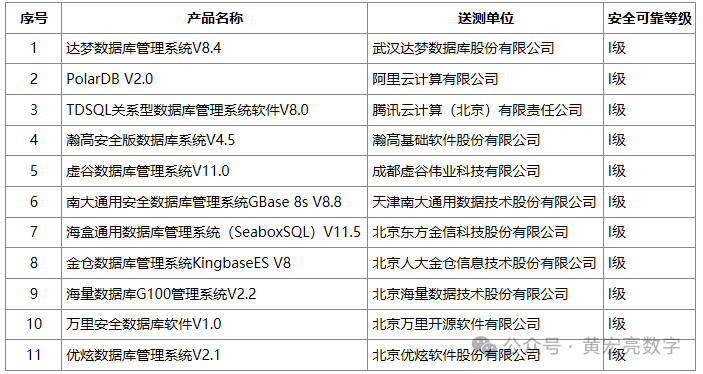
集中式数据库 PolarDBV2.0 通过第一批、第二批“安全可靠测评”PolarDB 数据库是云原生的数据库产品,共有多个引擎,分别为PolarDB V2.0(轻量化版本)、PolarDB V2.0(公有云版本)
PolarDB V2.0(轻量化版本)
PolarDB V2.0(公有云版本)
PolarDB国产数据库已经完成了与相关国产芯片及操作系统的互认,包括:
芯片 | 操作系统 |
鲲鹏、海光、飞腾等 | 麒麟、UOS、龙蜥等 |
在单机文件系统(如 ext4)上部署 PolarDB-PG,适用于所有PolarDB计算节点都可以访问相同本地磁盘存储的场景。
单机版通常用于快速搭建PolarDB学习或开发环境.
系统选择Linux, 例如麒麟,Debian 11, CentOS 7、8等
二、下载介质地址
https://www.csudata.com/clup/manual/5.x/10151
https://www.csudata.com/clup/manual/5.x/10152
安装包包括:
1、csumdb clup clup-agent
2、PolarDB数据库
运行下面的脚本一键安装PolarDB数据库:
wget -qO
/tmp/clup.sh --no-check-certificate https://get.csudata.com/csuinst/clup.sh
&& bash tmp/clup.sh db install
PolarDB依赖包如下,在使用脚本安装时,会自动把所有的依赖包都装好
krb5-devel clang
llvm llvm-devel libicu-devel perl-ExtUtils-Embed zlib zlib-devel openssl
openssl-devel pam pam-devel libxml2 libxml2-devel tcl tcl-devel openldap
openldap-devel libxslt libxslt-devel libuuid libuuid-devel systemd-devel
安装好PolarDB数据库后,需要到Clup的Web管理界面中,把PolarDB的bin目录配置进去,才可以在CLup中使用新装的PolarDB数据库,配置方法如下:
进入CLup的Web界面后,点击系统管理 -> CLup参数设置,找到pg_bin_path_string,点击修改,在原有的配置后面添加,/usr/polardb/bin,点保存即可生效。(见后面)
三、操作系统的配置
3.1、准备安装
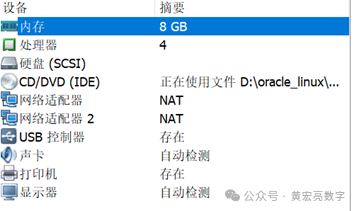
要安装一台polardb数据库服务器,首先需要准备一台PC服务器。本安装实例中,PC服务器有4个CPU核心、8GB内存、多块硬盘。
如果你手头上没有这种配置的的服务器,可以考虑使用Vmware Workstation虚拟机软件,仿真出一台这种配置的PC服务器
3.2、下载CentOS 7.4介质开始安装
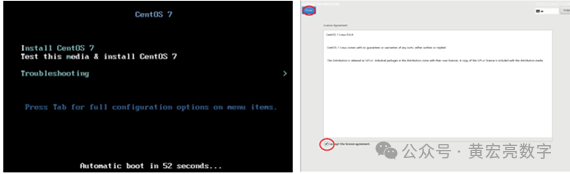
将刚刚下载的CentOS 7.4 ISO文件制作成光盘,使用光驱在实际的服务器上安装CentOS操作系统。可以直接使用CentOS 7.4 ISO文件,在Vmware Workstation虚拟化环境中,安装CentOS操作系统。
将安装盘放入光驱(物理光驱或者虚拟光驱),打开计算机的电源,按照提示一步一步进行:
3.3、安装完毕开始登录
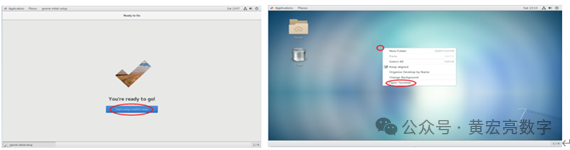
3.4、查看系统配置信息
查看 cpu 信息:
[root@hhllhh ~]#
lscpu
[root@hhllhh ~]#
cat /proc/cpuinfo
3.5、查看内存信息:
[root@hhllhh ~]#
free -m
注意:数据库内存要至少 1G,linux swap 分区一般是物理内存的 1.5倍
3.6、查看硬盘、分区信息
[root@hhllhh ~]#
fdisk -l
[root@hhllhh ~]#
df -h
如果数据库开启 SQL 日志分析,那么/tmp 分区至少要 600M
3.7、删除 virbr0 虚拟网卡
ip add list
virsh net-list
virsh net-destroy
default
virsh net-undefine
default
systemctl restart
libvirtd.service
virsh net-list
ip add list
3.8、更改网卡名称Eth0
安装完Centos7系统,网卡命名跟之前发生了变化,例如!
就是看着不爽也不会影响使用,只是个网卡名称而已。
eno16777736
1. 先编辑网卡的配置文件将里面的NAME DEVICE项修改为eth0
vim
/etc/sysconfig/network-scripts/ifcfg-eno16777736
2.重命名该配置文件。
[root@hhllhh yum.repos.d]# cd /etc/sysconfig/network-scripts/
[root@hhllhh network-scripts]#
mv ifcfg-eno16777736 ifcfg-eth0
3.禁用该可预测命名规则。对于这一点,你可以在启动时传递“net.ifnames=0
biosdevname=0 ”的内核参数。这是通过编辑/etc/default/grub并加入“net.ifnames=0 biosdevname=0 ”到GRUBCMDLINELINUX变量来实现的。
[root@hhllhh network-scripts]#
vim /etc/default/grub
"net.ifnames=0
biosdevname=0"
4.运行命令grub2-mkconfig -o /boot/grub2/grub.cfg来重新生成GRUB配置并更新内核参数。
[root@hhllhh network-scripts]#
grub2-mkconfig -o /boot/grub2/grub.cfg
5.重新启动机器,启动完之后网卡名称就变成了Eth0
[root@localhost
network-scripts]# init 6
重启完之后,验证!
[root@hhllhh
polardb]# ifconfig -a
eth0:
flags=4163<UP,BROADCAST,RUNNING,MULTICAST> mtu 1500
inet 192.168.58.129 netmask 255.255.255.0 broadcast 192.168.58.255
inet6 fe80::20c:29ff:fe49:251c prefixlen 64 scopeid 0x20<link>
ether 00:0c:29:49:25:1c txqueuelen 1000 (Ethernet)
RX packets 68105 bytes 88944264 (84.8 MiB)
RX errors 0 dropped 0 overruns 0 frame 0
TX packets 5954 bytes 701990 (685.5 KiB)
TX errors 0 dropped 0 overruns 0 carrier 0 collisions 0
eth1:
flags=4163<UP,BROADCAST,RUNNING,MULTICAST> mtu 1500
inet 192.168.74.129 netmask 255.255.255.0 broadcast 192.168.74.255
inet6 fe80::20c:29ff:fe49:2526 prefixlen 64 scopeid 0x20<link>
ether 00:0c:29:49:25:26 txqueuelen 1000 (Ethernet)
RX packets 3605 bytes 234632 (229.1 KiB)
RX errors 0 dropped 0 overruns 0 frame 0
TX packets 31 bytes 4274 (4.1 KiB)
TX errors 0 dropped 0 overruns 0 carrier 0 collisions 0
lo:
flags=73<UP,LOOPBACK,RUNNING> mtu
65536
inet 127.0.0.1 netmask 255.0.0.0
inet6 ::1 prefixlen 128 scopeid 0x10<host>
loop txqueuelen 1000 (Local Loopback)
RX packets 5686 bytes 1121427 (1.0 MiB)
RX errors 0 dropped 0 overruns 0 frame 0
TX packets 5686 bytes 1121427 (1.0 MiB)
TX errors 0 dropped 0 overruns 0 carrier 0 collisions 0
3.7、远程访问数据库需要关闭防火墙
[root@hhllhh ~]#
systemctl status firewalld
[root@hhllhh ~]#
systemctl stop firewalld
[root@hhllhh ~]#
systemctl disable firewalld
[root@hhllhh pgdata]#
systemctl status firewalld
● firewalld.service - firewalld - dynamic firewall daemon
Loaded: loaded
(/usr/lib/systemd/system/firewalld.service; enabled; vendor preset: enabled)
Active: inactive (dead) since Wed 2024-10-09
11:17:43 CST; 7s ago
Docs: man:firewalld(1)
Process: 9146 ExecStart=/usr/sbin/firewalld
--nofork --nopid $FIREWALLD_ARGS (code=exited, status=0/SUCCESS)
Main PID: 9146 (code=exited, status=0/SUCCESS)
Oct 09 08:22:09
hhllhh systemd[1]: Starting firewalld - dynamic firewall daemon...
Oct 09 08:22:12
hhllhh systemd[1]: Started firewalld - dynamic firewall daemon.
Oct 09 11:17:42
hhllhh systemd[1]: Stopping firewalld - dynamic firewall daemon...
Oct 09 11:17:43
hhllhh systemd[1]: Stopped firewalld - dynamic firewall daemon.
永久关闭防火墙命令。重启后,防火墙不会自动启动。
[root@hhllhh
pgdata]# systemctl disable firewalld
Removed symlink
/etc/systemd/system/multi-user.target.wants/firewalld.service.
Removed symlink
/etc/systemd/system/dbus-org.fedoraproject.FirewallD1.service.
[root@hhllhh
pgdata]#
3.9、关闭SELinux
getenforce
vi /etc/selinux/config
将以下的行SELINUX=enforcing
修改为
SELINUX=disabled
然后重新启动服务器
reboot
3.10、系统要求
内核要在 2.6 以上,glibc 2.3 UnixODBC gcc
[root@localhost
~]# uname -ra
[root@hhllhh usr]#
mkdir -p /data/polardb-pgdata
四、安装polardb的配置
1、相关的安装包
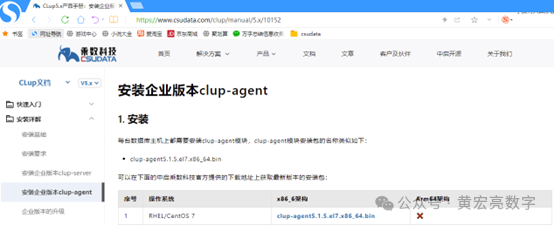
安装clup 安装clup需要下载三个安装包: csumdb clup clup-agent csumdb和clup的下载和离线安装参考CLup5.x产品手册:安装企业版本clup-server (csudata.com) 根据服务器操作系统和CPU架构选择安装包下载
https://www.csudata.com/clup/manual/5.x/10151
安装clup需要下载三个安装包: csumdb clup clup-agent
clup5.1.5.el7.x86_64.bin
csumdb1.1.2.el7.x86_64.bin
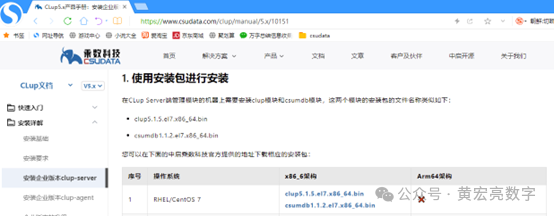
clup-agent5.1.5.el7.x86_64.bin
2、下载后依此执行安装包即可
bash
csumdb.1.1.2.el7.x86_64.bin
[root@hhllhh
polardb]# bash csumdb1.1.2.el7.x86_64.bin
== Installation is
starting ...
=== Installation
is complete.
[root@hhllhh
polardb]#
bash
clup5.1.5.el7.x86_64.bin –i
[root@hhllhh
polardb]# bash clup5.1.5.el7.x86_64.bin -i
==== Installation
is starting ...
What is your ip?
1)
192.168.58.129/24
2)
192.168.74.129/24
#? 1
==== Your ip is
192.168.58.129/24
replace
'{{probe_island_ip}}' with 192.168.58.2 in /opt/clup/conf/clup.conf.
==== register
systemd service ...
Created symlink
from /etc/systemd/system/multi-user.target.wants/clup.service to
/etc/systemd/system/clup.service.
register service
clup sucessfully.
==== register
systemd service ok.
==== Installation
is complete.
[root@hhllhh
polardb]#
下载后执行clup-agent安装包即可,要求输入IP时,输入clup-server端的ip
bash
clup-agent5.1.5.el7.x86_64.bin –i
[root@hhllhh
polardb]# bash clup-agent5.1.5.el7.x86_64.bin -i
==== Installation
is starting ...
What is your ip?
1)
192.168.58.129/24
2)
192.168.74.129/24
#? 1
==== Your ip is
192.168.58.129/24
Enter Clup Server
IP Addr: 192.168.58.129
Clup Server ip
is 192.168.58.129!
==== register
systemd service ...
2024-10-09
11:05:22,016 INFO clup-agent v5.1.5 Copyright (c) 2018-2023 CSUDATA.COM All
rights reserved.
Created symlink
from /etc/systemd/system/multi-user.target.wants/clup-agent.service to
/etc/systemd/system/clup-agent.service.
register service
clup-agent sucessfully.
==== register
systemd service ok.
==== Installation
is comple
3、安装后可查看clup和clup-agent的服务是否正常
systemctl status
clup
[root@hhllhh
polardb]# systemctl status clup
● clup.service - clup
Loaded: loaded
(/etc/systemd/system/clup.service; enabled; vendor preset: disabled)
Active: active (running) since Wed
2024-10-09 11:03:57 CST; 3min 54s ago
Main PID: 19710 (clupserver)
Tasks: 20
CGroup: /system.slice/clup.service
├─19710 /opt/clup/bin/clupserver start
└─19712 /opt/clup/bin/clupserver start
Oct 09 11:03:54
hhllhh systemd[1]: Starting clup...
Oct 09 11:03:55
hhllhh clupserver[19702]: clup not running
Oct 09 11:03:55
hhllhh clupserver[19707]: 2024-10-09 11:03:55,395 INFO ========== CLup starting
==========
Oct 09 11:03:57
hhllhh su[19714]: (to csumdb) root on none
Oct 09 11:03:57
hhllhh systemd[1]: Started clup.
[root@hhllhh
polardb]#
systemctl status
clup-agent
[root@hhllhh
polardb]# systemctl status clup-agent
● clup-agent.service - clup-agent
Loaded: loaded
(/etc/systemd/system/clup-agent.service; enabled; vendor preset: disabled)
Active: active (running) since Wed
2024-10-09 11:05:22 CST; 2min 45s ago
Process: 20121
ExecStart=/opt/clup-agent/bin/clup-agent start (code=exited, status=0/SUCCESS)
Process: 20115
ExecStartPre=/opt/clup-agent/bin/clup-agent stop (code=exited,
status=0/SUCCESS)
Main PID: 20124 (clup-agent)
Tasks: 13
CGroup: /system.slice/clup-agent.service
└─20124 /opt/clup-agent/bin/clup-agent start
Oct 09 11:05:22
hhllhh systemd[1]: Starting clup-agent...
Oct 09 11:05:22
hhllhh clup-agent[20115]: clup-agent not running
Oct 09 11:05:22
hhllhh clup-agent[20121]: 2024-10-09 11:05:22,625 INFO clup-agent v5.1.5
Copyright (c) 2018-2023 CSUDATA.COM All rights reserved.
Oct 09 11:05:22
hhllhh systemd[1]: Started clup-agent.
[root@hhllhh
polardb]#
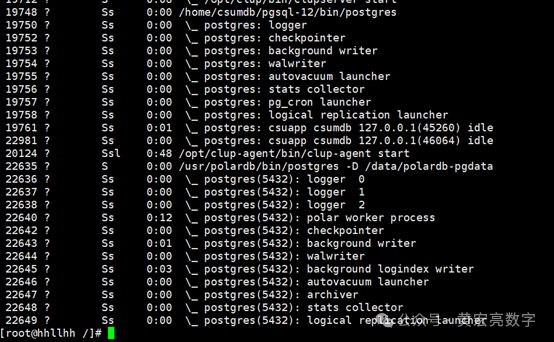
[root@hhllhh
polardb]# ps -afxww
19710 ? Ssl 0:11 /opt/clup/bin/clupserver start
19712 ? S 0:01 \_ /opt/clup/bin/clupserver start
19748 ? Ss 0:00
/home/csumdb/pgsql-12/bin/postgres
19750 ? Ss 0:00 \_ postgres: logger
19752 ? Ss 0:00 \_ postgres: checkpointer
19753 ? Ss 0:00 \_ postgres: background writer
19754 ? Ss 0:00 \_ postgres: walwriter
19755 ? Ss 0:00 \_ postgres: autovacuum launcher
19756 ? Ss 0:00 \_ postgres: stats collector
19757 ? Ss 0:00 \_ postgres: pg_cron launcher
19758 ? Ss 0:00 \_ postgres: logical replication
launcher
19761 ? Ss 0:00 \_ postgres: csuapp csumdb 127.0.0.1(45260)
idle
19763 ? Ss 0:00 \_ postgres: csuapp csumdb 127.0.0.1(45262)
idle
20124 ? Ssl 0:04
/opt/clup-agent/bin/clup-agent start
[root@hhllhh
polardb]#
[root@hhllhh
polardb]# netstat -anpt
Active Internet
connections (servers and established)
Proto Recv-Q
Send-Q Local Address Foreign
Address State PID/Program name
tcp 0 0 0.0.0.0:3500 0.0.0.0:* LISTEN 19748/postgres
tcp 0 0 0.0.0.0:111 0.0.0.0:* LISTEN 1/systemd
tcp 0 0 0.0.0.0:6000 0.0.0.0:* LISTEN 9756/X
tcp 0 0 0.0.0.0:4242 0.0.0.0:* LISTEN 19710/clupserver
tcp 0 0 0.0.0.0:4243 0.0.0.0:* LISTEN 20124/clup-agent
tcp 0 0 0.0.0.0:4245 0.0.0.0:* LISTEN 20124/clup-agent
tcp 0 0 0.0.0.0:22 0.0.0.0:* LISTEN 9686/sshd
tcp 0 0 127.0.0.1:631 0.0.0.0:* LISTEN 9679/cupsd
tcp 0 0 127.0.0.1:25 0.0.0.0:* LISTEN 9851/master
4、安装查看polardb包是否正常

[root@hhllhh
polardb]# tar xf /polardb/polardb-11.9-b20240624.el7.x86_64.tar.xz
[root@hhllhh
polardb]# cd polardb_tar
[root@hhllhh
polardb_tar]# chmod +x install.sh
[root@hhllhh
polardb_tar]# ./install.sh
安装zlog
安装pfs
install pfsd
success!
安装polardb
Polardb安装完成
copy依赖libssl.so.1.1和libcrypto.so.1.1
[root@hhllhh
polardb_tar]#
[root@hhllhh /]#
find . -name libssl.so.1.1
./usr/polardb/lib/libssl.so.1.1
./polardb/polardb_tar/dependencies/libs/libssl.so.1.1
[root@hhllhh /]#
find . -name libcrypto*
./usr/lib64/libcrypto.so.1.0.2k
./usr/lib64/libcrypto.so.10
./usr/lib64/libcrypto.so.0.9.8e
./usr/lib64/libcrypto.so.6
./usr/polardb/lib/libcrypto.so.1.1
./polardb/polardb_tar/dependencies/libs/libcrypto.so.1.1
5、进行polardb的配置
在浏览器打开该服务器的8090端口即可打开clup界面
http://192.168.58.129:8090/#/login
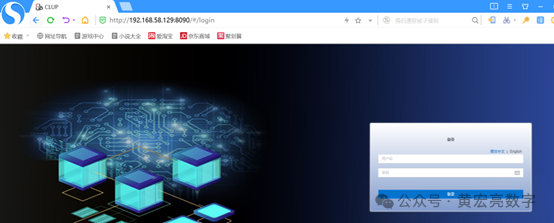
账号/密码: admin/cstech
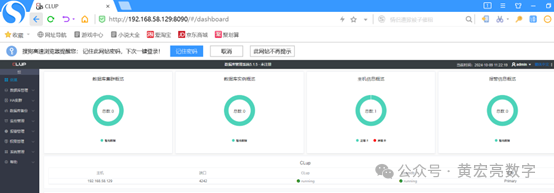
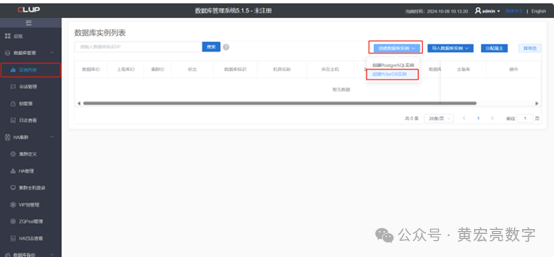
登录进去后,点击数据库管理->实例列表->创建数据库实例->创建polardb实例
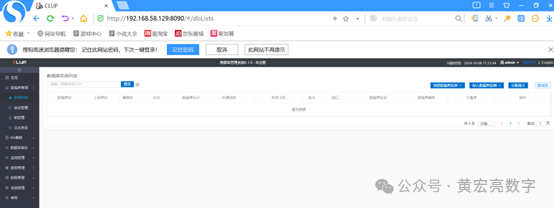
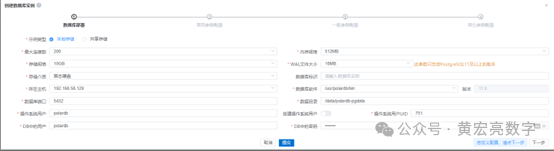
填写如下相关信息,点击提交,即可创建polardb单实例。
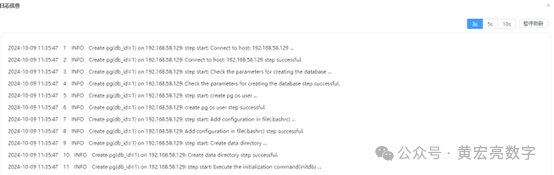
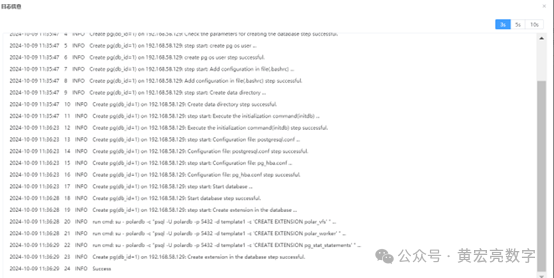
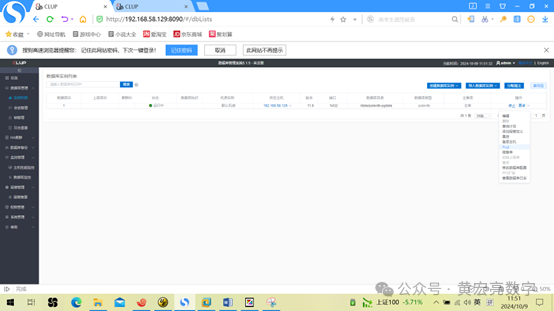
创建成功,在该数据库实例的操作中点击更多,选择psql即可进入数据库实例。
6、Polardb的运行状态
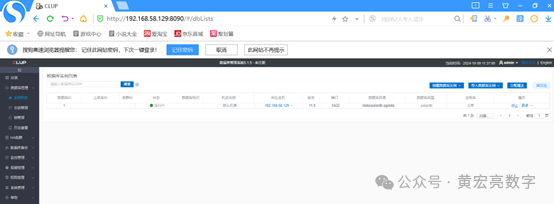
Polardb任务信息

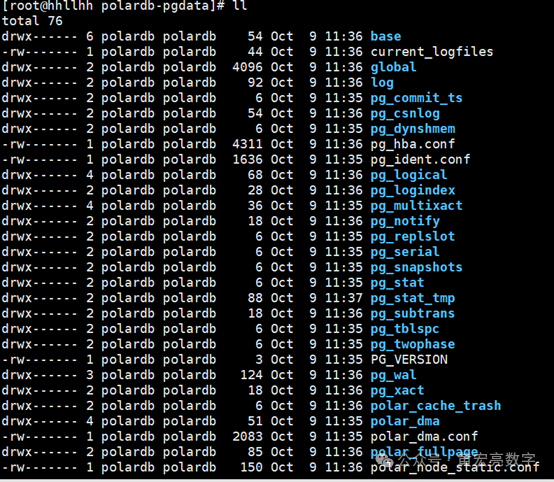
7、Polardb的数据库文件
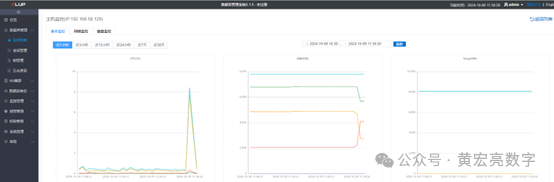
Polardb基本监控
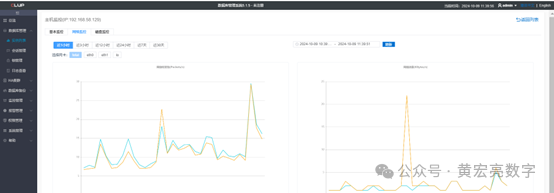
Polardb网络监控
Polardb磁盘监控
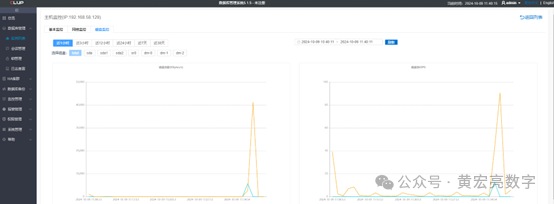
Polardb会话管理

Polardb线程状态
创建成功,在该数据库实例的操作中点击更多,选择psql即可进入数据库实例。
8、选择psql即可进入数据库实例
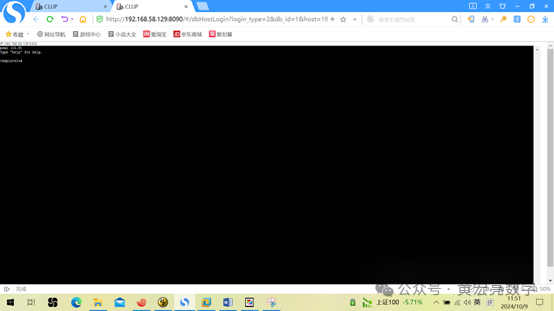
psql (11.9)
Type
"help" for help.
template1=# SHOW
data_directory;
data_directory
----------------------
/data/polardb-pgdata
(1 row)
template1=# select
* from pg_available_extensions;
name | default_version | installed_version
| comment
-----------------------+-----------------+-------------------+-----------------------------------------------------------------------
polar_monitor | 1.2 | | examine the polardb
information
adminpack | 2.0 | | administrative functions
for PostgreSQL
pageinspect | 1.7 | | inspect the contents of
database pages at a low level
lo | 1.1 | | Large Object maintenance
amcheck | 1.1 | | functions for verifying
relation integrity
pg_buffercache | 1.3 | | examine the shared buffer
cache
jsonb_plperlu | 1.0 | | transform between jsonb
and plperlu
polar_vfs | 1.0 | 1.0 | polar_vfs
dblink | 1.2 | | connect to other
PostgreSQL databases from within a database
hstore_plperl | 1.0 | | transform between hstore
and plperl
jsonb_plperl | 1.0 | | transform between jsonb
and plperl
tcn | 1.0 | | Triggered change
notifications
pgcrypto | 1.3 | | cryptographic functions
pgstattuple | 1.5 | | show tuple-level
statistics
intarray | 1.2 | | functions, operators, and
index support for 1-D arrays of integers
pg_visibility | 1.2 | | examine the visibility map
(VM) and page-level visibility info
hstore | 1.5 | | data type for storing sets
of (key, value) pairs
polar_monitor_preload | 1.1 | | examine the polardb
information
timetravel | 1.0 | | functions for implementing
time travel
pgrowlocks | 1.2 | | show row-level locking
information
earthdistance | 1.1 | | calculate great-circle
distances on the surface of the Earth
pg_freespacemap | 1.2 | | examine the free space map
(FSM)
ltree | 1.1 | | data type for hierarchical
tree-like structures
cube | 1.4 | | data type for
multidimensional cubes
vector | 0.5.1 | | vector data type and
ivfflat and hnsw access methods
polar_parameter_check | 1.0 | | kernel extension for
parameter validation
jsonb_plpythonu | 1.0 | | transform between jsonb
and plpythonu
hstore_plperlu | 1.0 | | transform between hstore
and plperlu
unaccent | 1.1 | | text search dictionary
that removes accents
xml2 | 1.1 | | XPath querying and XSLT
polar_px | 1.0 | | Parallel Execution
extension
autoinc | 1.0 | | functions for
autoincrementing fields
sslinfo | 1.2 | | information about SSL
certificates
citext | 1.5 | | data type for
case-insensitive character strings
moddatetime | 1.0 | | functions for tracking
last modification time
ltree_plpython3u | 1.0 | | transform between ltree
and plpython3u
template1=# SELECT
version();
version
--------------------------------
PostgreSQL 11.9 (POLARDB 11.9)
(1 row)
template1=# SHOW
ALL;
name |
setting |
description
---------------------------------------------------+--------------------------------------------------------------------------------------------------------------------------------------------------------------------------------------------------------------------
-------------------------------------------------------------------------------------------------------------------------------------------------------------------------------------------------------------------------------------------------------+----------------
-----------------------------------------------------------------------------------------------------------------------------------------------------------------
allow_system_table_mods | off
| Allows modifica
tions of the
structure of system tables.
application_name | psql
| Sets the applic
ation name to be
reported in statistics and logs.
archive_command |
/bin/true
| Sets the shell
command that will
be called to archive a WAL file.
archive_mode | on
| Allows archivin
g of WAL files
using archive_command.
archive_timeout | 10min
| Forces a switch
to the next WAL file if a new file has not
been started within N seconds.
array_nulls |
on
| Enable input of
NULL elements in arrays.
authentication_timeout | 1min
| Sets the maximu
m allowed time to
complete client authentication.
autovacuum |
on
| Starts the auto
vacuum subprocess.
autovacuum_analyze_scale_factor | 0.1
| Number of tuple
inserts, updates, or deletes prior to analyze
as a fraction of reltuples.
autovacuum_analyze_threshold | 500
以上,既然看到这里了,如果觉得不错,随手点个赞,下次再见。
1、信创名单查询:
http://www.itsec.gov.cn/aqkkcp/cpgg/202409/t20240930_194299.html
http://www.itsec.gov.cn/aqkkcp/cpgg/202312/t20231226_162074.html
2、审计监控诊断优化
• 老白D-Smart,借助他在健康监控、故障预警、问题诊断、定期巡检、专项审计等诸多自动化运维工作
微信DBAiop社区下载社区版
输入 《下载》 获得下载全部命令
输入 《下载7》 获得RHEL7/CENTOS 7绿色安装包
输入 《下载8》 获得RHEL8/CENTOS 8绿色安装包
输入 《docker》获得Docker版安装镜像安装包
• 海信聚好看的 DBdoctor,, 在对数据库几乎没有影响的情况下实时监控数据库和服务器的各项指标, 发现和诊断问题根因非常方便.
https://www.dbdoctor.cn/
3、集群管理软件
•乘数开源的clup, 专门用来管理集群管理软件, 如果你要管理很多套数据库,自研的连接池、分布式存储、一体机、备份平台等, 企业可以关注一下.
https://github.com/apecloud/kubeblocks
4、数据同步&迁移&备份恢复
•NineData, 老领导出去创业做的产品, 产品涵盖了数据同步、迁移、备份、比对、devops、chatDBA等.
https://www.ninedata.cloud/home
5、通用数据库管理桌面软件
•数据库运维、管理、开发人员或者学习者的“屠龙刀”
https://www.deskui.com/pages/dbcs.html
