



Centos7.6安装openGauss 6.0.0 (LTS)
openGauss版本介绍
openGauss社区版本分为长期支持版本和创新版本:
· 长期支持版本 (LTS) :规模上线使用,openGauss 6.0.0 LTS及后续LTS版本发布间隔周期为2年,社区提供3年支持,社区OGSP伙伴提供3年以后维护支持服务。
· 创新版本 (RCx) :作为LTS版本发布前的阶段性特性体验版本,仅供联创测试使用,提供6个月社区支持。
openGauss现已正式发行 6.0.0 LTS 版本,下面就开始在Centos7.6安装openGauss 6.0.0 (LTS)来体验一下。
安装前准备
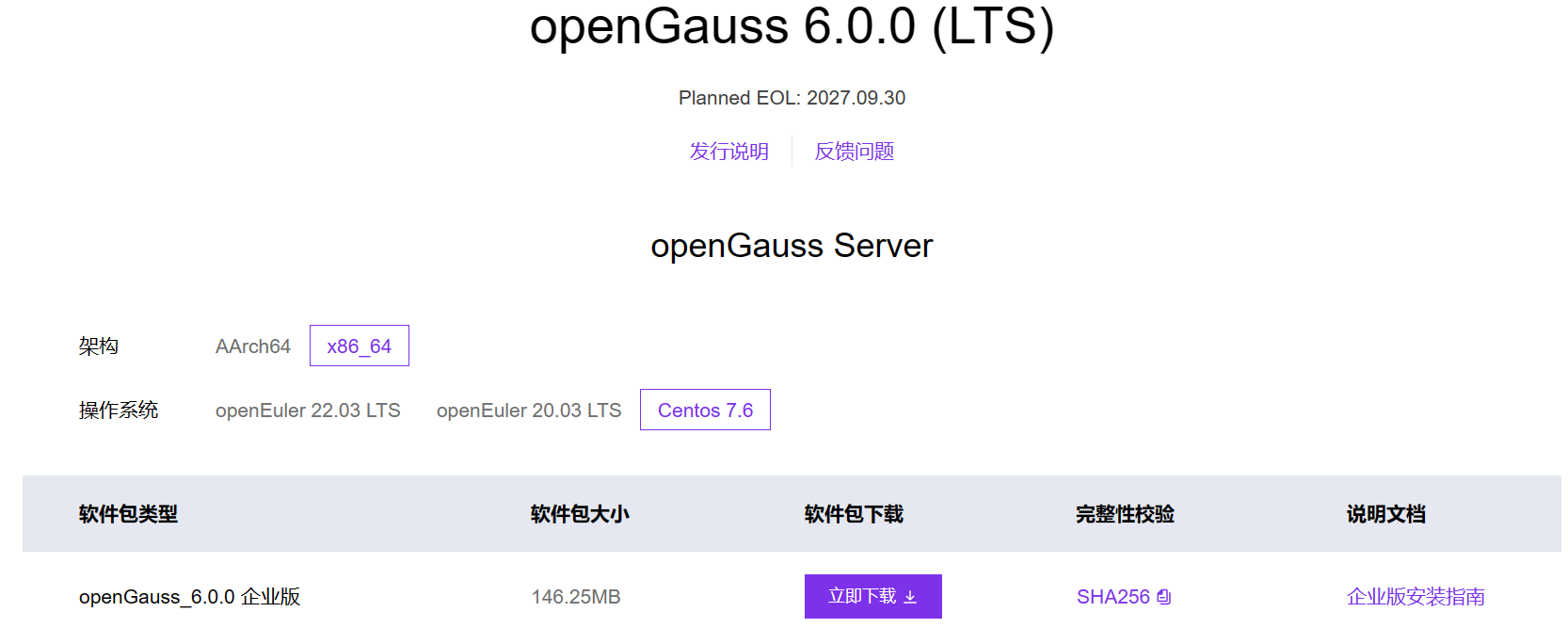
一、准备安装的服务器系统是centos7.6(x86_x64),去
openGauss软件 | openGauss下载 | openGauss软件包 | openGauss社区官网下载对应的安装包,如下图选择:
环境信息:
架构:x86_64
操作系统:Centos7.6
数据库:openGauss 6.0.0 (LTS)
二、安装路径规划
opengauss使用默认的5432端口
| /u01/app | 软件目录 |
|---|---|
| /u01/app/opengauss | 数据库软件目录 |
| /u01/5432 | 数据库实例相关目录,5432为端口根据需求也可能会有/u01/5433,/u01/5434 |
| /u01/5432/gsdata | 5432端口实例的数据目录 |
| /u01/5432/archive | 5432端口实例的归档目录 |
| /u01/5432/temp | 5432端口实例存放socket文件目录 |
| /u01/5432/logs | 日志目录,包括error 日志,性能数据日志等 |
三、环境设置
- 安装依赖包
yum install readline -y
yum install libaio-devel -y
yum install bc -y
yum install net-tools -y
yum install sysstat -y
yum install -y ntp ntpdate
- 关闭防火墙
关闭防火墙并禁止开机启动
systemctl stop firewalld
systemctl disable firewalld

检查防火墙是否启动
systemctl status firewalld
- 关闭selinux
查看selinux状态
getenforce

关闭selinux并禁止开机启动
vim /etc/sysconfig/selinux
SELINUX=disabled
- 允许root登录
修改sshd配置并重启
vim /etc/ssh/sshd_config
PermitRootLogin yes

systemctl restart sshd
-
关闭RemoveIPC
CentOS操作系统默认为关闭,可以跳过该步骤。
# 避免文件在用户登录创建后登出被变化的情况
关闭RemoveIPC
echo "RemoveIPC = no" >> /usr/lib/systemd/system/systemd-logind.service
sed -i 's/.*RemoveIPC.*/RemoveIPC=no/' /etc/systemd/logind.conf

systemctl daemon-reload
systemctl restart systemd-logind

#检查修改是否生效
loginctl show-session | grep RemoveIPC
systemctl show systemd-logind | grep RemoveIPC
*结果都为RemoveIPC=no
- 设置资源限制
vim /etc/security/limits.conf
* soft nproc unlimited
* hard nproc unlimited
* soft nofile 65535
* hard nofile 65535
* soft stack unlimited
* hard stack unlimited
* soft core unlimited
* hard core unlimited
* soft memlock unlimited
* hard memlock unlimited
- 设置字符集参数
echo $LANG
en_US.utf8

vim /etc/profile
export LANG=en_US.utf8
8 .添加排序规则
查看有en_US.utf8
locale -a |grep -i en_US
en_US
en_US.iso88591
en_US.iso885915
en_US.utf8

如果没有,添加
localedef -v -c -i en_US -f UTF-8 en_US.UTF-8
安装实例
- 安装包已经上传到服务器路径/root/soft/
[root@VM-12-13-centos soft]# ll
total 149764
-rw-r--r-- 1 root root 153356080 Sep 29 22:18 openGauss-All-6.0.0-CentOS7-x86_64.tar.gz
[root@VM-12-13-centos soft]# pwd
/root/soft

[root@VM-12-13-centos soft]# tar -zxvf openGauss-All-6.0.0-CentOS7-x86_64.tar.gz
openGauss-CM-6.0.0-CentOS7-x86_64.tar.gz
openGauss-OM-6.0.0-CentOS7-x86_64.tar.gz
openGauss-Server-6.0.0-CentOS7-x86_64.tar.bz2
openGauss-CM-6.0.0-CentOS7-x86_64.sha256
openGauss-OM-6.0.0-CentOS7-x86_64.sha256
openGauss-Server-6.0.0-CentOS7-x86_64.sha256
upgrade_sql.tar.gz
upgrade_sql.sha256
- 创建数据库安装用户
groupadd opengauss
useradd -g opengauss -s /bin/bash -md /home/opengauss opengauss
id opengauss
passwd opengauss

[root@VM-12-13-centos soft]# groupadd opengauss
[root@VM-12-13-centos soft]# useradd -g opengauss -s /bin/bash -md /home/opengauss opengauss
[root@VM-12-13-centos soft]# id opengauss
uid=1001(opengauss) gid=1001(opengauss) groups=1001(opengauss)
[root@VM-12-13-centos soft]# passwd opengauss
Changing password for user opengauss.
New password:
Retype new password:
passwd: all authentication tokens updated successfully.
[root@VM-12-13-centos soft]#
- 初始化数据库相应目录
mkdir -p /u01/5432/archive
mkdir -p /u01/5432/gsdata
mkdir -p /u01/5432/temp
mkdir -p /u01/5432/logs
mkdir -p /u01/5432/core_dump
chown -R  opengauss:opengauss /u01/5432/
chmod 700 /u01/5432/gsdata
mkdir -p /u01/app/opengauss
chown -R opengauss:opengauss /u01

[root@VM-12-13-centos soft]# ll /u01
total 8
drwxr-xr-x 7 opengauss opengauss 4096 Oct 25 16:09 5432
drwxr-xr-x 3 opengauss opengauss 4096 Oct 25 16:09 app

把安装步骤1中的openGauss-Server-6.0.0-CentOS7-x86_64.tar.bz2包解压缩到/u01/app/opengauss
[root@VM-12-13-centos soft]# tar -jxvf openGauss-Server-6.0.0-CentOS7-x86_64.tar.bz2 -C /u01/app/opengauss

chown -R opengauss:opengauss /u01/app/
- 设置环境变量
切换到opengauss,下面使用opengauss账户来操作了
su - opengauss
vim .bash_profile
export GAUSSHOME=/u01/app/opengauss
export GAUSSDATA=/u01/5432/
export PGPORT=5432
export LD_LIBRARY_PATH=$GAUSSHOME/lib:$GAUSSHOME/lib/libsimsearch:$GAUSSHOME/script/gspylib/clib:$LD_LIBRARY_PATH
export PATH=$GAUSSHOME/bin:$PATH
export PGUSER=dbAdmin
export GAUSSLOG=/u01/5432/logs

source .bash_profile
- 安装实例
[opengauss@VM-12-13-centos ~]$ which gs_initdb
/u01/app/opengauss/bin/gs_initdb

gs_initdb --nodename=gauss1 -D $GAUSSDATA/gsdata  --encoding=UTF-8 --locale=en_US.UTF-8  --username=dbAdmin --pwpasswd=opengauss@1234


创建一个实例成功后,可以看到下面信息
WARNING: enabling "trust" authentication for local connections
You can change this by editing pg_hba.conf or using the option -A, or
--auth-local and --auth-host, the next time you run gs_initdb.

Success. You can now start the database server of single node using:

    gaussdb -D /u01/5432/gsdata --single_node
or
    gs_ctl start -D /u01/5432/gsdata -Z single_node -l logfile

[opengauss@VM-12-13-centos ~]$
- 启动实例
[opengauss@VM-12-13-centos ~]$ gs_ctl start -D /u01/5432/gsdata -Z single_node -l logfile
[2024-10-25 16:38:03.443][30727][][gs_ctl]: gs_ctl started,datadir is /u01/5432/gsdata
[2024-10-25 16:38:03.475][30727][][gs_ctl]: waiting for server to start...
.
[2024-10-25 16:38:04.482][30727][][gs_ctl]:  done
[2024-10-25 16:38:04.482][30727][][gs_ctl]: server started (/u01/5432/gsdata)
[opengauss@VM-12-13-centos ~]$

# 查看数据库状态
[opengauss@VM-12-13-centos ~]$ ps -ef |grep gauss
root     25236 25974  0 16:20 pts/0    00:00:00 su - opengauss
opengau+ 30730     1  1 16:38 ?        00:00:00 /u01/app/opengauss/bin/gaussdb -D /u01/5432/gsdata
opengau+ 31094 25237  0 16:39 pts/0    00:00:00 grep --color=auto gauss
[opengauss@VM-12-13-centos ~]$ gs_ctl status -D /u01/5432/gsdata/
[2024-10-25 16:39:36.019][31246][][gs_ctl]: gs_ctl status,datadir is /u01/5432/gsdata
gs_ctl: server is running (PID: 30730)
/u01/app/opengauss/bin/gaussdb "-D" "/u01/5432/gsdata"
[opengauss@VM-12-13-centos ~]$

# 连接数据库,这里使用用户dbAdmin来连接数据库,密码是opengauss@1234
[opengauss@VM-12-13-centos ~]$ gsql -p 5432 -d postgres -U dbAdmin -r
Password for user dbAdmin:
gsql ((openGauss 6.0.0 build aee4abd5) compiled at 2024-09-29 18:38:08 commit 0 last mr  )
Non-SSL connection (SSL connection is recommended when requiring high-security)
Type "help" for help.

openGauss=# \l
                                List of databases
   Name    |  Owner  | Encoding |   Collate   |    Ctype    |  Access privileges
-----------+---------+----------+-------------+-------------+---------------------
 postgres  | dbAdmin | UTF8     | en_US.UTF-8 | en_US.UTF-8 |
 template0 | dbAdmin | UTF8     | en_US.UTF-8 | en_US.UTF-8 | =c/dbAdmin         +
           |         |          |             |             | dbAdmin=CTc/dbAdmin
 template1 | dbAdmin | UTF8     | en_US.UTF-8 | en_US.UTF-8 | =c/dbAdmin         +
           |         |          |             |             | dbAdmin=CTc/dbAdmin
(3 rows)

openGauss=#\q

# 停止数据库
[opengauss@VM-12-13-centos ~]$ gs_ctl stop -D /u01/5432/gsdata
[2024-10-25 16:45:45.617][696][][gs_ctl]: gs_ctl stopped ,datadir is /u01/5432/gsdata
waiting for server to shut down.... done
server stopped
- 初始化参数
根据服务器资源,按实际情况配置
$GAUSSDATA/gsdata/postgresql.conf
vi /u01/5432/gsdata/postgres.conf
listen_addresses = '*'
local_bind_address = '0.0.0.0'
port = 5432
max_connections = 1000
log_directory = '/u01/5432/logs/'
password_encryption_type = 0
- 白名单配置
vi /u01/5432/gsdata/pg_hba.conf
host all all 0.0.0.0/0 md5
- 启动数据库,尝试远程连接到数据库
[opengauss@VM-12-13-centos ~]$ gs_ctl start -D /u01/5432/gsdata -Z single_node -l logfile
[2024-10-25 16:53:06.551][2950][][gs_ctl]: gs_ctl started,datadir is /u01/5432/gsdata
[2024-10-25 16:53:06.591][2950][][gs_ctl]: waiting for server to start...
.
[2024-10-25 16:53:07.598][2950][][gs_ctl]:  done
[2024-10-25 16:53:07.598][2950][][gs_ctl]: server started (/u01/5432/gsdata)
[opengauss@VM-12-13-centos ~]$

[opengauss@VM-12-13-centos ~]$ gsql -d postgres -p 5432 -U dbAdmin -r

# 创建表空间
openGauss=# CREATE TABLESPACE hello_data RELATIVE LOCATION 'tablespace/hello_data' ;
CREATE TABLESPACE
openGauss=# \db
             List of tablespaces
    Name    |  Owner  |       Location
------------+---------+-----------------------
 hello_data | dbAdmin | tablespace/hello_data
 pg_default | dbAdmin |
 pg_global  | dbAdmin |
(3 rows)

# 创建数据库
openGauss=# create database hello with encoding='UTF-8' LC_COLLATE='C' LC_CTYPE='C' DBCOMPATIBILITY='B' connection limit -1;
CREATE DATABASE
openGauss=# \l
                                List of databases
   Name    |  Owner  | Encoding |   Collate   |    Ctype    |  Access privileges
-----------+---------+----------+-------------+-------------+---------------------
 hello     | dbAdmin | UTF8     | C           | C           |
 postgres  | dbAdmin | UTF8     | en_US.UTF-8 | en_US.UTF-8 |
 template0 | dbAdmin | UTF8     | en_US.UTF-8 | en_US.UTF-8 | =c/dbAdmin         +
           |         |          |             |             | dbAdmin=CTc/dbAdmin
 template1 | dbAdmin | UTF8     | en_US.UTF-8 | en_US.UTF-8 | =c/dbAdmin         +
           |         |          |             |             | dbAdmin=CTc/dbAdmin
(4 rows)

# 创建用户ccuser
openGauss=# create user ccuser password 'Ccuser123!' default tablespace hello_data;
NOTICE:  The encrypted password contains MD5 ciphertext, which is not secure.
CREATE ROLE

# 磁盘上查看创建的表空间,其实是创建了一个表空间同名的目录
[root@VM-12-13-centos tablespace]# pwd
/u01/5432/gsdata/pg_location/tablespace
[root@VM-12-13-centos tablespace]# ll
total 4
drwx------ 3 opengauss opengauss 4096 Oct 25 17:03 hello_data

[opengauss@VM-12-13-centos ~]$ gsql -d hello -p 5432 -U dbAdmin -r
Password for user dbAdmin:
gsql: FATAL:  could not load library "dblink.so": libltdl.so.7: cannot open shared object file: No such file or directory
CONTEXT:  SQL statement "create extension if not exists dblink;"

# 使用root用户安装包
#yum install libltdl*

[opengauss@VM-12-13-centos ~]$ gsql -d hello -p 5432 -U dbAdmin -r
Password for user dbAdmin:
gsql ((openGauss 6.0.0 build aee4abd5) compiled at 2024-09-29 18:38:08 commit 0 last mr  )
Non-SSL connection (SSL connection is recommended when requiring high-security)
Type "help" for help.

hello=# \l
                                List of databases
   Name    |  Owner  | Encoding |   Collate   |    Ctype    |  Access privileges
-----------+---------+----------+-------------+-------------+---------------------
 hello     | dbAdmin | UTF8     | C           | C           |
 postgres  | dbAdmin | UTF8     | en_US.UTF-8 | en_US.UTF-8 |
 template0 | dbAdmin | UTF8     | en_US.UTF-8 | en_US.UTF-8 | =c/dbAdmin         +
           |         |          |             |             | dbAdmin=CTc/dbAdmin
 template1 | dbAdmin | UTF8     | en_US.UTF-8 | en_US.UTF-8 | =c/dbAdmin         +
           |         |          |             |             | dbAdmin=CTc/dbAdmin
(4 rows)

# 在hello库,给ccuser用户创建一个ccuser模式
hello=# create schema ccuser authorization ccuser;
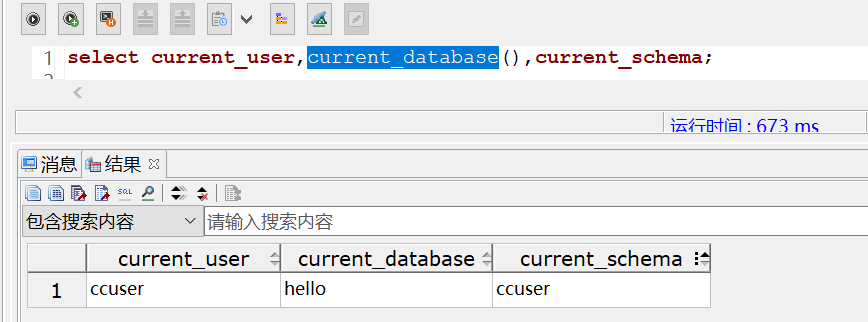
使用Data Studio工具远程连接数据库成功,如下图:
「喜欢这篇文章,您的关注和赞赏是给作者最好的鼓励」
关注作者
【版权声明】本文为墨天轮用户原创内容,转载时必须标注文章的来源(墨天轮),文章链接,文章作者等基本信息,否则作者和墨天轮有权追究责任。如果您发现墨天轮中有涉嫌抄袭或者侵权的内容,欢迎发送邮件至:contact@modb.pro进行举报,并提供相关证据,一经查实,墨天轮将立刻删除相关内容。
