



转载翻译自:https://neon.tech/blog/building-a-rag-application-with-llama-3-1-and-pgvector

人工智能战争已经开始。但这不是机器奴役我们并利用我们的体温来为计算提供动力的战争——至少还要 18 个月。这场人工智能战争是科技巨头之间的战争,也是封闭、专有模型与开源之间的战争。
一方面,微软支持的 OpenAI 凭借其 GPT 系列构建了最强大的封闭模型。这些模型为自然语言处理任务的性能设定了基准,在各种应用中展现出理解和生成类似人类文本的卓越能力。
另一方面,我们有扎克伯格和他的Llamas。Llamas 正在蓬勃发展。最新的 Llama 模型Llama 3.1[1]代表了开源 AI 技术的重大飞跃,它提供与顶级专有模型相当的性能,同时提供研究、修改和部署模型的自由,而不受闭源替代方案的限制和成本。
这就是我们要在这里做的事情。我们将使用 Meta 提供的最新和最强大的功能来构建一个 RAG 应用程序,该应用程序允许我们利用我们自己的特定知识来增强模型的响应。
但首先,我们必须回答这个问题:
什么是 RAG?
RAG,即检索增强生成[2],是一种将大型语言模型 (LLM) 的功能与外部知识检索相结合的 AI 技术。其理念是解决 LLM 的一个关键限制:无法在训练后访问或更新知识。
在 RAG 系统中,当收到查询时,它首先会经过检索步骤。此步骤会搜索知识库以查找相关信息。检索到相关信息后,它会与原始查询一起输入到 LLM 中。这使得模型不仅能够根据其预先训练的知识生成响应,还能根据外部知识库中最新和最相关的信息生成响应。
有几种方法可以做到这一点,但目前最常见的技术是使用嵌入[3]。嵌入是知识库中文本的数学表示。使用特定的嵌入模型,您可以将文本转换为密集的向量表示(称为嵌入)。
当文本被表示成这个向量时,对这些数字进行相似性搜索就容易多了。基本过程如下:
1. 你有大量文本或文档。经过一些预处理(拆分和清理),你为文本的每个元素创建一个嵌入。
2. 您将它们存储在向量数据库中 - 一个专门的(或不是)数据库,可以有效地存储这些长嵌入。
3. 当用户提出查询时,您便会通过嵌入模型运行该查询以创建其自己的嵌入。
4. 然后,您搜索数据库以寻找类似的嵌入。
5. 您从数据库返回与 N 个相似嵌入相关的文本,然后将其与原始查询一起传递给 LLM。
6. LLM 使用查询和返回的文本为用户制定更具体、更相关和最新的答案。
您可以查看应用程序。您可以将文档添加到向量数据库,并构建一个模型,让用户能够提取使用 API 的确切方法。您可以将所有过去的客户服务互动添加到向量数据库,并构建一个模型,了解客户面临的最大问题。您可以将公司的所有内部知识库文章添加到向量数据库,并构建一个模型,为不同部门的员工提供准确且最新的信息。
RAG 非常有用。RAG 的基础技术是向量数据库。许多特定的向量数据库工具可用于此应用程序,但俗话说,“只使用 Postgres 就好[4]”。
使用 Postgres 创建向量数据库非常简单,我们将在这里进行创建。
构建我们的人工智能应用程序
好的,那么我们要构建什么呢?我们将创建一个相当简单的应用程序,用励志名言激励我们。我们将自己创建这些名言并将其存储起来以供检索。
技术栈
以下是我们将要使用的内容:
ü 我们的模型是 Llama 3.1。Llama 3.1 是 Meta 最新的开源大语言模型,为 AI 自然语言任务提供最先进的性能,而不受专有模型的限制。
ü Neon 是我们的向量数据库。您可能知道这一点,但Neon[5]是一个无服务器 Postgres 数据库,可通过 pgvector 提供向量操作。它的无服务器计算和存储扩展使其成为高效存储和查询嵌入的理想选择。
ü OctoAI[6]将一切连接在一起。OctoAI是一个简化开源 AI 模型部署和管理的平台,使我们能够轻松地将 Llama 3.1 和我们的 Neon 数据库集成到应用程序中。
在 Neon 中创建向量数据库
Neon 有一个免费计划:首先,在这里创建一个帐户[7],然后按照这些说明[8]连接到您的数据库。
一旦连接上,要将 Neon 变成向量数据库只需三个词:
CREATE EXTENSION vector;
就是这样。Neon附带pgvector[9],这是一个 Postgres 扩展,可以实现嵌入的高效存储和相似性搜索。
然后,我们可以创建一个包含嵌入以及其他数据的引用表:
CREATE TABLE quotes (
	id BIGSERIAL PRIMARY KEY,
	quote text,
	author text,
	embedding VECTOR(1024)
	);
所以这个表有四列:
id:BIGSERIAL PRIMARY KEY 作为每个报价的主要标识符。
quote:存储励志名言实际文本的文本列。
author:用于存储说出或写下该引语的人的姓名的文本列。
embedding:VECTOR(1024) 列,用于存储嵌入模型生成的报价的 1024 维向量表示。
此向量允许稍后在向量空间中进行有效的相似性搜索。为什么是 1024?因为这是我们将要使用的嵌入模型[10]的输出向量的长度。如果您使用的是 OpenAI 嵌入模型,则此数字将高达3072[1]。这是一个需要谨慎的地方。嵌入越长,它使用的存储空间就越大,成本就越高。现在我们有了向量数据库(是的,这就是您要做的全部工作)。让我们填充它。
创建嵌入
在本例中,我们创建了一些假的引文并将它们存储在 CSV 中。我们这样做纯粹是为了表明模型是从我们的 RAG 数据中提取的,而不是从其他地方获取的。然后我们可以执行上面的步骤 1-3。
幸运的是,由于我们伪造了数据,因此我们不需要进行任何清理,我们可以直接创建和存储嵌入。以下是 Python 代码:
import requests
import os
import csv
from psycopg2 import pool
from dotenv import load_dotenv
import time
# Load .env file
load_dotenv()
def load_csv(filename):
    quotes, authors = [], []
    with open(filename, 'r') as file:
        reader = csv.reader(file)
        for row in reader:
            if row:
                quotes.append(row[0])
                authors.append(row[1])
    return quotes, authors
def get_embeddings(quotes):
    embeddings = []
    url = "https://text.octoai.run/v1/embeddings"
    headers = {
        "Content-Type": "application/json",
        "Authorization": f"Bearer {os.getenv('OCTO_API_TOKEN')}"
    }
    for quote in quotes:
        data = {
            "input": quote,
            "model": "thenlper/gte-large"
        }
        response = requests.post(url, headers=headers, json=data)
        if response.status_code == 200:
            response_json = response.json()
            embeddings.append(response_json['data'][0]['embedding'])
        else:
            print(f"Request failed with status code {response.status_code}")
        # Optional: Add delay to avoid hitting the rate limit
        time.sleep(1)
    return embeddings
def insert_into_db(quotes, authors, embeddings):
    connection_string = os.getenv('DATABASE_URL')
    connection_pool = pool.SimpleConnectionPool(1, 10, connection_string)
    if connection_pool:
        print("Connection pool created successfully")
    try:
        conn = connection_pool.getconn()
        cur = conn.cursor()
        for quote, author, embedding in zip(quotes, authors, embeddings):
            cur.execute(
                "INSERT INTO quotes (quotes, author, embedding) VALUES (%s, %s, %s)",
                (quote, author, embedding)
            )
        conn.commit()
        cur.close()
    finally:
        connection_pool.putconn(conn)
        connection_pool.closeall()
def main():
    quotes, authors = load_csv('fake_quote.csv')
    embeddings = get_embeddings(quotes)

    if len(quotes) != len(embeddings):
        print("Mismatch between number of quotes and embeddings")
        return

    insert_into_db(quotes, authors, embeddings)
if __name__ == "__main__":
    main()
每个功能起什么作用?
ü load_csv(filename):我们正在解析引文的 CSV 并返回引文和作者的列表。
ü get_embeddings(quotes):这是代码的核心。我们通过 OctoAI API 使用“helper/gte-large”模型为每个引言生成一个嵌入,并返回此嵌入列表。
ü insert_into_db(quotes, authors, embeddings):现在我们可以将所有内容添加到 Neon 中。我们利用连接池实现高效的数据库连接,并为每个quote-author-embedding三元组执行 SQL INSERT 语句,最后提交事务。它确保正确关闭数据库连接和连接池。
完成后,我们可以在Neon 表页面[2]中看到我们的数据:
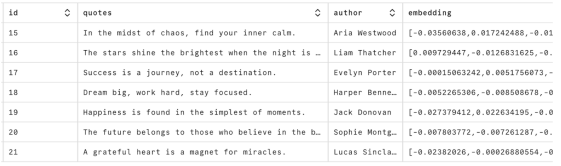
这也是了解嵌入是什么的好方法——只是一长串数字。这些嵌入是人工智能革命中一切的基础。一切都是为了匹配这些数字。现在我们可以开始使用这些数据了。
使用 Llama 3.1 构建 RAG 模型
现在我们到了业务端。让我们从代码开始,然后逐步讲解:
import requests
import sys
import os
import json
from psycopg2 import pool
from dotenv import load_dotenv
from octoai.text_gen import ChatMessage
from octoai.client import OctoAI
# Load .env file
load_dotenv()
def get_input_embedding(text):
   url = "https://text.octoai.run/v1/embeddings"
   headers = {
       "Content-Type": "application/json",
       "Authorization": f"Bearer {os.getenv('OCTO_API_TOKEN')}"
   }
   data = {
       "input": text,
       "model": "thenlper/gte-large"
   }
   response = requests.post(url, headers=headers, json=data)
   if response.status_code == 200:
       response_json = response.json()
       embedding_vector = response_json['data'][0]['embedding']
       return embedding_vector
   else:
       print(f"Request failed with status code {response.status_code}")
       return None
def get_quotes(input_embedding):
   # Get the connection string from the environment variable
   connection_string = os.getenv('DATABASE_URL')
   # Create a connection pool
   connection_pool = pool.SimpleConnectionPool(
       1, # Minimum number of connections in the pool
       10, # Maximum number of connections in the pool
       connection_string
   )
   # Check if the pool was created successfully
   if connection_pool:
       print("Connection pool created successfully")
   try:
       # Get a connection from the pool
       conn = connection_pool.getconn()
       # Create a cursor object
       cur = conn.cursor()
       cur.execute(f"SELECT * FROM quotes ORDER BY embedding <-> '{input_embedding}' LIMIT 2;")
       # Fetch the results
       quotes = cur.fetchall()
       # Extract and print the quote text and author name
       retrieved_quotes = []
       for item in quotes:
           quote_text = item[1]
           author_name = item[2]
           retrieved_quotes.append(f'"{quote_text}" - {author_name}')
       # Commit the transaction
       conn.commit()
       # Close the cursor
       cur.close()
       return retrieved_quotes
   finally:
       # Return the connection to the pool
       connection_pool.putconn(conn)
       # Close the connection pool
       connection_pool.closeall()
def generate_response(user_input, retrieved_quotes):
   # Construct the system prompt with retrieved quotes
   system_prompt = (
       "You are helping people get motivated. Here are some quotes related to your input:\n" +
       "\n".join(retrieved_quotes) +
       "\nPlease provide a response related to the input and consider the above quotes."
   )
   client = OctoAI(
       api_key=os.getenv('OCTO_API_TOKEN'),
   )
   completion = client.text_gen.create_chat_completion(
       model="meta-llama-3.1-405b-instruct",
       messages=[
           ChatMessage(
               role="system",
               content=system_prompt,
           ),
           ChatMessage(role="user", content=user_input),
       ],
       max_tokens=150,
   )
   message_content = completion.choices[0].message.content
   # Print the message content
   print(message_content)
def main():
   if len(sys.argv) < 2:
       print("Usage: python input.py 'Your text string goes here'")
       return

   user_input = sys.argv[1]

   # Get the embedding vector for the input text
   embedding_vector = get_input_embedding(user_input)
   if embedding_vector:
       # Get quotes similar to the input text
       retrieved_quotes = get_quotes(embedding_vector)
       if retrieved_quotes:
           # Generate and print the response
           generate_response(user_input, retrieved_quotes)
       else:
           print("No quotes retrieved from the database.")
   else:
       print("Failed to get embedding vector")
if __name__ == "__main__":
   main()
这从用户输入开始。我们在这里只是使用命令行,但你可以想象这个输入来自应用程序或其他前端。这是一个有关激励应用程序,所以让我们问它一些梦想:
python input.py 'I want to know about dreams'
该文本被传递给get_input_embedding。在此函数中,正是我们上面所做的,并为该字符串创建嵌入。最终,我们想要一个长度为 1024 的向量,以便我们可以对照 Neon 向量数据库中存储的 1024 长度向量进行检查。
embedding_vector然后将其传递给get_quotes。这将再次建立与 Neon 的连接,但这次它不是插入元素,而是运行此 SQL 查询:
SELECT * FROM quotes ORDER BY embedding <=> '{input_embedding}' LIMIT 2;
其中,input_embedding是我们用户输入的嵌入。此查询在我们存储的向量数据中执行相似性搜索。'<=>' 运算符计算输入嵌入和数据库中的每个嵌入之间的余弦距离。通过根据此距离对结果进行排序并将结果数量限制为 2,我们检索到与输入最相似的两个条目。在这种情况下,此函数将输出:
Quote: Dream big, work hard, stay focused.
Author: Harper Bennett
Quote: The future belongs to those who believe in the beauty of their dreams.
Author: Sophie Montgomery
您可以看到“相似之处”,这两句引言都谈到了梦想。现在,RAG 的第二个魔术是将这些引言添加到我们更大的模型的上下文中。让我们再次显示此代码,然后逐步执行它:
def generate_response(user_input, retrieved_quotes):
   # Construct the system prompt with retrieved quotes
   system_prompt = (
       "You are helping people get motivated. Here are some quotes related to your input:\n" +
       "\n".join(retrieved_quotes) +
       "\nPlease provide a response related to the input and consider the above quotes."
   )
   client = OctoAI(
       api_key=os.getenv('OCTO_API_TOKEN'),
   )
   completion = client.text_gen.create_chat_completion(
       model="meta-llama-3.1-405b-instruct",
       messages=[
           ChatMessage(
               role="system",
               content=system_prompt,
           ),
           ChatMessage(role="user", content=user_input),
       ],
       max_tokens=150,
   )
   message_content = completion.choices[0].message.content
   # Print the message content
   print(message_content)
该函数采用两个参数:用户输入和我们从向量数据库中检索到的内容。然后,它使用这些参数构建系统提示,并使用检索到的报价作为上下文。
然后我们初始化 OctoAI 客户端。在这里我们通过 OctoAI 调用 Llama 3.1 模型。我们使用聊天完成端点,以消息形式提供我们构建的系统提示和用户输入。我们将响应限制为 150 个令牌。
最后,我们从模型的输出中提取并打印生成的响应。这是我们从上述输入得到的结果:
Dreams! The spark that ignites the fire of motivation within us. As Sophie Montgomery so eloquently put it, "The future belongs to those who believe in the beauty of their dreams." This quote reminds us that our dreams are the foundation upon which we build our futures. They give us direction, purpose, and a sense of what's possible.
But, as Harper Bennett added, it's not just about having dreams; it's about taking action towards making them a reality. "Dream big, work hard, stay focused." This quote highlights the importance of putting in the effort required to bring our dreams to life. It's not just about wishing for something to happen, but about creating a plan, working towards it, and staying committed
这体现了我们 RAG 系统的核心:它获取我们从向量数据库(引语)中检索到的上下文,并用它来通知语言模型对用户输入的响应。我们在响应中得到这些引语,从而为模型的输出增加更多相关性。
我们用 Llama 3.1 和 Neon 创建了一个 RAG 模型。这里所有 AI 调用的成本是多少?
一分钱。这就是建造过程中的所有测试。
你的 AI 应用有一个家:Postgres
希望你通过这篇文章学到了三件事:
RAG 功能极其强大。这只是一个示例,但想象一下,向量数据库中有数千个文档,并且能够将所有这些知识添加到常规 LLM 中。它可以使您构建的应用程序与用户更加相关。
开源模型已做好准备。我们显然只是触及了 Llama 3.1 功能的表面,但基准测试将其与 OpenAI、Claude 和 Cohere 进行了比较,而且成本仅为其一小部分。
Postgres 是一个向量数据库。与 Llama 3.1 一样,我们才刚刚开始探索 Postgres 和向量的可能性。您可以了解有关优化Neon 以进行嵌入的[13]更多信息,这是一篇关于Postgres 与专用向量数据库的比较[14]的精彩文章。
如果您正在使用 Neon,则您已经拥有向量数据库。如果没有,请免费注册[15]并开始构建您的 AI 应用。


