



问题现象
客户在mysql 进行全库导入导出后,发现sys.host_summary无法查询,经沟通,可以导出时,使用–all-databases选项,如下。
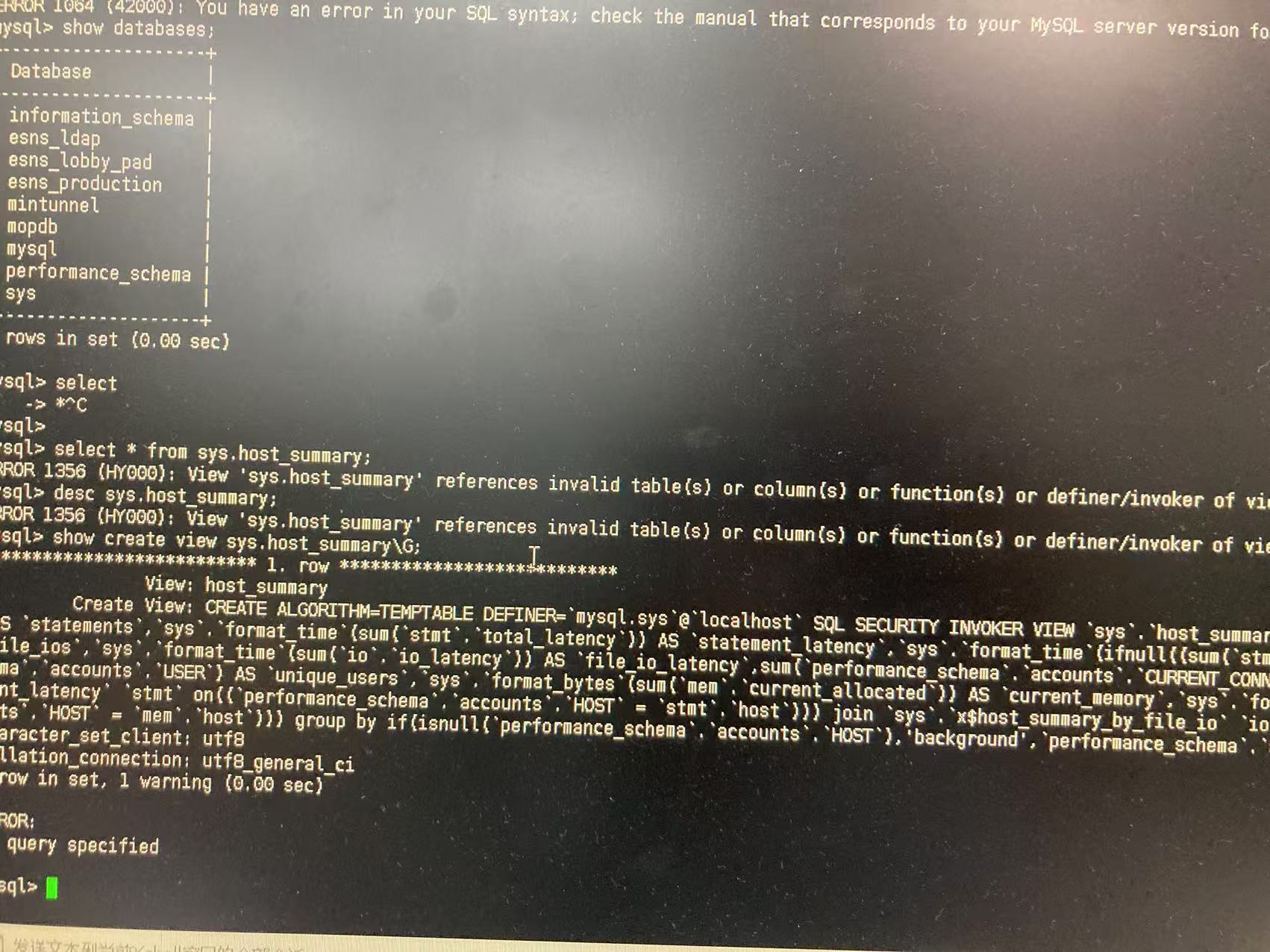
环境:
mysql 5.7.25 主主
分析
这是一个已知的Bug #83259,在5.7.XX版本,使用mysqldump或者mysqlpump,进行全库导出,使用–all-databases选项时,会跳过mysql.proc表中数据库等于sys 条目的备份,会造成sys下视图表在调用时出现异常,查询失败。
下面就此现象进行模拟和修复。
问题复现
创建测试数据库
使用dbdeployer分别创建一个单机和一套主主环境,模拟客户现场。
[mysql@19db2 ~]$ dbdeployer deploy single 5.7.25  <=====创建单节点
Database installed in $HOME/sandboxes/msb_5_7_25
run 'dbdeployer usage single' for basic instructions'
. sandbox server started
[mysql@19db2 ~]$ dbdeployer deploy --topology=all-masters replication 5.7.25 -n 2 --gtid --force    <=====创建主主同步
Installing and starting node 1
. sandbox server started
Installing and starting node 2
. sandbox server started
all-masters directory installed in $HOME/sandboxes/all_masters_msb_5_7_25
run 'dbdeployer usage multiple' for basic instructions'
$HOME/sandboxes/all_masters_msb_5_7_25/initialize_ms_nodes
# server: 1
# server: 2

[mysql@19db2 ~]$ ps -ef|grep sandboxes
mysql     30413      1  0 10:44 pts/0    00:00:00 /bin/sh bin/mysqld_safe --defaults-file=/home/mysql/sandboxes/msb_5_7_25/my.sandbox.cnf
mysql     30616  30413  0 10:44 pts/0    00:00:00 /home/mysql/opt/mysql/5.7.25/bin/mysqld --defaults-file=/home/mysql/sandboxes/msb_5_7_25/my.sandbox.cnf --basedir=/home/mysql/opt/mysql/5.7.25 --datadir=/home/mysql/sandboxes/msb_5_7_25/data --plugin-dir=/home/mysql/opt/mysql/5.7.25/lib/plugin --log-error=/home/mysql/sandboxes/msb_5_7_25/data/msandbox.err --pid-file=/home/mysql/sandboxes/msb_5_7_25/data/mysql_sandbox5725.pid --socket=/tmp/mysql_sandbox5725.sock --port=5725
mysql     31124      1  0 10:45 pts/0    00:00:00 /bin/sh bin/mysqld_safe --defaults-file=/home/mysql/sandboxes/all_masters_msb_5_7_25/node1/my.sandbox.cnf
mysql     31436  31124  1 10:45 pts/0    00:00:00 /home/mysql/opt/mysql/5.7.25/bin/mysqld --defaults-file=/home/mysql/sandboxes/all_masters_msb_5_7_25/node1/my.sandbox.cnf --basedir=/home/mysql/opt/mysql/5.7.25 --datadir=/home/mysql/sandboxes/all_masters_msb_5_7_25/node1/data --plugin-dir=/home/mysql/opt/mysql/5.7.25/lib/plugin --log-error=/home/mysql/sandboxes/all_masters_msb_5_7_25/node1/data/msandbox.err --pid-file=/home/mysql/sandboxes/all_masters_msb_5_7_25/node1/data/mysql_sandbox21226.pid --socket=/tmp/mysql_sandbox21226.sock --port=21226
mysql     31633      1  0 10:45 pts/0    00:00:00 /bin/sh bin/mysqld_safe --defaults-file=/home/mysql/sandboxes/all_masters_msb_5_7_25/node2/my.sandbox.cnf
mysql     31944  31633  2 10:45 pts/0    00:00:00 /home/mysql/opt/mysql/5.7.25/bin/mysqld --defaults-file=/home/mysql/sandboxes/all_masters_msb_5_7_25/node2/my.sandbox.cnf --basedir=/home/mysql/opt/mysql/5.7.25 --datadir=/home/mysql/sandboxes/all_masters_msb_5_7_25/node2/data --plugin-dir=/home/mysql/opt/mysql/5.7.25/lib/plugin --log-error=/home/mysql/sandboxes/all_masters_msb_5_7_25/node2/data/msandbox.err --pid-file=/home/mysql/sandboxes/all_masters_msb_5_7_25/node2/data/mysql_sandbox21227.pid --socket=/tmp/mysql_sandbox21227.sock --port=21227
....
创建后。
单机环境 端口5725
主主环境 端口21226/21227
单机创建模拟数据
直接导入sakila示例数据库。
[mysql@19db2 msb_5_7_25]$ pwd
/home/mysql/sandboxes/msb_5_7_25
[mysql@19db2 msb_5_7_25]$ ./use
Welcome to the MySQL monitor.  Commands end with ; or \g.
Your MySQL connection id is 3
Server version: 5.7.25 MySQL Community Server (GPL)

Copyright (c) 2000, 2019, Oracle and/or its affiliates. All rights reserved.

Oracle is a registered trademark of Oracle Corporation and/or its
affiliates. Other names may be trademarks of their respective
owners.

Type 'help;' or '\h' for help. Type '\c' to clear the current input statement.

mysql [localhost:5725] {msandbox} ((none)) > source /home/mysql/sakila/sakila-schema.sql

mysql [localhost:5725] {msandbox} (sakila) > source /home/mysql/sakila/sakila-data.sql

mysql [localhost:5725] {msandbox} (sakila) > show databases;
+--------------------+
| Database           |
+--------------------+
| information_schema |
| mysql              |
| performance_schema |
| sakila             | <========== 新创建的数据库
| sys                |
| test               |
+--------------------+
6 rows in set (0.00 sec)

mysql [localhost:5725] {msandbox} (sakila) >
单机导出–all-databases
[mysql@19db2 backup]$ pwd
/home/mysql/backup
[mysql@19db2 backup]$ ll
total 428
drwxr-x---  5 mysql mysql     44 Sep 26 15:49 20240926
drwxrwxr-x  9 mysql mysql    109 Sep 26 15:04 full20240729
-rw-rw-r--  1 mysql mysql 434803 Nov 13 09:49 master.zip
drwxrwxr-x 10 mysql mysql    321 Nov 13 10:10 mysql-sys-master
[mysql@19db2 backup]$ /home/mysql/opt/mysql/5.7.25/bin/mysqldump  -uroot --socket=/tmp/mysql_sandbox5725.sock -pmsandbox  --all-databases > /home/mysql/backup/all20241113.sql
mysqldump: [Warning] Using a password on the command line interface can be insecure.
[mysql@19db2 backup]$ ll
total 4536
drwxr-x---  5 mysql mysql      44 Sep 26 15:49 20240926
-rw-rw-r--  1 mysql mysql 4204352 Nov 13 10:55 all20241113.sql
drwxrwxr-x  9 mysql mysql     109 Sep 26 15:04 full20240729
-rw-rw-r--  1 mysql mysql  434803 Nov 13 09:49 master.zip
drwxrwxr-x 10 mysql mysql     321 Nov 13 10:10 mysql-sys-master
主主环境导入前检查
导入前检查 SYS的过程函数,48个
[mysql@19db2 all_masters_msb_5_7_25]$ pwd
/home/mysql/sandboxes/all_masters_msb_5_7_25
[mysql@19db2 all_masters_msb_5_7_25]$ ./m1
Welcome to the MySQL monitor.  Commands end with ; or \g.
Your MySQL connection id is 15
Server version: 5.7.25-log MySQL Community Server (GPL)

Copyright (c) 2000, 2019, Oracle and/or its affiliates. All rights reserved.

Oracle is a registered trademark of Oracle Corporation and/or its
affiliates. Other names may be trademarks of their respective
owners.

Type 'help;' or '\h' for help. Type '\c' to clear the current input statement.

node1 [localhost:21226] {msandbox} ((none)) >
node1 [localhost:21226] {msandbox} ((none)) > SELECT count(1) FROM mysql.proc WHERE db = 'sys';
+----------+
| count(1) |
+----------+
|       48 |
+----------+
1 row in set (0.00 sec)

node1 [localhost:21226] {msandbox} ((none)) > select count(*) from information_schema.ROUTINES where ROUTINE_SCHEMA='sys';
+----------+
| count(*) |
+----------+
|       48 |
+----------+
1 row in set (0.00 sec)
node1 [localhost:21227] {msandbox} ((none)) > select * from sys.host_summary\G
*************************** 1. row ***************************
                  host: localhost
            statements: 1980
     statement_latency: 1.71 s
 statement_avg_latency: 862.43 us
           table_scans: 24
              file_ios: 36426
       file_io_latency: 1.42 s
   current_connections: 4
     total_connections: 11
          unique_users: 3
        current_memory: 0 bytes
total_memory_allocated: 0 bytes
1 row in set (0.02 sec)
主主环境导入
执行导入
[mysql@19db2 backup]$ /home/mysql/opt/mysql/5.7.25/bin/mysql  -uroot --socket=/tmp/mysql_sandbox21226.sock -pmsandbox  < /home/mysql/backup/all20241113.sql
mysql: [Warning] Using a password on the command line interface can be insecure.
导入后检查,数据已经正常导入,并同步至主节点2。
# 主节点 1
[mysql@19db2 all_masters_msb_5_7_25]$ ./m1
Welcome to the MySQL monitor.  Commands end with ; or \g.
Your MySQL connection id is 15
Server version: 5.7.25-log MySQL Community Server (GPL)

Copyright (c) 2000, 2019, Oracle and/or its affiliates. All rights reserved.

Oracle is a registered trademark of Oracle Corporation and/or its
affiliates. Other names may be trademarks of their respective
owners.

Type 'help;' or '\h' for help. Type '\c' to clear the current input statement.

node1 [localhost:21226] {msandbox} ((none)) > show databases;
+--------------------+
| Database           |
+--------------------+
| information_schema |
| mysql              |
| performance_schema |
| sakila             |
| sys                |
| test               |
+--------------------+
6 rows in set (0.00 sec)

node1 [localhost:21226] {msandbox} ((none)) > use sakila
Reading table information for completion of table and column names
You can turn off this feature to get a quicker startup with -A

Database changed
node1 [localhost:21226] {msandbox} (sakila) > show tables;
+----------------------------+
| Tables_in_sakila           |
+----------------------------+
| actor                      |
| actor_info                 |
| address                    |
| category                   |
| city                       |
| country                    |
| customer                   |
| customer_list              |
| film                       |
| film_actor                 |
| film_category              |
| film_list                  |
| film_text                  |
| inventory                  |
| language                   |
| nicer_but_slower_film_list |
| payment                    |
| rental                     |
| sales_by_film_category     |
| sales_by_store             |
| staff                      |
| staff_list                 |
| store                      |
+----------------------------+
23 rows in set (0.00 sec)

node1 [localhost:21226] {msandbox} (sakila) >

# 主节点 2

[mysql@19db2 all_masters_msb_5_7_25]$ ./m2
Welcome to the MySQL monitor.  Commands end with ; or \g.
Your MySQL connection id is 10
Server version: 5.7.25-log MySQL Community Server (GPL)

Copyright (c) 2000, 2019, Oracle and/or its affiliates. All rights reserved.

Oracle is a registered trademark of Oracle Corporation and/or its
affiliates. Other names may be trademarks of their respective
owners.

Type 'help;' or '\h' for help. Type '\c' to clear the current input statement.

node2 [localhost:21227] {msandbox} ((none)) > show databases;
+--------------------+
| Database           |
+--------------------+
| information_schema |
| mysql              |
| performance_schema |
| sakila             |
| sys                |
| test               |
+--------------------+
6 rows in set (0.00 sec)

node2 [localhost:21227] {msandbox} ((none)) > use sakila
Reading table information for completion of table and column names
You can turn off this feature to get a quicker startup with -A

Database changed
node2 [localhost:21227] {msandbox} (sakila) > show tables;
+----------------------------+
| Tables_in_sakila           |
+----------------------------+
| actor                      |
| actor_info                 |
| address                    |
| category                   |
| city                       |
| country                    |
| customer                   |
| customer_list              |
| film                       |
| film_actor                 |
| film_category              |
| film_list                  |
| film_text                  |
| inventory                  |
| language                   |
| nicer_but_slower_film_list |
| payment                    |
| rental                     |
| sales_by_film_category     |
| sales_by_store             |
| staff                      |
| staff_list                 |
| store                      |
+----------------------------+
23 rows in set (0.00 sec)

node2 [localhost:21227] {msandbox} (sakila) >
sys视图检查,导入后检查
2个主节点 sys 下的过程函数已丢失。sys.host_summary不可用。
主节点1
[mysql@19db2 all_masters_msb_5_7_25]$ ./m1
Welcome to the MySQL monitor.  Commands end with ; or \g.
Your MySQL connection id is 17
Server version: 5.7.25-log MySQL Community Server (GPL)

Copyright (c) 2000, 2019, Oracle and/or its affiliates. All rights reserved.

Oracle is a registered trademark of Oracle Corporation and/or its
affiliates. Other names may be trademarks of their respective
owners.

Type 'help;' or '\h' for help. Type '\c' to clear the current input statement.

node1 [localhost:21226] {msandbox} ((none)) >  SELECT count(1) FROM mysql.proc WHERE db = 'sys';
+----------+
| count(1) |
+----------+
|        0 |
+----------+
1 row in set (0.00 sec)

node1 [localhost:21226] {msandbox} ((none)) > select count(*) from information_schema.ROUTINES where ROUTINE_SCHEMA='sys';
+----------+
| count(*) |
+----------+
|        0 |
+----------+
1 row in set (0.01 sec)

node1 [localhost:21226] {msandbox} ((none)) > select * from sys.host_summary;
ERROR 1356 (HY000): View 'sys.host_summary' references invalid table(s) or column(s) or function(s) or definer/invoker of view lack rights to use them
node1 [localhost:21226] {msandbox} ((none)) >

node1 [localhost:21226] {msandbox} (sys) > show create table host_summary\G
*************************** 1. row ***************************
                View: host_summary
         Create View: CREATE ALGORITHM=TEMPTABLE DEFINER=`mysql.sys`@`localhost` SQL SECURITY INVOKER VIEW `host_summary` AS select if(isnull(`performance_schema`.`accounts`.`HOST`),'background',`performance_schema`.`accounts`.`HOST`) AS `host`,sum(`stmt`.`total`) AS `statements`,`sys`.`format_time`(sum(`stmt`.`total_latency`)) AS `statement_latency`,`sys`.`format_time`(ifnull((sum(`stmt`.`total_latency`) / nullif(sum(`stmt`.`total`),0)),0)) AS `statement_avg_latency`,sum(`stmt`.`full_scans`) AS `table_scans`,sum(`io`.`ios`) AS `file_ios`,`sys`.`format_time`(sum(`io`.`io_latency`)) AS `file_io_latency`,sum(`performance_schema`.`accounts`.`CURRENT_CONNECTIONS`) AS `current_connections`,sum(`performance_schema`.`accounts`.`TOTAL_CONNECTIONS`) AS `total_connections`,count(distinct `performance_schema`.`accounts`.`USER`) AS `unique_users`,`sys`.`format_bytes`(sum(`mem`.`current_allocated`)) AS `current_memory`,`sys`.`format_bytes`(sum(`mem`.`total_allocated`)) AS `total_memory_allocated` from (((`performance_schema`.`accounts` join `sys`.`x$host_summary_by_statement_latency` `stmt` on((`performance_schema`.`accounts`.`HOST` = `stmt`.`host`))) join `sys`.`x$host_summary_by_file_io` `io` on((`performance_schema`.`accounts`.`HOST` = `io`.`host`))) join `sys`.`x$memory_by_host_by_current_bytes` `mem` on((`performance_schema`.`accounts`.`HOST` = `mem`.`host`))) group by if(isnull(`performance_schema`.`accounts`.`HOST`),'background',`performance_schema`.`accounts`.`HOST`)
character_set_client: utf8
collation_connection: utf8_general_ci
1 row in set, 1 warning (0.00 sec)
视图host_summary引用了sys.format_time的函数,但由于BUG原因,函数未导出,造成查询失败。
主节点2
[mysql@19db2 all_masters_msb_5_7_25]$ ./m2
Welcome to the MySQL monitor.  Commands end with ; or \g.
Your MySQL connection id is 11
Server version: 5.7.25-log MySQL Community Server (GPL)

Copyright (c) 2000, 2019, Oracle and/or its affiliates. All rights reserved.

Oracle is a registered trademark of Oracle Corporation and/or its
affiliates. Other names may be trademarks of their respective
owners.

Type 'help;' or '\h' for help. Type '\c' to clear the current input statement.

node2 [localhost:21227] {msandbox} ((none)) > SELECT count(1) FROM mysql.proc WHERE db = 'sys';
+----------+
| count(1) |
+----------+
|        0 |
+----------+
1 row in set (0.00 sec)

node2 [localhost:21227] {msandbox} ((none)) > select count(*) from information_schema.ROUTINES where ROUTINE_SCHEMA='sys';
+----------+
| count(*) |
+----------+
|        0 |
+----------+
1 row in set (0.00 sec)

node2 [localhost:21227] {msandbox} ((none)) > select * from sys.host_summary;
ERROR 1356 (HY000): View 'sys.host_summary' references invalid table(s) or column(s) or function(s) or definer/invoker of view lack rights to use them
问题修复
通过重建sys下的过程进行修复,Mysql已经提供sys-schema下的代码。
上传mysql-sys-master包
现场版本为5.7.25,需要执行mysql-sys-master/sys_57.sql进行修复
[mysql@19db2 backup]$ pwd
/home/mysql/backup
[mysql@19db2 backup]$ ll
total 4536
drwxr-x---  5 mysql mysql      44 Sep 26 15:49 20240926
-rw-rw-r--  1 mysql mysql 4204352 Nov 13 10:55 all20241113.sql
drwxrwxr-x  9 mysql mysql     109 Sep 26 15:04 full20240729
drwxrwxr-x 10 mysql mysql     321 Nov 13 10:10 mysql-sys-master
-rw-rw-r--  1 mysql mysql  434803 Nov 13 09:49 mysql-sys-master.zip <=========修复sys包
修复节点1
修复前,记录主节点1 GTID,因为在sys_57.sql,sql_log_bin = 0,不产生binlog日志
[mysql@19db2 all_masters_msb_5_7_25]$ ./m1
Welcome to the MySQL monitor.  Commands end with ; or \g.
Your MySQL connection id is 18
Server version: 5.7.25-log MySQL Community Server (GPL)

Copyright (c) 2000, 2019, Oracle and/or its affiliates. All rights reserved.

Oracle is a registered trademark of Oracle Corporation and/or its
affiliates. Other names may be trademarks of their respective
owners.

Type 'help;' or '\h' for help. Type '\c' to clear the current input statement.

node1 [localhost:21226] {msandbox} ((none)) > show master status;
+------------------+----------+--------------+------------------+--------------------------------------------+
| File             | Position | Binlog_Do_DB | Binlog_Ignore_DB | Executed_Gtid_Set                          |
+------------------+----------+--------------+------------------+--------------------------------------------+
| mysql-bin.000001 |  2097596 |              |                  | 00021226-1111-1111-1111-111111111111:1-248 |
+------------------+----------+--------------+------------------+--------------------------------------------+
1 row in set (0.00 sec)
在sys_57.sql脚本内有众多sql脚本调用,使用的相对路径,所以需要在mysql 连接需要在mysql-sys-master目录下进行,可以发现,执行后,主节点1 GTID并没有发生变化
[mysql@19db2 mysql-sys-master]$ pwd
/home/mysql/backup/mysql-sys-master  <======在mysql-sys-master包的目录下进入mysql

[mysql@19db2 mysql-sys-master]$ /home/mysql/sandboxes/all_masters_msb_5_7_25/m1
Welcome to the MySQL monitor.  Commands end with ; or \g.
Your MySQL connection id is 19
Server version: 5.7.25-log MySQL Community Server (GPL)

Copyright (c) 2000, 2019, Oracle and/or its affiliates. All rights reserved.

Oracle is a registered trademark of Oracle Corporation and/or its
affiliates. Other names may be trademarks of their respective
owners.

Type 'help;' or '\h' for help. Type '\c' to clear the current input statement.

node1 [localhost:21226] {msandbox} ((none)) >  source sys_57.sql


node1 [localhost:21226] {msandbox} (sys) > show master status;
+------------------+----------+--------------+------------------+--------------------------------------------+
| File             | Position | Binlog_Do_DB | Binlog_Ignore_DB | Executed_Gtid_Set                          |
+------------------+----------+--------------+------------------+--------------------------------------------+
| mysql-bin.000001 |  2097596 |              |                  | 00021226-1111-1111-1111-111111111111:1-248 |
+------------------+----------+--------------+------------------+--------------------------------------------+
1 row in set (0.00 sec)
检查mysql.proc中sys的过程,已经恢复至48个,并且host_summary视图已经可用。
node1 [localhost:21226] {msandbox} (sys) > SELECT count(1) FROM mysql.proc WHERE db = 'sys';
+----------+
| count(1) |
+----------+
|       48 |
+----------+
1 row in set (0.00 sec)

node1 [localhost:21226] {msandbox} (sys) > select count(*) from information_schema.ROUTINES where ROUTINE_SCHEMA='sys';
+----------+
| count(*) |
+----------+
|       48 |
+----------+
1 row in set (0.00 sec)

node1 [localhost:21226] {msandbox} (sys) > select * from host_summary\G
*************************** 1. row ***************************
                  host: localhost
            statements: 3450
     statement_latency: 5.43 s
 statement_avg_latency: 1.57 ms
           table_scans: 42
              file_ios: 33948
       file_io_latency: 1.49 s
   current_connections: 4
     total_connections: 18
          unique_users: 3
        current_memory: 0 bytes
total_memory_allocated: 0 bytes
1 row in set (0.01 sec)
修复节点2
参考修复节点1步骤,修复前后,检查GTID,修复后,检查sys下表视图可用性。
至此由导出导入BUG引起的sys.host_summary不可用问题修复完成。
其他修复方法
利用mysql_upgrade修复
使用mysql_upgrade,同样可以修复sys.host_summary不可用问题,但考虑到此命令会检查mysql内所有数据库,包括业务数据库,影响范围较大
[mysql@19db2 all_masters_msb_5_7_25]$ /home/mysql/opt/mysql/5.7.25/bin/mysql_upgrade -uroot --socket=/tmp/mysql_sandbox21226.sock -pmsandbox
mysql_upgrade: [Warning] Using a password on the command line interface can be insecure.
Checking if update is needed.
Checking server version.
Running queries to upgrade MySQL server.
Checking system database.
mysql.columns_priv                                 OK
mysql.db                                           OK
mysql.engine_cost                                  OK
mysql.event                                        OK
mysql.func                                         OK
......
The sys schema is already up to date (version 1.5.1).
Found 0 sys functions, but expected 22. Re-installing the sys schema.  <============检查后也是重装sys
Upgrading the sys schema.
Checking databases.
sakila.actor                                       OK
sakila.address                                     OK
sakila.category                                    OK
......
sakila.store                                       OK
sys.sys_config                                     OK
Upgrade process completed successfully.
Checking if update is needed.
利用其他库sys修复
找一个同版本的mysql,导出相应sys过程函数,在导入到目标库,主主环境,只需导入一个节点即可。
注:此修复会改变gtid号
[mysql@19db2 backup]$ /home/mysql/opt/mysql/5.7.25/bin/mysqldump  -uroot --socket=/tmp/mysql_sandbox5725.sock -pmsandbox  --databases sys --routines  > /home/mysql/backup/dump3.sql
mysqldump: [Warning] Using a password on the command line interface can be insecure.
[mysql@19db2 backup]$ /home/mysql/opt/mysql/5.7.25/bin/mysql  -uroot --socket=/tmp/mysql_sandbox21226.sock -pmsandbox  < /home/mysql/backup/dump2.sql
利用mysql_sys_schema.sql修复
mysql_sys_schema.sql位于二进制目录下,具体位置@@base_dir/share/mysql_sys_schema.sql,里面记录了sys的创建过程,但是此文件直接使用source 执行报错,需要手动设置语句结束符号。
因为mysql_sys_schema.sql文件内容格式,是配合mysql_install_db / mysqld --initialize命令使用。
[mysql@19db2 share]$ pwd
/home/mysql/opt/mysql/5.7.25/share
[mysql@19db2 share]$ ll
total 1944
....
-rw-r--r-- 1 mysql mysql   1760 Nov 12 11:00 mysql_security_commands.sql
-rw-r--r-- 1 mysql mysql 287110 Nov 12 11:00 mysql_sys_schema.sql  <======== 此文件
-rw-r--r-- 1 mysql mysql    811 Nov 12 11:00 mysql_system_tables_data.sql
-rw-r--r-- 1 mysql mysql 154626 Nov 12 11:00 mysql_system_tables.sql
-rw-r--r-- 1 mysql mysql  10410 Nov 12 11:00 mysql_test_data_timezone.sql
小贴士:
mysql-sys-master包修复,其实可以理解为mysql_sys_schema.sql脚本的源码版,使用mysql-sys-master包的脚本同样可以生产一份mysql_sys_schema.sql,如下
[mysql@19db2 mysql-sys-master]$ pwd
/home/mysql/backup/mysql-sys-master
[mysql@19db2 mysql-sys-master]$ ./generate_sql_file.sh
  -v (MySQL Version) parameter required, please run again with either '-v 56' or '-v 57'

Options:
================

    v: The version of MySQL to build the sys schema for, either '56' or '57'

    b: Whether to omit any lines that deal with sql_log_bin (useful for RDS)

    m: Whether to generate a mysql_install_db / mysqld --initialize formatted file

    u: The user to set as the owner of the objects (useful for RDS)

Examples:
================

Generate a MySQL 5.7 SQL file that uses the 'mark'@'localhost' user:

    ./generate_sql_file.sh -v 57 -u "'mark'@'localhost'"

Generate a MySQL 5.6 SQL file for RDS:

    ./generate_sql_file.sh -v 56 -b -u CURRENT_USER

Generate a MySQL 5.7 initialize / bootstrap file:

    ./generate_sql_file.sh -v 57 -m  <========使用此命令

[mysql@19db2 mysql-sys-master]$ ./generate_sql_file.sh -v 57 -m
sed: can't read : No such file or directory
sed: can't read : No such file or directory
sed: can't read : No such file or directory

    Wrote file: /home/mysql/backup/mysql-sys-master/gen/mysql_sys_schema.sql <======生成文件格式
Object Definer: 'mysql.sys'@'localhost'
   sql_log_bin: enabled

# 对比mysql-sys-master包生成的文件,和mysql二进制目录文件,只多出一个空行,其他没有不一致的地方
[mysql@19db2 mysql-sys-master]$ diff /home/mysql/backup/mysql-sys-master/gen/mysql_sys_schema.sql /home/mysql/opt/mysql/5.7.25/share/mysql_sys_schema.sql
442d441
<

# 删除/home/mysql/backup/mysql-sys-master/gen/mysql_sys_schema.sql 最后一行空行后,2个文件结果一致
[mysql@19db2 mysql-sys-master]$ diff /home/mysql/backup/mysql-sys-master/gen/mysql_sys_schema.sql /home/mysql/opt/mysql/5.7.25/share/mysql_sys_schema.sql

# 大小一致
[mysql@19db2 mysql-sys-master]$ ll /home/mysql/backup/mysql-sys-master/gen/mysql_sys_schema.sql
-rw-rw-r-- 1 mysql mysql 287110 Nov 13 13:44 /home/mysql/backup/mysql-sys-master/gen/mysql_sys_schema.sql
[mysql@19db2 mysql-sys-master]$ ll /home/mysql/opt/mysql/5.7.25/share/mysql_sys_schema.sql
-rw-r--r-- 1 mysql mysql 287110 Nov 12 11:00 /home/mysql/opt/mysql/5.7.25/share/mysql_sys_schema.sql
总结
使用mysql-sys-master进行修复sys下视图不可用,影响范围仅在sys数据库下,步骤简单,而且修复过程可见,可作为优先修复考虑。当然其他修复手段在测试完善后也可使用。
使用–all-databases选项会触发BUG ,后续导出建议:
1、使用–databases指定数据库导出
2、数据库较多时,可采用–all-databases+修复步骤实施
3、经验证,Mysql 8.0.xx 未发现此问题,可以升级至Mysql8版本
参考文档
https://github.com/mysql/mysql-server/commit/ded3155def2ba3356017c958c49ff58c2cae1830
