




前言
遇到过,手头没有合适的样例数据库吗?相信很多人遇到过。没关系,这里帮你搞定。所有数据全部来自互联网。
本文就介绍一个从公网下载pg样例数据的简单的方法。
下载位置:
https://www.postgresqltutorial.com/postgresql-getting-started/postgresql-sample-database/
而最后的实际位置是:
实际位置:https://www.postgresqltutorial.com/wp-content/uploads/2019/05/dvdrental.zip
简介
PostgreSQL 样例数据库。
Summary: 这个小手册里,将为你简单介绍一个PostgreSQL样例数据库,方便你学习和操练PostgreSQL。
将使用DVD出租这个数据库来展示PostgreSQL的特性。
DVD出租数据库也表示了DVD出租商店的整个业务逻辑。这个数据库包含了许多对象,包括:
15 张表 1 个触发器 7 个视图 8 个函数 1 个域 13 个序列
DVD Rental ER Model
Download the Printable ER Diagram[1] 你可以下载清晰的pdf版本。
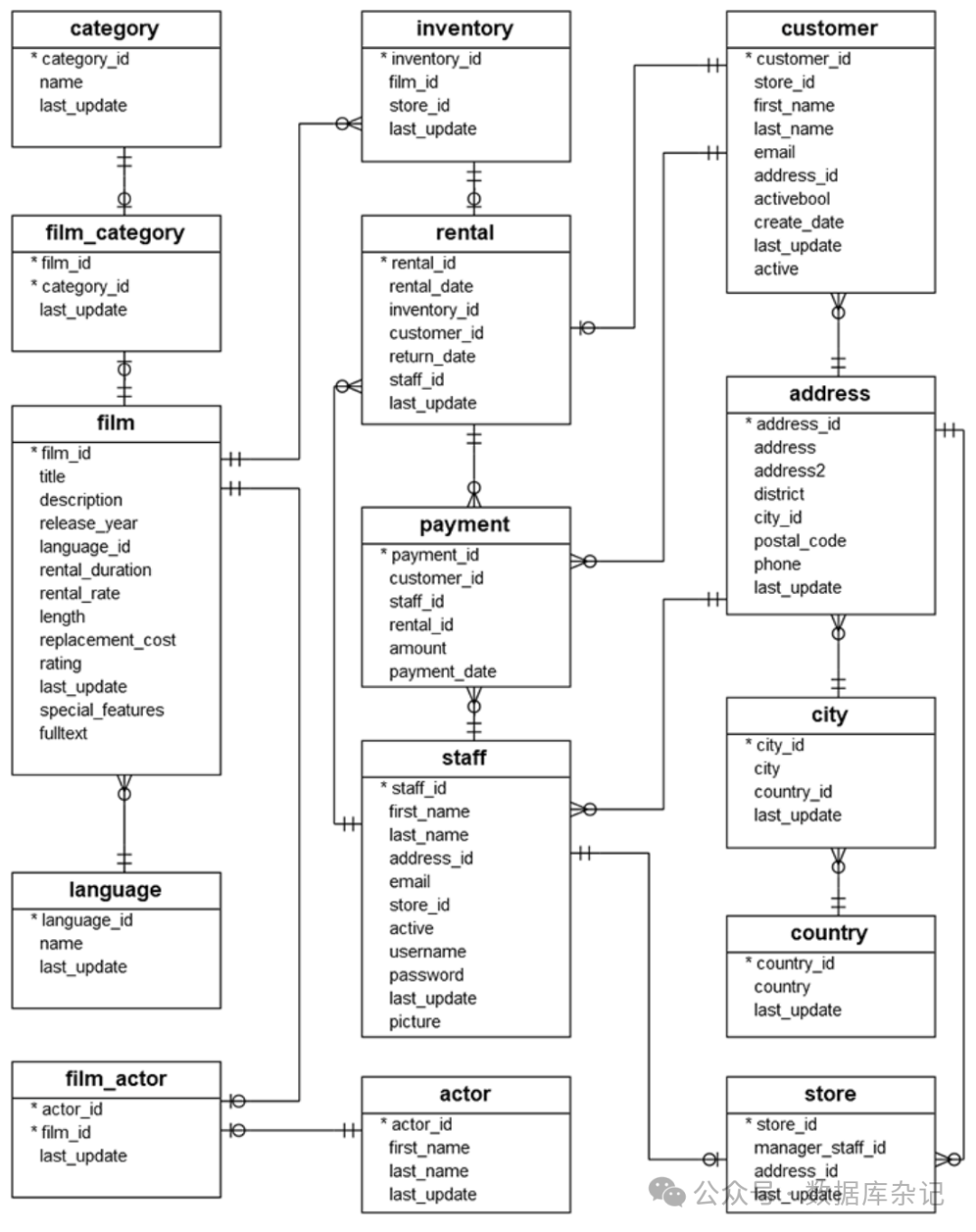
PostgreSQL 样例库中的表介绍
DVD 出租数据库中的表分别如下:
actor – 存储所有演员的数据,包括姓和名. film – 存储电影数据,如电影片名,发布年份,时长,等级等等。 film_actor – 存储电影以及演员之间的关联关系 category – 存储电影的相关目录数据 film_category- 存储电影以及目录之间关联关系 store – 存储商店数据,包含经理员工和相关地址信息 inventory – 存储库存数据 rental – 存储出租相关数据 payment – 存储顾客的支付信息 staff – 存储员工数据 customer – 存储顾客数据 address – 存储员工以及顾客的地址信息 city – 存储城市名 country – 存储国家名
下载 PostgreSQL sample database
下边的链接:
Download DVD Rental Sample Database[2]
你需要将这个zip文件解压成tar文件。
然后使用pg_restore将其恢复到目标实例当中。
pg_restore -U postgres -d dvdrental ./data/dvdrental.tar
简单的操作
启动一个pg16:
461JL9 opt pg_ctl start
waiting for server to start....2024-09-19 19:41:13.899 CST [1453] LOG:  redirecting log output to logging collector process
2024-09-19 19:41:13.899 CST [1453] HINT:  Future log output will appear in directory "log".
 done
server started

61JL9 opt psql --version
psql (PostgreSQL) 16.3 [By SeanHe]
这是一个MacOS上自行编译的pg16

-- 提前建好数据库
61JL9 data psql -c "create database dvdrental";
CREATE DATABASE

解压数据:
1JL9 opt cd ~/Downloads/postgres/data
61JL9 data unzip dvdrental.zip
Archive:  dvdrental.zip
  inflating: dvdrental.tar

恢复导入数据:
61JL9 data pg_restore -U postgres -d dvdrental ./dvdrental.tar
再看看有哪些表和数据:
61JL9 data psql dvdrental
psql (16.3 [By SeanHe])
Type "help" for help.

dvdrental=# \d
dvdrental=# \dt
             List of relations
 Schema |     Name      | Type  |  Owner
--------+---------------+-------+----------
 public | actor         | table | postgres
 public | address       | table | postgres
 public | category      | table | postgres
 public | city          | table | postgres
 public | country       | table | postgres
 public | customer      | table | postgres
 public | film          | table | postgres
 public | film_actor    | table | postgres
 public | film_category | table | postgres
 public | inventory     | table | postgres
 public | language      | table | postgres
 public | payment       | table | postgres
 public | rental        | table | postgres
 public | staff         | table | postgres
 public | store         | table | postgres
(15 rows)

dvdrental=# select count(*) from rental;
 count
-------
 16044
(1 row)

dvdrental=# select count(*) from payment;
 count
-------
 14596
(1 row)

dvdrental=# select count(*) from address;
 count
-------
   603
(1 row)

dvdrental=# select count(*) from actor;
 count
-------
   200
(1 row)

dvdrental=# select * from actor limit 5;
 actor_id | first_name |  last_name   |      last_update
----------+------------+--------------+------------------------
        1 | Penelope   | Guiness      | 2013-05-26 14:47:57.62
        2 | Nick       | Wahlberg     | 2013-05-26 14:47:57.62
        3 | Ed         | Chase        | 2013-05-26 14:47:57.62
        4 | Jennifer   | Davis        | 2013-05-26 14:47:57.62
        5 | Johnny     | Lollobrigida | 2013-05-26 14:47:57.62
(5 rows)

dvdrental=# select * from staff;
 staff_id | first_name | last_name | address_id |            email             | store_id | active | username |                 password                 |        last_update        |      picture
----------+------------+-----------+------------+------------------------------+----------+--------+----------+------------------------------------------+---------------------------+--------------------
        1 | Mike       | Hillyer   |          3 | Mike.Hillyer@sakilastaff.com |        1 | t      | Mike     | 8cb2237d0679ca88db6464eac60da96345513964 | 2006-05-16 16:13:11.79328 | \x89504e470d0a5a0a
        2 | Jon        | Stephens  |          4 | Jon.Stephens@sakilastaff.com |        2 | t      | Jon      | 8cb2237d0679ca88db6464eac60da96345513964 | 2006-05-16 16:13:11.79328 |
(2 rows)
里边的数据很丰富,尽情享用吧。
参考资料
Download the Printable ER Diagram: https://www.postgresqltutorial.com/wp-content/uploads/2018/03/printable-postgresql-sample-database-diagram.pdf
[2]Download DVD Rental Sample Database: https://www.postgresqltutorial.com/wp-content/uploads/2019/05/dvdrental.zip
我是【Sean】, 微信: _iihero, 欢迎大家长按关注并加星公众号:数据库杂记。有好资源相送,同时为你提供及时更新。已关注的朋友,发送0、1到7,都有好资源相送。

往期导读:
1. PostgreSQL中配置单双向SSL连接详解
2. 提升PSQL使用技巧:PostgreSQL中PSQL使用技巧汇集(1)
3. 提升PSQL使用技巧:PostgreSQL中PSQL使用技巧汇集(2)
4. PostgreSQL SQL的基础使用及技巧
5. PostgreSQL开发技术基础:过程与函数
6. PostgreSQL中vacuum 物理文件truncate发生的条件
7. PostgreSQL中表的年龄与Vacuum的实验探索:Vacuum有大用
8. PostgreSQL利用分区表来弥补AutoVacuum的不足
9. 也聊聊PostgreSQL中的空间膨胀与AutoVacuum
10. 正确理解SAP BTP中hyperscaler PG中的IOPS (AWS篇)
11. 由浅入深高可用(HA)之: HAProxy
