



SQL经典案例之NULL值排序与空字符串的滴滴点点
问题描述
- 对数据升降序排序操作时对于NULL值的处理
- NULL值与空字符串相爱相杀
构造测试数据
drop table t_null;
create table t_null(col1 int,col2 varchar(10),col3 int);
insert into t_null values(1,'ORACLE',99);
insert into t_null values(2,'MYSQL',88);
insert into t_null values(3,'POSTGRESQL',77);
insert into t_null values(4,'SQLSERVER',66);
insert into t_null values(5,'DB2',null);
insert into t_null values(6,'GAUSSDB',null);
insert into t_null values(7,'TIDB',null);
insert into t_null values(8,'MONGODB',55);
NULLS FIRST/LAST
- 默认排序方式:升序(ase),可用 desc 指定为降序
- 默认 NULL 为最大值
- NULLS FIRST/LAST 指定 NULL 为最前或最后
select * from t_null order by col3;
select * from t_null order by col3 asc;
select * from t_null order by col3 desc;
select * from t_null order by col3 nulls last;
select * from t_null order by col3 nulls first;
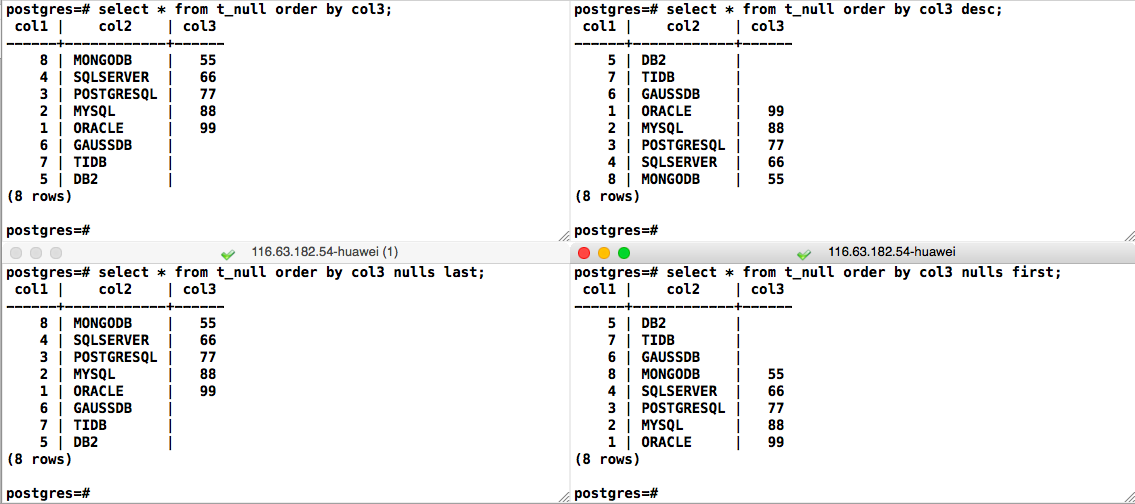
通用转换
将NULL转换为实际值
case when
select *,case when col3 is null then 0 else 1 end as is_null
from t_null order by is_null desc,col3;

select col1,col2,col3
from(
	select *,case when col3 is null then 0 else 1 end as is_null
	from t_null
) x
order by is_null desc,col3;

coalesce
select *,coalesce(col3,0) as is_null
from t_null order by is_null desc,col3;

select col1,col2,col3
from(
	select *,coalesce(col3,0) as is_null
	from t_null
) x
order by is_null desc,col3;

…
排序扩展
根据依赖于数据的键进行排序:t_null表若col2列为MYSQL按col1列排序,其次按col3排序
insert into t_null values(9,'MYSQL',33);
insert into t_null values(10,'MYSQL',44);

select * from t_null
order by case when col2='MYSQL' then col1 else col3 end;

select *,case when col2='MYSQL' then col1 else col3 end as order_column
from t_null order by order_column;

NULL的判断
- 判断值是否为NULL:is [not] null
NULL与任何值(包括NULL本身)都不相等,也不会相等,因此不能使用 = 或 != 来做判断
select * from t_null where col3 = null;
select * from t_null where col3 != null;
select * from t_null where col3 <> null;
select * from t_null where col3 is null;
select * from t_null where col3 is not null;

NULL与空字符串
- 在Oracle中空字符串与NULL等价
- 但在MySQL和PostgreSQL等数据库中非等价

NULL的比较
NULL代表未知,任何数据与NULL进行算术比较的结果也是未知,非真也非假,以下比较结果都是未知
NULL = 0
NULL != 0
NULL = ''
NULL = NULL
NULL != NULL
NULL = NULL OR NULL != NULL
在不同数据库中会提供些特殊运算符用于等值比较,也支持NULL的比较
MySQL的 <=>
select 1<=>1,1<=>NULL,NULL<=>NULL;

PostgreSQL的IS [NOT] DISTINCT FROM
select 1 IS DISTINCT FROM 1 AS "1!=1",
	1 IS DISTINCT FROM NULL AS "1!=NULL",
	NULL IS DISTINCT FROM NULL AS "NULL!=NULL";

NULL 与 NOT IN
-- NULL 与 IN
select * from t_null where col1 in (1,2,3,NULL);
-- 等价于
select * from t_null where col1=1 OR col1=2 OR col1=3 OR col1=NULL;

OR运算符只要两边有一个结果为真,最终结果就为真,所以列表中的NULL对查询不会产生影响
-- NULL 与 NOT IN
select * from t_null where col1 not in (1,2,3,NULL);
-- 等价于
select * from t_null where col1!=1 AND col1!=2 AND col1!=3 AND col1!=NULL;

而NOT IN等价最后的 !=NULL 结果是未知,也就意味着没有任何数据满足查询条件,也就不会返回任何结果。
⚠️ 在查询条件中使用 NOT IN 运算符时,一定要小心列表中可能出现的空置
count(*) 与count(col)
- count(*)与count(1)会统计所有行数(包括NULL和非NULL)
- count(列名)统计该列非 NULL 值的个数
insert into t_null values(11,null,11);
insert into t_null values(12,'',22);
insert into t_null values(13,null,22);
insert into t_null values(14,'',11);

select * from t_null;
select count(*),count(1),count(col2),count(col3),sum(col3),max(col3),min(col3) from t_null;

最后修改时间:2025-02-22 13:56:14
「喜欢这篇文章,您的关注和赞赏是给作者最好的鼓励」
关注作者
【版权声明】本文为墨天轮用户原创内容,转载时必须标注文章的来源(墨天轮),文章链接,文章作者等基本信息,否则作者和墨天轮有权追究责任。如果您发现墨天轮中有涉嫌抄袭或者侵权的内容,欢迎发送邮件至:contact@modb.pro进行举报,并提供相关证据,一经查实,墨天轮将立刻删除相关内容。
