



安装模块
使用python操作mysql有几种第三方模块,比较有名的是pymysql和mysql-connector-python,用法类似。
mysql-connector-python是官方提供的驱动模块。
pymysql官网:
https://github.com/PyMySQL/PyMySQL
使用清华镜像进行pymysql安装:
pip install pymysql -i https://pypi.tuna.tsinghua.edu.cn/simple
或者直接用pycharm安装。
新建一个项目:
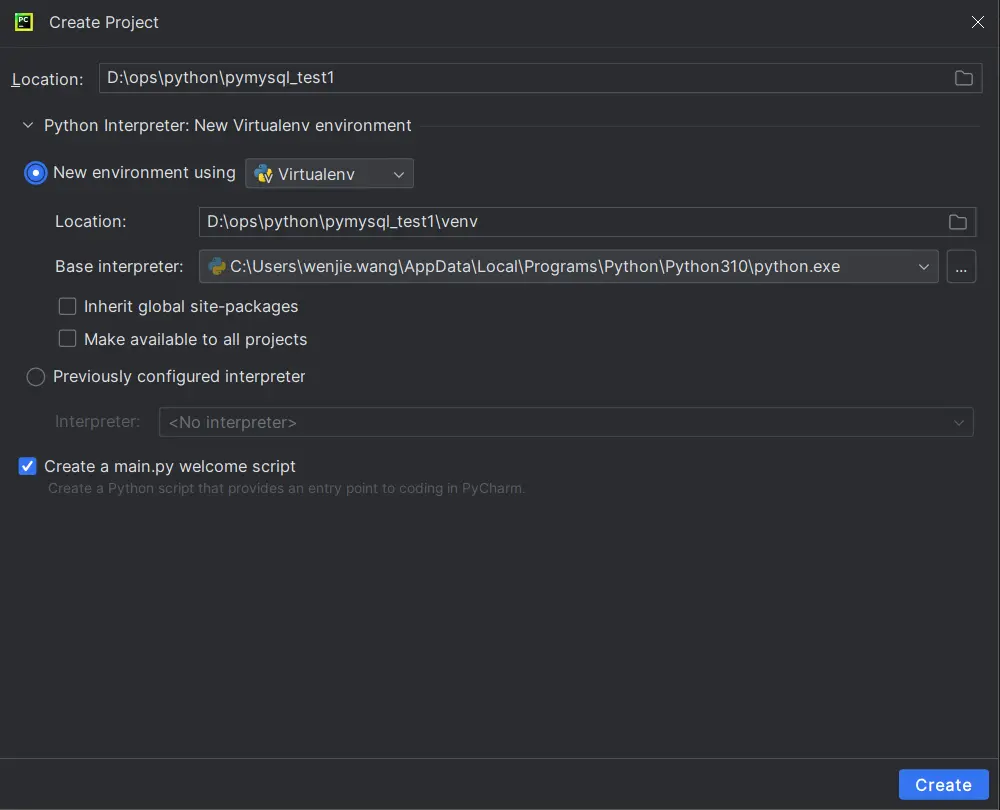
添加pymysql
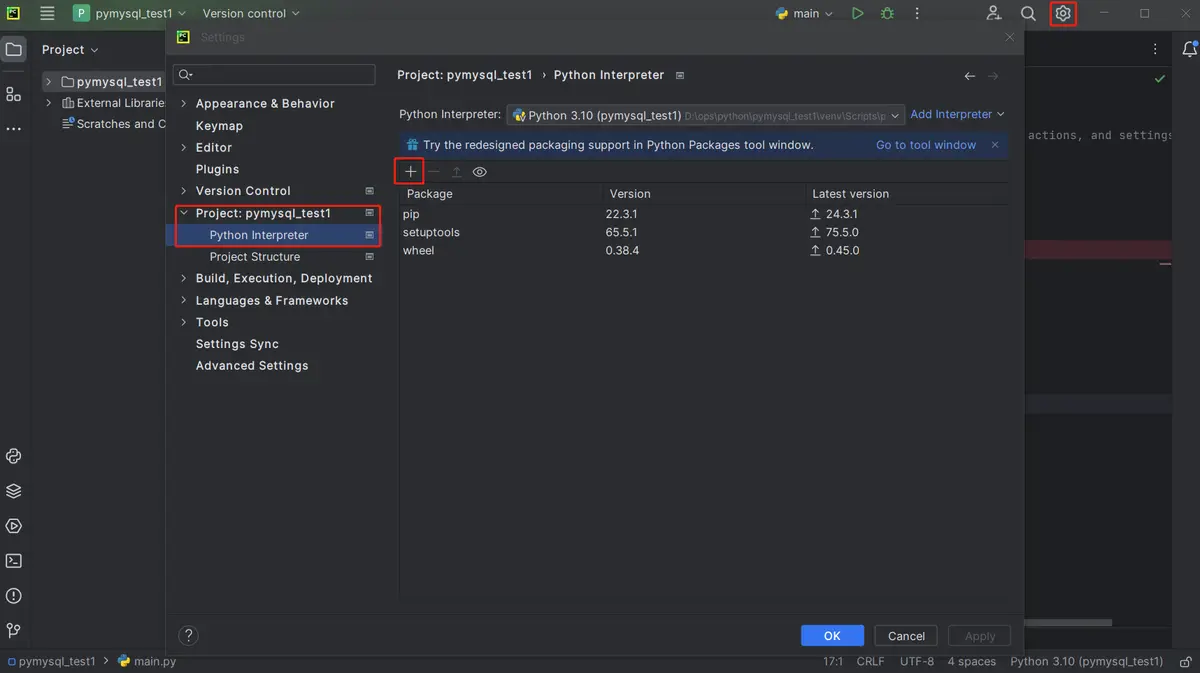
注意版本不要选rc,还是内测版不稳定;选项将-i镜像地址输入进来
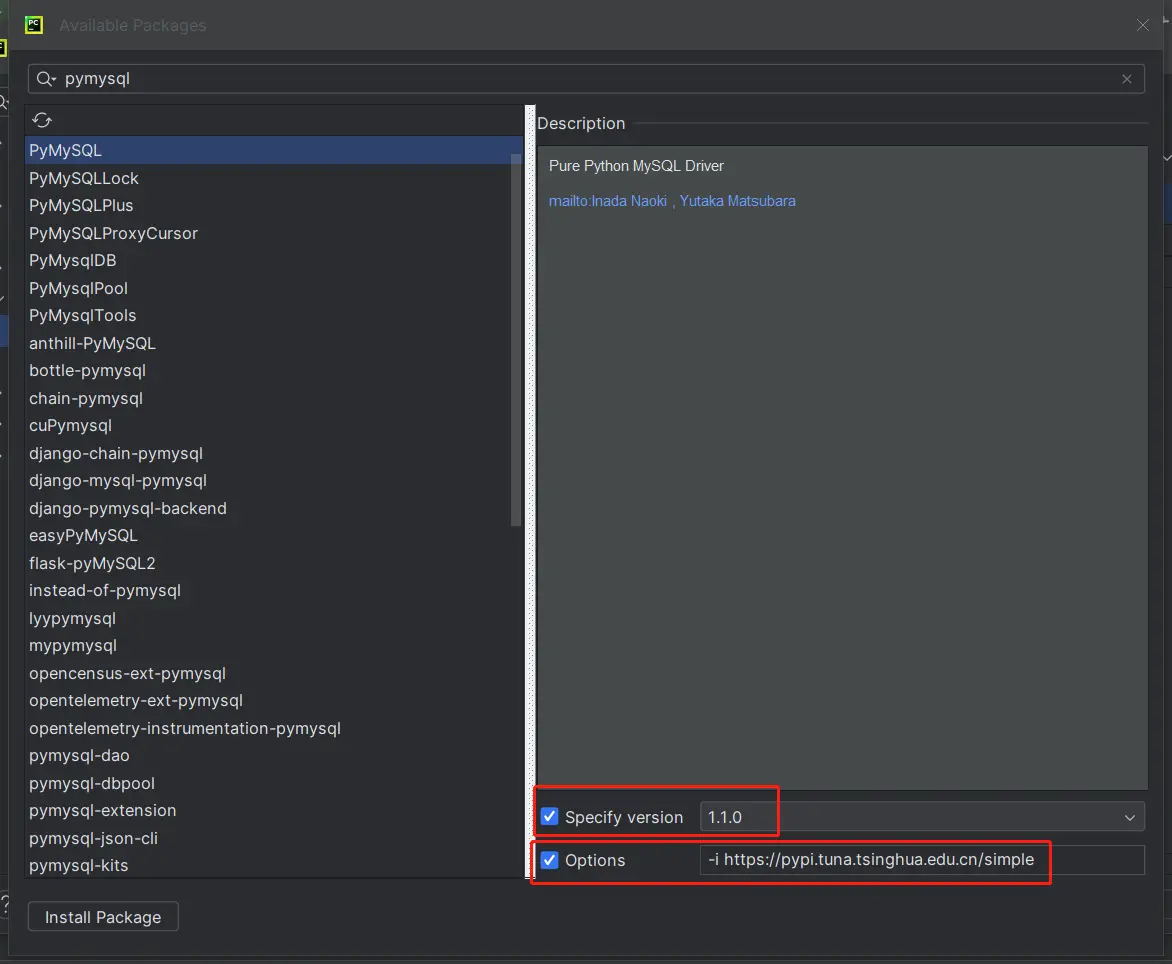

然后点install package,片刻后会提示package ‘PyMySQL’ installed successfully。
在内网环境下,需要配置内网PyPI源,再安装。
windows上打开pycharm下的terminal修改:
pip config set global.index-url https://mirrors.hxxxxn.com/repository/Pypi/simple/
或者找到pip.ini配置文件,并修改为:
[global]
index-url = https://mirrors.hxxxxn.com/repository/Pypi/simple/

[install]
trusted-host=mirrors.hxxxxn.com
之后再次打开pycharm下的terminal,执行如下命令安装:
pip install PyMySQL
创建数据库连接
"""
    pymysql创建连接基本写法
"""
from pymysql import Connection

# 定义全局变量
con = None

try:
    # 创建连接
    con = Connection(
        host="10.0.8.86",  # hostname
        port=3306,  # port
        user="wenjie.wang",
        password="xxxxxx"
    )
    # 查看con类型
    print(type(con))

    # 查看基本信息
    print(con.get_host_info())
    print(con.get_server_info())

except Exception as e:
    print("异常:", e)

finally:
    if con:
        # 关闭连接
        con.close()
其中:
con类型的结果为<class ‘pymysql.connections.Connection’>
get_host_info()结果为socket 10.0.8.86:3306
get_server_info()结果为8.0.36
报错汇总
如果host配置有问题,可能会报如下错误:
异常: (2003, "Can't connect to MySQL server on '10.0.8.186' (timed out)")
如果端口配置有问题,可能会报如下错误:
异常: (2003, "Can't connect to MySQL server on '10.0.8.86' ([WinError 10061] 由于目标计算机积极拒绝,无法连接。)")
如果账号有问题,可能会报如下错误:
异常: (1045, "Access denied for user 'wenjie.wang1'@'10.xxx.x.xx' (using password: YES)")
如果密码有问题,可能会报如下错误:
异常: 'cryptography' package is required for sha256_password or caching_sha2_password auth methods
执行DDL语句
连接MySQL数据库后,可以使用cursor()方法创建一个游标对象。
游标对象用于执行MySQL语句并返回结果。
from pymysql import Connection

# 定义全局变量
con = None

try:
    # 创建连接
    con = Connection(
        host="10.0.8.86",  # hostname
        port=3306,  # port
        user="wenjie.wang",
        password="xxxxxx",
        database="test"
    )

    # 创建游标对象
    cursor = con.cursor()

    # 定义一个建表语句
    sql = """
    CREATE TABLE `t1` (
	`id` INT NOT NULL AUTO_INCREMENT,
	`name` VARCHAR(50) NULL DEFAULT NULL,
	PRIMARY KEY (`id`)
    )
    COLLATE='utf8mb4_general_ci'
    ;
    """

    # 选择连接的数据库,可在连接配置中写好
    # con.select_db("test")

    # 使用游标对象执行SQL
    cursor.execute(sql)

    # 关闭游标
    # cursor.close()
except Exception as e:
    print("异常:", e)

finally:
    if con:
        # 关闭连接
        con.close()
理论上cursor也是需要关闭的,但实际上可以不用关,当关闭连接的时候,cursor也自动关闭了。
执行DML语句
同样可以使用cursor()方法创建一个游标对象,执行DML语句并返回结果。
from pymysql import Connection

# 定义全局变量
con = None

try:
    # 创建连接
    con = Connection(
        host="10.0.8.86",  # hostname
        port=3306,  # port
        user="wenjie.wang",
        password="xxxxxx",
        database="test"
    )

    # 创建游标对象
    cursor = con.cursor()

    # 使用游标对象执行DML语句
    cursor.execute("select * from t1;")

    # 获取所有查询结果
    result = cursor.fetchall()
    # print(type(result), result)
    for row in result:
        print(row)

except Exception as e:
    print("异常:", e)

finally:
    if con:
        # 关闭连接
        con.close()
其中查询结果是一个元组类型<class ‘tuple’>
对于插入、更新、删除等事务型操作,可以使用自动提交:
from pymysql import Connection

# 定义全局变量
con = None

try:
    # 创建连接
    con = Connection(
        host="10.0.8.86",  # hostname
        port=3306,  # port
        user="wenjie.wang",
        password="xxxxxx",
        database="test",
        autocommit=True
    )

    # 创建游标对象
    cursor = con.cursor()

    # 插入
    cursor.execute("insert into t1(name) values('qi.wang');")

    # 提交
    # con.commit()

    # 获取新插入的记录的主键id
    print("主键id=", con.insert_id())

except Exception as e:
    print("异常:", e)

finally:
    if con:
        # 关闭连接
        con.close()
调用存储过程
from pymysql import Connection

# 定义全局变量
con = None

try:
    # 创建连接
    con = Connection(
        host="10.0.8.86",  # hostname
        port=3306,  # port
        user="wenjie.wang",
        password="21!!Asato123",
        database="test",
        autocommit=True
    )

    # 创建游标对象
    cursor = con.cursor()

    # 使用游标对象调用存储过程
    cursor.execute("call test_add(1,2,@s);")
    cursor.execute("select @s;")

    result = cursor.fetchone()
    print(result[0]) #元组类型,取第一个数

except Exception as e:
    print("异常:", e)

finally:
    if con:
        # 关闭连接
        con.close()
