



 关注「Raymond运维」公众号,并设为「星标」,第一时间获取更多运维等文章,不再错过精彩内容。
什么是sidecar?

sidecar,直译为边车。如上图所示,边车就是加装在摩托车旁来达到拓展功能的目的,比如行驶更加稳定,可以拉更多的人和货物,坐在边车上的人可以给驾驶员指路等。边车模式通过给应用服务加装一个“边车”来达到控制和逻辑的分离的目的。
对于微服务来讲,我们可以用边车模式来做诸如 日志收集、服务注册、服务发现、限流、鉴权等不需要业务服务实现的控制面板能力。通常和边车模式比较的就是像spring-cloud那样的sdk模式,像上面提到的这些能力都通过sdk实现。

这两种实现模式各有优劣,sidecar模式会引入额外的性能损耗以及延时,但传统的sdk模式会让代码变得臃肿并且升级复杂,控制面能力和业务面能力不能分开升级。
本文的代码已经上传到gitee
sidecar 实现原理
介绍了sidecar的诸多功能,但是,sidecar是如何做到这些能力的呢?
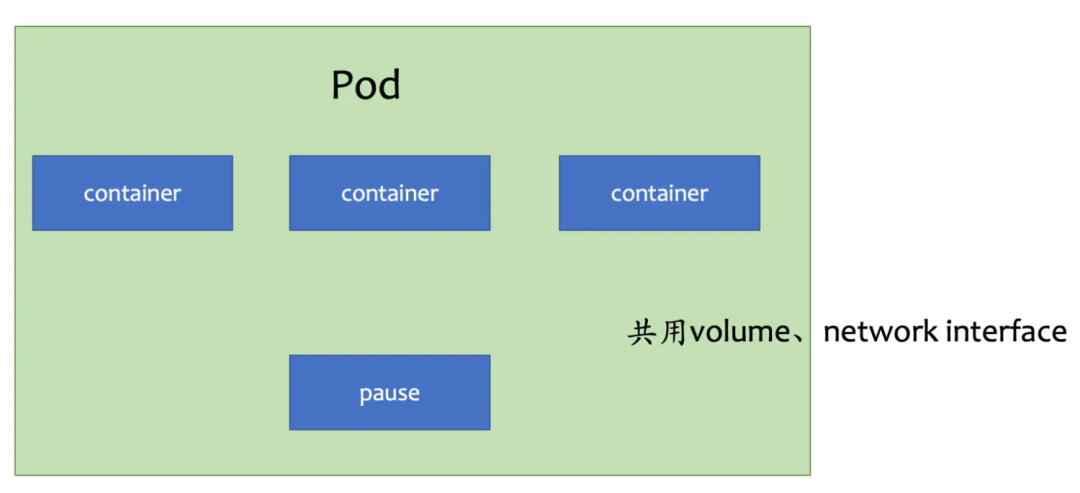
原来,在kubernetes中,一个pod是部署的最小单元,但一个pod里面,允许运行多个container(容器),多个container(容器)之间共享存储卷和网络栈。这样子,我们就可以多container来做sidecar,或者init-container(初始化容器)来调整挂载卷的权限
日志收集sidecar
日志收集sidecar的原理是利用多个container间可以共用挂载卷的原理实现的,通过将应用程序的日志路径挂出,用另一个程序访问路径下的日志来实现日志收集,这里用cat来替代了日志收集,部署yaml模板如下
apiVersion: v1kind: Podmetadata:name: webserverspec:volumes:- name: shared-logsemptyDir: {}containers:- name: nginximage: ttbb/nginx:matevolumeMounts:- name: shared-logsmountPath: /opt/sh/openresty/nginx/logs- name: sidecar-containerimage: ttbb/basecommand: ["sh","-c","while true; do cat opt/sh/openresty/nginx/logs/nginx.pid; sleep 30; done"]volumeMounts:- name: shared-logsmountPath: /opt/sh/openresty/nginx/logs
使用kubectl create -f 创建pod,通过kubectl logs命令就可以看到sidecar-container打印的日志输出
kubectl logs webserver sidecar-container
转发请求sidecar
这一节我们来实现,一个给应用程序转发请求的sidecar,应用程序代码如下
use std::io::prelude::*;use std::net::{TcpListener, TcpStream};fn main() {let listener = TcpListener::bind("127.0.0.1:7878").unwrap();for stream in listener.incoming() {let stream = stream.unwrap();handle_connection(stream);}println!("Hello, world!");}fn handle_connection(mut stream: TcpStream) {let mut buffer = [0; 1024];stream.read(&mut buffer).unwrap();let contents = "Hello";let response = format!("HTTP/1.1 200 OK\r\nContent-Length: {}\r\n\r\n{}",contents.len(),contents);println!("receive a request!");stream.write(response.as_bytes()).unwrap();stream.flush().unwrap();}
我们再来写一个sidecar,它会每15秒向应用程序发出请求
use std::thread;use std::time::Duration;fn main() {loop {thread::sleep(Duration::from_secs(15));let response = reqwest::blocking::get("http://localhost:7878").unwrap();println!("{}", response.text().unwrap())}}
通过仓库下的intput/build.sh
脚本构造镜像,运行yaml如下
apiVersion: v1kind: Podmetadata:name: webserverspec:containers:- name: input-serverimage: sidecar-examples:input-http-server- name: input-sidecarimage: sidecar-examples:sidecar-input
通过查看kubectl logs input input-http-server可以看到input-http-server收到了请求
receive a request!
receive a request!
拦截请求sidecar
应用程序代码,它会每15s向localhost
发出请求
package com.shoothzj.sidecarimport akka.actor.typed.ActorSystemimport akka.actor.typed.scaladsl.Behaviorsimport akka.http.scaladsl.Httpimport akka.http.scaladsl.model._import scala.concurrent.{ExecutionContextExecutor, Future}import scala.util.{Failure, Success}object HttpClient {def main(args: Array[String]): Unit = {while (true) {Thread.sleep(15_000L)implicit val system: ActorSystem[Nothing] = ActorSystem(Behaviors.empty, "SingleRequest")// needed for the future flatMap/onComplete in the endimplicit val executionContext: ExecutionContextExecutor = system.executionContextval responseFuture: Future[HttpResponse] = Http().singleRequest(HttpRequest(uri = "http://localhost:7979/hello"))responseFuture.onComplete {case Success(res) => println(res)case Failure(_) => sys.error("something wrong")}}}}
我们再来写一个sidecar,它会拦截http请求并打印日志
package com.shoothzj.sidecarimport akka.actor.typed.ActorSystemimport akka.actor.typed.scaladsl.Behaviorsimport akka.http.scaladsl.Httpimport akka.http.scaladsl.model._import akka.http.scaladsl.server.Directives._import scala.concurrent.ExecutionContextExecutorimport scala.io.StdInobject HttpServer {def main(args: Array[String]): Unit = {implicit val system: ActorSystem[Nothing] = ActorSystem(Behaviors.empty, "my-system")// needed for the future flatMap/onComplete in the endimplicit val executionContext: ExecutionContextExecutor = system.executionContextval route =path("hello") {get {println("receive a request")complete(HttpEntity(ContentTypes.`text/html(UTF-8)`, "<h1>Say hello to akka-http</h1>"))}}val bindingFuture = Http().newServerAt("localhost", 7979).bind(route)while (true) {Thread.sleep(15_000L)}}}
通过仓库下的output/build.sh
脚本构造镜像,运行yaml如下
apiVersion: v1kind: Podmetadata:name: outputspec:volumes:- name: shared-logsemptyDir: {}containers:- name: output-workloadimage: sidecar-examples:output-workloadimagePullPolicy: Never- name: sidecar-outputimage: sidecar-examples:sidecar-outputimagePullPolicy: Never
通过查看kubectl logs output output-workload可以看到output-sidecar收到了请求
HttpResponse(200 OK,List(Server: akka-http/10.2.9, Date: Tue, 29 Mar 2022 00:15:47 GMT),HttpEntity.Strict(text/html; charset=UTF-8,31 bytes total),HttpProtocol(HTTP/1.1))HttpResponse(200 OK,List(Server: akka-http/10.2.9, Date: Tue, 29 Mar 2022 00:16:02 GMT),HttpEntity.Strict(text/html; charset=UTF-8,31 bytes total),HttpProtocol(HTTP/1.1))HttpResponse(200 OK,List(Server: akka-http/10.2.9, Date: Tue, 29 Mar 2022 00:16:17 GMT),HttpEntity.Strict(text/html; charset=UTF-8,31 bytes total),HttpProtocol(HTTP/1.1))HttpResponse(200 OK,List(Server: akka-http/10.2.9, Date: Tue, 29 Mar 2022 00:16:32 GMT),HttpEntity.Strict(text/html; charset=UTF-8,31 bytes total),HttpProtocol(HTTP/1.1))HttpResponse(200 OK,List(Server: akka-http/10.2.9, Date: Tue, 29 Mar 2022 00:16:47 GMT),HttpEntity.Strict(text/html; charset=UTF-8,31 bytes total),HttpProtocol(HTTP/1.1))HttpResponse(200 OK,List(Server: akka-http/10.2.9, Date: Tue, 29 Mar 2022 00:17:02 GMT),HttpEntity.Strict(text/html; charset=UTF-8,31 bytes total),HttpProtocol(HTTP/1.1))HttpResponse(200 OK,List(Server: akka-http/10.2.9, Date: Tue, 29 Mar 2022 00:17:17 GMT),HttpEntity.Strict(text/html; charset=UTF-8,31 bytes total),HttpProtocol(HTTP/1.1))HttpResponse(200 OK,List(Server: akka-http/10.2.9, Date: Tue, 29 Mar 2022 00:17:32 GMT),HttpEntity.Strict(text/html; charset=
链接:https://www.cnblogs.com/huaweiyun/p/17934157.html
(版权归原作者所有,侵删)
微
信
群
WeChat group

为方便大家更好的交流运维等相关技术问题,特创建了微信交流群。需要加群的小伙伴们在关注微信公众号后,点击底部菜单关于→联系我,即可获取加群方式。
博客
客
Blog

CSDN博客

掘金博客
长按识别二维码访问博客网站,查看更多优质原创运维等文章。
