




Zabbix
作者简介

Zabbix资深玩家,SRE高级运维架构师,精通服务组件监控、模板制作及告警治理; 擅长领域:Zabbix API定制化开发,对接企业蓝鲸,JMS保垒机等运维资产管理; Zabbix 6.0 + 7.0 官方中文手册译者。
部署背景
一、环境约定
1.1 系统版本
操作系统:Red Hat Enterprise Linux 8.8 (Ootpa),高度的稳定企业级操作系统,能够为Zabbix的运行提供可靠的基础。 Zabbix版本:Zabbix 7.0最新版LTS,实时监控服务器、网络设备、应用程序等,为银行系统提供全面的监控服务。 MySQL版本:MySQL 8.0,关系型数据库管理系统,为Zabbix提供数据存储支持。 Web服务器:PHP 8.0,Zabbix的Web界面主程序语言,提供友好的用户交互体验 前端代理:NGINX,Web服务器和反向代理服务器,能够有效地处理并发请求,提高系统的响应速度。
1.2 硬件信息
CPU:至少2个核心,以保证系统能够快速处理监控数据和执行相关任务。 内存:至少8GB,确保系统在运行Zabbix及相关服务时能够有足够的内存资源,避免出现内存不足的情况。 存储:至少20GB可用空间,用于存储Zabbix的安装文件、数据库文件、日志文件等,监控数据存储另算。
二、RHEL8安装
2.1 系统初始化
# hostnamectl set-hostname zabbix-server && bash
# sestatus |egrep 'SELinux status|Current mode'
# sed -i 's/SELINUX=enforcing/SELINUX=disabled/g' /etc/selinux/config
# setenforce 0
# sestatus |egrep 'SELinux status|Current mode'
# systemctl stop firewalld
# systemctl disable firewalld
# systemctl status firewalld
# rm -f /etc/localtime
# ln -sf /usr/share/zoneinfo/Asia/Shanghai /etc/localtime
# hwclock -w
# timedatectl
# date
2.2 搭建本地源
# ll /mnt/dvd
# mkdir -p /mnt/dvd
# mount -o loop /root/rhel-8.8-x86_64-dvd.iso /mnt/dvd
# cd /etc/yum.repos.d/
# mkdir bak
# mv * bak
# tee > /etc/yum.repos.d/local.repo << 'EOF'
[LocalRepo_BaseOS]

name=LocalRepository_BaseOS
baseurl=file:///mnt/dvd/BaseOS
enabled=1
gpgcheck=0

[LocalRepo_AppStream]
name=LocalRepository_AppStream
baseurl=file:///mnt/dvd/AppStream
enabled=1
gpgcheck=0
EOF
# yum clean all
# yum makecache
# yum -y install lrzsz
2.3 准备离线资源
Zabbix:从Zabbix官方网站下载Zabbix 7.0最新版LTS的安装包,以及其所需的依赖库和插件。 MySQL:下载MySQL 8安装包,确保其版本与笔者的部署需求相匹配。 NGINX:下载NGINX的安装包,确保其版本与笔者的部署需求相匹配。 下载PHP:下载PHP 8的安装包,Zabbix Web运行基本环境。
# wget https://cdn.zabbix.com/zabbix/sources/stable/7.0/zabbix-7.0.3.tar.gz
# wget https://cdn.mysql.com/archives/mysql-8.0/mysql-8.0.32-linux-glibc2.12-x86_64.tar
# wget https://nginx.org/download/nginx-1.24.0.tar.gz
# wget https://www.php.net/distributions/php-8.3.3.tar.gz
三、MySQL8安装
3.1 卸载原有版本
rpm -qa|grep -i mysql
rpm -ev --nodeps 【上一步查询到的mysql版本名称】
find / -user mysql
find / -name mysql
3.2 安装当前版本
安装目录:/usr/local/mysql data 目录:/data/mysql/data/ 日志位置:/data/mysql/mysql_error.err
# xz -d tar xvf mysql-8.0.32-linux-glibc2.12-x86_64.tar
# tar xvf mysql-8.0.32-linux-glibc2.12-x86_64.tar.xz
# mv mysql-8.0.32-linux-glibc2.12-x86_64 mysql
# mv mysql /usr/local/
# groupadd mysql
# useradd -r -g mysql -s /bin/false mysql
# cd /usr/local/
# chown -R mysql:mysql /usr/local/mysql/
# mkdir -p /data/mysql/{data,backup,scripts,binlog}
# ll /data/mysql/
# chown -R mysql:mysql /data/mysql/
# echo "export PATH=$PATH:/usr/local/mysql/bin"  >>  /etc/profile
# source /etc/profile
# tee >  /etc/my.cnf << "EOF"
[mysqld]
user=mysql
port=3306
#basedir=/data/mysql
datadir = /data/mysql/data/
default_authentication_plugin=mysql_native_password
log_error=/data/mysql/mysql_error.err
max_connections=10000
max_connect_errors=10
character-set-server=utf8mb4
default-storage-engine=INNODB
default_authentication_plugin=mysql_native_password
[mysql]
default-character-set=utf8mb4
EOF
# mysqld --initialize --user=mysql
# cat /data/mysql/mysql_error.err
2024-09-14T08:26:30.427181Z 0 [Warning] [MY-010918] [Server] 'default_authentication_plugin' is deprecated and will be removed in a future release. Please use authentication_policy instead.
2024-09-14T08:26:30.427271Z 0 [System] [MY-013169] [Server] /usr/local/mysql/bin/mysqld (mysqld 8.0.32) initializing of server in progress as process 30827
2024-09-14T08:26:30.450042Z 1 [System] [MY-013576] [InnoDB] InnoDB initialization has started.
2024-09-14T08:26:31.128008Z 1 [System] [MY-013577] [InnoDB] InnoDB initialization has ended.
2024-09-14T08:26:32.685398Z 6 [Note] [MY-010454] [Server] A temporary password is generated for root@localhost: h62_Ruq-hxpo
# cp /usr/local/mysql/support-files/mysql.server /etc/init.d/mysqld
# chkconfig mysqld on
# systemctl start mysqld
3.3 如有防火墙
# firewall-cmd --list-all
# firewall-cmd --zone=public --add-port=3306/tcp --permanent
# firewall-cmd --reload
3.4 验证连通性
# mysql -uroot -p
mysql: error while loading shared libraries: libtinfo.so.5: cannot open shared object file: No such file or directory
# sudo ln -s /usr/lib64/libtinfo.so.6.1 /usr/lib64/libtinfo.so.5
# mysql -uroot -p
Enter password:
Welcome to the MySQL monitor.  Commands end with ; or \g.
Your MySQL connection id is 8
Server version: 8.0.32

Copyright (c) 2000, 2022, Oracle and/or its affiliates.

Oracle is a registered trademark of Oracle Corporation and/or its
affiliates. Other names may be trademarks of their respective
owners.

Type 'help;' or '\h' for help. Type '\c' to clear the current input statement.
# 修改初始密码
mysql> alter user root@localhost identified by '111111';
Query OK, 0 rows affected (0.00 sec)
# 刷新权限
mysql> flush privileges;
Query OK, 0 rows affected (0.01 sec)
# systemctl enable mysql
# systemctl restart mysql
四、Zabbix安装
4.1 安装依赖
# yum -y install net-snmp net-snmp-devel pcre*
4.2 编译安装
# groupadd zabbix
# useradd -g zabbix zabbix
# tar -zxf zabbix-7.0.3.tar.gz
# cd zabbix-7.0.3/
# ./configure --prefix=/usr/local/zabbix --enable-server --enable-agent --with-mysql --with-net-snmp --with-libcurl --with-libxml2 --with-unixodbc --enable-ipv6 --enable-java --with-openssl  --with-iconv --with-iconv-include --with-iconv-lib --with-libpcre --with-libevent --with-zlib --with-zlib-include --with-zlib-lib --with-libpthread
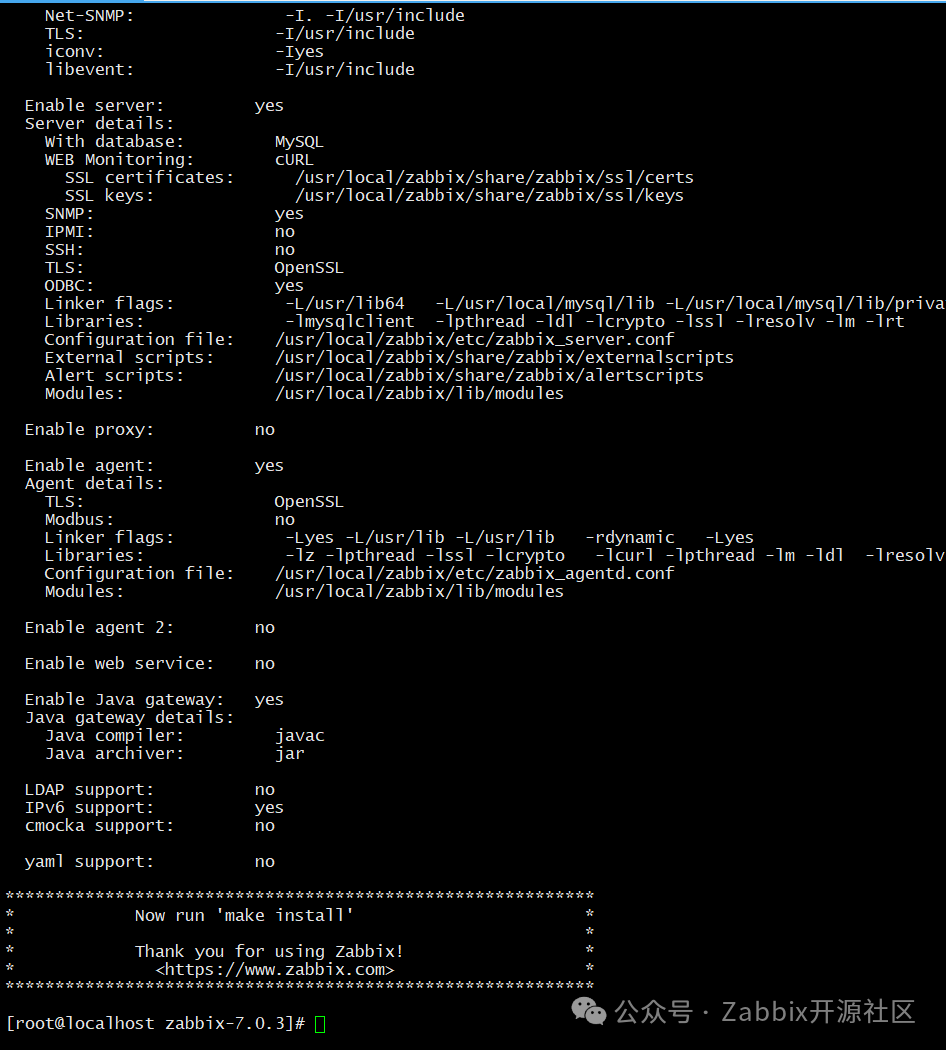
# make install
make[2]: Nothing to be done for 'install-exec-am'.
 /usr/bin/mkdir -p '/usr/local/zabbix/share/man/man1'
 /usr/bin/install -c -m 644 'zabbix_get.man' '/usr/local/zabbix/share/man/man1/zabbix_get.1'
 /usr/bin/install -c -m 644 'zabbix_sender.man' '/usr/local/zabbix/share/man/man1/zabbix_sender.1'
 /usr/bin/mkdir -p '/usr/local/zabbix/share/man/man8'
 /usr/bin/install -c -m 644 'zabbix_agentd.man' '/usr/local/zabbix/share/man/man8/zabbix_agentd.8'
 /usr/bin/install -c -m 644 'zabbix_server.man' '/usr/local/zabbix/share/man/man8/zabbix_server.8'
make[2]: Leaving directory '/root/zabbix-7.0.3/man'
make[1]: Leaving directory '/root/zabbix-7.0.3/man'
Making install in misc
make[1]: Entering directory '/root/zabbix-7.0.3/misc'
make[2]: Entering directory '/root/zabbix-7.0.3/misc'
make[2]: Nothing to be done for 'install-exec-am'.
make[2]: Nothing to be done for 'install-data-am'.
make[2]: Leaving directory '/root/zabbix-7.0.3/misc'
make[1]: Leaving directory '/root/zabbix-7.0.3/misc'
make[1]: Entering directory '/root/zabbix-7.0.3'
make[2]: Entering directory '/root/zabbix-7.0.3'
make[2]: Nothing to be done for 'install-exec-am'.
make[2]: Nothing to be done for 'install-data-am'.
make[2]: Leaving directory '/root/zabbix-7.0.3'
make[1]: Leaving directory '/root/zabbix-7.0.3'
# ln -s /usr/local/mysql/lib/libmysqlclient.so.21.2.32 /usr/lib64/libmysqlclient.so.21

# /usr/local/zabbix/sbin/zabbix_server -V
zabbix_server (Zabbix) 7.0.3
Revision d93ce022627 19 August 2024, compilation time: Sep 26 2024 16:14:19

Copyright (C) 2024 Zabbix SIA
License AGPLv3: GNU Affero General Public License version 3 <https://www.gnu.org/licenses/>.
This is free software: you are free to change and redistribute it according to
the license. There is NO WARRANTY, to the extent permitted by law.

This product includes software developed by the OpenSSL Project
for use in the OpenSSL Toolkit (http://www.openssl.org/).

Compiled with OpenSSL 1.1.1k  FIPS 25 Mar 2021
Running with OpenSSL 1.1.1k  FIPS 25 Mar 2021
4.3 导入库表
# mysql -uroot -p
password
mysql> create database zabbix character set utf8mb4 collate utf8mb4_bin;
mysql> create user zabbix@localhost identified by '111111';
mysql> grant all privileges on zabbix.* to zabbix@localhost;
mysql> create user zabbix@127.0.0.1 identified by '111111';
mysql> grant all privileges on zabbix.* to zabbix@127.0.0.1;
mysql> set global log_bin_trust_function_creators = 1;
mysql> quit;
# cd zabbix-7.0.3/database/mysql
# mysql -u root -p111111 zabbix < schema.sql
# mysql -u root -p111111 zabbix < images.sql
# mysql -u root -p111111 zabbix < data.sql
4.4 配置服务
# cd zabbix-7.0.3/
# cp misc/init.d/fedora/core/zabbix_* /etc/init.d/
# ll -d /etc/init.d/zabbix_*
# chmod +x /etc/init.d/zabbix_*
# chown -R zabbix: /usr/local/zabbix/
# vi /etc/init.d/zabbix_server
将
BASEDIR=/usr/local
修改为
BASEDIR=/usr/local/zabbix

# vi /etc/init.d/zabbix_agentd
将
BASEDIR=/usr/local
修改为
BASEDIR=/usr/local/zabbix
# grep -Ev "^#|^$" /usr/local/zabbix/etc/zabbix_server.conf
LogFile=/usr/local/zabbix/logs/zabbix_server.log
PidFile=/usr/local/zabbix/run/zabbix_server.pid
DBHost=127.0.0.1
DBName=zabbix
DBUser=zabbix
DBPassword=111111
DBPort=3306
Include=/usr/local/zabbix/etc/zabbix_server.conf.d/*.conf
StatsAllowedIP=127.0.0.1
EnableGlobalScripts=0
# chkconfig --add zabbix_server
# chkconfig  zabbix_server on
# service zabbix_server start

# chkconfig --add zabbix_agentd
# chkconfig  zabbix_agentd on
# service start zabbix_agentd  start
五、Nginx安装
5.1 安装部署
# tar -zxvf nginx-1.24.0.tar.gz
# cd nginx-1.24.0/
./configure --user=zabbix --group=zabbix --prefix=/usr/local/nginx --with-http_stub_status_module --with-http_ssl_module --with-http_gzip_static_module --with-pcre
# make -j 8 && make install
# /usr/local/nginx/sbin/nginx -V
# /usr/local/nginx/sbin/nginx -V
nginx version: nginx/1.24.0
built by gcc 8.5.0 20210514 (Red Hat 8.5.0-18) (GCC)
built with OpenSSL 1.1.1k  FIPS 25 Mar 2021
TLS SNI support enabled
configure arguments: --user=zabbix --group=zabbix --prefix=/usr/local/nginx --with-http_stub_status_module --with-http_ssl_module --with-http_gzip_static_module --with-pcre
5.2 加载配置
# tee > /usr/local/nginx/conf/nginx.conf << "EOF"

user zabbix zabbix;
worker_processes auto;
error_log  logs/error.log  crit;
error_log  logs/error.log  notice;
error_log  logs/error.log  info;
pid        logs/nginx.pid;

events {
    worker_connections  1024;
}

http {
    include       mime.types;
    default_type  application/octet-stream;
    #access_log  logs/access.log  main;

    sendfile        on;
    #tcp_nopush     on;
    #keepalive_timeout  0;
    keepalive_timeout  65;
    #gzip  on;

    server {
        listen       80;
        server_name  localhost;
        #charset koi8-r;
        #access_log  logs/host.access.log  main;
        location / {
            root   html;
            index  index.html index.htm index.php;
        }
        error_page   500 502 503 504  /50x.html;
        location = /50x.html {
            root   html;
        }
        location ~ \.php$ {
            fastcgi_pass   127.0.0.1:9000;
            fastcgi_index  index.php;
            fastcgi_param  SCRIPT_FILENAME  $document_root$fastcgi_script_name;
            include        fastcgi_params;
        }
    }
}
EOF
5.3 配置服务
# tee > /usr/lib/systemd/system/nginx.service << "EOF"

[Unit]
Description=nginx
After=network.target

[Service]
Type=forking
ExecStart=/usr/local/nginx/sbin/nginx -c /usr/local/nginx/conf/nginx.conf
ExecReload=-/usr/local/nginx/sbin/nginx -s reload
ExecStop=-/usr/local/nginx/sbin/nginx -s quit
PrivateTmp=true

[Install]
WantedBy=multi-user.target
EOF
# systemctl daeon-reload
# systemctl start nginx
# systemctl status nginx
# systemctl enable nginx
# curl localhost -I
HTTP/1.1 200 OK
Server: nginx/1.24.0
Date: Sat, 14 Sep 2024 09:34:36 GMT
Content-Type: text/html
Content-Length: 615
Last-Modified: Sat, 14 Sep 2024 09:22:49 GMT
Connection: keep-alive
ETag: "66e555e9-267"
Accept-Ranges: bytes
六、PHP8安装
6.1 安装依赖
# yum install -y unzip gcc gcc-c++ perl readline readline-devel openssl openssl-devel zlib zlib-devel ncurses-devel perl-ExtUtils-Embed libxslt* python3-devel
# yum -y install libevent-devel unixODBC unixODBC-devel java-1.8.0-openjdk-devel openssl-devel
# yum install cmake -y
# cmake --version
6.2 编译安装
# tar xf php-8.3.3.tar.gz
# cd php-8.3.3/
# ./configure --prefix=/usr/local/php --sysconfdir=/etc/php --with-openssl --with-zlib --with-bz2 --with-curl --enable-bcmath --enable-gd --with-webp --with-jpeg --with-mhash --enable-mbstring --with-imap-ssl --with-mysqli --enable-exif --with-ffi --with-zip --enable-sockets --with-pcre-jit --enable-fpm --with-pdo-mysql --enable-pcntl --with-gettext --with-freetype
SQLite3版本(至少为 3.7.7)
checking whether to enable the SQLite3 extension... yes
checking for sqlite3 >= 3.7.7... no
configure: error: Package requirements (sqlite3 >= 3.7.7) were not met:

No package 'sqlite3' found

Consider adjusting the PKG_CONFIG_PATH environment variable if you
installed software in a non-standard prefix.
sqlite开发库
# yum -y install sqlite-devel
BZip2支持,但在默认路径下没有找到
BZip2库
checking whether to enable bc style precision math functions... yes
checking for BZip2 support... yes
checking for BZip2 in default path... not found
configure: error: Please reinstall the BZip2 distribution
zip2开发库
[root@zabbix02 php-8.3.8]# yum -y install bzip2-devel
libffi库且其版本需要大于或等于
3.0.11,但是并没有找到满足条件的库
checking whether to enable EXIF (metadata from images) support... yes
checking for FFI support... yes
checking for libffi >= 3.0.11... no
configure: error: Package requirements (libffi >= 3.0.11) were not met:

No package 'libffi' found

Consider adjusting the PKG_CONFIG_PATH environment variable if you
installed software in a non-standard prefix.
libffi开发库
[root@zabbix02 php-8.3.8]# yum -y install libffi-devel
libpng库
checking for zlib... yes
checking for libpng... no
configure: error: Package requirements (libpng) were not met:

No package 'libpng' found

Consider adjusting the PKG_CONFIG_PATH environment variable if you
installed software in a non-standard prefix.
libpng开发库
[root@zabbix02 php-8.3.8]# yum -y install libpng-devel
libwebp库,或者找到的版本低于所需的
0.2.0checking for libpng... yes
checking for libwebp >= 0.2.0... no
configure: error: Package requirements (libwebp >= 0.2.0) were not met:
No package 'libwebp' found
Consider adjusting the PKG_CONFIG_PATH environment variable if you
installed software in a non-standard prefix.
libwebp开发库
[root@zabbix02 php-8.3.8]# yum -y install libwebp-devel
libjpeg库
checking for libwebp >= 0.2.0... yes
checking for libjpeg... no
configure: error: Package requirements (libjpeg) were not met:

No package 'libjpeg' found

Consider adjusting the PKG_CONFIG_PATH environment variable if you
installed software in a non-standard prefix.
libjpeg开发库
[root@zabbix02 php-8.3.8]# yum -y install libjpeg-devel
oniguruma库
checking whether to enable multibyte regex support (requires oniguruma)... yes
checking for oniguruma... no
configure: error: Package requirements (oniguruma) were not met:

No package 'oniguruma' found

Consider adjusting the PKG_CONFIG_PATH environment variable if you
installed software in a non-standard prefix.
oniguruma开发库
# yum install autoconf automake libtool -y
# wget https://github.com/kkos/oniguruma/archive/v6.9.4.tar.gz -O oniguruma-6.9.4.tar.gz
# tar xf oniguruma-6.9.4.tar.gz
# cd oniguruma-6.9.4/
# ./autogen.sh && ./configure --prefix=/usr
# make && make install
libzip库版本
checking for zip archive read/write support... yes
checking for libzip >= 0.11 libzip != 1.3.1 libzip != 1.7.0... no
configure: error: Package requirements (libzip >= 0.11 libzip != 1.3.1 libzip != 1.7.0) were not met:

No package 'libzip' found
No package 'libzip' found
No package 'libzip' found

Consider adjusting the PKG_CONFIG_PATH environment variable if you
installed software in a non-standard prefix.
libzip开发库
[root@zabbix02 php-8.3.8]# wget ftp://ftp.icm.edu.pl/packages/linux-pbone/rpms.remirepo.net/enterprise/7/remi/x86_64/libzip5-devel-1.10.0-1.el7.remi.x86_64.rpm
[root@zabbix02 php-8.3.8]# wget ftp://ftp.icm.edu.pl/packages/linux-pbone/rpms.remirepo.net/enterprise/7/remi/x86_64/libzip5-1.10.0-1.el7.remi.x86_64.rpm
[root@zabbix02 php-8.3.8]# yum -y install ./libzip5-*
configure: error: Package requirements (libcurl >= 7.29.0) were not met:

Package 'libcurl', required by 'virtual:world', not found

Consider adjusting the PKG_CONFIG_PATH environment variable if you
installed software in a non-standard prefix.

Alternatively, you may set the environment variables CURL_CFLAGS
and CURL_LIBS to avoid the need to call p
# yum install -y libcurl-devel
# curl -LO https://jaist.dl.sourceforge.net/project/freetype/freetype2/2.13.2/freetype-2.13.2.tar.xz
# tar xf freetype-2.13.2.tar.xz
# cd freetype-2.13.2
# ./configure
Library configuration:
  external zlib: yes (pkg-config)
  bzip2:         yes (autoconf test)
  libpng:        yes (pkg-config)
  harfbuzz:      no
  brotli:        no
  pthread:       yes

configure: WARNING:
  `make refdoc' will fail since pip package `docwriter' is not installed.
  To install, run `pip install docwriter', or to use a Python
  virtual environment, run `make refdoc-venv' (requires pip package
  `virtualenv').  These operations require Python >= 3.5.
[root@zabbix02 freetype-2.13.2]# make && make install
/usr/bin/install -c -m 644 /root/freetype-2.13.2/include/ft2build.h                  \
          /usr/local/include/freetype2/ft2build.h
/usr/bin/install -c -m 644 ./builds/unix/ftconfig.h                        \
          /usr/local/include/freetype2/freetype/config/ftconfig.h
/usr/bin/install -c -m 644 /root/freetype-2.13.2/objs/ftmodule.h                          \
          /usr/local/include/freetype2/freetype/config/ftmodule.h
/usr/bin/install -c -m 644 ./builds/unix/ftoption.h                        \
          /usr/local/include/freetype2/freetype/config/ftoption.h
/usr/bin/install -c -m 644 ./builds/unix/freetype2.m4          \
          /usr/local/share/aclocal/freetype2.m4
/usr/bin/install -c -m 644 ./builds/unix/freetype2.pc             \
          /usr/local/lib/pkgconfig/freetype2.pc
# cd php-8.3.8/
# make clean
# export PKG_CONFIG_PATH=/usr/local/lib/pkgconfig:$PKG_CONFIG_PATH
# ./configure --prefix=/usr/local/php --sysconfdir=/etc/php --with-openssl --with-zlib --with-bz2 --with-curl --enable-bcmath --enable-gd --with-webp --with-jpeg --with-mhash --enable-mbstring --with-imap-ssl --with-mysqli --enable-exif --with-ffi --with-zip --enable-sockets --with-pcre-jit --enable-fpm --with-pdo-mysql --enable-pcntl --with-gettext --with-freetype
# make -j 4 && make install
Installing shared extensions:     /usr/local/php/lib/php/extensions/no-debug-non-zts-20230831/
Installing PHP CLI binary:        /usr/local/php/bin/
Installing PHP CLI man page:      /usr/local/php/php/man/man1/
Installing PHP FPM binary:        /usr/local/php/sbin/
Installing PHP FPM defconfig:     /etc/php/
Installing PHP FPM man page:      /usr/local/php/php/man/man8/
Installing PHP FPM status page:   /usr/local/php/php/php/fpm/
Installing phpdbg binary:         /usr/local/php/bin/
Installing phpdbg man page:       /usr/local/php/php/man/man1/
Installing PHP CGI binary:        /usr/local/php/bin/
Installing PHP CGI man page:      /usr/local/php/php/man/man1/
Installing build environment:     /usr/local/php/lib/php/build/
Installing header files:          /usr/local/php/include/php/
Installing helper programs:       /usr/local/php/bin/
  program: phpize
  program: php-config
Installing man pages:             /usr/local/php/php/man/man1/
  page: phpize.1
  page: php-config.1
Installing PDO headers:           /usr/local/php/include/php/ext/pdo/
# cd php-8.3.3/
# mv /etc/php/php-fpm.d/www.conf.default /etc/php/php-fpm.d/www.conf
# mv /etc/php/php-fpm.conf.default /etc/php/php-fpm.conf
# ln -s /usr/local/php/bin/* /usr/bin/
# cp ./sapi/fpm/php-fpm.service /lib/systemd/system/
# cp php.ini-development /usr/local/php/lib/php.ini
# ln -s /usr/local/php/lib/php.ini /etc/php.ini
6.3 配置服务
# cat /usr/local/nginx/conf/nginx.conf
user  zabbix;
worker_processes  1;

error_log  /apps/nginx/logs/error.log warn;

events {
    worker_connections  1024;
}


http {
    include     /apps/nginx/conf.d/*.conf;
    include       mime.types;
    log_format  main  '$remote_addr - $remote_user [$time_local] "$request" '
                      '$status $body_bytes_sent "$http_referer" '
                      '"$http_user_agent" "$http_x_forwarded_for"';
    access_log  /apps/nginx/logs/access.log  main;
    default_type  application/octet-stream;
    sendfile        on;
    keepalive_timeout  65;
}
[root@zabbix01 zabbix-7.0.0]# cat /usr/local/nginx/conf.d/zabbix.conf
server {
        listen 80;
        server_name localhost;
        root /apps/nginx/html;
        index index.php;
        location ~ \.php$ {
                index index.php;
                fastcgi_pass 127.0.0.1:9000;
                fastcgi_index index.php;
                fastcgi_param SCRIPT_FILENAME $document_root$fastcgi_script_name;
                include fastcgi_params;
        }
}
# systemctl restart nginx
# systemctl daemon-reload
# systemctl enable --now php-fpm
# vim /usr/lib/systemd/system/php-fpm.service
ProtectSystem=full   #将这一行修改为ProtectSystem=false
# systemctl daemon-reload
# systemctl start php-fpm
# systemctl status php-fpm
● php-fpm.service - The PHP FastCGI Process Manager
   Loaded: loaded (/usr/lib/systemd/system/php-fpm.service; enabled; vendor preset: disabled)
   Active: active (running) since Thu 2024-09-19 15:44:47 CST; 26s ago
 Main PID: 266392 (php-fpm)
    Tasks: 3 (limit: 23008)
   Memory: 8.4M
   CGroup: /system.slice/php-fpm.service
           ├─266392 php-fpm: master process (/etc/php/php-fpm.conf)
           ├─266393 php-fpm: pool www
           └─266394 php-fpm: pool www

Sep 19 15:44:47 localhost.localdomain systemd[1]: Started The PHP FastCGI Process Manager.
七、ZBX登录
7.1 加载前端
# rm -rf /usr/local/nginx/html
# cp -r zabbix-7.0.3/ui /usr/local/nginx/html
# chown -R zabbix.zabbix /usr/local/nginx
# systemctl restart php-fpm
7.2 配置数据库
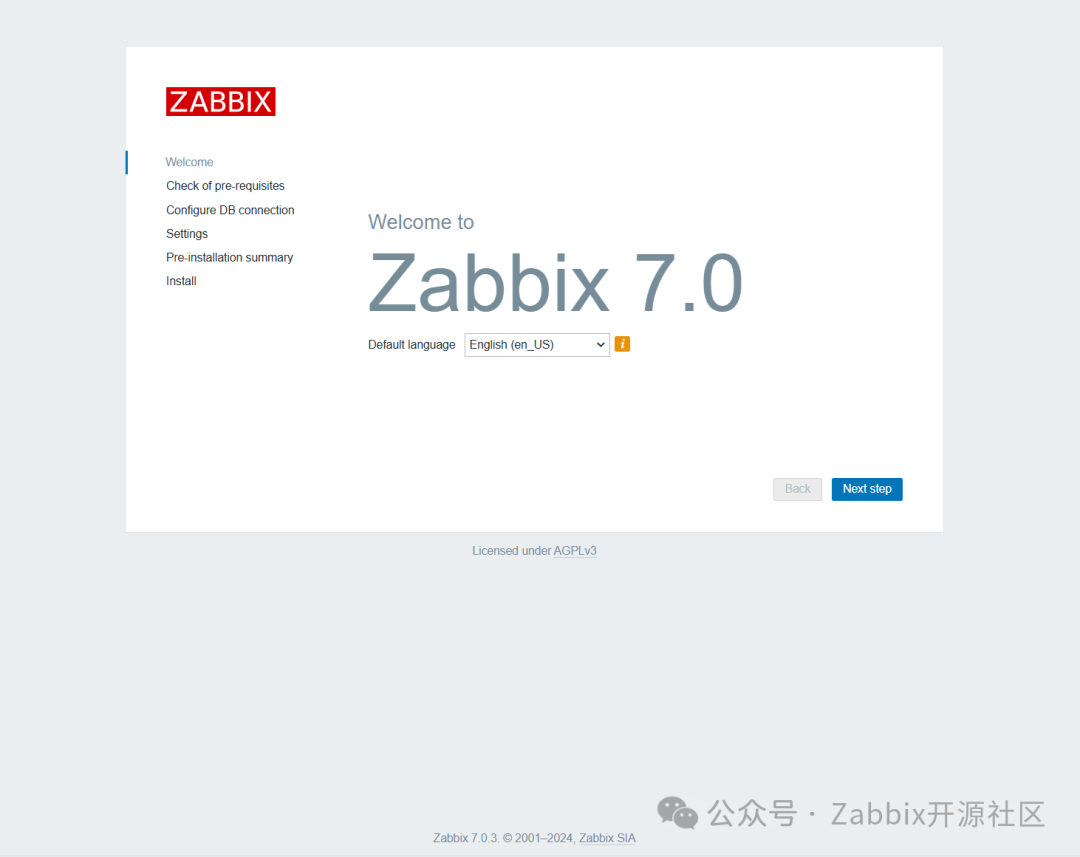
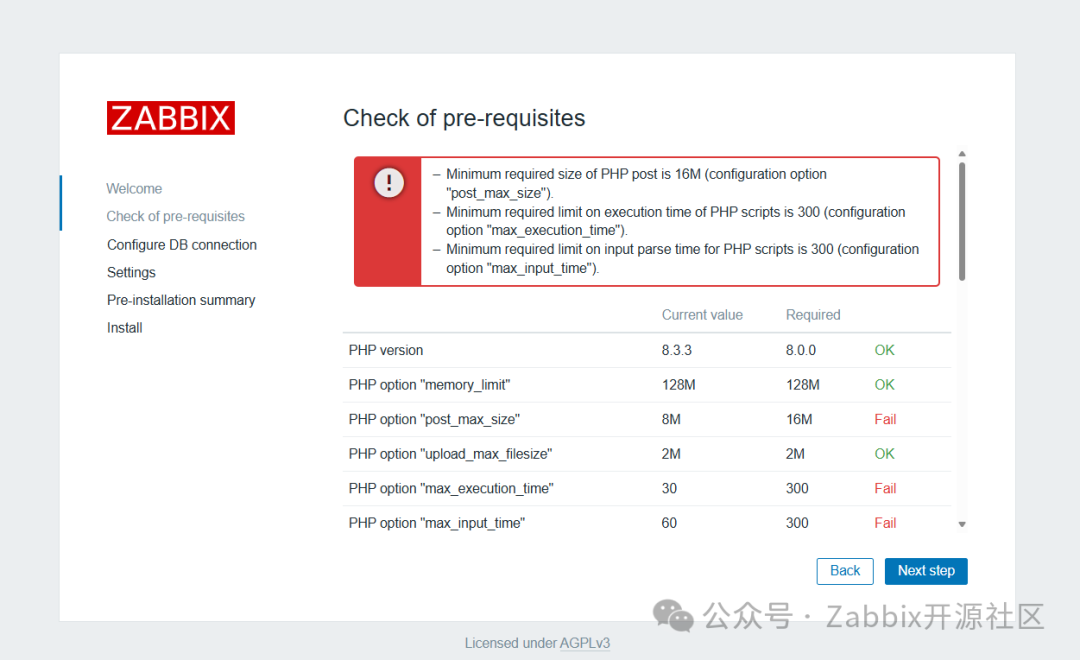
- Minimum required size of PHP post is 16M (configuration option "post_max_size").
- Minimum required limit on execution time of PHP scripts is 300 (configuration option "max_execution_time").
- Minimum required limit on input parse time for PHP scripts is 300 (configuration option "max_input_time").
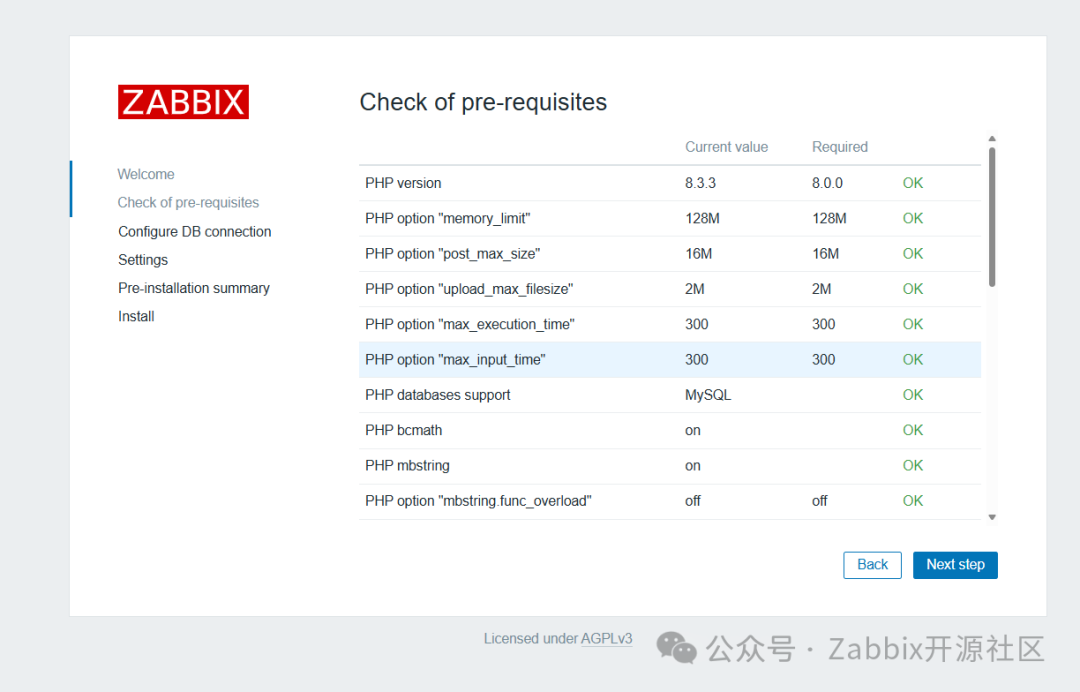
# grep -E "^post_max_size|^max_execution_time|^max_input_time" /etc/php.ini
max_execution_time = 300
max_input_time = 300
post_max_size = 16M
# systemctl restart php-fpm
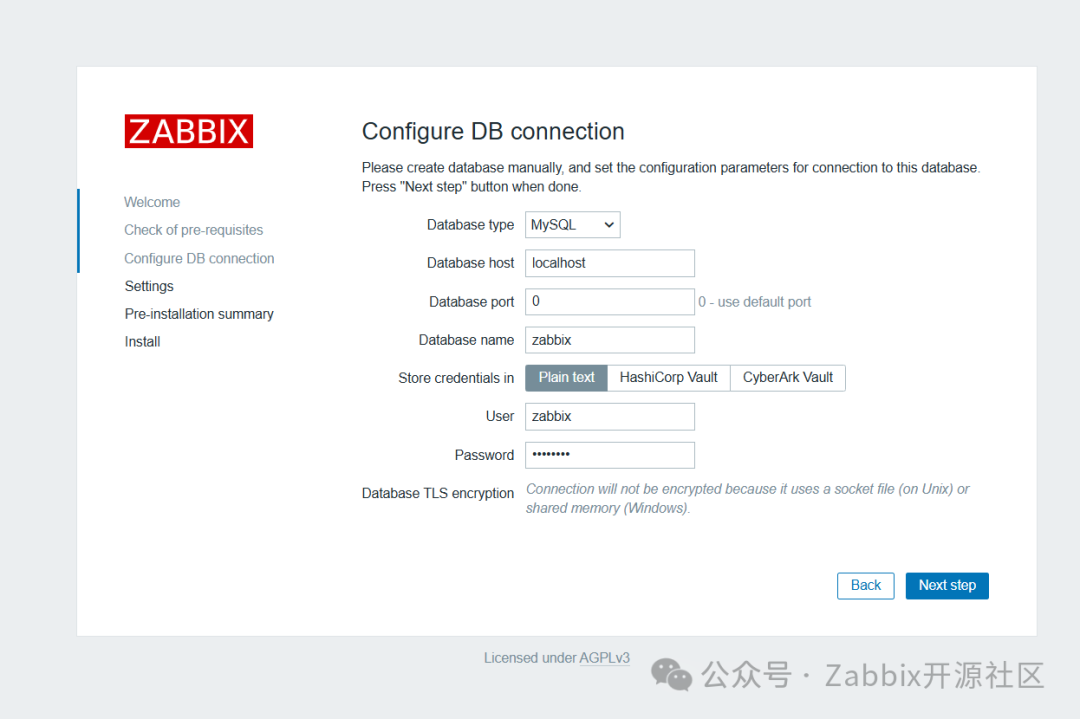
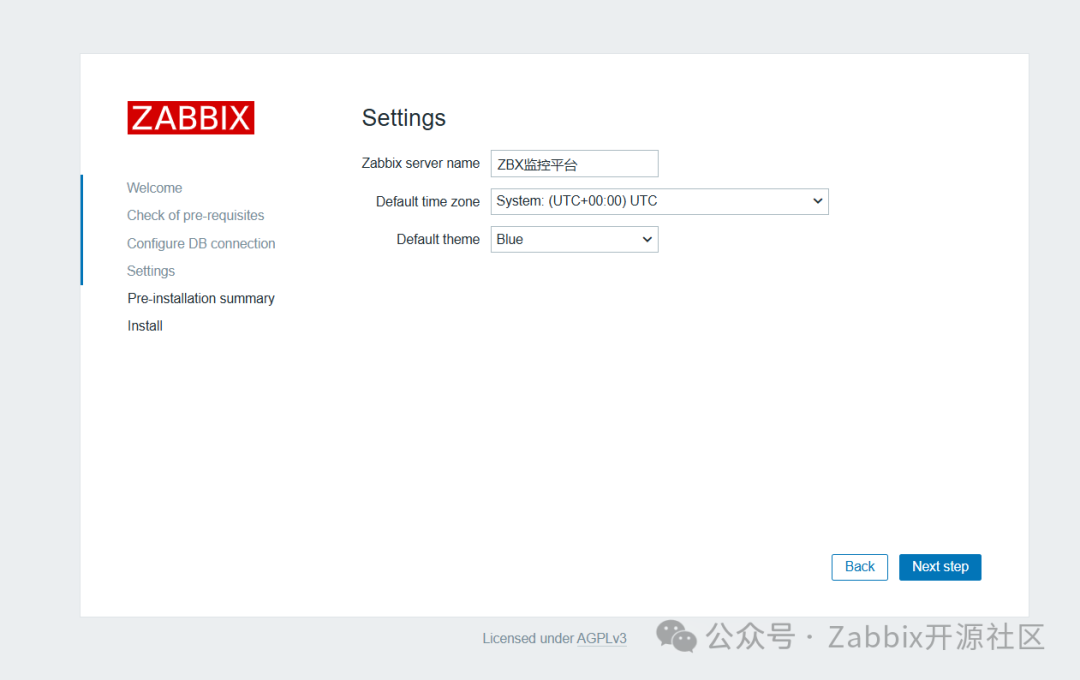
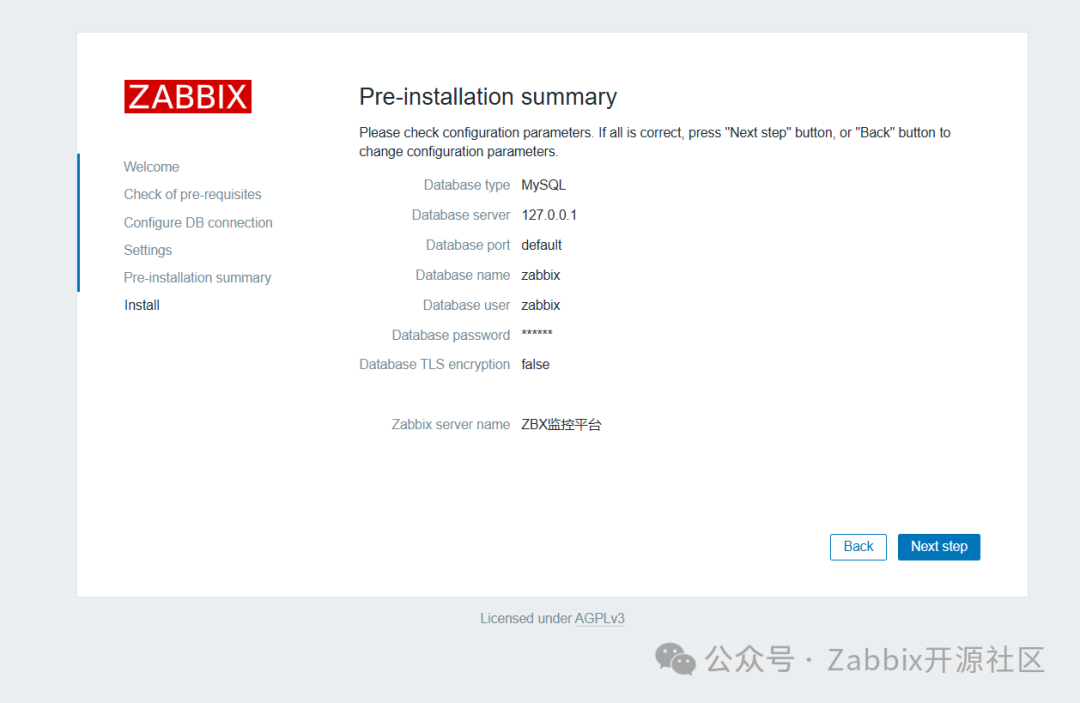
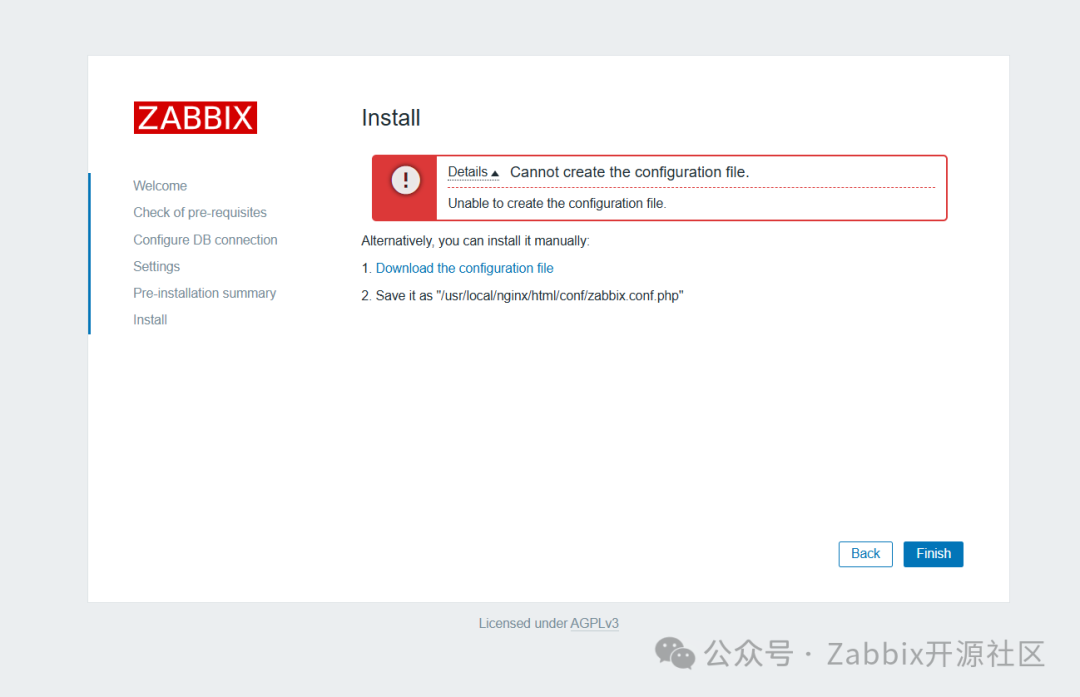
# grep -E "^user|^group" /etc/php/php-fpm.d/www.conf
user = zabbix
group = zabbix
[root@zabbix01 php-8.3.8]# systemctl restart php-fpm

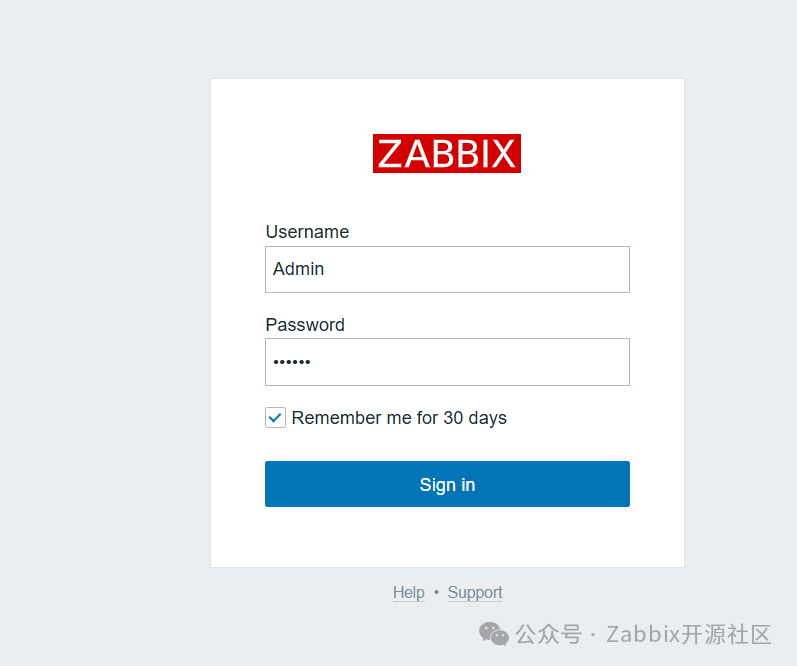
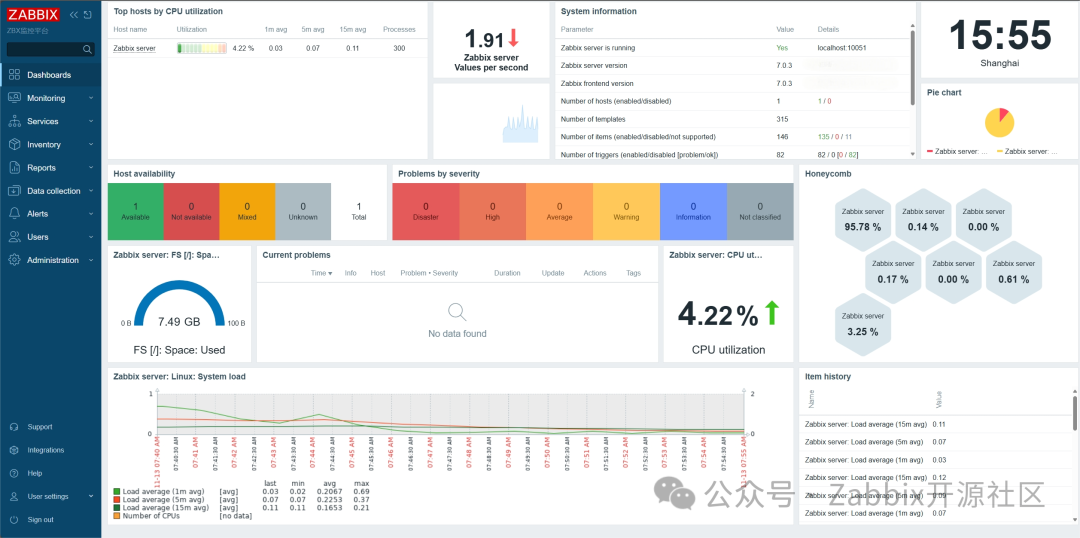
7.3 登陆平台
八、部署总结

文章转载自Zabbix开源社区,如果涉嫌侵权,请发送邮件至:contact@modb.pro进行举报,并提供相关证据,一经查实,墨天轮将立刻删除相关内容。
