



前言
当谈到备份和恢复 PostgreSQL 集群时,我们的大多数用户都依赖 pgBackRest 或 pg_rman等第三方备份工具。原因很明显:这些工具都为您提供了备份存储库、完整备份和增量备份以及大量其他功能,并且都可以自动完成您期望从备份解决方案中获得的大部分任务。在PostgreSQL 16版本之前的所有操作都是进行完整备份,并将其与WAL 段的归档相结合以获得时间点恢复。虽然这对于较小的数据集群来说可能已经足够了,但当您的数据集群变大或者您有大量集群需要管理时,这就会变得非常痛苦。为了满足不同用户的需求,确保备份方案满足用户期望。 PostgreSQL 17中增量备份的引入增强了Postgres备份和恢复功能的灵活性和效率。本文我们将探讨增量备份的概述、收集数据块变化满足增量备份的细节以及使用 pg_basebackup 完成生产环境增量备份的实用脚本。
WAL Summarizer
增量备份是根据全量备份和WAL summarizer进程收集的WAL摘要文件进行的。为了理解数据块变化是如何跟踪。下面我就来先聊一下WAL Summarizer。
WAL Summarizer进程
为了PostgreSQL 17版本中支持增量备份。增加了WAL Summarizer 进程跟踪对所有数据库块(包括关系和可见性映射)的更改,并将这些修改写入位于 pg_wal/summaries/ 目录中的 WAL 摘要文件。
开启WAL Summarizer进程,注意默认 summarize_wal参数是off的这里我们将它设置为on。还有一个重要的参数wal_summary_keep_time是代表跟踪摘要文件保留多久默认是10天。
[postgres@pg17 ~]$ psql
psql (17.2)
Type "help" for help.

postgres=# show summarize_wal;
 summarize_wal
---------------
 off
(1 row)

postgres=# alter system set summarize_wal = 'on';
ALTER SYSTEM
postgres=# select pg_reload_conf();
 pg_reload_conf
----------------
 t
(1 row)

postgres=# \dconfig *summa*
List of configuration parameters
       Parameter       | Value
-----------------------+-------
 summarize_wal         | on
 wal_summary_keep_time | 10d
(2 rows)

postgres=#
检查WAL Summarizer进程
[postgres@pg17 ~]$ ps xf
    PID TTY      STAT   TIME COMMAND
   1818 pts/0    S      0:00 -bash
   1869 pts/0    R+     0:00  \_ ps xf
   1806 ?        Ss     0:00 /usr/local/pgsql/bin/postgres -D /usr/local/pgsql/data
   1807 ?        Ss     0:00  \_ postgres: checkpointer
   1808 ?        Ss     0:00  \_ postgres: background writer
   1810 ?        Ss     0:00  \_ postgres: walwriter
   1811 ?        Ss     0:00  \_ postgres: autovacuum launcher
   1812 ?        Ss     0:00  \_ postgres: logical replication launcher
   1858 ?        Ss     0:00  \_ postgres: walsummarizer     <--PostgreSQL 17新增进程
[postgres@pg17 ~]$
WAL summaries格式目录
摘要文件格式如下
{Timeline}{start_lsn}{end_lsn}.summary
查看 pg_wal/summaries/ 目录中的 WAL 摘要文件摘要文件,如下所示
[postgres@pg17 ~]$ ls -lh /usr/local/pgsql/data/pg_wal/summaries/
total 44K
-rw------- 1 postgres postgres 4.7K Nov 27 14:56 00000001000000000100002800000000010B1D38.summary
-rw------- 1 postgres postgres 4.9K Nov 27 14:56 0000000100000000010B1D380000000001538020.summary
-rw------- 1 postgres postgres   56 Nov 27 14:56 0000000100000000015380200000000001538120.summary
-rw------- 1 postgres postgres  230 Nov 27 14:56 000000010000000001538120000000000153EAB0.summary
-rw------- 1 postgres postgres   56 Nov 27 14:56 00000001000000000153EAB0000000000153EBB0.summary
-rw------- 1 postgres postgres   88 Nov 27 14:56 00000001000000000153EBB0000000000153EEE8.summary
-rw------- 1 postgres postgres  264 Nov 27 14:56 00000001000000000153EEE800000000015878C8.summary
-rw------- 1 postgres postgres   32 Nov 27 14:56 0000000100000000015878C80000000001587A08.summary
-rw------- 1 postgres postgres   32 Nov 27 14:57 000000010000000001587A080000000001587AB8.summary
[postgres@pg17 ~]$
我们也可以通过pg_available_wal_summaries() 函数来查看wal summaries文件信息,我们可以看到查询出来的结果和 pg_wal/summaries/ 目录中wal summaries文件一样的。这里面跟踪文件数据保留时间和wal_summary_keep_time这个参数有关默认10天。
postgres=# select * from pg_available_wal_summaries() order by start_lsn;
 tli | start_lsn |  end_lsn
-----+-----------+-----------
   1 | 0/1000028 | 0/10B1D38
   1 | 0/10B1D38 | 0/1538020
   1 | 0/1538020 | 0/1538120
   1 | 0/1538120 | 0/153EAB0
   1 | 0/153EAB0 | 0/153EBB0
   1 | 0/153EBB0 | 0/153EEE8
   1 | 0/153EEE8 | 0/15878C8
   1 | 0/15878C8 | 0/1587A08
   1 | 0/1587A08 | 0/1587AB8
(9 rows)

postgres=#
WAL summaries摘要文件内容
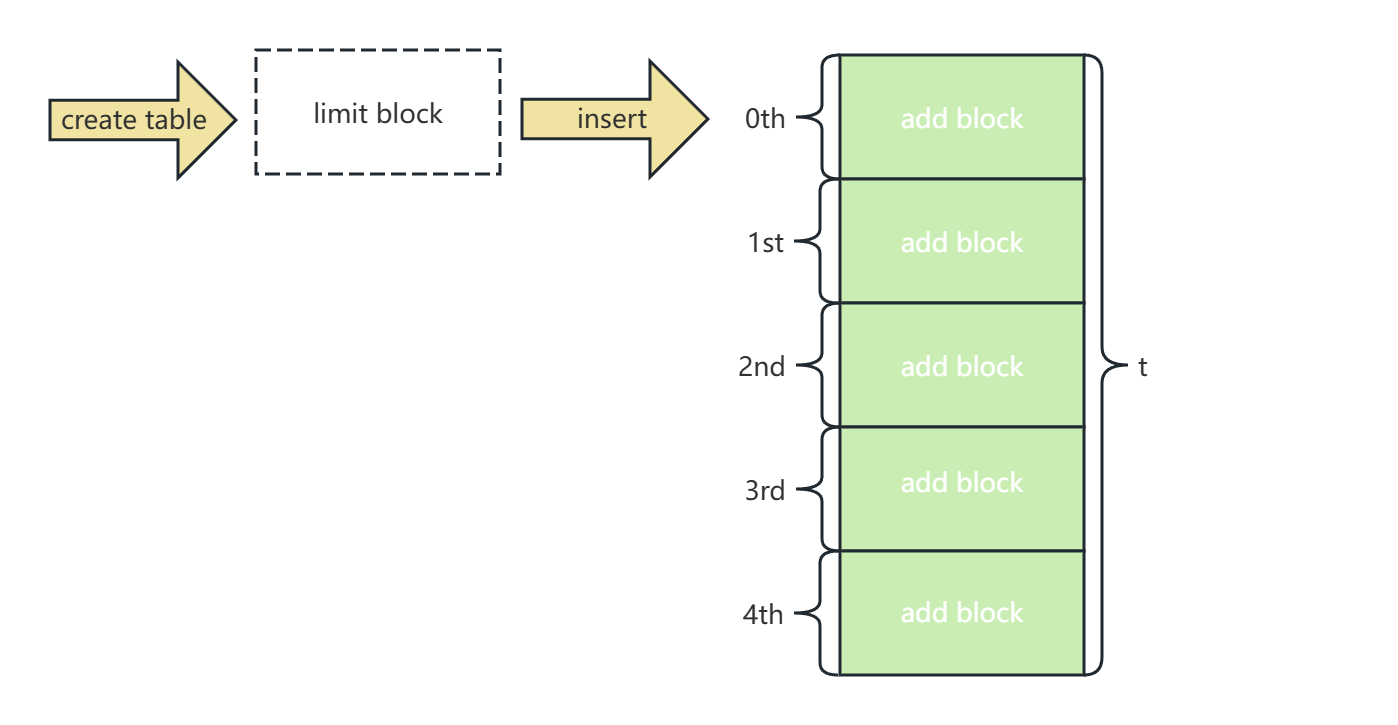
我们先创建一个t表,再插入1000条记录,来看一下wal summaries跟踪记录了写什么,如下所示
postgres=# create table t (id int);
CREATE TABLE
postgres=# insert into t select generate_series(1,1000);
INSERT 0 1000
postgres=# checkpoint;
CHECKPOINT
postgres=# select pg_relation_filepath('t');
 pg_relation_filepath
----------------------
 base/5/16393
(1 row)

postgres=#
我们通过pg_walsummary工具查看wal summaries文件发现对象是16393一共有新增了5个数据块0-4block号,同时查询文件大小然后除以8k一个块得出一共有5个数据块,如下所示
[postgres@pg17 summaries]$ ls -lart
total 60
drwx------. 4 postgres postgres   77 Nov 26 16:53 ..
-rw-------  1 postgres postgres 4808 Nov 27 14:56 00000001000000000100002800000000010B1D38.summary
-rw-------  1 postgres postgres   56 Nov 27 14:56 0000000100000000015380200000000001538120.summary
-rw-------  1 postgres postgres 4992 Nov 27 14:56 0000000100000000010B1D380000000001538020.summary
-rw-------  1 postgres postgres   56 Nov 27 14:56 00000001000000000153EAB0000000000153EBB0.summary
-rw-------  1 postgres postgres  230 Nov 27 14:56 000000010000000001538120000000000153EAB0.summary
-rw-------  1 postgres postgres  264 Nov 27 14:56 00000001000000000153EEE800000000015878C8.summary
-rw-------  1 postgres postgres   88 Nov 27 14:56 00000001000000000153EBB0000000000153EEE8.summary
-rw-------  1 postgres postgres   32 Nov 27 14:56 0000000100000000015878C80000000001587A08.summary
-rw-------  1 postgres postgres   32 Nov 27 14:57 000000010000000001587A080000000001587AB8.summary
-rw-------  1 postgres postgres  570 Dec  2 10:03 000000010000000001587AB800000000015A4CA0.summary
-rw-------  1 postgres postgres   60 Dec  2 10:05 0000000100000000015A4CA000000000015A4F68.summary
-rw-------  1 postgres postgres  686 Dec  2 10:12 0000000100000000015A4F6800000000015CEA38.summary   <--找到t表的摘要文件start_lsn:15A4F68和end_lsn:15CEA38
drwx------. 2 postgres postgres 4096 Dec  2 10:12 .
[postgres@pg17 summaries]$ pg_walsummary 0000000100000000015A4F6800000000015CEA38.summary | grep 16393
TS 1663, DB 5, REL 16393, FORK main: limit 0
TS 1663, DB 5, REL 16393, FORK main: blocks 0..4
[postgres@pg17 summaries]$ pg_walsummary --individual 0000000100000000015A4F6800000000015CEA38.summary | grep 16393
TS 1663, DB 5, REL 16393, FORK main: limit 0
TS 1663, DB 5, REL 16393, FORK main: block 0
TS 1663, DB 5, REL 16393, FORK main: block 1
TS 1663, DB 5, REL 16393, FORK main: block 2
TS 1663, DB 5, REL 16393, FORK main: block 3
TS 1663, DB 5, REL 16393, FORK main: block 4
[postgres@pg17 summaries]$ ls -la ../../base/5/16393
-rw------- 1 postgres postgres 40960 Dec  2 10:12 ../../base/5/16393
[postgres@pg17 summaries]$ echo "40960/8192" |bc
5
[postgres@pg17 summaries]$
同样我们可以用pg_wal_summary_contents() 函数,我们可以检索表 t 的摘要数据,如下所示
postgres=# select * from pg_available_wal_summaries() order by start_lsn;
 tli | start_lsn |  end_lsn
-----+-----------+-----------
   1 | 0/1000028 | 0/10B1D38
   1 | 0/10B1D38 | 0/1538020
   1 | 0/1538020 | 0/1538120
   1 | 0/1538120 | 0/153EAB0
   1 | 0/153EAB0 | 0/153EBB0
   1 | 0/153EBB0 | 0/153EEE8
   1 | 0/153EEE8 | 0/15878C8
   1 | 0/15878C8 | 0/1587A08
   1 | 0/1587A08 | 0/1587AB8
   1 | 0/1587AB8 | 0/15A4CA0
   1 | 0/15A4CA0 | 0/15A4F68
   1 | 0/15A4F68 | 0/15CEA38        <--t表的摘要文件start_lsn:15A4F68和end_lsn:15CEA38
   1 | 0/15CEA38 | 0/15CFA50
(13 rows)

postgres=# select p.relname, s.relforknumber, s.relblocknumber, s.is_limit_block from pg_wal_summary_contents(1,'0/15A4F68','0/15CEA38') as s, pg_class as p where s.relfilenode = p.oid AND p.relname = 't';
 relname | relforknumber | relblocknumber | is_limit_block
---------+---------------+----------------+----------------
 t       |             0 |              0 | t
 t       |             0 |              0 | f
 t       |             0 |              1 | f
 t       |             0 |              2 | f
 t       |             0 |              3 | f
 t       |             0 |              4 | f
(6 rows)

postgres=#
对t表进行更新操作
postgres=# update t set id=id+2000 where id=1 or id=300;
UPDATE 2
postgres=# checkpoint;
CHECKPOINT
postgres=#
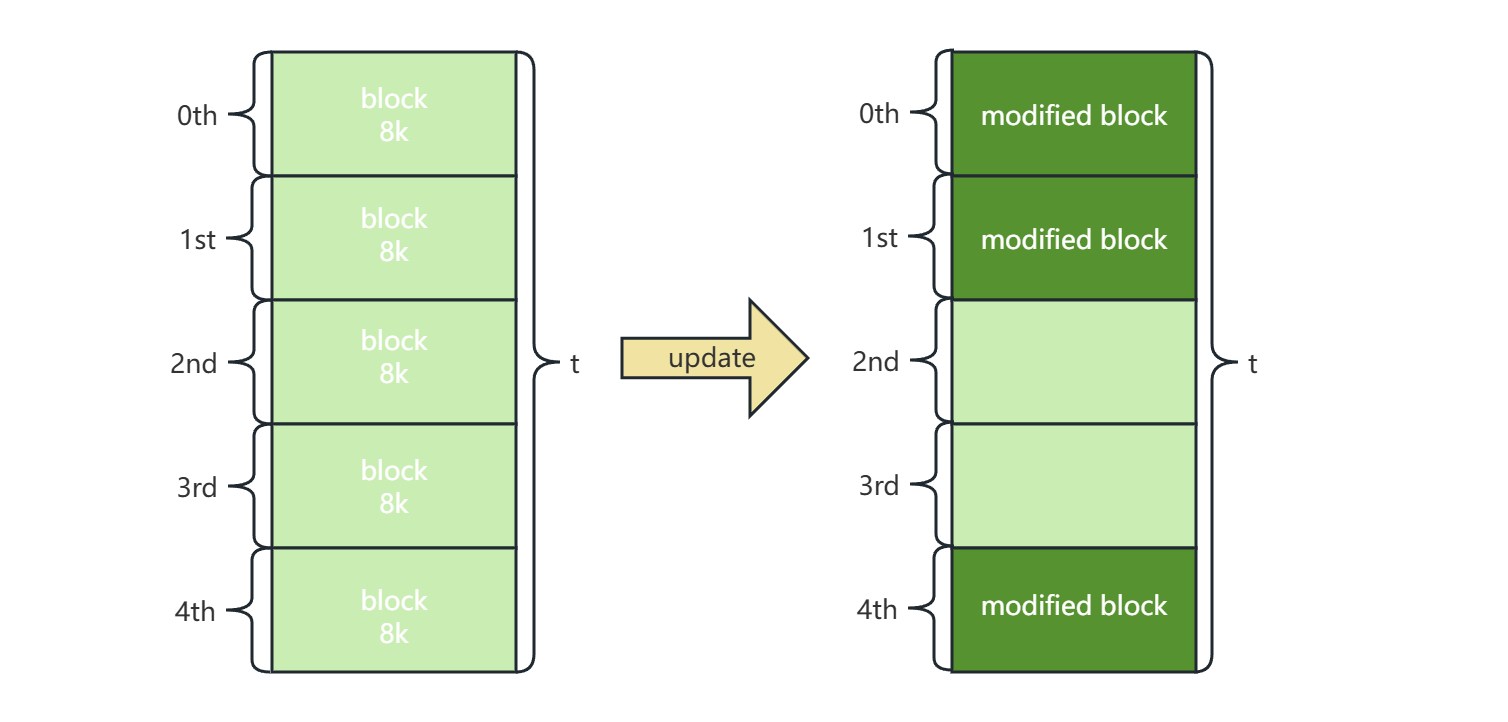
同样pg_walsummary工具查看wal summaries文件发现对象是16393一共有3个数据块被修改了0,1,4block号,如下所示
[postgres@pg17 summaries]$ pg_walsummary 0000000100000000015CFA5000000000015D4A98.summary | grep 16393
TS 1663, DB 5, REL 16393, FORK main: blocks 0..1
TS 1663, DB 5, REL 16393, FORK main: block 4
[postgres@pg17 summaries]$ pg_walsummary --individual 0000000100000000015CFA5000000000015D4A98.summary | grep 16393
TS 1663, DB 5, REL 16393, FORK main: block 0
TS 1663, DB 5, REL 16393, FORK main: block 1
TS 1663, DB 5, REL 16393, FORK main: block 4
[postgres@pg17 summaries]$
同样我们可以用pg_wal_summary_contents() 函数,我们可以检索表 t 的摘要数据,如下所示
postgres=# select p.relname, s.relforknumber, s.relblocknumber, s.is_limit_block from pg_wal_summary_contents(1,'0/15CFA50','0/15D4A98') as s, pg_class as p where s.relfilenode = p.oid AND p.relname = 't';
 relname | relforknumber | relblocknumber | is_limit_block
---------+---------------+----------------+----------------
 t       |             0 |              0 | f
 t       |             0 |              4 | f
 t       |             0 |              1 | f
(3 rows)

postgres=#
我们也可以通过pageinspect插件观察块内部变化,如下所示
postgres=# create extension pageinspect;
CREATE EXTENSION
postgres=# select * from heap_page_items(get_raw_page('t',0))order by lp_off desc;
 lp  | lp_off | lp_flags | lp_len | t_xmin | t_xmax | t_field3 | t_ctid  | t_infomask2 | t_infomask | t_hoff | t_bits | t_oid |   t_data
-----+--------+----------+--------+--------+--------+----------+---------+-------------+------------+--------+--------+-------+------------
   2 |   8160 |        1 |     28 |    756 |      0 |        0 | (0,2)   |           1 |       2304 |     24 |        |       | \x02000000
   3 |   8128 |        1 |     28 |    756 |      0 |        0 | (0,3)   |           1 |       2304 |     24 |        |           | \xdf000000
。。。省略
 225 |   1024 |        1 |     28 |    756 |      0 |        0 | (0,225) |           1 |       2304 |     24 |        |       | \xe1000000
 226 |    992 |        1 |     28 |    756 |      0 |        0 | (0,226) |           1 |       2304 |     24 |        |       | \xe2000000
   1 |      0 |        3 |      0 |        |        |          |         |             |            |        |        |       |    <--update后,对第0块查询内容,id=1的这行已经不可见
(226 rows)

postgres=# select * from heap_page_items(get_raw_page('t',1))order by lp_off desc;
 lp  | lp_off | lp_flags | lp_len | t_xmin | t_xmax | t_field3 | t_ctid  | t_infomask2 | t_infomask | t_hoff | t_bits | t_oid |   t_data
-----+--------+----------+--------+--------+--------+----------+---------+-------------+------------+--------+--------+-------+------------
   1 |   8160 |        1 |     28 |    756 |      0 |        0 | (1,1)   |           1 |       2304 |     24 |        |       | \xe3000000
   2 |   8128 |        1 |     28 |    756 |      0 |        0 | (1,2)   |           1 |       2304 |     24 |        |       | \xe4000000
。。。省略
  73 |   5856 |        1 |     28 |    756 |      0 |        0 | (1,73)  |           1 |       2304 |     24 |        |       | \x2b010000
  75 |   5824 |        1 |     28 |    756 |      0 |        0 | (1,75)  |           1 |       2304 |     24 |        |       | \x2d010000
。。。省略
 226 |    992 |        1 |     28 |    756 |      0 |        0 | (1,226) |           1 |       2304 |     24 |        |       | \xc4010000
  74 |      0 |        3 |      0 |        |        |          |         |             |            |        |        |       |     <--同样update后,对第1块查询内容,id=300的这行也不可见
(226 rows)

postgres=# select * from heap_page_items(get_raw_page('t',4))order by lp_off desc;
 lp | lp_off | lp_flags | lp_len | t_xmin | t_xmax | t_field3 | t_ctid | t_infomask2 | t_infomask | t_hoff | t_bits | t_oid |   t_data
----+--------+----------+--------+--------+--------+----------+--------+-------------+------------+--------+--------+-------+------------
  1 |   8160 |        1 |     28 |    756 |      0 |        0 | (4,1)  |           1 |       2304 |     24 |        |       | \x89030000
。。。省略
 96 |   5120 |        1 |     28 |    756 |      0 |        0 | (4,96) |           1 |       2304 |     24 |        |       | \xe8030000
 97 |   5088 |        1 |     28 |    758 |      0 |        0 | (4,97) |           1 |      10496 |     24 |        |       | \xd1070000  <--update后对第4块查询内容,新增一条id=2001的记录,因为\xd1070000,要把十六进制颠倒变成7d1再转换成十进制正好是2001
 98 |   5056 |        1 |     28 |    758 |      0 |        0 | (4,98) |           1 |      10496 |     24 |        |       | \xfc080000  <--update后对第1块查询内容,新增一条id=2300的记录,因为\xfc080000,要把十六进制颠倒变成8fc再转换成十进制正好是2300
(98 rows)

postgres=# select * from t where id=2001 or id=2300;
  id
------
 2001
 2300
(2 rows)

postgres=#
增量备份
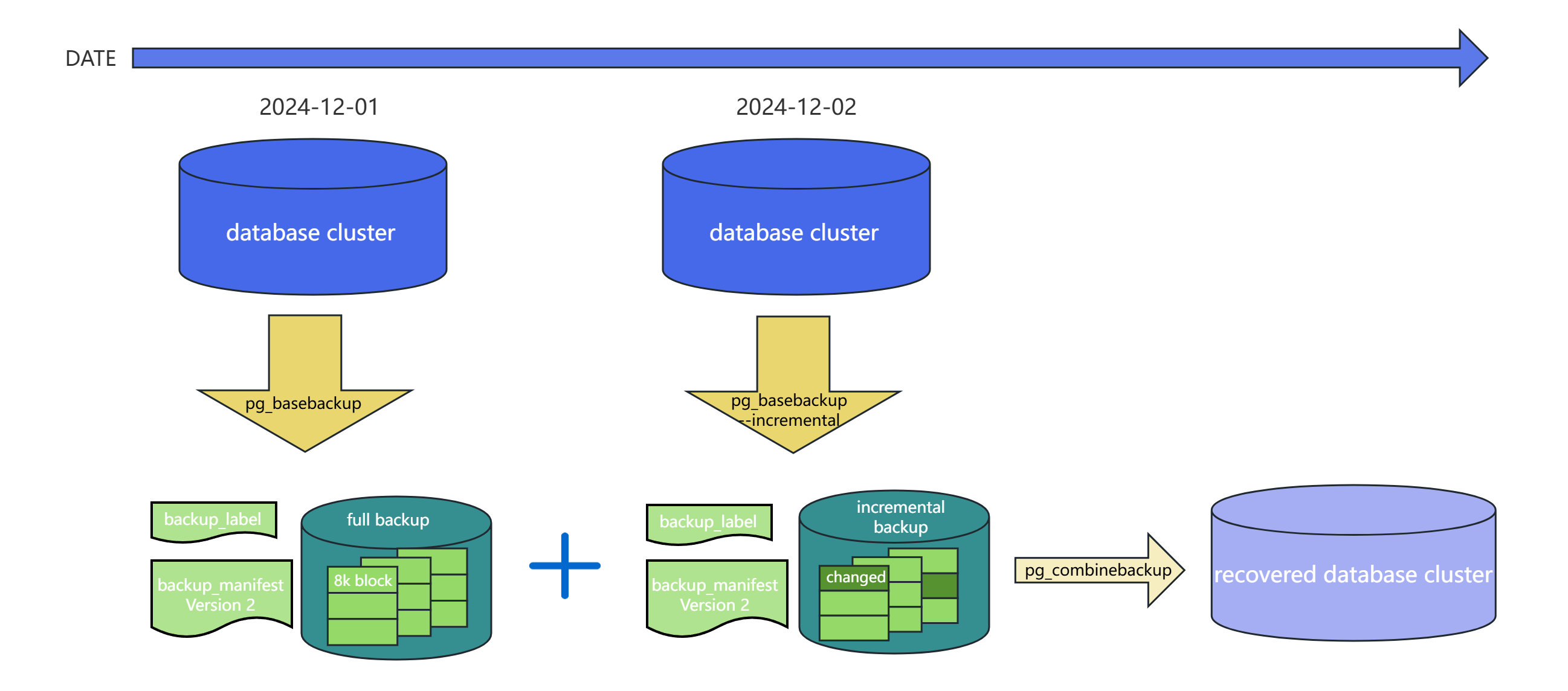
在过往我们全量备份和 WAL archiving 能够实现 PITR(Point-In-Time Recovery),但如果数据量很大5T的数据库而言全量备份+WAL,备份时间长而且占用大量的空间。如下所示
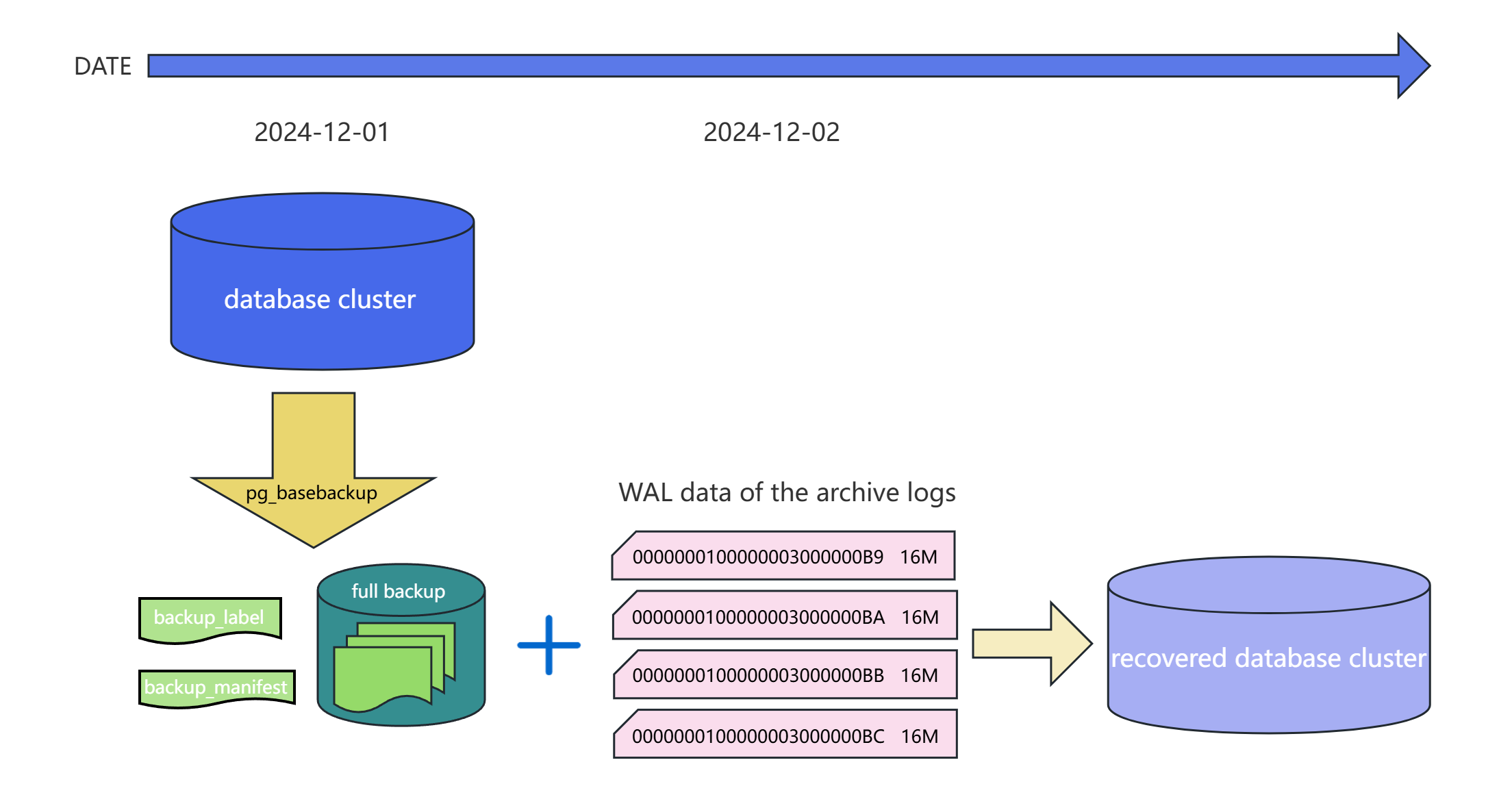
在PostgreSQL 17版本中我们可以用全量备份+增量备份的方式来实现 PITR(Point-In-Time Recovery)。最近的全量备份和后续的增量备份进行合并,相比回放大量的 WAL 日志,恢复时间更短,可以快速使系统恢复正常运行。如下所示
增量备份实战
开启增量参数
postgres=# show summarize_wal;
 summarize_wal
---------------
 off
(1 row)

postgres=# alter system set summarize_wal = 'on';
ALTER SYSTEM
postgres=# select pg_reload_conf();
 pg_reload_conf
----------------
 t
(1 row)

postgres=# \dconfig *summa*
List of configuration parameters
       Parameter       | Value
-----------------------+-------
 summarize_wal         | on
 wal_summary_keep_time | 10d
(2 rows)

postgres=#
进行全量备份
创建/backup备份目录,对整个数据库进行一次全备
本文之后生产环境的脚本中所有备份集都放在/backup下
[root@pg17 ~]# mkdir /backup
[root@pg17 ~]# chown -R postgres:postgres /backup
[root@pg17 ~]# su - postgres
[postgres@pg17 ~]$ pg_basebackup -Fp -D /backup/$(date +%Y-%m-%d-FULL) -v
Password:
pg_basebackup: initiating base backup, waiting for checkpoint to complete
pg_basebackup: checkpoint completed
pg_basebackup: write-ahead log start point: 0/2000028 on timeline 1
pg_basebackup: starting background WAL receiver
pg_basebackup: created temporary replication slot "pg_basebackup_22796"
pg_basebackup: write-ahead log end point: 0/2000120
pg_basebackup: waiting for background process to finish streaming ...
pg_basebackup: syncing data to disk ...
pg_basebackup: renaming backup_manifest.tmp to backup_manifest
pg_basebackup: base backup completed
[postgres@pg17 ~]$ ls -l /backup/
total 4
drwx------ 19 postgres postgres 4096 Dec  2 21:42 2024-12-02-FULL
[postgres@pg17 ~]$ du -sh /backup/2024-12-02-FULL/
40M     /backup/2024-12-02-FULL/
[postgres@pg17 ~]$
修改数据
删除t表里603条记录。
[postgres@pg17 ~]$ psql
psql (17.2)
Type "help" for help.

postgres=# delete from t where id>=400;
DELETE 603
postgres=# select count(1) from t;
 count
-------
   397
(1 row)

postgres=# checkpoint;
CHECKPOINT
postgres=#
进行增量备份
根据全备的backup_manifest列表,进行-i增量备份
[postgres@pg17 ~]$ pg_basebackup -Fp -D /backup/$(date +%Y-%m-%d-INCR) -v -i /backup/2024-12-02-FULL/backup_manifest
Password:
pg_basebackup: initiating base backup, waiting for checkpoint to complete
pg_basebackup: checkpoint completed
pg_basebackup: write-ahead log start point: 0/4000028 on timeline 1
pg_basebackup: starting background WAL receiver
pg_basebackup: created temporary replication slot "pg_basebackup_22875"
pg_basebackup: write-ahead log end point: 0/4000120
pg_basebackup: waiting for background process to finish streaming ...
pg_basebackup: syncing data to disk ...
pg_basebackup: renaming backup_manifest.tmp to backup_manifest
pg_basebackup: base backup completed
[postgres@pg17 ~]$ ls -l /backup/
total 8
drwx------ 19 postgres postgres 4096 Dec  2 21:42 2024-12-02-FULL
drwx------ 19 postgres postgres 4096 Dec  2 22:04 2024-12-02-INCR
[postgres@pg17 ~]$ du -sh /backup/2024-12-02-INCR/
22M     /backup/2024-12-02-INCR/
[postgres@pg17 ~]$
合并增量备份
合并备份时,需要全量备份处于第一位,并且增量备份需要保持顺序和连续性
[postgres@pg17 ~]$ cd /backup/
[postgres@pg17 backup]$ pg_combinebackup 2024-12-02-FULL 2024-12-02-INCR -o 2024-12-02-RESTORE-FULL
[postgres@pg17 backup]$ ls -l /backup/
total 12
drwx------ 19 postgres postgres 4096 Dec  2 21:42 2024-12-02-FULL
drwx------ 19 postgres postgres 4096 Dec  2 22:04 2024-12-02-INCR
drwx------ 19 postgres postgres 4096 Dec  2 22:31 2024-12-02-RESTORE-FULL
[postgres@pg17 backup]$ du -sh 2024-12-02-RESTORE-FULL
40M     2024-12-02-RESTORE-FULL
[postgres@pg17 backup]$
验证恢复启动合并数据库
停原来的5432端口实例,防止误操作。启动合并后的2024-12-02-RESTORE-FULL数据目录到5433端口。查询变更后的t表记录数
[postgres@pg17 backup]$ pg_ctl stop
waiting for server to shut down.... done
server stopped
[postgres@pg17 backup]$ pg_ctl start -D /backup/2024-12-02-RESTORE-FULL -o '-p 5433'
waiting for server to start....2024-12-02 22:36:25.759 CST [22970] LOG:  starting PostgreSQL 17.2 on x86_64-pc-linux-gnu, compiled by gcc (GCC) 11.5.0 20240719 (Red Hat 11.5.0-2), 64-bit
2024-12-02 22:36:25.760 CST [22970] LOG:  listening on IPv6 address "::1", port 5433
2024-12-02 22:36:25.760 CST [22970] LOG:  listening on IPv4 address "127.0.0.1", port 5433
2024-12-02 22:36:25.761 CST [22970] LOG:  listening on Unix socket "/tmp/.s.PGSQL.5433"
2024-12-02 22:36:25.762 CST [22973] LOG:  database system was interrupted; last known up at 2024-12-02 22:04:27 CST
2024-12-02 22:36:25.771 CST [22973] LOG:  starting backup recovery with redo LSN 0/4000028, checkpoint LSN 0/4000080, on timeline ID 1
2024-12-02 22:36:25.772 CST [22973] LOG:  redo starts at 0/4000028
2024-12-02 22:36:25.772 CST [22973] LOG:  completed backup recovery with redo LSN 0/4000028 and end LSN 0/4000120
2024-12-02 22:36:25.772 CST [22973] LOG:  consistent recovery state reached at 0/4000120
2024-12-02 22:36:25.772 CST [22973] LOG:  redo done at 0/4000120 system usage: CPU: user: 0.00 s, system: 0.00 s, elapsed: 0.00 s
2024-12-02 22:36:25.843 CST [22971] LOG:  checkpoint starting: end-of-recovery immediate wait
2024-12-02 22:36:25.844 CST [22971] LOG:  checkpoint complete: wrote 3 buffers (0.0%); 0 WAL file(s) added, 0 removed, 0 recycled; write=0.001 s, sync=0.001 s, total=0.003 s; sync files=2, longest=0.001 s, average=0.001 s; distance=16384 kB, estimate=16384 kB; lsn=0/5000028, redo lsn=0/5000028
2024-12-02 22:36:25.846 CST [22970] LOG:  database system is ready to accept connections
 done
server started
[postgres@pg17 backup]$ psql -p 5433 -c "select count(*) from t"
 count
-------
   397  <--验证成功
(1 row)

[postgres@pg17 backup]$ ps xf
    PID TTY      STAT   TIME COMMAND
  22755 pts/1    S+     0:00 -bash
  21511 pts/3    S      0:00 -bash
  22987 pts/3    R+     0:00  \_ ps xf
   1818 pts/0    S      0:00 -bash
   9978 pts/0    S+     0:00  \_ psql
  22970 ?        Ss     0:00 /usr/local/pgsql/bin/postgres -D /backup/2024-12-02-RESTORE-FULL -p 5433
  22971 ?        Ss     0:00  \_ postgres: checkpointer
  22972 ?        Ss     0:00  \_ postgres: background writer
  22974 ?        Ss     0:00  \_ postgres: walwriter
  22975 ?        Ss     0:00  \_ postgres: walsummarizer
  22976 ?        Ss     0:00  \_ postgres: autovacuum launcher
  22977 ?        Ss     0:00  \_ postgres: logical replication launcher
[postgres@pg17 backup]$
生产环境备份策略
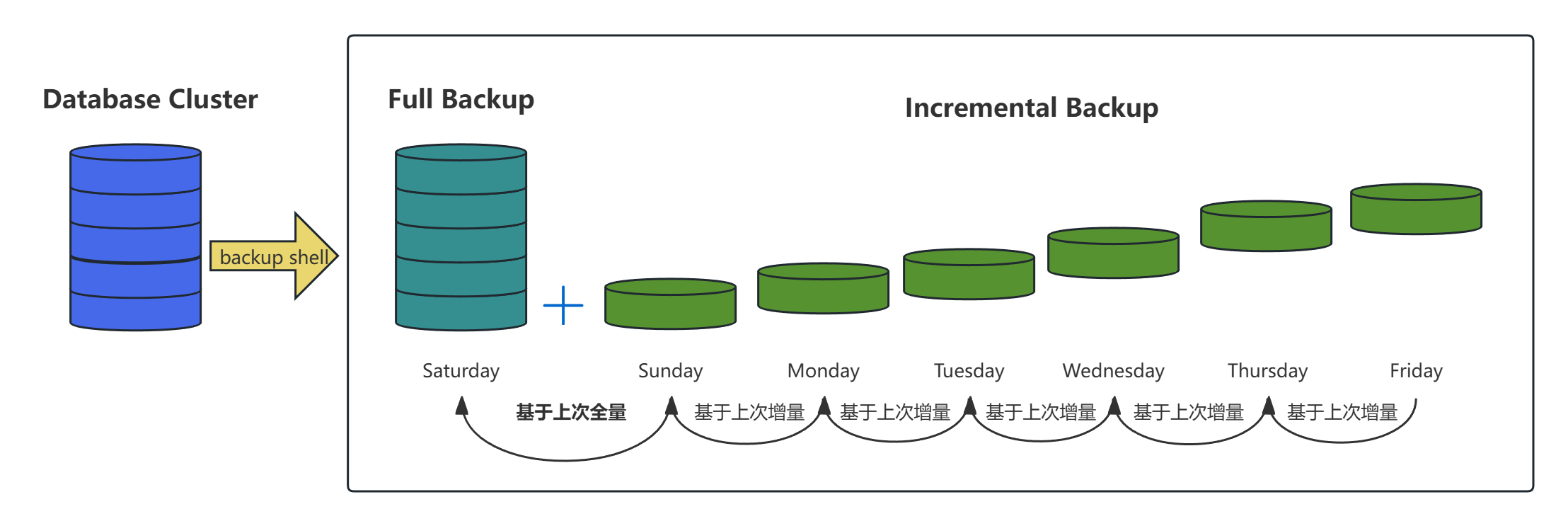
生产环境一般数据量较大,我们采用每周六全备加上每周日~周五增量备份的策略。有效备份保留1个月。如下所示
备份脚本
参考了JiekeXu老师的xtrabackup备份脚本,我们生产环境可以使用备份策略脚本,如下所示
[postgres@pg17 ~]$ mkdir -p /home/postgres/scripts
[postgres@pg17 ~]$ vim /home/postgres/scripts/backup.sh
#!/bin/bash

#PostgreSQL env settings

export PGPORT=5432
export PGUSER=postgres
export PGHOME=/usr/local/pgsql
export PGDATA=$PGHOME/data
export LD_LIBRARY_PATH=$PGHOME/lib
export MANPATH=$PGHOME/share/man
export PATH=$PGHOME/bin:$PATH
export LANG="en_US.UTF-8"
export PGHOST=localhost
export PGPASSWORD="finish!1978"

BAK_BASE="/backup"
DATE=`date +%F`
YESTERDAY=`date +%F -d "-1 days"`
WEEK_DAY=`date +%w`
BAK_DIR=$BAK_BASE/$DATE-$WEEK_DAY

echo ""
START_TIME=`date "+%Y-%m-%d %H:%M:%S"`
echo "############## Physical backup start at $START_TIME ##############"
echo ""

if [ "$WEEK_DAY" == "6"  ]; then
        pg_basebackup -Fp -D $BAK_DIR -v
        TYPE="FULL"
elif [ "$WEEK_DAY" == "0"  ]; then
        INCRE_BASE=$BAK_BASE/$YESTERDAY-6
        pg_basebackup -Fp -D $BAK_DIR -v -i $INCRE_BASE/backup_manifest
        TYPE="INCR"
else
        INCRE_BASE=$BAK_BASE/$YESTERDAY-$[WEEK_DAY-1]
        pg_basebackup -Fp -D $BAK_DIR -v -i $INCRE_BASE/backup_manifest
        TYPE="INCR"
fi


echo ""
END_TIME=`date "+%Y-%m-%d %H:%M:%S"`
echo "############## Physical backup end at $END_TIME ##############"
echo ""

SIZE=`du -sh $BAK_DIR | awk '{print $1}'`

if [ $? -eq 0 ]; then
    echo "Backup completed successfully."
    echo "Backup is available at: $BAK_DIR/backup_label"
    printf "|------------------------------------------|--------|---------------------|---------------------|------------|\n"
    printf "| %-40s | %-6s | %-19s | %-19s | %-10s |\n" \
            "Label" "Type" "Start Timestamp" "Stop Timestamp" "Size"
    printf "|------------------------------------------|--------|---------------------|---------------------|------------|\n"
    printf "| %-40s | %-6s | %-19s | %-19s | %-10s |\n" \
            "$BAK_DIR/backup_label" "$TYPE" "$START_TIME" "$END_TIME" "$SIZE"
    printf "|------------------------------------------|--------|---------------------|---------------------|------------|\n"
else
    echo "Backup failed."
exit
fi


[postgres@pg17 ~]$ chmod +x /home/postgres/scripts/backup.sh
[postgres@pg17 ~]$ vim  /home/postgres/scripts/cleanup.sh
#!/bin/bash

echo ""
START_TIME=`date "+%Y-%m-%d %H:%M:%S"`
echo "############## clean up start at $START_TIME ##############"
echo ""

find /backup -maxdepth 1 -type d -mtime +30
find /backup -maxdepth 1 -type d -mtime +30 -exec rm -rf {} \;

echo ""
END_TIME=`date "+%Y-%m-%d %H:%M:%S"`
echo "############## clean up end at $END_TIME ##############"
echo ""

[postgres@pg17 ~]$ chmod +x /home/postgres/scripts/cleanup.sh
[postgres@pg17 ~]$
设置自动运行脚本
每天 0:30 分使用 pg_basebackup进行备份,注意只有周六是全量备份,其他时间均是增量备份。每周六早上 8:00 分清理 30 天之前的备份
[postgres@pg17 ~]$ crontab -l
30 0 * * * /home/postgres/scripts/backup.sh >> /home/postgres/scripts/backup.log 2>&1
00 08 * * 6 /home/postgres/scripts/cleanup.sh >> /home/postgres/scripts/cleanup.log 2>&1
[postgres@pg17 ~]$
查看备份结果
[postgres@pg17 ~]$ ls -l /backup
total 44
drwx------ 19 postgres postgres 4096 Nov 23 00:30 2024-11-23-6
drwx------ 19 postgres postgres 4096 Nov 24 00:30 2024-11-24-0
drwx------ 19 postgres postgres 4096 Nov 25 00:30 2024-11-25-1
drwx------ 19 postgres postgres 4096 Nov 26 00:30 2024-11-26-2
drwx------ 19 postgres postgres 4096 Nov 27 00:30 2024-11-27-3
drwx------ 19 postgres postgres 4096 Nov 28 00:30 2024-11-28-4
drwx------ 19 postgres postgres 4096 Nov 29 00:30 2024-11-29-5
drwx------ 19 postgres postgres 4096 Nov 30 00:30 2024-11-30-6
drwx------ 19 postgres postgres 4096 Dec  1 00:30 2024-12-01-0
drwx------ 19 postgres postgres 4096 Dec  2 00:30 2024-12-02-1
drwx------ 19 postgres postgres 4096 Dec  3 00:30 2024-12-03-2
[postgres@pg17 ~]$ tail /home/postgres/scripts/backup.log

############## Physical backup end at 2024-12-03 00:30:02 ##############

Backup completed successfully.
Backup is available at: /backup/2024-12-03-2/backup_label
|------------------------------------------|--------|---------------------|---------------------|------------|
| Label                                    | Type   | Start Timestamp     | Stop Timestamp      | Size       |
|------------------------------------------|--------|---------------------|---------------------|------------|
| /backup/2024-12-03-2/backup_label        | INCR   | 2024-12-03 00:30:01 | 2024-12-03 00:30:02 | 22M        |
|------------------------------------------|--------|---------------------|---------------------|------------|
[postgres@pg17 ~]$
总结
PostgreSQL 17版本中增量备份的优点
- 无需安装第三方备份工具,直接使用官方工具
- 备份和恢复时间缩短,备份存储空间减少
缺点
- 备份集压缩格式无法完成合并,不过听说在18版本会有改变
- 没有catalog对备份周期,备份集记录和管理
总而言之,很推荐在PostgreSQL 17新版本中使用pg_basebackup来完成各种备份需求。以上就是我对PostgreSQL 17新版本增量备份一点心得和分享,如有错误也请谅解,欢迎即时留言指正。
参考文档如下
https://www.interdb.jp/pg/pgsql09/06.html
https://www.pgday.ch/common/slides/2024_Incremental_Backups.pdf
https://www.modb.pro/db/1845644357157875712
https://pg-x.github.io/posts/2024-01-20-postgres-incremental-backup/
https://pgdash.io/blog/incremental-backup-in-postgresql-17.html
https://pganalyze.com/blog/5mins-postgres-17-incremental-backups
https://www.mydbops.com/blog/postgresql-17-incremental-backup-pg-basebackup-pg-combinebackup
https://www.dbi-services.com/blog/postgresql-17-incremental-backups-pg_walsummary/
