



小T导读

物模型如何结合 TDengine?

物模型介绍

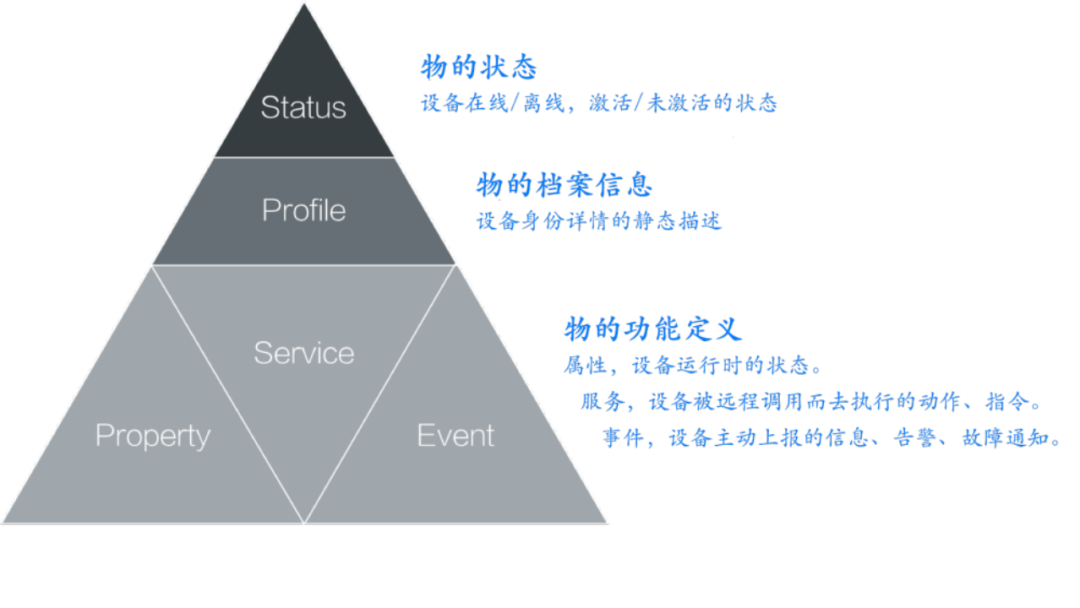
物模型如何结合 TDengine?
物模型超级表与产品的关系
产品物模型:每类特定产品设备使用一个超级表来定义。
通用物模型:只创建一个超级表,后续的产品可以按需引入该物模型,产品下的设备则直接使用这个超级表。
TDengine 支持灵活的数据模型设计,既可以使用多列模型,也可以选择单列模型。多列模型相当于将多个字段存储在同一张超级表中,通常在写入和存储效率上表现较优。而在某些情况下,例如数据采集点的种类和数量经常变化时,单列模型则可能更为适用,因为它简化了应用程序的设计和管理,允许独立管理和扩展每个物理量的超级表。
综上所述,TDengine 提供了灵活的数据模型选项,用户可以根据具体需求和应用场景选择最适合的模型。无论是采用窄表设计、单列模型还是多列模型,最终目的是为了优化性能和简化管理复杂性。
物模型和表分为三种对应关系
普通类型: 根据物模型的数据类型,映射单列模式的超级表。物模型定义示例如下图所示。
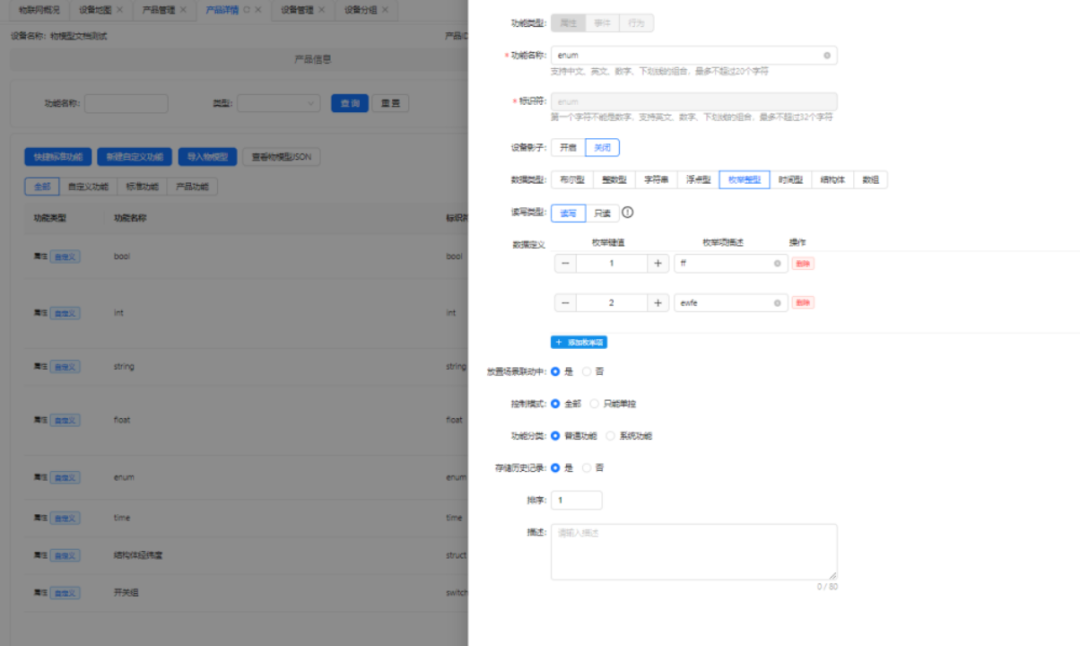
CREATE STABLE IF NOT EXISTS model_custom_property_00b_int (ts timestamp,param BIGINT)TAGS (product_id BINARY(50),device_name BINARY(50),property_type BINARY(50));
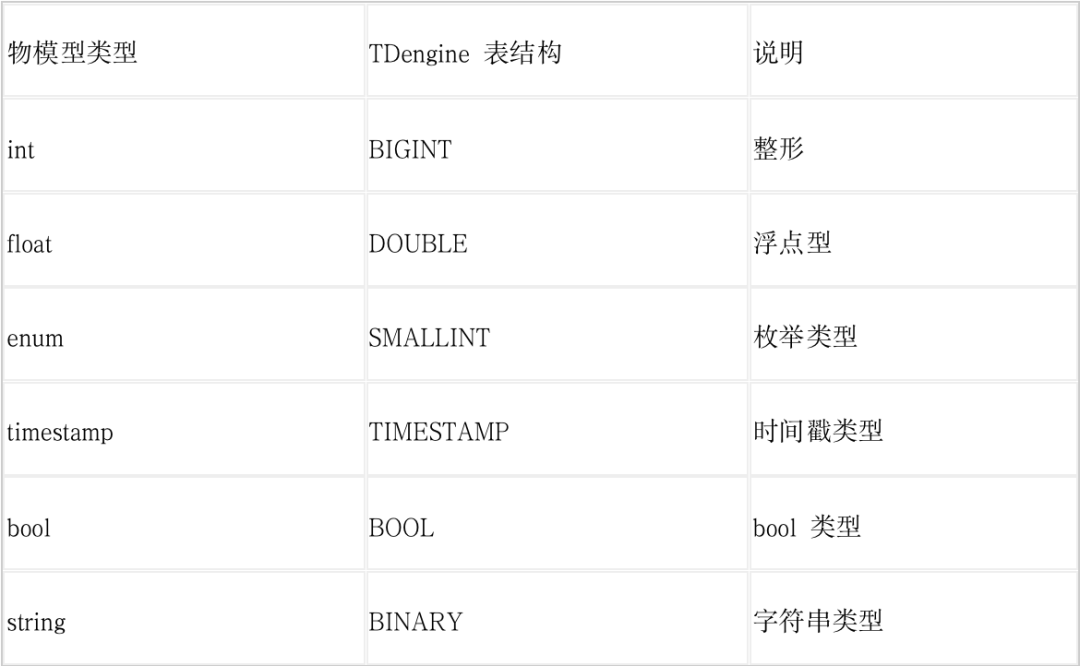
CREATE STABLE IF NOT EXISTS model_custom_property_00b_int (ts timestamp,param BIGINT) TAGS (product_id BINARY(50),device_name BINARY(50),property_type BINARY(50));CREATE STABLE IF NOT EXISTS model_custom_property_00b_float (ts timestamp,param DOUBLE) TAGS (product_id BINARY(50),device_name BINARY(50),property_type BINARY(50));CREATE STABLE IF NOT EXISTS model_custom_property_00b_enum (ts timestamp,param SMALLINT) TAGS (product_id BINARY(50),device_name BINARY(50),property_type BINARY(50));CREATE STABLE IF NOT EXISTS model_custom_property_00b_timestamp (ts timestamp,param TIMESTAMP) TAGS (product_id BINARY(50),device_name BINARY(50),property_type BINARY(50));CREATE STABLE IF NOT EXISTS model_custom_property_00b_bool (ts timestamp,param BOOL) TAGS (product_id BINARY(50),device_name BINARY(50),property_type BINARY(50));CREATE STABLE IF NOT EXISTS model_custom_property_00b_string (ts timestamp,param BINARY(5000)) TAGS (product_id BINARY(50),device_name BINARY(50),property_type BINARY(50));
对应的每个设备创建的普通表如下: CREATE TABLE IF NOT EXISTS device_property_00b_device1_int USING model_custom_property_00b_int TAGS('00b','device1','int');CREATE TABLE IF NOT EXISTS device_property_00b_device1_enum USING model_custom_property_00b_enum TAGS('00b','device1','enum');CREATE TABLE IF NOT EXISTS device_property_00b_device1_bool USING model_custom_property_00b_bool TAGS('00b','device1','bool');CREATE TABLE IF NOT EXISTS device_property_00b_device1_string USING model_custom_property_00b_string TAGS('00b','device1','string');CREATE TABLE IF NOT EXISTS device_property_00b_device1_float USING model_custom_property_00b_float TAGS('00b','device1','float');CREATE TABLE IF NOT EXISTS device_property_00b_device1_timestamp USING model_custom_property_00b_timestamp TAGS('00b','device1','timestamp');
结构体类型:拥有多个字段并将物模型进行整体抽象,映射为多列模式的超级表。物模型定义示例如下图所示。
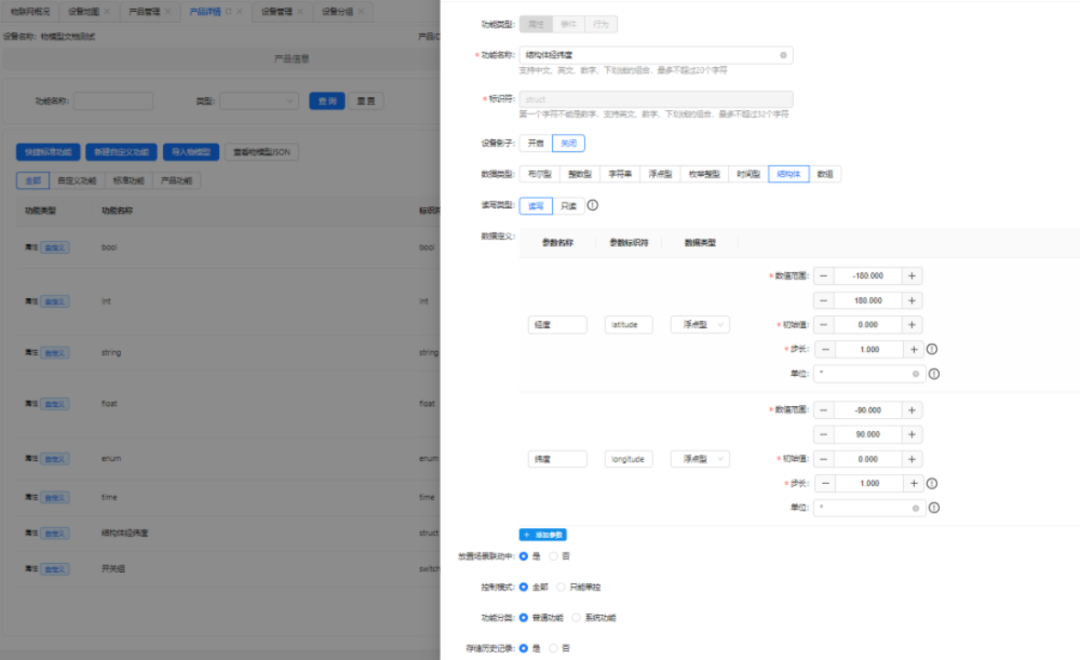
CREATE STABLE IF NOT EXISTS model_custom_property_00b_struct (ts timestamp, latitude DOUBLE,longitude DOUBLE) TAGS (product_id BINARY(50),device_name BINARY(50),property_type BINARY(50));
CREATE TABLE IF NOT EXISTS device_property_00b_device1_struct USING model_custom_property_00b_struct TAGS('00b','device1','struct');
数组类型: 数组类型在物联网平台中较为特殊,传统平台中的数组无法单独操作某一位。例如,如果想单独修改开关10的状态,必须传递完整的数组(如:[0,1,1,0,1,0,1,1,0,1])来进行控制,这种方式并不符合现实世界的需求。联犀则对数组进行了扩展,支持下角标访问。比如,要修改开关 10 的状态,只需传递
"switch.10": 1
即可。接下来,让我们来看一下联犀是如何处理这种数据结构的。物模型定义示例如下图所示。
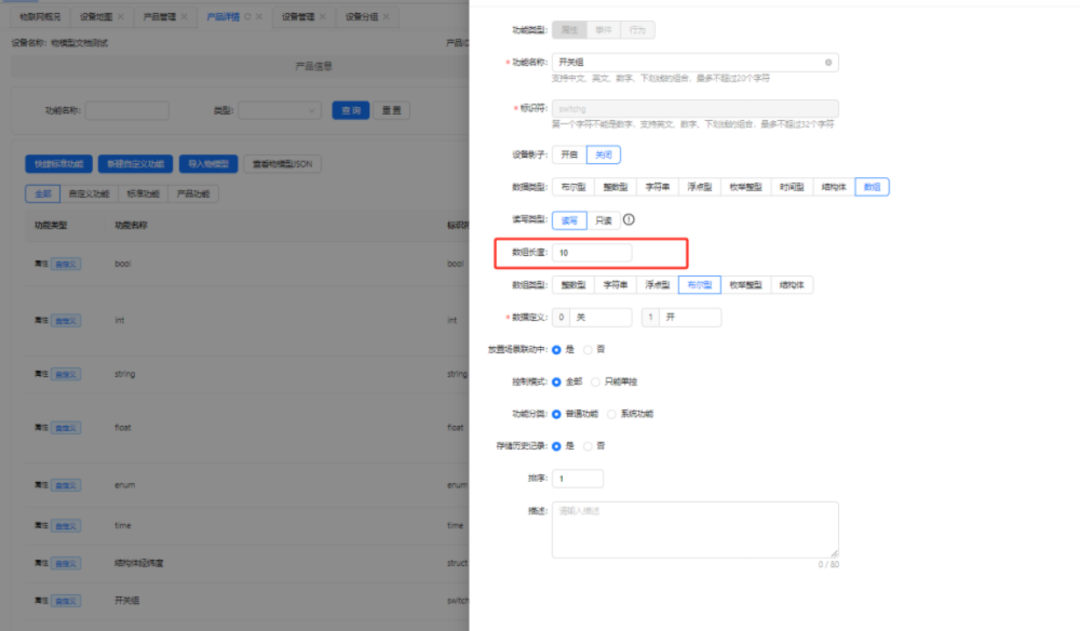
CREATE STABLE IF NOT EXISTS model_custom_property_00b_switchg (ts timestamp,param BOOL) TAGS (product_id BINARY(50),device_name BINARY(50),_num BIGINT,property_type BINARY(50));
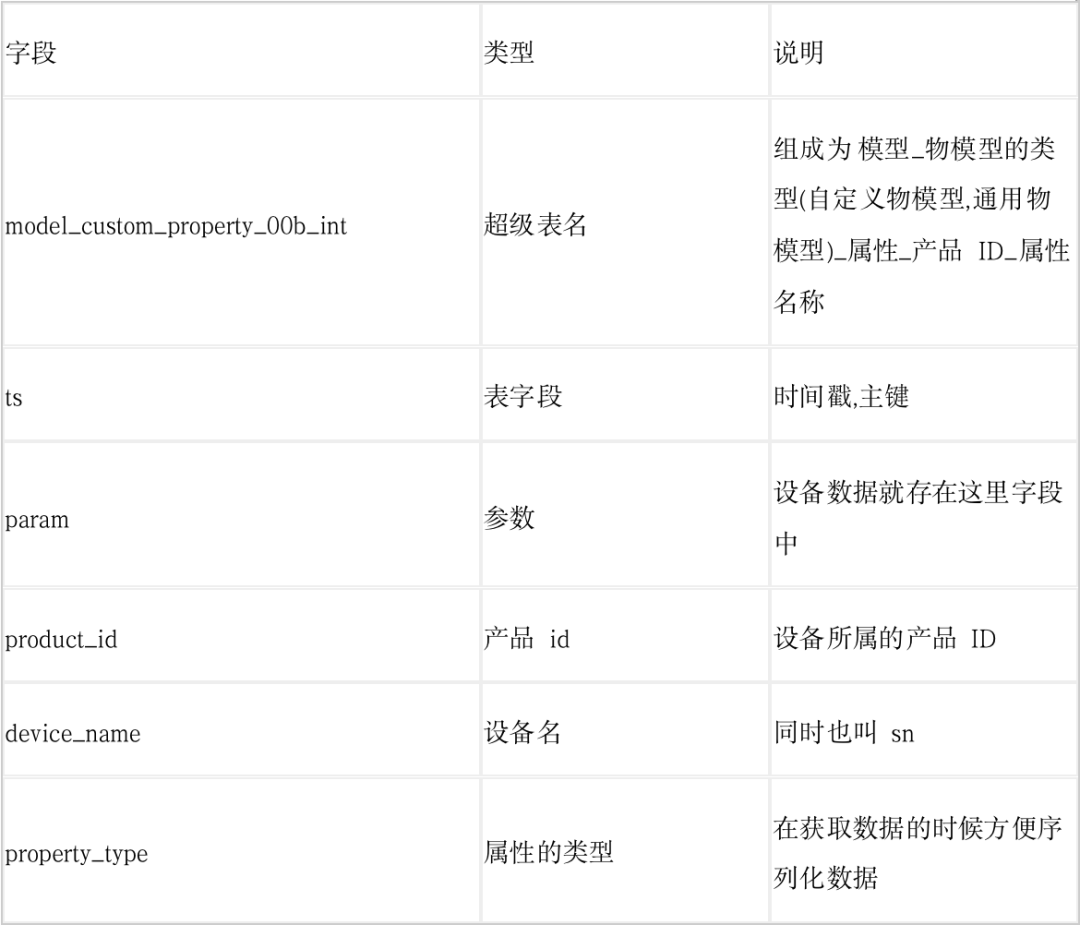
相关参数说明:
可以看到,数组类型的定义与简单类型相似,区别在于它额外添加了一个 _num
字段,用来标识数组的下标。这种设计的好处在于,即使数组长度达到 1000,依然只需定义一个超级表。虽然每个设备的普通表需要定义 1000 个,但由于是由一个超级表进行管理,整体管理变得更加简便。接下来,我们来看看每个设备创建的普通表是什么样的。
CREATE TABLE IF NOT EXISTS device_property_00b_device1_switchg_0 USING model_custom_property_00b_switchg TAGS('00b','device1',0,'bool');CREATE TABLE IF NOT EXISTS device_property_00b_device1_switchg_1 USING model_custom_property_00b_switchg TAGS('00b','device1',1,'bool');CREATE TABLE IF NOT EXISTS device_property_00b_device1_switchg_2 USING model_custom_property_00b_switchg TAGS('00b','device1',2,'bool');CREATE TABLE IF NOT EXISTS device_property_00b_device1_switchg_3 USING model_custom_property_00b_switchg TAGS('00b','device1',3,'bool');CREATE TABLE IF NOT EXISTS device_property_00b_device1_switchg_4 USING model_custom_property_00b_switchg TAGS('00b','device1',4,'bool');CREATE TABLE IF NOT EXISTS device_property_00b_device1_switchg_5 USING model_custom_property_00b_switchg TAGS('00b','device1',5,'bool');CREATE TABLE IF NOT EXISTS device_property_00b_device1_switchg_6 USING model_custom_property_00b_switchg TAGS('00b','device1',6,'bool');CREATE TABLE IF NOT EXISTS device_property_00b_device1_switchg_7 USING model_custom_property_00b_switchg TAGS('00b','device1',7,'bool');CREATE TABLE IF NOT EXISTS device_property_00b_device1_switchg_8 USING model_custom_property_00b_switchg TAGS('00b','device1',8,'bool');CREATE TABLE IF NOT EXISTS device_property_00b_device1_switchg_9 USING model_custom_property_00b_switchg TAGS('00b','device1',9,'bool');
如何发挥 TDengine 的性能?
从 HTTP 切换到 WebSocket:TDengine 从 3.x 版本开始支持 WebSocket,我们顺势升级,经过测试,性能和稳定性都有所提升,但在高并发的情况下,系统资源消耗依然较大。
改进同步操作为异步操作:通过将同步操作转为异步处理,显著提高了整体性能。
SQL 批量插入优化:TDengine 支持单条 SQL 语句插入多条数据,甚至跨表插入,这大大提升了写入性能。
INSERT INTOtb_name[USING stb_name [(tag1_name, ...)] TAGS (tag1_value, ...)][(field1_name, ...)]VALUES (field1_value, ...) [(field1_value2, ...) ...] | FILE csv_file_path[tb2_name[USING stb_name [(tag1_name, ...)] TAGS (tag1_value, ...)][(field1_name, ...)]VALUES (field1_value, ...) [(field1_value2, ...) ...] | FILE csv_file_path...];INSERT INTO tb_name [(field1_name, ...)] subquery
官方示例如下:
INSERT INTO d21001 USING meters TAGS ('California.SanFrancisco', 2) VALUES ('2021-07-13 14:06:34.630', 10.2, 219, 0.32) ('2021-07-13 14:06:35.779', 10.15, 217, 0.33)d21002 USING meters (groupId) TAGS (2) VALUES ('2021-07-13 14:06:34.255', 10.15, 217, 0.33)d21003 USING meters (groupId) TAGS (2) (ts, current, phase) VALUES ('2021-07-13 14:06:34.255', 10.27, 0.31);
设备插入数据时,首先生成类似
d21003 USING meters (groupId) TAGS (2) (ts, current, phase) VALUES ('2021-07-13 14:06:34.255', 10.27, 0.31)
格式的插入语句。将生成的 SQL 语句放入 Golang 的 Channel 中。
多个异步入库协程监听 Channel,并从中取出 SQL 语句。当执行间隔超过 1 秒或 SQL 数量达到上限时,协程会将这些数据合并成完整的 SQL 批量插入数据库。
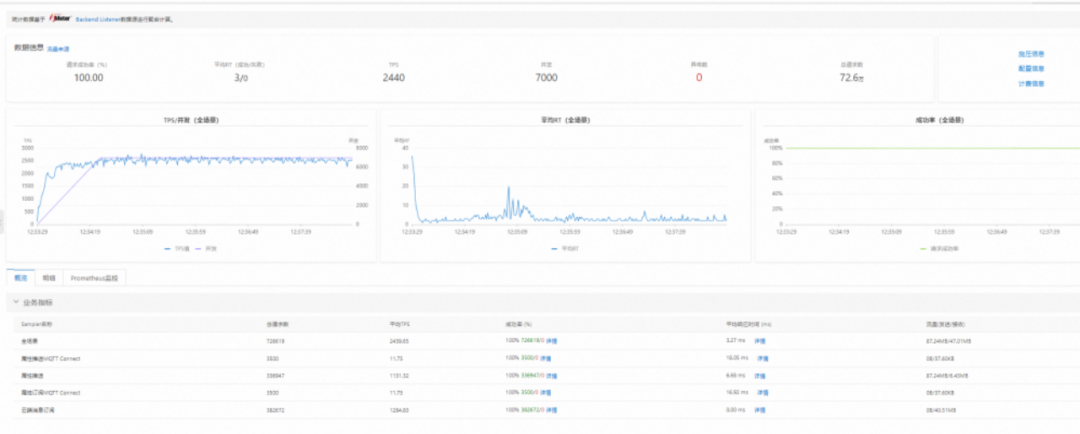
关键代码如下:
type Td struct {*sql.DB}type ExecArgs struct {Query stringArgs []any}var (td = Td{}once = sync.Once{}insertChan = make(chan ExecArgs, 1000))const (asyncExecMax = 200 //异步执行sql最大数量asyncRunMax = 40)func NewTDengine(DataSource conf.TSDB) (TD *Td, err error) {once.Do(func() {if DataSource.Driver == "" {DataSource.Driver = "taosWS"}td.DB, err = sql.Open(DataSource.Driver, DataSource.DSN)if err != nil {return}td.DB.SetMaxIdleConns(50)td.DB.SetMaxOpenConns(50)td.DB.SetConnMaxIdleTime(time.Hour)td.DB.SetConnMaxLifetime(time.Hour)_, err = td.Exec("create database if not exists ithings;")if err != nil {return}for i := 0; i < asyncRunMax; i++ {utils.Go(context.Background(), func() {td.asyncInsertRuntime()})}})if err != nil {logx.Errorf("TDengine 初始化失败,err:%v", err)}return &td, err}func (t *Td) asyncInsertRuntime() {r := rand.Intn(1000)tick := time.Tick(time.Second/2 + time.Millisecond*time.Duration(r))execCache := make([]ExecArgs, 0, asyncExecMax*2)exec := func() {if len(execCache) == 0 {return}sql, args := t.genInsertSql(execCache...)var err errorfor i := 3; i > 0; i-- { //三次重试_, err = t.Exec(sql, args...)if err == nil {break}}if err != nil {logx.Error(err)}execCache = execCache[0:0] //清空切片}for {select {case _ = <-tick:exec()case e := <-insertChan:execCache = append(execCache, e)if len(execCache) > asyncExecMax {exec()}}}}func (t *Td) AsyncInsert(query string, args ...any) {insertChan <- ExecArgs{Query: query,Args: args,}}func (t *Td) genInsertSql(eas ...ExecArgs) (query string, args []any) {qs := make([]string, 0, len(eas))as := make([]any, 0, len(eas))for _, e := range eas {qs = append(qs, e.Query)as = append(as, e.Args...)}return fmt.Sprintf("insert into %s;", strings.Join(qs, " ")), as}

TDengine 查询
ORM 设计
func (d *DeviceDataRepo) getPropertyArgFuncSelect(ctx context.Context,filter msgThing.FilterOpt) (sq.SelectBuilder, error) {schemaModel, err := d.getSchemaModel(ctx, filter.ProductID)if err != nil {return sq.SelectBuilder{}, err}p, ok := schemaModel.Property[filter.DataID]if !ok {return sq.SelectBuilder{}, errors.Parameter.AddMsgf("dataID:%s not find", filter.DataID)}var (sql sq.SelectBuilder)if p.Define.Type == schema.DataTypeStruct {sql = sq.Select("FIRST(ts) AS ts", d.GetSpecsColumnWithArgFunc(p.Define.Specs, filter.ArgFunc))} else {sql = sq.Select("FIRST(ts) AS ts", fmt.Sprintf("%s(param) as param", filter.ArgFunc))}if filter.Interval != 0 {sql = sql.Interval("?a", filter.Interval) //TDengine特有语法}if len(filter.Fill) > 0 {sql = sql.Fill(filter.Fill)//TDengine特有语法}return sql, nil}
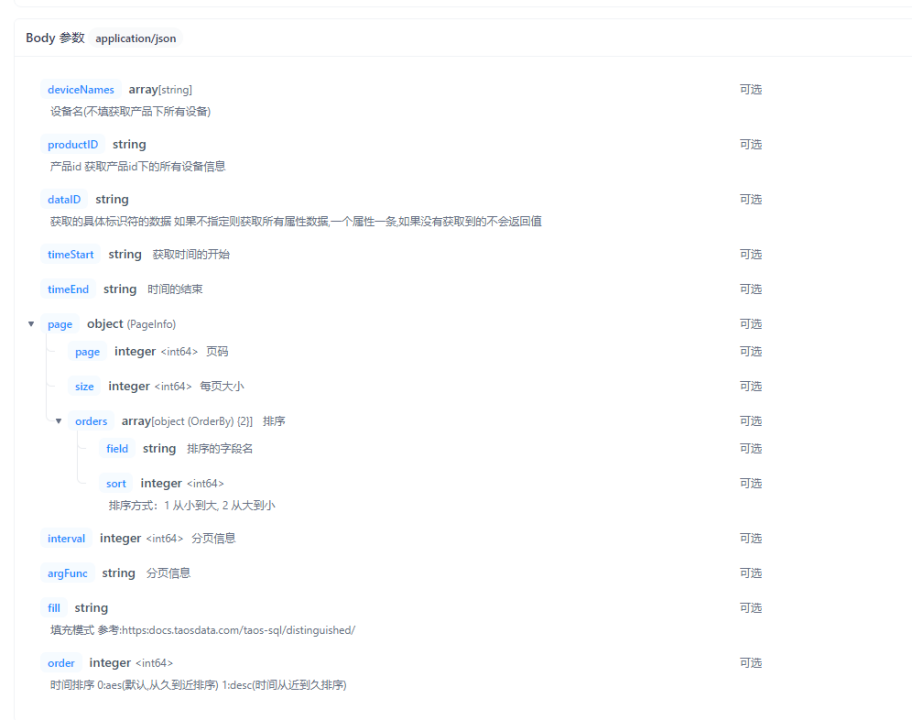
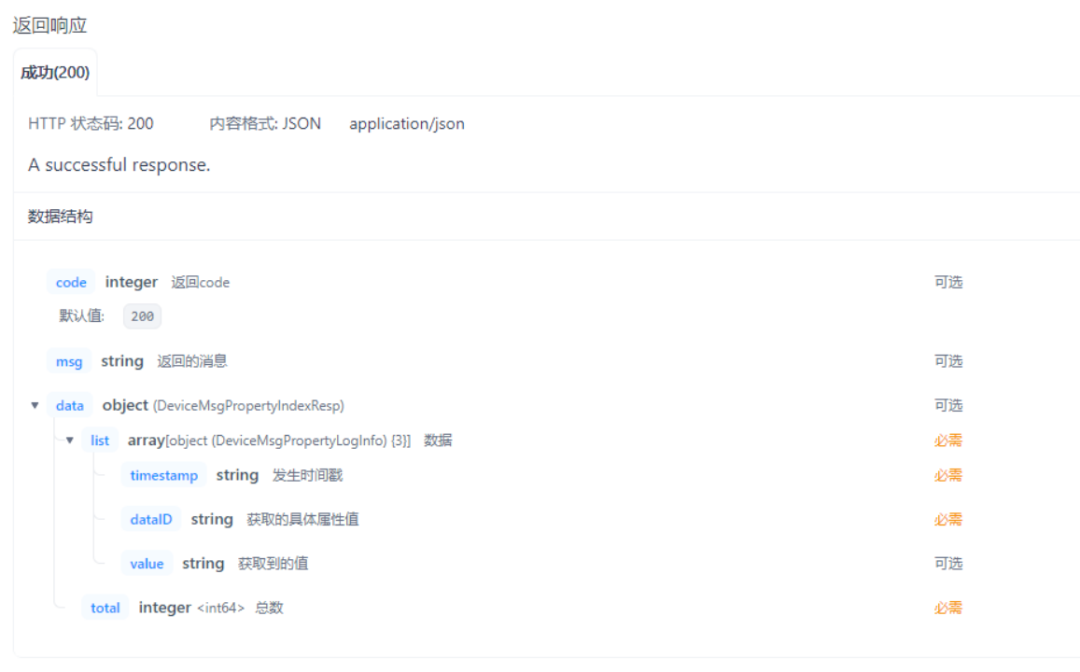
灵活的查询接口
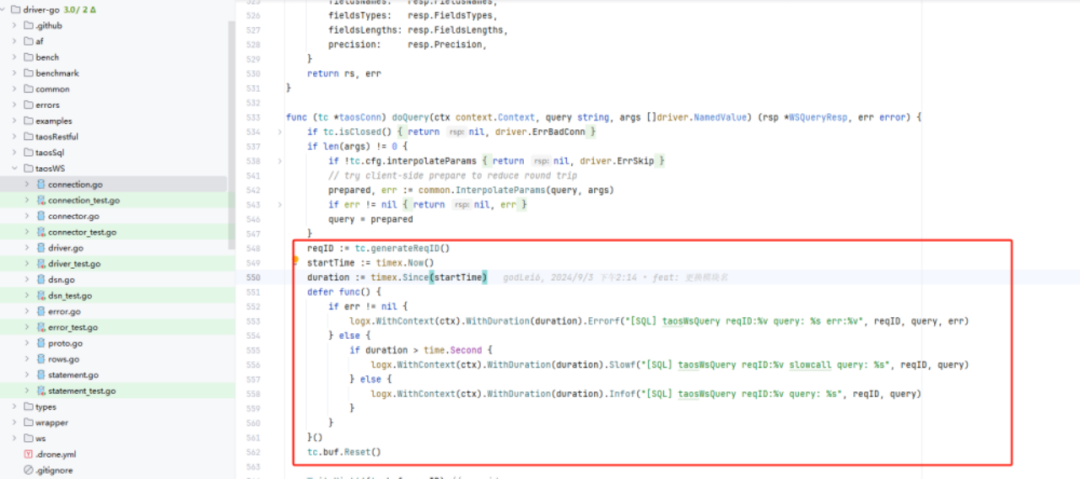
TDengine 链路追踪
driver-go/taosWS/connection.go文件中。联犀打印的日志如下:
结语
附录
联犀开源地址: https://gitee.com/unitedrhino
TDengine ORM 定制: https://gitee.com/unitedrhino/squirrel
TDengine 官方驱动定制: https://gitee.com/unitedrhino/driver-go
往期推荐
客户盘点:北微传感、青山钢铁、首自信、国电投、江河信息、寓信科技、前晨汽车、华风数据、协鑫鑫光、双合电气、路特斯、昆船电子、天合富家、红有软件、上海晶澳太阳能、极氪汽车、威士顿、树根互联、福州城建、积成电子、西电电力、中船九院、大唐水电院
Use Case:泛能网产业智能平台、电芯容量预测系统、煤矿安全生产综合管控平台、虚拟电厂运营管理平台、明阳集团能源大数据应用系统、知轮智慧轮胎系统、中国地震台网中心、中移物联智慧出行场景、搜狐基金、智光电气、黑格智能设备追踪场景、韵达订单扫描系统、顺丰大数据监控平台、车辆轨迹定位存储引擎项目、西门子轻量级数字化解决方案
技术分享:TDengine S3 存储、TDengine 流计算、TDengine 建模实战、与工业 SCADA 深度融合、TDengine 与新型电力系统、TDgpt 如何助力数据预测、Historian Connector+TDengine、长查询问题实战分享、TDengine 数据订阅、TDengine SQL 查询规则、万字长文解读怎样激活 TDengine 最高性价比
测试报告:TDengine 线性扩展能力测试、IoT 场景下 TDengine 3.0 性能对比分析报告、DevOps 场景下 TDengine 3.0 性能对比分析报告
👇 点击阅读原文,立即体验 TDgpt!
