



一、asm实例启动和查找顺序
介绍
10grac和之后版本的rac最大的区别在于OCR+VOTING DISK由raw变为到ASM存储,10g启动gi直接从裸设备读取配置文件,启动grid,而11g之后asm都没有启动,怎么去读取呢?
我们先引入一个问题:
11gR2之后,OCR/VOTEDISK存放在ASM磁盘组,这也就意味着在GI能够启动的前提是能够顺利启动ASM实例并且能够将相应磁盘组MOUNT起来;
而ASM的spfile却放在ASM磁盘组里,这也同样意味着要先启动ASM实例并且能读到参数文件。那如何解决这个问题呢?
11gR2中引入了gpnp profile,用于存放ASM参数文件路径,这允许oracle在ASM实例启动以前读到参数文件。
rac是如何定位到spfile位置的?
当ASM实例寻找初始化参数文件(即pfile或者spfile)时,将按照如下顺序:1. 由GPnP profile指定的参数文件位置2. 如果GPnP profile里没有指定,再按照下面顺序寻找:位于ASM HOME目录下的spfile,(比如 $ORACLE_HOME/dbs/spfile+ASM.ora)位于ASM HOME目录下的pfile[grid@his1 ~]$ cd u01/app/19.0.0/grid/gpnp/his1/profiles/peer/[grid@his1 peer]$ gpnptool getpval -p=profile.xml -asm_dis -o-/dev/oracleasm/disks/*[grid@his1 peer]$ gpnptool getpval -p=profile.xml -asm_spf -o-+OCR/his-cluster/ASMPARAMETERFILE/registry.253.1136486347
单机oracle asm 如何定位到spfile位置的?
在单实例环境中,没有GPnP profile,这些信息位于ASM资源(ora.asm)中,储存在OLR中。下面是一个单实例的例子:crsctl stat res ora.asm -p | egrep "ASM_DISKSTRING|SPFILE"ASM_DISKSTRING=SPFILE=+DATA/ASM/ASMPARAMETERFILE/registry.253.822856169
到目前为止,我们知道了ASM如何获得ASM磁盘和spfile的位置。但是磁盘组还没有mount时,ASM怎么读取spfile呢?
为了支持spfile储存在ASM磁盘组中,磁盘头中增加了两个条目:kfdhdb.spfile - ASM spfile所在AU号kfdhdb.spfflg - ASM spfile的标志位。如果值为1,那么ASM spfile就位于这个磁盘,AU号由kfdhdb.spfile指明。在发现磁盘的过程中,ASM实例读取磁盘头,寻找spfile的相关信息。找到储存spfile的磁盘后,就可以读取初始参数文件。[grid@his1 peer]$ kfed read dev/oracleasm/disks/ASMOCR1 aun=0 aus=4M blkn=0|egrep -i "kfdhdb.spfile|kfdhdb.spfflg"kfdhdb.spfile: 33 ; 0x0f4: 0x00000021kfdhdb.spfflg: 1 ; 0x0f8: 0x00000001下面在我的测试磁盘组OCR中做个演示,首先检查磁盘组状态和冗余类型[grid@his1 peer]$ asmcmd lsdg -g OCR |cut -c1-26Inst_ID State Type1 MOUNTED NORMAL2 MOUNTED NORMAL可以看到磁盘组是mount状态,冗余类型是normal。也就是说ASM spfile会有两副本。那么我们会看到两个磁盘设置了kfdhdb.spfile和kfdhdb.spfflg的值。下面验证一下:for disk in `asmcmd lsdsk -G OCR --suppressheader`doecho $diskkfed read $disk | grep spfdone/dev/oracleasm/disks/ASMOCR1kfdhdb.spfile: 33 ; 0x0f4: 0x00000021kfdhdb.spfflg: 1 ; 0x0f8: 0x00000001/dev/oracleasm/disks/ASMOCR2kfdhdb.spfile: 0 ; 0x0f4: 0x00000000kfdhdb.spfflg: 0 ; 0x0f8: 0x00000000/dev/oracleasm/disks/ASMOCR3kfdhdb.spfile: 33 ; 0x0f4: 0x00000021kfdhdb.spfflg: 1 ; 0x0f8: 0x00000001可以看到,确实有两个磁盘储存了ASM spfile。下面看一下磁盘/dev/oracleasm/disks/ASMOCR1 33号AU的内容:[grid@his1 peer]$ dd if=/dev/oracleasm/disks/ASMOCR1 bs=4M skip=33 count=1|strings+ASM1.__oracle_base='/u01/app/grid'#ORACLE_BASE set from in memory value+ASM2.__oracle_base='/u01/app/grid'#ORACLE_BASE set from in memory value*.asm_diskgroups='EDATA','NDATA'#Manual Mount*.asm_diskstring='/dev/oracleasm/disks/*'*.asm_power_limit=1*.large_pool_size=12M*.remote_login_passwordfile='EXCLUSIVE'记录了1+0 的读入记录了1+0 的写出4194304字节(4.2 MB)已复制,0.0371301 秒,113 MB/秒.磁盘/dev/oracleasm/disks/ASMOCR1 33号AU就是我们要找的ASM spfile。
二、gpnp
gpnp介绍
gpnp 全称为 grid plug and play ,是Oracle 11 gR2 版本集群管理软件新增的组件。该组件的功能由gpnpd.bin 守护进程实现的。Oracle 设计gpnp 的目的主要有以下两点:目的1: 将集群的基本配置信息保存在本地,以便在启动集群时能够从本地文件中获得足够的信息,而不再需要完全依赖于OCR。目的2: 通过和mdnsd 进行通信,能够更加灵活地识别集群中的节点,使集群结构更加灵活,而不再需要从OCR 中获取节点列表。gpnp 组件由两部分构成:gpnp wallet 和gpnp profile。gpnp walletgpnp wallet 的功能是保存需要访问gpnp profile 文件的客户签名信息, 当客户访问 gpnp profile 时通过wallet 中的签名信息进行验证,以确保只有指定的客户能够访问profile 文件。这部分内容是不需要用户配置的,在安装GI 时,Oracle 会自动完成签名信息的初始化。另外,gpnp 的wallet 文件可以在路径<GI_home>/gpnp/wallets/peer 下找到。例如:-rwx—— 1 grid oinstall 6301 Sep 19 11:45 cwallet.ssogpnp profilegpnp profile 是gpnp组件的重要部分,它是一个XML 文件,用于保存启动( bootstrap )集群节点时所需的必要信息。换句话说,当GI 在启动时,所有必需的信息都保存在gpnp profile中,从某种意思上说 gpnp profile中的信息类似于数据库bootstrap时所需要的信息。文件存在 < grid_home>/gpnp/profiles/peer 下:cd $ORACLE_HOME/gpnp/profiles/peer-rw-r–r– 1 grid oinstall 1890 Oct 12 12:56 profile.xml[root@hisdb01 ~]# find u01 -name profile.xml --只有RAC才有profile.xml,单实例asm没有/u01/app/11.2.0/grid/gpnp/hisdb01/profiles/peer/profile.xmlGPnP Profile 文件的作用:GPnP Profile 文件是一个保存于 $GRID_HOME/gpnp/<hostname>/profiles/peer 目录下的小型 XML 文件,名称为 profile.xml。其用于正确描述 RAC 每个节点的全局特性。每个节点上都会保存一个本地的 GPnP Profile,并且由 GPnP 守护进程(GPnPD)维护。
GPnP Profile 包含的内容:
GPnP Profile 的功能类似于 SPFILE,其用于保存启动数据库集群程序所需的必要信息,如下表所示。
<gpnp:GPnP-Profile xmlns="http://www.grid-pnp.org/2005/11/gpnp-profile" xmlns:gpnp="http://www.grid-pnp.org/2005/11/gpnp-profile" xmlns:orcl="http://www.oracle.com/gpnp/2005/11/gpnp-profile" xmlns:xsi="http://www.w3.org/2001/XMLSchema-instance" Version="1.0" xsi:schemaLocation="http://www.grid-pnp.org/2005/11/gpnp-profile gpnp-profile.xsd" ProfileSequence="13" ClusterUId="1f33833f2632df82ff058237ec956baa" ClusterName="hisdb-cluster" PALocation=""><gpnp:Network-Profile><gpnp:HostNetwork id="gen" HostName="*"><gpnp:Network id="net1" IP="192.168.133.0" Adapter="ens33" Use="public"/><gpnp:Network id="net2" IP="10.10.10.0" Adapter="ens36" Use="cluster_interconnect"/></gpnp:HostNetwork></gpnp:Network-Profile><orcl:CSS-Profile id="css" DiscoveryString="+asm" LeaseDuration="400"/><orcl:ASM-Profile id="asm" DiscoveryString="/dev/asm*" SPFile="+SYSTEMDG/hisdb-cluster/asmparameterfile/registry.253.1146094277"/><ds:Signature xmlns:ds="http://www.w3.org/2000/09/xmldsig#"><ds:SignedInfo><ds:CanonicalizationMethod Algorithm="http://www.w3.org/2001/10/xml-exc-c14n#"/><ds:SignatureMethod Algorithm="http://www.w3.org/2000/09/xmldsig#rsa-sha1"/><ds:Reference URI=""><ds:Transforms><ds:Transform Algorithm="http://www.w3.org/2000/09/xmldsig#enveloped-signature"/><ds:Transform Algorithm="http://www.w3.org/2001/10/xml-exc-c14n#"><InclusiveNamespaces xmlns="http://www.w3.org/2001/10/xml-exc-c14n#" PrefixList="gpnp orcl xsi"/></ds:Transform></ds:Transforms><ds:DigestMethod Algorithm="http://www.w3.org/2000/09/xmldsig#sha1"/><ds:DigestValue>meCzdSrsLhSb/SoTKDJLglr+XXo=</ds:DigestValue></ds:Reference></ds:SignedInfo><ds:SignatureValue>hxfUQtn6HIkBZGol6EYgwWUH4kKh3ezQptPVC+JnPgGrYalKpdv9FJd8e3wcpik6z6WclKpE80S2Cvrg8mvMnathRi5XSg1MwnWwKSEYv4KU1MD8H2MFtRYBCXMlKWGRKEpslLz3LN0ISQp1STMUDI36/cMfFvZknt+XW4RwIbI=</ds:SignatureValue></ds:Signature></gpnp:GPnP-Profile>
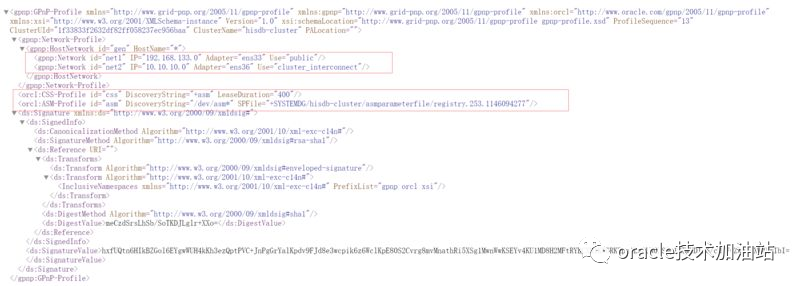
GPnP Profile 参数说明:
大致分类如下:集群名称(Cluster name)网络类型,包含业务及心跳网络(Network classifications, Public/Private)用于 CSS 进程的存储(Storage to be used for CSS)用于 ASM 的存储(Storage to be used for ASM : SPFILE location, ASM DiskString etc)数字签名信息(Digital signature information):GPnP Profile 对安全十分敏感,其可识别根分区的信息,并且保存了数据签名的配置权限。详细介绍:1 . ProfileSequence 表示该gpnp profile 的序列号, 该文件每做一次修改, 序列号就会增加1 , 也就是说, 序列号最大的gpnp profile 包含的信息是最新的。2 . ClusterUid 表示集群的Global ID。从版本12C 开始GI 通过ClusterUid 来唯一标识一个集群。这个Global ID 是在安装时随机产生的, 而且不能修改。3 . ClusterName 表示集群名称。在版本12C 之前, GI 通过集群名称来标识集群, 也就是说在同一个子网中不能存在同名的集群。4 . gpnp:Network id=”net1” IP=* .* . * .* Adapter=”eth0” Use=”public” 表示集群的公网信息。选项Use用于区分网络的用途, 这个选项只能为public 或者cluster_interconnect。5 . gpnp:Network id=”net2” IP=’* * * *’ Adapter=”eth1 ” Use=”cluster_interconnect” 表示集群的私网信息。选项id 表示网络资源的名称;选项IP指定子网信息;选项Adapter为网卡信息。6 . orcl:CSS-Profile id=”css ” DiscoveryString=”+asm” LeaseDuation=”400”,其中id="css"表示这部分信息是css需要使用的。DiscoveryString=”+asm ” 表示表决盘(VF)保存的路径, cssd 在启动时会到这个路径下去扫描表决盘, 在这个例子中+asm 表示读者使用了asm, cssd 会扫描ASM 的disk_string来发现表决盘。LeaseDuration 定义了节点号的租借有效期。7. orcl:ASM-Profile id=”asm” DiscoveryString=”/dev/asm-*” SPFile=”+DATA/node- cluster/asmparameterfile/registry.253.957185753” , 其中id=”asm ” 表示这部分信息是ASM需要使用的。SPFile指定了ASM实例启动时需要访问的SPFile位置。
GPnP Profile 这些信息什么时候会更新:
1.GPnP 守护进程(GPnPD)将在软件安装、系统启动或 Profile 更新时复制 Profile 的变化,以此实现所有节点 GPnP Profile 的同步更新。2.当由 oifcfg、crsctl、asmcmd 等命令更改集群配置时,GPnP Profile 都将被同步更新。注意:每次变更了,里面的序列号都会加1;可使用此命令查看:gpnptool getpval -p=./profile.xml -prf_sq -o-
GPnP Profile 维护工具:
[root@hisdb01 peer]# gpnptool -helpUnrecognized verb "-help"Oracle GPnP ToolUsage:"gpnptool <verb> <switches>", where verbs are:create Create a new GPnP Profileedit Edit existing GPnP Profilegetpval Get value(s) from GPnP Profileget Get profile in effect on local noderget Get profile in effect on remote GPnP nodeput Put profile as a current bestfind Find all RD-discoverable resources of given typelfind Find local gpnpd servercheck Perform basic profile sanity checksc14n Canonicalize, format profile text (XML C14N)sign Sign/re-sign profile with wallet's private keyunsign Remove profile signature, if anyverify Verify profile signature against wallet certificatehelp Print detailed tool helpver Show tool version该命令可用于查看本地gpnp位置,全局位置、修改gpnp、获取当前的gpnp值,签名和取消签名等功能;使用场景:1、错误的修改了profile.xml导致gi起不来使用;使用最多的命令:查看当前gpnp内容:[root@hisdb01 peer]# gpnptool get -?Oracle GPnP Toolget Get profile in effect on local nodeUsage:"gpnptool get <switches>", where switches are:-o[=gpnptool.out] Output result to a file, optional-o- Output result to stdout-ovr Overwrite output file, if exists, optional-noocr Do not try shared resources in OCR, optional-t[=3] Trace level (min..max=0..7), optional-f=<val> Command file name, optional-? Print verb help and exit[root@hisdb01 peer]# gpnptool get -o-<?xml version="1.0" encoding="UTF-8"?><gpnp:GPnP-Profile Version="1.0" xmlns="http://www.grid-pnp.org/2005/11/gpnp-profile" xmlns:gpnp="http://www.grid-pnp.org/2005/11/gpnp-profile" xmlns:orcl="http://www.oracle.com/gpnp/2005/11/gpnp-profile" xmlns:xsi="http://www.w3.org/2001/XMLSchema-instance" xsi:schemaLocation="http://www.grid-pnp.org/2005/11/gpnp-profile gpnp-profile.xsd" ProfileSequence="13" ClusterUId="1f33833f2632df82ff058237ec956baa" ClusterName="hisdb-cluster" PALocation=""><gpnp:Network-Profile><gpnp:HostNetwork id="gen" HostName="*"><gpnp:Network id="net1" IP="192.168.133.0" Adapter="ens33" Use="public"/><gpnp:Network id="net2" IP="10.10.10.0" Adapter="ens36" Use="cluster_interconnect"/></gpnp:HostNetwork></gpnp:Network-Profile><orcl:CSS-Profile id="css" DiscoveryString="+asm" LeaseDuration="400"/><orcl:ASM-Profile id="asm" DiscoveryString="/dev/asm*" SPFile="+SYSTEMDG/hisdb-cluster/asmparameterfile/registry.253.1146094277"/><ds:Signature xmlns:ds="http://www.w3.org/2000/09/xmldsig#"><ds:SignedInfo><ds:CanonicalizationMethod Algorithm="http://www.w3.org/2001/10/xml-exc-c14n#"/><ds:SignatureMethod Algorithm="http://www.w3.org/2000/09/xmldsig#rsa-sha1"/><ds:Reference URI=""><ds:Transforms><ds:Transform Algorithm="http://www.w3.org/2000/09/xmldsig#enveloped-signature"/><ds:Transform Algorithm="http://www.w3.org/2001/10/xml-exc-c14n#"> <InclusiveNamespaces xmlns="http://www.w3.org/2001/10/xml-exc-c14n#" PrefixList="gpnp orcl xsi"/></ds:Transform></ds:Transforms><ds:DigestMethod Algorithm="http://www.w3.org/2000/09/xmldsig#sha1"/><ds:DigestValue>meCzdSrsLhSb/SoTKDJLglr+XXo=</ds:DigestValue></ds:Reference></ds:SignedInfo><ds:SignatureValue>hxfUQtn6HIkBZGol6EYgwWUH4kKh3ezQptPVC+JnPgGrYalKpdv9FJd8e3wcpik6z6WclKpE80S2Cvrg8mvMnathRi5XSg1MwnWwKSEYv4KU1MD8H2MFtRYBCXMlKWGRKEpslLz3LN0ISQp1STMUDI36/cMfFvZknt+XW4RwIbI=</ds:SignatureValue></ds:Signature></gpnp:GPnP-Profile>Success.修改当前gpnp内容:[root@hisdb01 peer]# gpnptool edit -?Oracle GPnP Tooledit Edit existing GPnP ProfileUsage:"gpnptool edit <switches>", where switches are:-prf[=id|-id|1|0] Profile Tag: <GPnP-Profile>, optional-[id:]prf_cn=<val> Profile Tag: <GPnP-Profile [Id="id"] ClusterName="<val>">, optional-[id:]prf_pa=<uri> Profile Tag: <GPnP-Profile [Id="id"] PALocation="<uri>">, optional-[id:]prf_sq=<num> Profile Tag: <GPnP-Profile [Id="id"] ProfileSequence="<num>">, optional-[id:]prf_cid=<val> Profile Tag: <GPnP-Profile [Id="id"] ClusterUId="<val>">, optional-[pid:]nets[=id|-id|1|0]Profile Tag: <Network-Profile> child of <GPnP-Profile Id="pid">, optional-[pid:]haip[=id|-id|1|0]Profile Tag: <HAIP> child of <Network-Profile Id="pid">, optional-[id:]haip_ma=<val> Profile Tag: <HAIP [Id="id"] MulticastAddress="<val>">, optional-[id:]haip_bm=<val> Profile Tag: <HAIP [Id="id"] BootMode="<val>">, optional-[id:]haip_s=<val> Profile Tag: <HAIP [Id="id"] Subnet="<val>">, optional-[pid:]hnet[=id|-id|1|0]Profile Tag: <HostNetwork> child of <Network-Profile Id="pid">, optional-[id:]hnet_nm=<val> Profile Tag: <HostNetwork [Id="id"] HostName="<val>">, optional-[pid:]net[=id|-id|1|0]Profile Tag: <Network> child of <HostNetwork Id="pid">, optional-[id:]net_ip=<val> Profile Tag: <Network [Id="id"] IP="<val>">, optional-[id:]net_use=<val> Profile Tag: <Network [Id="id"] Use="<val>">, optional-[id:]net_nt=<val> Profile Tag: <Network [Id="id"] NameTempl="<val>">, optional-[id:]net_aip=<val> Profile Tag: <Network [Id="id"] AutoIP="<val>">, optional-[id:]net_ada=<val> Profile Tag: <Network [Id="id"] Adapter="<val>">, optional-[pid:]asm[=id|-id|1|0]Profile Tag: <ASM-Profile> child of <GPnP-Profile Id="pid">, optional-[id:]asm_dis=<val> Profile Tag: <ASM-Profile [Id="id"] DiscoveryString="<val>">, optional-[id:]asm_spf=<val> Profile Tag: <ASM-Profile [Id="id"] SPFile="<val>">, optional-[id:]asm_uid=<hexnum>Profile Tag: <ASM-Profile [Id="id"] UniverseId="<hexnum>">, optional-[pid:]css[=id|-id|1|0]Profile Tag: <CSS-Profile> child of <GPnP-Profile Id="pid">, optional-[id:]css_dis=<val> Profile Tag: <CSS-Profile [Id="id"] DiscoveryString="<val>">, optional-[id:]css_ld=<num> Profile Tag: <CSS-Profile [Id="id"] LeaseDuration="<num>">, optional-[id:]css_cin=<num> Profile Tag: <CSS-Profile [Id="id"] ProfileCIN="<num>">, optional-[id:]css_cuv=<val> Profile Tag: <CSS-Profile [Id="id"] CUV="<val>">, optional-[pid:]ocr[=id|-id|1|0]Profile Tag: <OCR-Profile> child of <GPnP-Profile Id="pid">, optional-[id:]ocr_oid=<num> Profile Tag: <OCR-Profile [Id="id"] OCRId="<num>">, optional-rmws Remove whitespace from xml, optional-fmt[=0,2] Format profile. Value is ident level,step, optional-p[=profile.xml] GPnP profile name-o[=gpnptool.out] Output result to a file, optional-o- Output result to stdout-ovr Overwrite output file, if exists, optional-t[=3] Trace level (min..max=0..7), optional-f=<val> Command file name, optional-? Print verb help and exit--修改asm_diskstring[root@hisdb01 peer]# gpnptool edit -p=./profile.xml -o=./profile.xml -ovr -prf_sq=13 -asm_dis='/dev/asm*'--修改spfile位置[root@hisdb01 peer]# gpnptool edit -p=./profile.xml -o=./profile.xml -ovr -prf_sq=13 -asm:asm_spf='+OCR/grac4/asmparameterfile/spfileCopyASM.ora'--还可以修改网卡[root@hisdb01 peer]# gpnptool edit -p=./profile.xml -o=./profile.xml -ovr -prf_sq=13 -net2:net_ip=20.20.20.0注意看id:这个要根据profile.xml文件内容来写,有就写,没有就省略
GPnP Profile 修改案例:
以下是修改asm_diskstrings值的过程记录:1.查看当前的gpnp profile 的序号[root@hisdb01 ~]# locate profile.xml/u01/app/11.2.0/grid/gpnp/hisdb01/profiles/peer/profile.xml/u01/app/11.2.0/grid/gpnp/profiles/peer/profile.xml/usr/share/mime/application/vnd.iccprofile.xml/usr/share/mime/application/x-profile.xml[root@hisdb01 ~]# cd u01/app/11.2.0/grid/gpnp/hisdb01/profiles/peer/[root@hisdb01 peer]# gpnptool getpval -p=./profile.xml -prf_sq -o-122.查看当前的gpnp profile 中的asm 的diskstring 的设置[root@hisdb01 peer]# gpnptool get<orcl:ASM-Profile id="asm" DiscoveryString="bad1*" SPFile="+SYSTEMDG/hisdb-cluster/asmparameterfile/registry.253.1146094277"/>3.把原来的文件备份一下[root@hisdb01 peer]# cp -p profile.xml profile.xml.bak4. 把错误的参数改过来[root@hisdb01 peer]# gpnptool edit -p=./profile.xml -o=./profile.xml -ovr -prf_sq=13 -asm_dis='/dev/asm*'这里面还要把序列号再加1.5. 让当前的改变生效[root@hisdb01 peer]# gpnptool sign -p=./profile.xml -o=./profile.xml -ovr -w=cw-fs:peer-w=file:/oracle/app/11.2.0.4/grid/gpnp/$hostname/wallets/peer6.查看当前的状态[root@hisdb01 peer]# gpnptool get7.启动集群[root@hisdb01 peer]# crsctl start crs
GPnP Profile 故障后如何恢复:
1、gpnp 的文件是profile.xml,如果一个或者全部节点丢失了,我们能恢复吗?可以,直接把profile.xml文件删除了,重新启动crs,我们看到它又恢复了回来;2、pending.xml文件和profile.xml文件的关系?当GPnP配置文件不存在时,GPnPd会自动将其从现有节点复制为pending.xml。pending.xml内容与profile.xml中的条目相同。当集群的所有服务和资源出现时,这个pending.xml会自动消失。3、profile.xml 如果丢失了或者被是从哪里获取的?gpnpd进程通过OLR配置信息重建的profile.xml文件
文章转载自数据库技术加油站,如果涉嫌侵权,请发送邮件至:contact@modb.pro进行举报,并提供相关证据,一经查实,墨天轮将立刻删除相关内容。
