1、简介
灰度发布(Canary Release)是一种渐进式的发布策略,允许新版本的应用逐步替代旧版本,从而在真实环境中验证新版本的稳定性和性能,同时最小化对用户的影响。Istio作为一个强大的服务网格,提供了丰富的流量管理功能,使得灰度发布变得更加容易和灵活。
2、前提条件
部署Istio:确保Istio已经在你的Kubernetes集群中部署并运行。
示例应用:集群中已有一个正在运行的示例应用,以供灰度发布演示。
3、部署示例应用
该应用由四个单独的微服务构成。 这个应用模仿在线书店的一个分类,显示一本书的信息。 页面上会显示一本书的描述,书籍的细节(ISBN、页数等),以及关于这本书的一些评论。
$ kubectl create namespace bookinfo
$ kubectl -n bookinfo create -f samples/bookinfo/platform/kube/bookinfo.yaml
$ kubectl -n bookinfo get po
NAME                                  READY   STATUS    RESTARTS   AGE
details-v1-5974b67c8-wclnd            1/1     Running   0          34s
productpage-v1-64794f5db4-jsdbg       1/1     Running   0          33s
ratings-v1-c6cdf8d98-jrfrn            1/1     Running   0          33s
reviews-v1-7f6558b974-kq6kj           1/1     Running   0          33s
reviews-v2-6cb6ccd848-qdg2k           1/1     Running   0          34s
reviews-v3-cc56b578-kppcx             1/1     Running   0          34s
Bookinfo 应用分为四个单独的微服务:
productpage
. 这个微服务会调用details
和reviews
两个微服务,用来生成页面。details
. 这个微服务中包含了书籍的信息。reviews
. 这个微服务中包含了书籍相关的评论。它还会调用ratings
微服务。ratings
. 这个微服务中包含了由书籍评价组成的评级信息。
reviews
微服务有 3 个版本:
v1 版本不会调用
ratings
服务。v2 版本会调用
ratings
服务,并使用 1 到 5 个黑色星形图标来显示评分信息。v3 版本会调用
ratings
服务,并使用 1 到 5 个红色星形图标来显示评分信息。
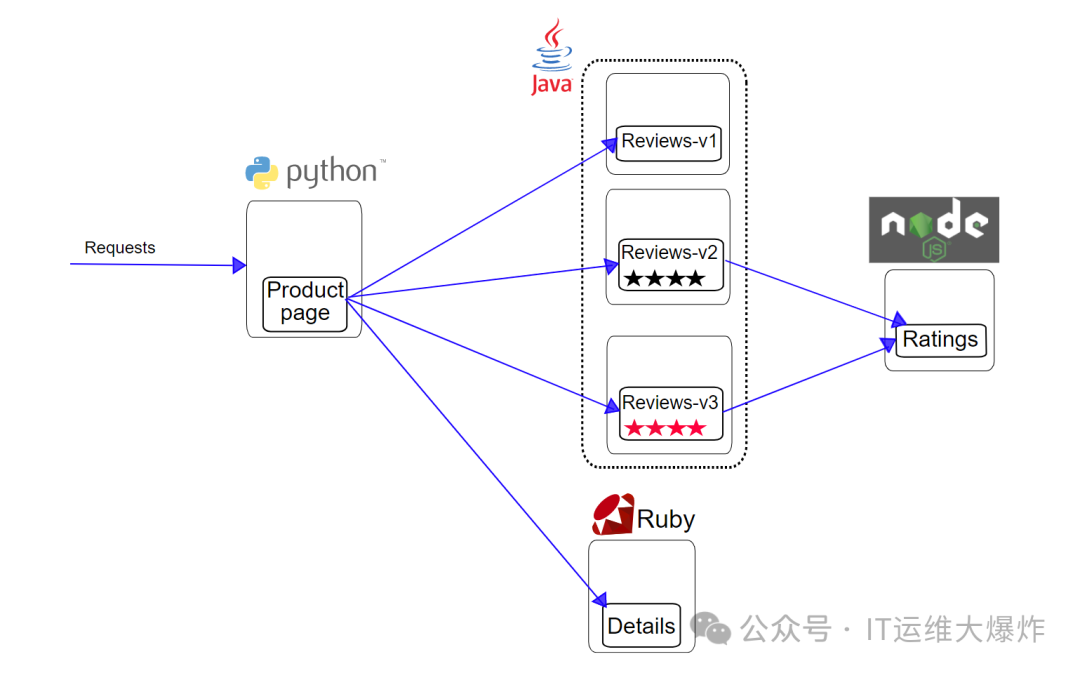
Bookinfo 是一个异构应用,几个微服务是由不同的语言编写的。这些服务对 Istio 并无依赖,但是构成了一个有代表性的服务网格的例子:它由多个服务、多个语言构成,并且 reviews
服务具有多个版本。
4、使用ingress访问productpage服务
Ingress对象主要用于定义从外部访问集群内部服务的路由规则,而无法直接对流量进行细粒度的管控
[root@mast01 istio]# vim ingress-productpage.yaml
apiVersion: extensions/v1beta1
kind: Ingress
metadata:
  name: productpage
  namespace: bookinfo
spec:
  rules:
  - host: productpage.bookinfo.com
    http:
      paths:
      - backend:
          serviceName: productpage
          servicePort: 9080
        path: /
status:
  loadBalancer: {}
5、注入sidecar容器
使用
istioctl kube-inject
$ kubectl -n bookinfo apply -f <(istioctl kube-inject -f samples/bookinfo/platform/kube/bookinfo.yaml)为命名空间打label
# 给命名空间打标签,这样部署在该命名空间的服务会自动注入sidecar容器
$ kubectl label namespace bookinfo istio-injection=enabled
6、访问路径路由
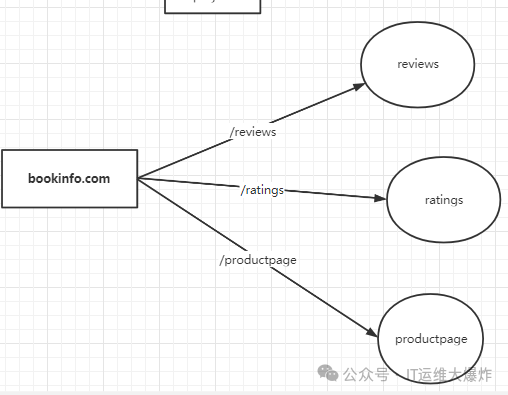
# ingress-gateway访问productpage
[root@mast01 istio]# kubectl apply -f  productpage-gateway.yaml
apiVersion: networking.istio.io/v1alpha3
kind: Gateway
metadata:
  name: productpage-gateway
  namespace: bookinfo
spec:
  selector:
    istio: ingressgateway # use istio default controller
  servers:
  - port:
      number: 80
      name: http
      protocol: HTTP
    hosts:
    - productpage.bookinfo.com  #灰度部署使用
    - bookinfo.com   #这里只是用bookinfo域名
[root@mast01 istio]# vim bookinfo-routing-with-uri-path.yaml
apiVersion: networking.istio.io/v1alpha3
kind: VirtualService
metadata:
  name: bookinfo
  namespace: bookinfo
spec:
  gateways:
  - productpage-gateway
  hosts:
    - bookinfo.com
  http:
  - name: productpage-route
    match:
    - uri:
        prefix: /productpage
    route:
    - destination:
        host: productpage
  - name: reviews-route
    match:
    - uri:
        prefix: /reviews
    route:
    - destination:
        host: reviews
  - name: ratings-route
    match:
    - uri:
        prefix: /ratings
    route:
    - destination:
        host: ratings
nginx新增配置
[root@work01 ~]# docker ps|grep nginx
cb3e4c1f6831   registry.aliyuncs.com/google_containers/pause:3.5   "/pause"                 4 hours ago   Up 4 hours                                       k8s_POD_ingress-nginx-controller-q8bpj_ingress-nginx_0844d622-9c54-45e7-8678-ded0a541bbda_4
541df06320b6   nginx:alpine                                        "/docker-entrypoint.…"   2 weeks ago   Up 4 hours   0.0.0.0:80->80/tcp, :::80->80/tcp   istio-nginx

[root@work01 ~]# docker exec -it istio-nginx sh

/ # cd etc/nginx/conf.d/

/etc/nginx/conf.d # vi bookinfo.conf
upstream bookinfo {
    server 192.168.58.116:31927;
}
server {
    listen       80;
    listen  [::]:80;
    server_name  bookinfo.com;

    location / {
        proxy_set_header Host $host;
        proxy_set_header X-Real-IP $remote_addr;
        proxy_set_header X-Forwarded-For $proxy_add_x_forwarded_for;
        proxy_http_version 1.1;
        proxy_pass http://bookinfo;
    }
}

/etc/nginx/conf.d # nginx -t
nginx: the configuration file /etc/nginx/nginx.conf syntax is ok
nginx: configuration file /etc/nginx/nginx.conf test is successful

/etc/nginx/conf.d # nginx -s reload
2024/07/08 08:00:09 [notice] 37#37: signal process started
实际的访问对应表
bookinfo.com/productpage  -> productpage:8090/productpage
bookinfo.com/ratings  ->  ratings:9080/ratings
bookinfo.com/reviews  ->  reviews:9080/reviews
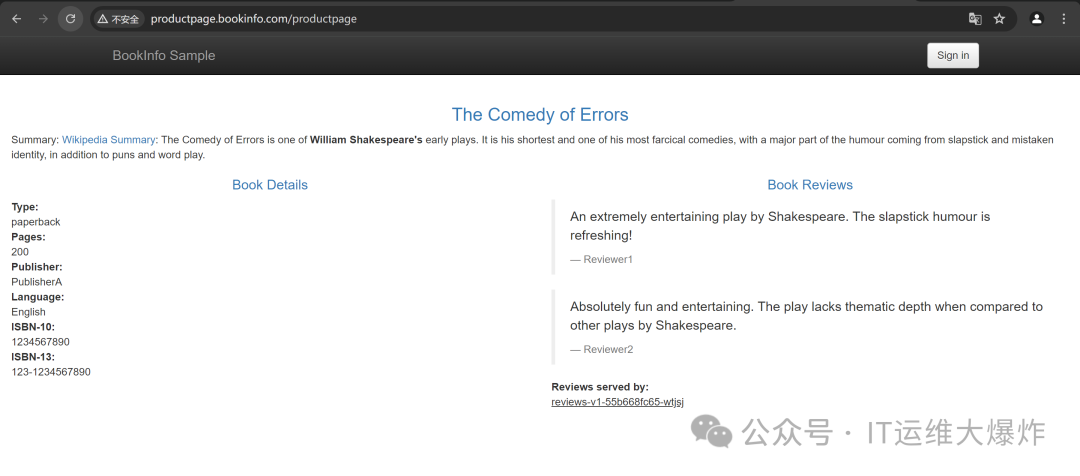
访问:http://bookinfo.com/productpage

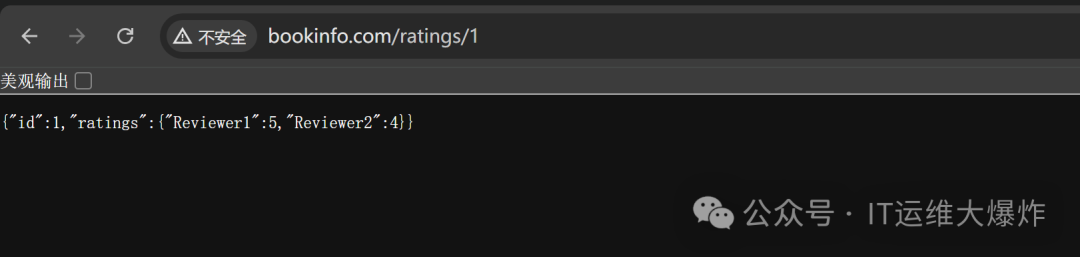
访问:http://bookinfo.com/ratings/1
7、灰度发布
灰度发布是一种逐步发布新版本的策略。Istio使用VirtualService
和DestinationRule
来定义流量的路由和目标,我们可以使用Istio的VirtualService
和DestinationRule
来控制流量,这些Istio资源允许你定义复杂的流量路由规则,从而实现细粒度的流量管理功能。实现ingress解决不了的按照比例分配流量。
8、轮流接收流量
[root@mast01 istio]# vim productpage-gateway.yaml
apiVersion: networking.istio.io/v1alpha3
kind: Gateway
metadata:
  name: productpage-gateway
  namespace: bookinfo
spec:
  selector:
    istio: ingressgateway # use istio default controller
  servers:
  - port:
      number: 80
      name: http
      protocol: HTTP
    hosts:
    - productpage.bookinfo.com
[root@mast01 istio]# vim productpage-virtualservice.yaml
apiVersion: networking.istio.io/v1alpha3
kind: VirtualService
metadata:
  name: gateway-front-tomcat
  namespace: bookinfo
spec:
  gateways:
  - productpage-gateway
  hosts:
  - productpage.bookinfo.com
  http:
  - route:
    - destination:
        host: productpage
        port:
          number: 9080
nginx新增配置
[root@work01 ~]# docker exec -it istio-nginx sh

/ # cd etc/nginx/conf.d/

/etc/nginx/conf.d # vi productpage.conf
upstream bookinfo-productpage {
  server 192.168.58.116:31927;
}
server {
    listen       80;
    listen  [::]:80;
    server_name  productpage.bookinfo.com;

    location  {
        proxy_set_header Host $host;
        proxy_set_header X-Real-IP $remote_addr;
        proxy_set_header X-Forwarded-For $proxy_add_x_forwarded_for;
        proxy_http_version 1.1;
        proxy_pass http://bookinfo-productpage;
    }
}

/etc/nginx/conf.d # nginx -t
nginx: the configuration file etc/nginx/nginx.conf syntax is ok
nginx: configuration file etc/nginx/nginx.conf test is successful

/etc/nginx/conf.d # nginx -s reload
2024/07/08 08:00:09 [notice] 37#37: signal process started
访问v1--->v2--->v3 流量均分
9、指定版本接受流量
此时我们假设一种场景,把reviews的v3当作当前版本,v1和v2当作迭代版本,先将所有流量都指向v3,之后采用灰度的方式将流量慢慢的导向新版本
[root@mast01 istio]# kubectl -n bookinfo get  pod --show-labels
NAME                              READY   STATUS    RESTARTS      AGE     LABELS
reviews-v1-55b668fc65-wtjsj       2/2     Running   4 (20h ago)   3d21h   app=reviews,pod-template-hash=55b668fc65,security.istio.io/tlsMode=istio,service.istio.io/canonical-name=reviews,service.istio.io/canonical-revision=v1,version=v1
reviews-v2-858f99c99-zsqpk        2/2     Running   0             146m    app=reviews,pod-template-hash=858f99c99,security.istio.io/tlsMode=istio,service.istio.io/canonical-name=reviews,service.istio.io/canonical-revision=v2,version=v2
reviews-v3-7886dd86b9-65l6k       2/2     Running   4 (20h ago)   3d21h   app=reviews,pod-template-hash=7886dd86b9,security.istio.io/tlsMode=istio,service.istio.io/canonical-name=reviews,service.istio.io/canonical-revision=v3,version=v3

[root@mast01 istio]# vim destination-rule-reviews.yaml
apiVersion: networking.istio.io/v1alpha3
kind: DestinationRule
metadata:
  name: reviews
  namespace: bookinfo
spec:
  host: reviews
  trafficPolicy:
    loadBalancer:
      simple: RANDOM
  subsets:
  - name: v1
    labels:
      version: v1 #subset v1指向具有version=v1的pod
  - name: v2
    labels:
      version: v2 #subset v2指向具有version=v2的pod
  - name: v3
    labels:
      version: v3 #subset v3指向具有version=v3的pod

#只想访问`reviews-v3`
[root@mast01 istio]# vim virtual-service-reviews-v3.yaml
apiVersion: networking.istio.io/v1alpha3
kind: VirtualService
metadata:
  name: reviews
  namespace: bookinfo
spec:
  hosts:
    - reviews
  http:
  - route:
    - destination:
        host: reviews
        subset: v3

[root@mast01 istio]# kubectl apply -f virtual-service-reviews-v3.yaml

[root@mast01 istio]# kubectl -n bookinfo describe  vs reviews
Name:         reviews
Namespace:    bookinfo
Labels:       <none>
Annotations:  <none>
API Version:  networking.istio.io/v1beta1
Kind:         VirtualService
Metadata:
  Creation Timestamp:  2024-07-08T08:47:51Z
  Generation:          3
  Managed Fields:
    API Version:  networking.istio.io/v1alpha3
    Fields Type:  FieldsV1
    fieldsV1:
      f:metadata:
        f:annotations:
          .:
          f:kubectl.kubernetes.io/last-applied-configuration:
      f:spec:
        .:
        f:hosts:
        f:http:
    Manager:         kubectl-client-side-apply
    Operation:       Update
    Time:            2024-07-08T08:47:51Z
  Resource Version:  602873
  UID:               044a8298-ddec-45c8-a80d-75c6bca41e8a
Spec:
  Hosts:
    reviews
  Http:
    Route:
      Destination:
        Host:    reviews
        Subset:  v3
Events:          <none>
访问100%v3
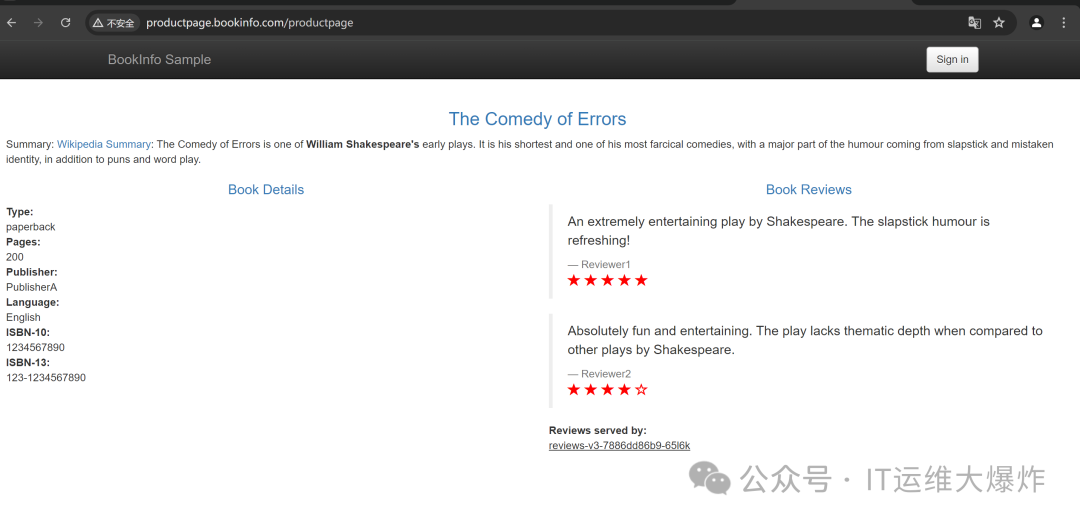
10、流量按需分配
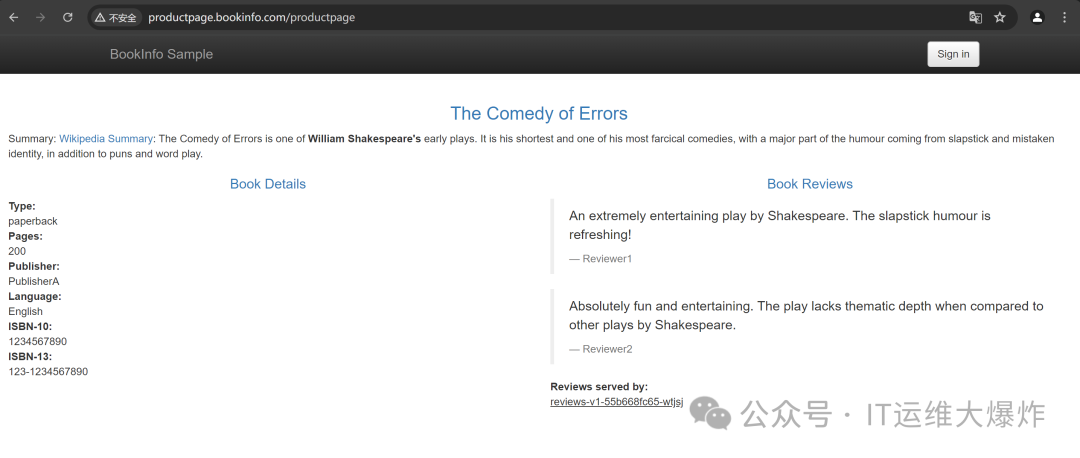
此时我们假设一种场景,项目目前使用的版本是v1,但是产品页面没有评分系统,随着产品的迭代有了需要查看产品评分的需求,此时开发reviews的v2版本添加了产品评分的需求。但是由于是新开发的应用,只能引入一部分流量监测服务的稳定性,此时可以使用VirtualService将10%的流量导向v2版本,剩下的90%依旧导向v1版本
# 流量导向
90% -> reivews-v1
10% -> reviews-v2
0%  -> reviews-v3
[root@mast01 istio]# vim virtual-service-reviews-90-10.yaml
apiVersion: networking.istio.io/v1alpha3
kind: VirtualService
metadata:
  name: reviews
  namespace: bookinfo
spec:
  hosts:
    - reviews
  http:
  - route:
    - destination:
        host: reviews
        subset: v1
      weight: 90
    - destination:
        host: reviews
        subset: v2
      weight: 10

[root@mast01 istio]# kubectl apply -f virtual-service-reviews-90-10.yaml

[root@mast01 istio]# kubectl -n bookinfo describe  vs reviews
Name:         reviews
Namespace:    bookinfo
Labels:       <none>
Annotations:  <none>
API Version:  networking.istio.io/v1beta1
Kind:         VirtualService
Metadata:
  Creation Timestamp:  2024-07-08T08:47:51Z
  Generation:          4
  Managed Fields:
    API Version:  networking.istio.io/v1alpha3
    Fields Type:  FieldsV1
    fieldsV1:
      f:metadata:
        f:annotations:
          .:
          f:kubectl.kubernetes.io/last-applied-configuration:
      f:spec:
        .:
        f:hosts:
        f:http:
    Manager:         kubectl-client-side-apply
    Operation:       Update
    Time:            2024-07-08T08:47:51Z
  Resource Version:  603027
  UID:               044a8298-ddec-45c8-a80d-75c6bca41e8a
Spec:
  Hosts:
    reviews
  Http:
    Route:
      Destination:
        Host:    reviews
        Subset:  v1
      Weight:    90
      Destination:
        Host:    reviews
        Subset:  v2
      Weight:    10
Events:          <none>
访问90%v1--->10%v2
11、总结
# 假如v2版本的副本数扩容为3,v2版本的流量会如何分配?  会不会变成30%?
[root@mast01 istio]# kubectl -n bookinfo scale deploy reviews-v2 --replicas=3

# 流量导向发现还是,即使后面有多个pod,只会转到其中一个上面。
90% -> reivews-v1
10% -> reviews-v2
0%  -> reviews-v3
欢迎大家扫码关注:

本公众号只写原创,不接广告、不接广告、不接广告。下期小伙伴想学习什么技术,可以私信发我吆。