



小T导读
Guide
在数字化转型的过程中,监控与告警功能的优化对保障系统的稳定运行至关重要。本篇文章是“2024,我想和 TDengine 谈谈”征文活动的三等奖作品之一,作者张世伟详细介绍了如何利用 TDengine、taosKeeper 和 TDinsight 实现对 TDengine 服务的状态监控与告警功能。他通过容器化安装 TDengine 和 Grafana,演示了如何配置 Grafana 数据源、导入 TDinsight 仪表板、以及如何设置告警规则和通知策略。欢迎大家阅读。

如果没有监控,那么最好的情况是没有问题发生,最糟糕的情况则是问题发生了但没有被发现。——《Prometheus监控实战》
今天我们非常高兴地宣布,TDengine 3.3.3.0 版本正式发布。本次更新引入了多项重要功能和性能优化,旨在为用户提供更高效、更灵活的数据解决方案。在 3.3.3.0 版本中,我们着重优化了监控和告警功能,新增了多种常见的 MySQL 函数,并增强了对 MongoDB 数据源的支持。这些改进将为用户在物联网和大数据应用中提供更强大的功能,助力大家在数字化转型过程中实现更大的成功。
虚拟资源
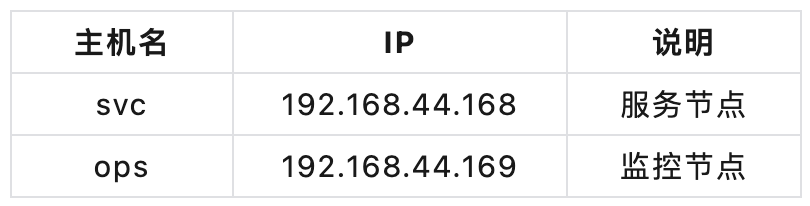
基本选用当前最新版本,即将安装的 Grafana 及组件版本信息如下:
Grafana 版本:11.2.0
TDengine 版本:3.3.3.0(自带了 taosAdapter 与 taosKeeper)
系统环境
[root@ops ~]# uname -aLinux ops 5.10.0-182.0.0.95.oe2203sp3.x86_64 #1 SMP Sat Dec 30 13:10:36 CST 2023 x86_64 x86_64 x86_64 GNU/Linux[root@ops ~]# cat proc/versionLinux version 5.10.0-182.0.0.95.oe2203sp3.x86_64 (root@dc-64g.compass-ci) (gcc_old (GCC) 10.3.1, GNU ld (GNU Binutils) 2.37) #1 SMP Sat Dec 30 13:10:36 CST 2023
svc 节点:使用 Docker 安装 TDengine 3.3.3.0
[root@svc opt]# docker pull tdengine/tdengine:3.3.3.0[root@svc opt]# docker run -d --name tdengine -v opt/tdengine/data:/var/lib/taos \-v opt/tdengine/log:/var/log/taos \-p 6030:6030 -p 6041:6041 -p 6043-6060:6043-6060 -p 6043-6060:6043-6060/udp tdengine/tdengine:3.3.3.00b9e36feac54d787114e5eed8b5dc7fa132dcd29d736b7489733194a27f28cab
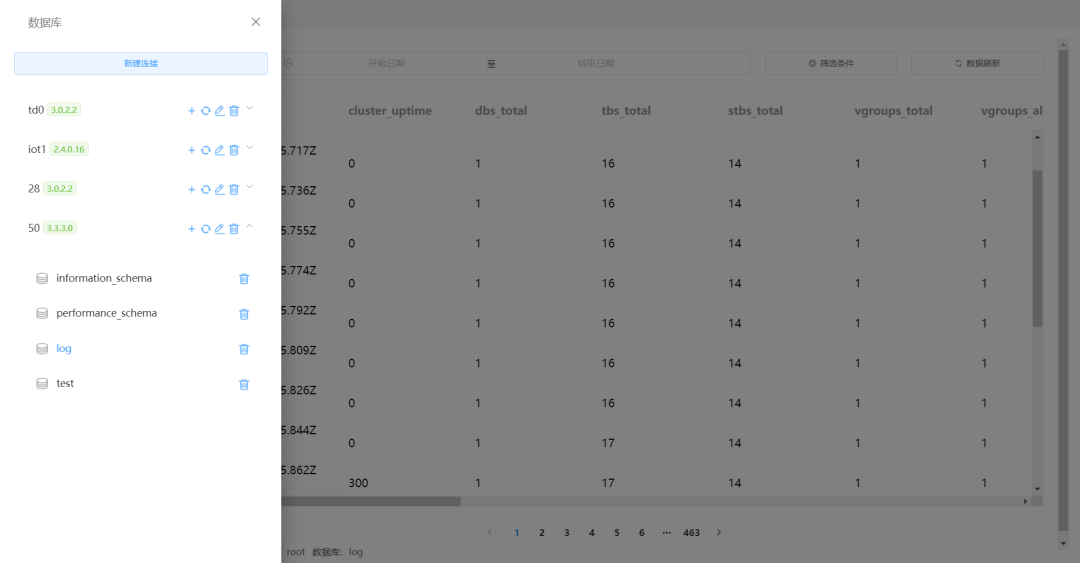
使用客户端工具验证 TDengine 安装效果
通过浏览器验证 metrics 端点
log数据库,Grafana 则通过读取该数据库中的数据表来实现监控数据的可视化展示。
taosKeeper是 TDengine 3.0 版本的监控指标导出工具,通过简单配置即可获取 TDengine 的运行状态(这些指标可以导入到 Prometheus,本文直接使用 TDengine 存储)。
ops 节点:使用 Docker Compose 安装 Grafana
# 编辑TDinsight下载脚本[root@ops monitoring]# vi tdinsight-plugin.shget_latest_release() {curl --silent "https://api.github.com/repos/taosdata/grafanaplugin/releases/latest" |grep '"tag_name":' |sed -E 's/.*"v([^"]+)".*/\1/'}TDENGINE_PLUGIN_VERSION=$(get_latest_release)grafana-cli \--pluginUrl https://github.com/taosdata/grafanaplugin/releases/download/v$TDENGINE_PLUGIN_VERSION/tdengine-datasource-$TDENGINE_PLUGIN_VERSION.zip \plugins install tdengine-datasource# 复制下载脚本到Grafana容器中[root@ops monitoring]# docker cp tdinsight-plugin.sh ops-grafana:/usr/share/grafanaSuccessfully copied 2.05kB to ops-grafana:/usr/share/grafana# 下载并安装TDinsight插件[root@ops monitoring]# docker exec ops-grafana bash tdinsight-plugin.shDeprecation warning: The standalone 'grafana-cli' program is deprecated and will be removed in the future. Please update all uses of 'grafana-cli' to 'grafana cli'✔ Downloaded and extracted tdengine-datasource v3.6.0 zip successfully to var/lib/grafana/plugins/tdengine-datasourcePlease restart Grafana after installing or removing plugins. Refer to Grafana documentation for instructions if necessary.# 重启Grafana容器[root@ops monitoring]# docker restart ops-grafanaops-grafana
TDinsight 监控实战
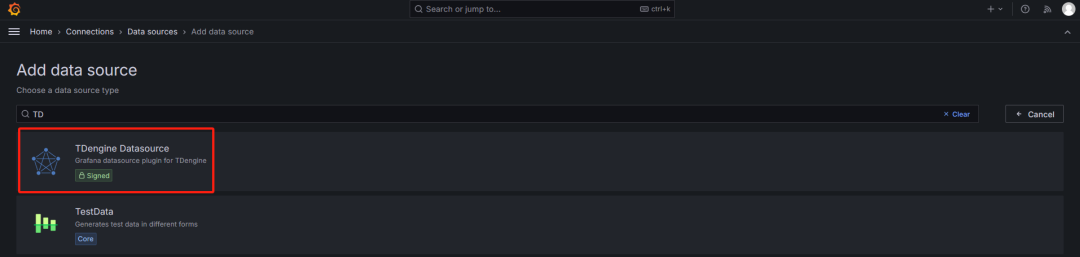
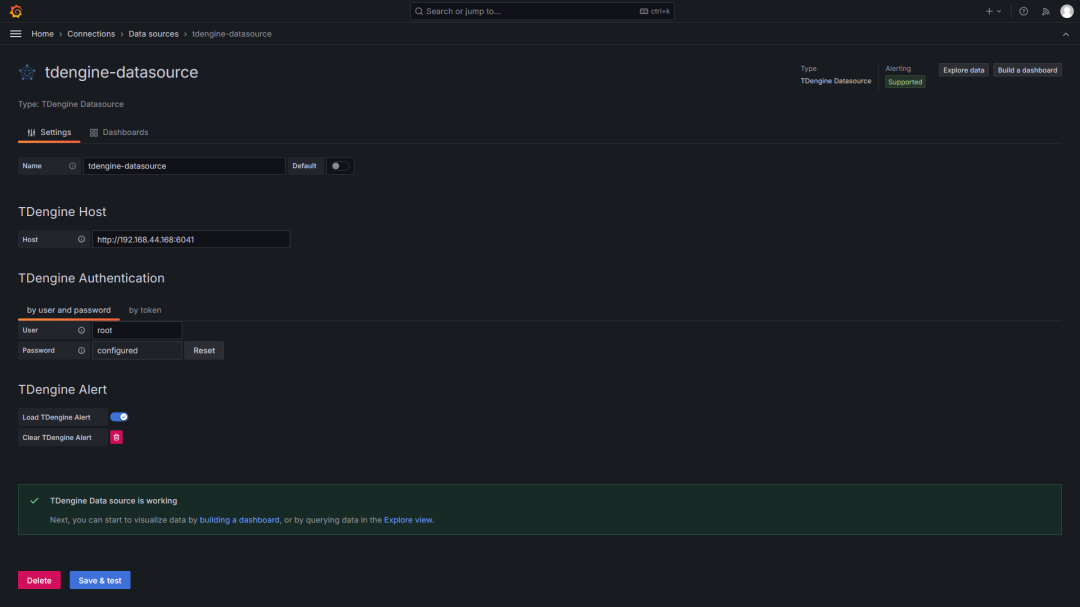
在左侧菜单中点击 “Add new connection”。
选择或搜索 “Data Sources”。
点击 “Add data source”,然后选择 “TDengine Datasource”。
在 “HTTP” 部分,输入 TDengine 的地址,例如:
http://192.168.44.168:6041
。点击 “Save & Test”,确认连接成功。
1
导入仪表盘
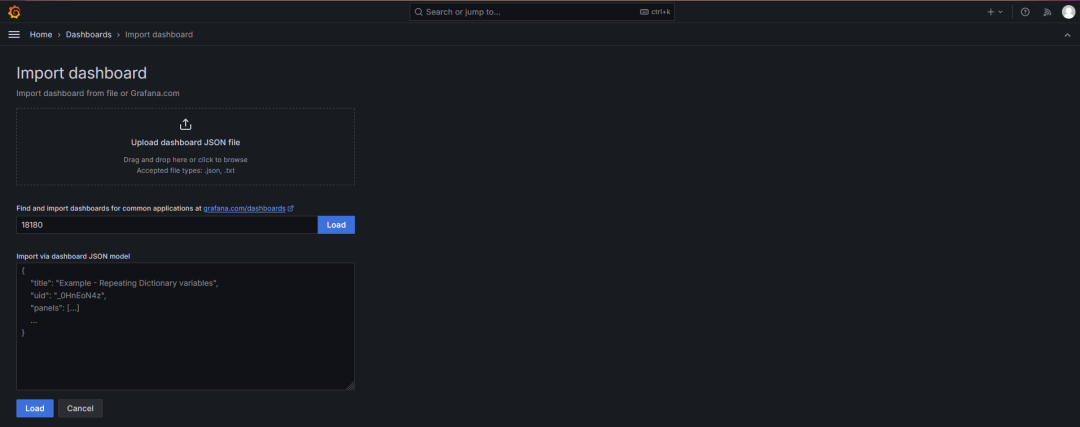
在 Grafana 右侧菜单中点击 “New” 按钮,选择 “Import”。
在输入框中,直接输入仪表板 ID【常用的主机监控仪表板 ID 是 18180(TDinsight for 3.x)】,或者上传 JSON 文件。
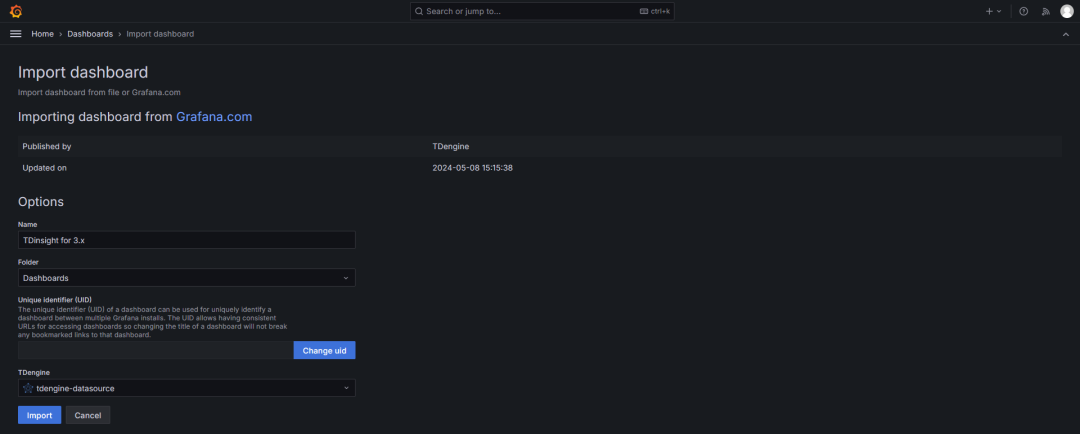
点击 “Load”,然后选择已配置好的数据源。
点击 “Import” 完成导入。
2
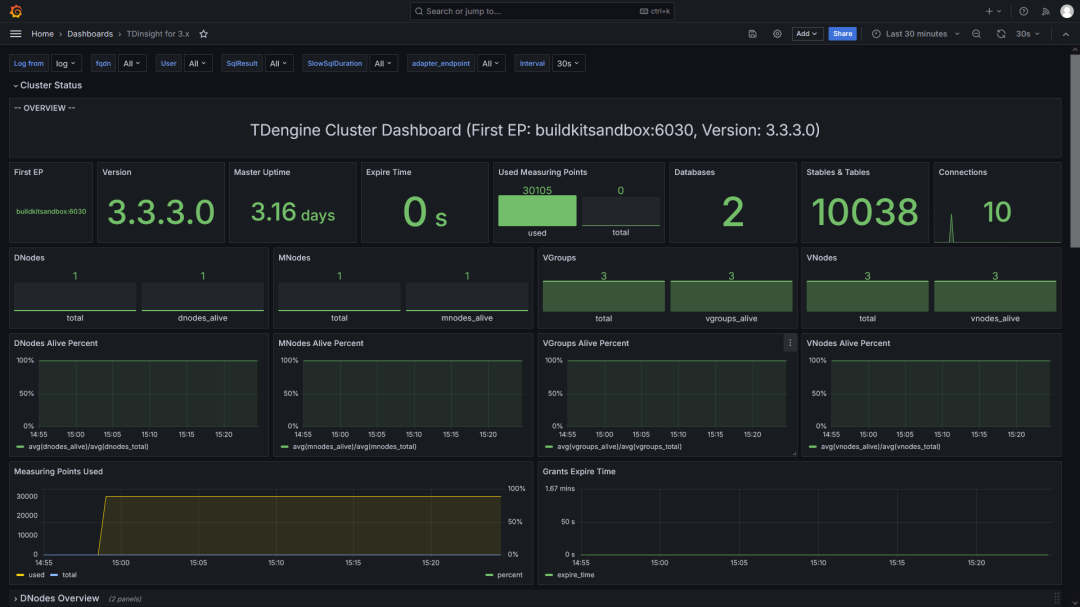
TDinsight 监控效果

TDinsight 告警实战
一个好警报的关键是能够在正确的时间、以正确的理由和正确的速度发送,并在其中放入有用的信息。
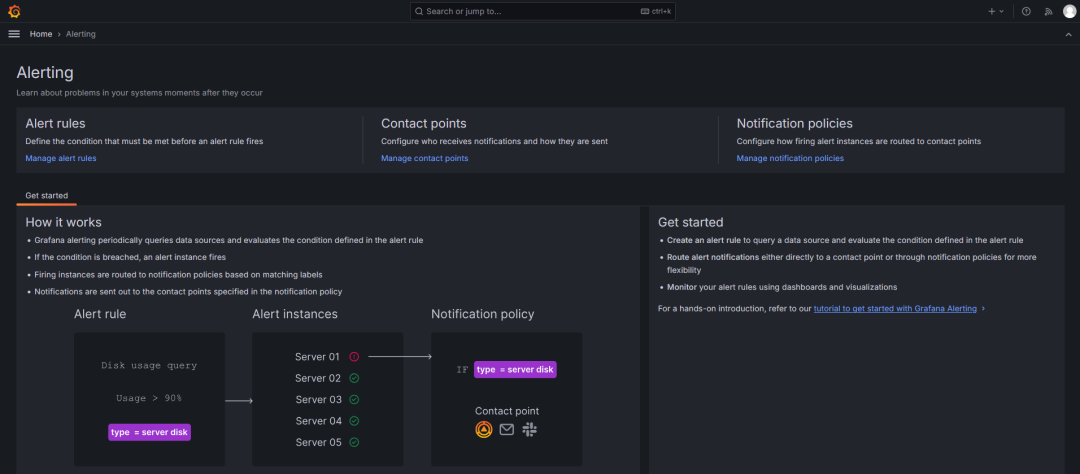
Grafana 定期查询数据源并评估告警规则中定义的条件。
当条件被触发时,则会触发告警实例。
生成的告警实例根据标签匹配规则,路由至相应的通知策略。
通知会发送到策略中指定的联系点。
1
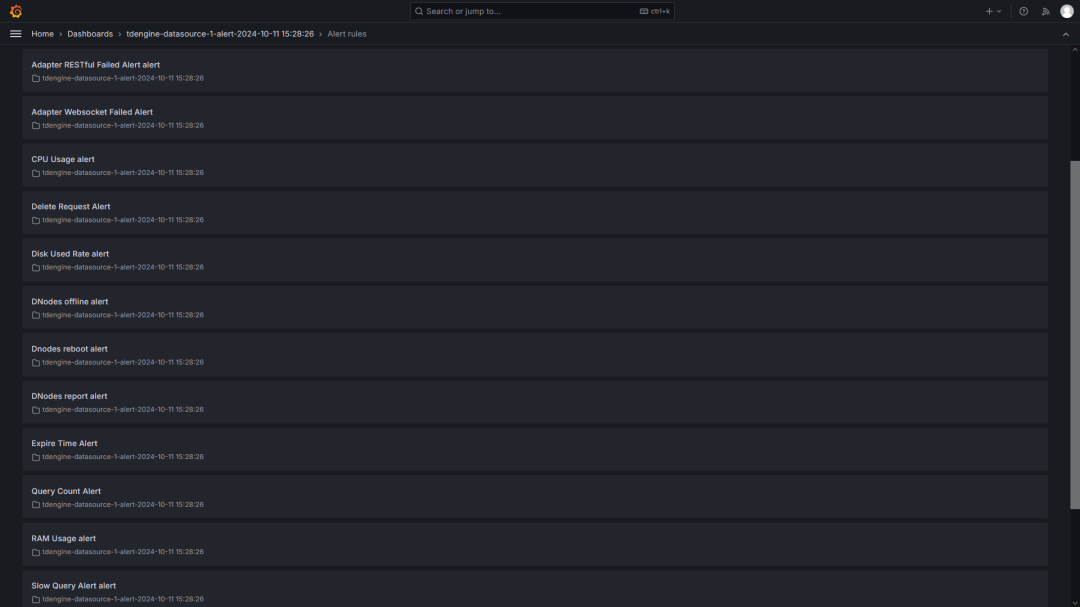
配置告警规则
哪些问题需要通知;
谁需要被告知;
如何告知他们;
多久告知他们一次。
2
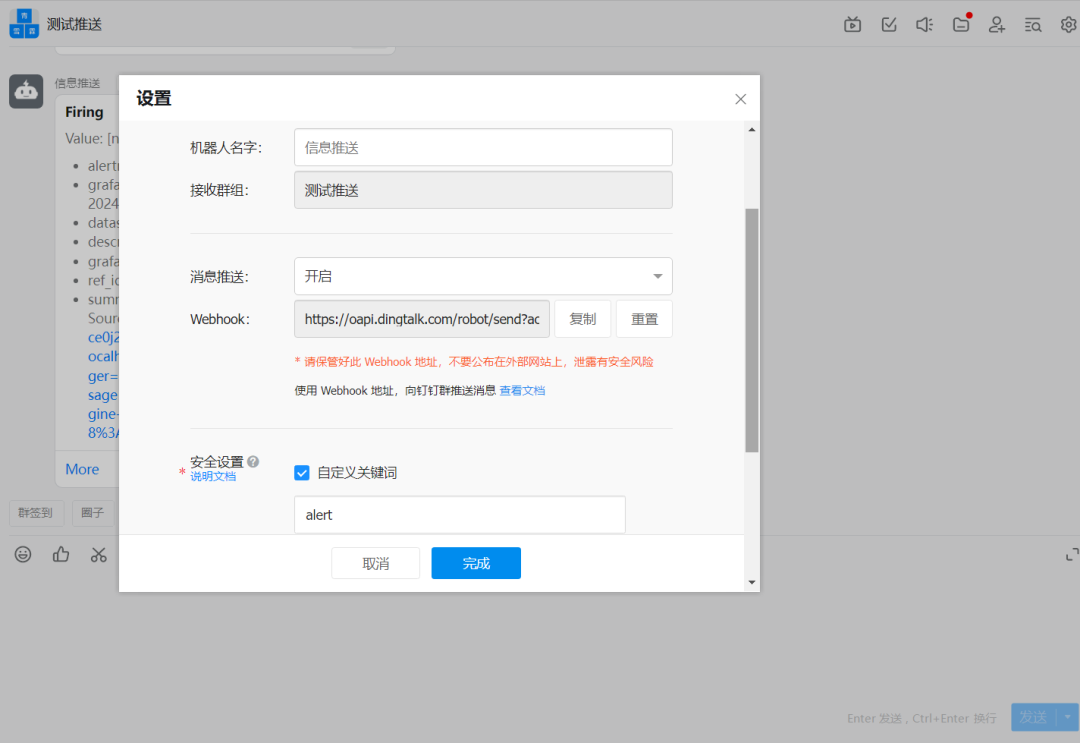
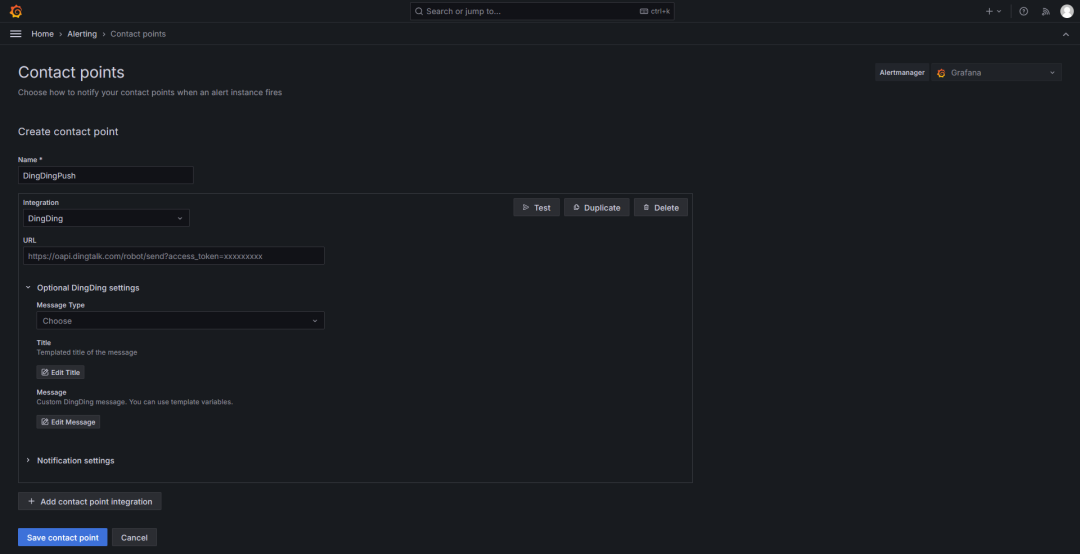
配置推送方式
DingDingPush。在配置中,将消息类型(Message Type)更改为
ActionCard。
3
配置通知策略

4
模拟压力告警
taosBenchmark命令。为了触发告警,我们在
test数据库中创建了 10000 张表,每张表插入 200 万条数据。由于容器磁盘空间的限制,这将导致磁盘告警的触发,进而导致 DNodes 和 VNodes 停止工作,从而触发相应的告警。
[root@ops monitoring]# docker exec -it tdengine /bin/bashroot@9118ddbfa74b:~# taosBenchmark -I stmt -n 2000000 -t 10000
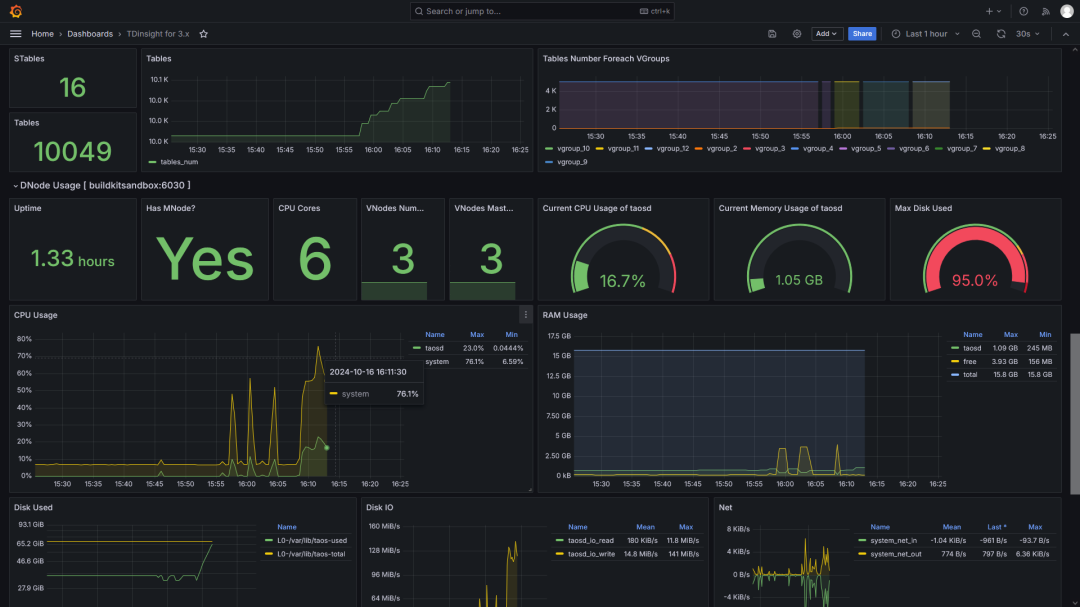
在 TDinsight 的仪表板上可以看到磁盘使用率已到达 95%,根据报警规则设置,即将触发告警。
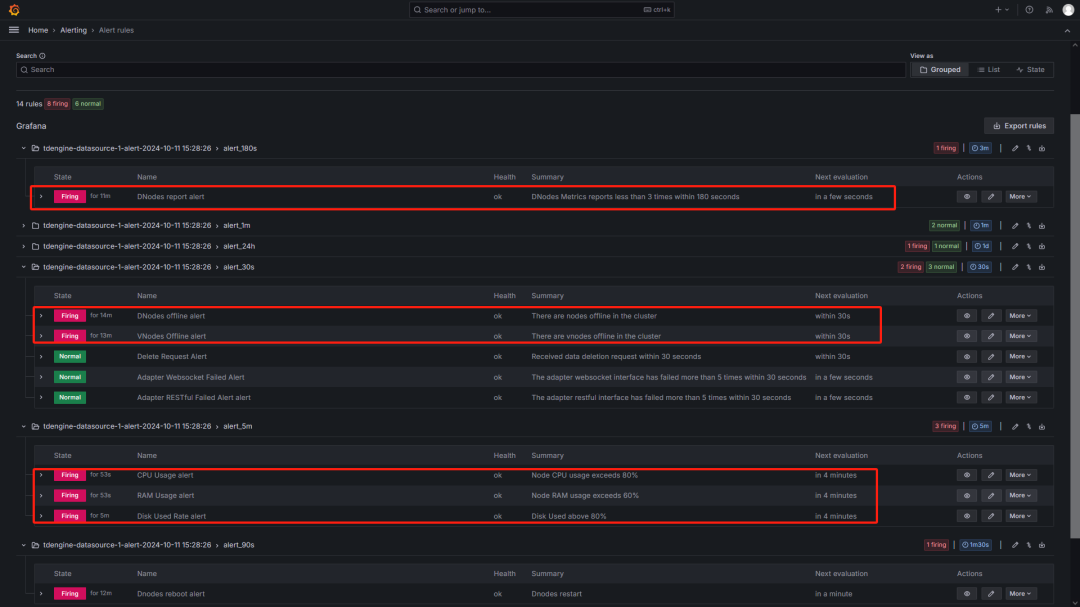
5
告警触发推送与告警解除推送
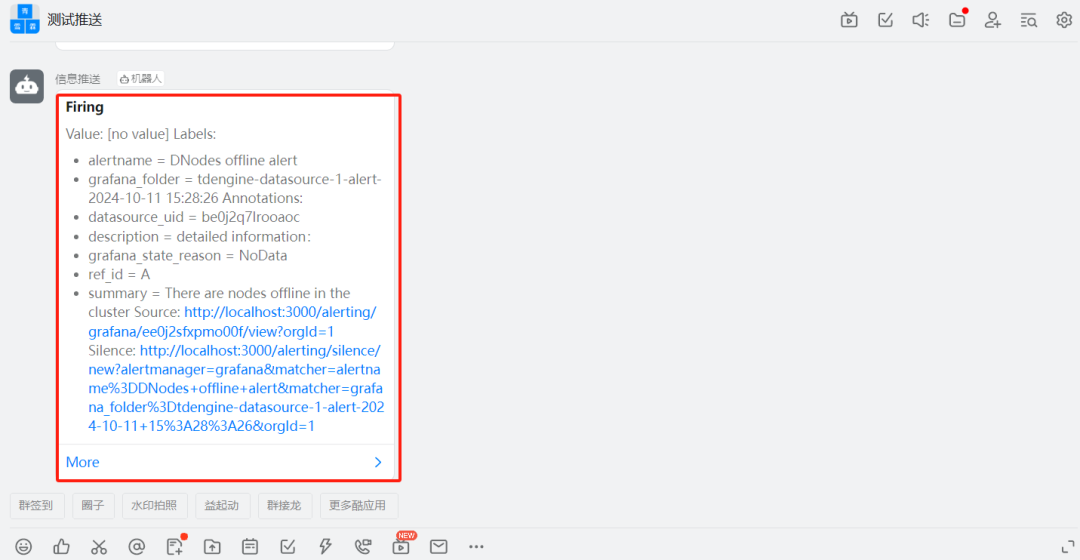
drop database test;删除
test数据库后,TDengine 服务恢复正常。经过一段时间(一个告警监测周期),钉钉上会自动收到各类告警解除的通知。
[root@localhost monitoring]# docker exec -it tdengine /bin/bashroot@9118ddbfa74b:~# taosWelcome to the TDengine Command Line Interface, Client Version:3.3.3.0Copyright (c) 2023 by TDengine, all rights reserved.********************************* Tab Completion ************************************** The TDengine CLI supports tab completion for a variety of items, ** including database names, table names, function names and keywords. ** The full list of shortcut keys is as follows: ** [ TAB ] ...... complete the current word ** ...... if used on a blank line, display all supported commands ** [ Ctrl + A ] ...... move cursor to the st[A]rt of the line ** [ Ctrl + E ] ...... move cursor to the [E]nd of the line ** [ Ctrl + W ] ...... move cursor to the middle of the line ** [ Ctrl + L ] ...... clear the entire screen ** [ Ctrl + K ] ...... clear the screen after the cursor ** [ Ctrl + U ] ...... clear the screen before the cursor *****************************************************************************************Server is TDengine Community Edition, ver:3.3.3.0 and will never expire.taos> drop database test;Drop OK, 0 row(s) affected (1.476353s)
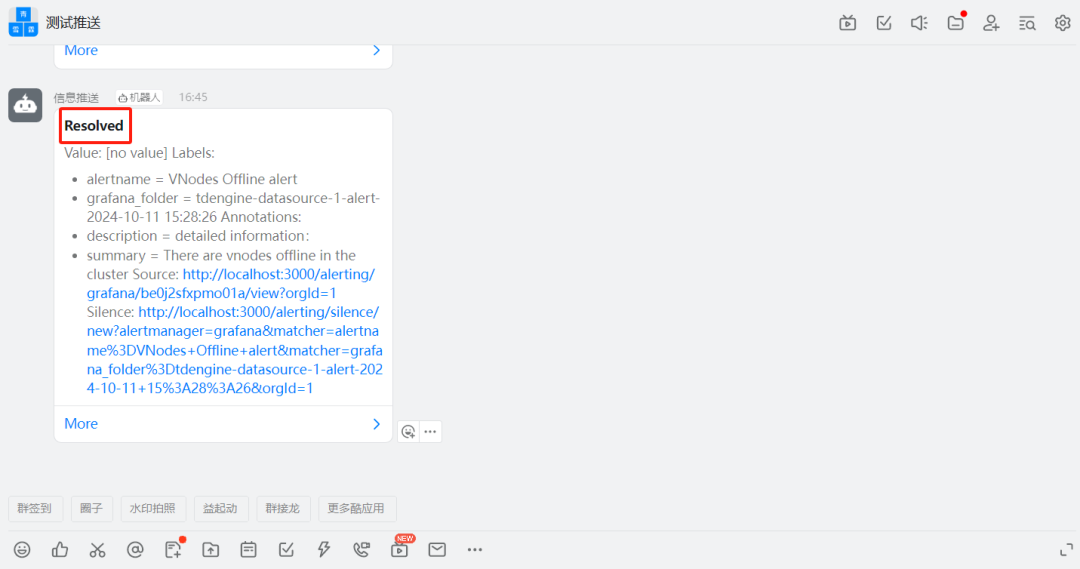
alertstate字段表示报警的状态,可能有以下几种取值:
Firing:表示报警已触发。当报警规则条件满足时,报警状态会变为 Firing,表示触发了报警。通常情况下,报警会发送给相关的接收器或通知渠道,以便进行处理。
Resolved:表示报警已解决。当报警条件不再满足时,报警状态会变为 Resolved,表示报警已经解决。这意味着报警规则所监控的指标已经恢复到正常状态,不再需要进一步的处理。
Pending:表示报警处于等待状态。当报警规则的条件满足时,报警状态会从 Firing 变为 Pending,表示报警处于等待状态。在报警状态从 Firing 到 Resolved 之间的过渡期间,报警可能会处于 Pending 状态,这通常是因为报警规则定义了一些延迟或滞后的条件。
结语
If you can’t measure it, you can’t improve it!
参考资料
Reference
1)https://github.com/taosdata/TDengine/releases/tag/ver-3.3.3.0
2)https://github.com/taosdata/TDengine/releases/tag/ver-3.3.3.0
3)https://grafana.com/grafana/dashboards/18180-tdinsight-for-3-x/
4)https://docs.taosdata.com/reference/components/taoskeeper/
往期推荐
客户盘点:北微传感、青山钢铁、首自信、国电投、江河信息、寓信科技、前晨汽车、华风数据、协鑫鑫光、双合电气、路特斯、昆船电子、天合富家、红有软件、上海晶澳太阳能、极氪汽车、威士顿、树根互联、福州城建、积成电子、西电电力、中船九院、大唐水电院
Use Case:泛能网产业智能平台、电芯容量预测系统、煤矿安全生产综合管控平台、虚拟电厂运营管理平台、明阳集团能源大数据应用系统、知轮智慧轮胎系统、中国地震台网中心、中移物联智慧出行场景、搜狐基金、智光电气、黑格智能设备追踪场景、韵达订单扫描系统、顺丰大数据监控平台、车辆轨迹定位存储引擎项目、西门子轻量级数字化解决方案
技术分享:TDengine S3 存储、TDengine 流计算、TDengine 建模实战、与工业 SCADA 深度融合、TDengine 与新型电力系统、TDgpt 如何助力数据预测、Historian Connector+TDengine、长查询问题实战分享、TDengine 数据订阅、TDengine SQL 查询规则、万字长文解读怎样激活 TDengine 最高性价比
测试报告:TDengine 线性扩展能力测试、IoT 场景下 TDengine 3.0 性能对比分析报告、DevOps 场景下 TDengine 3.0 性能对比分析报告
👇 点击阅读原文,立即体验 TDgpt!
