



pg_rman 简介
pg_rman是一款开源的PostgreSQL在线备份和恢复工具,pg_rman项目的目标是提供一种像pg_dump一样简单的在线备份和PITR方法。pg_rman类似于Oracle的rman备份工具,能实现全量、增量、归档备份,支持压缩备份,可以很灵活的管理PostgreSQL数据库的备份,支持存储快照。
由于pg_rman属于热备份工具,因此要求 postgreSQL 服务器运行在归档模式下。pg_rman采用基于本地数据复制的方式进行备份,而不是采用流方式进行备份。这就需要将pg_rman 与 PostgreSOL 服务器安装在一起。
pg_rman 下载
下载地址:https://github.com/ossc-db/pg_rman
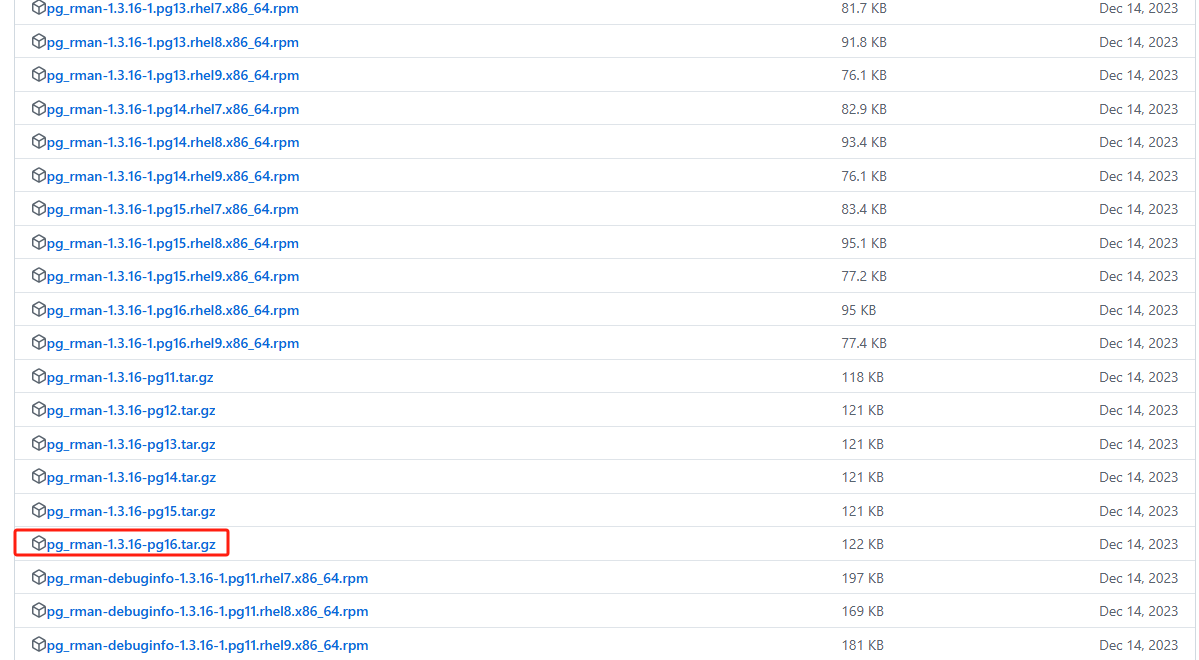
pg_rman 安装
pg_rman解压
将pg_rman解压到/opt目录。
tar -zxvf pg_rman-1.3.16-pg16.tar.gz -C /opt
chown -R postgres:postgres /opt/pg_rman-1.3.16-pg16
cd /opt/pg_rman-1.3.16-pg16
查看解压后的文件:
[root@node1 pg_rman-1.3.16-pg16]# ll
total 288
-rw-rw-r-- 1 postgres postgres 59980 Dec 12  2023 backup.c
-rw-rw-r-- 1 postgres postgres 19759 Dec 12  2023 catalog.c
-rw-rw-r-- 1 postgres postgres  1716 Dec 12  2023 COPYRIGHT
-rw-rw-r-- 1 postgres postgres 31131 Dec 12  2023 data.c
-rw-rw-r-- 1 postgres postgres 14478 Dec 12  2023 delete.c
-rw-rw-r-- 1 postgres postgres 16330 Dec 12  2023 dir.c
drwxrwxr-x 2 postgres postgres    62 Dec 12  2023 docs
drwxrwxr-x 2 postgres postgres   280 Dec 12  2023 expected
-rw-rw-r-- 1 postgres postgres  4432 Dec 12  2023 idxpagehdr.h
-rw-rw-r-- 1 postgres postgres  5556 Dec 12  2023 init.c
-rw-rw-r-- 1 postgres postgres   874 Dec 12  2023 Makefile
-rw-rw-r-- 1 postgres postgres  3863 Dec 12  2023 parray.c
-rw-rw-r-- 1 postgres postgres  1377 Dec 12  2023 parray.h
-rw-rw-r-- 1 postgres postgres 13154 Dec 12  2023 pg_rman.c
-rw-rw-r-- 1 postgres postgres 12542 Dec 12  2023 pg_rman.h
drwxrwxr-x 2 postgres postgres    49 Dec 12  2023 pgsql_src
drwxrwxr-x 2 postgres postgres    72 Dec 12  2023 pgut
-rw-rw-r-- 1 postgres postgres  4515 Dec 12  2023 README.md
-rw-rw-r-- 1 postgres postgres 43166 Dec 12  2023 restore.c
drwxrwxr-x 2 postgres postgres    36 Dec 12  2023 script
-rw-rw-r-- 1 postgres postgres  7076 Dec 12  2023 show.c
drwxrwxr-x 2 postgres postgres    28 Dec 12  2023 SPECS
drwxrwxr-x 2 postgres postgres  4096 Dec 12  2023 sql
-rw-rw-r-- 1 postgres postgres  1407 Dec 12  2023 util.c
-rw-rw-r-- 1 postgres postgres  6833 Dec 12  2023 validate.c
-rw-rw-r-- 1 postgres postgres  1986 Dec 12  2023 xlog.c
源码编译安装
#使用postgres用户安装
su - postgres
cd /opt/pg_rman-1.3.16-pg16
make && make install
#编译安装完成后,pg_rman会自动部署到$PGHOME/bin目录下
执行部分过程如下:
[postgres@node1 pg_rman-1.3.16-pg16]$ make && make install
gcc -std=gnu99 -Wall -Wmissing-prototypes -Wpointer-arith -Wdeclaration-after-statement -Werror=vla -Wendif-labels -Wmissing-format-attribute -Wformat-security -fno-strict-aliasing -fwrapv -fexcess-precision=standard -O2 -I/opt/pg17/include -lm -I. -I./ -I/opt/pg17/include/postgresql/server -I/opt/pg17/include/postgresql/internal  -D_GNU_SOURCE -I/usr/include/libxml2   -c -o backup.o backup.c
...
...
gcc -std=gnu99 -Wall -Wmissing-prototypes -Wpointer-arith -Wdeclaration-after-statement -Werror=vla -Wendif-labels -Wmissing-format-attribute -Wformat-security -fno-strict-aliasing -fwrapv -fexcess-precision=standard -O2 backup.o catalog.o data.o delete.o dir.o init.o parray.o pg_rman.o restore.o show.o util.o validate.o xlog.o pgsql_src/pg_ctl.o pgut/pgut.o pgut/pgut-port.o  -L/opt/pg17/lib   -Wl,--as-needed -Wl,-rpath,'/opt/pg17/lib',--enable-new-dtags  -L/opt/pg17/lib -lpq -lpgcommon -lpgport -lz -lreadline -lpthread -lrt -ldl -lm -o pg_rman
/bin/mkdir -p '/opt/pg17/bin'
/bin/install -c  pg_rman '/opt/pg17/bin'  #pg_rman自动部署到$PGHOME/bin目录下
[postgres@node1 pg_rman-1.3.16-pg16]$
pg_rman 用法
  pg_rman OPTION init                  #初始化备份目录
  pg_rman OPTION backup                #执行数据库备份
  pg_rman OPTION restore               #执行数据库恢复
  pg_rman OPTION show [DATE]           #列出备份集
  pg_rman OPTION show detail [DATE]    #列出备份集详细信息
  pg_rman OPTION validate [DATE]       #验证备份集,注意:pg_rman的备份集必须是经过验证的,否则不能进行恢复和和增量备份
  pg_rman OPTION delete DATE           #删除备份集,注意:这里并不删除物理备份集
  pg_rman OPTION purge                 #从备份目录中真正备份文件集
使用 pg_rman 备份数据库
1、创建备份目录和归档目录
su - root
mkdir -p /backup /archive
chown -R postgres:postgres /backup /archive
以下操作都用postgres用户进行。
2、开启postgres归档
su - postgres
vi postgresql.conf
archive_mode = on
archive_command = 'DIR="/archive/"; (test -d $DIR || mkdir -p $DIR) && cp %p $DIR/%f'
3、初始化备份目录
pg_rman init --backup-path=/backup
执行过程如下:
[postgres@node1 ~]$ pg_rman init --backup-path=/backup
INFO: ARCLOG_PATH is set to '/archive'
INFO: SRVLOG_PATH is set to '/data/pg17/log'
初始化后生成几个文件:
[postgres@node1 ~]$ ll /backup
total 8
drwx------ 4 postgres postgres 34 Dec 22 11:58 backup
-rw-rw-r-- 1 postgres postgres 53 Dec 22 11:58 pg_rman.ini
-rw-rw-r-- 1 postgres postgres 40 Dec 22 11:58 system_identifier
drwx------ 2 postgres postgres  6 Dec 22 11:58 timeline_history
4、pg_rman 全量备份
构造测试表和数据:
create table tab1(id int,name varchar(100));
insert into tab1 values(1,'a');
insert into tab1 values(2,'b');
insert into tab1 values(3,'c');
insert into tab1 values(4,'d');
insert into tab1 values(5,'e');
全备份数据库:
pg_rman backup --backup-mode=full --backup-path=/backup --with-serverlog --progress
说明:--with-serverlog表示将数据库日志文件一起备份
执行过程如下:
[postgres@node1 ~]$ pg_rman backup --backup-mode=full --backup-path=/backup --with-serverlog --progress
INFO: copying database files
Processed 998 of 998 files, skipped 0
INFO: copying archived WAL files
Processed 18 of 18 files, skipped 0
INFO: copying server log files
Processed 22 of 22 files, skipped 0
INFO: backup complete
INFO: Please execute 'pg_rman validate' to verify the files are correctly copied.
校验备份集:
pg_rman validate --backup-path=/backup --progress
执行过程如下:
[postgres@node1 ~]$  pg_rman validate --backup-path=/backup --progress
INFO: validate: "2024-12-22 12:10:58" backup and archive log files by CRC
INFO: backup "2024-12-22 12:10:58" is valid
列出备份集:
pg_rman show --backup-path=/backup
执行过程如下:
[postgres@node1 ~]$ pg_rman show --backup-path=/backup
=====================================================================
 StartTime           EndTime              Mode    Size   TLI  Status
=====================================================================
2024-12-22 12:10:58  2024-12-22 12:11:02  FULL   117MB     1  OK
[postgres@node1 ~]$
5、pg_rman 增量备份
增量备份是基于文件系统的更新时间执行的一种备份方式。
增量备份前提:
- 必须要有对应的全量备份。
- 当全量备份后需要验证备份集。
测试表中插入数据:
insert into tab1 values(6,'f');
insert into tab1 values(6,'g');
增量备份数据库:
pg_rman backup --backup-mode=incremental --backup-path=/backup --with-serverlog --progress
执行过程如下:
[postgres@node1 ~]$ pg_rman backup --backup-mode=incremental --backup-path=/backup --progress
INFO: copying database files
Processed 998 of 998 files, skipped 969
INFO: copying archived WAL files
Processed 21 of 21 files, skipped 18
INFO: copying server log files
Processed 22 of 22 files, skipped 21
INFO: backup complete
INFO: Please execute 'pg_rman validate' to verify the files are correctly copied.
校验备份集:
pg_rman validate --backup-path=/backup --progress
执行过程如下:
[postgres@node1 ~]$ pg_rman validate --backup-path=/backup --progress
INFO: validate: "2024-12-22 13:00:07" backup and archive log files by CRC
INFO: backup "2024-12-22 13:00:07" is valid
列出备份集:
pg_rman show --backup-path=/backup
执行过程如下:
[postgres@node1 ~]$ pg_rman show --backup-path=/backup
=====================================================================
 StartTime           EndTime              Mode    Size   TLI  Status
=====================================================================
2024-12-22 13:00:07  2024-12-22 13:00:09  INCR    33MB     1  OK
2024-12-22 12:10:58  2024-12-22 12:11:02  FULL   117MB     1  OK
6、使用 pg_rman 备份归档
pg_rman backup --backup-mode=archive --backup-path=/backup --progress
执行过程如下:
[postgres@node1 ~]$ pg_rman backup --backup-mode=archive  --backup-path=/backup --progress
INFO: copying archived WAL files
Processed 15 of 15 files, skipped 0
INFO: backup complete
INFO: Please execute 'pg_rman validate' to verify the files are correctly copied.
[postgres@node1 ~]$ pg_rman validate  --backup-path=/backup
INFO: validate: "2024-12-22 18:43:51" archive log files by CRC
INFO: backup "2024-12-22 18:43:51" is valid
[postgres@node1 ~]$
使用 pg_rman 恢复数据库
恢复分为两种方式:原地覆盖式恢复和设置新的$PGDATA目录恢复。
1、原地覆盖式恢复
模拟删除tab1表:
drop table tab1;
恢复全备:
1.1 列出备份集
pg_rman show --backup-path=/backup
执行过程如下:
[postgres@node1 ~]$ pg_rman show --backup-path=/backup
=====================================================================
 StartTime           EndTime              Mode    Size   TLI  Status
=====================================================================
2024-12-22 13:00:07  2024-12-22 13:00:09  INCR    33MB     1  OK
2024-12-22 12:10:58  2024-12-22 12:11:02  FULL   117MB     1  OK
1.2 停止数据库
pg_ctl stop
1.3 进行全量恢复:恢复到时间点“2024-12-22 12:11:02”(EndTime)
就是使用全量备份来恢复。
如果不指定参数recovery-target-time,则恢复到最新时间。
如果不指定参数 hard-copy,则归档日志目录里的归档日志是使用的硬连接指向备份目录中的归档日志,加了这个参数的话,则是直接把备份目录中的归档日志拷贝到归档日志目录。
pg_rman restore --backup-path=/backup --recovery-target-time "2024-12-22 12:11:02" --hard-copy
执行过程如下:
[postgres@node1 ~]$ pg_rman restore --backup-path=/backup --recovery-target-time "2024-12-22 12:11:02" --hard-copy
INFO: the recovery target timeline ID is not given
INFO: use timeline ID of current database cluster as recovery target: 1
INFO: calculating timeline branches to be used to recovery target point
INFO: searching latest full backup which can be used as restore start point
INFO: found the full backup can be used as base in recovery: "2024-12-22 12:10:58"
INFO: copying online WAL files and server log files
INFO: clearing restore destination
INFO: validate: "2024-12-22 12:10:58" backup and archive log files by SIZE
INFO: backup "2024-12-22 12:10:58" is valid
INFO: restoring database files from the full mode backup "2024-12-22 12:10:58"
INFO: searching incremental backup to be restored
INFO: searching backup which contained archived WAL files to be restored
INFO: backup "2024-12-22 12:10:58" is valid
INFO: restoring WAL files from backup "2024-12-22 12:10:58"
INFO: backup "2024-12-22 13:00:07" is valid
INFO: restoring WAL files from backup "2024-12-22 13:00:07"
INFO: restoring online WAL files and server log files
INFO: create pg_rman_recovery.conf for recovery-related parameters.
INFO: remove an 'include' directive added by pg_rman in postgresql.conf if exists
INFO: append an 'include' directive in postgresql.conf for pg_rman_recovery.conf
INFO: generating recovery.signal
INFO: removing standby.signal if exists to restore as primary
INFO: restore complete
HINT: Recovery will start automatically when the PostgreSQL server is started. After the recovery is done, we recommend to remove recovery-related parameters configured by pg_rman.
[postgres@node1 ~]$
1.4 启动数据库并检查数据
pg_ctl start
postgres=# select * from tab1;
 id | name
----+------
  1 | a
  2 | b
  3 | c
  4 | d
  5 | e
(5 rows)
此时表中全备时候的5条记录都恢复回来了。
1.5 停止数据库
pg_ctl stop
1.6 进行增量恢复:恢复到时间点“2024-12-22 13:00:09”(EndTime)
就是使用增量备份来恢复。
pg_rman restore --backup-path=/backup --recovery-target-time "2024-12-22 13:00:09" --hard-copy
执行过程如下:
[postgres@node1 ~]$ pg_rman restore --backup-path=/backup --recovery-target-time "2024-12-22 13:00:09" --hard-copy
INFO: the recovery target timeline ID is not given
INFO: use timeline ID of current database cluster as recovery target: 1
INFO: calculating timeline branches to be used to recovery target point
INFO: searching latest full backup which can be used as restore start point
INFO: found the full backup can be used as base in recovery: "2024-12-22 12:10:58"
INFO: copying online WAL files and server log files
INFO: clearing restore destination
INFO: validate: "2024-12-22 12:10:58" backup and archive log files by SIZE
INFO: backup "2024-12-22 12:10:58" is valid
INFO: restoring database files from the full mode backup "2024-12-22 12:10:58"
INFO: searching incremental backup to be restored
INFO: validate: "2024-12-22 13:00:07" backup and archive log files by SIZE
INFO: backup "2024-12-22 13:00:07" is valid
INFO: restoring database files from the incremental mode backup "2024-12-22 13:00:07"
INFO: searching backup which contained archived WAL files to be restored
INFO: backup "2024-12-22 13:00:07" is valid
INFO: restoring WAL files from backup "2024-12-22 13:00:07"
INFO: restoring online WAL files and server log files
INFO: create pg_rman_recovery.conf for recovery-related parameters.
INFO: remove an 'include' directive added by pg_rman in postgresql.conf if exists
INFO: append an 'include' directive in postgresql.conf for pg_rman_recovery.conf
INFO: generating recovery.signal
INFO: removing standby.signal if exists to restore as primary
INFO: restore complete
HINT: Recovery will start automatically when the PostgreSQL server is started. After the recovery is done, we recommend to remove recovery-related parameters configured by pg_rman.
[postgres@node1 ~]$
1.7 启动数据库并检查数据
pg_ctl start
执行过程如下:
pg_ctl start
postgres=# select * from tab1;
 id | name
----+------
  1 | a
  2 | b
  3 | c
  4 | d
  5 | e
  6 | f
  6 | g
(7 rows)

postgres=#
此时表中增量备份时候的2条记录也都恢复回来了。
2、设置新的$PGDATA目录恢复
2.1 创建新的数据库目录
mkdir -p /newdata
chown -R postgres:postgres /newdata
chmod 700 /newdata
2.2 设置新的PGDATA目录
su - postgres
export PGDATA=/newdata
2.3 数据库恢复
pg_rman restore --backup-path=/backup --recovery-target-time "2024-12-22 13:00:09" --hard-copy
执行过程如下:
[postgres@node1 ~]$ pg_rman restore --backup-path=/backup --recovery-target-time "2024-12-22 13:00:09”" --hard-copy
WARNING: pg_controldata file "/newdata/global/pg_control" does not exist
INFO: the recovery target timeline ID is not given
INFO: use timeline ID of latest full backup as recovery target: 1
INFO: calculating timeline branches to be used to recovery target point
INFO: searching latest full backup which can be used as restore start point
INFO: found the full backup can be used as base in recovery: "2024-12-22 12:10:58"
INFO: copying online WAL files and server log files
INFO: clearing restore destination
INFO: validate: "2024-12-22 12:10:58" backup and archive log files by SIZE
INFO: backup "2024-12-22 12:10:58" is valid
INFO: restoring database files from the full mode backup "2024-12-22 12:10:58"
INFO: searching incremental backup to be restored
INFO: validate: "2024-12-22 13:00:07" backup and archive log files by SIZE
INFO: backup "2024-12-22 13:00:07" is valid
INFO: restoring database files from the incremental mode backup "2024-12-22 13:00:07"
INFO: searching backup which contained archived WAL files to be restored
INFO: backup "2024-12-22 13:00:07" is valid
INFO: restoring WAL files from backup "2024-12-22 13:00:07"
INFO: restoring online WAL files and server log files
INFO: create pg_rman_recovery.conf for recovery-related parameters.
INFO: remove an 'include' directive added by pg_rman in postgresql.conf if exists
INFO: append an 'include' directive in postgresql.conf for pg_rman_recovery.conf
INFO: generating recovery.signal
INFO: removing standby.signal if exists to restore as primary
INFO: restore complete
HINT: Recovery will start automatically when the PostgreSQL server is started. After the recovery is done, we recommend to remove recovery-related parameters configured by pg_rman.
[postgres@node1 ~]$
2.4 启动数据库并检查数据
pg_ctl start
select * from tab1;
注意:不管是全量恢复还是增量恢复,如果在恢复数时没有给出恢复的时间线或者恢复后数据库的状态,则数据库在恢复完成并启动后,会进入需要pg_wal_replay_resume() 的状态,在数据库执行完 pg_wal_replay_resume 后数据库就可以正常工作了。
操作过程如下:
postgres=# select pg_is_in_recovery();
 pg_is_in_recovery
-------------------
 t
(1 row)

postgres=# select pg_wal_replay_resume();
 pg_wal_replay_resume
----------------------

(1 row)

postgres=# select pg_is_in_recovery();
 pg_is_in_recovery
-------------------
 f
(1 row)
删除备份
包括两步:
1、 delete备份数据
2、 purge备份数据:从备份目录真正删除备份文件
pg_rman delete --backup-path=/backup 2024-12-22 13:00:09 -f
pg_rman purge --backup-path=/backup
修改备份策略
pg_rman初始化之后会在备份目录中产生 pg_rman.ini 文件,用来保存配置备份的环境变量、备份选项、备份集保留期限等信息。
[postgres@node1 ~]$ cd /backup
[postgres@node1 backup]$ cat pg_rman.ini
ARCLOG_PATH='/archive'           #归档目录
SRVLOG_PATH='/data/pg17/log'     #数据库日志目录
可以编辑pg_rman.ini,加入下面信息:
[postgres@node1 ~]$ vi pg_rman.ini
KEEP_DATA_GENERATIONS = 3    #备份冗余度,即备份数量
KEEP_DATA_DAYS = 15          #备份集保存天数
COMPRESS_DATA = YES          #压缩数据
KEEP_ARCLOG_FILES = 10       #归档文件保存个数
KEEP_ARCLOG_DAYS = 15        #归档文件保存的天数
KEEP_SRVLOG_FILES = 10       #数据库日志文件保存个数
KEEP_SRVLOG_DAYS = 30        #数据库日志文件保存天数
附录
pg_rman命令:
[postgres@node1 ~]$ pg_rman --help
pg_rman manage backup/recovery of PostgreSQL database.

Usage:
  pg_rman OPTION init
  pg_rman OPTION backup
  pg_rman OPTION restore
  pg_rman OPTION show [DATE]
  pg_rman OPTION show detail [DATE]
  pg_rman OPTION validate [DATE]
  pg_rman OPTION delete DATE
  pg_rman OPTION purge

Common Options:
  -D, --pgdata=PATH         location of the database storage area
  -A, --arclog-path=PATH    location of archive WAL storage area
  -S, --srvlog-path=PATH    location of server log storage area
  -B, --backup-path=PATH    location of the backup storage area
  -G, --pgconf-path=PATH    location of the configuration storage area
  -c, --check               show what would have been done
  -v, --verbose             show what detail messages
  -P, --progress            show progress of processed files

Backup options:
  -b, --backup-mode=MODE    full, incremental, or archive
  -s, --with-serverlog      also backup server log files
  -Z, --compress-data       compress data backup with zlib
  -C, --smooth-checkpoint   do smooth checkpoint before backup
  -F, --full-backup-on-error   switch to full backup mode
                               if pg_rman cannot find validate full backup
                               on current timeline
      NOTE: this option is only used in --backup-mode=incremental or archive.
  --keep-data-generations=NUM keep NUM generations of full data backup
  --keep-data-days=NUM        keep enough data backup to recover to N days ago
  --keep-arclog-files=NUM   keep NUM of archived WAL
  --keep-arclog-days=DAY    keep archived WAL modified in DAY days
  --keep-srvlog-files=NUM   keep NUM of serverlogs
  --keep-srvlog-days=DAY    keep serverlog modified in DAY days
  --standby-host=HOSTNAME   standby host when taking backup from standby
  --standby-port=PORT       standby port when taking backup from standby

Restore options:
  --recovery-target-time    time stamp up to which recovery will proceed
  --recovery-target-xid     transaction ID up to which recovery will proceed
  --recovery-target-inclusive whether we stop just after the recovery target
  --recovery-target-timeline  recovering into a particular timeline
  --recovery-target-action    action the server should take once the recovery target is reached
  --hard-copy                 copying archivelog not symbolic link

Catalog options:
  -a, --show-all            show deleted backup too

Delete options:
  -f, --force               forcibly delete backup older than given DATE

Connection options:
  -d, --dbname=DBNAME       database to connect
  -h, --host=HOSTNAME       database server host or socket directory
  -p, --port=PORT           database server port
  -U, --username=USERNAME   user name to connect as
  -w, --no-password         never prompt for password
  -W, --password            force password prompt

Generic options:
  -q, --quiet               don't show any INFO or DEBUG messages
  --debug                   show DEBUG messages
  --help                    show this help, then exit
  --version                 output version information, then exit

Read the website for details. <http://github.com/ossc-db/pg_rman>
Report bugs to <http://github.com/ossc-db/pg_rman/issues>.
总结
pg_rman工具还是非常灵活的,管理备份也非常方便,是DBA备份 PostgreSQL 数据库的好帮手。
关于作者:
专注于Oracle、MySQL、PG、OpenGauss和国产数据库的研究,热爱生活,热衷于分享数据库技术。
微信公众号:飞天online
墨天轮:https://www.modb.pro/u/15197
如有任何疑问,欢迎大家留言,共同进步~~~
