



👋 热爱编程的小伙伴们,欢迎来到我的编程技术分享公众号!在这里,我会分享编程技巧、实战经验、技术干货,还有各种有趣的编程话题!
什么是 openGauss?
openGauss 是华为推出的一款企业级开源关系型数据库管理系统(RDBMS),其基于 PostgreSQL 的代码库进行开发,采用了自主创新的技术架构,旨在提供高性能、高可用、易扩展的数据库解决方案。openGauss 支持多种数据存储引擎,具备丰富的分布式特性,能够满足现代化企业对大规模数据存储和处理的需求。
openGauss 的特点、
高性能:支持并行查询、高效的存储引擎和多维索引。 高可用:内置自动故障转移和恢复机制,支持主备架构和集群部署。 分布式支持:支持分布式数据库架构,能够处理海量数据。 兼容 PostgreSQL:兼容 PostgreSQL 标准,便于从 PostgreSQL 迁移到 openGauss。 强安全性:支持多层次的安全机制,包括数据加密、权限控制等。
安装前环境准备
安装软件
yum install -y libaio-devel readline-devel expect
修改 selinux
vim etc/selinux/config

# 修改 SELINUX
SELINUX=disabled
关闭防火墙
systemctl disable firewalld.service
systemctl stop firewalld.service

重启服务器
reboot
预安装
上传安装包
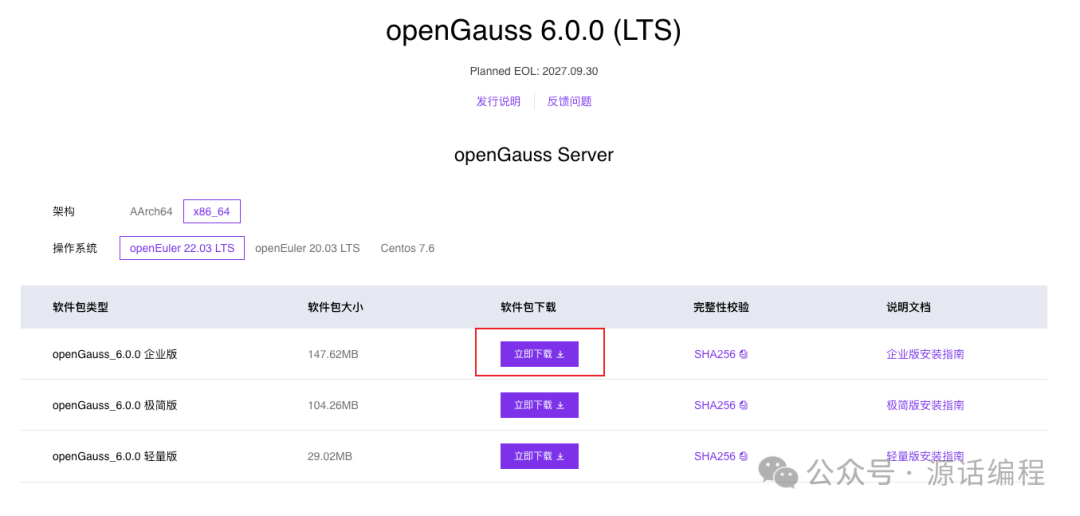
上传openGauss_6.0.0 企业版
安装包到opt
目录

下载地址:https://opengauss.org/zh/download/
,下载自习系统对应的版本,例如我的系统是openEuler22.03
解压安装包
cd opt
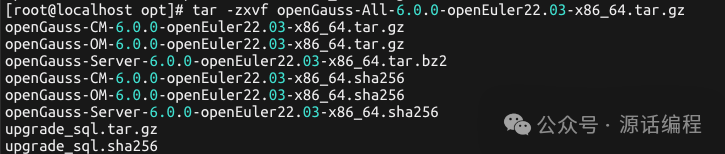
tar -zxvf openGauss-All-6.0.0-openEuler22.03-x86_64.tar.gz
tar -zxvf openGauss-OM-6.0.0-openEuler22.03-x86_64.tar.gz
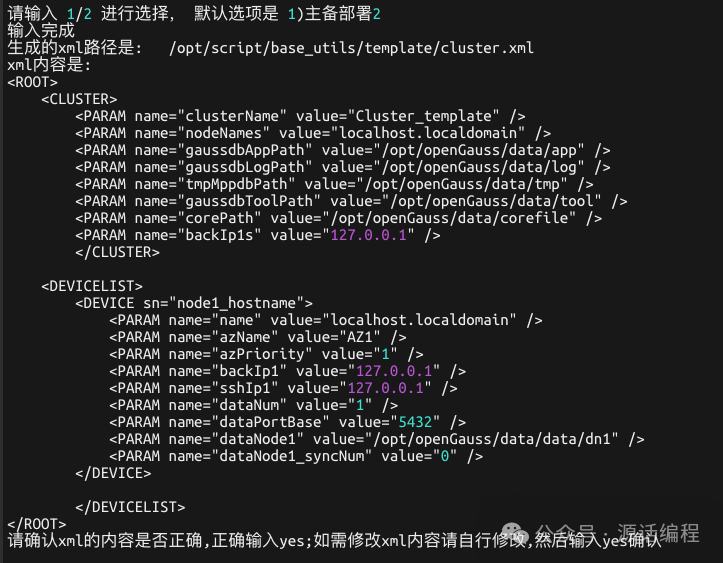
执行预安装
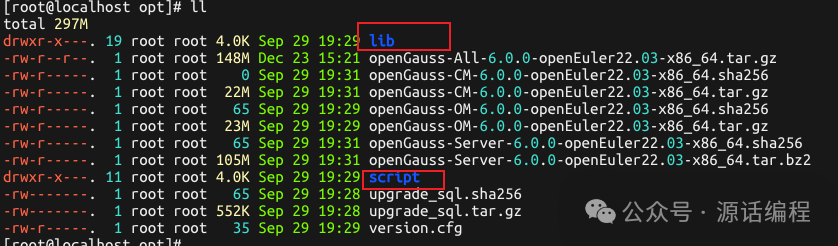
进入/opt/script
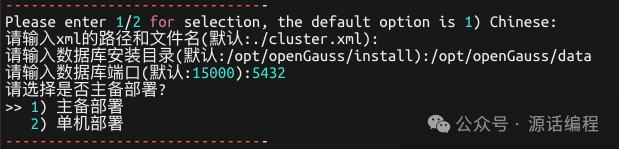
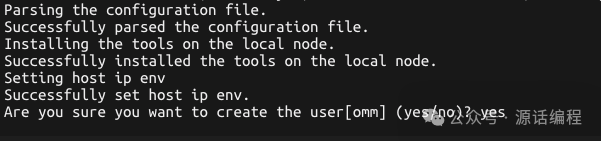
目录,执行命令 ./gs_preinstall -U omm -G opengauss --one-stop-install
,预安装会创建创建omm
账户,根据提示设置omm
账户密码。本次部署为单机部署
。


执行安装
su - omm
cd opt/script
./gs_install -X opt/script/base_utils/template/cluster.xml
omm
指的是前置脚本gs_preinstall
中-U
参数指定的用户。安装脚本 gs_install
必须以前置脚本中指定的omm
执行,否则,脚本执行会报错。cluster.xml
是预安装时生成的默认配置文件
[root@localhost ~]# su - omm
Last login: Tue Dec 24 13:43:51 CST 2024 on pts/0

Welcome to 5.10.0-60.18.0.50.oe2203.x86_64

System information as of time:  Tue Dec 24 02:52:34 PM CST 2024

System load:    0.03
Processes:      188
Memory used:    3.9%
Swap used:      0%
Usage On:       5%
IP address:     192.168.124.101
Users online:   2
To run a command as administrator(user "root"),use "sudo <command>".
[omm@localhost ~]$ cd opt/script/
[omm@localhost script]$ ./gs_install -X opt/script/base_utils/template/cluster.xml
Parsing the configuration file.
Successfully checked gs_uninstall on every node.
Check preinstall on every node.
Successfully checked preinstall on every node.
Creating the backup directory.
Successfully created the backup directory.
begin deploy..
Installing the cluster.
begin prepare Install Cluster..
Checking the installation environment on all nodes.
begin install Cluster..
Installing applications on all nodes.
Successfully installed APP.
begin init Instance..
encrypt cipher and rand files for database.
Please enter password for database:
Please repeat for database:
[GAUSS-50306] : The password of database is incorrect.The two passwords are different, please enter password again.
Please enter password for database:
Please repeat for database:
begin to create CA cert files
The sslcert will be generated in opt/openGauss/data/app/share/sslcert/om
NO cm_server instance, no need to create CA for CM.
Non-dss_ssl_enable, no need to create CA for DSS
Cluster installation is completed.
Configuring.
Deleting instances from all nodes.
Successfully deleted instances from all nodes.
Checking node configuration on all nodes.
Initializing instances on all nodes.
Updating instance configuration on all nodes.
Check consistence of memCheck and coresCheck on database nodes.
Configuring pg_hba on all nodes.
Configuration is completed.
The cluster status is Normal.
Successfully started cluster.
Successfully installed application.
end deploy..
配置远程访问
修改配置文件
配置 openGauss
远程访问需要修改 postgresql.conf
和 pg_hba.conf
这两个配置文件。
修改 postgresql.conf
的listen_addresses
= '*'
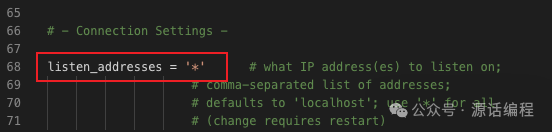
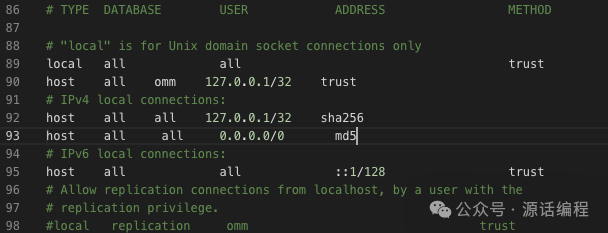
修改 postgresql.conf
的password_encryption_type = 0

修改 pg_hba.conf
,添加host all all 0.0.0.0/0 md5
创建远程访问用户
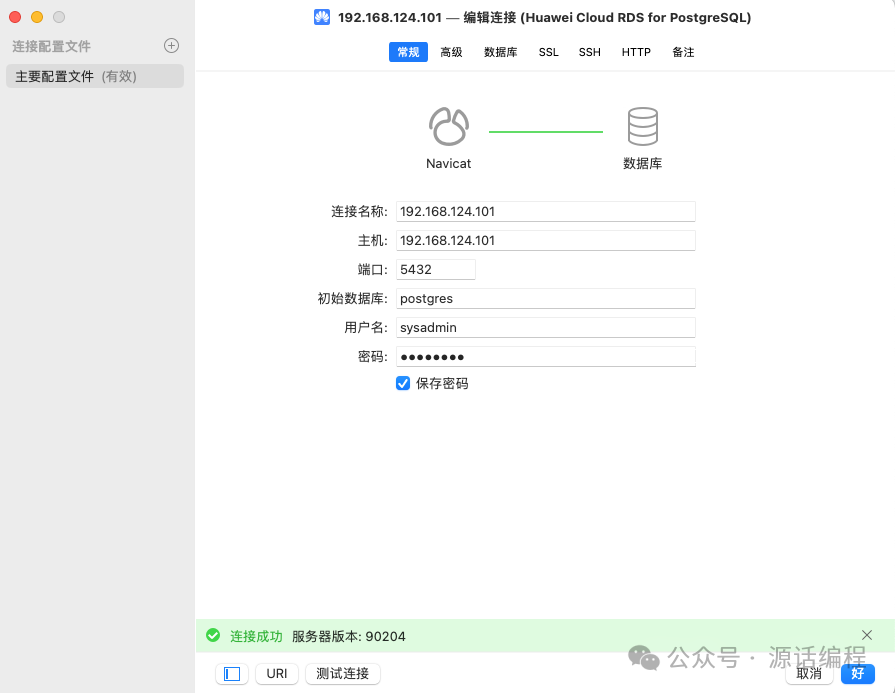
连接数据库 gsql -d postgres -p 5432 -r创建用户 sysadmin
设置密码并赋予权限
[omm@localhost script]$ gsql -d postgres -p 5432 -r
gsql ((openGauss 6.0.0 build aee4abd5) compiled at 2024-09-29 19:14:27 commit 0 last mr  )
Non-SSL connection (SSL connection is recommended when requiring high-security)
Type "help" for help.

openGauss=# CREATE USER sysadmin WITH SYSADMIN password "gauss@123";
NOTICE:  The encrypted password contains MD5 ciphertext, which is not secure.
CREATE ROLE
重启数据库
使用 gs_om -t restart
重启数据库
[omm@localhost ~]$ gs_om -t restart

Stopping cluster.
=========================================
Successfully stopped cluster.
=========================================
End stop cluster.

Starting cluster.
=========================================
[SUCCESS] localhost.localdomain
2024-12-24 16:02:37.391 676a6a9c.1 [unknown] 140581281810880 [unknown] 0 dn_6001 01000  0 [BACKEND] WARNING:  could not create any HA TCP/IP sockets
2024-12-24 16:02:37.391 676a6a9c.1 [unknown] 140581281810880 [unknown] 0 dn_6001 01000  0 [BACKEND] WARNING:  could not create any HA TCP/IP sockets
2024-12-24 16:02:38.411 676a6a9c.1 [unknown] 140581281810880 [unknown] 0 dn_6001 01000  0 [BACKEND] WARNING:  Failed to initialize the memory protect for g_instance.attr.attr_storage.cstore_buffers (1024 Mbytes) or shared memory (4482 Mbytes) is larger.
2024-12-24 16:02:39.954 676a6a9c.1 [unknown] 140581281810880 [unknown] 0 dn_6001 01000  0 [BACKEND] WARNING:  Cgroup get_cgroup Gaussdb:omm information: Cgroup does not exist(50002)
2024-12-24 16:02:39.954 676a6a9c.1 [unknown] 140581281810880 [unknown] 0 dn_6001 01000  0 [BACKEND] WARNING:  Cgroup get_cgroup Gaussdb:omm/Class/DefaultClass information: Cgroup does not exist(50002)
=========================================
Successfully started.
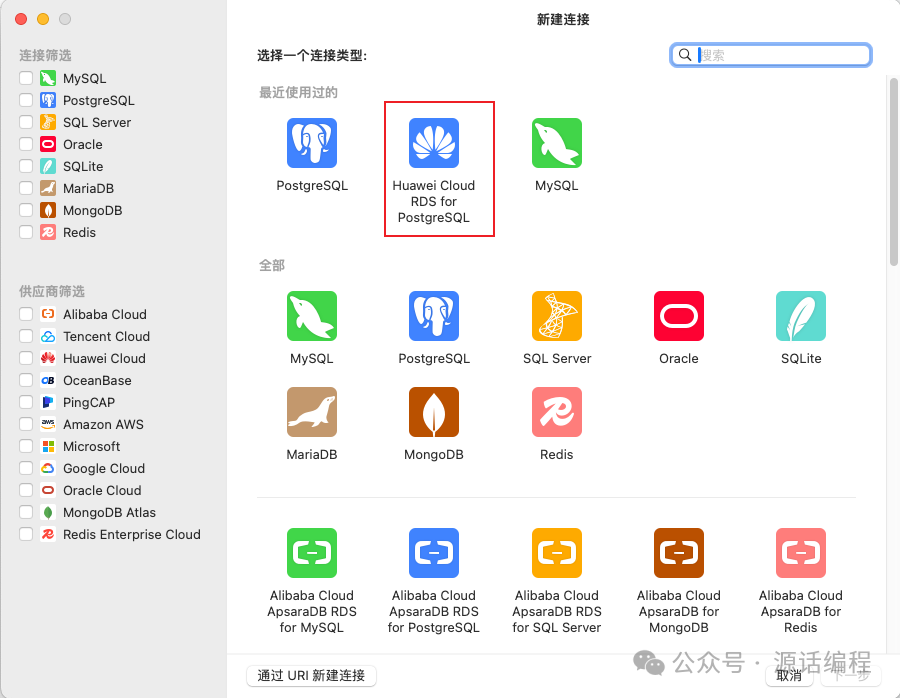
远程访问
结语
openGauss 是一款功能强大的开源数据库,适用于大规模数据存储和处理场景。本文主要介绍了如何安装 openGauss 和配置远程连接,更多的功能大家可以查看官网进一步学习。
个人观点,仅供参考,非常感谢各位朋友们的支持与关注!
如果你觉得这个作品对你有帮助,请不吝点赞、在看,分享给身边更多的朋友。如果你有任何疑问或建议,欢迎在评论区留言交流。
文章转载自源话编程,如果涉嫌侵权,请发送邮件至:contact@modb.pro进行举报,并提供相关证据,一经查实,墨天轮将立刻删除相关内容。
