



openGauss 6.0 LTS 如期发布,是三年支持版本,相比以前版本功能上性能上都有很大提升,安装也全程支持普通用户,不再需要root用户预安装。PTK安装工具是云和恩墨为mogdb数据研发的安装管理工具,简化了安装管理过程,对集群进行扩缩容、主备切换、安装插件等功能 ,同时也适用opengauss。下面记录一下用PTK安装openGauss 6.0 LTS。
本次安装所用虚拟机操作系统为openEuler 22.03 SP3,已关闭防火墙和selinux。两个虚拟机组成一主一备模式,资源情况如下:
[root@db1 ~]# cat etc/os-releaseNAME="openEuler"VERSION="22.03 (LTS-SP3)"ID="openEuler"VERSION_ID="22.03"PRETTY_NAME="openEuler 22.03 (LTS-SP3)"ANSI_COLOR="0;31"[root@db1 ~]# free -htotal used free shared buff/cache availableMem: 3.3Gi 575Mi 2.9Gi 8.6Mi 275Mi 2.8GiSwap: 4.0Gi 0B 4.0Gi
ptk工具在线安装
curl --proto '=https' --tlsv1.2 -sSf https://cdn-mogdb.enmotech.com/ptk/install.sh | sh
交互生成安装模板文件
[root@db1 srv]# ptk template create✔ Please enter cluster name (default: bell): openguass✔ Please enter system username (default: omm):✔ Please enter group of user (default: omm): dbgrp✔ Please enter db password (8~15 characters, 3 classes): *********✔ Retype db password: *********✔ Please enter db port (range 1024~65535) (default: 26000):✔ Please enter mogdb base dir (which should be empty) (default: opt/mogdb): opt/huawei✔ Do you want to intall cm component (default=n) [y/n]: yAnd then, let's add some db servers================db server 1================✔ Please enter server ip (IPv4 only): 192.168.56.11✔ Please choose db role: primary✔ Please enter available zone name (default: AZ1):✔ Please enter zone("AZ1") priority (default: 1):================ end ================✔ Do you want to add another db server (default=n) [y/n]: y================db server 2================✔ Please enter server ip (IPv4 only): 192.168.56.13✔ Please choose db role: standby✔ Please enter available zone name (default: AZ1):✔ [SSH] Please enter ssh user (default: root): root✔ [SSH] Please enter ssh port (default: 22):✔ [SSH] Please choice an auth method: : Password✔ [SSH] Please enter ssh password: *********================ end ================✔ Do you want to add another db server (default=n) [y/n]:Generate /srv/config.2024-10-01T13_46_00.yaml successfully
生成的模板文件内容
[root@db1 srv]# cat config.2024-10-01T13_46_00.yamlglobal:cluster_name: openguassuser: ommgroup: dbgrpdb_password: pTk6YWE4MWEzZjc9PDw9PT9AQnk5bGRsbkFsb3NqaG5TMkJvTmZYQmhScm9TblVEb1ZkcGtMS1E3bjVwQ2M=db_port: 26000base_dir: /opt/huaweicm_option:dir: /opt/huawei/cmcm_server_port: 15300db_servers:- host: 192.168.56.11role: primaryaz_name: AZ1az_priority: 1- host: 192.168.56.13role: standbyaz_name: AZ1az_priority: 1ssh_option:port: 22user: rootpassword: pTk6YmU1NGZkYTQ9PDw9PT9AQ0ZBX1ltTTR3blZKcnk1VnYwRTRmN21Jemh2OGV4VTNvS2VJbkFKNDBWZlk=
检查操作系统,检查是否缺少必须的依赖包
[root@db1 srv]# ptk checkos -f config.2024-10-02T11_34_39.yaml --detailINFO[2024-10-02T13:31:35.033] prechecking dependent tools...INFO[2024-10-02T13:31:35.673] [192.168.56.11][omm] kernel version: 5.10.0-230.0.0.132.oe2203sp3.x86_64INFO[2024-10-02T13:31:35.728] [192.168.56.13][omm] kernel version: 5.10.0-230.0.0.132.oe2203sp3.x86_64INFO[2024-10-02T13:31:35.731] [192.168.56.11][omm] swap memory 0kB, total memory 3490312kBINFO[2024-10-02T13:31:35.789] [192.168.56.13][omm] swap memory 0kB, total memory 3490316kBWARN[2024-10-02T13:31:35.797] [192.168.56.11][omm] device(sda) 'IO Request'=64, expect 256WARN[2024-10-02T13:31:35.908] [192.168.56.13][omm] device(sda) 'IO Request'=64, expect 256INFO[2024-10-02T13:31:36.368] [192.168.56.11][omm] check kernel.core_patternINFO[2024-10-02T13:31:36.372] [192.168.56.11][omm] check RemoveIPC valueINFO[2024-10-02T13:31:36.379] [192.168.56.11][omm] check KillUserProcesses valueINFO[2024-10-02T13:31:38.017] [192.168.56.13][omm] check kernel.core_patternINFO[2024-10-02T13:31:38.134] [192.168.56.13][omm] check RemoveIPC valueINFO[2024-10-02T13:31:38.252] [192.168.56.13][omm] check KillUserProcesses valueWARN[2024-10-02T13:31:41.362] [192.168.56.11][omm] device(/dev/sda) readahead value=8192, expect 16384.WARN[2024-10-02T13:31:41.417] [192.168.56.13][omm] device(/dev/sda) readahead value=8192, expect 16384.INFO[2024-10-02T13:31:41.946] [192.168.56.13][omm] check port 26000INFO[2024-10-02T13:31:41.946] [192.168.56.11][omm] check port 26000INFO[2024-10-02T13:31:41.951] [192.168.56.11][omm] port 26000 is freeINFO[2024-10-02T13:31:42.221] [192.168.56.13][omm] port 26000 is freeINFO[2024-10-02T13:31:42.221] [192.168.56.13][omm] platform: openEuler_22.03_64bitINFO[2024-10-02T13:31:42.221] [192.168.56.11][omm] platform: openEuler_22.03_64bitINFO[2024-10-02T13:31:42.226] [192.168.56.11][omm] timezone: +0800INFO[2024-10-02T13:31:42.282] [192.168.56.13][omm] timezone: +0800INFO[2024-10-02T13:31:42.282] all checkers finishedINFO[2024-10-02T13:31:42.282] time elapsed: 7s# Check ResultsItem | Level | Message------------------------------------+---------+-------------------------------------------------------A1.Check_OS_Version | OK |A2.Check_Kernel_Version | OK |A3.Check_Unicode | OK |A4.Check_TimeZone | OK |A5.Check_Swap_Memory_Configure | OK |A6.Check_SysCtl_Parameter | OK |A7.Check_FileSystem_Configure | OK |A8.Check_Disk_Configure | OK |A9.Check_BlockDev_Configure | Warning | [192.168.56.13]:| | device(/dev/sda) readahead value=8192, expect 16384.| | [192.168.56.11]:| | device(/dev/sda) readahead value=8192, expect 16384.A9.Check_Logical_Block | OK |A10.Check_NR_Request | Warning | [192.168.56.11]:| | device(sda) 'IO Request'=64, expect 256| | [192.168.56.13]:| | device(sda) 'IO Request'=64, expect 256A10.Check_Asynchronous_IO_Request | OK |A10.Check_IO_Configure | OK |A11.Check_Network_Configure | OK |A12.Check_Time_Consistency | OK |A13.Check_Firewall_Status | OK |A14.Check_THP_Status | OK |A15.Check_Dependent_Package | OK |A16.Check_CPU_Instruction_Set | OK |A17.Check_Port | OK |A18.Check_Selinux | OK |A19.Check_User_Ulimit | OK |A20.Check_Directory | OK |Total count 23, abnormal count 0, warning count 2
检查通过,如有不通过项目,会有明细提示,同时生成.sh结尾的文件,直接执行自动补全缺少的软件包。
下载企业版opengauss到本地,文件名已按新的命名规则命名。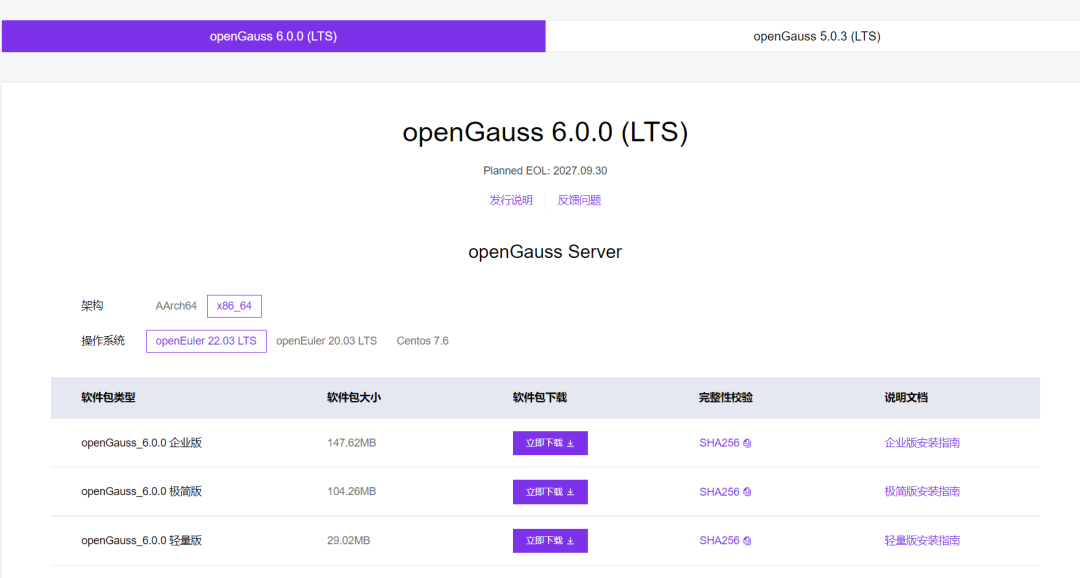
wget https://opengauss.obs.cn-south-1.myhuaweicloud.com/6.0.0/openEuler22.03/x86/openGauss-All-6.0.0-openEuler22.03-x86_64.tar.gz
启动安装,–install-cm安装CM组件
[root@db1 srv]# ptk install -f config.2024-10-02T11_34_39.yaml --install-cm --pkg openGauss-All-6.0.0-openEuler22.03-x86_64.tar.gzINFO[2024-10-02T13:33:00.988] PTK Version: 1.7.2 releaseINFO[2024-10-02T13:33:00.989] load config from config.2024-10-02T11_34_39.yamlIf you continue to install the software,you are accepting the license agreement of the software.[Y]: Accept and continue[C]: Show content of licence agreement[N]: Abort installation and exit✔ Please enter (default: Y): YINFO[2024-10-02T13:33:03.685] cm enabled but cm_servers is empty, use db servers as cm serversThe cluster will contains 2 cm nodes, so please confirm following cms configs:- (Optional) db_service_vip=""- (Required) third_party_gateway_ip=""- (Optional) cms_enable_failover_on2nodes="True"- (Optional) cms_enable_db_crash_recovery="False"✔ The 'third_party_gateway_ip' is not configed, please enter: 192.168.56.16Now, these configs are:- db_service_vip=""- third_party_gateway_ip="192.168.56.16"- cms_enable_failover_on2nodes="True"- cms_enable_db_crash_recovery="False"✔ Do you want to modify them (default=n) [y/n]:INFO[2024-10-02T13:33:24.439] not mogdb package, auto add --not-limit-cm-nodes flagCluster Name: "chaum"+--------------+---------------+-------------+----------+------------+---------------------+----------+| az(priority) | ip | user(group) | port | role | data dir | upstream |+--------------+---------------+-------------+----------+------------+---------------------+----------+| AZ1(1) | 192.168.56.13 | omm(dbgrp) | db:26000 | db:standby | db:/opt/huawei/data | - || | | | cm:15300 | | cm:/opt/huawei/cm | || | 192.168.56.11 | omm(dbgrp) | db:26000 | db:primary | db:/opt/huawei/data | - || | | | cm:15300 | | cm:/opt/huawei/cm | |+--------------+---------------+-------------+----------+------------+---------------------+----------+✔ Is cluster config correct (default=n) [y/n]: YINFO[2024-10-02T13:33:34.113] start check hostname ...INFO[2024-10-02T13:33:34.270] check hostname successINFO[2024-10-02T13:33:34.270] start check os ...INFO[2024-10-02T13:33:34.271] prechecking dependent tools...INFO[2024-10-02T13:33:34.852] [192.168.56.11][omm] kernel version: 5.10.0-230.0.0.132.oe2203sp3.x86_64INFO[2024-10-02T13:33:34.907] [192.168.56.13][omm] kernel version: 5.10.0-230.0.0.132.oe2203sp3.x86_64WARN[2024-10-02T13:33:35.081] [192.168.56.11][omm] device(sda) 'IO Request'=64, expect 256WARN[2024-10-02T13:33:35.136] [192.168.56.13][omm] device(sda) 'IO Request'=64, expect 256INFO[2024-10-02T13:33:37.793] [192.168.56.11][omm] check kernel.core_patternINFO[2024-10-02T13:33:37.797] [192.168.56.11][omm] check RemoveIPC valueINFO[2024-10-02T13:33:37.804] [192.168.56.11][omm] check KillUserProcesses valueINFO[2024-10-02T13:33:39.443] [192.168.56.13][omm] check kernel.core_patternINFO[2024-10-02T13:33:39.556] [192.168.56.13][omm] check RemoveIPC valueINFO[2024-10-02T13:33:39.672] [192.168.56.13][omm] check KillUserProcesses valueINFO[2024-10-02T13:33:40.332] [192.168.56.11][omm] timezone: +0800INFO[2024-10-02T13:33:40.388] [192.168.56.13][omm] timezone: +0800INFO[2024-10-02T13:33:40.391] [192.168.56.11][omm] swap memory 0kB, total memory 3490312kBINFO[2024-10-02T13:33:40.448] [192.168.56.13][omm] swap memory 0kB, total memory 3490316kBWARN[2024-10-02T13:33:40.451] [192.168.56.11][omm] device(/dev/sda) readahead value=8192, expect 16384.WARN[2024-10-02T13:33:40.508] [192.168.56.13][omm] device(/dev/sda) readahead value=8192, expect 16384.INFO[2024-10-02T13:33:40.807] [192.168.56.13][omm] platform: openEuler_22.03_64bitINFO[2024-10-02T13:33:40.807] [192.168.56.11][omm] platform: openEuler_22.03_64bitINFO[2024-10-02T13:33:41.219] [192.168.56.13][omm] check port 26000INFO[2024-10-02T13:33:41.219] [192.168.56.11][omm] check port 26000INFO[2024-10-02T13:33:41.224] [192.168.56.11][omm] port 26000 is freeINFO[2024-10-02T13:33:41.482] [192.168.56.13][omm] port 26000 is freeINFO[2024-10-02T13:33:41.482] all checkers finishedINFO[2024-10-02T13:33:41.482] time elapsed: 7sINFO[2024-10-02T13:33:41.482] check os successINFO[2024-10-02T13:33:41.482] start check distro ...INFO[2024-10-02T13:33:41.482] check distro successINFO[2024-10-02T13:33:41.482] start check user ...INFO[2024-10-02T13:33:41.644] check user successINFO[2024-10-02T13:33:41.644] start check port ...INFO[2024-10-02T13:33:41.644] checking port 26000 on host 192.168.56.11 (db listen port) ...INFO[2024-10-02T13:33:41.644] checking port 15300 on host 192.168.56.13 (cm listen port) ...INFO[2024-10-02T13:33:41.649] checking port 26001 on host 192.168.56.11 (db HA port) ...INFO[2024-10-02T13:33:41.653] checking port 15300 on host 192.168.56.11 (cm listen port) ...INFO[2024-10-02T13:33:41.918] checking port 26000 on host 192.168.56.13 (db listen port) ...INFO[2024-10-02T13:33:42.185] checking port 26001 on host 192.168.56.13 (db HA port) ...INFO[2024-10-02T13:33:42.452] check port successINFO[2024-10-02T13:33:43.599] start prepare installation package ...INFO[2024-10-02T13:33:43.599] installation package is readyINFO[2024-10-02T13:33:43.599] parse installation package ...INFO[2024-10-02T13:34:34.502] db product: openGauss, version: Server, number: 92.954, commit_id: aee4abd5INFO[2024-10-02T13:34:34.894] extract openGauss-Server-6.0.0-openEuler22.03-x86_64.tar.bz2 to dir tmp/ptk_tmp_462330969INFO[2024-10-02T13:34:43.982] execute command: gaussdb --versionINFO[2024-10-02T13:34:44.042] parse installation package successINFO[2024-10-02T13:34:44.042] start complete the configuration ...WARN[2024-10-02T13:34:44.042] Not MogDB, skip check db version for installing CMINFO[2024-10-02T13:34:44.042] complete the configuration successINFO[2024-10-02T13:34:44.042] save the topology to metadataINFO[2024-10-02T13:34:44.043] start distribute installation package ...INFO[2024-10-02T13:34:45.973] distrubite packages successINFO[2024-10-02T13:34:45.973] start install logic nodes ...INFO[2024-10-02T13:34:45.973] deploy db to omm@192.168.56.11INFO[2024-10-02T13:34:45.973] deploy db to omm@192.168.56.13INFO[2024-10-02T13:34:45.973] [192.168.56.11][omm] make user omm's dir(s): opt/huaweiINFO[2024-10-02T13:34:45.973] [192.168.56.13][omm] make user omm's dir(s): opt/huaweiINFO[2024-10-02T13:34:46.076] [192.168.56.11][omm] clean user omm's ipc resourceINFO[2024-10-02T13:34:46.183] [192.168.56.11][omm] make user omm's dir(s): opt/huawei/tool,/opt/huawei/tool/ptk_tool/binINFO[2024-10-02T13:34:46.272] [192.168.56.13][omm] clean user omm's ipc resourceINFO[2024-10-02T13:34:46.388] [192.168.56.13][omm] make user omm's dir(s): opt/huawei/tool,/opt/huawei/tool/ptk_tool/binINFO[2024-10-02T13:34:49.950] [192.168.56.11][omm] extract openGauss-All-6.0.0-openEuler22.03-x86_64.tar.gz to dir opt/huawei/toolINFO[2024-10-02T13:34:50.705] [192.168.56.13][omm] extract openGauss-All-6.0.0-openEuler22.03-x86_64.tar.gz to dir opt/huawei/toolINFO[2024-10-02T13:34:50.813] [192.168.56.11][omm] extract openGauss-OM-6.0.0-openEuler22.03-x86_64.tar.gz to dir opt/huawei/toolINFO[2024-10-02T13:34:51.414] [192.168.56.11][omm] try to fix psutil python libWARN[2024-10-02T13:34:51.610] [192.168.56.11][omm] Not found python3.6 or 3.7, skip fix psutil dynamic lib,please install proper python and fix it manually or reinstall by ptkif you don't fix this, it will cause that gs_om and cm_ctl cannot run properly, but not ptk and databaseINFO[2024-10-02T13:34:51.611] [192.168.56.11][omm] write file /opt/huawei/tool/script/py_pstree.pyINFO[2024-10-02T13:34:51.613] [192.168.56.13][omm] extract openGauss-OM-6.0.0-openEuler22.03-x86_64.tar.gz to dir /opt/huawei/toolINFO[2024-10-02T13:34:51.715] [192.168.56.11][omm] write file /opt/huawei/tool/ptk_tool/bin/README.mdINFO[2024-10-02T13:34:51.887] [192.168.56.11][omm] write file /opt/huawei/tool/ptk_tool/bin/pscpINFO[2024-10-02T13:34:52.072] [192.168.56.11][omm] write file /opt/huawei/tool/ptk_tool/bin/psshINFO[2024-10-02T13:34:52.235] [192.168.56.11][omm] write file /opt/huawei/tool/ptk_tool/bin/task_pool.pyINFO[2024-10-02T13:34:52.268] [192.168.56.13][omm] try to fix psutil python libINFO[2024-10-02T13:34:52.407] [192.168.56.11][omm] make user omm's dir(s): /opt/huawei/appWARN[2024-10-02T13:34:52.477] [192.168.56.13][omm] Not found python3.6 or 3.7, skip fix psutil dynamic lib,please install proper python and fix it manually or reinstall by ptkif you don't fix this, it will cause that gs_om and cm_ctl cannot run properly, but not ptk and databaseINFO[2024-10-02T13:34:52.477] [192.168.56.13][omm] write file /opt/huawei/tool/script/py_pstree.pyINFO[2024-10-02T13:34:52.588] [192.168.56.13][omm] write file /opt/huawei/tool/ptk_tool/bin/README.mdINFO[2024-10-02T13:34:52.627] [192.168.56.11][omm] extract openGauss-Server-6.0.0-openEuler22.03-x86_64.tar.bz2 to dir /opt/huawei/appINFO[2024-10-02T13:34:52.752] [192.168.56.13][omm] write file /opt/huawei/tool/ptk_tool/bin/pscpINFO[2024-10-02T13:34:52.917] [192.168.56.13][omm] write file /opt/huawei/tool/ptk_tool/bin/psshINFO[2024-10-02T13:34:53.098] [192.168.56.13][omm] write file /opt/huawei/tool/ptk_tool/bin/task_pool.pyINFO[2024-10-02T13:34:53.281] [192.168.56.13][omm] make user omm's dir(s): /opt/huawei/appINFO[2024-10-02T13:34:53.477] [192.168.56.13][omm] extract openGauss-Server-6.0.0-openEuler22.03-x86_64.tar.bz2 to dir /opt/huawei/appINFO[2024-10-02T13:35:02.234] [192.168.56.11][omm] change mode of /opt/huawei/app to 700INFO[2024-10-02T13:35:02.302] [192.168.56.11][omm] make user omm's dir(s): /opt/huawei/app/share/postgresqlINFO[2024-10-02T13:35:02.615] [192.168.56.11][omm] copy /opt/huawei/tool/script/gspylib/etc/sql/pmk_schema.sql to /opt/huawei/app/share/postgresqlINFO[2024-10-02T13:35:02.680] [192.168.56.11][omm] copy /opt/huawei/tool/script/gspylib/etc/sql/pmk_schema_single_inst.sql to /opt/huawei/app/share/postgresqlINFO[2024-10-02T13:35:02.748] [192.168.56.11][omm] write file /opt/huawei/app/bin/transfer.pyINFO[2024-10-02T13:35:02.850] [192.168.56.11][omm] set user omm profilesINFO[2024-10-02T13:35:03.167] [192.168.56.13][omm] change mode of /opt/huawei/app to 700INFO[2024-10-02T13:35:03.237] [192.168.56.13][omm] make user omm's dir(s): /opt/huawei/app/share/postgresqlINFO[2024-10-02T13:35:03.275] [192.168.56.11][omm] validate and try to fix ld library for gs_initdbINFO[2024-10-02T13:35:03.347] [192.168.56.11][omm] validate and try to fix ld library for gaussdbINFO[2024-10-02T13:35:03.420] [192.168.56.11][omm] make user omm's dir(s): /opt/huawei/log/gs_profile,/opt/huawei/log/pg_log,/opt/huawei/log/pg_audit,/opt/huawei/log/bin,/opt/huawei/log/pg_log/dn_6001,/opt/huawei/log/pg_audit/dn_6001INFO[2024-10-02T13:35:03.562] [192.168.56.13][omm] copy /opt/huawei/tool/script/gspylib/etc/sql/pmk_schema.sql to /opt/huawei/app/share/postgresqlINFO[2024-10-02T13:35:03.630] [192.168.56.13][omm] copy /opt/huawei/tool/script/gspylib/etc/sql/pmk_schema_single_inst.sql to /opt/huawei/app/share/postgresqlINFO[2024-10-02T13:35:03.701] [192.168.56.13][omm] write file /opt/huawei/app/bin/transfer.pyINFO[2024-10-02T13:35:03.802] [192.168.56.13][omm] set user omm profilesINFO[2024-10-02T13:35:04.222] [192.168.56.13][omm] validate and try to fix ld library for gs_initdbINFO[2024-10-02T13:35:04.291] [192.168.56.13][omm] validate and try to fix ld library for gaussdbINFO[2024-10-02T13:35:04.363] [192.168.56.13][omm] make user omm's dir(s): /opt/huawei/log/gs_profile,/opt/huawei/log/pg_log,/opt/huawei/log/pg_audit,/opt/huawei/log/bin,/opt/huawei/log/pg_log/dn_6002,/opt/huawei/log/pg_audit/dn_6002INFO[2024-10-02T13:35:05.186] [192.168.56.11][omm] make user omm's dir(s): /opt/huawei/tmpINFO[2024-10-02T13:35:05.441] [192.168.56.11][omm] save version to upgrade_versionINFO[2024-10-02T13:35:05.764] [192.168.56.11][omm] create file cluster_manual_startINFO[2024-10-02T13:35:05.833] [192.168.56.11][omm] generate cluster_static_config fileINFO[2024-10-02T13:35:05.936] [192.168.56.11][omm] make user omm's dir(s): /opt/huawei/dataINFO[2024-10-02T13:35:06.120] [192.168.56.13][omm] make user omm's dir(s): /opt/huawei/tmpINFO[2024-10-02T13:35:06.141] [192.168.56.11][omm] write file /opt/huawei/tool/.ptk_deployerINFO[2024-10-02T13:35:06.322] [192.168.56.13][omm] save version to upgrade_versionINFO[2024-10-02T13:35:06.610] [192.168.56.13][omm] create file cluster_manual_startINFO[2024-10-02T13:35:06.675] [192.168.56.13][omm] generate cluster_static_config fileINFO[2024-10-02T13:35:06.774] [192.168.56.13][omm] make user omm's dir(s): /opt/huawei/dataINFO[2024-10-02T13:35:06.968] [192.168.56.13][omm] write file /opt/huawei/tool/.ptk_deployerINFO[2024-10-02T13:35:07.064] generate certification filesINFO[2024-10-02T13:35:08.051] download certification filesINFO[2024-10-02T13:35:08.692] upload certification files to omm@192.168.56.13INFO[2024-10-02T13:35:09.473] generate ssl files for cmINFO[2024-10-02T13:35:11.711] certification files setup successINFO[2024-10-02T13:35:11.711] deploy CM to omm@192.168.56.11INFO[2024-10-02T13:35:11.711] [192.168.56.11][omm] add user omm to cron.allowINFO[2024-10-02T13:35:11.711] deploy CM to omm@192.168.56.13INFO[2024-10-02T13:35:11.711] [192.168.56.13][omm] add user omm to cron.allowINFO[2024-10-02T13:35:11.716] [192.168.56.11][omm] make user omm's dir(s): /opt/huawei/cm,/opt/huawei/cm/cm_server,/opt/huawei/cm/cm_agent,/opt/huawei/log/cm/om_monitorINFO[2024-10-02T13:35:11.804] [192.168.56.13][omm] make user omm's dir(s): /opt/huawei/cm,/opt/huawei/cm/cm_server,/opt/huawei/cm/cm_agent,/opt/huawei/log/cm/om_monitorINFO[2024-10-02T13:35:12.869] [192.168.56.11][omm] extract openGauss-CM-6.0.0-openEuler22.03-x86_64.tar.gz to dir /opt/huawei/appINFO[2024-10-02T13:35:12.907] [192.168.56.13][omm] extract openGauss-CM-6.0.0-openEuler22.03-x86_64.tar.gz to dir /opt/huawei/appINFO[2024-10-02T13:35:13.211] [192.168.56.11][omm] change /opt/huawei/app owner to ommINFO[2024-10-02T13:35:13.211] [192.168.56.11][omm] copy /opt/huawei/app/share/config/cm_server.conf.sample to /opt/huawei/cm/cm_server/cm_server.confINFO[2024-10-02T13:35:13.248] [192.168.56.13][omm] change /opt/huawei/app owner to ommINFO[2024-10-02T13:35:13.248] [192.168.56.13][omm] copy /opt/huawei/app/share/config/cm_server.conf.sample to /opt/huawei/cm/cm_server/cm_server.confINFO[2024-10-02T13:35:13.286] [192.168.56.11][omm] copy /opt/huawei/app/share/config/cm_agent.conf.sample to /opt/huawei/cm/cm_agent/cm_agent.confINFO[2024-10-02T13:35:13.331] [192.168.56.13][omm] copy /opt/huawei/app/share/config/cm_agent.conf.sample to /opt/huawei/cm/cm_agent/cm_agent.confINFO[2024-10-02T13:35:13.360] [192.168.56.11][omm] change /opt/huawei/cm owner to ommINFO[2024-10-02T13:35:13.360] [192.168.56.11][omm] update cm config file: /opt/huawei/cm/cm_agent/cm_agent.confINFO[2024-10-02T13:35:13.403] [192.168.56.13][omm] change /opt/huawei/cm owner to ommINFO[2024-10-02T13:35:13.403] [192.168.56.13][omm] update cm config file: /opt/huawei/cm/cm_agent/cm_agent.confINFO[2024-10-02T13:35:13.505] [192.168.56.11][omm] update cm config file: /opt/huawei/cm/cm_server/cm_server.confINFO[2024-10-02T13:35:13.546] [192.168.56.13][omm] update cm config file: /opt/huawei/cm/cm_server/cm_server.confINFO[2024-10-02T13:35:13.963] [192.168.56.11][omm] start om_monitorINFO[2024-10-02T13:35:13.996] [192.168.56.13][omm] start om_monitorINFO[2024-10-02T13:35:14.032] [192.168.56.11][omm] remove cron task: om_monitorINFO[2024-10-02T13:35:14.065] [192.168.56.13][omm] remove cron task: om_monitorINFO[2024-10-02T13:35:14.109] [192.168.56.11][omm] set omm cron task: om_monitorINFO[2024-10-02T13:35:14.140] [192.168.56.13][omm] set omm cron task: om_monitorINFO[2024-10-02T13:35:14.255] initialize db on omm@192.168.56.11INFO[2024-10-02T13:35:14.255] [192.168.56.11][omm] the database is initializing, please wait a few minutesINFO[2024-10-02T13:35:14.282] initialize db on omm@192.168.56.13INFO[2024-10-02T13:35:14.282] [192.168.56.13][omm] the database is initializing, please wait a few minutesINFO[2024-10-02T13:35:32.073] [192.168.56.13][omm] config postgresql.confINFO[2024-10-02T13:35:32.162] [192.168.56.13][omm] config pg_hba.confINFO[2024-10-02T13:35:32.242] [192.168.56.13][omm] copy ssl files to data dirINFO[2024-10-02T13:35:34.156] [192.168.56.11][omm] config postgresql.confINFO[2024-10-02T13:35:34.239] [192.168.56.11][omm] config pg_hba.confINFO[2024-10-02T13:35:34.316] [192.168.56.11][omm] copy ssl files to data dirptk will add this config to /etc/sudoers on nodes [192.168.56.11,192.168.56.13]:omm ALL=(ALL) NOPASSWD:/usr/sbin/ifconfig✔ Are you sure and continue (default=n) [y/n]: yINFO[2024-10-02T13:36:08.310] logic nodes installed successINFO[2024-10-02T13:36:08.311] generating ptkc ...INFO[2024-10-02T13:36:08.542] start build ssh trust ...INFO[2024-10-02T13:36:09.322] ssh trust build successINFO[2024-10-02T13:36:09.322] start launch db ...INFO[2024-10-02T13:36:09.322] [192.168.56.11][omm] start cluster by cm_ctl ...INFO[2024-10-02T13:36:09.322] [192.168.56.11][omm] the database is starting, please wait a few minutesINFO[2024-10-02T13:35:14.282] initialize db on omm@192.168.56.13INFO[2024-10-02T13:35:14.282] [192.168.56.13][omm] the database is initializing, please wait a few minutesINFO[2024-10-02T13:35:32.073] [192.168.56.13][omm] config postgresql.confINFO[2024-10-02T13:35:32.162] [192.168.56.13][omm] config pg_hba.confINFO[2024-10-02T13:35:32.242] [192.168.56.13][omm] copy ssl files to data dirINFO[2024-10-02T13:35:34.156] [192.168.56.11][omm] config postgresql.confINFO[2024-10-02T13:35:34.239] [192.168.56.11][omm] config pg_hba.confINFO[2024-10-02T13:35:34.316] [192.168.56.11][omm] copy ssl files to data dirptk will add this config to /etc/sudoers on nodes [192.168.56.11,192.168.56.13]:omm ALL=(ALL) NOPASSWD:/usr/sbin/ifconfig✔ Are you sure and continue (default=n) [y/n]: yINFO[2024-10-02T13:36:08.310] logic nodes installed successINFO[2024-10-02T13:36:08.311] generating ptkc ...INFO[2024-10-02T13:36:08.542] start build ssh trust ...INFO[2024-10-02T13:36:09.322] ssh trust build successINFO[2024-10-02T13:36:09.322] start launch db ...INFO[2024-10-02T13:36:09.322] [192.168.56.11][omm] start cluster by cm_ctl ...INFO[2024-10-02T13:36:09.322] [192.168.56.11][omm] the database is starting, please wait a few minutesINFO[2024-10-02T13:36:39.626] [192.168.56.11][omm] start cluster by cm_ctl successINFO[2024-10-02T13:36:39.626] [192.168.56.11][omm] check dn state of 192.168.56.11:26000INFO[2024-10-02T13:36:51.391] [192.168.56.11][omm] switchover successINFO[2024-10-02T13:36:51.391] clear temp dirs ...INFO[2024-10-02T13:36:51.469] clear temp dirs successINFO[2024-10-02T13:36:51.469] time elapsed: 3m27scluste_name | host | user | port | status | message--------------+---------------+------+-------+---------------+----------chaum | 192.168.56.11 | omm | 26000 | start_success | success| 192.168.56.13 | omm | 26000 | start_success | success[root@db1 srv]# ptk cluster status -n chaum[ Cluster State ]cluster_name : chaumcluster_state : Normaldatabase_version : openGauss Server (build aee4abd5)cm_version : 6.0.0 (build dfaa3703)[ CMServer State ]id | ip | port | hostname | role-----+---------------+-------+----------+----------1 | 192.168.56.11 | 15300 | db1 | primary2 | 192.168.56.13 | 15300 | db3 | standby[ Datanode State ]cluster_name | id | ip | port | user | nodename | db_role | state | uptime | upstream---------------+------+---------------+-------+------+----------+---------+--------+----------+-----------chaum | 6001 | 192.168.56.11 | 26000 | omm | dn_6001 | primary | Normal | 00:02:19 | -| 6002 | 192.168.56.13 | 26000 | omm | dn_6002 | standby | Normal | 00:02:44 | -
用CM命令查询集群状态
[omm@db1 ~]$ cm_ctl query -Cv[ CMServer State ]node instance state-----------------------1 db1 1 Primary2 db3 2 Standby[ Cluster State ]cluster_state : Normalredistributing : Nobalanced : Yescurrent_az : AZ_ALL[ Datanode State ]node instance state | node instance state----------------------------------------------------------------------1 db1 6001 P Primary Normal | 2 db3 6002 S Standby Normal
用PTK查询集群状态
[root@db1 srv]# ptk cluster -n chaum status[ Cluster State ]cluster_name : chaumcluster_state : Normaldatabase_version : openGauss Server (build aee4abd5)cm_version : 6.0.0 (build dfaa3703)[ CMServer State ]id | ip | port | hostname | role-----+---------------+-------+----------+----------1 | 192.168.56.11 | 15300 | db1 | primary2 | 192.168.56.13 | 15300 | db3 | standby[ Datanode State ]cluster_name | id | ip | port | user | nodename | db_role | state | uptime | upstream---------------+------+---------------+-------+------+----------+---------+--------+----------+-----------chaum | 6001 | 192.168.56.11 | 26000 | omm | dn_6001 | primary | Normal | 00:12:05 | -| 6002 | 192.168.56.13 | 26000 | omm | dn_6002 | standby | Normal | 00:20:20 | -
用PTK改集群名称
[root@db1 srv]# ptk cluster -n chaum rename -N gdb
INFO[2024-11-12T20:55:40.161] rename cluster success
ptk切换主备角色有,用时13秒
[root@db1 srv]# ptk cluster -n gdb switchover -i 6002INFO[2024-11-12T20:57:32.703] check cluster statusINFO[2024-11-12T20:57:34.418] do checkpointINFO[2024-11-12T20:57:34.828] start switchover, please wait a few moments ...INFO[2024-11-12T20:57:46.389] switchover output:.....cm_ctl: switchover successfully.INFO[2024-11-12T20:57:46.389] switchover successfullyINFO[2024-11-12T20:57:46.390] time elapsed: 13s
关集群用时11s
[root@db1 srv]# ptk cluster -n gdb stopINFO[2024-11-12T20:59:31.263] operation: stopINFO[2024-11-12T20:59:31.263] ========================================INFO[2024-11-12T20:59:31.263] stop cluster by cm_ctl ...INFO[2024-11-12T20:59:42.253] ========================================INFO[2024-11-12T20:59:42.253] stop successfully
点击阅读原文跳转作者文章
文章转载自openGauss,如果涉嫌侵权,请发送邮件至:contact@modb.pro进行举报,并提供相关证据,一经查实,墨天轮将立刻删除相关内容。
