




青云科技旗下 AI 算力云服务——基石智算正式推出大模型服务平台,现已开启公测啦!公测阶段,接口调用限时免费。
AI 发展日新月异,但在模型相关的应用过程中,总会遇到各种各样的难题,比如怎么高效管理 AI 模型资源,又或者在模型训练、部署与优化时困难重重。不过别担心,大模型服务平台就是帮大家解决这些问题的。
基石智算大模型服务平台是一个专为开发者设计的高效、灵活、稳定、易用的综合性大模型服务平台,旨在提供便捷、高效、快速体验的大模型服务,同时支持开发者制作全新应用或集成现有应用。该平台致力于简化大模型技术的使用门槛,让每一位开发者都能轻松利用前沿人工智能技术推动项目的创新与发展。

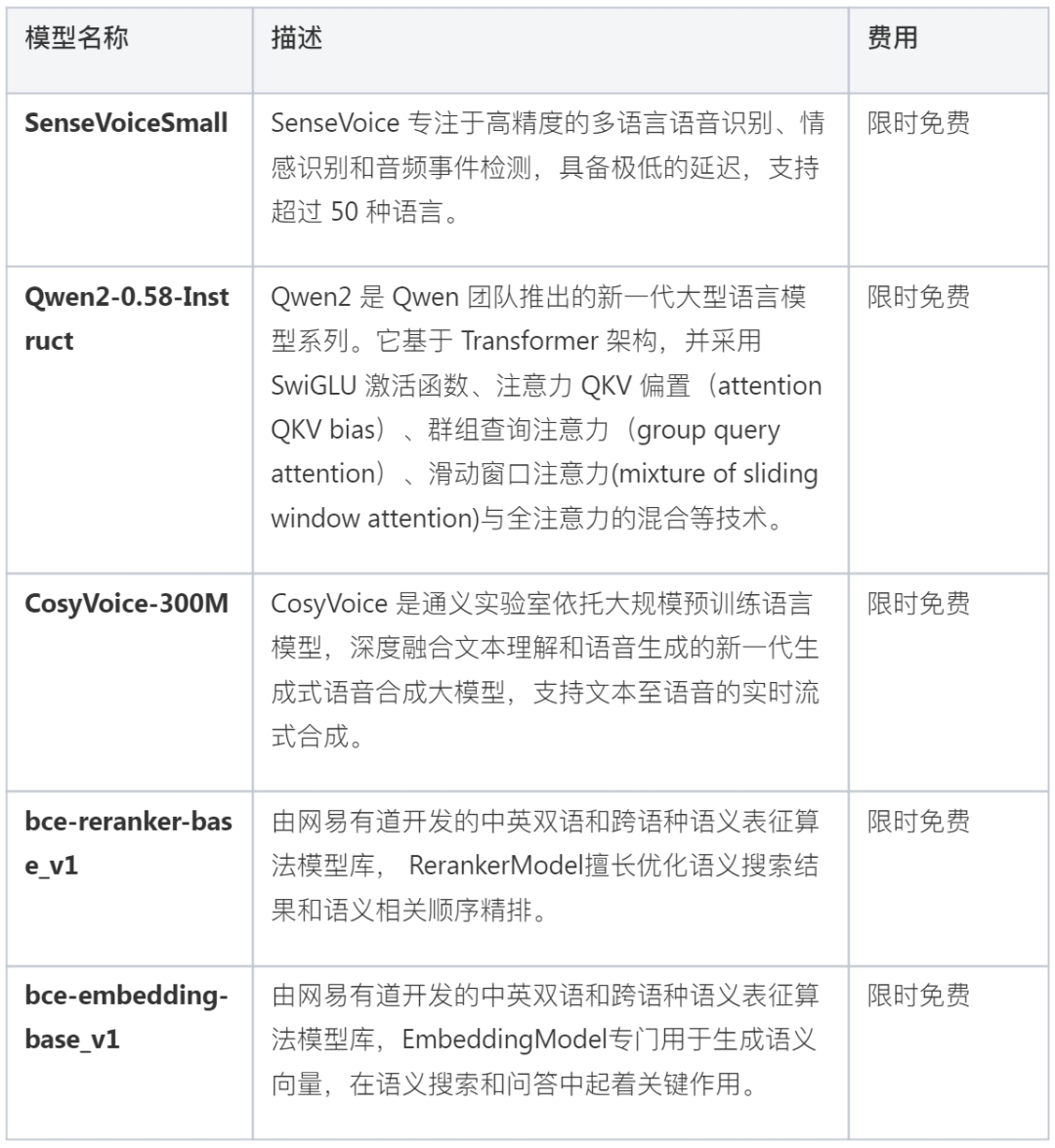
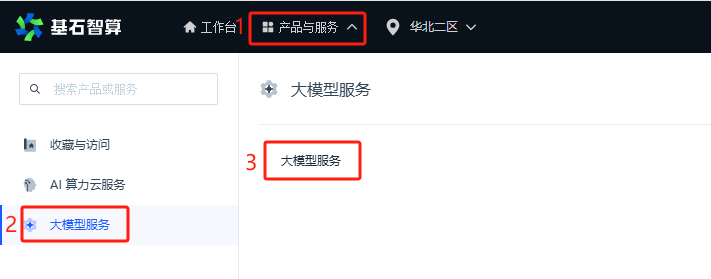
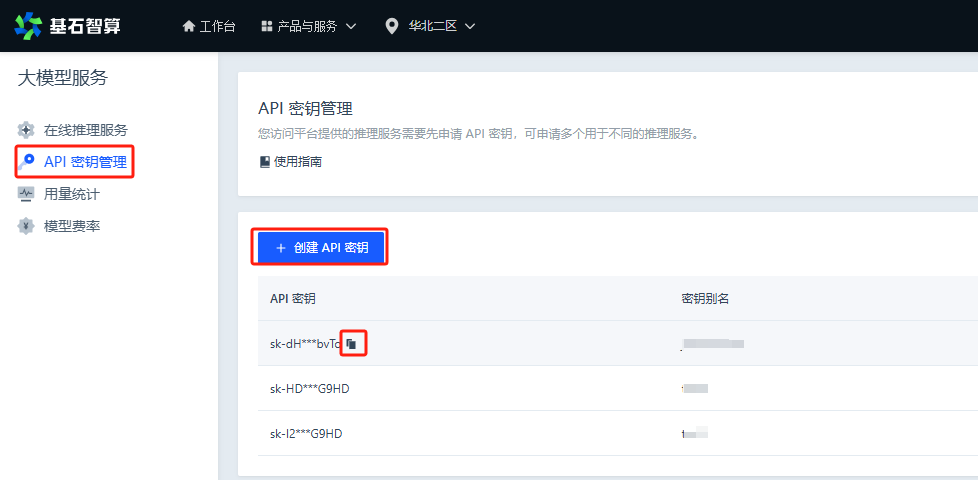
代码运行后,会提示输入一段语音,程序采集到语音后调用“语音转文字”接口,识别出文字结果并打印到控制台。然后调用大语言模型生成会话回复(支持多轮会话),把回复内容打印到控制台,同时调用“文字转语音”接口,就可以把合成出来的语音朗读出来。完成这一轮交互后,就会进入下一次循环。
步骤:
# -*- coding: utf-8 -*-import osimport ioimport threadingimport timeimport waveimport queueimport randomimport pygameimport pyaudiofrom openai import OpenAIclient = OpenAI(api_key='sk-XXXXXXXXXXXXXXXXXXXXXXXXXXXXXXX', base_url='https://openapi.coreshub.cn/v1' )FORMAT = pyaudio.paInt16CHANNELS = 1RATE = 16000CHUNK = 1024def clear_and_print(content):content = content.replace('\n', '')print(f'\r{content}', end='', flush=True)def truncate_to_last_sentence(text):last_punct = max(text.rfind('!'), text.rfind('。'), text.rfind('?'))if last_punct != -1:return text[:last_punct + 1]return textclass AudioRecorder:"""录音机"""def __init__(self):self.audio = pyaudio.PyAudio()self.stream = Noneself.frames = []self.is_recording = Falsedef start_recording(self):self.is_recording = Trueself.frames = []print("[系统] 输入任意键开始录音,退出请按'q'")if input() == 'q':print('[系统] 再见!')exit(0)self.stream = self.audio.open(format=FORMAT, channels=CHANNELS, rate=RATE, input=True,frames_per_buffer=CHUNK, stream_callback=self.callback)self.stream.start_stream()print("[系统] 开始录音,任意键结束录音...")def stop_recording(self):if self.stream:self.stream.stop_stream()self.stream.close()self.stream = Noneself.is_recording = Falseprint("[系统] 录音结束.")return self.save_audio()def save_audio(self):filename = f"recording_{int(time.time())}.wav"wf = wave.open(filename, 'wb')wf.setnchannels(CHANNELS)wf.setsampwidth(self.audio.get_sample_size(FORMAT))wf.setframerate(RATE)wf.writeframes(b''.join(self.frames))wf.close()return filenamedef callback(self, in_data, frame_count, time_info, status):if self.is_recording:self.frames.append(in_data)return (in_data, pyaudio.paContinue)def listen(self):self.start_recording()try:input()except KeyboardInterrupt:passfinally:return self.stop_recording()def __del__(self):if self.stream:self.stream.stop_stream()self.stream.close()self.audio.terminate()class AudioPlayer:def __init__(self):self.text_queue = queue.Queue()self.audio_data_queue = queue.Queue()self.is_playing = Falsepygame.mixer.init()threading.Thread(target=self._request_audio_thread, daemon=True).start()threading.Thread(target=self._play_audio_thread, daemon=True).start()def add_to_queue(self, text):self.text_queue.put(text)def _request_audio_thread(self):while True:text = self.text_queue.get()response = client.audio.speech.create(model='CosyVoice-300M', voice='中文女', input=text)audio_data = io.BytesIO(response.content)self.audio_data_queue.put(audio_data)self.text_queue.task_done()def _play_audio_thread(self):while True:audio_data = self.audio_data_queue.get()self._play_audio(audio_data)time.sleep(0.8 + 0.1 * abs(random.random()))self.audio_data_queue.task_done()def _play_audio(self, audio_data):self.is_playing = Truepygame.mixer.music.load(audio_data)pygame.mixer.music.play()while pygame.mixer.music.get_busy():pygame.time.Clock().tick(10)self.is_playing = Falsedef stream_chat_response(messages):response = client.chat.completions.create(model="Qwen2-0.5B-Instruct", messages=messages, stream=True)full_text = ""for chunk in response:if len(chunk.choices) and chunk.choices[0].delta.content:new_content = chunk.choices[0].delta.contentfull_text += new_contentyield new_content, full_textdef clean_text(text):text = text.replace("\n", "")text = text.replace("*", "")return textrecorder = AudioRecorder()audio_player = AudioPlayer()history = []print('[系统] 开始对话')while True:audio_file = recorder.listen()# ------------------------------------------------------------------------------------------------print('ASR 推理中...')with open(audio_file, 'rb') as file:response = client.audio.transcriptions.create(file=file, model='SenseVoiceSmall')os.remove(audio_file)question_txt = response.textprint("> 问题: ", question_txt)# ------------------------------------------------------------------------------------------------messages = [{"role": "system", "content": "You are a helpful assistant."},*[{"role": "user" if i % 2 == 0 else "assistant", "content": msg} for i, msg in enumerate(sum(history, ()))],{"role": "user", "content": question_txt}]full_text = ""audio_chunk = ""for new_content, full_text in stream_chat_response(messages):clear_and_print(f'< 回答: {full_text}')audio_chunk += new_contentif ('!' in audio_chunk or '?' in audio_chunk or '。' in audio_chunk) and len(audio_chunk) > 55:truncated_chunk = truncate_to_last_sentence(audio_chunk)if truncated_chunk:cleaned_chunk = clean_text(truncated_chunk)audio_player.add_to_queue(cleaned_chunk)audio_chunk = audio_chunk[len(truncated_chunk):]print()if audio_chunk:truncated_chunk = truncate_to_last_sentence(audio_chunk)if truncated_chunk:audio_player.add_to_queue(truncated_chunk)if len(audio_chunk) > len(truncated_chunk):audio_player.add_to_queue(audio_chunk[len(truncated_chunk):])history.append((question_txt, full_text))history = history[-8:]audio_player.text_queue.join()audio_player.audio_data_queue.join()
# 安装依赖pip install pygame pyaudio openaipython audio_robot.py
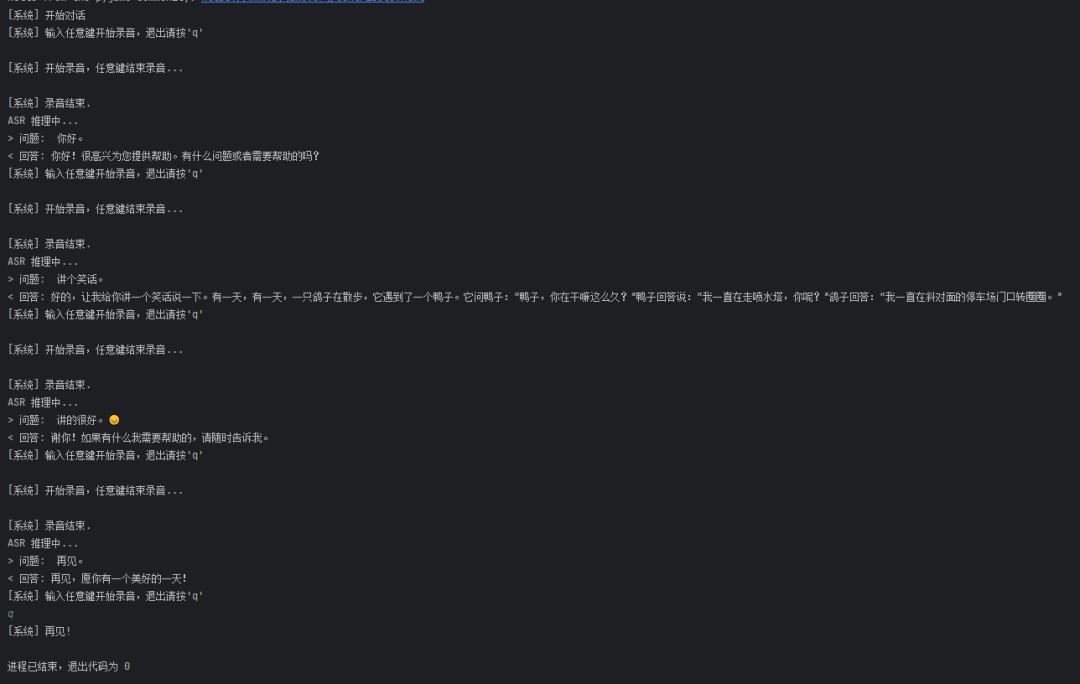
示例:


相关链接
- FIN -
更多推荐





 点击“阅读原文”了解更多
文章转载自青云QingCloud,如果涉嫌侵权,请发送邮件至:contact@modb.pro进行举报,并提供相关证据,一经查实,墨天轮将立刻删除相关内容。
