



K8s升级步骤
1.上传新版本镜像
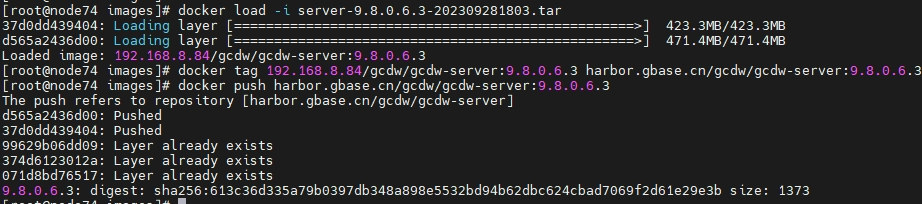
2.编辑value.yaml,除各镜像版本外,其他已有参数与老版本保持一致
3.删除所有租户的warehouse
4.
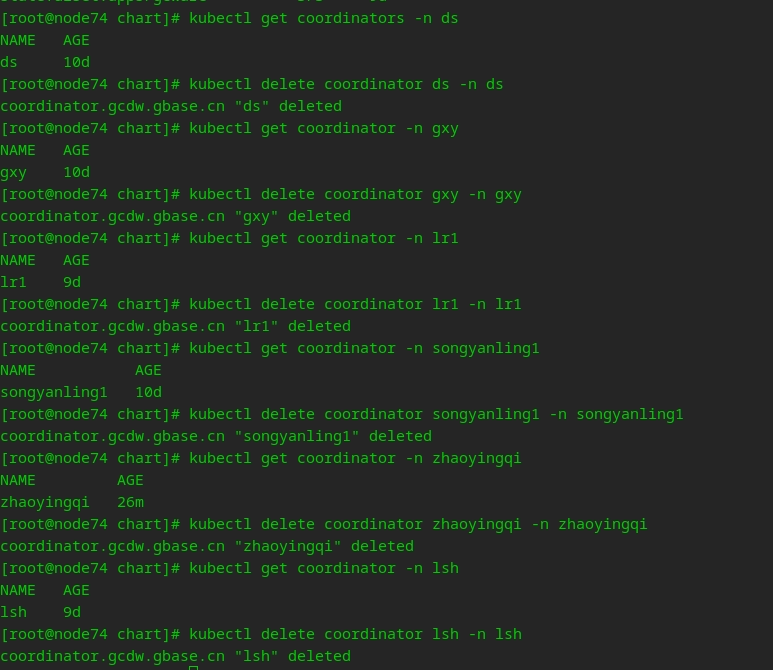
删除租户的coordinator资源
Kubectl get coordinator -n namespace
#查看命名空间下coordinator资源的名称
Kubectl delete coordinator coor_name -n namespace #删除coordinator资源
5.
卸载gcdw实例的系统服务
helm ls -n gcdw-system #查看已安装的helm实例
helm uninstall “helm实例名” -n gcdw-system #卸载已安装的helm实例
Kubectl get all -n gcdw-system #查看gcdw-system下的资源是否卸载干净
[root@node74 chart]# helm ls -n pub1
WARNING: Kubernetes configuration file is group-readable. This is
insecure. Location: /root/.kube/config
WARNING: Kubernetes configuration file is world-readable. This is
insecure. Location: /root/.kube/config
NAME NAMESPACE REVISION UPDATED STATUS CHART APP VERSION
gcdw pub1 1 2023-09-27 15:56:33.26237738
+0800 CST deployed gcdw-9.8
[root@node74 chart]# helm uninstall gcdw -n pub1
WARNING: Kubernetes configuration file is group-readable. This is
insecure. Location: /root/.kube/config
WARNING: Kubernetes configuration file is world-readable. This is
insecure. Location: /root/.kube/config
release "gcdw" uninstalled
[root@node74 chart]# kubectl get all -n pub1
No resources found in pub1 namespace.
6.安装新版本gcdw的系统服务
[root@node74 helm_gcdw]# helm install gcdw chart/
-n pub1
WARNING: Kubernetes configuration file is
group-readable. This is insecure. Location: /root/.kube/config
WARNING: Kubernetes configuration file is
world-readable. This is insecure. Location: /root/.kube/config
NAME: gcdw
LAST DEPLOYED: Sun Oct 8 09:25:20 2023
NAMESPACE: pub1
STATUS: deployed
REVISION: 1
TEST SUITE: None
#查看资源是否安装成功
[root@node74 helm_gcdw]# kubectl get all -n pub1
NAME READY STATUS
RESTARTS AGE
pod/gcdw-ftp-0 1/1 Running
0 21s
pod/gcdw-operator-75f78f7677-q7smr 1/1
Running 0 20s
pod/gcdw-redis-0 1/1 Running
0 21s
pod/gcdw-saas-agent-0 1/1 Running
0 21s
pod/gcdw-saas-backend-0 1/1 Running
0 21s
pod/gcdw-saas-frontend-0 1/1 Running
0 21s
NAME TYPE CLUSTER-IP EXTERNAL-IP PORT(S) AGE
service/gcdw-ftp ClusterIP None <none> 21/TCP 21s
service/gcdw-redis ClusterIP 10.68.149.149 <none> 6378/TCP 21s
service/gcdw-saas-agent NodePort 10.68.38.154 <none> 8080:28090/TCP 21s
service/gcdw-saas-backend ClusterIP
None <none> 8082/TCP 21s
service/gcdw-saas-frontend NodePort
10.68.251.224 <none> 80:32161/TCP 21s
NAME READY UP-TO-DATE
AVAILABLE AGE
deployment.apps/gcdw-operator 1/1
1 1 21s
NAME
DESIRED CURRENT READY
AGE
replicaset.apps/gcdw-operator-75f78f7677 1
1 1 21s
NAME READY AGE
statefulset.apps/gcdw-ftp 1/1 21s
statefulset.apps/gcdw-redis 1/1 21s
statefulset.apps/gcdw-saas-agent 1/1
21s
statefulset.apps/gcdw-saas-backend 1/1
21s
statefulset.apps/gcdw-saas-frontend 1/1
21s
7.启动所有租户的coordinator和warehouse资源
进入backend pod。根据步骤4.中记录的所有资源名称依次启动coordinator资源
[root@gcdw-saas-backend-0 backend]# ./account --create_resource -A lr1
account: lr1
defining environment variables : MY_POD_IMAGE, VALUE :
harbor.gbase.cn/gcdw/gcdw-server:9.8.0.6.3
defining environment variables : MY_POD_APIVERSION, VALUE :
gcdw.gbase.cn/v1alpha1
defining environment variables : MY_FOUNDATION_KEY, VALUE :
jZOkerb8:1nsw9f40@10.10.55.71:4500
begin to Create or Update Crd, json string is
{"apiVersion":"gcdw.gbase.cn/v1alpha1","kind":"Coordinator","metadata":{"name":"lr1","namespace":"lr1"},"spec":{"image":"harbor.gbase.cn/gcdw/gcdw-server:9.8.0.6.3","size":2,"command":["/opt/startup.sh","-c
gcluster_metadata_server_ip=192.168.1.1 gcluster_instance_name='lr1' -f
jZOkerb8:1nsw9f40@10.10.55.71:4500 -s
GCDW_S3_ACCESS_KEY_ID=2ZA33NAY9ADBQMQOUL3R
GCDW_S3_SECRET_KEY=tbUXYhgH9DdapEJtqU6x+cXk0H1XsImpRc3zQYZp
GCDW_S3_ENDPOINT=10.10.13.159:9000 GCDW_S3_REGION=minio GCDW_S3_BUCKET=liurui1
GCDW_STORAGE_STYLE= GCDW_HDFS_NAMENODES=
GCDW_HDFS_URI="],"schedule_type":""}}
2023-10-08 09:52:33 [ K8s Info ] Creating resource
{"apiVersion":"gcdw.gbase.cn/v1alpha1","kind":"Coordinator","metadata":{"name":"lr1","namespace":"lr1"},"spec":{"image":"harbor.gbase.cn/gcdw/gcdw-server:9.8.0.6.3","size":2,"command":["/opt/startup.sh","-c
gcluster_metadata_server_ip=192.168.1.1 gcluster_instance_name='lr1' -f
jZOkerb8:1nsw9f40@10.10.55.71:4500 -s
GCDW_S3_ACCESS_KEY_ID=2ZA33NAY9ADBQMQOUL3R
GCDW_S3_SECRET_KEY=tbUXYhgH9DdapEJtqU6x+cXk0H1XsImpRc3zQYZp
GCDW_S3_ENDPOINT=10.10.13.159:9000 GCDW_S3_REGION=minio GCDW_S3_BUCKET=liurui1
GCDW_STORAGE_STYLE= GCDW_HDFS_NAMENODES=
GCDW_HDFS_URI="],"schedule_type":""}}
2023-10-08 09:52:33 [ K8s Info ] Created resource lr1
2023-10-08 09:52:40 [ K8s Info ] Resources are ready :
["coordinator-1-0.coordinator-1","coordinator-2-0.coordinator-2"]
Create or Update Crd success, coor addr is :
coordinator-1-0.coordinator-1 coordinator-2-0.coordinator-2
SUCCESS
8.登录所有租户的web端,创建并启动warehouse,设置各租户的默认warehouse。
