



KES V9 RWC集群极速部署实战
一、部署概要
KingbaseES(简称KES)作为一款入选国家自主创新产品目录的数据库产品,广泛应用于国内各行业。当前KingbaseES V9系列的最新发布版本为 V009R001C002B0014。本文通过搭建虚拟环境来快速部署最新发布KingbaseES V9 RWC读写分离数据库集群。
二、环境规划
一主两备环境
节点名称 | 资源配置 | 系统环境 | IP地址 | 说明 |
|---|---|---|---|---|
node1 | 2 Core 4 GiB | redhat7.8 | 192.168.126.231 | 主节点 |
node1 | 2 Core 4 GiB | redhat7.8 | 192.168.126.233 | 备节点 |
node3 | 2 Core 4 GiB | redhat7.8 | 192.168.126.235 | 备节点 |
备注:集群中所有节点必须要求做时钟同步,系统时间需保持一致(要求至少误差范围在2s以内);否则,可能会导致主库的WAL、快照等数据不能及时回收的影响。
三、集群架构
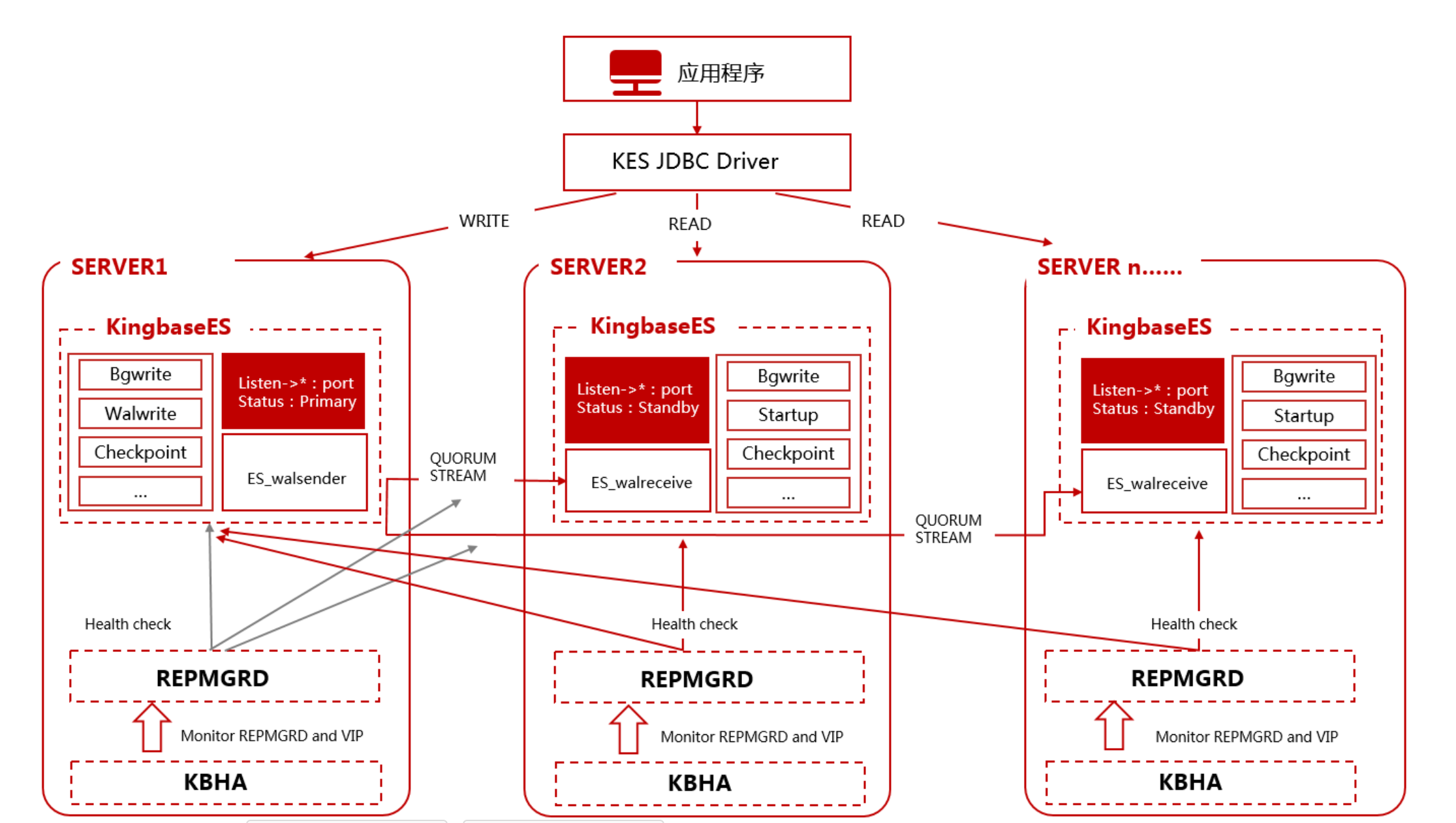
四、环境准备
1、创建kingbase用户
不用root用户,创建kingbase用户进行部署,配置ssh互信和sudo免密
#创建用户&&设置密码
useradd kingbase && passwd kingbase
2、创建安装目录
KingbaseES默认的安装目录是 /opt/Kingbase/ES/V9 。如果不存在,您需要使用root用户先创建该目录,并赋予kingbase用户对该目录的读写权限。
mkdir -p /opt/Kingbase/ES/V9
chmod o+rwx /opt/Kingbase/ES/V9
chown -R kingbase:kingbase /opt/Kingbase/ES/V9
3、创建数据目录
数据目录是KingbaseES中存放数据文件的目录,默认是在安装目录下的data目录。也可以与安装目录分开单独设置。您可以根据业务系统数据量来单独设置数据目录路径,例如将数据目录初始化在本机硬盘或者挂载在盘阵上。您可以运行如下命令创建数据目录:
mkdir /home/kingbase/data
备注:数据目录不必事先创建。安装过程中会提示指定数据目录,如果目录不存在安装程序会自动创建。
五、集群安装与配置
1、KingBaseES V9软件安装
2、配置 kingbase 用户环境变量
su - kingbase
export KINGBASE_DATA=/home/kingbase/data
export KINGBASE_HOME= /opt/Kingbase/ES/V9/kingbase
export PATH=$PATH:$KINGBASE_HOME/bin:
source ~/.bash_profile
#使该环境变量生效
3、配置集群
1.系统服务检查
需要关闭数据库自动启动服务(如果存在):
停止服务:
service kingbased stop 或 systemctl stop kingbased
关闭服务开机自动启动:
#Redhat或CentOS系列操作系统
chkconfig --del kingbased 或 systemctl disable kingbased
2.集群所需文件及文件名约束
集群部署所需要的所有文件需要已存在设备上,且 install.conf文件、cluster_install.sh、trust_cluster.sh 都需要在同一设备的同一目录下,需安装数据库后获取对应文件,以下是集群部署所需要的所有文件
- db.zip #数据库压缩包
- cluster_install.sh #部署脚本
- install.conf #部署配置文件
- trust_cluster.sh #配置SSH免密脚本
$ cd ClientTools/guitools/DeployTools/zip

3.集群部署执行约束
- 执行脚本的操作只能在集群主机上执行,通用机需用普通用户执行脚本。
- 配置文件中所有要求写路径的参数都必须是绝对路径,不支持相对路径。
- license_file 参数只需写 license 文件名即可,无需写路径。
- 脚本支持使用非 22 端口进行 ssh 连接,如果想要修改 ssh连接端口,除了更改配置文件 install.conf之外,还需修改系统/etc/ssh/sshd_config 文件中的 Port 项,然后重启 sshd服务才能正常部署集群。修改系统文件以及重启 sshd 服务均需要使用 root用户执行。
4.编辑 install.conf 配置文件
提供 install.conf 配置文件用于配置集群部署所需参数
[install]
## whether it is BMJ, if so, on_bmj=1, if not on_bmj=0, defaults to on_bmj=0
on_bmj=0
## the cluster node IP which needs to be deployed, is separated by spaces, for example: all_ip=(192.168.1.10 192.168.1.11)
## or all_ip=(host1 host2)
## means deployed cluster of DG ==> ha_running_mode='DG'
all_ip=(node1 node2 node3)
## only set if need to setup witness node in cluster. The value is the IP of witness node, for example: witness_ip="192.168.1.12"
## or witness_ip="host"
## it must be NULL when ha_running_mode='TPTC'
#witness_ip="adminnode"
## the node IP will deployed in PRODUCTION, could not set it when all_ip is not NULL.
## the virtual_ip must be NULL, and auto_cluster_recovery_level will be 0.
## means deployed cluster of TPTC ==> ha_running_mode='TPTC'
## Cannot be configured as a domain name
production_ip=()
## the node IP will deployed in LOCAL DISASTER, could not be NULL if the production_ip is not NULL.
## Cannot be configured as a domain name
local_disaster_recovery_ip=()
## the node IP will deployed in REMOTE DISASTER, it could be NULL even the production_ip is not NULL.
## Cannot be configured as a domain name
remote_disaster_recovery_ip=()
## the path of cluster to be deployed, for example: install_dir="/home/kingbase/tmp_kingbase" [if it is BMJ, you do not need to configure this parameter]
## the directory structure after deployment:
## ${install_dir}/kingbase/data the data directory
## ${install_dir}/kingbase/archive log archive directory
## ${install_dir}/kingbase/etc configuration file directory
## ${install_dir}/kingbase/bin、lib、share、log install file directory
## the last layer of directory could not add '/'
install_dir="/opt/Kingbase/ES/V9"
## the absolute path of zip package, for example: zip_package="/home/kingbase/db.zip" [if it is BMJ or deploy_by_sshd=0, you do not need to configure this parameter]
## zip、tar and tar.gz package can be supported.
zip_package="/opt/Kingbase/ES/V9/ClientTools/guitools/DeployTools/zip/db.zip"
## the name of license.dat [if it is BMJ or deploy_by_sshd=0, you do not need to configure this parameter]
## if there is no license file set, the default license file in zip_package will be read.
## if there are multiple license files, please write down all of them.
## make sure that the write order of license.dat file is the same as that of all_ip, if the same license file can be used in different devices, you can just write once.
## since the license file must named with "license.dat", if you have more than one license files, please use different name to distinguish them.
## example: license_file=(license.dat) or license_file=(license.dat-1 license.dat-2)
license_file=(license.dat)
# database initializes user configuration
db_user="system" # the user name of database
db_password="system" # the password of database.
db_port="54321" # the port of database, defaults is 54321
db_mode="oracle" # database mode: pg, oracle, mysql
db_auth="scram-sha-256" # database authority: scram-sha-256, md5, scram-sm3, sm4, default is scram-sha-256
db_case_sensitive="no" # database case sensitive settings: yes, no. default is yes - case sensitive; no - case insensitive
# (NOTE. cannot set to 'no' when db_mode="pg", and cannot set to 'yes' when db_mode="mysql").
db_checksums="yes" # the checksum for data: yes, no. default is yes - a checksum is calculated for each data block to prevent corruption; no - nothing to do.
archive_mode="always" # enables archiving; off, on, or always
encoding="UTF8" # set default encoding for new databases. must be one of ('default' 'UTF8' 'GBK' 'GB2312' 'GB18030')
locale="zh_CN.UTF-8" # set default locale for new databases.
other_db_init_options="" # addional initdb options,such as "--scenario-tuning" (NOTE. cannot set --scenario-tuning when db_mode="mysql")
sync_security_guc="no" # sync security GUC parameters in cluster (exclude witness): yes, no. default is no.
# yes - for auto sync security GUC, create extension kdb_schedule and security_utils; no - nothing to do.
tcp_keepalives_idle="2" # (integer; default: 7200; since Linux 2.2)
# The number of seconds a connection needs to be idle before TCP begins sending out keep-alive counts. Keep-alives are sent only when the
# SO_KEEPALIVE socket option is enabled. The default value is 7200 seconds (2 hours). An idle connection is terminated after approximately an
# additional 11 minutes (9 counts an interval of 75 seconds apart) when keep-alive is enabled.
tcp_keepalives_interval="2" # (integer; default: 75; since Linux 2.4)
# The number of seconds between TCP keep-alive counts.
tcp_keepalives_count="3" # (integer; default: 9; since Linux 2.2)
# The maximum number of TCP keep-alive counts to send before giving up and killing the connection if no response is obtained from the other end.
tcp_user_timeout="9000" # (since Linux 2.6.37)
connection_timeout="10" # connection timeout when use ssh or sys_securecmdd
wal_sender_timeout="30000" # in milliseconds; 0 disables
wal_receiver_timeout="30000" # time that receiver waits for
# communication from master
# in milliseconds; 0 disables
## the trust ip, which separated by English ',', and spaces are not allowed.
## For example: trusted_servers="192.168.28.1,192.168.29.1" or trusted_servers="host1,host2"
trusted_servers="192.168.126.1"
## if failed to ping trusted_servers, the database can still be running? on, off. default is on - do nothing, the database will running; off - will stop the database.
running_under_failure_trusted_servers='on'
#####################################################################
# Optional parameters
#####################################################################
## Will or not use the data directory which is already exists on one node.
# 0: there is no data, will generate the data directory by initdb.
# 1: there is only one data, use it as the primary node. (In TPTC, the data directory must on any node of produtcion_ip.)
use_exist_data=0
## the path of data directory, BMJ defaults to "/opt/Kingbase/ES/V8/data", the general machine defaults to "install_dir/kingbase/data"
data_directory="/home/kingbase/data"
## if seperate sys_wal from data directory, set the sys_wal location to waldir.
## the location should not be under the data directory
## the location should be an absolute path
## the waldir should be an empty path or nonexistent, initdb would create the location if it's nonexistent
waldir=''
## the vitural IP, for example: virtual_ip="192.168.28.188/24"
virtual_ip="192.168.126.232"
## ignore any VIP operation failure.
## on: continue to complete the command event if failed to load/arping/unload VIP (except in failover).
## off: abort the command if failed to load/arping/unload VIP. (default)
ignore_vip_failure='off'
## the net device, after configuring the vitural IP, net_device must been configured.
## please make sure that the writing order of net_device is the same as all_ip, if the net_device is the same, it should also be written together.
## do not need to consider net_device on witness node if configured witness_ip
## for example: net_device=(ens192 ens192) or net_device=(ens192 eth0)
net_device=(ens33)
## the net device ip, after configuring the vitural IP, net_device_ip must been configured.
## please make sure that the writing order of net_device_ip is the same as all_ip
## do not need to consider net_device_ip on witness node if configured witness_ip
## for example: net_device_ip=(10.10.11.128 10.10.11.129)
net_device_ip=(192.168.126.231 192.168.126.233 192.168.126.235)
## the path of ip, arping, ping command, defaults is /sbin or /bin
## by default, the arping_path is located in the bin directory of the database installation directory, if arping_path is null, then use default value.
## for example, if there is BMJ, arping_path=/opt/Kingbase/ES/V8/Server/bin
ipaddr_path="/sbin"
arping_path=""
ping_path="/bin"
## deploy option, if root authority is provided when deploy.
## default is 1, it is permit to deploy with root. 0 means deploy without root.
install_with_root=1
## super user, defaults is root
super_user="root"
## ordinary user, defaults is kingbase
execute_user="kingbase"
## other cluster parameters
deploy_by_sshd=1 # choose whether to use sshd when deploy, 0 means not to use (deploy by sys_securecmdd), 1 means to use (deploy by sshd), default value is 1; when on_bmj=1, it will auto set to no(deploy_by_sshd=0)
use_scmd=0 # Is the cluster running on sys_securecmdd or sshd? 1 means yes (on sys_securecmdd), 0 means no (on sshd), default value is 1. sys_securecmdd service need root; when on_bmj=1, it will auto set to yes(use_scmd=1)
reconnect_attempts="10" # the number of retries in the event of an error
reconnect_interval="6" # retry interval
recovery="standby" # the way of cluster recovery: standby/automatic/manual
ssh_port="22" # the port of ssh, default is 22
scmd_port="8890" # the port of sys_securecmdd, default is 8890
## ssl option, default value is '0', will not use ssl in cluster.
## set use_ssl=1 in database, and the cluster will use 'sslmode=require' to connect to database.
use_ssl=0
## all nodes failed recovery option, default value 1, do auto recovery when all nodes failed when network is OK and only one primary in cluster.
## 0 means disable the all fails recovery feature
## 2 means max availability option,the cluster must contains two nodes and the trust server must be set, the recovery must be set to automatic.
auto_cluster_recovery_level='1'
## enable the disk check, default value is 'off', will do nothing when disk is error.
## if set to 'on', stop the database when disk is error.
use_check_disk='off'
## setting for kingbase synchronous_standby_names mode, values in "quorum\sync\all\async\custom"
## quorum: the first do WAL replay standby can be sync node
## sync: the first standby in synchronous_standby_names, which connect to primary now, is sync node
## all: all the standbys in synchronous_standby_names, which connect to primary now, are sync node, and if there is no standby connect to primary, it is equal to async
## async: no standby is sync node
## custom: support for configuring the role of each node, and each node in the cluster must be assigned a role.
## For ha_running_mode='TPTC' the synchronous default value is 'all'.
## For ha_running_mode='DG', the synchronous default value is 'quorum'.
synchronous=''
## set nodes role as a sync nodes.
## the sync_nodes, which separated by English spaces.
## this parameter is only valid when synchronous is custom mode.
## the nodes in the sync_nodes parameter must all come from the all_ip parameter.
## for example: synchrongous_nodes=(192.168.1.10 192.168.1.11 192.168.1.12)
## if the ha_running_mode is 'TPTC',sync_nodes are invalid.
sync_nodes=()
## set nodes role as a potential nodes.
## other rules are consistent with parameter sync_nodes.
potential_nodes=()
## set nodes role as a async nodes.
## other rules are consistent with parameter sync_nodes.
async_nodes=()
## For ha_running_mode='TPTC', if the sync nodes have the same location with primary ?
## 0: some nodes could be sync nodes. (don't care what the location is)
## 1: only the nodes have same location with primary, could be sync nodes.
## the default is 0. (when ha_running_mode='DG' or synchronous='async', this parameter has no effect)
sync_in_same_location=0
## For ha_running_mode='TPTC', if we can do failover when the standby node has different location with failure primary?
## 'off': can not do failover, if the standby node has different location with primary.
## 'none': can do failover.
## 'any': can do failover, need ANY server alive in primary's location if the standby node has different location with primary.
## 'all': can do failover, need ALL servers alive in primary's location if the standby node has different location with primary.
## the default is off. (when ha_running_mode='DG', this parameter has no effect)
failover_need_server_alive='off'
## config of create a standby/witness node.
## when the cluster is in quorum or sync mode and expand sync standby node,
## it may automatically adjust synchronous_node and synchronous_standby_count parameters.
[expand]
expand_type="" # The node type of standby/witness node, which would be add to cluster. 0:standby 1:witness
primary_ip="" # The ip addr of cluster primary node, which need to expand a standby/witness node.
expand_ip="" # The ip addr of standby/witness node, which would be add to cluster.
node_id="" # The node_id of standby/witness node, which would be add to cluster. It does not the same with any one in cluster node
# for example: node_id="3"
sync_type="" # the sync_type parameter is used to specify the sync type for expand node. 0:sync 1:potential 2:async
# this parameter is only valid when expand_type="0" and the synchronous parameter of the cluster is set to custom mode.
## Specific instructions ,see it under [install]
install_dir="" # the last layer of directory could not add '/'
zip_package=""
net_device=() # if virtual_ip set,it must be set
net_device_ip=() # if virtual_ip set,it must be set
license_file=()
deploy_by_sshd="1"
ssh_port="22"
scmd_port="8890"
## config of drop a standby/witness node
## when shrink a sync standby node,
## it may automatically adjust synchronous_node and synchronous_standby_count parameters.
[shrink]
shrink_type="" # The node type of standby/witness node, which would be delete from cluster. 0:standby 1:witness
primary_ip="" # The ip addr of cluster primary node, which need to shrink a standby/witness node.
shrink_ip="" # The ip addr of standby/witness node, which would be delete from cluster.
node_id="" # The node_id of standby/witness node, which would be delete from cluster. It does not the same with any one in cluster node
# for example: node_id="3"
## Specific instructions ,see it under [install]
install_dir="" # the last layer of directory could not add '/'
ssh_port="22" # the port of ssh, default is 22
scmd_port="8890" # the port of sys_securecmd, default is 8890
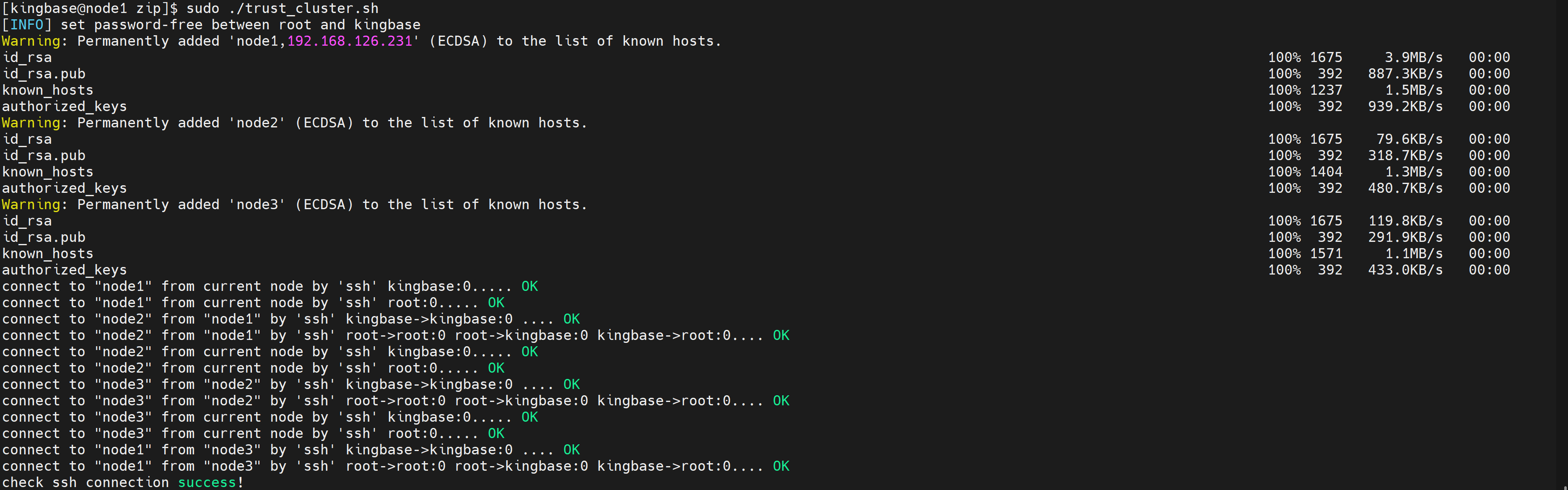
5.SSH 免密配置
通过 sshd 服务自动分发文件并部署,需要配置节点间 ssh 免密
6.主从集群部署
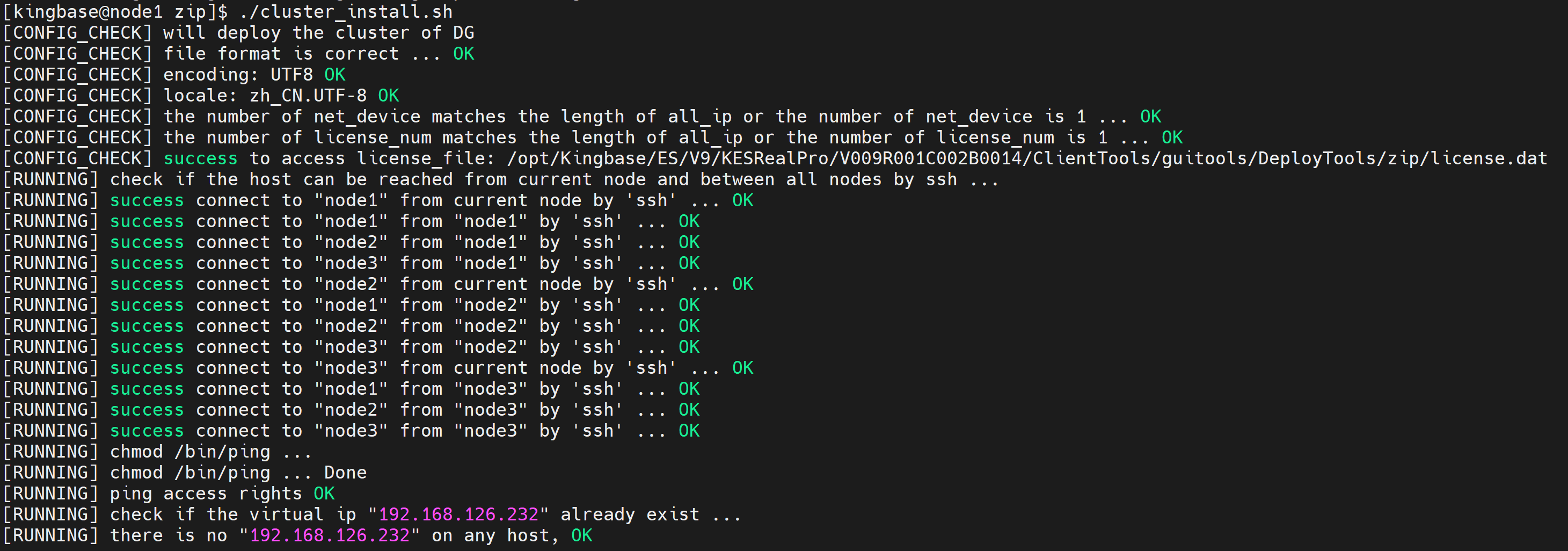
集群部署用户执行 sh cluster_install.sh命令进行集群部署,部署脚本将按照配置自动完成集群部署工作(在主节点操作)。
如果已开启数据库服务,请执行之前关闭数据库服务。
$ sh cluster_install.sh
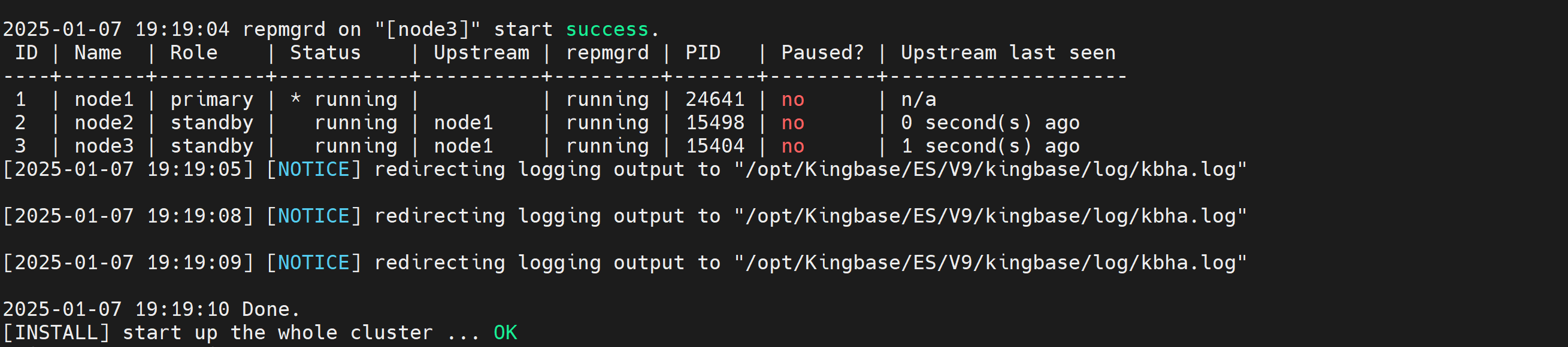
start up the whole cluster ... OK
7.部署后检查
部署成功后,执行命令"repmgr cluster show"查看集群是否正常。

六、集群启停
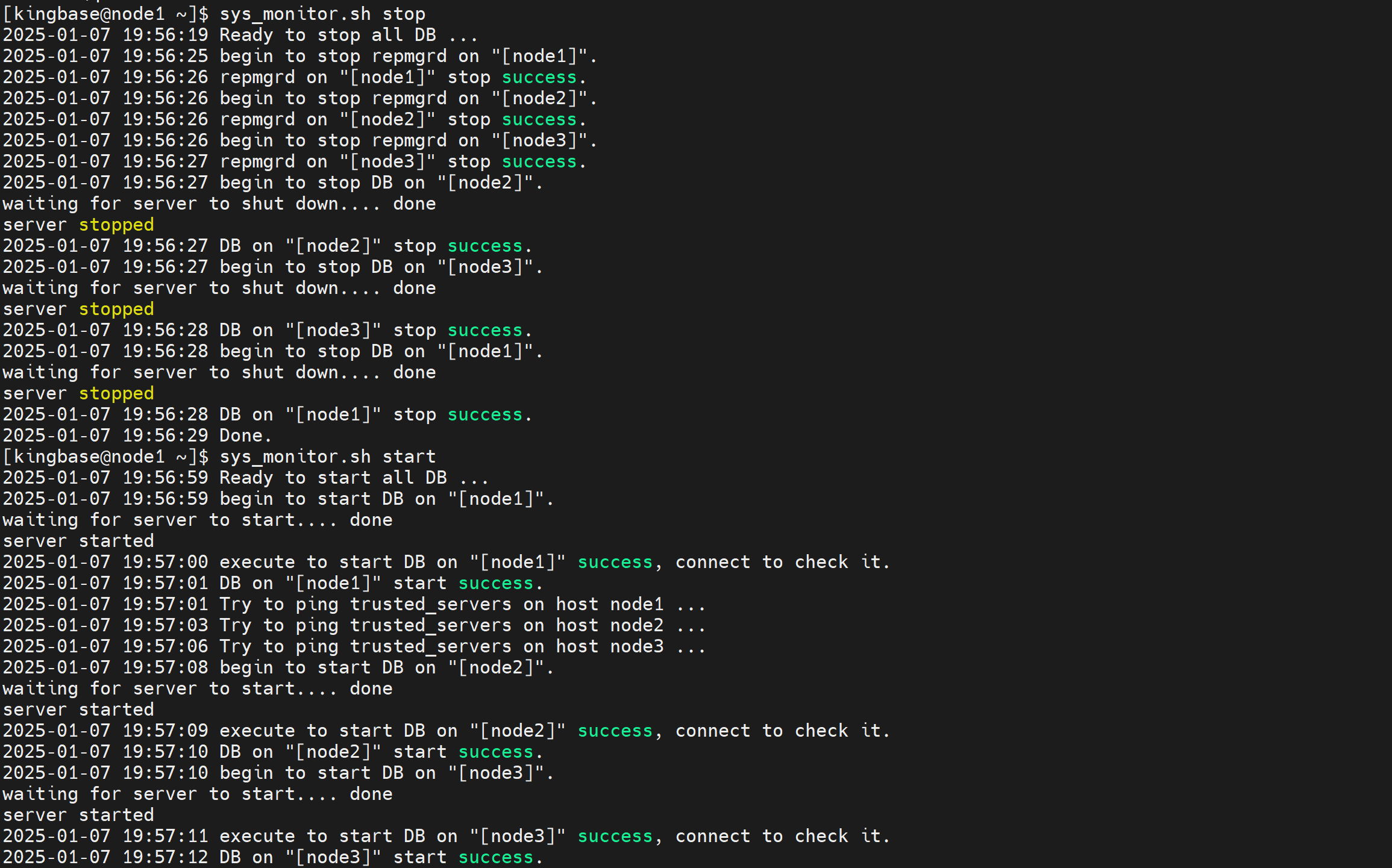
1、启动数据库服务
$ sys_monitor.sh start
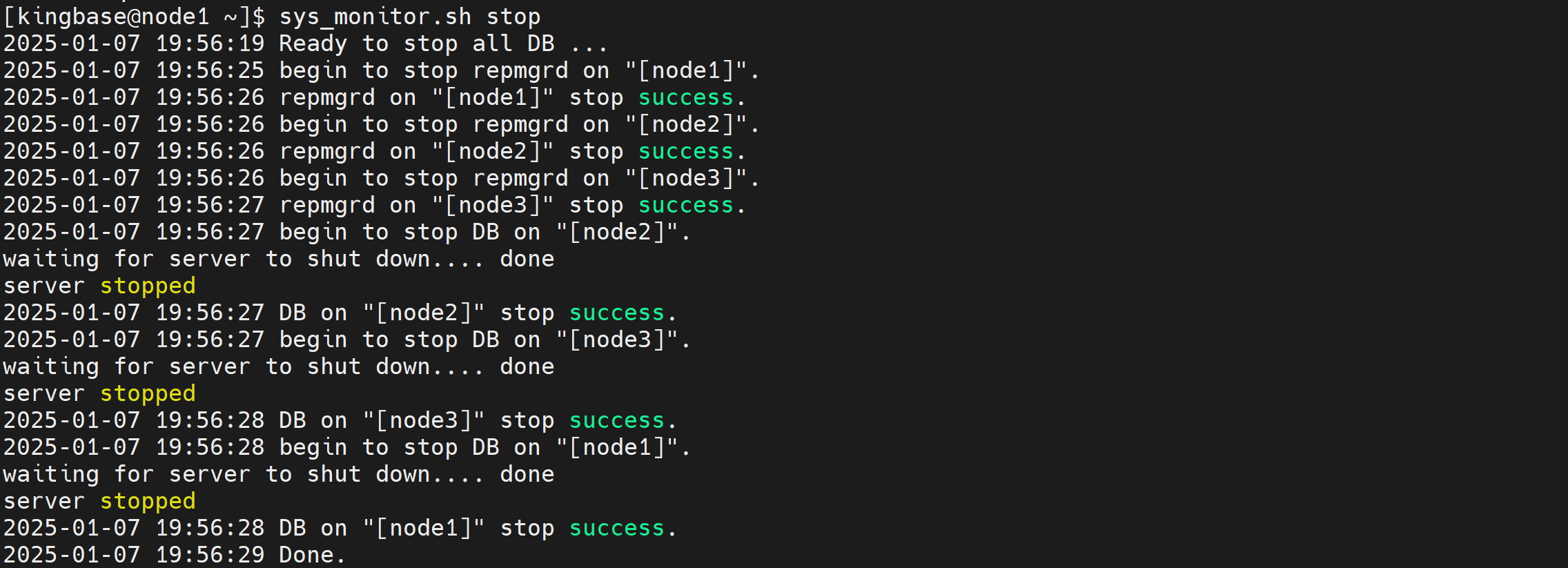
2、停止数据库服务
$ sys_monitor.sh stop
七、问题整理
安装集群报错

chown -R kingbase:kingbase /opt/Kingbase/ES/V9
