



大家好, 今天和大家聊聊开源数据库的TDE方案。
什么是TDE? Transparent Data Encryption 即数据透明加密。
熟悉商业旗舰数据库oracle 的小伙伴们都会了解, ORACLE 的是通过钱包WALLET 对表空间的文件进行加密的。
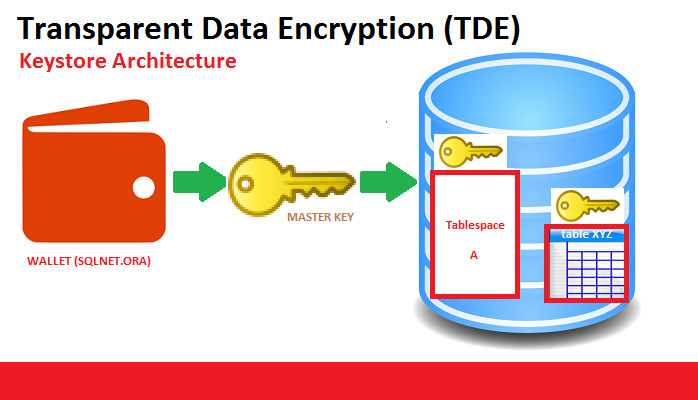
为什么要TDE? 或者说TDE的好处是什么? 防止一些敏感的数据文件级别的泄露。
今天我们看看在国内最为火爆的开源数据库mysql 是如何实现TDE的。
首先ORACLE 官方的mysql 版本只有企业支持: https://www.mysql.com/cn/products/enterprise/
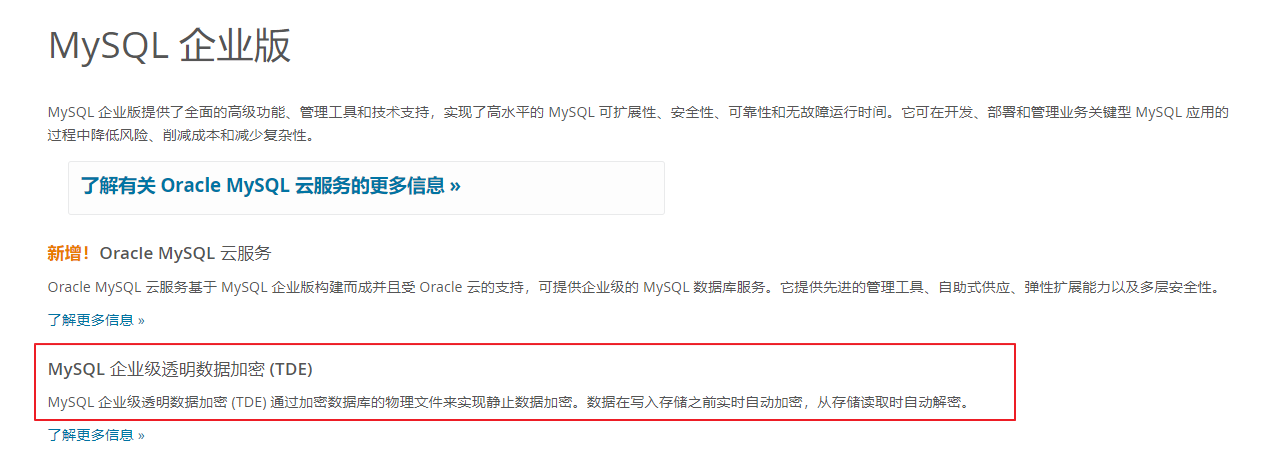
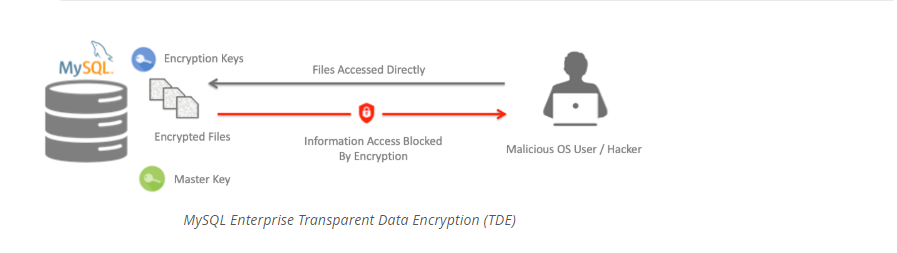
MYSQL TDE的架构: https://www.mysql.com/cn/products/enterprise/tde.html
目前国内的市场来说,大部分公司用的都是percona 公司二次编译包装版本的 mysql 数据库, percona 版的mysql 也提供了TDE的相关方案:
https://www.percona.com/blog/percona-server-for-mysql-encryption-options-and-choices/
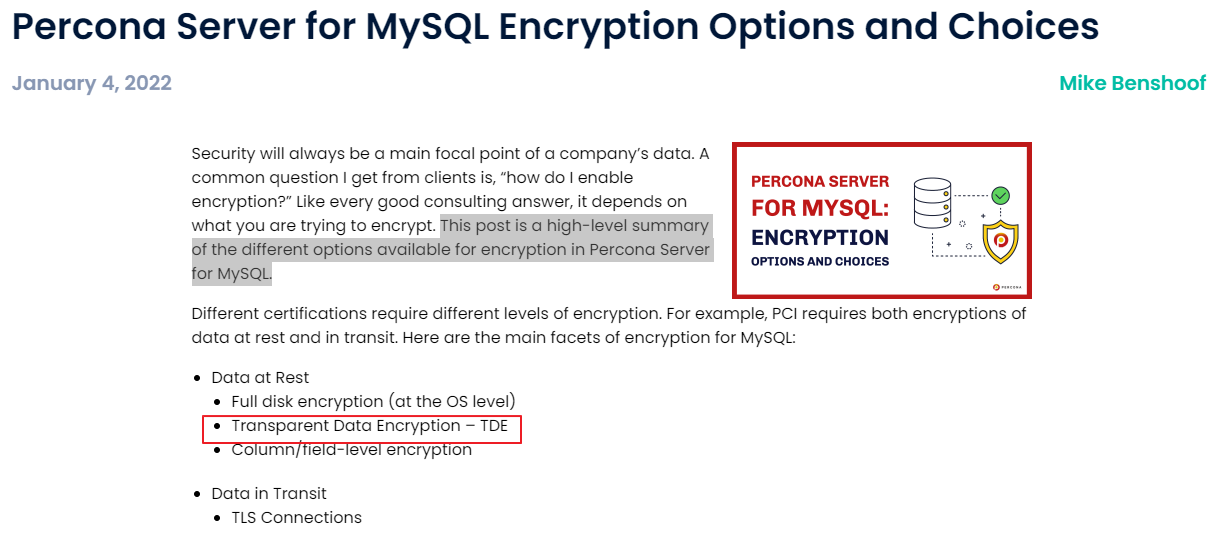
关于mysql 透明加密的学习,我们可以参考官方文档: https://www.mysql.com/cn/products/enterprise/tde.html
TDE 对于文件的加密,涉及到了如下的部分:
- File-Per-Table Tablespace Encryption --单个表文件的加密
- General Tablespace Encryption --通用表空间加密
- Doublewrite File Encryption – 双写文件加密
- MySQL System Tablespace Encryption --system 系统表空间加密
- Redo Log Encryption – redo 日志文件加密
- Undo Log Encryption – undo 日志文件加密
- Binary log and Relay Log Encryption – binlog 和中继日志的加密
- Audit Log Encryption --审计日志文件加密
我们可以挑选2个常见加密场景测试一下:
A)单个表文件的加密
B) binlog 和中继日志的加密
如何开启 mysql TDE?
测试加密之前,我们需要在MYSQL 实例级别打开TDE的功能, 这里我画了一张图:
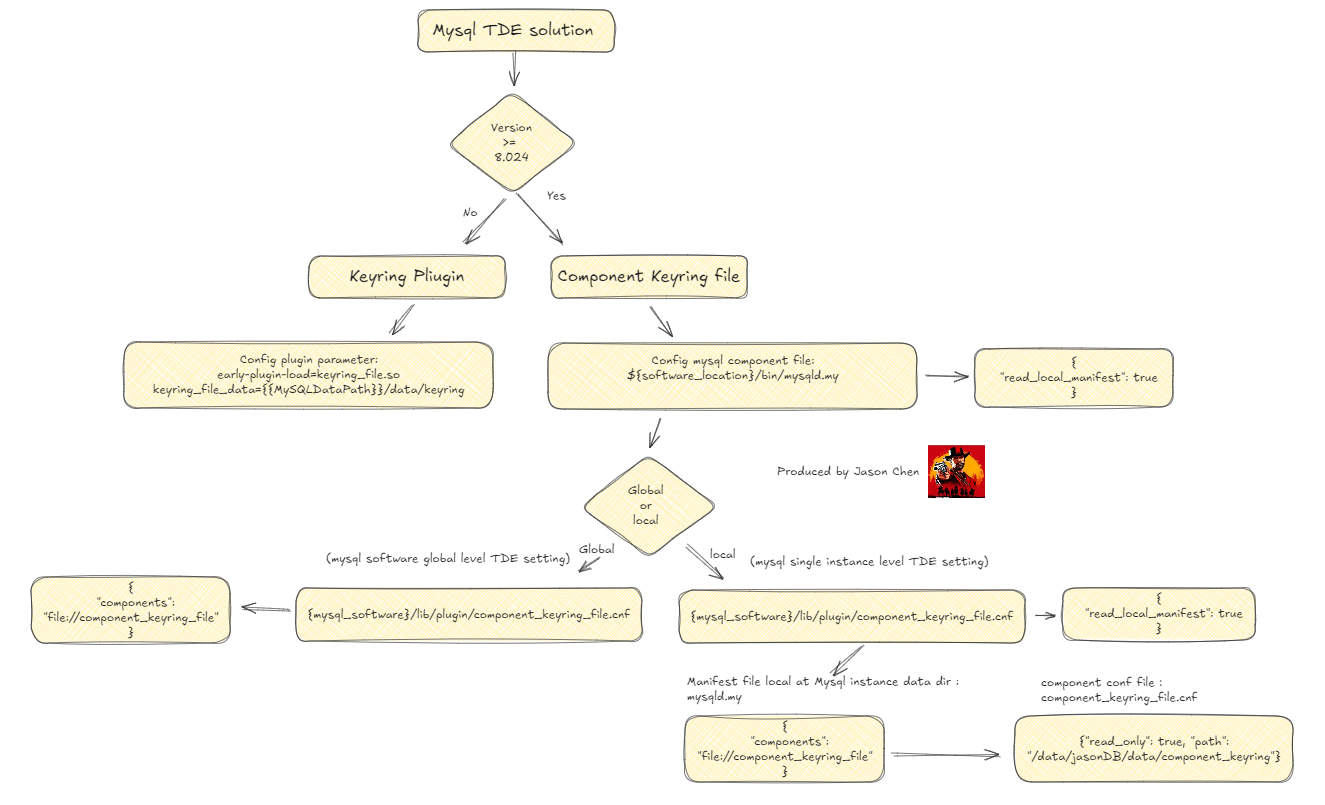
MYSQL keyring 有2种方式:
1) plugin 方式
2) component_keyring_file 方式
今天我们要讨论的是 component_keyring_file的方式, mysql 版本是 percona mysql 8.0.35,我们添加一下TDE的相关配置文件:
添加全局配置文件 manifest file : component_keyring_file.cnf 和 mysqld.my
( The server attempts to read its global manifest file from the directory where the server is installed.)
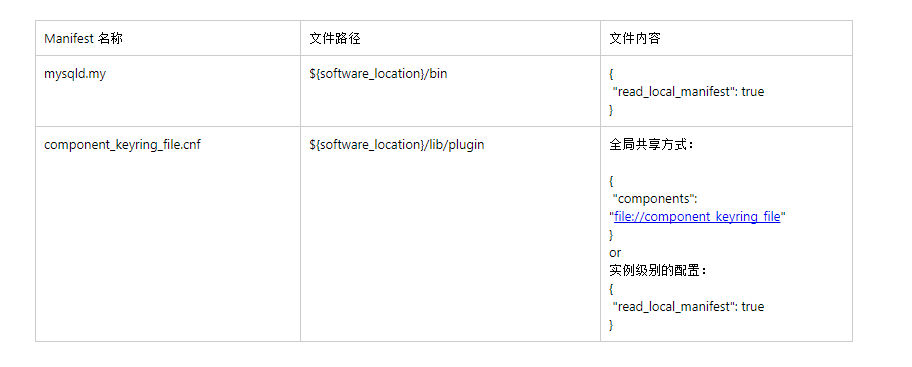
A)全局共享方式,一台机器上所有MYSQL实例 统一使用一个 keyring
全局文件配置为:(${software_location}/lib/plugin/component_keyring_file.cnf)
export software_location="/data/percona8.0.36"


vi  ${software_location}/bin/mysqld.my
{
 "read_local_manifest": true
}


vi ${software_location}/lib/plugin/component_keyring_file.cnf
{
 "components": "file://component_keyring_file"
}
B)实例级别的配置, 每个MYSQL 实例采取独立的keyring 加密方式
MYSQL 实例级别的配置路径: ${mysql_data}/mysqld.my --> 定义了keyring 的路径
export software_location="/data/percona8.0.36"
export mysql_data="/data/jasonDB/data"

vi  ${software_location}/bin/mysqld.my

{
 "read_local_manifest": true
}

vi ${mysql_data}/mysqld.my

{
 "components": "file://component_keyring_file"
}
vi ${mysql_data}/component_keyring_file.cnf

{"read_only": true, "path": "/data/jasonDB/data/component_keyring"}
配置文件后,我们需要重启mysql 实例:
root@localhost:mysql_jasonDB.sock [performance_schema]> shutdown;
/data/percona8.0.36/bin/mysqld_safe --defaults-file=/data/jasonDB/my_jasonDB.cnf --user=mysql &2>1
最后我们查看TDE 配置生效:Component_status is Active .
select * from performance_schema.keyring_component_status
--------------


+---------------------+--------------------------------------+
| STATUS_KEY          | STATUS_VALUE                         |
+---------------------+--------------------------------------+
| Component_name      | component_keyring_file               |
| Author              | Oracle Corporation                   |
| License             | GPL                                  |
| Implementation_name | component_keyring_file               |
| Version             | 1.0                                  |
| Component_status    | Active                               |
| Data_file           | /data/jasonDB/data/component_keyring |
| Read_only           | Yes                                  |
+---------------------+--------------------------------------+
8 rows in set (0.01 sec)
下面我们测试一下几个加密场景:
测试场景一: 表文件级别的加密
-- 创建表的时候加密
root@localhost:mysql_jasonDB.sock [testdb]>  CREATE TABLE t1 (id int primary key, name varchar(20)) ENCRYPTION = 'Y';
--------------
CREATE TABLE t1 (id int primary key, name varchar(20)) ENCRYPTION = 'Y'
--------------


Query OK, 0 rows affected (0.04 sec)


root@localhost:mysql_jasonDB.sock [testdb]> insert into t1 select 1, 'jason';
--------------
insert into t1 select 1, 'jason'
--------------


Query OK, 1 row affected (0.02 sec)
Records: 1  Duplicates: 0  Warnings: 0
查看数据库中加密的表:
SELECT TABLE_SCHEMA, TABLE_NAME, CREATE_OPTIONS FROM INFORMATION_SCHEMA.TABLES
      WHERE CREATE_OPTIONS LIKE '%ENCRYPTION%'
--------------


+--------------+------------+----------------+
| TABLE_SCHEMA | TABLE_NAME | CREATE_OPTIONS |
+--------------+------------+----------------+
| testdb       | t1         | ENCRYPTION='Y' |
+--------------+------------+----------------+
1 row in set (0.02 sec)
测试场景二:binlog 和relay log 的加密
From MySQL 8.0.14, binary log files and relay log files can be encrypted:
从mysql 8.0.14 版本开始, 支持binlog和relay log 的加密
需要打开参数 binlog_encryption , 默认为关闭状态
可以通过 show binary logs 观察 Encrypted 的状态
root@localhost:mysql_jasonDB.sock [performance_schema]> select @@binlog_encryption ;
--------------
select @@binlog_encryption
--------------


+---------------------+
| @@binlog_encryption |
+---------------------+
|                   0 |
+---------------------+
1 row in set (0.01 sec)

root@localhost:mysql_jasonDB.sock [performance_schema]> set global binlog_encryption=on;
--------------
set global binlog_encryption=on
--------------


Query OK, 0 rows affected (0.03 sec)


root@localhost:mysql_jasonDB.sock [performance_schema]> show binary logs;
--------------
show binary logs
--------------


+-----------------------+-----------+-----------+
| Log_name              | File_size | Encrypted |
+-----------------------+-----------+-----------+
| jasonDB_binlog.000013 |       249 | No        |
| jasonDB_binlog.000014 |       249 | No        |
| jasonDB_binlog.000015 |       709 | Yes       |
+-----------------------+-----------+-----------+
10 rows in set (0.00 sec)
如果mysql 的binlog 都加密,会存在一些问题?
1)数据误删除了,binlog 都加密该如何读取?
我们先看一下官方自带的命令行工具: mysqlbinlog
root@localhost:mysql_jasonDB.sock [testdb]> flush logs;
--------------
flush logs
--------------


Query OK, 0 rows affected (0.06 sec)


root@localhost:mysql_jasonDB.sock [testdb]> show binary logs;
--------------
show binary logs
--------------


+-----------------------+-----------+-----------+
| Log_name              | File_size | Encrypted |
+-----------------------+-----------+-----------+
| jasonDB_binlog.000016 |       709 | Yes       |
+-----------------------+-----------+-----------+
11 rows in set (0.00 sec)

root@localhost:mysql_jasonDB.sock [testdb]> create table test_tbl(id int primary key, name varchar(20));
--------------
create table test_tbl(id int primary key, name varchar(20))
--------------


Query OK, 0 rows affected (0.05 sec)


root@localhost:mysql_jasonDB.sock [testdb]> insert into test_tbl select 1,'jason';
--------------
insert into test_tbl select 1,'jason'
--------------


Query OK, 1 row affected (0.01 sec)
Records: 1  Duplicates: 0  Warnings: 0
mysqlbinlog 解析日志: jasonDB_binlog.000016, 会出现错误: ERROR: Reading encrypted log files directly is not supported.
INFRA [mysql@dc02psqldbuat04 binlogs]# /data/percona8.0.36/bin/mysqlbinlog  jasonDB_binlog.000016  --verbose --database=testdb > binlog.txt
ERROR: Reading encrypted log files directly is not supported.
官方提示mysqlbinlog 可以通过–read-from-remote-server 的方式, 理由想必也很简单 就是数据库实例连接认证,进行TDE的解密工作
/data/percona8.0.36/bin/mysqlbinlog jasonDB_binlog.000016 --verbose --read-from-remote-server --host=10.29.234.18 --port=3730 --user=jason --password=********* > binlog.txt

我们再来看一下python 读取binlog 的模块: mysql-replication 是否支持TDE之后的binlog 解析
业界著名的MYSQL解析工具 binlog2sql 也是基于这个python模块:
写一个监听binlog 的小脚本:
#!/usr/bin/env python
# -*- coding: utf-8 -*-
#
# Dump all replication events from a remote mysql server
#

from pymysqlreplication import BinLogStreamReader
MYSQL_SETTINGS = {
  "host": "10.29.234.18",
  "port": 3730,
  "user": "jason",
   "passwd": "*********"


}


def main():
   # server_id is your slave identifier, it should be unique.
   # set blocking to True if you want to block and wait for the next event at
   # the end of the stream
   stream = BinLogStreamReader(connection_settings=MYSQL_SETTINGS,
                               server_id=1186,
                               blocking=True)


   for binlogevent in stream:
       try:
           binlogevent.dump()
       except Exception as e:
           pass


   stream.close()


if __name__ == "__main__":
   main()
mysql 客户端执行:
root@localhost:mysql_jasonDB.sock [testdb]> show binary logs;
--------------
show binary logs
--------------


+-----------------------+-----------+-----------+
| Log_name              | File_size | Encrypted |
+-----------------------+-----------+-----------+
| jasonDB_binlog.000017 |       709 | Yes       |
+-----------------------+-----------+-----------+
12 rows in set (0.00 sec)


root@localhost:mysql_jasonDB.sock [testdb]> insert into test_tbl select 200,'jason chen';
--------------
insert into test_tbl select 200,'jason chen'
--------------


Query OK, 1 row affected (0.01 sec)
Records: 1  Duplicates: 0  Warnings: 0
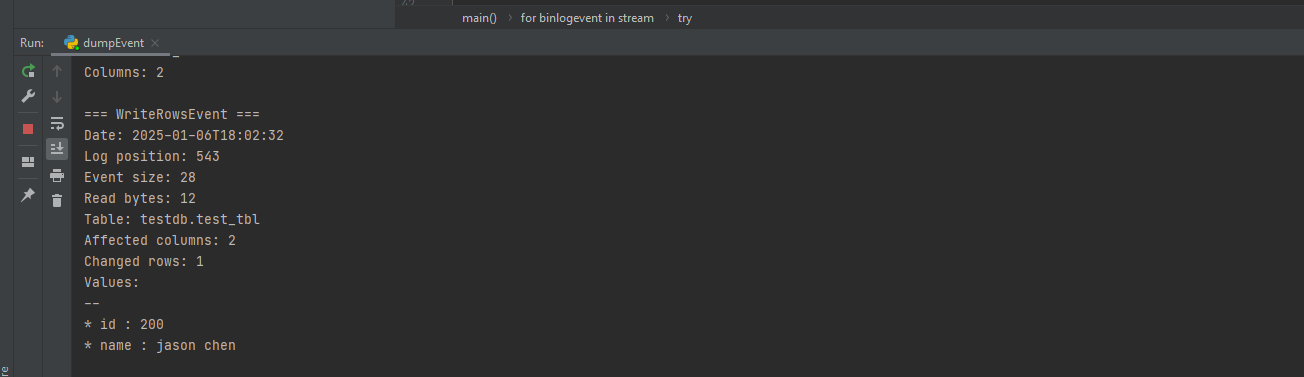
小脚本监听端输出: 我们可以看到可以正常的输出解析的内容
2)常见的CDC 工具 , 例如 flinkCDC
测试代码段:
import org.apache.flink.api.common.eventtime.WatermarkStrategy;
import org.apache.flink.streaming.api.environment.StreamExecutionEnvironment;
import org.apache.flink.cdc.debezium.JsonDebeziumDeserializationSchema;
import org.apache.flink.cdc.connectors.mysql.source.MySqlSource;


public class MySqlSourceExample {
   public static void main(String[] args) throws Exception {
       MySqlSource<String> mySqlSource = MySqlSource.<String>builder()
               .hostname("10.29.234.18")
               .port(3730)
               .databaseList("testdb") // 设置捕获的数据库, 如果需要同步整个数据库,请将 tableList 设置为 ".*".
               .tableList("testdb.test_tbl") // 设置捕获的表
               .username("jason")
               .password("********")
               .deserializer(new JsonDebeziumDeserializationSchema()) // 将 SourceRecord 转换为 JSON 字符串
               .build();
       StreamExecutionEnvironment env = StreamExecutionEnvironment.getExecutionEnvironment();

       // 设置 3s 的 checkpoint 间隔
       env.enableCheckpointing(3000);

       env.fromSource(mySqlSource, WatermarkStrategy.noWatermarks(), "MySQL Source")
               // 设置 source 节点的并行度为 4
               .setParallelism(4)
               .print().setParallelism(1); // 设置 sink 节点并行度为 1


       env.execute("Print MySQL Snapshot + Binlog");
   }
}
mysql 客户端执行:
root@localhost:mysql_jasonDB.sock [testdb]> insert into test_tbl select 300,'jason chen';
--------------
insert into test_tbl select 300,'jason chen'
--------------


Query OK, 1 row affected (0.07 sec)
Records: 1  Duplicates: 0  Warnings: 0
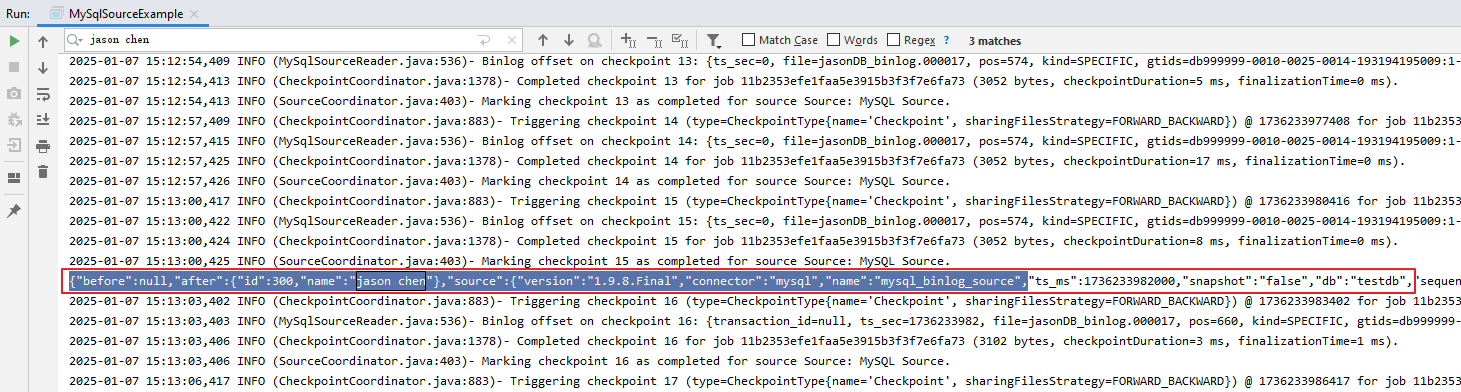
flinkCDC 程序解析输出正常:
我们再看看加密后的数据库如何恢复?
假设业务部门需要DBA在一台新的机器上恢复历史数据库的备份集.
恢复流程图:
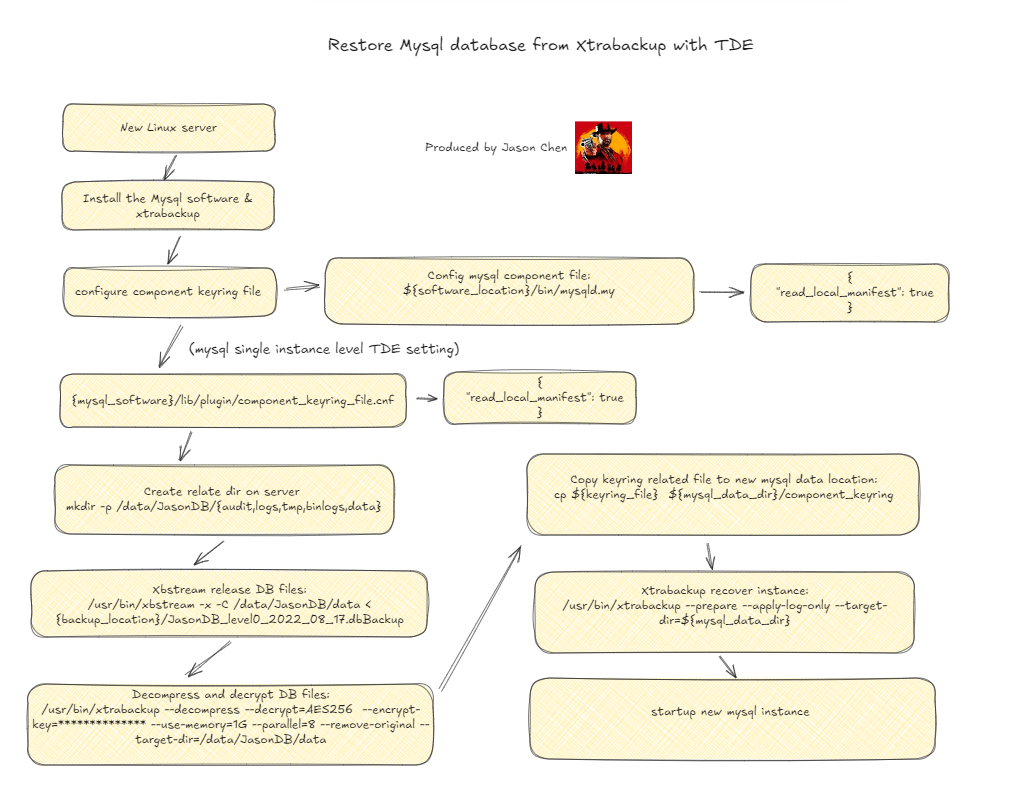
恢复命令如下:
关键点是: 我们需要拷贝keyring file 到 MySQL 实例的数据目录下面
###env setting
export mysql_base=/data/JasonDB
export mysql_software_location=/data/percona8.0.36
export backupset=/data/backup/jasonDB_level0_2025_01_08.dbBackup
export mysql_data_dir=/data/JasonDB/data
export keyring_file=/data/backup/jasonDB_component_keyring_2025_01_08
export mysql_conf=my_jasonDB.cnf


###config mysql componet file: mysqld.my
cat << EOF > ${mysql_software_location}/bin/mysqld.my
{
  "read_local_manifest": true
}
EOF


###config keyring file: component_keyring_file.cnf
cat << EOF > ${mysql_software_location}/lib/plugin/component_keyring_file.cnf
{
  "read_local_manifest": true
}
EOF


###Create relate dir on server
sudo mkdir -p /data/JasonDB/{audit,logs,tmp,binlogs,data}
sudo chown -R mysql:mysql  /data/JasonDB


###Xbstream release DB files
/usr/bin/xbstream -x -C ${mysql_data_dir} < ${backupset}


###Decompress and decrypt DB files:
/usr/bin/xtrabackup --decompress --decrypt=AES256  --encrypt-key=HXDNUzjf9XfQ1iPqcizDW3LhR5UApAd0 --use-memory=1G --parallel=8 --remove-original --target-dir=${mysql_data_dir}


###copy keyring file:
cp ${keyring_file}  ${mysql_data_dir}/component_keyring


###
/usr/bin/xtrabackup --prepare --apply-log-only --target-dir=${mysql_data_dir}


###startup mysql instance
${mysql_software_location}/bin/mysqld_safe --defaults-file=${mysql_base}/${mysql_conf} --user=mysql > /dev/null 2>&1 &
最后我们总结一下:
1.如果你从事金融行业,数据敏感度比较高,那么需要考虑数据TDE的加密方案,相对于业界老牌数据库厂商oracle, sqlserver, mysql(企业版)
开源的数据库也会提供一些TDE的方案,比如开源数据库著名厂商percona.
2.数据文件加密时候,该如何恢复?
a)我们需要在新安装的数据库软件bin下配置mysqld.my 以及lib/plugin下配置文件component_keyring_file.cnf
d)恢复数据库实例的时候,需要拷贝component_keyring 文件到数据库data目录下
3.binlog 加密之后, 该如何读取?
我们测试了 binlog 读取的2个业界常见工具:
mysqlbinlog 不连库直接读是不支持的, 需要结合参数read-from-remote-server
python 读取binlog的模块 mysql-replication (国内著名的binlog读取工具binlog2sql python 版本也是基于这个模块开发): 是可以读取加密后binlog的
4.数据加密要结合业务系统和下游ETL大数据品台的业务对接进行测试。 特别是binlog 集成CDC 的数据同步方案。
我们测试了mysql flinkcdc 的集成,是可以支持的
Have a fun 🙂 !
