



操作系统: macOS Catalina
基础镜像: continuumio/anaconda3
GoCoding!GoCoding!GoCoding!GoCoding!GoCoding!
Step 1) 安装 XQuartz,允许网络连接
GoCoding!GoCoding!GoCoding!GoCoding!GoCoding!
# 安装brew cask install xquartz# 运行open -a xquartz
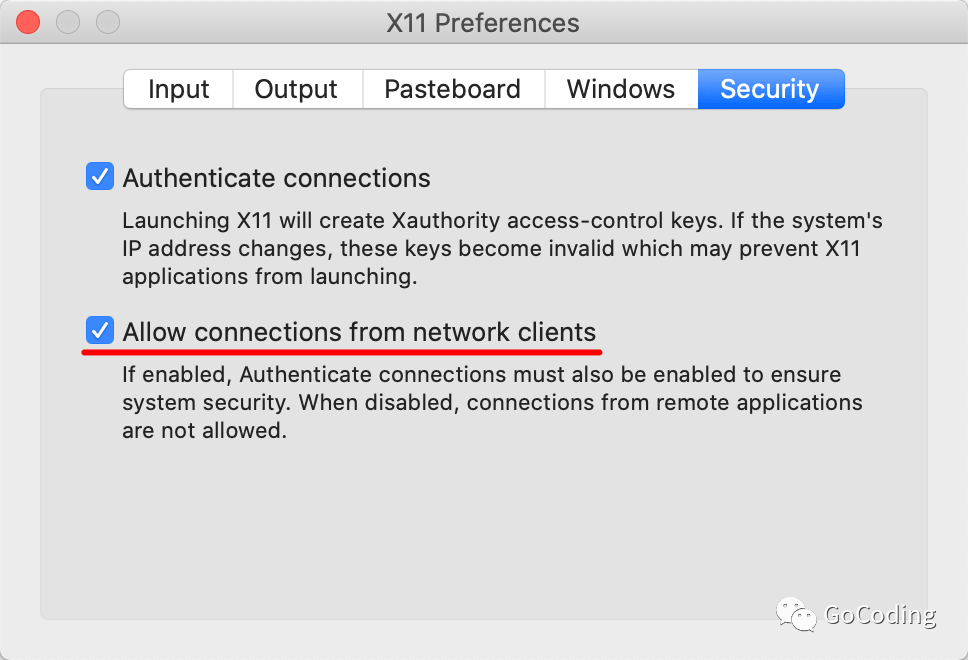
进入 "Preferences > Security"
勾选 "Allow connections from network clients"
GoCoding!GoCoding!GoCoding!GoCoding!GoCoding!
Step 2) 安装 Docker,准备相关镜像
GoCoding!GoCoding!GoCoding!GoCoding!GoCoding!
brew cask install docker# 或,直接下载再安装:# https://download.docker.com/mac/stable/Docker.dmg
拉取 OpenCV 镜像,用其显示:
docker pull joinaero/anaconda3-opencv3:1.0.0
GoCoding!GoCoding!GoCoding!GoCoding!GoCoding!
Step 3) xhost 添加主机 IP
GoCoding!GoCoding!GoCoding!GoCoding!GoCoding!
# 获取 IPIP=$(ifconfig en0 | grep inet | awk '$1=="inet" {print $2}')echo $IP# 增加 IPxhost + $IP
GoCoding!GoCoding!GoCoding!GoCoding!GoCoding!
Step 4) OpenCV 预览图片
GoCoding!GoCoding!GoCoding!GoCoding!GoCoding!
XQuartz, xterm 继续执行:
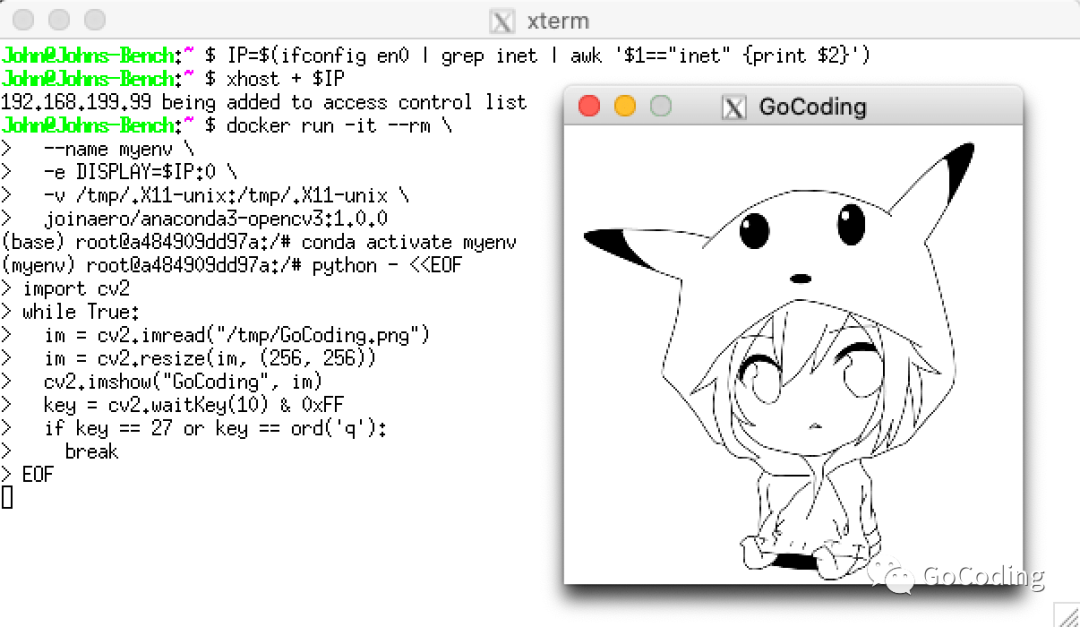
docker run -it --rm \--name myenv \-e DISPLAY=$IP:0 \-v /tmp/.X11-unix:/tmp/.X11-unix \joinaero/anaconda3-opencv3:1.0.0conda activate myenvpython - <<EOFimport cv2while True:im = cv2.imread("/tmp/GoCoding.png")im = cv2.resize(im, (256, 256))cv2.imshow("GoCoding", im)key = cv2.waitKey(10) & 0xFFif key == 27 or key == ord('q'):breakEOF
预览效果如下:
GoCoding!GoCoding!GoCoding!GoCoding!GoCoding!
结语
GoCoding!GoCoding!GoCoding!GoCoding!GoCoding!
Go coding!
文章转载自GoCoding,如果涉嫌侵权,请发送邮件至:contact@modb.pro进行举报,并提供相关证据,一经查实,墨天轮将立刻删除相关内容。
