



前言
2024年3月30日,openGauss 6.0.0 RC1版本正式上线.迫不及待的体验了一把,分享给大家
1.版本说明
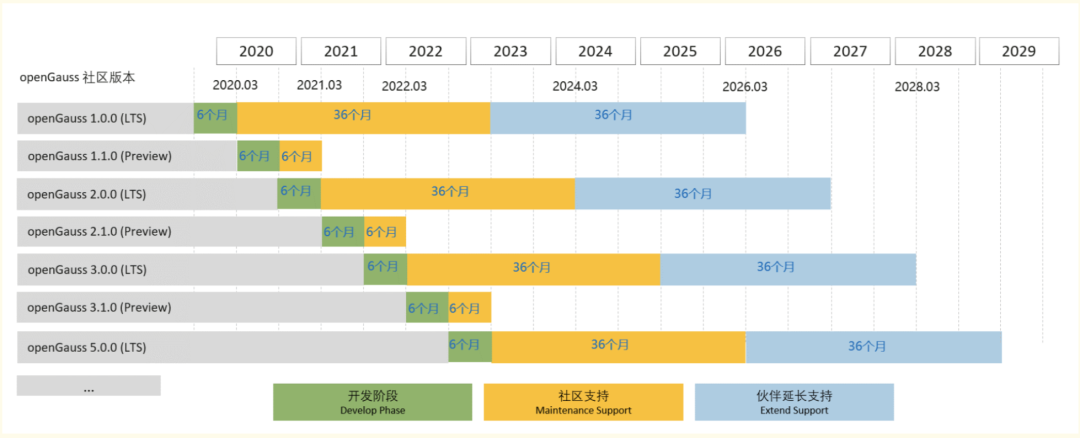
openGauss社区版本分为长期支持版本和创新版本:
长期支持版本 (LTS) :规模上线使用,openGauss 6.0.0 LTS及后续LTS版本发布间隔周期为2年,社区提供3年支持,社区OGSP伙伴提供3年以后维护支持服务。
创新版本 (RCx) :作为LTS版本发布前的阶段性特性体验版本,仅供联创测试使用,提供6个月社区支持。
openGauss 6.0.0-RC1 是社区最新发布的创新版本,版本生命周期为 0.5 年。(创新版本命名:由原方案 XX.1.0 Preview (例:5.1.0 preview),调整为现方案 XX.0.0-RCx),本次发布包含 2 个数据库服务端安装版本:企业版、轻量版,用户可根据使用场景需要下载不同版本,并基于此进行场景化验证,提前发现问题并反馈社区,社区将在下个 LTS 版本发布前进行问题修复,openGauss 6.0.0 LTS 版本将在 2024 年 9 月 30 日进行发布。
openGauss社区版本生命周期管理如下
2.新特性介绍
1.内核能力增强
企业级特性:存储过程增强
内核四高能力:高性能、高可用、高智能、高安全
2.DataPod 三层资源池化架构持续创新
支持 SPQ 多机并行查询框架
新增 DMS 资源统计视图
DSS 功能增强
容灾能力增强
3.DataKit 数据全生命周期管理平台能力增强
迁移能力、对象管理、智能运维、安装部署
4.生态兼容性增强
MySQL 兼容
3.安装包下载
更多具体发行说明请参考官网:
https://docs-opengauss.osinfra.cn/zh/docs/latest/docs/ReleaseNotes/Releasenotes.html
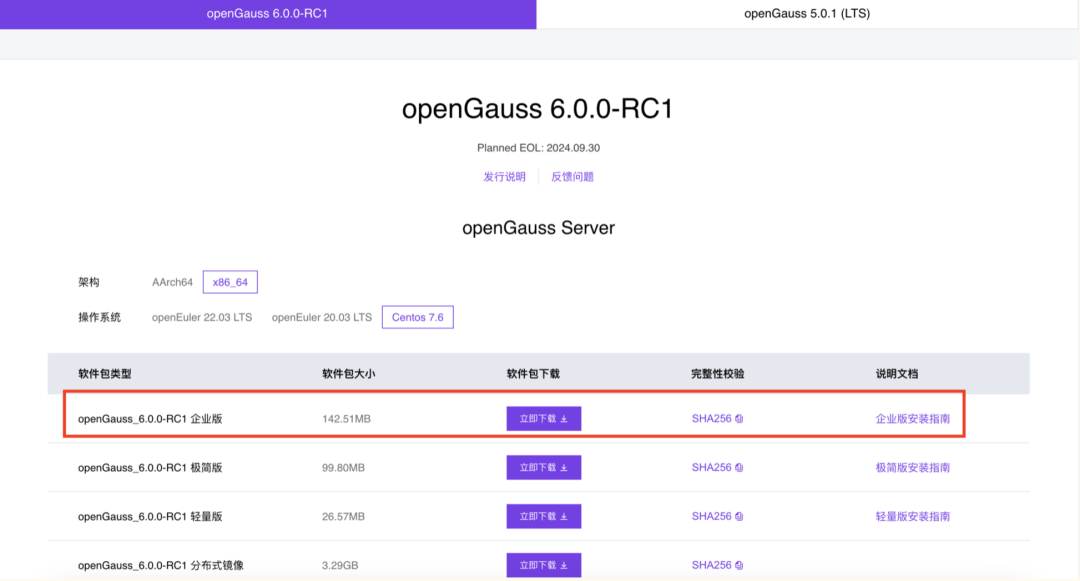
6.0.0 RC1版本下载地址
https://opengauss.org/zh/download/
openGauss-6.0.0-RC1-CentOS-64bit-all.tar.gz
4.部署前准备
4.1 关闭安全服务
修改/etc/selinux/config文件中的“SELINUX”值为“disabled”。
4.2 防火墙关闭
systemctl status firewalld若防火墙状态显示为active (running),则表示防火墙未关闭,请关闭防火墙。systemctl stop firewalld.servicesystemctl disable firewalld.servicesystemctl status firewalld.service临时关闭selinuxsetenforce 0查看selinux状态getenforce
4.3 host配置
[root@centos79 ~]# cat etc/hosts127.0.0.1 localhost localhost.localdomain localhost4 localhost4.localdomain4::1 localhost localhost.localdomain localhost6 localhost6.localdomain6192.168.6.20 centos79
4.4 安装依赖包
##创建挂载目录mkdir /cdrom##挂载目录mount -t iso9660 -o ro dev/cdrom cdrom##yum源配置文件cd /etc/yum.repos.d/mkdir bakmv CentOS* bak##配置yum文件vi local.repocat>/etc/yum.repos.d/local.repo<<EOF[base-local]name=CentOS7-localbaseurl=file:///cdromenabled=1gpgcheck=0EOF#清空并重载yumyum clean allyum makecache##安装依赖yum -y install libaio-devel flex bison ncurses-devel \glibc-devel patch redhat-lsb-core readline-devel openssl-devel sqlite-devel libnsl
4.5 安装python3
Python3安装还依赖zlib,如果没有先安装依赖,这里我们安装python3.6的版本[root@centos79 ~]# yum install -y zlib[root@centos79 ~]# rpm -qa | grep zlibzlib-devel-1.2.7-18.el7.x86_64zlib-1.2.7-18.el7.x86_64python官网 https://www.python.org/downloads/release/python-3615/下载安装包即可安装包为:Python-3.6.15.tgz[root@centos79 ~]# tar -zxvf Python-3.6.15.tgz[root@centos79 ~]# cd Python-3.6.15/[root@centos79 ~]# ./configure --prefix=/usr/local/python3 --enable-shared[root@centos79 ~]# make[root@centos79 ~]# make install注意:make编译时间比较长,耐心等待configure: error: no acceptable C compiler found in $PATHyum install gcc注意此时还需要设置下OS上python的软连接[root@centos79 ~]# ln -s usr/local/python3/bin/python3.6 usr/bin/python3[root@centos79 ~]# ln -s usr/local/python3/bin/pip3 usr/bin/pip[root@centos79 Python-3.6.15]# python -Vpython: error while loading shared libraries: libpython3.6m.so.1.0: cannot open shared object file: No such file or directory[root@centos79 Python-3.6.15]# find -name libpython3.6m.so.1.0/usr/local/python3/lib/libpython3.6m.so.1.0/opt/Python-3.6.15/libpython3.6m.so.1.0cp opt/Python-3.6.15/libpython3.6m.so.1.0 usr/lib64/[root@centos79 Python-3.6.15]# pythonPython 3.6.15 (default, Apr 5 2024, 09:38:03)[GCC 4.8.5 20150623 (Red Hat 4.8.5-44)] on linuxType "help", "copyright", "credits" or "license" for more information.>>>
5.单机安装
5.1 前提条件
已完成用户组和普通用户的创建。
所有服务器操作系统和网络均正常运行。
普通用户必须有数据库包解压路径、安装路径的读、写和执行操作权限,并且安装路径必须为空。
普通用户对下载的openGauss压缩包有执行权限。
安装前请检查指定的openGauss端口矩阵中所有端口是否被占用,如果被占用请更改端口或者停止当前使用端口进程。
5.2 安装包解压
注意:上传安装包到服务器/opt/openGaussmkdir -p opt/openGauss--openGauss安装目录mkdir -p openGauss##解压安装包chmod 755 -R opt/openGausscd opt/openGauss[root@centos79 openGauss]# tar -zxvf openGauss-6.0.0-RC1-CentOS-64bit-all.tar.gz[root@centos79 openGauss]# llopenGauss-6.0.0-RC1-CentOS-64bit-cm.tar.gzopenGauss-6.0.0-RC1-CentOS-64bit-om.tar.gzopenGauss-6.0.0-RC1-CentOS-64bit.tar.bz2openGauss-6.0.0-RC1-CentOS-64bit-cm.sha256openGauss-6.0.0-RC1-CentOS-64bit-om.sha256openGauss-6.0.0-RC1-CentOS-64bit.sha256upgrade_sql.tar.gzupgrade_sql.sha256[root@centos79 openGauss]# tar -zxvf openGauss-6.0.0-RC1-CentOS-64bit-om.tar.gz[root@centos79 openGauss]# lltotal 293256drwxr-xr-x. 19 root root 4096 Mar 31 12:15 lib-rwxr-xr-x. 1 root root 149449208 Apr 5 09:31 openGauss-6.0.0-RC1-CentOS-64bit-all.tar.gz-rw-r--r--. 1 root root 109 Mar 31 12:16 openGauss-6.0.0-RC1-CentOS-64bit-cm.sha256-rw-r--r--. 1 root root 22466710 Mar 31 12:16 openGauss-6.0.0-RC1-CentOS-64bit-cm.tar.gz-rw-r--r--. 1 root root 65 Mar 31 12:15 openGauss-6.0.0-RC1-CentOS-64bit-om.sha256-rw-r--r--. 1 root root 23122340 Mar 31 12:15 openGauss-6.0.0-RC1-CentOS-64bit-om.tar.gz-rw-r--r--. 1 root root 65 Mar 31 12:16 openGauss-6.0.0-RC1-CentOS-64bit.sha256-rw-r--r--. 1 root root 104672194 Mar 31 12:16 openGauss-6.0.0-RC1-CentOS-64bit.tar.bz2drwxr-xr-x. 11 root root 4096 Mar 31 12:15 script-rw-------. 1 root root 65 Mar 31 12:14 upgrade_sql.sha256-rw-------. 1 root root 541779 Mar 31 12:14 upgrade_sql.tar.gz-rw-r--r--. 1 root root 36 Mar 31 12:15 version.cfg
5.3 XML配置文件
安装openGauss前需要创建cluster_config.xml文件。cluster_config.xml文件包含部署openGauss的服务器信息、安装路径、IP地址以及端口号等。本次部署以单节点配置的方式创建XML配置文件编辑配置XML文件:vi opt/openGauss/db_config.xml<?xml version="1.0" encoding="UTF-8"?><ROOT><!-- openGauss整体信息 --><CLUSTER><!-- 数据库名称 --><PARAM name="clusterName" value="dbCluster" ><!-- 数据库节点名称(hostname) --><PARAM name="nodeNames" value="centos79" ><!-- 数据库安装目录--><PARAM name="gaussdbAppPath" value="/openGauss/app" ><!-- 日志目录--><PARAM name="gaussdbLogPath" value="/openGauss/log/omm" ><!-- 临时文件目录--><PARAM name="tmpMppdbPath" value="/openGauss/tmp" ><!-- 数据库工具目录--><PARAM name="gaussdbToolPath" value="/openGauss/om" ><!-- 数据库core文件目录--><PARAM name="corePath" value="/openGauss/corefile" ><!-- 节点IP,与数据库节点名称列表一一对应 --><PARAM name="backIp1s" value="192.168.6.20"/></CLUSTER><!-- 每台服务器上的节点部署信息 --><DEVICELIST><!-- 节点1上的部署信息 --><DEVICE sn="centos79"><!-- 节点1的主机名称 --><PARAM name="name" value="centos79"/><!-- 节点1所在的AZ及AZ优先级 --><PARAM name="azName" value="AZ1"/><PARAM name="azPriority" value="1"/><!-- 节点1的IP,如果服务器只有一个网卡可用,将backIP1和sshIP1配置成同一个IP --><PARAM name="backIp1" value="192.168.6.20"/><PARAM name="sshIp1" value="192.168.6.20"/><!--dbnode--><PARAM name="dataNum" value="1"/><PARAM name="dataPortBase" value="15400"/><PARAM name="dataNode1" value="/openGauss/data/dn"/><PARAM name="dataNode1_syncNum" value="0"/></DEVICE></DEVICELIST></ROOT>
5.4 用户及组创建
##创建用户组dbgrp[root@centos79 ~]# groupadd dbgroup##创建用户组dbgroup下的普通用户omm,并设置密码为Gauss_123useradd -g dbgroup omm
5.5 初始化安装
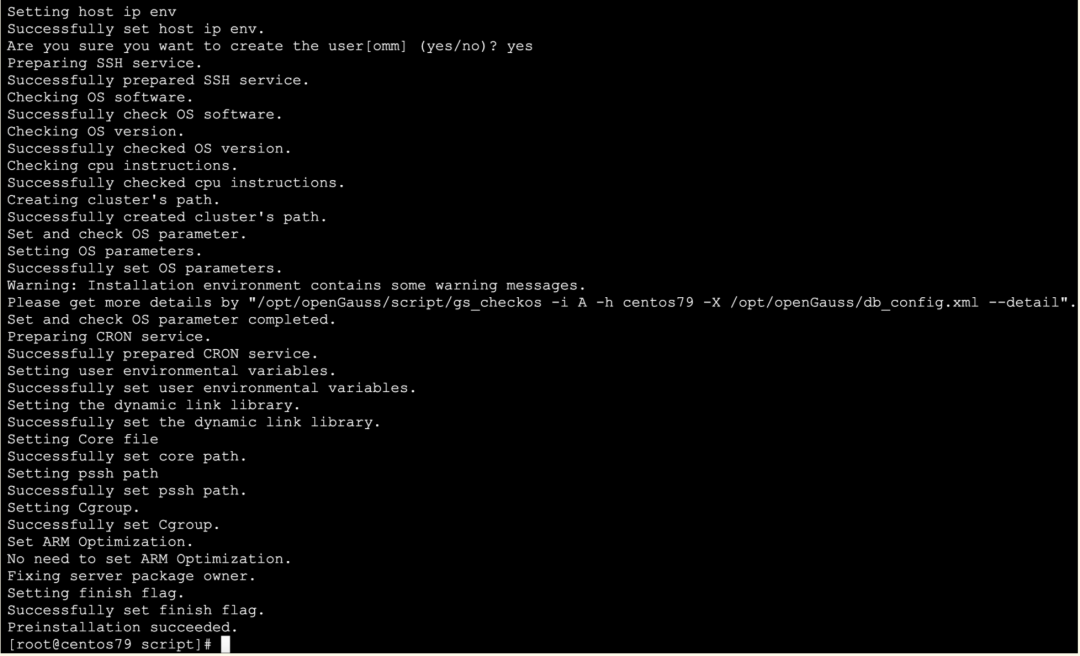
chmod 775 openGauss -Rchown omm:dbgroup openGauss -R[root@centos79 ~]# cd opt/openGauss/script[root@centos79 ~]# export LD_LIBRARY_PATH=/opt/openGauss/script/gspylib/clib:$LD_LIBRARY_PATH[root@centos79 script]# ./gs_preinstall -U omm -G dbgroup -X /opt/openGauss/db_config.xml安装集群过程中,输入omm用户密码:Gauss_123[root@centos79 script]# /opt/openGauss/script/gs_checkos -i A -h centos79 --detailChecking items:A1. [ OS version status ] : Normal[centos79]centos_7.9.2009_64bitA2. [ Kernel version status ] : NormalThe names about all kernel versions are same. The value is "3.10.0-1160.el7.x86_64".A3. [ Unicode status ] : NormalThe values of all unicode are same. The value is "LANG=en_US.UTF-8".A4. [ Time zone status ] : NormalThe informations about all timezones are same. The value is "+0800".A5. [ Swap memory status ] : Warning[centos79]SwapMemory 5238681600 TotalMemory 3953942528A6. [ System control parameters status ] : Warning[centos79]Warning reason: variable 'net.ipv4.tcp_retries1' RealValue '3' ExpectedValue '5'.Warning reason: variable 'net.ipv4.tcp_syn_retries' RealValue '6' ExpectedValue '5'.Check_SysCtl_Parameter warning.A7. [ File system configuration status ] : Warning[centos79]Warning reason: variable 'open files' RealValue '1024' ExpectedValue '1000000'Warning reason: variable 'max user processes' RealValue '14950' ExpectedValue 'unlimited'A8. [ Disk configuration status ] : NormalThe value about XFS mount parameters is correct.A9. [ Pre-read block size status ] : NormalThe value about Pre-read block size is correct.A10.[ IO scheduler status ] : NormalThe value of IO scheduler is correct.A11.[ Network card configuration status ] : Warning[centos79]BondMode NullWarning reason: network 'ens33' 'mtu' RealValue '1500' ExpectedValue '8192'A12.[ Time consistency status ] : Warning[centos79]The NTPD not detected on machine and local time is "2024-04-05 09:57:04".A13.[ Firewall service status ] : NormalThe firewall service is stopped.A14.[ THP service status ] : NormalThe THP service is stopped.Total numbers:14. Abnormal numbers:0. Warning numbers:5.
5.6 正式安装
#切换到omm用户[root@centos79 ~]# su - omm[omm@centos79 ~]$ gs_install -X /opt/openGauss/db_config.xml此处指定数据库密码:Gauss_123
6.安装验证
6.1 DB状态检查
# 通过openGauss提供的gs_om工具可以完成数据库状态检查以omm用户身份登录服务器。执行如下命令检查数据库状态是否正常,"cluster_state"显示"Normal"表示数据库可正常使用[root@centos79 ~]# su - omm[omm@centos79 ~]$ gs_om -t status-----------------------------------------------------------------------cluster_name : dbClustercluster_state : Normalredistributing : No-----------------------------------------------------------------------[omm@centos79 ~]$ gs_om -t status --detail[ Cluster State ]cluster_state : Normalredistributing : Nocurrent_az : AZ_ALL[ Datanode State ]node node_ip port instance state--------------------------------------------------------------------------------------1 centos79 192.168.6.20 15400 6001 /openGauss/data/dn P Primary Normal
6.2 数据库登陆
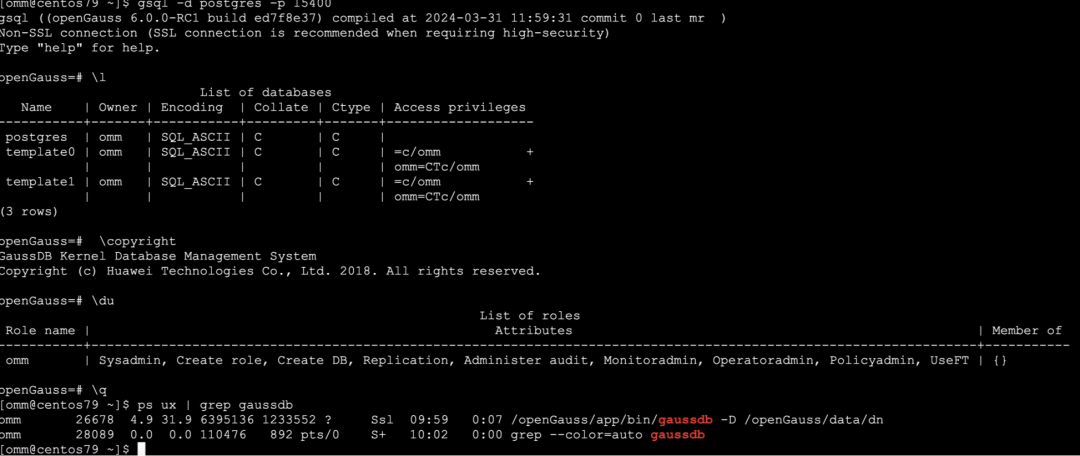
[omm@centos79 ~]$ gsql -d postgres -p 15400gsql ((openGauss 6.0.0-RC1 build ed7f8e37) compiled at 2024-03-31 11:59:31 commit 0 last mr )Non-SSL connection (SSL connection is recommended when requiring high-security)Type "help" for help.openGauss=# \lList of databasesName | Owner | Encoding | Collate | Ctype | Access privileges-----------+-------+-----------+---------+-------+-------------------postgres | omm | SQL_ASCII | C | C |template0 | omm | SQL_ASCII | C | C | =c/omm +| | | | | omm=CTc/ommtemplate1 | omm | SQL_ASCII | C | C | =c/omm +| | | | | omm=CTc/omm(3 rows)[omm@centos79 ~]$ gsql -Vgsql (openGauss 6.0.0-RC1 build ed7f8e37) compiled at 2024-03-31 11:59:31 commit 0 last mr
6.3 DB启动及关闭
[omm@centos79 ~]$ gs_om -t stopStopping cluster.=========================================Successfully stopped cluster.=========================================End stop cluster.[omm@centos79 ~]$ gs_om -t startStarting cluster.=========================================[SUCCESS] centos792024-04-05 10:03:40.426 660f5bfc.1 [unknown] 139722610186880 [unknown] 0 dn_6001 01000 0 [BACKEND] WARNING: could not create any HA TCP/IP sockets2024-04-05 10:03:40.426 660f5bfc.1 [unknown] 139722610186880 [unknown] 0 dn_6001 01000 0 [BACKEND] WARNING: could not create any HA TCP/IP sockets2024-04-05 10:03:40.428 660f5bfc.1 [unknown] 139722610186880 [unknown] 0 dn_6001 01000 0 [BACKEND] WARNING: Failed to initialize the memory protect for g_instance.attr.attr_storage.cstore_buffers (1024 Mbytes) or shared memory (3540 Mbytes) is larger.=========================================Successfully started.[omm@centos79 ~]$ gs_om -t status --detail[ Cluster State ]cluster_state : Normalredistributing : Nocurrent_az : AZ_ALL[ Datanode State ]node node_ip port instance state--------------------------------------------------------------------------------------1 centos79 192.168.6.20 15400 6001 /openGauss/data/dn P Primary Normal
7.总结及故障处理
1.python3安装后报错[root@centos79 ~]# python3 -Vpython3: error while loading shared libraries: libpython3.6m.so.1.0: cannot open shared object file: No such file or directory出现以上报错处理方法,libpython3.6m.so.1.0复制到/usr/lib64/目录下即可[root@centos79 ~]# find / -name libpython3.6m.so.1.0/usr/local/python3/lib/libpython3.6m.so.1.0/opt/Python-3.6.15/libpython3.6m.so.1.0[root@centos79 ~]# cp /usr/local/python3/lib/libpython3.6m.so.1.0 /usr/lib642./usr/bin/env: python3: No such file or directory注意此时还需要设置下OS上python的软连接[root@centos79 ~]# ln -s /usr/local/python3/bin/python3.6 /usr/bin/python3[root@centos79 ~]# ln -s /usr/local/python3/bin/pip3 /usr/bin/pip
点击阅读原文跳转作者文章
