学习目标
进一步学习表空间与数据库对象的关系,了解 oid 的含义。
课程学习
1.创建表空间、多个数据库和用户
su - omm
gsql -r
--进入数据库omm,创建测试数据库
CREATE DATABASE testdb1 WITH TABLESPACE = test_tbs;
CREATE DATABASE testdb2 WITH TABLESPACE = test_tbs;
CREATE DATABASE testdb3 WITH TABLESPACE = test_tbs;
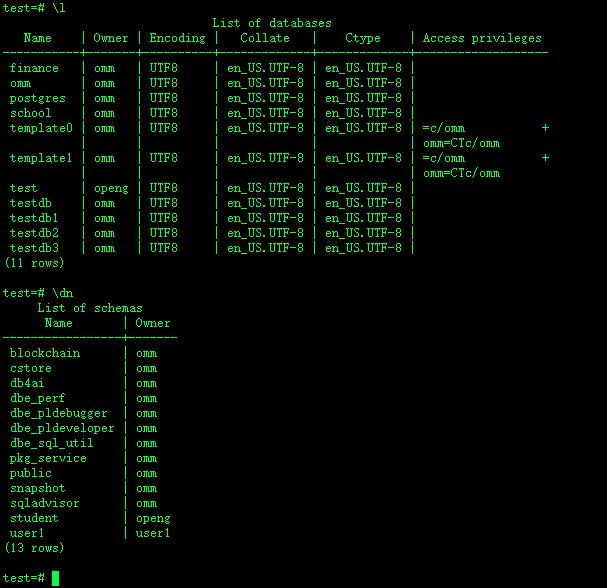
--查看数据库列表和用户列表 :
\c test
\l
\dn
2.使用 sql 查看数据库所在的表空间
--查看数据库所在的表空间,可以看到一个表空间可以有多个数据库
select datname,dattablespace,spcname from pg_database d, pg_tablespace t where d.dattablespace=t.oid;
datname | dattablespace | spcname
-----------+---------------+------------
template1 | 1663 | pg_default
school | 1663 | pg_default
finance | 1663 | pg_default
template0 | 1663 | pg_default
test | 1663 | pg_default
testdb | 16479 | test_tbs
postgres | 1663 | pg_default
omm | 1663 | pg_default
testdb1 | 16479 | test_tbs
testdb2 | 16479 | test_tbs
testdb3 | 16479 | test_tbs
(11 rows)
3.在文件系统中查看表空间中的多个数据库
--查看数据库、表空间的 oid
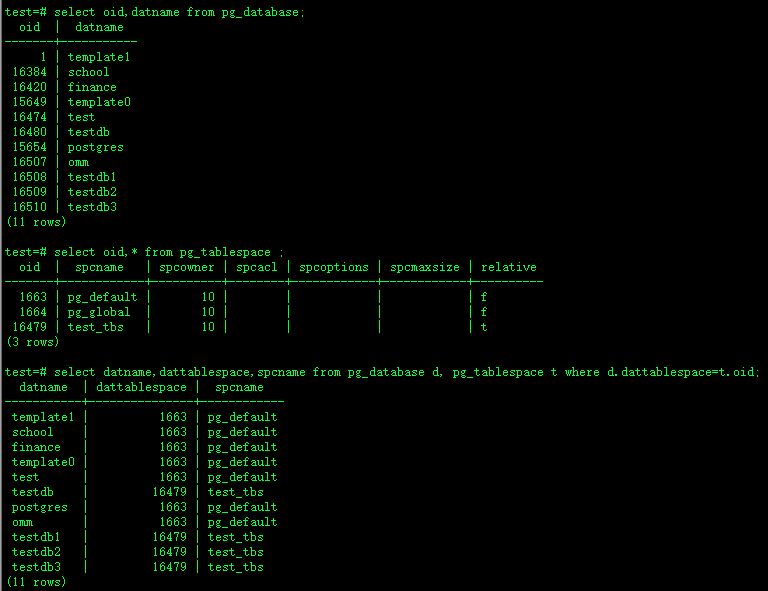
select oid,datname from pg_database;
select oid,* from pg_tablespace ;
select datname,dattablespace,spcname from pg_database d, pg_tablespace t where d.dattablespace=t.oid;
test=# select oid,datname from pg_database;
oid | datname
-------+-----------
1 | template1
16384 | school
16420 | finance
15649 | template0
16474 | test
16480 | testdb
15654 | postgres
16507 | omm
16508 | testdb1
16509 | testdb2
16510 | testdb3
(11 rows)
test=# select oid,* from pg_tablespace ;
oid | spcname | spcowner | spcacl | spcoptions | spcmaxsize | relative
-------+------------+----------+--------+------------+------------+----------
1663 | pg_default | 10 | | | | f
1664 | pg_global | 10 | | | | f
16479 | test_tbs | 10 | | | | t
(3 rows)
test=# select datname,dattablespace,spcname from pg_database d, pg_tablespace t where d.dattablespace=t.oid;
datname | dattablespace | spcname
-----------+---------------+------------
template1 | 1663 | pg_default
school | 1663 | pg_default
finance | 1663 | pg_default
template0 | 1663 | pg_default
test | 1663 | pg_default
testdb | 16479 | test_tbs
postgres | 1663 | pg_default
omm | 1663 | pg_default
testdb1 | 16479 | test_tbs
testdb2 | 16479 | test_tbs
testdb3 | 16479 | test_tbs
(11 rows)
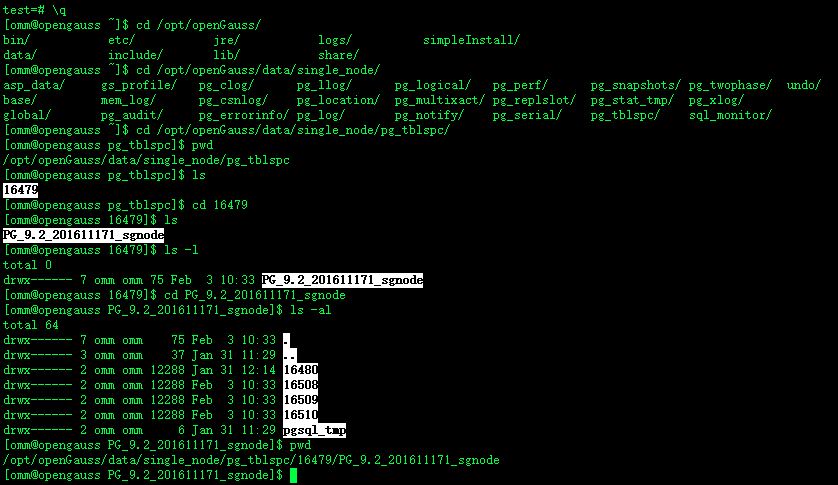
--从文件系统,查看 test_tbs 表空间 oid,可以看到一个表空间可以有多个数据库
[omm@opengauss ~]$ cd /opt/openGauss/data/single_node/pg_tblspc/
[omm@opengauss pg_tblspc]$ pwd
/opt/openGauss/data/single_node/pg_tblspc
[omm@opengauss pg_tblspc]$ ls
16479
[omm@opengauss pg_tblspc]$ cd 16479
[omm@opengauss 16479]$ ls
PG_9.2_201611171_sgnode
[omm@opengauss 16479]$ ls -l
total 0
drwx------ 7 omm omm 75 Feb 3 10:33 PG_9.2_201611171_sgnode
[omm@opengauss 16479]$ cd PG_9.2_201611171_sgnode
[omm@opengauss PG_9.2_201611171_sgnode]$ ls -al
total 64
drwx------ 7 omm omm 75 Feb 3 10:33 .
drwx------ 3 omm omm 37 Jan 31 11:29 ..
drwx------ 2 omm omm 12288 Jan 31 12:14 16480
drwx------ 2 omm omm 12288 Feb 3 10:33 16508
drwx------ 2 omm omm 12288 Feb 3 10:33 16509
drwx------ 2 omm omm 12288 Feb 3 10:33 16510
drwx------ 2 omm omm 6 Jan 31 11:29 pgsql_tmp
[omm@opengauss PG_9.2_201611171_sgnode]$ pwd
/opt/openGauss/data/single_node/pg_tblspc/16479/PG_9.2_201611171_sgnode
--说明:16479 是表空间 test_tbs 的 oid,16480-16510 分别是数据库 testdb、testdb1、testdb2、testdb3 的 oid。
课后作业
1.创建表空间 test_tbs
create tablespace test_tbs relative location 'tablespace/test_ts1';
2.创建 3 个数据库 testdb1、testdb2、testdb3,默认表空间为 test_tbs
create database testdb1 with tablespace = test_tbs;
create database testdb2 with tablespace = test_tbs;
create database testdb3 with tablespace = test_tbs;
3.使用 sql 查看表空间 test_tbs 上有几个数据库
omm=# select datname,dattablespace,spcname from pg_database d, pg_tablespace t where d.dattablespace=t.oid;
datname | dattablespace | spcname
-----------+---------------+------------
template1 | 1663 | pg_default
school | 1663 | pg_default
finance | 1663 | pg_default
template0 | 1663 | pg_default
test | 1663 | pg_default
testdb | 16479 | test_tbs
postgres | 1663 | pg_default
omm | 1663 | pg_default
testdb1 | 16479 | test_tbs
testdb2 | 16479 | test_tbs
testdb3 | 16479 | test_tbs
(11 rows)
4.在文件系统中查看表空间 test_tbs 中的多个数据库
omm=# select oid,datname from pg_database;
oid | datname
-------+-----------
1 | template1
16384 | school
16420 | finance
15649 | template0
16474 | test
16480 | testdb
15654 | postgres
16507 | omm
16508 | testdb1
16509 | testdb2
16510 | testdb3
(11 rows)
omm=# select oid,* from pg_tablespace ;
oid | spcname | spcowner | spcacl | spcoptions | spcmaxsize | relative
-------+------------+----------+--------+------------+------------+----------
1663 | pg_default | 10 | | | | f
1664 | pg_global | 10 | | | | f
16479 | test_tbs | 10 | | | | t
(3 rows)
omm=# select datname,dattablespace,spcname from pg_database d, pg_tablespace t where d.dattablespace=t.oid;
datname | dattablespace | spcname
-----------+---------------+------------
template1 | 1663 | pg_default
school | 1663 | pg_default
finance | 1663 | pg_default
template0 | 1663 | pg_default
test | 1663 | pg_default
testdb | 16479 | test_tbs
postgres | 1663 | pg_default
omm | 1663 | pg_default
testdb1 | 16479 | test_tbs
testdb2 | 16479 | test_tbs
testdb3 | 16479 | test_tbs
(11 rows)
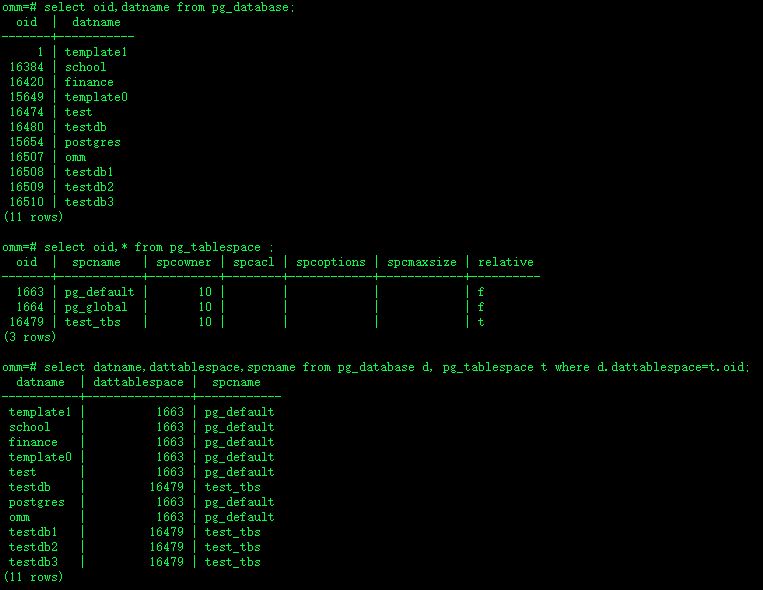
由上可知, 表空间 test_tbs 的 oid 为 16479.
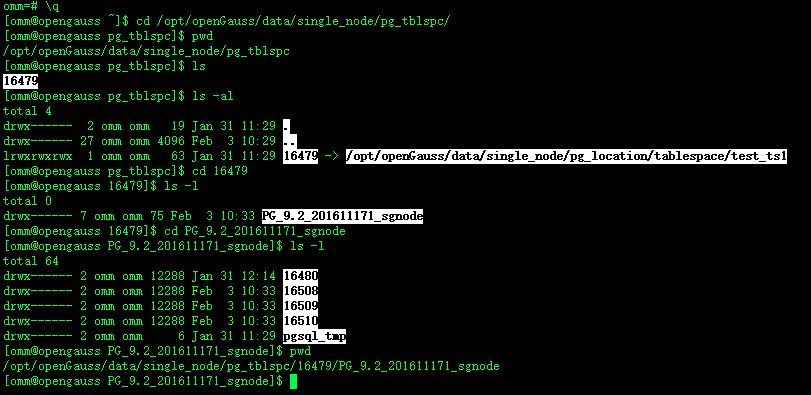
[omm@opengauss ~]$ cd /opt/openGauss/data/single_node/pg_tblspc/
[omm@opengauss pg_tblspc]$ pwd
/opt/openGauss/data/single_node/pg_tblspc
[omm@opengauss pg_tblspc]$ ls
16479
[omm@opengauss pg_tblspc]$ ls -al
total 4
drwx------ 2 omm omm 19 Jan 31 11:29 .
drwx------ 27 omm omm 4096 Feb 3 10:29 ..
lrwxrwxrwx 1 omm omm 63 Jan 31 11:29 16479 -> /opt/openGauss/data/single_node/pg_location/tablespace/test_ts1
[omm@opengauss pg_tblspc]$ cd 16479
[omm@opengauss 16479]$ ls -l
total 0
drwx------ 7 omm omm 75 Feb 3 10:33 PG_9.2_201611171_sgnode
[omm@opengauss 16479]$ cd PG_9.2_201611171_sgnode
[omm@opengauss PG_9.2_201611171_sgnode]$ ls -l
total 64
drwx------ 2 omm omm 12288 Jan 31 12:14 16480
drwx------ 2 omm omm 12288 Feb 3 10:33 16508
drwx------ 2 omm omm 12288 Feb 3 10:33 16509
drwx------ 2 omm omm 12288 Feb 3 10:33 16510
drwx------ 2 omm omm 6 Jan 31 11:29 pgsql_tmp
[omm@opengauss PG_9.2_201611171_sgnode]$ pwd
/opt/openGauss/data/single_node/pg_tblspc/16479/PG_9.2_201611171_sgnode