



背景描述:
某客户CV备份软件无法识别设备,计划在窗口内重启Oracle数据库服务器节点1服务器。重启主库后,ADG备库同步延时。
问题原因:
备库数据库中触发器审计触发导致
解决方法:
禁用备库触发器
基础环境:
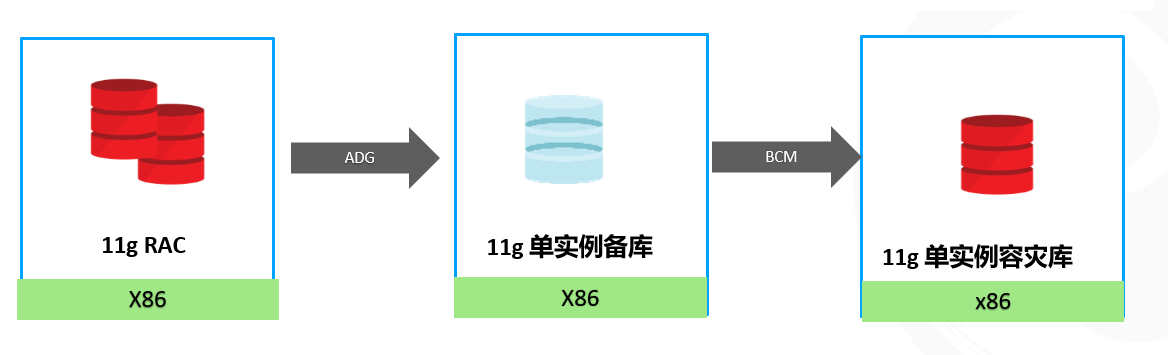
分析过程:
1、数据库日志
主库节点1日志:
Mon Jun 17 21:17:45 2024
Error 1017 received logging on to the standby

Check that the primary and standby are using a password file
and remote_login_passwordfile is set to SHARED or EXCLUSIVE,
and that the SYS password is same in the password files.
      returning error ORA-16191

FAL[server, ARC3]: Error 16191 creating remote archivelog file 'xfdbdg'
FAL[server, ARC3]: FAL archive failed, see trace file.
ARCH: FAL archive failed. Archiver continuing
ORACLE Instance xfdb1 - Archival Error. Archiver continuing.
Mon Jun 17 21:23:06 2024
Error 1017 received logging on to the standby

Check that the primary and standby are using a password file
and remote_login_passwordfile is set to SHARED or EXCLUSIVE,
and that the SYS password is same in the password files.
      returning error ORA-16191

PING[ARC1]: Heartbeat failed to connect to standby 'xfdbdg'. Error is 16191.
Mon Jun 17 21:24:07 2024
Error 1017 received logging on to the standby

Check that the primary and standby are using a password file
and remote_login_passwordfile is set to SHARED or EXCLUSIVE,
and that the SYS password is same in the password files.
      returning error ORA-16191
【说明】主库节点1日志中有Heartbeat failed to connect to standby ‘xfdbdg’. Error is 16191和Error 1017等报错。
主库节点2:
LGWR: Setting 'active' archival for destination LOG_ARCHIVE_DEST_2

Mon Jun 17 21:14:12 2024
Archived Log entry 20178 added for thread 2 sequence 4503 ID 0x885095b7 dest 1:
Error 1017 received logging on to the standby

Check that the primary and standby are using a password file
and remote_login_passwordfile is set to SHARED or EXCLUSIVE,
and that the SYS password is same in the password files.
      returning error ORA-16191
Error 16191 for archive log file 16 to 'xfdbdg'
Errors in file /u01/app/oracle/diag/rdbms/xfdb/xfdb2/trace/xfdb2_nsa2_143682.trc:
ORA-16191: Primary log shipping client not logged on standby
Mon Jun 17 21:14:56 2024
Error 1017 received logging on to the standby
Check that the primary and standby are using a password file
and remote_login_passwordfile is set to SHARED or EXCLUSIVE,
and that the SYS password is same in the password files.
      returning error ORA-16191
PING[ARC1]: Heartbeat failed to connect to standby 'xfdbdg'. Error is 16191.
【说明】主库节点12日志中报错是 Heartbeat failed to connect to standby ‘xfdbdg’. Error is 16191和Error 1017。
备库日志:
Mon Jun 17 21:24:13 2024
alter database recover managed standby database cancel
Mon Jun 17 21:24:13 2024
MRP0: Background Media Recovery cancelled with status 16037
Errors in file /u01/app/oracle/diag/rdbms/xfdbdg/xfdbdg/trace/xfdbdg_pr00_370139.trc:
ORA-16037: user requested cancel of managed recovery operation
Managed Standby Recovery not using Real Time Apply
Recovery interrupted!
Recovered data files to a consistent state at change 13960488814850
Mon Jun 17 21:24:13 2024
MRP0: Background Media Recovery process shutdown (xfdbdg)
Managed Standby Recovery Canceled (xfdbdg)
【说明】MRP0: Background Media Recovery cancelled with status 16037备库MRP进程终止
2、检查主备库密码文件
主备库执行md5校验
[oracle@pri dbs]$ md5sum orapwxfdb
90f199187064b1437c092a4a54a2fffb  orapwxfdb
[oracle@adg dbs]$ md5sum orapwxfdbdg
90f199187064b1437c092a4a54a2fffb  orapwxfdbdg
【说明】主备库密码文件md5值一致。
3、检查连接
sqlplus sys/password@xfdb as  sysdba
sqlplus sys/password@xfdbdg as  sysdba
【说明】主备库验证连接正常。
4、检查备库trace文件
u01/app/oracle/diag/rdbms/xfdbdg/xfdbdg/trace/xfdbdg_pr00_370139.trc
Trace file /u01/app/oracle/diag/rdbms/xfdbdg/xfdbdg/trace/xfdbdg_pr00_370139.trc
Oracle Database 11g Enterprise Edition Release 11.2.0.4.0 - 64bit Production
With the Partitioning, Automatic Storage Management, OLAP, Data Mining
and Real Application Testing options
ORACLE_HOME = /u01/app/oracle/product/11.2.0/dbhome_1
System name:    Linux
Node name:      zpipadg
Release:        2.6.32-642.el6.x86_64
Version:        #1 SMP Wed Apr 13 00:51:26 EDT 2016
Machine:        x86_64
Instance name: xfdbdg
Redo thread mounted by this instance
Error in executing triggers on connect internal
【说明】trc中有trigger触发器的error
5、检查触发器
create or replace TRIGGER SYS.login_log
after logon on database
DECLARE
 ipaddr   VARCHAR2 (15);
begin
ipaddr := SYS_CONTEXT ('USERENV', 'IP_ADDRESS');
IF ipaddr is not null then
insert into login_history
select username, machine, sysdate, sys_context('userenv', 'ip_address')
from v$session
where audsid = userenv('sessionid');
commit;
end if;
end;
【说明】数据库中有通过触发器记录ip的审计功能。因为备库是只读状态,无法执行insert语句。
处理建议
1、在备库中禁用触发器
SQL>ALTER SYSTEM SET "_system_trig_enabled"=FALSE;
SQL> SELECT I.KSPPINM NAME,
     I.KSPPDESC DESCRIPTION,
      CV.KSPPSTVL VALUE,
   CV.KSPPSTDF ISDEFAULT
 FROM SYS.X$KSPPI I, SYS.X$KSPPCV CV
WHERE I.INST_ID = USERENV('Instance')
  AND CV.INST_ID = USERENV('Instance')
  AND I.INDX = CV.INDX
  AND I.KSPPINM LIKE '_system_trig_enabled'
ORDER BY REPLACE(I.KSPPINM, '_', '');  4    5    6    7    8    9   10

NAME                 DESCRIPTION                    VALUE           ISDEFAULT
-------------------- ------------------------------ --------------- ---------
_system_trig_enabled are system triggers enabled    FALSE            TRUE
2、调整触发器
create or replace TRIGGER SYS.login_log
after logon on database
DECLARE
 ipaddr   VARCHAR2 (15);
begin
select database_role
into db_role
from v$database;
If db_role <> 'PHYSICAL STANDBY' then
ipaddr := SYS_CONTEXT ('USERENV', 'IP_ADDRESS');
IF ipaddr is not null then
insert into login_history
select username, machine, sysdate, sys_context('userenv', 'ip_address')
from v$session
where audsid = userenv('sessionid');
commit;
end if;
end if;
end;
在触发器中增加数据库角色的判断,当数据库不是物理备库时执行数据库登录审计。
【小结】在ADG环境中数据库中类似审计的触发器作为巡检检查项;对于ORA-1017、ORA-16191报错分析除了密码文件还可以检查触发器;数据库增加审计功能产品或触发器、存储过程等对象时应该充分考虑ADG特点,经过测试后再上线。
-the end-
最后修改时间:2025-07-16 13:59:43
「喜欢这篇文章,您的关注和赞赏是给作者最好的鼓励」
关注作者
【版权声明】本文为墨天轮用户原创内容,转载时必须标注文章的来源(墨天轮),文章链接,文章作者等基本信息,否则作者和墨天轮有权追究责任。如果您发现墨天轮中有涉嫌抄袭或者侵权的内容,欢迎发送邮件至:contact@modb.pro进行举报,并提供相关证据,一经查实,墨天轮将立刻删除相关内容。
