



准备环境
yum install -y java-1.8.0-openjdk.x86_64yum install -y unzip
3. 查看是否安装成功


audit-libs-2.6.5-3.el7.x86_64elfutils-libelf-0.166-2.el7.x86_64expat-2.1.0-8.el7.x86_64fontconfig-2.10.95-10.el7.x86_64freetype-2.4.11-12.el7.x86_64glibc-2.17-157.el7.x86_64libcap-ng-0.7.5-4.el7.x86_64libgcc-4.8.5-11.el7.x86_64libstdc++-4.8.5-11.el7.x86_64libX11-1.6.3-3.el7.x86_64libXau-1.0.8-2.1.el7.x86_64libxcb-1.11-4.el7.x86_64libXext-1.3.3-3.el7.x86_64libXrender-0.9.8-2.1.el7.x86_64ncurses-libs-5.9-13.20130511.el7.x86_64nss-softokn-freebl-3.16.2.3-14.4.el7.x86_64pam-1.1.8-18.el7.x86_64readline-6.2-9.el7.x86_64zlib-1.2.7-17.el7.x86_64unzip-6.0-16.el7.x86_64java-1.8.0-openjdk.x86_64
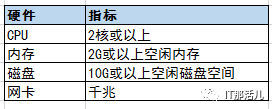
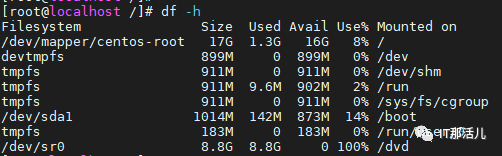
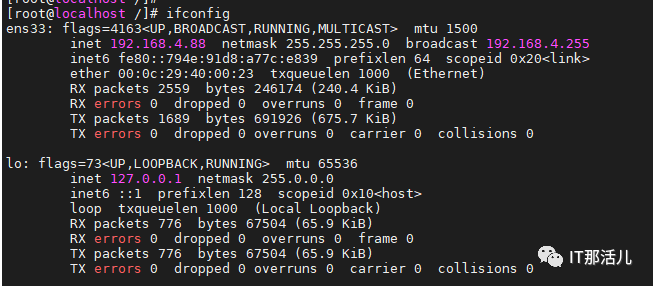
硬件环境检查
1. 查看内存


安装前准备
1. 需要创建gbasedbt用户和组作为数据库的超级管理员
groupadd gbasedbtuseradd -g gbasedbt -d /home/gbasedbt -m -s /bin/bash gbasedbt
2. 准备好安装包
GBase8s_Express_Edition.tar

[root@localhost ~]# mkdir install[root@localhost ~]# cd install[root@localhost install]# tar -xf /setup/GBase8s_Express_Edition.tar[root@localhost install]# ls -lrt

静默安装:
[root@localhost install]# mkdir /opt/gbase[root@localhost install]# chmod 755 /opt/gbase[root@localhost install]# ./ids_install -i silent -DLICENSE_ACCEPTED=TRUE -DUSER_INSTALL_DIR=/opt/gbase
配置环境变量
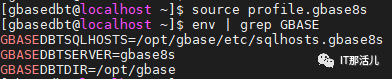
su – gbasedbtvi profile.gbase8sexport GBASEDBTSERVER=gbase8sexport GBASEDBTDIR=/opt/gbaseexport GBASEDBTSQLHOSTS=/opt/gbase/etc/sqlhosts.gbase8sexport ONCONFIG=onconfig.gbase8sexport PATH=/opt/gbase/bin:$PATHexport DB_LOCALE=zh_CN.utf8export CLIENT_LOCALE=zh_CN.utf8unset GL_USEGLUexport PATH=$GBASEDBTDIR/bin:$GBASEDBTDIR/sbin:$PATH[gbasedbt@localhost ~]$ source profile.gbase8s
查看是否生效
[gbasedbt@localhost ~]$ touch /opt/gbase/etc/sqlhosts.gbase8s[gbasedbt@localhost ~]$ vi /opt/gbase/etc/sqlhosts.gbase8s[gbasedbt@localhost ~]$ cat /opt/gbase/etc/sqlhosts.gbase8sgbase8s onsoctcp 192.168.4.88 9088
[gbasedbt@localhost ~]$ cd /opt/gbase/etc[gbasedbt@localhost etc]$ ls onconfig.stdonconfig.std[gbasedbt@localhost etc]$ cp onconfig.std onconfig.gbase8s[gbasedbt@localhost etc]$ ls onconfig.*onconfig.gbase8s onconfig.std
按照以下表内的参数,将配置文件onconfig.gbase8s进行修改
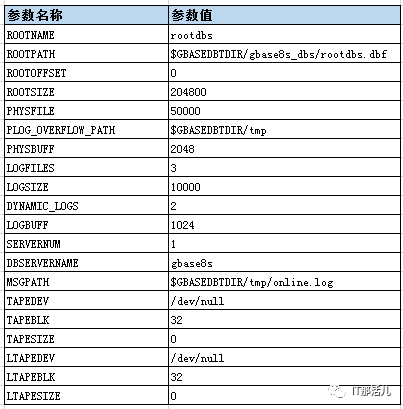
初始化实例
[gbasedbt@localhost ~]$ mkdir -p $GBASEDBTDIR/gbase8s_dbs[gbasedbt@localhost ~]$ touch $GBASEDBTDIR/gbase8s_dbs/rootdbs.dbf[gbasedbt@localhost ~]$ chmod 660 $GBASEDBTDIR/gbase8s_dbs/rootdbs.dbf[gbasedbt@localhost etc]$ gserver init
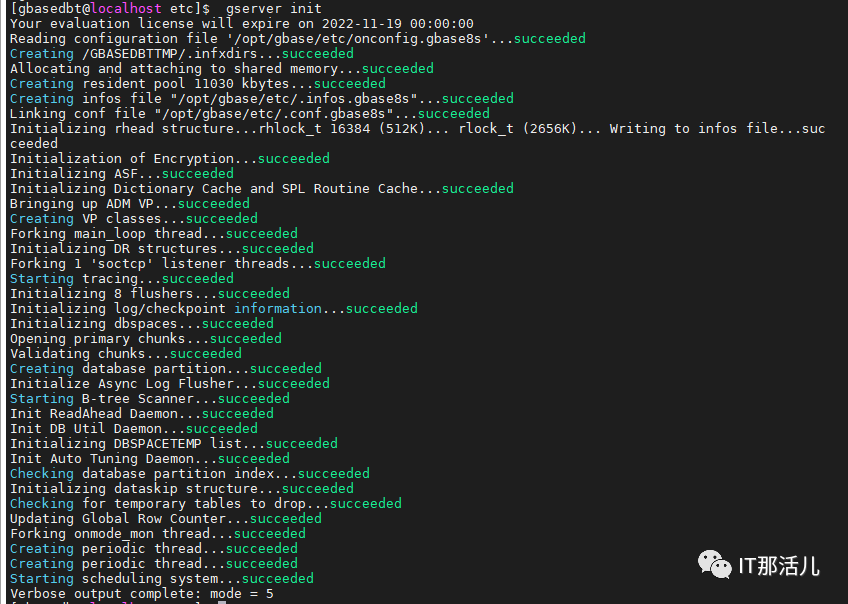

卸载GBase 8s
cd /opt/gbase/uninstall/uninstall_ids/[root@localhost uninstall_ids]# lsInstallScript.iap_xml installvariables.properties removablesList.txt uninstaller.jar uninstallids uninstallids.lax[root@localhost uninstall_ids]# ./uninstallids
1. 清除残余目录
[root@localhost uninstall_ids]# cd /opt[root@localhost opt]# lsGbase[root@localhost opt]# rm -rf gbase
2. 删除用户
[root@localhost opt]# userdel -r gbasedbt
本 文 原 创 来 源:IT那活儿微信公众号(上海新炬王翦团队)
文章转载自IT那活儿,如果涉嫌侵权,请发送邮件至:contact@modb.pro进行举报,并提供相关证据,一经查实,墨天轮将立刻删除相关内容。
