



大家好,这里是公众号 DBA学习之路,分享一些学习国产数据库路上的知识和经验。
目录
- 前言
- KingbaseRWC 介绍
- 环境准备
- 安装前配置
- 检查操作系统版本(所有节点)
- 配置 /etc/hosts(所有节点)
- 关闭防火墙(所有节点)
- 禁用 selinux(所有节点)
- 创建主机用户(所有节点)
- 创建目录(所有节点)
- 系统参数配置(所有节点)
- 资源配置(所有节点)
- 配置 RemoveIPC(所有节点)
- 检查 /tmp 目录(所有节点)
- 配置时间同步(所有节点)
- 部署 KingbaseRWC 集群
- 访问数据库
- 写在最后
前言
最近在研究金仓数据库的读写分离集群(KingbaseRWC),看着大家有写过不少图形化部署的教程了,我打算试一下静默安装的方式,本文记录一下部署过程!
PS:看着跟 Oracle ADG 有点相似。
KingbaseRWC 介绍
KingbaseES 读写分离集群(KingbaseRWC): KingbaseES 读写分离集群通过物理复制保障企业数据的高可用性、数据保护和灾难恢复并具备读请求的负载均衡能力。相比数据守护集群,该类集群中所有备库均可对外提供查询能力,从而减轻了主库的读负载压力,可实现更高的事务吞吐率;该软件支持在多个备库间进行读负载均衡。
KingbaseRWC 读写分离集群架构:
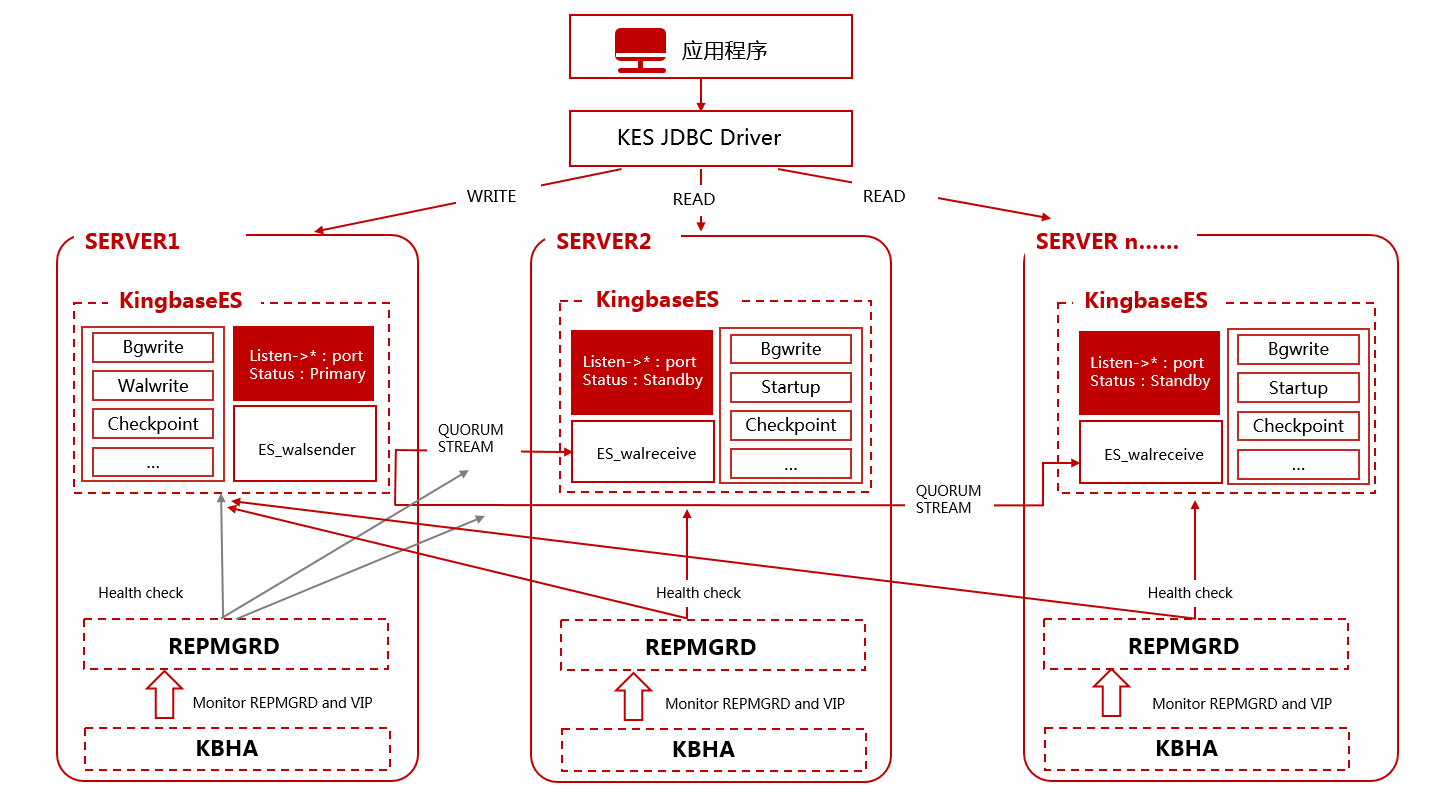
其成员可能包括主节点(primary node)、备节点(standby node)、辅助节点(witness node)、备份节点(repo node)。
KingbaseRWC 功能特点:
- 多实例冗余,支持实例级(含异地)容灾切换。
- 节点独立存储多份数据冗余,支持数据(存储)级容灾(集群内任一存储完好均可恢复其余节点介质故障)。
- 平衡应用读写负载,可将交易类系统指向主库,只读类系统指向备库实现读写分离均衡负载。
- 支持坏块检测与修复。
官方推荐配置如下:
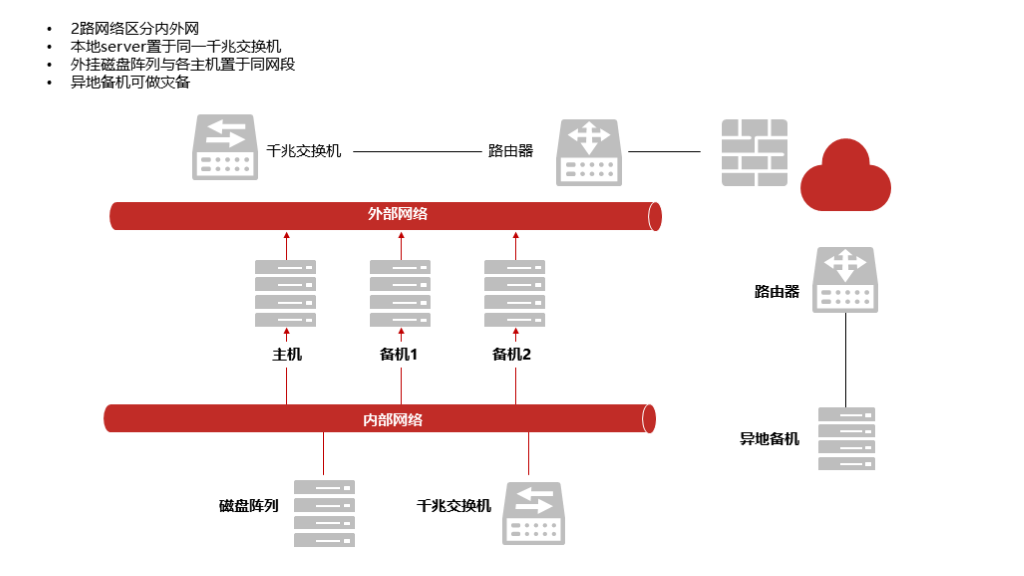
本文演示部署一套 1 主 1 备的 KingbaseRWC 集群。
环境准备
本文演示环境:
| 主机名 | IP | 版本 | CPU | 内存 | 硬盘 | |
|---|---|---|---|---|---|---|
| 主 | kesrwc01 | 192.168.6.87 | 银河麒麟 Kylin V10 | x86 | 8G | 100G |
| 备 | kesrwc02 | 192.168.6.88 | 银河麒麟 Kylin V10 | x86 | 8G | 100G |
安装前配置
检查操作系统版本(所有节点)
检查操作系统版本信息:
## 以节点一为例
[root@kesrwc01 ~]# cat /etc/os-release
NAME="Kylin Linux Advanced Server"
VERSION="V10 (Halberd)"
ID="kylin"
VERSION_ID="V10"
PRETTY_NAME="Kylin Linux Advanced Server V10 (Halberd)"
ANSI_COLOR="0;31"
配置 /etc/hosts(所有节点)
建议配置主机名解析:
## 以节点一为例
[root@kesrwc01 ~]# cat<<-EOF>>/etc/hosts
192.168.6.87 kesrwc01
192.168.6.88 kesrwc02
EOF
关闭防火墙(所有节点)
数据库安装均建议关闭防火墙:
## 以节点一为例
[root@kesrwc01 ~]# systemctl stop firewalld
[root@kesrwc01 ~]# systemctl disable firewalld
Removed /etc/systemd/system/multi-user.target.wants/firewalld.service.
Removed /etc/systemd/system/dbus-org.fedoraproject.FirewallD1.service.
禁用 selinux(所有节点)
所有节点建议关闭 SELNUX,防止造成一些不必要的问题:
## 以节点一为例
## 这里使用 setenforce 0 临时生效
[root@kesrwc01 ~]# /usr/sbin/setenforce 0
/usr/sbin/setenforce: SELinux is disabled
[root@kesrwc01 ~]# sed -i 's/SELINUX=enforcing/SELINUX=disabled/g' /etc/selinux/config
[root@kesrwc01 ~]# sestatus
SELinux status:                 disabled
将 SELINUX 参数设置为 disabled,即 SELINUX=disabled 保存退出后,需要重新启动才能生效。
创建主机用户(所有节点)
建议在所有服务器上创建 KES 产品的安装用户 kingbase,而非使用 root 身份执行安装部署:
## 以节点一为例
[root@kesrwc01 ~]# useradd -u 2000 -d /home/kingbase -m kingbase
[root@kesrwc01 ~]# echo "kingbase:kingbase" | chpasswd
[root@kesrwc01 ~]# id kingbase
用户id=2000(kingbase) 组id=2000(kingbase) 组=2000(kingbase)
如果有密码复杂性要求,不想设置密码太复杂的话,可以取消密码复杂度:
## 以节点一为例
[root@kesrwc01 ~]# sed -i 's/^password\+[[:space:]]\+requisite[[:space:]]\+pam_pwquality.so/#&/g' /etc/pam.d/system-auth
[root@kesrwc01 ~]# sed -i 's/use_authtok$//' /etc/pam.d/system-auth
创建目录(所有节点)
为了利于数据库的日常运维、持续使用、存储扩容等,我们在安装前必须做好选项、存储目录规划。
创建安装所需目录并且授权:
## 以节点一为例
[root@kesrwc01 ~]# mkdir -p /KingbaseES/V9 /backup /archive /install /data
[root@kesrwc01 ~]# chown -R kingbase:kingbase {/KingbaseES,/backup,/archive,/install,/data}
[root@kesrwc01 ~]# chmod -R 775 {/KingbaseES,/backup,/archive,/install,/data}
系统参数配置(所有节点)
为了避免在 KingbaseES 安装和使用过程中出现问题,官方建议调整系统内核参数:
| 参数 | 参考值 | 所在文件 |
|---|---|---|
| semmsl | 5010 | /proc/sys/kernel/sem |
| semmns | 641280 | /proc/sys/kernel/sem |
| semopm | 5010 | /proc/sys/kernel/sem |
| semmni | 256 | /proc/sys/kernel/sem |
| shmall | 2097152 | /proc/sys/kernel/shmall |
| shmmax | 最小: 536870912 最大: 物理内存值减去1字节 建议: 大于物理内存的一半 |
/proc/sys/kernel/shmmax |
| rmem_default | 8388608 | /proc/sys/net/core/rmem_default |
| rmem_max | 16777216 | /proc/sys/net/core/rmem_max |
| wmem_default | 8388608 | /proc/sys/net/core/wmem_default |
| wmem_max | 16777216 | /proc/sys/net/core/wmem_max |
注意:这里关于 shmmax 和 shmall 参数值的计算,我们可以参考 Oracle 来设置:
# 物理内存(KB)
os_memory_total=$(awk '/MemTotal/{print $2}' /proc/meminfo)
# 获取系统页面大小,用于计算内存总量
pagesize=$(getconf PAGE_SIZE)
((shmall = (os_memory_total - 1) * 1024 / pagesize))
((shmmax = os_memory_total * 1024 - 10))
# 如果 shmall 小于 2097152,则将其设为 2097152
((shmall < 2097152)) && shmall=2097152
# 如果 shmmax 小于 4294967295,则将其设为 4294967295
((shmmax < 4294967295)) && shmmax=4294967295
复制以上命令,直接执行即可计算得出这两个参数值:
## 以节点一为例
[root@kesrwc01 ~]# echo $shmall
2097152
[root@kesrwc01 ~]# echo $shmmax
7008071670
根据官方建议值,配置系统参数文件:
## 以节点一为例
[root@kesrwc01 ~]# cat<<-EOF>>/etc/sysctl.conf
kernel.shmall= 2097152
kernel.shmmax= 7008071670
kernel.sem= 5010 641280 5010 256
net.core.rmem_default= 8388608
net.core.rmem_max= 16777216
net.core.wmem_default= 8388608
net.core.wmem_max= 16777216
net.ipv4.tcp_rmem = 8192 65536 16777216
net.ipv4.tcp_wmem = 8192 87380 16777216
net.core.default_qdisc=fq_codel
EOF

## 生效配置
[root@kesrwc01 ~]# sysctl -p
资源配置(所有节点)
限制用户可使用的资源数量对系统的稳定性非常重要,可以通过调整资源限制数量改进系统性能:
## 以节点一为例
[root@kesrwc01 ~]# cat<<-EOF>>/etc/security/limits.conf
* soft nofile 655360
* hard nofile 655360
* soft nproc 655360
* hard nproc 655360
* soft core 655360
* hard core 655360
* soft memlock 50000000
* hard memlock 50000000
EOF
配置 RemoveIPC(所有节点)
systemd-logind 服务中引入的一个特性 RemoveIPC,会造成程序信号丢失等问题,只有Redhat7 及以上和一些特殊的国产Linux的版本需要修改,改之前可先查看此项是否为默认yes),需要设置 RemoveIPC=no:
## 以节点一为例
[root@kesrwc01 ~]# sed -i 's/#RemoveIPC=no/RemoveIPC=no/' /etc/systemd/logind.conf
[root@kesrwc01 ~]# grep RemoveIPC /etc/systemd/logind.conf
RemoveIPC=no
[root@kesrwc01 ~]# sed -i 's/#DefaultTasksAccounting=yes/DefaultTasksAccounting=no/' /etc/systemd/system.conf
[root@kesrwc01 ~]# sed -i 's/#DefaultTasksMax=80%/DefaultTasksMax= 65536/' /etc/systemd/system.conf
[root@kesrwc01 ~]# cat /etc/systemd/system.conf | grep DefaultTask
DefaultTasksAccounting=no
DefaultTasksMax= 65536
# 重新加载 systemd 守护进程并重启 systemd-logind 服务生效
[root@kesrwc01 ~]# systemctl daemon-reload
[root@kesrwc01 ~]# systemctl restart systemd-logind.service
检查 /tmp 目录(所有节点)
KES 安装对于 /tmp 目录有一定要求,至少需要 10G 空间,否则安装时会报警并使用 kingbase 用户家目录作为替代:
Now launch installer...
正在准备进行安装
警告:/tmp 磁盘空间不足!正在尝试将 /home/kingbase 用于安装基础和 tmp dir。
手动挂载 /tmp 目录空间:
## 以节点一为例
[root@kesrwc01 ~]# cat<<-EOF>>/etc/fstab
tmpfs /tmp tmpfs size=10G 0 0
EOF
[root@kesrwc01 ~]# mount -o remount /tmp
[root@kesrwc01 ~]# df -h | grep /tmp
tmpfs                   10G   16K   10G    1% /tmp
配置环境变量(所有节点)
访问数据库需要使用 kingbase 主机用户,(为了方便)配置 kingbase 用户环境变量:
## 以节点一为例
[kingbase@kesrwc01 ~]$ cat<<-\EOF>>/home/kingbase/.bash_profile
export KINGBASE_HOME=/KingbaseES/V9/cluster/kingbase
export KINGBASE_DATA=/data
export LD_LIBRARY_PATH=$KINGBASE_HOME/lib:/lib:/usr/lib:/usr/lib64
export PATH=$KINGBASE_HOME/bin:/usr/sbin:$PATH
export PS1="[`whoami`@`hostname`:"'$PWD]$ '
alias ksystem='ksql test system'
alias ksso='ksql test sso'
## 解决 clear 命令无法使用问题
export TERMINFO=/usr/share/terminfo
export TERM=vt100
EOF
两个节点都需要配置,配置完成后生效环境变量:
[kingbase@kesrwc01 ~]$ source ~/.bash_profile
配置好环境变量之后就可以不需要到指定路径下执行命令了。
配置时间同步(所有节点)
这个不是必须配置,但是建议配置,用于在系统中配置 NTP 实现时间同步。
⭐️ 配置 Linux 时间同步可以参考为之前写的文章:Linux 一键配置时钟同步全攻略
部署 KingbaseRWC 集群
安装数据库软件(主节点)
安装 KingbaseRWC 之前需要在主节点安装 KingbaseES 数据库软件。
在主节点都上传 KES 最新的安装包:
KingbaseES_V009R001C002B0014_Lin64_install.iso到 /install 目录下,直接官网下载即可!
以节点一为例:
## 挂载 iso 文件需要使用 root 用户,安装包上传在 /install 目录,挂载到 /mnt 目录下
[root@kesrwc01 ~]# umount /mnt
[root@kesrwc01 ~]# mount -o loop /install/KingbaseES_V009R001C002B0014_Lin64_install.iso /mnt/
## 将挂载出来的安装文件拷贝到 /install 目录下
[root@kesrwc01 ~]# cp -r /mnt/* /install
## 复制完成后取消安装 iso 的挂载
[root@kesrwc01 ~]# umount /mnt
## 由于之前 root 复制的安装文件权限为 root,所以需要重新授权 kingbase 用户
[root@kesrwc01 ~]# chown -R kingbase:kingbase /install
[root@kesrwc01 ~]# chmod -R 775 /install
[root@kesrwc01 ~]# su - kingbase
[kingbase@kesrwc01 ~]$ cd /install/setup
## 修改 silent.cfg 模板文件
[kingbase@kesrwc01:/install/setup]$ cat<<-EOF>/install/setup/silent.cfg
KB_LICENSE_PATH=
CHOSEN_INSTALL_SET=Custom
CHOSEN_FEATURE_LIST=DEPLOY
USER_INSTALL_DIR=/KingbaseES/V9
USER_SELECTED_DATA_FOLDER=/data
DB_PORT=54321
DB_USER=system
DB_PASS=
DB_PASS2=
ENCODING_PARAM=UTF8
LOCALE_PARAM=zh_CN.UTF-8
INITCUSTOM=
DATABASE_MODE_PARAM=ORACLE
CASE_SENSITIVE_PARAM=YES
BLOCK_SIZE_PARAM=8k
AUTHENTICATION_METHOD_PARAM=scram-sha-256
EOF
## 静默安装
[kingbase@kesrwc01:/install/setup]$ cd /install
[kingbase@kesrwc01:/install]$ ./setup.sh -i silent -f /install/setup/silent.cfg
Now launch installer...
          Verifying JVM...Complete.
安装成功后,在 ${USER_INSTALL_DIR}/ClientTools/guitools/DeployTools/zip/ 目录下拷贝安装文件到 /install 目录下:
[kingbase@kesrwc01 ~]$ cd /KingbaseES/V9/ClientTools/guitools/DeployTools/zip/
[kingbase@kesrwc01 zip]$ ls
cluster_install.sh  db.zip  install.conf  securecmdd.zip  trust_cluster.sh
[kingbase@kesrwc01 zip]$ cp * /install/
接下来就可以部署 KingbaseRWC 集群了。
部署集群(主节点)
配置 install.conf
静默安装需要先配置 install.conf 文件:
[kingbase@kesrwc01 install]$ vi install.conf
## 修改以下几个必要参数,具体参数请参考官方文档,根据实际情况进行修改

all_ip=(192.168.6.87 192.168.6.88)
install_dir="/KingbaseES/V9/cluster/"
zip_package="/install/db.zip"
data_directory="/data"
trusted_servers="192.168.6.254"
SSH 免密配置
静默安装需要配置免密,使用 root 用户执行 trust_cluster.sh 脚本即可:
[root@kesrwc01 ~]# cd /install/
[root@kesrwc01 install]# sh trust_cluster.sh
[INFO] set password-free between root and kingbase
Generating public/private rsa key pair.
...
...
...

## 过程中根据提示输入密码即可
root@192.168.6.88's password:
id_rsa                                                                                                                                                                                                                                                                                     100% 2602   167.8KB/s   00:00
id_rsa.pub                                                                                                                                                                                                                                                                                 100%  567    70.4KB/s   00:00
authorized_keys                                                                                                                                                                                                                                                                            100%  567    74.1KB/s   00:00
known_hosts

...
...
...
connect to "192.168.6.87" from current node by 'ssh' kingbase:0..... OK
connect to "192.168.6.87" from current node by 'ssh' root:0..... OK
connect to "192.168.6.88" from "192.168.6.87" by 'ssh' kingbase->kingbase:0 .... OK
connect to "192.168.6.88" from "192.168.6.87" by 'ssh' root->root:0 root->kingbase:0 kingbase->root:0.... OK
connect to "192.168.6.88" from current node by 'ssh' kingbase:0..... OK
connect to "192.168.6.88" from current node by 'ssh' root:0..... OK
connect to "192.168.6.87" from "192.168.6.88" by 'ssh' kingbase->kingbase:0 .... OK
connect to "192.168.6.87" from "192.168.6.88" by 'ssh' root->root:0 root->kingbase:0 kingbase->root:0.... OK
check ssh connection success!
集群静默安装
切换到 kingbase 用户,一键静默安装:
[kingbase@kesrwc01 ~]$ cd /install/
[kingbase@kesrwc01 install]$ sh cluster_install.sh
[CONFIG_CHECK] will deploy the cluster of DG
[CONFIG_CHECK] file format is correct ... OK
[CONFIG_CHECK] encoding: UTF8 OK
[CONFIG_CHECK] locale: zh_CN.UTF-8 OK
[CONFIG_CHECK] the number of license_num matches the length of all_ip or the number of license_num is 1 ... OK
[RUNNING] check if the host can be reached from current node and between all nodes by ssh ...
[RUNNING] success connect to "192.168.6.87" from current node by 'ssh' ... OK
[RUNNING] success connect to "192.168.6.87" from "192.168.6.87" by 'ssh' ... OK
[RUNNING] success connect to "192.168.6.88" from "192.168.6.87" by 'ssh' ... OK
[RUNNING] success connect to "192.168.6.88" from current node by 'ssh' ... OK
[RUNNING] success connect to "192.168.6.87" from "192.168.6.88" by 'ssh' ... OK
[RUNNING] success connect to "192.168.6.88" from "192.168.6.88" by 'ssh' ... OK
[RUNNING] chmod /bin/ping ...
[RUNNING] chmod /bin/ping ... Done
[RUNNING] ping access rights OK
[RUNNING] check the db is running or not...
[RUNNING] the db is not running on "192.168.6.87:54321" ..... OK
[RUNNING] the db is not running on "192.168.6.88:54321" ..... OK
[RUNNING] check the sys_securecmdd is running or not...
[RUNNING] the sys_securecmdd is not running on "192.168.6.87:8890" ..... OK
[RUNNING] the sys_securecmdd is not running on "192.168.6.88:8890" ..... OK
[RUNNING] check if the install dir (create dir and check it's owner/permission) ...
[RUNNING] check if the install dir (create dir and check it's owner/permission) on "192.168.6.87" ... OK
[RUNNING] check if the install dir (create dir and check it's owner/permission) on "192.168.6.88" ... OK
[RUNNING] check if the dir "/KingbaseES/V9/cluster/kingbase" is already exist ...
[RUNNING] the dir "/KingbaseES/V9/cluster/kingbase" is not exist on "192.168.6.87" ..... OK
[RUNNING] the dir "/KingbaseES/V9/cluster/kingbase" is not exist on "192.168.6.88" ..... OK
[RUNNING] check the data directory (create it and check whether it is empty) ...
[RUNNING] when use_exist_data=0, create the empty data directory on "192.168.6.87" ..... OK
[RUNNING] when use_exist_data=0, create the empty data directory on "192.168.6.88" ..... OK
2025-02-08 06:58:14 [INFO] start to check system parameters on 192.168.6.87 ...
2025-02-08 06:58:14 [WARNING] [GSSAPIAuthentication] yes (should be: no) on 192.168.6.87
2025-02-08 06:58:15 [INFO] [UseDNS] is null on 192.168.6.87
2025-02-08 06:58:15 [INFO] [UsePAM] yes  on 192.168.6.87
2025-02-08 06:58:15 [INFO] [ulimit.open files] 655360 on 192.168.6.87
2025-02-08 06:58:16 [INFO] [ulimit.open proc] 655360 on 192.168.6.87
2025-02-08 06:58:16 [INFO] [ulimit.core size] 655360 (no unlimited) on 192.168.6.87
2025-02-08 06:58:16 [INFO] the value of [ulimit.core size] is wrong, now will change it on 192.168.6.87 ...
2025-02-08 06:58:16 [INFO] change ulimit.core size on 192.168.6.87 ...
2025-02-08 06:58:17 [INFO] change ulimit.core size on 192.168.6.87 ... Done
2025-02-08 06:58:17 [INFO] [ulimit.core size] unlimited on 192.168.6.87
2025-02-08 06:58:17 [INFO] [ulimit.mem lock] 50000000 on 192.168.6.87
2025-02-08 06:58:19 [INFO] [kernel.sem] 5010 641280 5010 256 on 192.168.6.87
2025-02-08 06:58:19 [INFO] [RemoveIPC] no on 192.168.6.87
2025-02-08 06:58:19 [INFO] [DefaultTasksAccounting] no on 192.168.6.87
2025-02-08 06:58:20 [INFO] write file "/etc/udev/rules.d/kingbase.rules" on 192.168.6.87
2025-02-08 06:58:21 [INFO] [crontab] chmod /usr/bin/crontab ...
2025-02-08 06:58:22 [INFO] [crontab] chmod /usr/bin/crontab ... Done
2025-02-08 06:58:22 [INFO] [crontab access] OK
2025-02-08 06:58:23 [INFO] [cron.allow] add kingbase to cron.allow ...
2025-02-08 06:58:23 [INFO] [cron.allow] add kingbase to cron.allow ... Done
2025-02-08 06:58:24 [INFO] [crontab auth] crontab is accessible by kingbase now on 192.168.6.87
2025-02-08 06:58:24 [INFO] [SELINUX] disabled on 192.168.6.87
2025-02-08 06:58:25 [INFO] [firewall] down on 192.168.6.87
2025-02-08 06:58:26 [INFO] [The memory] OK on 192.168.6.87
2025-02-08 06:58:26 [INFO] [The hard disk] OK on 192.168.6.87
2025-02-08 06:58:26 [INFO] [ping] chmod /bin/ping ...
2025-02-08 06:58:27 [INFO] [ping] chmod /bin/ping ... Done
2025-02-08 06:58:27 [INFO] [ping access] OK
2025-02-08 06:58:27 [INFO] [/bin/cp --version] on 192.168.6.87 OK
2025-02-08 06:58:27 [INFO] [Virtual IP] Not configured on 192.168.6.87
2025-02-08 06:58:27 [INFO] start to check system parameters on 192.168.6.88 ...
2025-02-08 06:58:28 [WARNING] [GSSAPIAuthentication] yes (should be: no) on 192.168.6.88
2025-02-08 06:58:28 [INFO] [UseDNS] is null on 192.168.6.88
2025-02-08 06:58:28 [INFO] [UsePAM] yes  on 192.168.6.88
2025-02-08 06:58:29 [INFO] [ulimit.open files] 655360 on 192.168.6.88
2025-02-08 06:58:29 [INFO] [ulimit.open proc] 655360 on 192.168.6.88
2025-02-08 06:58:29 [INFO] [ulimit.core size] 655360 (no unlimited) on 192.168.6.88
2025-02-08 06:58:29 [INFO] the value of [ulimit.core size] is wrong, now will change it on 192.168.6.88 ...
2025-02-08 06:58:29 [INFO] change ulimit.core size on 192.168.6.88 ...
2025-02-08 06:58:30 [INFO] change ulimit.core size on 192.168.6.88 ... Done
2025-02-08 06:58:30 [INFO] [ulimit.core size] unlimited on 192.168.6.88
2025-02-08 06:58:31 [INFO] [ulimit.mem lock] 50000000 on 192.168.6.88
2025-02-08 06:58:32 [INFO] [kernel.sem] 5010 641280 5010 256 on 192.168.6.88
2025-02-08 06:58:32 [INFO] [RemoveIPC] no on 192.168.6.88
2025-02-08 06:58:32 [INFO] [DefaultTasksAccounting] no on 192.168.6.88
2025-02-08 06:58:33 [INFO] write file "/etc/udev/rules.d/kingbase.rules" on 192.168.6.88
2025-02-08 06:58:34 [INFO] [crontab] chmod /usr/bin/crontab ...
2025-02-08 06:58:34 [INFO] [crontab] chmod /usr/bin/crontab ... Done
2025-02-08 06:58:35 [INFO] [crontab access] OK
2025-02-08 06:58:36 [INFO] [cron.allow] add kingbase to cron.allow ...
2025-02-08 06:58:36 [INFO] [cron.allow] add kingbase to cron.allow ... Done
2025-02-08 06:58:36 [INFO] [crontab auth] crontab is accessible by kingbase now on 192.168.6.88
2025-02-08 06:58:37 [INFO] [SELINUX] disabled on 192.168.6.88
2025-02-08 06:58:37 [INFO] [firewall] down on 192.168.6.88
2025-02-08 06:58:38 [INFO] [The memory] OK on 192.168.6.88
2025-02-08 06:58:38 [INFO] [The hard disk] OK on 192.168.6.88
2025-02-08 06:58:38 [INFO] [ping] chmod /bin/ping ...
2025-02-08 06:58:39 [INFO] [ping] chmod /bin/ping ... Done
2025-02-08 06:58:39 [INFO] [ping access] OK
2025-02-08 06:58:39 [INFO] [/bin/cp --version] on 192.168.6.88 OK
2025-02-08 06:58:39 [INFO] [Virtual IP] Not configured on 192.168.6.88
[INSTALL] create the install dir "/KingbaseES/V9/cluster/kingbase" on every host ...
[INSTALL] success to create the install dir "/KingbaseES/V9/cluster/kingbase" on "192.168.6.87" ..... OK
[INSTALL] success to create the install dir "/KingbaseES/V9/cluster/kingbase" on "192.168.6.88" ..... OK
[INSTALL] success to access the zip_package "/install/db.zip" on "192.168.6.87" ..... OK
[INSTALL] decompress the "/install/db.zip" to "/KingbaseES/V9/cluster/kingbase/__tmp_decompress__"
[INSTALL] success to recreate the tmp dir "/KingbaseES/V9/cluster/kingbase/__tmp_decompress__" on "192.168.6.87" ..... OK
[INSTALL] success to decompress the "/install/db.zip" to "/KingbaseES/V9/cluster/kingbase/__tmp_decompress__" on "192.168.6.87"..... OK
[INSTALL] scp the dir "/KingbaseES/V9/cluster/kingbase/__tmp_decompress__" to "/KingbaseES/V9/cluster/kingbase" on all host
[INSTALL] try to copy the install dir "/KingbaseES/V9/cluster/kingbase" to "192.168.6.87" .....
[INSTALL] success to scp the install dir "/KingbaseES/V9/cluster/kingbase" to "192.168.6.87" ..... OK
[INSTALL] try to copy the install dir "/KingbaseES/V9/cluster/kingbase" to "192.168.6.88" .....
[INSTALL] success to scp the install dir "/KingbaseES/V9/cluster/kingbase" to "192.168.6.88" ..... OK
[INSTALL] remove the dir "/KingbaseES/V9/cluster/kingbase/__tmp_decompress__"
[INSTALL] change the auth of bin directory on 192.168.6.87 ...
[INSTALL] change the auth of bin directory on 192.168.6.88 ...
[INSTALL] check license_file ...
[INSTALL] success to access license_file on 192.168.6.87: /KingbaseES/V9/cluster/kingbase/bin/license.dat
[INSTALL] check license_file ...
[INSTALL] success to access license_file on 192.168.6.88: /KingbaseES/V9/cluster/kingbase/bin/license.dat
[INSTALL] set the archive_command to "exit 0" and the archive dir is NULL
[INSTALL] the archive dir is NULL, not do archive ...
[INSTALL] create the dir "etc" "log" on all host
[RUNNING] config sys_securecmdd and start it ...
[RUNNING] config the sys_securecmdd port to 8890 ...
[RUNNING] success to config the sys_securecmdd port on 192.168.6.87 ... OK
successfully initialized the sys_securecmdd, please use "/KingbaseES/V9/cluster/kingbase/bin/sys_HAscmdd.sh start" to start the sys_securecmdd
[RUNNING] success to config sys_securecmdd on 192.168.6.87 ... OK
Created symlink /etc/systemd/system/multi-user.target.wants/securecmdd.service → /etc/systemd/system/securecmdd.service.
[RUNNING] success to start sys_securecmdd on 192.168.6.87 ... OK
[RUNNING] config sys_securecmdd and start it ...
[RUNNING] config the sys_securecmdd port to 8890 ...
[RUNNING] success to config the sys_securecmdd port on 192.168.6.88 ... OK
successfully initialized the sys_securecmdd, please use "/KingbaseES/V9/cluster/kingbase/bin/sys_HAscmdd.sh start" to start the sys_securecmdd
[RUNNING] success to config sys_securecmdd on 192.168.6.88 ... OK
Created symlink /etc/systemd/system/multi-user.target.wants/securecmdd.service → /etc/systemd/system/securecmdd.service.
[RUNNING] success to start sys_securecmdd on 192.168.6.88 ... OK
[RUNNING] check if the host can be reached between all nodes by scmd ...
[RUNNING] success connect to "192.168.6.87" from "192.168.6.87" by '/KingbaseES/V9/cluster/kingbase/bin/sys_securecmd' ... OK
[RUNNING] success connect to "192.168.6.88" from "192.168.6.87" by '/KingbaseES/V9/cluster/kingbase/bin/sys_securecmd' ... OK
[RUNNING] success connect to "192.168.6.87" from "192.168.6.88" by '/KingbaseES/V9/cluster/kingbase/bin/sys_securecmd' ... OK
[RUNNING] success connect to "192.168.6.88" from "192.168.6.88" by '/KingbaseES/V9/cluster/kingbase/bin/sys_securecmd' ... OK
[INSTALL] begin to init the database on "192.168.6.87" ...
The database cluster will be initialized with locales
  COLLATE:  zh_CN.UTF-8
  CTYPE:    zh_CN.UTF-8
  MESSAGES: C
  MONETARY: zh_CN.UTF-8
  NUMERIC:  zh_CN.UTF-8
  TIME:     zh_CN.UTF-8
The files belonging to this database system will be owned by user "kingbase".
This user must also own the server process.

The default text search configuration will be set to "simple".

The comparision of strings is case-sensitive.
Data page checksums are enabled.

initdb: could not find suitable text search configuration for locale "zh_CN.UTF-8"
fixing permissions on existing directory /data ... ok
creating subdirectories ... ok
selecting dynamic shared memory implementation ... posix
selecting default max_connections ... 100
selecting default shared_buffers ... 128MB
selecting default time zone ... Asia/Shanghai
creating configuration files ... ok
Begin setup encrypt device
initializing the encrypt device ... ok
running bootstrap script ... ok
performing post-bootstrap initialization ... ok
create security database ... ok
load security database ... ok
syncing data to disk ... ok

Success. You can now start the database server using:

    /KingbaseES/V9/cluster/kingbase/bin/sys_ctl -D /data -l logfile start

[INSTALL] end to init the database on "192.168.6.87" ... OK
[INSTALL] wirte the kingbase.conf on "192.168.6.87" ...
[INSTALL] wirte the kingbase.conf on "192.168.6.87" ... OK
[INSTALL] wirte the es_rep.conf on "192.168.6.87" ...
[INSTALL] wirte the es_rep.conf on "192.168.6.87" ... OK
[INSTALL] wirte the sys_hba.conf on "192.168.6.87" ...
[INSTALL] wirte the sys_hba.conf on "192.168.6.87" ... OK
[INSTALL] wirte the .encpwd on every host
[INSTALL] write the repmgr.conf on every host
[INSTALL] write the repmgr.conf on "192.168.6.87" ...
[INSTALL] write the repmgr.conf on "192.168.6.87" ... OK
[INSTALL] write the repmgr.conf on "192.168.6.88" ...
[INSTALL] write the repmgr.conf on "192.168.6.88" ... OK
[INSTALL] start up the database on "192.168.6.87" ...
[INSTALL] /KingbaseES/V9/cluster/kingbase/bin/sys_ctl -w -t 60 -l /KingbaseES/V9/cluster/kingbase/logfile -D /data start
waiting for server to start.... done
server started
[INSTALL] start up the database on "192.168.6.87" ... OK
[INSTALL] create the database "esrep" and user "esrep" for repmgr ...
CREATE DATABASE
CREATE ROLE
GRANT
GRANT ROLE
[INSTALL] create the database "esrep" and user "esrep" for repmgr ... OK
[INSTALL] register the primary on "192.168.6.87" ...
[INFO] connecting to primary database...
[NOTICE] attempting to install extension "repmgr"
[NOTICE] "repmgr" extension successfully installed
[NOTICE] primary node record (ID: 1) registered
[INSTALL] register the primary on "192.168.6.87" ... OK
[INSTALL] clone and start up the standby ...
clone the standby on "192.168.6.88" ...
/KingbaseES/V9/cluster/kingbase/bin/repmgr -h 192.168.6.87 -U esrep -d esrep -p 54321 --fast-checkpoint --upstream-node-id 1 standby clone
[NOTICE] destination directory "/data" provided
[INFO] connecting to source node
[DETAIL] connection string is: host=192.168.6.87 user=esrep port=54321 dbname=esrep
[DETAIL] current installation size is 87 MB
[NOTICE] checking for available walsenders on the source node (2 required)
[NOTICE] checking replication connections can be made to the source server (2 required)
[INFO] checking and correcting permissions on existing directory "/data"
[INFO] creating replication slot as user "esrep"
[NOTICE] starting backup (using sys_basebackup)...
[INFO] executing:
  /KingbaseES/V9/cluster/kingbase/bin/sys_basebackup -l "repmgr base backup"  -D /data -h 192.168.6.87 -p 54321 -U esrep -c fast -X stream -S repmgr_slot_2
[NOTICE] standby clone (using sys_basebackup) complete
[NOTICE] you can now start your Kingbase server
[HINT] for example: sys_ctl -D /data start
[HINT] after starting the server, you need to register this standby with "repmgr standby register"
clone the standby on "192.168.6.88" ... OK
start up the standby on "192.168.6.88" ...
/KingbaseES/V9/cluster/kingbase/bin/sys_ctl -w -t 60 -l /KingbaseES/V9/cluster/kingbase/logfile -D /data start
waiting for server to start.... done
server started
start up the standby on "192.168.6.88" ... OK
register the standby on "192.168.6.88" ...
[INFO] connecting to local node "node2" (ID: 2)
[INFO] connecting to primary database
[INFO] standby registration complete
[NOTICE] standby node "node2" (ID: 2) successfully registered
[INSTALL] register the standby on "192.168.6.88" ... OK
[INSTALL] start up the whole cluster ...
2025-02-08 07:00:44 Ready to start all DB ...
2025-02-08 07:00:44 begin to start DB on "[192.168.6.87]".
2025-02-08 07:00:45 DB on "[192.168.6.87]" already started, connect to check it.
2025-02-08 07:00:47 DB on "[192.168.6.87]" start success.
2025-02-08 07:00:47 Try to ping trusted_servers on host 192.168.6.87 ...
2025-02-08 07:00:50 Try to ping trusted_servers on host 192.168.6.88 ...
2025-02-08 07:00:53 begin to start DB on "[192.168.6.88]".
2025-02-08 07:00:53 DB on "[192.168.6.88]" already started, connect to check it.
2025-02-08 07:00:55 DB on "[192.168.6.88]" start success.
 ID | Name  | Role    | Status    | Upstream | Location | Priority | Timeline | LSN_Lag | Connection string
----+-------+---------+-----------+----------+----------+----------+----------+---------+-----------------------------------------------------------------------------------------------------------------------------------------------------------------------
 1  | node1 | primary | * running |          | default  | 100      | 1        |         | host=192.168.6.87 user=esrep dbname=esrep port=54321 connect_timeout=10 keepalives=1 keepalives_idle=2 keepalives_interval=2 keepalives_count=3 tcp_user_timeout=9000
 2  | node2 | standby |   running | node1    | default  | 100      | 1        | 0 bytes | host=192.168.6.88 user=esrep dbname=esrep port=54321 connect_timeout=10 keepalives=1 keepalives_idle=2 keepalives_interval=2 keepalives_count=3 tcp_user_timeout=9000
2025-02-08 07:00:55 The primary DB is started.
2025-02-08 07:00:55 begin to start repmgrd on "[192.168.6.87]".
[2025-02-08 07:00:56] [NOTICE] using provided configuration file "/KingbaseES/V9/cluster/kingbase/bin/../etc/repmgr.conf"
[2025-02-08 07:00:56] [NOTICE] redirecting logging output to "/KingbaseES/V9/cluster/kingbase/log/hamgr.log"

2025-02-08 07:00:58 repmgrd on "[192.168.6.87]" start success.
2025-02-08 07:00:58 begin to start repmgrd on "[192.168.6.88]".
[2025-02-08 06:59:49] [NOTICE] using provided configuration file "/KingbaseES/V9/cluster/kingbase/bin/../etc/repmgr.conf"
[2025-02-08 06:59:49] [NOTICE] redirecting logging output to "/KingbaseES/V9/cluster/kingbase/log/hamgr.log"

2025-02-08 07:01:01 repmgrd on "[192.168.6.88]" start success.
 ID | Name  | Role    | Status    | Upstream | repmgrd | PID   | Paused? | Upstream last seen
----+-------+---------+-----------+----------+---------+-------+---------+--------------------
 1  | node1 | primary | * running |          | running | 60877 | no      | n/a
 2  | node2 | standby |   running | node1    | running | 68396 | no      | 1 second(s) ago
[2025-02-08 07:01:04] [NOTICE] redirecting logging output to "/KingbaseES/V9/cluster/kingbase/log/kbha.log"

[2025-02-08 06:59:59] [NOTICE] redirecting logging output to "/KingbaseES/V9/cluster/kingbase/log/kbha.log"

2025-02-08 07:01:11 Done.
[INSTALL] start up the whole cluster ... OK
等待几分钟就安装完成了。
检查集群
检查集群状态:
[kingbase@kesrwc01:/home/kingbase]$ repmgr cluster show
 ID | Name  | Role    | Status    | Upstream | Location | Priority | Timeline | LSN_Lag | Connection string
----+-------+---------+-----------+----------+----------+----------+----------+---------+-----------------------------------------------------------------------------------------------------------------------------------------------------------------------
 1  | node1 | primary | * running |          | default  | 100      | 1        |         | host=192.168.6.87 user=esrep dbname=esrep port=54321 connect_timeout=10 keepalives=1 keepalives_idle=2 keepalives_interval=2 keepalives_count=3 tcp_user_timeout=9000
 2  | node2 | standby |   running | node1    | default  | 100      | 1        | 0 bytes | host=192.168.6.88 user=esrep dbname=esrep port=54321 connect_timeout=10 keepalives=1 keepalives_idle=2 keepalives_interval=2 keepalives_count=3 tcp_user_timeout=9000

[kingbase@kesrwc01:/home/kingbase]$ repmgr service status
 ID | Name  | Role    | Status    | Upstream | repmgrd     | PID | Paused? | Upstream last seen
----+-------+---------+-----------+----------+-------------+-----+---------+--------------------
 1  | node1 | primary | * running |          | not running | n/a | n/a     | n/a
 2  | node2 | standby |   running | node1    | not running | n/a | n/a     | n/a
启停集群
在任意节点上执行一键关闭集群:
[kingbase@kesrwc01:/home/kingbase]$ sys_monitor.sh stop
2025-02-08 07:33:20 Ready to stop all DB ...
2025-02-08 07:33:32 begin to stop repmgrd on "[192.168.6.87]".
2025-02-08 07:33:33 repmgrd on "[192.168.6.87]" already stopped.
2025-02-08 07:33:33 begin to stop repmgrd on "[192.168.6.88]".
2025-02-08 07:33:34 repmgrd on "[192.168.6.88]" already stopped.
2025-02-08 07:33:34 begin to stop DB on "[192.168.6.88]".
waiting for server to shut down.... done
server stopped
2025-02-08 07:33:34 DB on "[192.168.6.88]" stop success.
2025-02-08 07:33:34 begin to stop DB on "[192.168.6.87]".
waiting for server to shut down.... done
server stopped
2025-02-08 07:33:35 DB on "[192.168.6.87]" stop success.
2025-02-08 07:33:36 Done.
检查各节点相关进程和端口是否已经释放:
[root@kesrwc01 ~]# netstat -anlp|grep -E '54321'|column -t
[root@kesrwc02 ~]# netstat -anlp|grep -E '54321'|column -t
如果需要关闭主机的话,启动主机需要先启动主节点,然后依次启动备节点,异步备库节点。然后在任意节点上执行一键启动集群:
[kingbase@kesrwc02:/home/kingbase]$ sys_monitor.sh start
2025-02-08 07:47:02 Ready to start all DB ...
2025-02-08 07:47:02 begin to start DB on "[192.168.6.88]".
waiting for server to start..../bin/sh: /data/../logfile: Permission denied
 stopped waiting
sys_ctl: could not start server
Examine the log output.
2025-02-08 07:47:03 execute to start DB on "[192.168.6.88]" failed.
2025-02-08 07:47:04 Start DB on localhost(192.168.6.88) failed, will do nothing and exit.
这里启动报错了,看报错说是无法访问 /data/…/logfile 日志文件,看一下脚本里怎么调用的:
[kingbase@kesrwc02:/data]$ cd /KingbaseES/V9/cluster/kingbase/bin/
[kingbase@kesrwc02:/KingbaseES/V9/cluster/kingbase/bin]$ grep sys_ctl sys_monitor.sh
        execute_command ${execute_user} $host "${sys_bindir}/sys_ctl -D ${data_directory} -w -t 60 -l ${data_directory}/../logfile start"
    execute_command ${execute_user} $host "${sys_bindir}/sys_ctl -D ${data_directory} -m fast -w -t 60 -l ${data_directory}/../logfile stop"
    ${sys_bindir}/sys_ctl -D ${data_directory} status >/dev/null 2>&1
            execute_command ${execute_user} $db_ip "${sys_bindir}/sys_ctl -D $data_directory reload" 2>&1
    ${sys_bindir}/sys_ctl -D ${data_directory} status >/dev/null 2>&1
可以看到脚本在启动数据库时,调用的命令是:
${sys_bindir}/sys_ctl -D ${data_directory} -w -t 60 -l ${data_directory}/../logfile start
这里指定的 -l 值是 ${data_directory}/../logfile,这个 data_directory 是获取的 repmgr.conf 配置文件值:
[kingbase@kesrwc02:/KingbaseES/V9/cluster/kingbase/etc]$ cat repmgr.conf | grep data_directory
data_directory='/data'
检查确实没有这个文件:
[kingbase@kesrwc02:/data]$ ll /data/../logfile
ls: 无法访问 '/data/../logfile': 没有那个文件或目录
但是之前集群安装的时候,看日志里面输出的启动数据库的命令是:
/KingbaseES/V9/cluster/kingbase/bin/sys_ctl -w -t 60 -l /KingbaseES/V9/cluster/kingbase/logfile -D /data start
那这看起来不就是 data_directory 的值取错了吗?应该是取 KINGBASE_HOME 环境变量才对吧!
[kingbase@kesrwc02:/home/kingbase]$ ll $KINGBASE_HOME/logfile
-rw------- 1 kingbase kingbase 1644  2月  8 08:40 /KingbaseES/V9/cluster/kingbase//logfile
好家伙,修改一下 sys_monitor.sh 脚本,将 sys_ctl 启停数据库命令中的 ${data_directory}/../logfile 替换为 ${KINGBASE_HOME}/logfile 即可:
[kingbase@kesrwc02:/KingbaseES/V9/cluster/kingbase/bin]$ sed -i 's/${data_directory}\/..\/logfile/${KINGBASE_HOME}\/logfile/' /KingbaseES/V9/cluster/kingbase/bin/sys_monitor.sh
确保已修改成功:
[kingbase@kesrwc02:/KingbaseES/V9/cluster/kingbase/bin]$ grep '${KINGBASE_HOME}/logfile' sys_monitor.sh
        execute_command ${execute_user} $host "${sys_bindir}/sys_ctl -D ${data_directory} -w -t 60 -l ${KINGBASE_HOME}/logfile start"
    execute_command ${execute_user} $host "${sys_bindir}/sys_ctl -D ${data_directory} -m fast -w -t 60 -l ${KINGBASE_HOME}/logfile stop"
再次启动集群:
[kingbase@kesrwc01:/home/kingbase]$ sys_monitor.sh start
2025-02-08 08:41:06 Ready to start all DB ...
2025-02-08 08:41:06 begin to start DB on "[192.168.6.87]".
waiting for server to start.... done
server started
2025-02-08 08:41:07 execute to start DB on "[192.168.6.87]" success, connect to check it.
2025-02-08 08:41:08 DB on "[192.168.6.87]" start success.
2025-02-08 08:41:08 Try to ping trusted_servers on host 192.168.6.87 ...
2025-02-08 08:41:11 Try to ping trusted_servers on host 192.168.6.88 ...
2025-02-08 08:41:14 begin to start DB on "[192.168.6.88]".
waiting for server to start.... done
server started
2025-02-08 08:41:16 execute to start DB on "[192.168.6.88]" success, connect to check it.
2025-02-08 08:41:17 DB on "[192.168.6.88]" start success.
 ID | Name  | Role    | Status    | Upstream | Location | Priority | Timeline | LSN_Lag | Connection string
----+-------+---------+-----------+----------+----------+----------+----------+---------+-----------------------------------------------------------------------------------------------------------------------------------------------------------------------
 1  | node1 | primary | * running |          | default  | 100      | 1        |         | host=192.168.6.87 user=esrep dbname=esrep port=54321 connect_timeout=10 keepalives=1 keepalives_idle=2 keepalives_interval=2 keepalives_count=3 tcp_user_timeout=9000
 2  | node2 | standby |   running | node1    | default  | 100      | 1        | 0 bytes | host=192.168.6.88 user=esrep dbname=esrep port=54321 connect_timeout=10 keepalives=1 keepalives_idle=2 keepalives_interval=2 keepalives_count=3 tcp_user_timeout=9000
2025-02-08 08:41:17 The primary DB is started.
2025-02-08 08:41:17 begin to start repmgrd on "[192.168.6.87]".
[2025-02-08 08:41:19] [NOTICE] using provided configuration file "/KingbaseES/V9/cluster/kingbase/bin/../etc/repmgr.conf"
[2025-02-08 08:41:19] [NOTICE] redirecting logging output to "/KingbaseES/V9/cluster/kingbase/log/hamgr.log"

2025-02-08 08:41:21 repmgrd on "[192.168.6.87]" start success.
2025-02-08 08:41:21 begin to start repmgrd on "[192.168.6.88]".
[2025-02-08 08:40:12] [NOTICE] using provided configuration file "/KingbaseES/V9/cluster/kingbase/bin/../etc/repmgr.conf"
[2025-02-08 08:40:12] [NOTICE] redirecting logging output to "/KingbaseES/V9/cluster/kingbase/log/hamgr.log"

2025-02-08 08:41:24 repmgrd on "[192.168.6.88]" start success.
 ID | Name  | Role    | Status    | Upstream | repmgrd | PID   | Paused? | Upstream last seen
----+-------+---------+-----------+----------+---------+-------+---------+--------------------
 1  | node1 | primary | * running |          | running | 70859 | no      | n/a
 2  | node2 | standby |   running | node1    | running | 78011 | no      | 1 second(s) ago
[2025-02-08 08:41:30] [NOTICE] redirecting logging output to "/KingbaseES/V9/cluster/kingbase/log/kbha.log"

[2025-02-08 08:40:27] [NOTICE] redirecting logging output to "/KingbaseES/V9/cluster/kingbase/log/kbha.log"

2025-02-08 08:41:39 Done.
集群启动成功,检查集群状态:
[kingbase@kesrwc02:/home/kingbase]$ repmgr cluster show
 ID | Name  | Role    | Status    | Upstream | Location | Priority | Timeline | LSN_Lag | Connection string
----+-------+---------+-----------+----------+----------+----------+----------+---------+-----------------------------------------------------------------------------------------------------------------------------------------------------------------------
 1  | node1 | primary | * running |          | default  | 100      | 1        |         | host=192.168.6.87 user=esrep dbname=esrep port=54321 connect_timeout=10 keepalives=1 keepalives_idle=2 keepalives_interval=2 keepalives_count=3 tcp_user_timeout=9000
 2  | node2 | standby |   running | node1    | default  | 100      | 1        | 0 bytes | host=192.168.6.88 user=esrep dbname=esrep port=54321 connect_timeout=10 keepalives=1 keepalives_idle=2 keepalives_interval=2 keepalives_count=3 tcp_user_timeout=9000
访问数据库
配置本地免密登录
修改 /data/sys_hba.conf 配置文件:
## 以节点一为例
[kingbase@kesrwc01 ~]$ vi /data/sys_hba.conf

# TYPE  DATABASE        USER            ADDRESS                 METHOD

# "local" is for Unix domain socket connections only
local   all             all                                     scram-sha-256

## 将 local 认证方式 scram-sha-256 修改为 trust 即可
```bash
# TYPE  DATABASE        USER            ADDRESS                 METHOD

# "local" is for Unix domain socket connections only
local   all             all                                     trust
重启数据库生效:
[kingbase@kesrwc01:/home/kingbase]$ sys_ctl restart
等待服务器进程关闭 .... 完成
服务器进程已经关闭
等待服务器进程启动 ....2025-02-08 07:14:20.703 CST [64559] LOG:  config the real archive_command string as soon as possible to archive WAL files
2025-02-08 07:14:20.711 CST [64559] LOG:  sepapower extension initialized
2025-02-08 07:14:20.717 CST [64559] LOG:  starting KingbaseES V009R001C002B0014 on x86_64-pc-linux-gnu, compiled by gcc (GCC) 4.8.5 20150623 (Red Hat 4.8.5-28), 64-bit
2025-02-08 07:14:20.717 CST [64559] LOG:  listening on IPv4 address "0.0.0.0", port 54321
2025-02-08 07:14:20.717 CST [64559] LOG:  listening on IPv6 address "::", port 54321
2025-02-08 07:14:20.719 CST [64559] LOG:  listening on Unix socket "/tmp/.s.KINGBASE.54321"
2025-02-08 07:14:20.921 CST [64559] LOG:  redirecting log output to logging collector process
2025-02-08 07:14:20.921 CST [64559] HINT:  Future log output will appear in directory "sys_log".
 完成
服务器进程已经启动
本地免密连接:
[kingbase@kesrwc01:/home/kingbase]$ ksql test system
输入 "help" 来获取帮助信息.

test=#
主节点连接数据库做一些数据测试:
[kingbase@kesrwc01:/home/kingbase]$ ksql test system
输入 "help" 来获取帮助信息.

test=# show data_directory;
 data_directory
----------------
 /data
(1 行记录)

test=# \conninfo
以用户 "system" 的身份,通过套接字"/tmp"在端口"54321"连接到数据库 "test"
test=# create database lucifer;
CREATE DATABASE
test=# \c lucifer
您现在以用户名"system"连接到数据库"lucifer"。
lucifer=# create table test (id int,name varchar2(20));
CREATE TABLE
lucifer=# insert into test values (1,'lucifer');
INSERT 0 1
lucifer=# select * from test;
 id |  name
----+---------
  1 | lucifer
(1 行记录)

lucifer=# \q
备节点查询数据,查看是否同步:
[kingbase@kesrwc02:/home/kingbase]$ ksql lucifer system
输入 "help" 来获取帮助信息.

## 数据正常同步
lucifer=# select * from test;
 id |  name
----+---------
  1 | lucifer
(1 行记录)

## 测试备节点确实无法写入,只能查询
lucifer=# insert into test values (2,'lucifer');
ERROR:  cannot execute INSERT in a read-only transaction
数据同步正常。
写在最后
其实我一开始测试过图形化部署,在银河麒麟 V10 SP3 图形化部署集群-添加节点失败,疑似 BUG。
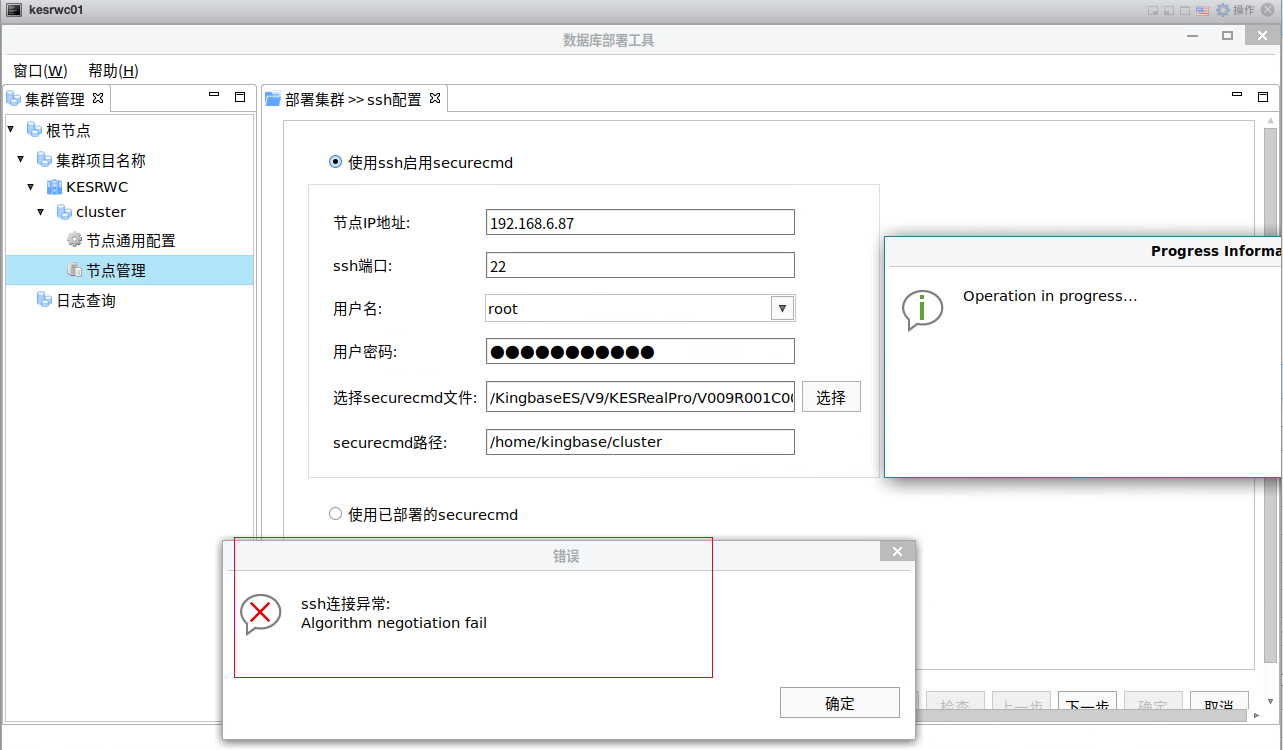
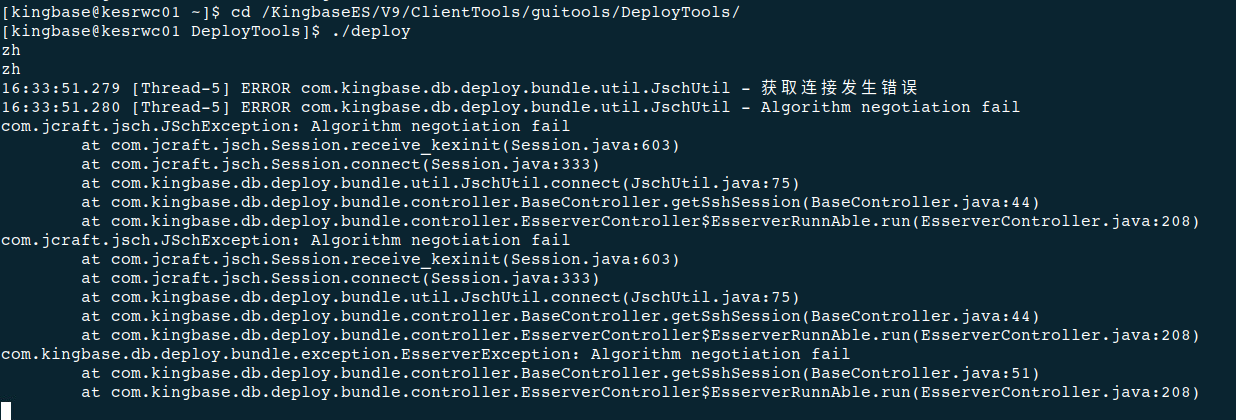
期待官方可以重现解决这个问题。
📚 推荐阅读:DBA 学习之路
如果这篇文章对你有帮助,推荐访问我的 Oracle DBA 系统学习站点,涵盖 100 天完整学习路线:
- 🔧 Oracle 安装部署 · RMAN 备份恢复 · Data Pump 数据迁移
- 🏗️ RAC 高可用 · DataGuard 容灾 · 多租户架构
- 🔍 故障排查 · 升级迁移 · GoldenGate 数据同步
