



openGauss 每日一练第 3 天打卡,巩固 openGauss 数据库和表基本操作基础知识!
学习目标
今天学习前三节课作业,活动详情请参考 每日一练:openGauss数据库在线实训课程。
前面每日一练链接:
openGauss每日一练第1天 | 数据库和表的基本操作(一)
openGauss每日一练第2天 | 数据库和表的基本操作(二)
课后作业 1
1.创建一个表 products
| 字段名 | 数据类型 | 含义 |
|---|---|---|
| product_id | INTEGER | 产品编号 |
| product_name | Char(30) | 产品名 |
| category | Char(20) | 种类 |
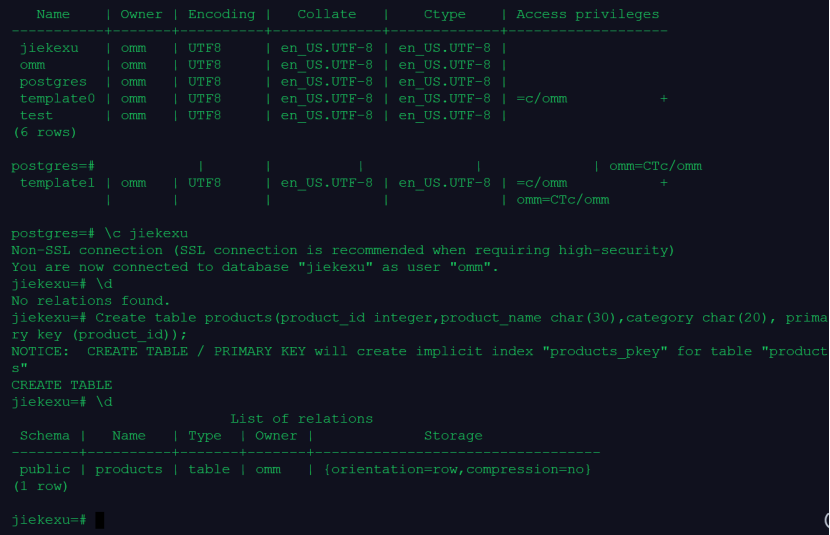
创建数据库和表
\l
create database jiekexu;
-- 查看数据库
\l
-- 切换数据库
\c jiekexu
--查看表
\d
Create table products(product_id integer,product_name char(30),category char(20), primary key (product_id));
-- 查看表
\d
jiekexu-#                           List of relations
 Schema |   Name   | Type  | Owner |             Storage
--------+----------+-------+-------+----------------------------------
 public | products | table | omm   | {orientation=row,compression=no}
(1 row)

-- 查看索引信息
jiekexu-# \di
                      List of relations
 Schema |     Name      | Type  | Owner |  Table   | Storage
--------+---------------+-------+-------+----------+---------
 public | products_pkey | index | omm   | products |
(1 row)

--显示表结构信息,与 Oracle、MySQL 中的 desc 效果差不多。
jiekexu-# \d products
         Table "public.products"
    Column    |     Type      | Modifiers
--------------+---------------+-----------
 product_id   | integer       | not null
 product_name | character(30) |
 category     | character(20) |
Indexes:
    "products_pkey" PRIMARY KEY, btree (product_id) TABLESPACE pg_default
--\d+ 表名,显示比“\d”命令的执行结果更详细的信息,除了前面介绍的信息,还会显示所有与表的列关联的注释,以及表中出现的OID。
jiekexu-# \d+ products
 category     | character(20) |           | extended |              |
Indexes:
    "products_pkey" PRIMARY KEY, btree (product_id) TABLESPACE pg_default
Has OIDs: no
Options: orientation=row, compression=no

jiekexu-#                              Table "public.products"
    Column    |     Type      | Modifiers | Storage  | Stats target | Description
--------------+---------------+-----------+----------+--------------+-------------
 product_id   | integer       | not null  | plain    |              |
 product_name | character(30) |           | extended |              |

jiekexu-#
2.向表中插入数据,采用一次插入一条和多条记录的方式
| product_id | product_name | category |
|---|---|---|
| 1502 | olympus camera | electrncs |
| 1601 | lamaze | toys |
| 1700 | wait interface | Books |
| 1666 | harry potter | toys |
插入一行数据
--查看自动提交参数是否开启,如下为 on 自动提交开启。
jiekexu=# show autocommit;
 autocommit
------------
 on
(1 row)
--自动提交,无需 commit.
insert into products values('1502','olympus camera','electrncs');
插入多行数据
insert into products (product_id,product_name,category) values
('1601','lamaze','toys'),
('1700','wait interface','Books'),
('1666','harry potter','toys');
3.查询表中所有记录及记录数
jiekexu=# select * from products;
 product_id |          product_name          |       category
------------+--------------------------------+----------------------
       1502 | olympus camera                 | electrncs
       1601 | lamaze                         | toys
       1700 | wait interface                 | Books
       1666 | harry potter                   | toys
(4 rows)

jiekexu=# select count(*) from products;
 count
-------
     4
(1 row)

4.查询表中所有category记录,并将查询结果按升序排序
jiekexu=# select category from products order by category;
       category
----------------------
 Books
 electrncs
 toys
 toys
(4 rows)
5.查询表中category为toys的记录
jiekexu=# select * from products where category='toys';
 product_id |          product_name          |       category
------------+--------------------------------+----------------------
       1601 | lamaze                         | toys
       1666 | harry potter                   | toys
(2 rows)
6.删除表 products
drop table products;
===================================================
课后作业 2
1.创建一个表 products
| 字段名 | 数据类型 | 含义 |
|---|---|---|
| product_id | INTEGER | 产品编号 |
| product_name | Char(30) | 产品名 |
| category | Char(20) | 种类 |
创建数据库和表
\l
create database jiekexu;
-- 查看数据库
\l
-- 切换数据库
\c jiekexu
--查看表
\d
Create table products(product_id integer,product_name char(30),category char(20), primary key (product_id));

NOTICE:  CREATE TABLE / PRIMARY KEY will create implicit index "products_pkey" for table "products"
CREATE TABLE
-- 查看表
\d
jiekexu-#                           List of relations
 Schema |   Name   | Type  | Owner |             Storage
--------+----------+-------+-------+----------------------------------
 public | products | table | omm   | {orientation=row,compression=no}
(1 row)
2.向表中插入数据,采用一次插入一条和多条记录的方式
| product_id | product_name | category |
|---|---|---|
| 1502 | olympus camera | electrncs |
| 1601 | lamaze | toys |
| 1700 | wait interface | Books |
| 1666 | harry potter | toys |
插入一行数据
insert into products values('1502','olympus camera','electrncs');
插入多行数据
insert into products  values
('1601','lamaze','toys'),
('1700','wait interface','Books'),
('1666','harry potter','toys');

--自动提交,无需 commit.
3.获取表中一条记录、三条记录和所有记录
jiekexu=# select * from products limit 1;
 product_id |          product_name          |       category
------------+--------------------------------+----------------------
       1601 | lamaze                         | toys
(1 row)

jiekexu=# select * from products limit 3;
 product_id |          product_name          |       category
------------+--------------------------------+----------------------
       1601 | lamaze                         | toys
       1700 | wait interface                 | Books
       1666 | harry potter                   | toys
(3 rows)

jiekexu=# select * from products;
 product_id |          product_name          |       category
------------+--------------------------------+----------------------
       1601 | lamaze                         | toys
       1700 | wait interface                 | Books
       1666 | harry potter                   | toys
       1502 | olympus camera                 | electrncs
(4 rows)
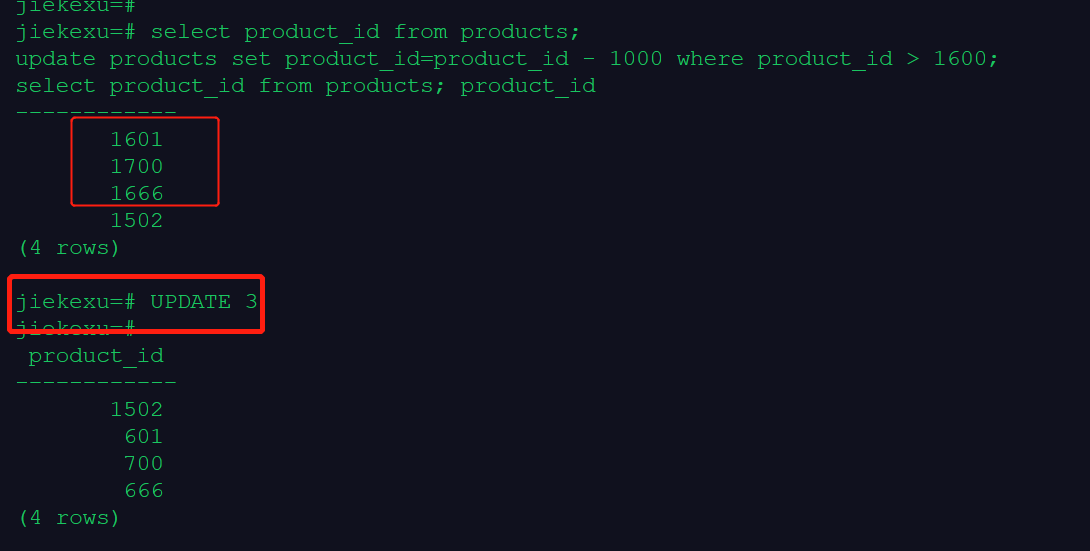
4.将满足product_id > 1600的记录的product_id更新为product_id – 1000,并查看products中所有记录是否更新成功
select product_id from products;
update products set product_id=product_id - 1000 where product_id > 1600;
select product_id from products;
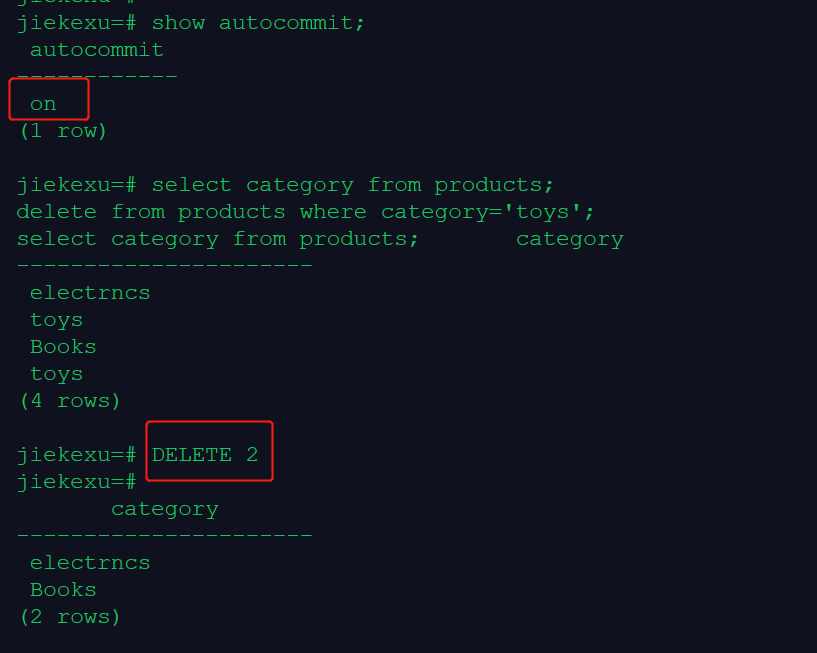
5.删除category为toys的所有记录,并查看products中数据是否删除成功
jiekexu=# show autocommit;
 autocommit
------------
 on
(1 row)

select category from products;
delete from products where category='toys';
select category from products;
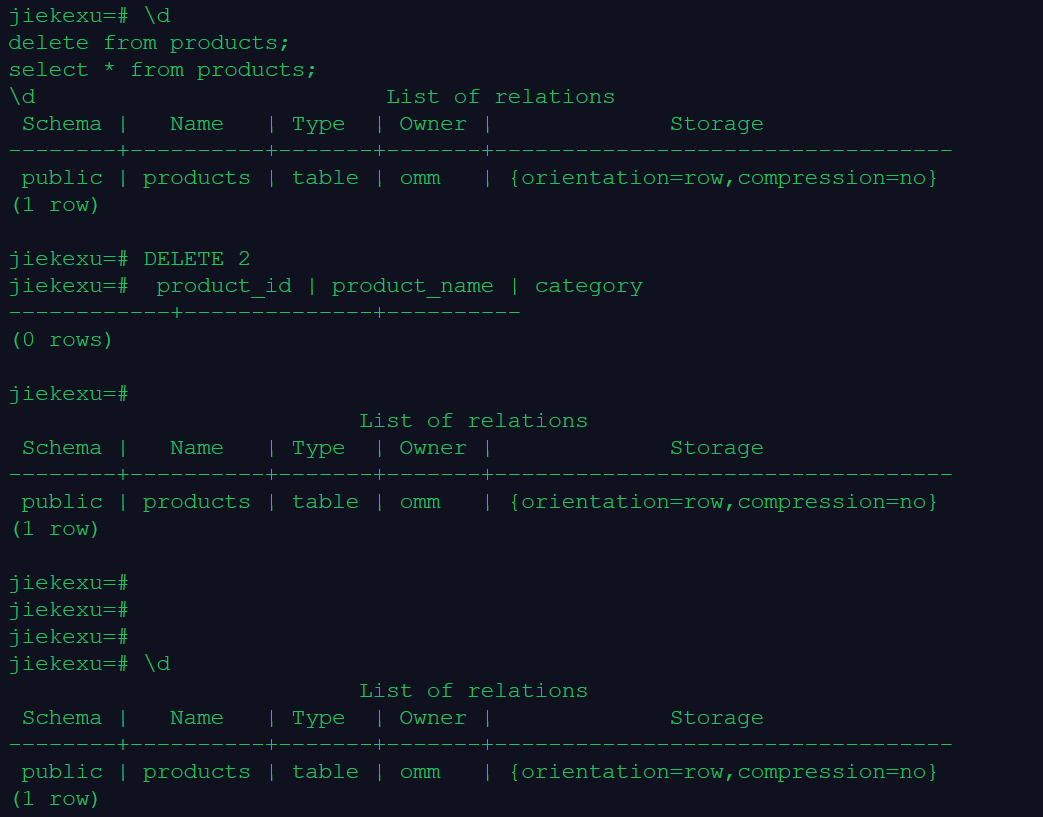
6.删除products中所有数据,并查看数据是否删除成功
\d
delete from products;
select * from products;
\d

 Schema |   Name   | Type  | Owner |             Storage
--------+----------+-------+-------+----------------------------------
 public | products | table | omm   | {orientation=row,compression=no}
(1 row)

jiekexu=# DELETE 2
jiekexu=#  product_id | product_name | category
------------+--------------+----------
(0 rows)

jiekexu=#
                          List of relations
 Schema |   Name   | Type  | Owner |             Storage
--------+----------+-------+-------+----------------------------------
 public | products | table | omm   | {orientation=row,compression=no}
(1 row)
7.删除表 products
drop table products;

jiekexu=# \d
                          List of relations
 Schema |   Name   | Type  | Owner |             Storage
--------+----------+-------+-------+----------------------------------
 public | products | table | omm   | {orientation=row,compression=no}
(1 row)

jiekexu=# select * from products;
 product_id | product_name | category
------------+--------------+----------
(0 rows)

jiekexu=#
jiekexu=# drop table products;
DROP TABLE
jiekexu=# \d
No relations found.
=======================================
课后作业 3
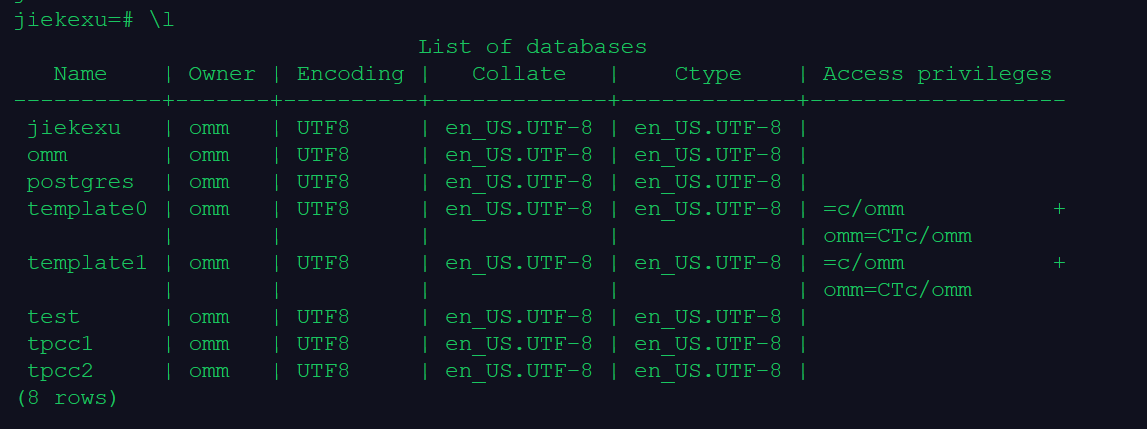
1.分别创建名为 tpcc1 和 tpcc2 的数据库
\l
create database tpcc1;
create database tpcc2;
\l

jiekexu=# \l
                              List of databases
   Name    | Owner | Encoding |   Collate   |    Ctype    | Access privileges
-----------+-------+----------+-------------+-------------+-------------------
 jiekexu   | omm   | UTF8     | en_US.UTF-8 | en_US.UTF-8 |
 omm       | omm   | UTF8     | en_US.UTF-8 | en_US.UTF-8 |
 postgres  | omm   | UTF8     | en_US.UTF-8 | en_US.UTF-8 |
 template0 | omm   | UTF8     | en_US.UTF-8 | en_US.UTF-8 | =c/omm           +
           |       |          |             |             | omm=CTc/omm
 template1 | omm   | UTF8     | en_US.UTF-8 | en_US.UTF-8 | =c/omm           +
           |       |          |             |             | omm=CTc/omm
 test      | omm   | UTF8     | en_US.UTF-8 | en_US.UTF-8 |
 tpcc1     | omm   | UTF8     | en_US.UTF-8 | en_US.UTF-8 |
 tpcc2     | omm   | UTF8     | en_US.UTF-8 | en_US.UTF-8 |
(8 rows)
jiekexu=# CREATE DATABASE music;
CREATE DATABASE
jiekexu=#
jiekexu=# \l
                              List of databases
   Name    | Owner | Encoding |   Collate   |    Ctype    | Access privileges
-----------+-------+----------+-------------+-------------+-------------------
 jiekexu   | omm   | UTF8     | en_US.UTF-8 | en_US.UTF-8 |
 music     | omm   | UTF8     | en_US.UTF-8 | en_US.UTF-8 |
 omm       | omm   | UTF8     | en_US.UTF-8 | en_US.UTF-8 |
 postgres  | omm   | UTF8     | en_US.UTF-8 | en_US.UTF-8 |
 template0 | omm   | UTF8     | en_US.UTF-8 | en_US.UTF-8 | =c/omm           +
           |       |          |             |             | omm=CTc/omm
 template1 | omm   | UTF8     | en_US.UTF-8 | en_US.UTF-8 | =c/omm           +
           |       |          |             |             | omm=CTc/omm
 test      | omm   | UTF8     | en_US.UTF-8 | en_US.UTF-8 |
(7 rows)

jiekexu=# SELECT DATNAME,DATCONNLIMIT FROM PG_DATABASE WHERE DATNAME='music';
 datname | datconnlimit
---------+--------------
 music   |           -1
(1 row)

jiekexu=# ALTER DATABASE music CONNECTION LIMIT= 10;
ALTER DATABASE
jiekexu=# SELECT DATNAME,DATCONNLIMIT FROM PG_DATABASE WHERE DATNAME='music';
jiekexu=#  datname | datconnlimit
---------+--------------
 music   |           10
(1 row)
2.将 tpcc1 数据库重命名为 tpcc10
alter database ptcc1 rename to ptcc10;

jiekexu=# alter database tpcc1 rename to tpcc10;
ALTER DATABASE
jiekexu=# \l
                              List of databases
   Name    | Owner | Encoding |   Collate   |    Ctype    | Access privileges
-----------+-------+----------+-------------+-------------+-------------------
 jiekexu   | omm   | UTF8     | en_US.UTF-8 | en_US.UTF-8 |
 omm       | omm   | UTF8     | en_US.UTF-8 | en_US.UTF-8 |
 postgres  | omm   | UTF8     | en_US.UTF-8 | en_US.UTF-8 |
 template0 | omm   | UTF8     | en_US.UTF-8 | en_US.UTF-8 | =c/omm           +
           |       |          |             |             | omm=CTc/omm
 template1 | omm   | UTF8     | en_US.UTF-8 | en_US.UTF-8 | =c/omm           +
           |       |          |             |             | omm=CTc/omm
 test      | omm   | UTF8     | en_US.UTF-8 | en_US.UTF-8 |
 tpcc10    | omm   | UTF8     | en_US.UTF-8 | en_US.UTF-8 |
 tpcc2     | omm   | UTF8     | en_US.UTF-8 | en_US.UTF-8 |
(8 rows)
3.分别使用\l和\l+两个元命令查看数据库信息
jiekexu=# \l
                              List of databases
   Name    | Owner | Encoding |   Collate   |    Ctype    | Access privileges
-----------+-------+----------+-------------+-------------+-------------------
 jiekexu   | omm   | UTF8     | en_US.UTF-8 | en_US.UTF-8 |
 omm       | omm   | UTF8     | en_US.UTF-8 | en_US.UTF-8 |
 postgres  | omm   | UTF8     | en_US.UTF-8 | en_US.UTF-8 |
 template0 | omm   | UTF8     | en_US.UTF-8 | en_US.UTF-8 | =c/omm           +
           |       |          |             |             | omm=CTc/omm
 template1 | omm   | UTF8     | en_US.UTF-8 | en_US.UTF-8 | =c/omm           +
           |       |          |             |             | omm=CTc/omm
 test      | omm   | UTF8     | en_US.UTF-8 | en_US.UTF-8 |
 tpcc10    | omm   | UTF8     | en_US.UTF-8 | en_US.UTF-8 |
 tpcc2     | omm   | UTF8     | en_US.UTF-8 | en_US.UTF-8 |
(8 rows)

jiekexu=# \l+
                                                               List of databases
   Name    | Owner | Encoding |   Collate   |    Ctype    | Access privileges | Size  | Tablespac
e |                Description
-----------+-------+----------+-------------+-------------+-------------------+-------+----------
--+--------------------------------------------
 jiekexu   | omm   | UTF8     | en_US.UTF-8 | en_US.UTF-8 |                   | 10 MB | pg_defaul
t |
 omm       | omm   | UTF8     | en_US.UTF-8 | en_US.UTF-8 |                   | 10 MB | pg_defaul
t |
 postgres  | omm   | UTF8     | en_US.UTF-8 | en_US.UTF-8 |                   | 10 MB | pg_defaul
t | default administrative connection database
 template0 | omm   | UTF8     | en_US.UTF-8 | en_US.UTF-8 | =c/omm           +| 10 MB | pg_defaul
t | default template for new databases
t | unmodifiable empty database
           |       |          |             |             | omm=CTc/omm       |       |
  |
 test      | omm   | UTF8     | en_US.UTF-8 | en_US.UTF-8 |                   | 10 MB | pg_defaul
t |
           |       |          |             |             | omm=CTc/omm       |       |
  |
 template1 | omm   | UTF8     | en_US.UTF-8 | en_US.UTF-8 | =c/omm           +| 10 MB | pg_defaul
 tpcc10    | omm   | UTF8     | en_US.UTF-8 | en_US.UTF-8 |                   | 10 MB | pg_defaul
t |
 tpcc2     | omm   | UTF8     | en_US.UTF-8 | en_US.UTF-8 |                   | 10 MB | pg_defaul
t |
(8 rows)
4.在数据库 tpcc2 中创建 customer 表,字段自定义
\c tpcc2
\d
create table customer(id int);
\d

jiekexu=# \c tpcc2
\d
create table customer(id int);
\dNon-SSL connection (SSL connection is recommended when requiring high-security)
You are now connected to database "tpcc2" as user "omm".
tpcc2=# No relations found.
tpcc2=# CREATE TABLE
tpcc2=#
                          List of relations
 Schema |   Name   | Type  | Owner |             Storage
--------+----------+-------+-------+----------------------------------
 public | customer | table | omm   | {orientation=row,compression=no}
(1 row)
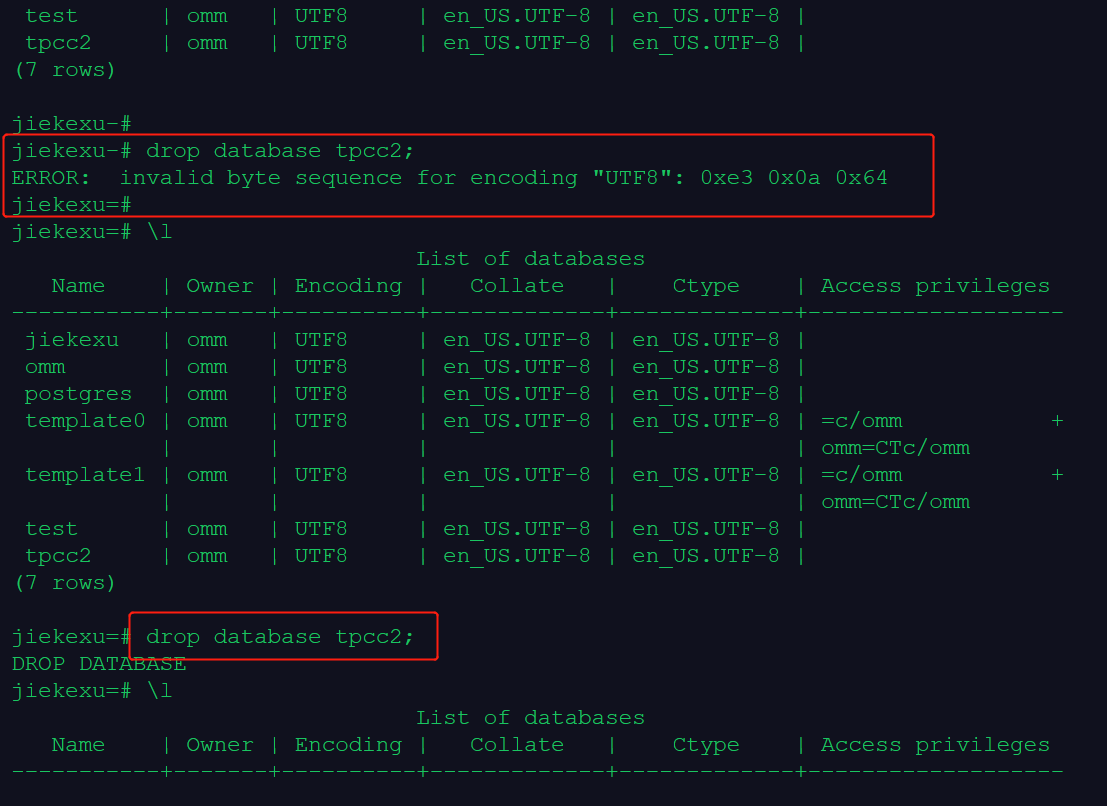
5.删除新创建的数据库
\l
drop database tpcc2;
drop database tpcc10;
\l

注意:tpcc2=# ERROR:  cannot drop the currently open database 不能够删除当前连接的数据库,需要切换到其他库才可删除此库。
6.退出gsql程序
\q 或者 Ctrl + d 退出。
欧耶,前三课作业实操练习完成啦!
最后修改时间:2021-12-06 12:58:19
「喜欢这篇文章,您的关注和赞赏是给作者最好的鼓励」
关注作者
【版权声明】本文为墨天轮用户原创内容,转载时必须标注文章的来源(墨天轮),文章链接,文章作者等基本信息,否则作者和墨天轮有权追究责任。如果您发现墨天轮中有涉嫌抄袭或者侵权的内容,欢迎发送邮件至:contact@modb.pro进行举报,并提供相关证据,一经查实,墨天轮将立刻删除相关内容。
