



手把手教你在word中接入deepseek,秒生文档材料 得到很多小伙伴的关注,但因为deepseek官网的API停止充值,2025年AI加持不加班的希望瞬间落空。近期天翼云息壤,新老用户均可免费体验2500万Tokens,限时两周。本文带你将api接口调整到天翼云,体现AI带来的生产力。
01
天翼云账号注册
打开官网https://www.ctyun.cn/,点击右上角免费注册
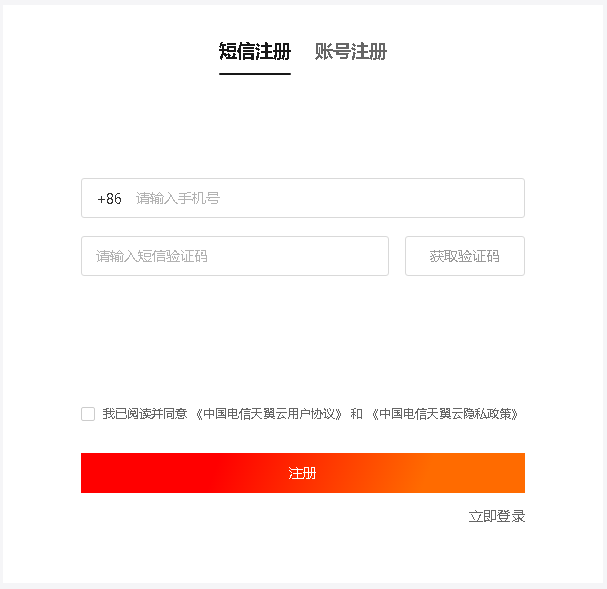
注册登录后,点击首页的如下图的立即体验,或输入网址https://huiju.ctyun.cn/experienceCenter/

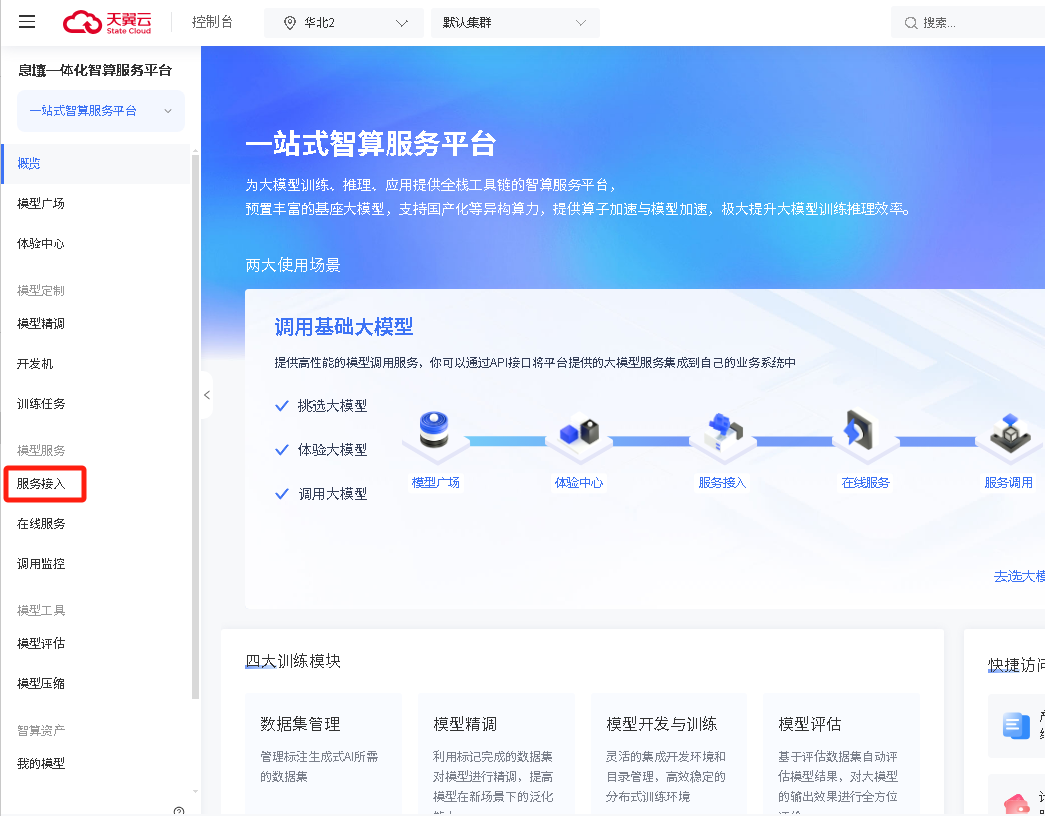
进入如下界面,点击左侧菜单栏的服务接入
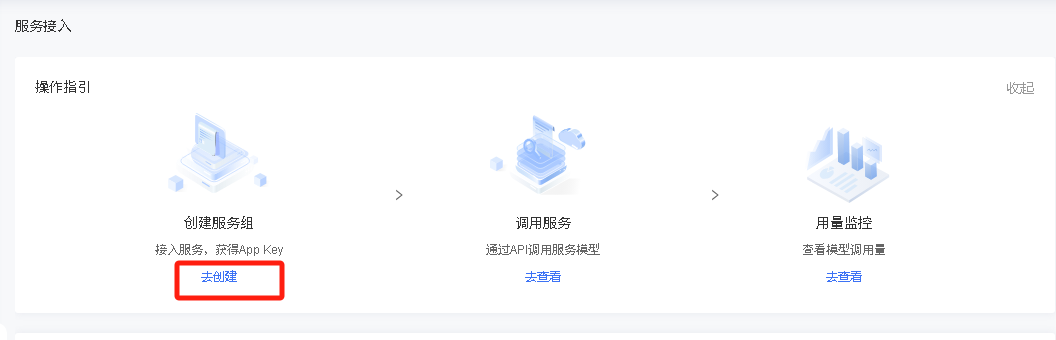
显示如下界面,点击去创建进行服务组创建
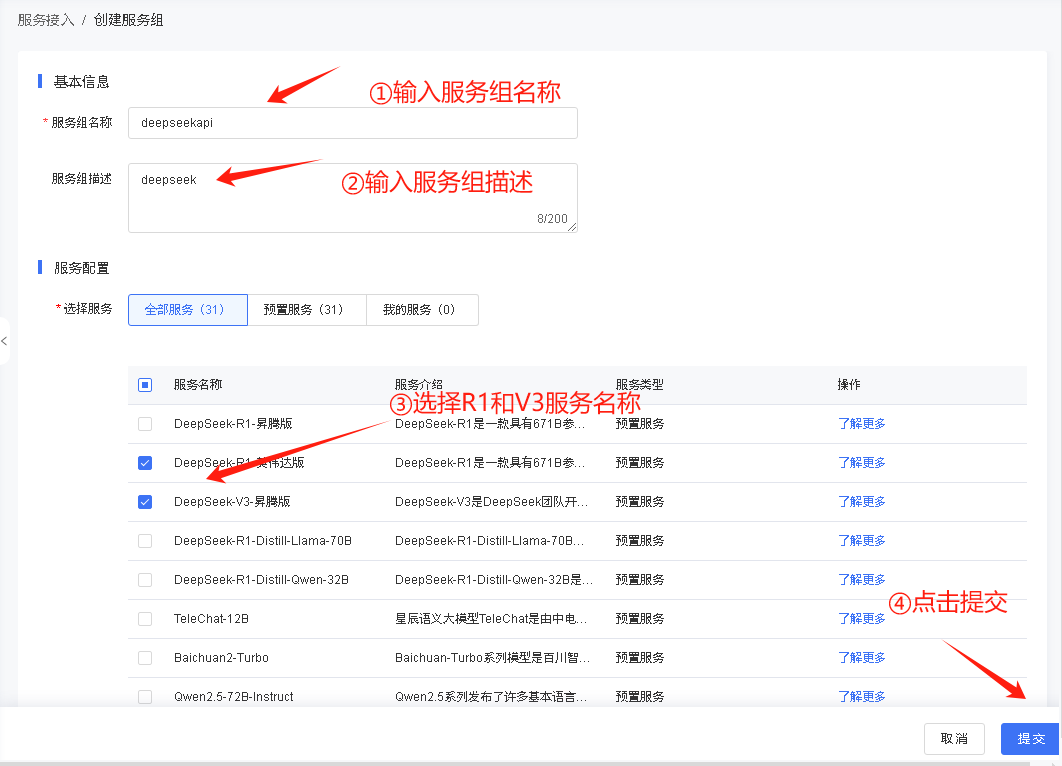
根据下图进行填写,填写完成后提交
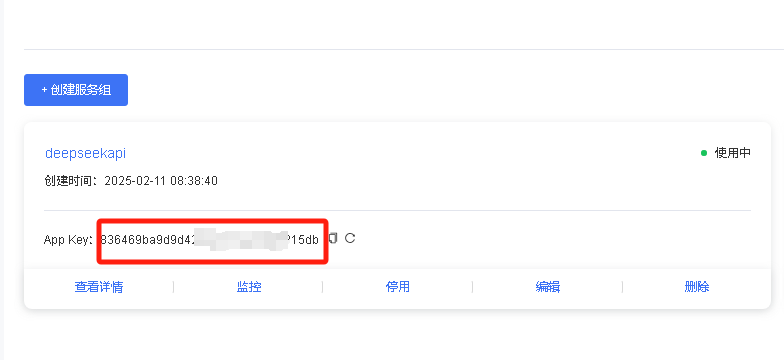
提交后下方显示创建信息,如图所示,获取apikey
02
修改VBA脚本
因为地址和模型发生变化,我们只需要将请求地址和模型名修改一下,完整代码如下,注意需要将代码中你的apikey更换为天翼云创建服务的App Key
Function CallDeepSeekAPI(api_key As String, inputText As String)Dim API As StringDim SendTxt As StringDim Http As ObjectDim status_code As IntegerDim response As StringAPI = "https://wishub-x1.ctyun.cn/v1/chat/completions"SendTxt = "{""model"": ""9dc913a037774fc0b248376905c85da5"", ""messages"": [{""role"":""system"", ""content"":""你是word文案助手""}, {""role"":""user"", ""content"":""" & inputText & """}], ""stream"": false}"Set Http = CreateObject("MSXML2.XMLHTTP")With Http.Open "POST", API, False.setRequestHeader "Content-Type", "application/json".setRequestHeader "Authorization", "Bearer " & api_key.send SendTxtstatus_code = .Statusresponse = .responseTextEnd With' 弹出窗口显示 API 响应(调试用)' MsgBox "API Response: " & response, vbInformation, "Debug Info"If status_code = 200 ThenCallDeepSeekAPI = responseElseCallDeepSeekAPI = "Error: " & status_code & " - " & responseEnd IfSet Http = NothingEnd FunctionFunction CallDeepSeekRAPI(api_key As String, inputText As String)Dim API As StringDim SendTxt As StringDim Http As ObjectDim status_code As IntegerDim response As StringAPI = "https://wishub-x1.ctyun.cn/v1/chat/completions"SendTxt = "{""model"": ""7ba7726dad4c4ea4ab7f39c7741aea68"", ""messages"": [{""role"":""system"", ""content"":""你是word文案助手""}, {""role"":""user"", ""content"":""" & inputText & """}], ""stream"": false}"Set Http = CreateObject("MSXML2.XMLHTTP")With Http.Open "POST", API, False.setRequestHeader "Content-Type", "application/json".setRequestHeader "Authorization", "Bearer " & api_key.send SendTxtstatus_code = .Statusresponse = .responseTextEnd With' 弹出窗口显示 API 响应(调试用)' MsgBox "API Response: " & response, vbInformation, "Debug Info"If status_code = 200 ThenCallDeepSeekRAPI = responseElseCallDeepSeekRAPI = "Error: " & status_code & " - " & responseEnd IfSet Http = NothingEnd FunctionSub DeepSeekV3()Dim api_key As StringDim inputText As StringDim response As StringDim regex As ObjectDim matches As ObjectDim originalSelection As Objectapi_key = "你的apikey"If api_key = "" ThenMsgBox "Please enter the API key."Exit SubElseIf Selection.Type <> wdSelectionNormal ThenMsgBox "请选择文本."Exit SubEnd If' 保存原始选中的文本Set originalSelection = Selection.Range.DuplicateinputText = Replace(Replace(Replace(Replace(Replace(Selection.Text, "\", "\\"), vbCrLf, ""), vbCr, ""), vbLf, ""), Chr(34), "\""")response = CallDeepSeekAPI(api_key, inputText)If Left(response, 5) <> "Error" ThenSet regex = CreateObject("VBScript.RegExp")With regex.Global = True.MultiLine = True.IgnoreCase = False.Pattern = """content"":""(.*?)"""End WithSet matches = regex.Execute(response)If matches.Count > 0 Thenresponse = matches(0).SubMatches(0)response = Replace(Replace(response, """", Chr(34)), """", Chr(34))response = Replace(response, "\n", vbCrLf)response = Replace(response, "\n", vbCrLf)response = Replace(response, "*", "")response = Replace(response, "#", "")' 取消选中原始文本Selection.Collapse Direction:=wdCollapseEnd' 将内容插入到选中文字的下一行Selection.TypeParagraph ' 插入新行Selection.TypeText Text:=response' 将光标移回原来选中文本的末尾originalSelection.SelectElseMsgBox "Failed to parse API response.", vbExclamationEnd IfElseMsgBox response, vbCriticalEnd IfEnd SubSub DeepSeekR()Dim api_key As StringDim inputText As StringDim response As StringDim regex As ObjectDim matches As ObjectDim originalSelection As Objectapi_key = "你的apikey"If api_key = "" ThenMsgBox "Please enter the API key."Exit SubElseIf Selection.Type <> wdSelectionNormal ThenMsgBox "请选择文本."Exit SubEnd If' 保存原始选中的文本Set originalSelection = Selection.Range.DuplicateinputText = Replace(Replace(Replace(Replace(Replace(Selection.Text, "\", "\\"), vbCrLf, ""), vbCr, ""), vbLf, ""), Chr(34), "\""")response = CallDeepSeekRAPI(api_key, inputText)If Left(response, 5) <> "Error" ThenSet regex = CreateObject("VBScript.RegExp")With regex.Global = True.MultiLine = True.IgnoreCase = False.Pattern = """content"":""(.*?)"""End WithSet matches = regex.Execute(response)If matches.Count > 0 Thenresponse = matches(0).SubMatches(0)response = Replace(Replace(response, """", Chr(34)), """", Chr(34))response = Replace(response, "\n", vbCrLf)response = Replace(response, "*", "")response = Replace(response, "#", "")' 取消选中原始文本Selection.Collapse Direction:=wdCollapseEnd' 将内容插入到选中文字的下一行Selection.TypeParagraph ' 插入新行Selection.TypeText Text:=response' 将光标移回原来选中文本的末尾originalSelection.SelectElseMsgBox "Failed to parse API response.", vbExclamationEnd IfElseMsgBox response, vbCriticalEnd IfEnd Sub
03
写文档的生产力来了
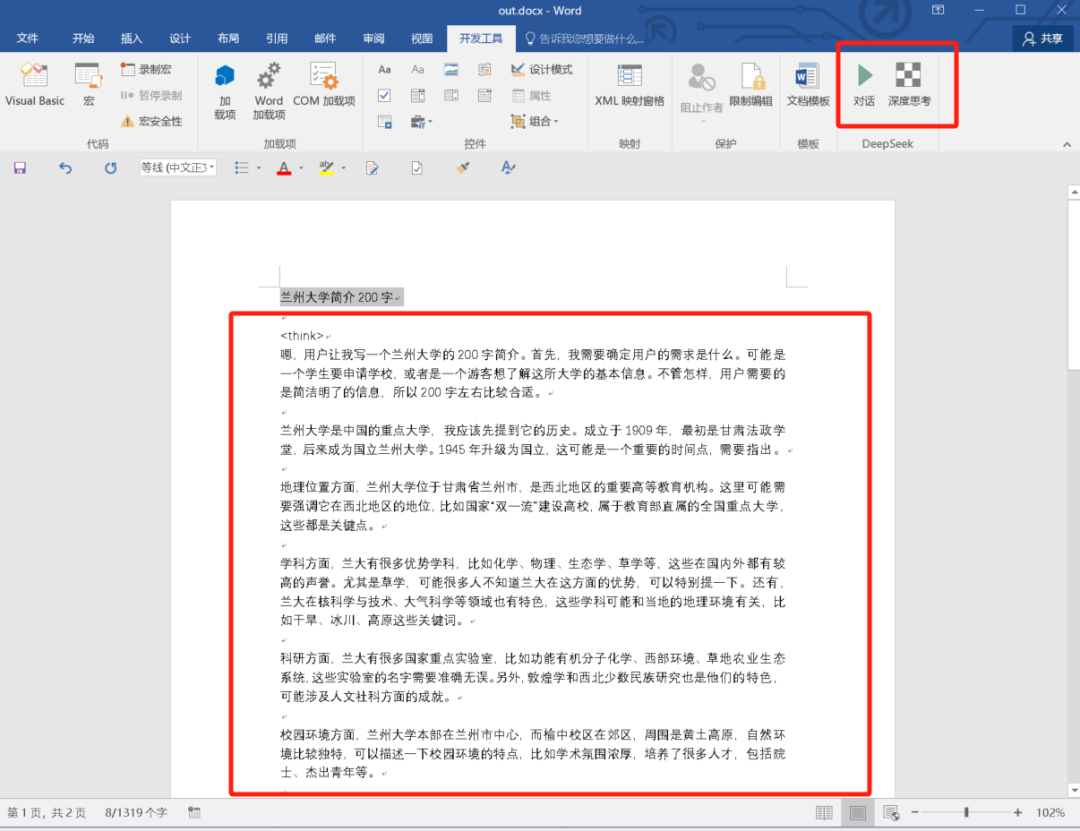
选择要扩展的内容,点击对话调用deepseek-v3,点击深度思考调用deepseek-r1
如果你在配置过程中有任何问题,可扫码加群,和小伙伴一起探讨,如果扫码过期,也可以通过公众号加我,我拉你入群。

文章转载自数据库平台优化,如果涉嫌侵权,请发送邮件至:contact@modb.pro进行举报,并提供相关证据,一经查实,墨天轮将立刻删除相关内容。
