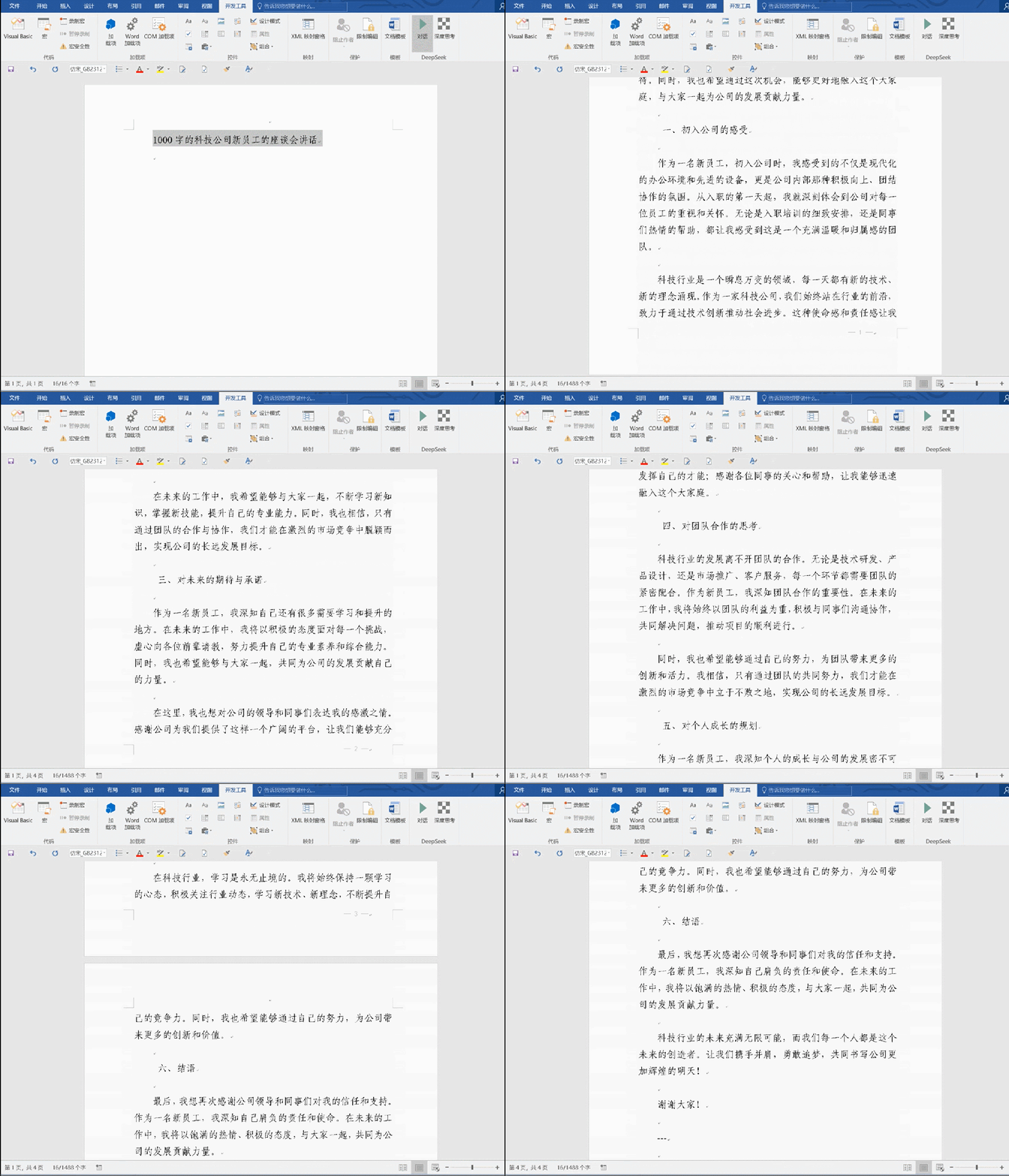
将DeepSeek接入Word,实现无需切换即可进行材料续写的功能,具有显著的价值和广泛的应用前景。以下是其核心价值的详细描述:
1. 提升工作效率
在文档编辑过程中,用户无需频繁切换应用或界面,直接在Word中调用DeepSeek进行内容续写,极大减少了操作步骤和时间成本。无论是撰写报告、论文,还是创作文案,用户都可以专注于内容创作,而无需中断思路去处理技术细节。
2. 无缝衔接创作流程
DeepSeek接入Word后,用户可以在同一界面中完成从构思到成稿的全过程。AI能够根据上下文自动生成连贯的内容,帮助用户快速填补空白段落或扩展思路。这种无缝衔接的创作体验,尤其适合需要高效输出的场景,如新闻写作、商业计划书撰写等。
3. 智能辅助与内容优化
DeepSeek不仅能续写材料,还能提供语法修正、风格优化、逻辑完善等智能辅助功能。用户可以在Word中实时获得AI的建议,提升文档质量。这种智能化的辅助工具,特别适合非母语写作者或需要高精度表达的专业人士。
4. 降低创作门槛
对于不擅长写作或缺乏灵感的用户,DeepSeek的接入可以显著降低创作门槛。AI能够根据用户输入的关键词或主题,自动生成高质量的内容草稿,帮助用户快速启动创作。这种功能在教育、营销等领域尤其有价值。
5. 个性化定制与学习能力
DeepSeek可以根据用户的使用习惯和写作风格进行个性化定制,逐渐学习并适应用户的偏好。在Word中,这种能力可以体现为更精准的内容续写和更符合用户需求的建议,进一步提升用户体验。
6. 多场景适用性
无论是学术研究、商业写作,还是日常办公,DeepSeek接入Word都能满足多样化的需求。例如,研究人员可以利用AI快速生成文献综述,企业员工可以高效完成合同或提案撰写,学生则可以借助AI优化论文结构。
7. 数据安全与隐私保护
在Word中直接调用DeepSeek,避免了将敏感文档上传至第三方平台的风险,确保了数据的安全性和隐私性。这对于处理机密文件的企业或个人用户尤为重要。
8. 未来扩展潜力
随着AI技术的不断发展,DeepSeek在Word中的应用还可以进一步扩展。例如,支持多语言翻译、自动生成图表、智能排版等功能,为用户提供更全面的文档处理解决方案。
总之,将DeepSeek接入Word,不仅提升了文档编辑的效率和体验,还为用户提供了智能化、个性化的创作支持。这种创新整合,将在未来的办公和学习场景中发挥越来越重要的作用。
01
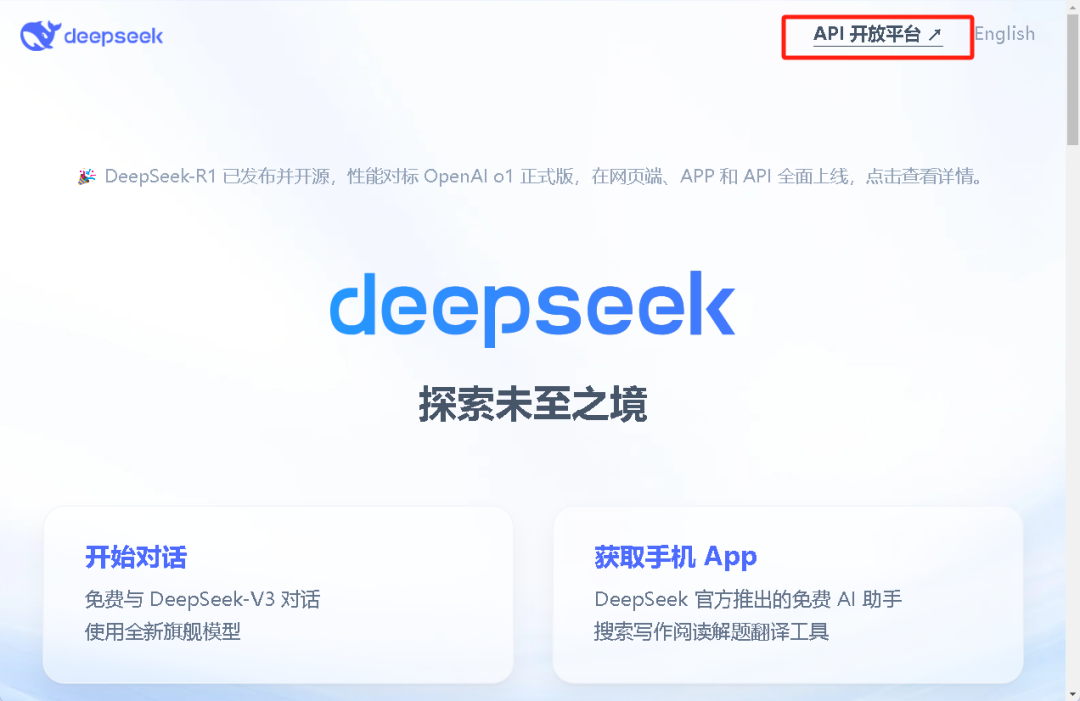
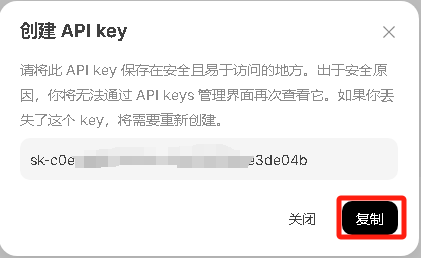
注册deepseek获取API_KEY
1.登录www.deepseek.com,注册登录后点击左上角"API开放平台"
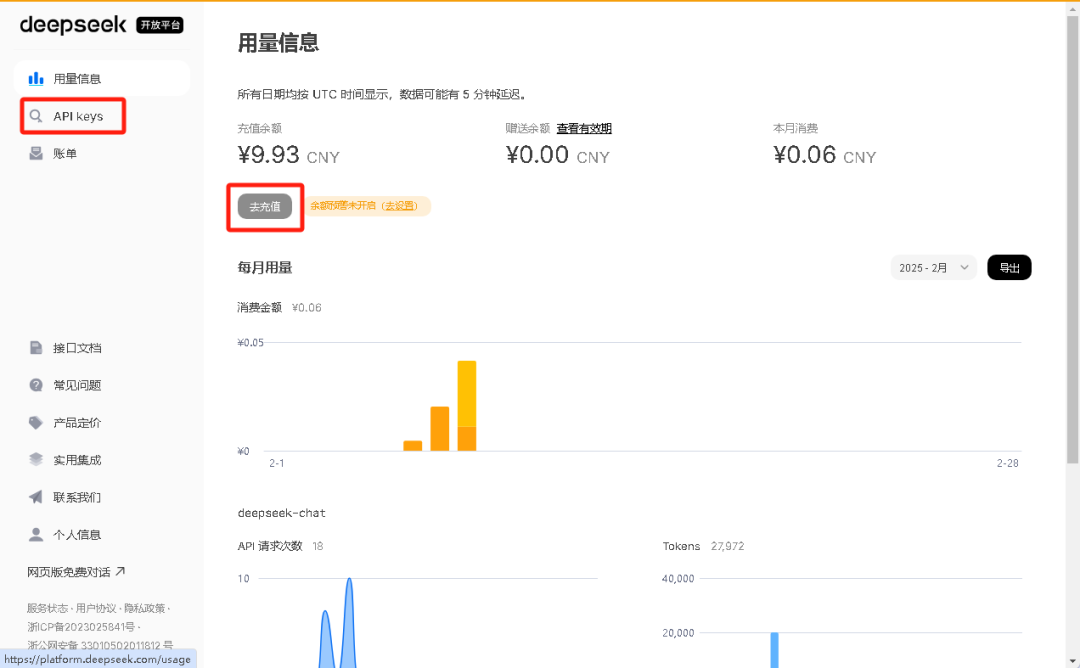
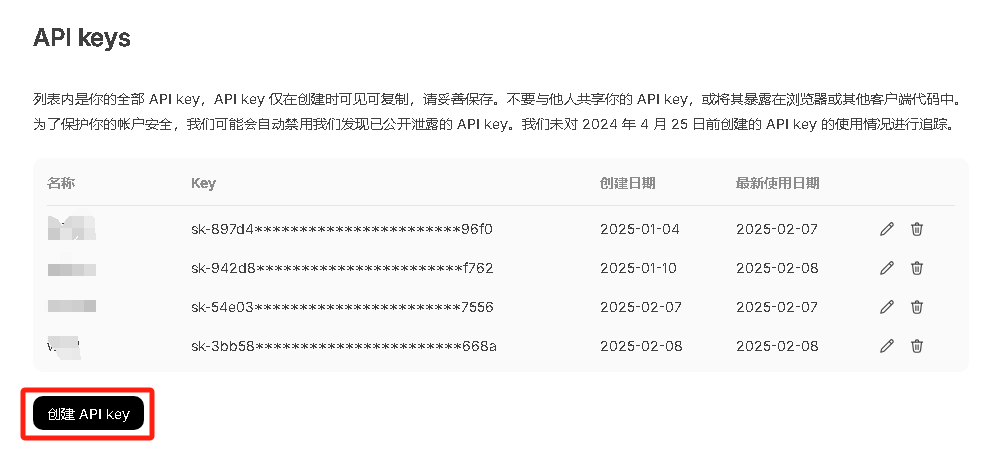
02
在word中添加deepseek的VBA脚本
1.在开发工具中天街vb脚本,如果没有开发工具,可在文件-选项-自定义功能区中设置

2.在Normal的模块下右键新增模块,输入代码后保存
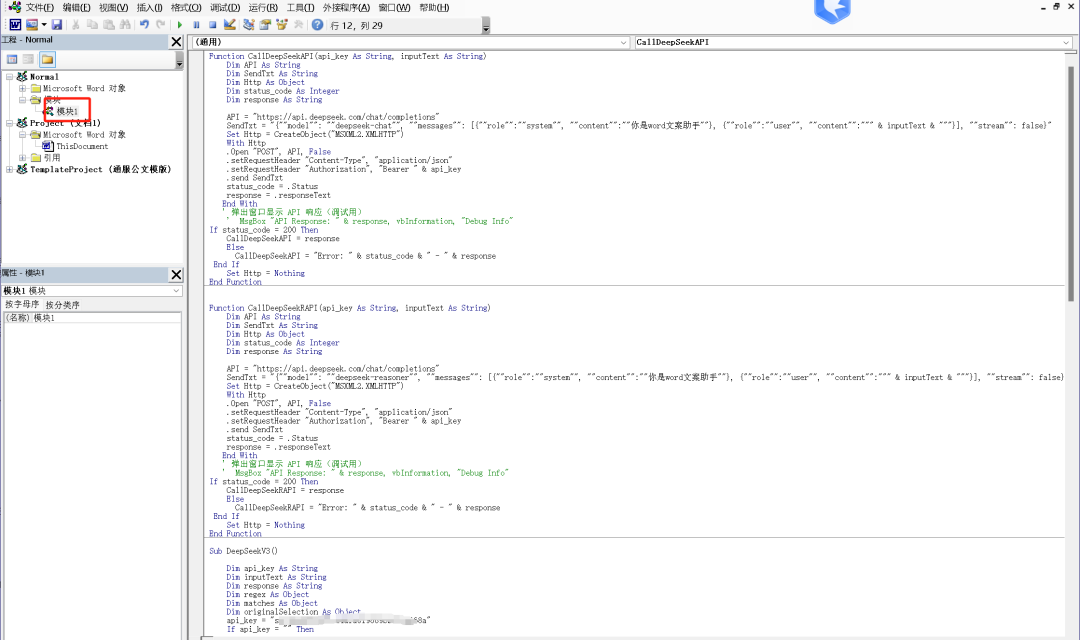
输入代码如下,将前面保存的Key替换代码中的"你的APIKEY"
Function CallDeepSeekAPI(api_key As String, inputText As String)Dim API As StringDim SendTxt As StringDim Http As ObjectDim status_code As IntegerDim response As StringAPI = "https://api.deepseek.com/chat/completions"SendTxt = "{""model"": ""deepseek-chat"", ""messages"": [{""role"":""system"", ""content"":""你是word文案助手""}, {""role"":""user"", ""content"":""" & inputText & """}], ""stream"": false}"Set Http = CreateObject("MSXML2.XMLHTTP")With Http.Open "POST", API, False.setRequestHeader "Content-Type", "application/json".setRequestHeader "Authorization", "Bearer " & api_key.send SendTxtstatus_code = .Statusresponse = .responseTextEnd WithIf status_code = 200 ThenCallDeepSeekAPI = responseElseCallDeepSeekAPI = "Error: " & status_code & " - " & responseEnd IfSet Http = NothingEnd FunctionFunction CallDeepSeekRAPI(api_key As String, inputText As String)Dim API As StringDim SendTxt As StringDim Http As ObjectDim status_code As IntegerDim response As StringAPI = "https://api.deepseek.com/chat/completions"SendTxt = "{""model"": ""deepseek-reasoner"", ""messages"": [{""role"":""system"", ""content"":""你是word文案助手""}, {""role"":""user"", ""content"":""" & inputText & """}], ""stream"": false}"Set Http = CreateObject("MSXML2.XMLHTTP")With Http.Open "POST", API, False.setRequestHeader "Content-Type", "application/json".setRequestHeader "Authorization", "Bearer " & api_key.send SendTxtstatus_code = .Statusresponse = .responseTextEnd WithIf status_code = 200 ThenCallDeepSeekRAPI = responseElseCallDeepSeekRAPI = "Error: " & status_code & " - " & responseEnd IfSet Http = NothingEnd FunctionSub DeepSeekV3()Dim api_key As StringDim inputText As StringDim response As StringDim regex As ObjectDim matches As ObjectDim originalSelection As Objectapi_key = "你的APIKEY"If api_key = "" ThenMsgBox "Please enter the API key."Exit SubElseIf Selection.Type <> wdSelectionNormal ThenMsgBox "请选择文本."Exit SubEnd If' 保存原始选中的文本Set originalSelection = Selection.Range.DuplicateinputText = Replace(Replace(Replace(Replace(Replace(Selection.Text, "\", "\\"), vbCrLf, ""), vbCr, ""), vbLf, ""), Chr(34), "\""")response = CallDeepSeekAPI(api_key, inputText)If Left(response, 5) <> "Error" ThenSet regex = CreateObject("VBScript.RegExp")With regex.Global = True.MultiLine = True.IgnoreCase = False.Pattern = """content"":""(.*?)"""End WithSet matches = regex.Execute(response)If matches.Count > 0 Thenresponse = matches(0).SubMatches(0)response = Replace(Replace(response, """", Chr(34)), """", Chr(34))response = Replace(response, "\n", vbCrLf)response = Replace(response, "\n", vbCrLf)response = Replace(response, "*", "")response = Replace(response, "#", "")' 取消选中原始文本Selection.Collapse Direction:=wdCollapseEnd' 将内容插入到选中文字的下一行Selection.TypeParagraph ' 插入新行Selection.TypeText Text:=response' 将光标移回原来选中文本的末尾originalSelection.SelectElseMsgBox "Failed to parse API response.", vbExclamationEnd IfElseMsgBox response, vbCriticalEnd IfEnd SubSub DeepSeekR()Dim api_key As StringDim inputText As StringDim response As StringDim regex As ObjectDim matches As ObjectDim originalSelection As Objectapi_key = "你的APIKEY"If api_key = "" ThenMsgBox "Please enter the API key."Exit SubElseIf Selection.Type <> wdSelectionNormal ThenMsgBox "请选择文本."Exit SubEnd If' 保存原始选中的文本Set originalSelection = Selection.Range.DuplicateinputText = Replace(Replace(Replace(Replace(Replace(Selection.Text, "\", "\\"), vbCrLf, ""), vbCr, ""), vbLf, ""), Chr(34), "\""")response = CallDeepSeekRAPI(api_key, inputText)If Left(response, 5) <> "Error" ThenSet regex = CreateObject("VBScript.RegExp")With regex.Global = True.MultiLine = True.IgnoreCase = False.Pattern = """content"":""(.*?)"""End WithSet matches = regex.Execute(response)If matches.Count > 0 Thenresponse = matches(0).SubMatches(0)response = Replace(Replace(response, """", Chr(34)), """", Chr(34))response = Replace(response, "\n", vbCrLf)response = Replace(response, "*", "")response = Replace(response, "#", "")' 取消选中原始文本Selection.Collapse Direction:=wdCollapseEnd' 将内容插入到选中文字的下一行Selection.TypeParagraph ' 插入新行Selection.TypeText Text:=response' 将光标移回原来选中文本的末尾originalSelection.SelectElseMsgBox "Failed to parse API response.", vbExclamationEnd IfElseMsgBox response, vbCriticalEnd IfEnd Sub
03
生成功能配置
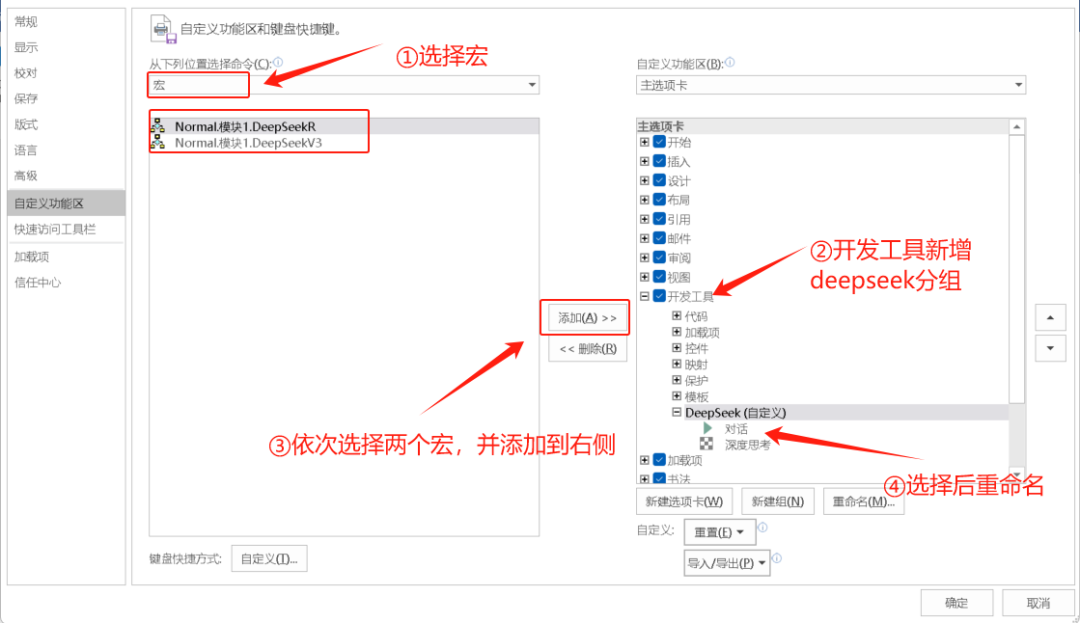
1.打开菜单文件-选项-自定义功能区,如下图进行设置
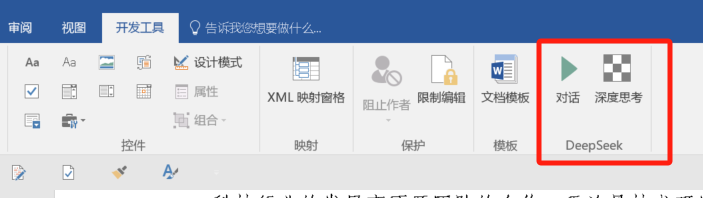
 设置完成后,菜单如图所示
04
生成功能测试
1.新建一个文档,输入如下内容,选择文字后,点击"对话"
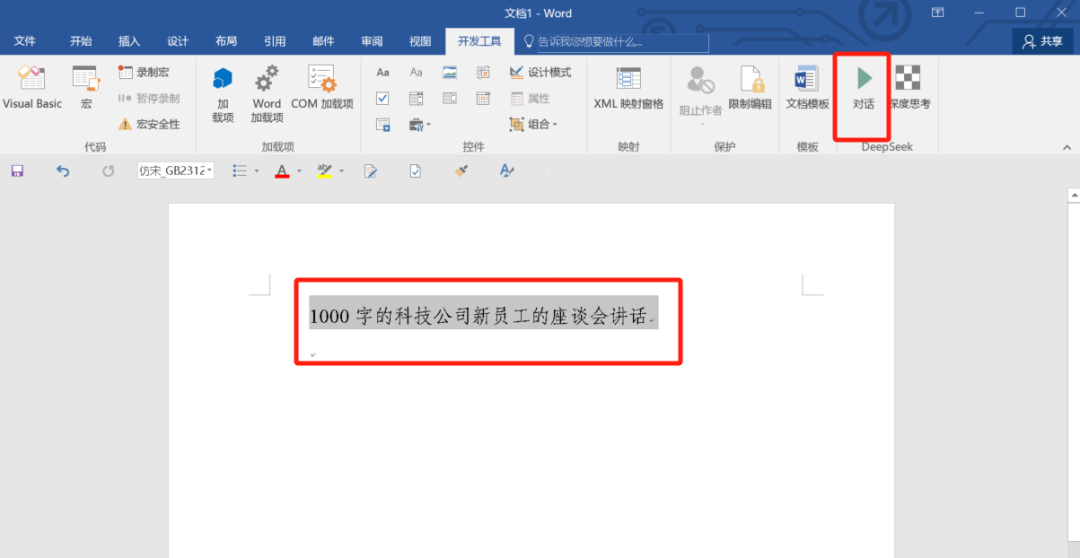
2.效果如图