




大家好,我是一安~
前言
需求详细说明:
一、项目启动与页面展示
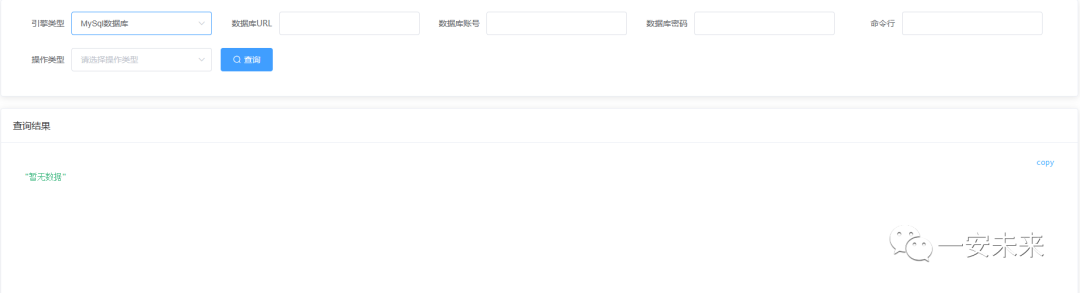
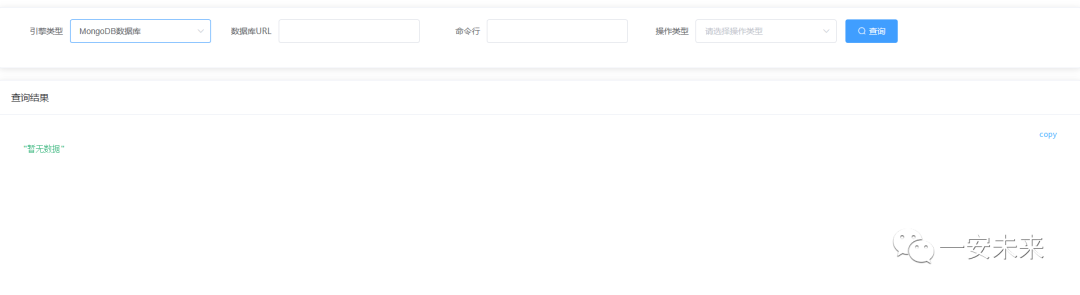
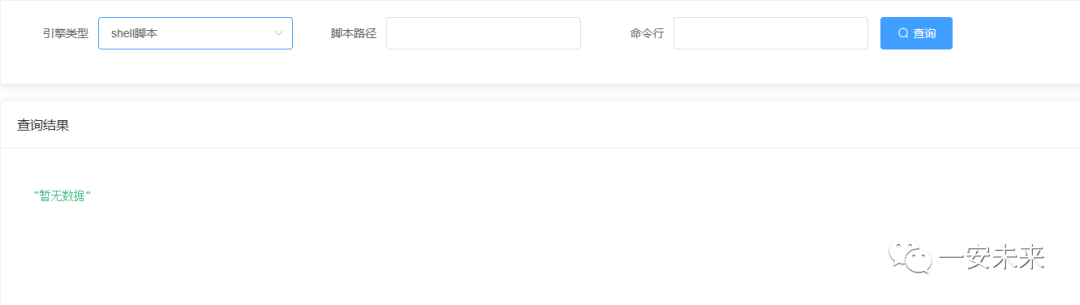
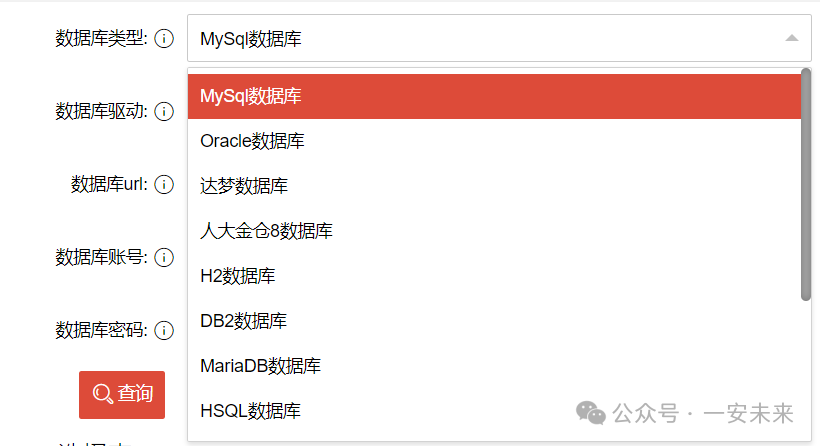
项目启动后,用户应能看到一个基础页面。 在页面中,用户应能选择引擎类型,包括: mysql、oracle、mongo、shell
。
二、引擎选择与展示
当用户选择 mysql
或oracle
作为引擎时:页面应展示以下输入项:数据库地址、数据库账号、数据库密码、命令行和操作类型。 当用户选择 mongo
作为引擎时:页面应只展示以下输入项:数据库地址、命令行和操作类型。 当用户选择 shell
作为引擎时:页面应展示以下输入项:脚本路径、命令行。
三、输入项处理与默认值
如果用户未填写数据库地址、数据库账号、数据库密码,则应使用默认数据库信息。 如果用户填写了数据库地址、数据库账号、数据库密码,则应动态切换至用户输入的数据库信息。
四、查询功能
用户在填写完所有必要信息后,可以点击“查询”按钮。 点击“查询”后,系统应根据用户选择的引擎类型、数据库信息、命令行和操作类型进行相应的查询。
以上主要功能点是如何实现可以动态的注入新的数据源
正文
测试页面设计比较清晰简洁,易于理解和使用:
原理
Mysql
或Oracle
数据源切换
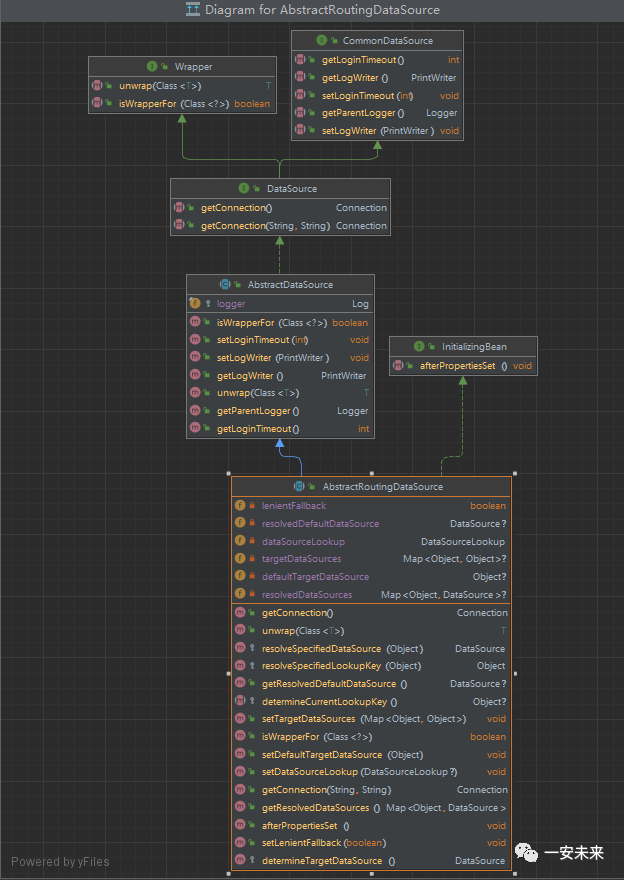
AbstractRoutingDataSource
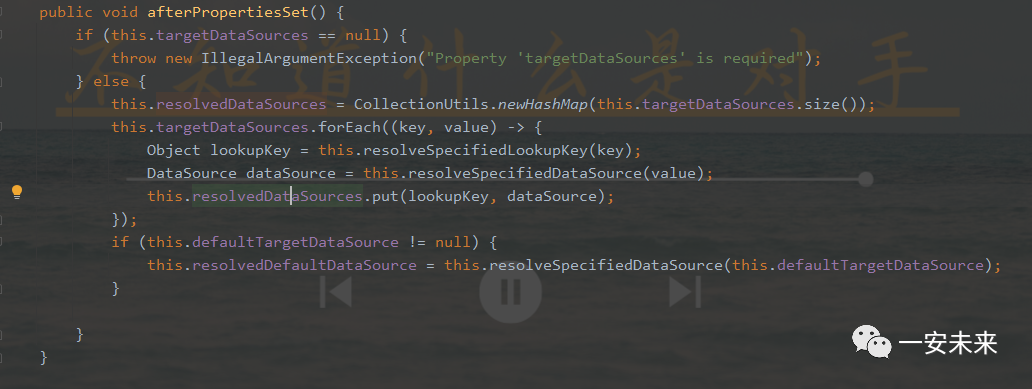
是多数据源切换中常用的一种实现方式,主要关注以下几个参数:
defaultTargetDataSource
:默认的数据源,当需要切换的数据源不存在或发生异常时,会使用该默认数据源。这个参数在初始化AbstractRoutingDataSource
时需要提供。targetDataSources
:这是一个存储多个数据源实例的Map
,设置该参数后,AbstractRoutingDataSource
会将这些数据源实例存储在内部,以便后续的路由切换。

resolvedDataSources
:这是一个同步到targetDataSources
的数据源Map
,在初始化后,AbstractRoutingDataSource
会将targetDataSources
中的数据源实例同步到resolvedDataSources
中。afterPropertiesSet
:这是生命周期回调方法,当所有属性都设置好之后会自动执行该方法。
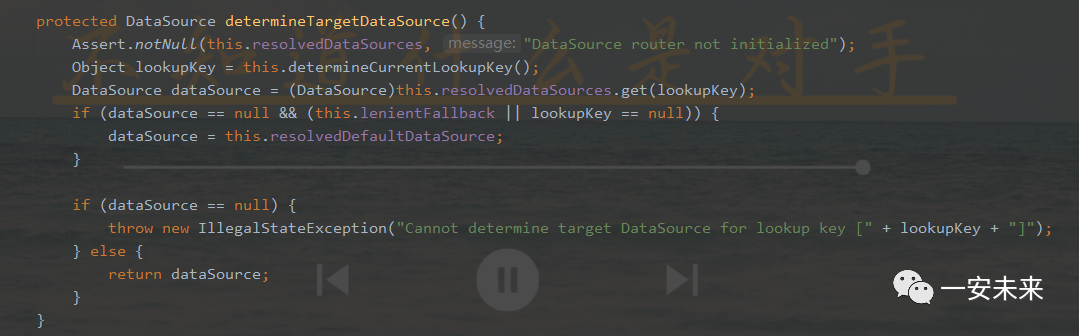
determineCurrentLookupKey
:这是一个抽象方法,子类需要实现该方法以自定义数据源的切换逻辑。在该方法中,会根据当前线程的上下文信息返回一个用于获取对应数据源的key
,这个key
是从resolvedDataSources
中获取数据源实例的依据。
Mongo
数据源切换
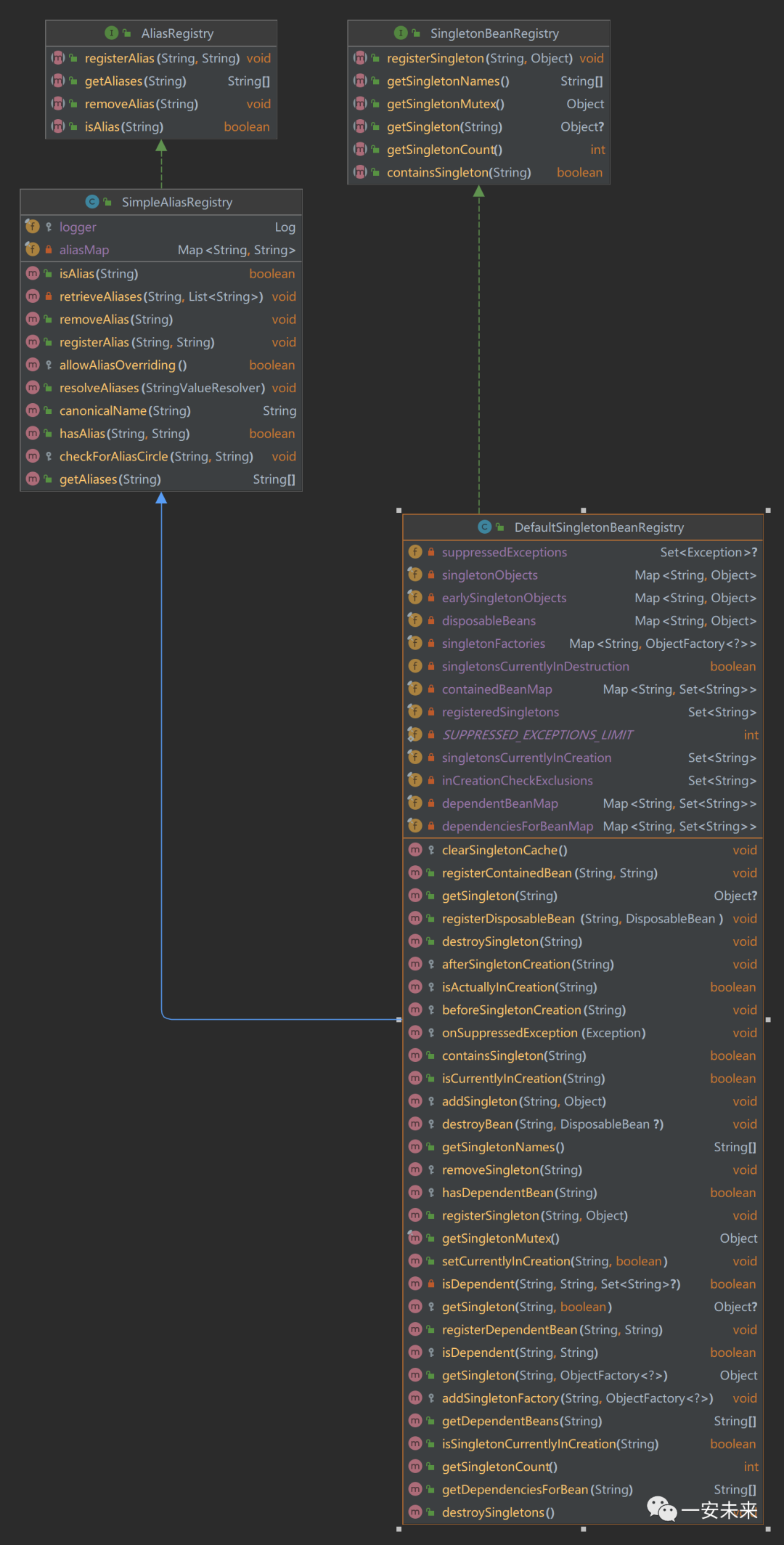
DefaultSingletonBeanRegistry
是 Spring
框架中一个重要的类,用于管理单例 Bean 的生命周期。
registerSingleton
:用于向DefaultSingletonBeanRegistry
注册一个新的单例 Bean。这个方法接收一个 Bean 名称和一个Object
对象作为参数,将它们关联起来,以便后续可以通过名称获取到对应的 Bean 实例。

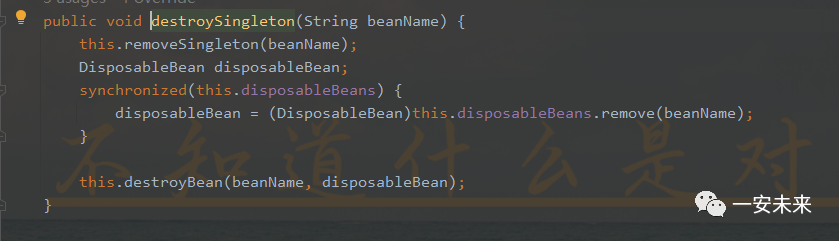
destroySingleton
:用于销毁一个已经注册的单例 Bean。这个方法接收一个 Bean 名称作为参数,通过名称找到对应的 Bean 实例,然后调用其destroy
方法来销毁它。
具体实现
按照上面原理介绍去实现:
定义 DynamicDataSource
类继承AbstractRoutingDataSource
,重写determineCurrentLookupKey()
方法。配置多个数据源启动时注入 targetDataSources
和defaultTargetDataSource
。通过 Druid
初始化新增数据源,通过afterPropertiesSet()
方法将重新解析数据源。对于 mongo
的采用DefaultSingletonBeanRegistry
重新注入新的数据源。采用策略模式将每个算法封装成一个对象
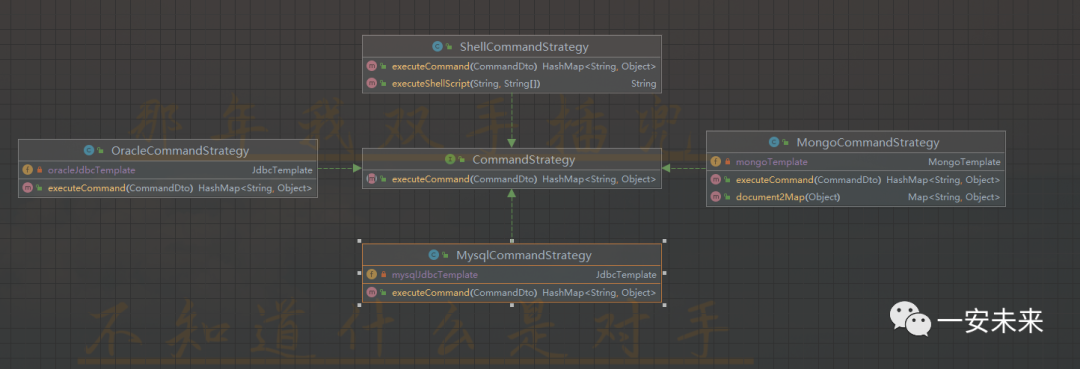
依赖引入:
<dependency>
    <groupId>org.springframework.boot</groupId>
    <artifactId>spring-boot-starter-web</artifactId>
</dependency>

<dependency>
    <groupId>org.springframework.boot</groupId>
    <artifactId>spring-boot-starter-jdbc</artifactId>
</dependency>

<dependency>
    <groupId>mysql</groupId>
    <artifactId>mysql-connector-java</artifactId>
    <version>5.1.48</version>
</dependency>

<dependency>
    <groupId>com.oracle</groupId>
    <artifactId>ojdbc6</artifactId>
    <version>11.2.0</version>
    <scope>system</scope>
    <systemPath>${project.basedir}/lib/ojdbc6.jar</systemPath>
</dependency>

<dependency>
    <groupId>com.alibaba</groupId>
    <artifactId>druid-spring-boot-starter</artifactId>
    <version>1.1.10</version>
</dependency>

<dependency>
    <groupId>com.baomidou</groupId>
    <artifactId>mybatis-plus-boot-starter</artifactId>
    <version>3.0.5</version>
</dependency>

<dependency>
    <groupId>org.springframework.boot</groupId>
    <artifactId>spring-boot-starter-data-mongodb</artifactId>
</dependency>

<dependency>
    <groupId>org.projectlombok</groupId>
    <artifactId>lombok</artifactId>
</dependency>
配置默认数据源:
server:
  port: 8080

spring:
  datasource:
    mysql:
      url: jdbc:mysql://xxx.xxx.xxx.xxx:3306/scp?characterEncoding=utf8&useSSL=false
      driver-class-name: com.mysql.jdbc.Driver
      username: root
      password: root
      connection-error-retry-attempts: 3
    oracle:
      url: jdbc:oracle:thin:@xxx.xxx.xxx.xxx:1521:ora11g
      driver-class-name: oracle.jdbc.driver.OracleDriver
      username: vpdn
      password: vpdn
      connection-error-retry-attempts: 3
    mongo:
      uri: mongodb://admin:admin@xxx.xxx.xxx.xxx:27017/test?authSource=admin&authMechanism=SCRAM-SHA-1
定义DynamicDataSource
:
public class DynamicDataSource extends AbstractRoutingDataSource {
    private static final Logger LOGGER = LoggerFactory.getLogger(DynamicDataSource.class);

    // 通过ThreadLocal线程隔离的优势线程存储线程,当前线程只能操作当前线程的局部变量
    private static final ThreadLocal<String> DATA_SOURCE_KEY = new ThreadLocal<>();
    // 把已有的数据源封装在Map里
    private Map<Object, Object> dynamicTargetDataSources = new HashMap<>();

    @Override
    protected Object determineCurrentLookupKey() {
        String key = DATA_SOURCE_KEY.get();
        LOGGER.info("current data-source is {}", key);
        return key;
    }


    /**
     * 创建一个新的数据源连接,并且设置此数据源为我们要用的数据源
     **/
    public  void changeDataSource(CommandDto commandDto) throws Exception {
        String type = commandDto.getType();
        String jdbcUrl = commandDto.getJdbcUrl();
        String username = commandDto.getUsername();
        String password = commandDto.getPassword();
        if("mysql".equalsIgnoreCase(type)){
            Class.forName("com.mysql.jdbc.Driver");
        }else{
            Class.forName("oracle.jdbc.driver.OracleDriver");
        }

        // 通过Druid数据库连接池连接数据库
        DruidDataSource dataSource = new DruidDataSource();
        dataSource.setUrl(jdbcUrl);
        dataSource.setUsername(username);
        dataSource.setPassword(password);
        dataSource.setConnectionErrorRetryAttempts(3);
        // 数据源初始化
        dataSource.init();
        //获取已解析的数据源
        Map<Object, DataSource> resolvedDataSources = super.getResolvedDataSources();
        //数据源的键值对存入Map
        this.dynamicTargetDataSources.putAll(resolvedDataSources);
        this.dynamicTargetDataSources.put(type, dataSource);
        // 设置数据源
        this.setTargetDataSources(this.dynamicTargetDataSources);
        // 解析数据源
        this.afterPropertiesSet();
        // 切换数据源
        DATA_SOURCE_KEY.set(type);
    }

    public static void changeDataSource(String dataSourceKey) {
        DATA_SOURCE_KEY.set(dataSourceKey);
    }

    public static void clearDataSource() {
        DATA_SOURCE_KEY.remove();
    }
}
配置数据源:
@Configuration
public class DynamicDataSourceConfig {
    @Bean
    @ConfigurationProperties("spring.datasource.mysql")
    public DataSource mysqlDataSource(){
        return DruidDataSourceBuilder.create().build();
    }

    @Bean
    @ConfigurationProperties("spring.datasource.oracle")
    public DataSource oracleDataSource(){
        return DruidDataSourceBuilder.create().build();
    }

    @Primary
    @Bean(name = "dynamicDataSource")
    public DynamicDataSource dataSource() {
        DynamicDataSource dynamicDataSource = new DynamicDataSource();
        dynamicDataSource.setDefaultTargetDataSource(mysqlDataSource());
        Map<Object, Object> targetDataSources = new HashMap<>(5);
        targetDataSources.put("mysql", mysqlDataSource());
        targetDataSources.put("oracle", oracleDataSource());
        dynamicDataSource.setTargetDataSources(targetDataSources);
        return dynamicDataSource;
    }


    @Bean
    public SqlSessionFactory sqlSessionFactory(@Qualifier("dynamicDataSource") DataSource dataSource) throws Exception {
        MybatisSqlSessionFactoryBean sessionFactory = new MybatisSqlSessionFactoryBean();
        sessionFactory.setDataSource(dataSource);
        PathMatchingResourcePatternResolver resolver = new PathMatchingResourcePatternResolver();
        sessionFactory.setMapperLocations(resolver.getResources("classpath*:/mapper/**/*.xml"));

        //map接收返回值值为null的问题,默认是当值为null,将key返回
        MybatisConfiguration configuration = new MybatisConfiguration();
        configuration.setCallSettersOnNulls(true);
        configuration.setJdbcTypeForNull(JdbcType.NULL);
        sessionFactory.setConfiguration(configuration);
        //设置全局GlobaleConfig用于解决Oracle主键自增
        if (dataSource.getConnection().getMetaData().getDriverName().contains("Oracle")){
            //设置全局GlobaleConfig用于解决Oracle主键自增
            com.baomidou.mybatisplus.core.config.GlobalConfig.DbConfig config = new com.baomidou.mybatisplus.core.config.GlobalConfig.DbConfig();
            config.setKeyGenerator(keyGenerator());
            com.baomidou.mybatisplus.core.config.GlobalConfig globalConfig = new GlobalConfig();
            globalConfig.setDbConfig(config);
            sessionFactory.setGlobalConfig(globalConfig);
        }
        return sessionFactory.getObject();
    }

    @Bean(name = "keyGenerator")
    public IKeyGenerator keyGenerator(){
        return new OracleKeyGenerator();
    }

    @Bean(name = "jdbcTemplate")
    public JdbcTemplate primaryJdbcTemplate(
            @Qualifier("dynamicDataSource") DataSource dataSource) {
        return new JdbcTemplate(dataSource);
    }
}
对于mysql
或oracle
,采用JdbcTemplate
方式执行命令,这里不再多介绍,主要介绍一下mongo
和shell
mongo
一些常用的查询运算符:
$eq
:等于$ne
:不等于$gt
:大于$gte
:大于等于$lt
:小于$lte
:小于等于$in
:在指定的值数组中$nin
:不在指定的值数组中$and
:多个条件同时满足$or
:满足任意一个条件使用样例:
查询年龄大于等于20的文档: "{\"find\": \"your_collection\", \"filter\": {\"age\": {\"$gte\": 20}}}"插入: "{\"insert\":\"your_collection\",\"documents\":[{\"sessionid\":\"sessionid-2310291708500037511\",\"user_id\":\"userid-23102917085000371407\"}]}"更新: "{\"update\": \"your_collection\", \"updates\": [{\"q\": {\"full_name\": \"full_name-231029170850003713\"}, \"u\": {\"$set\": {\"full_name\": \"full_name-yian\"}}}]}"删除: "{\"delete\": \"your_collection\", \"deletes\": [{\"q\": {\"full_name\": \"full_name-yian\"}, \"limit\": 1}]}"最后采用
mongoTemplate.executeCommand(String jsonCommand)
执行命令。
shell
采用ProcessBuilder
,Java
中用于创建和管理操作系统进程的类,与之前的Process
类相比,ProcessBuilder
提供了更强大和灵活的API
,可以更好地控制进程的输入、输出和错误流
演示效果
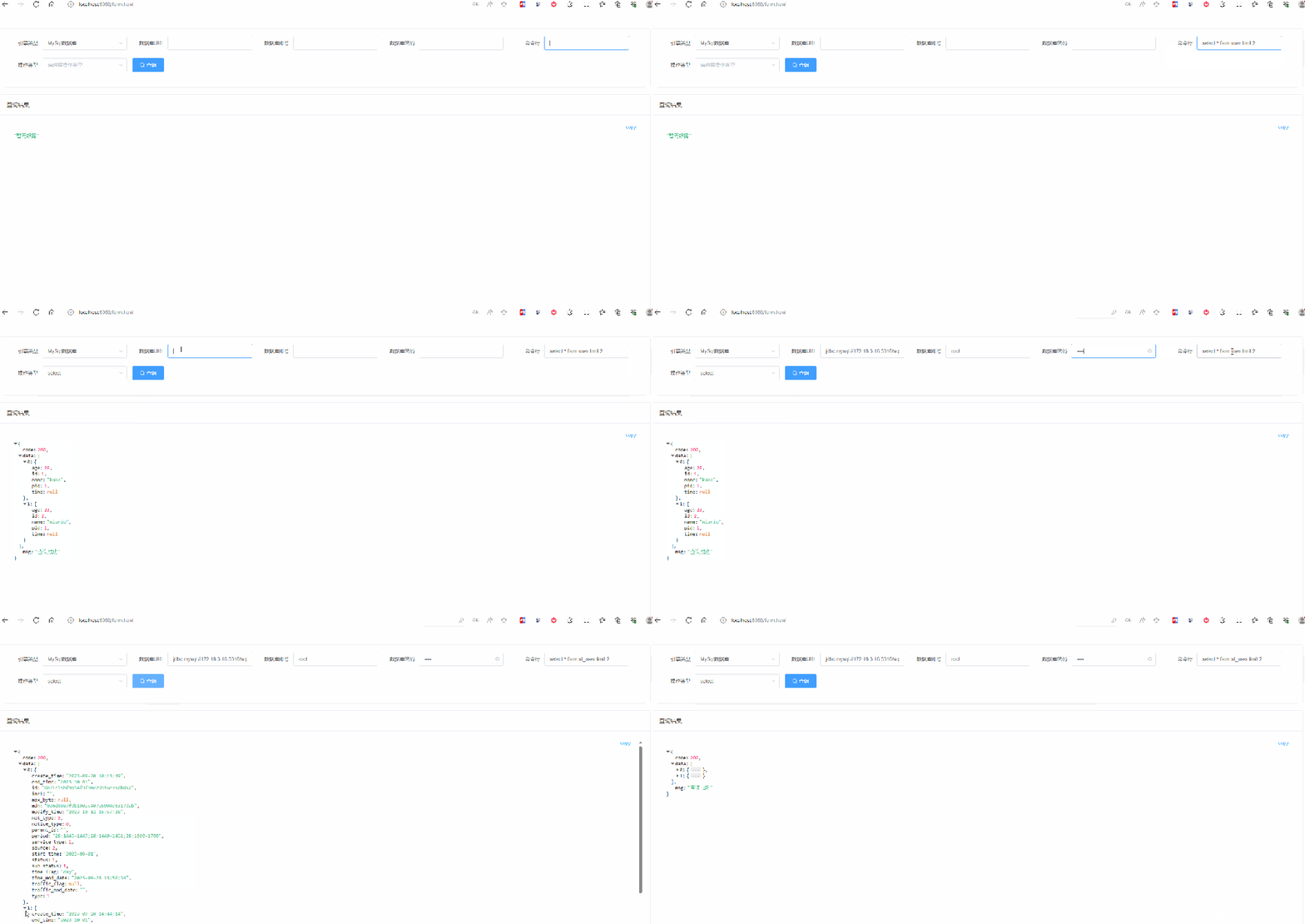
页面html
:
<!DOCTYPE html>
<html lang="en">

<head>
    <meta charset="UTF-8">
    <meta name="viewport" content="width=device-width, initial-scale=1.0">
    <title>表单</title>
    <script src="https://unpkg.com/vue@2.7.14/dist/vue.min.js"></script>
    <link rel="stylesheet" href="https://unpkg.com/element-ui/lib/theme-chalk/index.css">
    <script src="https://unpkg.com/element-ui/lib/index.js"></script>
    <script src="https://unpkg.com/axios@1.6.3/dist/axios.min.js"></script>
    <script src="https://unpkg.com/vue-json-viewer@2.2.22/vue-json-viewer.js"></script>
    <style>
        .content {
            margin: 50px auto;
        }

        .json-content {
            height: 650px;
            overflow-y: auto;
        }
    </style>
</head>

<body>
    <div class="content">
        <div id="app">
            <el-card>
                <el-form ref="ruleForm" label-width="100px" inline>
                    <el-form-item label="引擎类型">
                        <el-select v-model="formData.type" placeholder="请选择类型" style="width: 240px;">
                            <el-option label="全部" :value="null"></el-option>
                            <el-option v-for="(typeDes,type) in typeOptions" :key="type" :label="typeDes"
                                :value="type"></el-option>
                        </el-select>
                    </el-form-item>
                    <el-form-item label="数据库URL" prop="jdbcUrl" v-if="formData.type !== 'shell'">
                        <el-input v-model="formData.jdbcUrl" style="width: 240px;"></el-input>
                    </el-form-item>
                    <template v-if="formData.type === 'mysql' || formData.type === 'oracle'">
                        <el-form-item label="数据库账号" prop="username">
                            <el-input v-model="formData.username" style="width: 240px;"></el-input>
                        </el-form-item>
                        <el-form-item label="数据库密码" prop="password">
                            <el-input type="password" show-password v-model="formData.password"
                                style="width: 240px;"></el-input>
                        </el-form-item>
                    </template>
                    <el-form-item label="脚本路径" prop="desc" v-if="formData.type === 'shell'">
                        <el-input v-model="formData.desc" style="width: 240px;"></el-input>
                    </el-form-item>
                    <el-form-item label="命令行" prop="command">
                        <el-input v-model="formData.command" style="width: 240px;"></el-input>
                    </el-form-item>
                    <el-form-item label="操作类型" prop="desc" v-if="formData.type !== 'shell' && formData.type">
                        <el-select v-model="formData.desc" placeholder="请选择操作类型" style="width: 240px;">
                            <el-option label="全部" :value="null"></el-option>
                            <el-option v-for="(desc,key) in descOptions" :key="key" :label="desc"
                                :value="desc"></el-option>
                        </el-select>
                    </el-form-item>
                    <el-form-item>
                        <el-button type="primary" icon="el-icon-search" @click="search">查询</el-button>
                    </el-form-item>
                </el-form>
            </el-card>
            <div style="height:20px;"></div>
            <el-card header="查询结果">
                <div class="json-content">
                    <json-viewer :value="searchResult" :expand-depth=5 copyable sort></json-viewer>
                </div>
            </el-card>
        </div>
    </div>
    <script>
        Vue.use(JsonView.default)
        new Vue({
            el: '#app',
            data() {
                return {
                    formData: {
                        type: null,
                        jdbcUrl: '',
                        username: '',
                        password: '',
                        command: '',
                        desc: ''
                    },
                    typeOptions: {
                        'mysql': 'MySql数据库',
                        'oracle': 'Oracle数据库',
                        'mongo': 'MongoDB数据库',
                        'shell': 'shell脚本'
                    },
                    descOptions: {
                        'insert': 'insert',
                        'delete': 'delete',
                        'update': 'update',
                        'select': 'select'
                    },
                    searchResult: '暂无数据'
                }
            },
            watch: {
                "formData.type"(val, old) {
                    if (old === 'shell' || val === 'shell') {
                        this.formData.desc = '';
                    }
                    this.formData.jdbcUrl = '';
                    this.formData.username = '';
                    this.formData.password = '';
                    this.formData.command = '';
                }
            },
            methods: {
                async search() {
                    const result = await axios.post('http://localhost:8080/execute', this.formData).then(res => res.data);
                    this.searchResult = result;
                }
            }
        })
    </script>
</body>

</html>
控制层:
@RestController
@RequiredArgsConstructor(onConstructor_ = {@Lazy, @Autowired})
public class CommandController {

    private final DynamicDataSource dynamicDataSource;
    private final JdbcTemplate jdbcTemplate;
    private final MongoTemplate mongoTemplate;
    private final CommandContext commandContext;

    private final ApplicationContext applicationContext;


    @PostMapping("/execute")
    public HashMap<String, Object> executeCommand(@RequestBody CommandDto commandDto) throws Exception {
        String type = commandDto.getType();
        String jdbcUrl = commandDto.getJdbcUrl();
        String username = commandDto.getUsername();
        String password = commandDto.getPassword();
        if(StringUtils.hasText(jdbcUrl)&&StringUtils.hasText(username)&&StringUtils.hasText(password)){
            //切换数据源之前先清空
            DynamicDataSource.clearDataSource();
            //切换数据源
            dynamicDataSource.changeDataSource(commandDto);
        }else if("mysql".equalsIgnoreCase(type)){
            DynamicDataSource.clearDataSource();
            DynamicDataSource.changeDataSource("mysql");
        }else if("oracle".equalsIgnoreCase(type)){
            DynamicDataSource.clearDataSource();
            DynamicDataSource.changeDataSource("oracle");
        }else if(StringUtils.hasText(jdbcUrl)&&"mongo".equalsIgnoreCase(type)){
            DefaultSingletonBeanRegistry registry = (DefaultSingletonBeanRegistry) applicationContext.getAutowireCapableBeanFactory();
            registry.destroySingleton("mongoDbFactory");
            registry.registerSingleton("mongoDbFactory", new SimpleMongoClientDatabaseFactory(jdbcUrl));
        }
        if ("mysql".equalsIgnoreCase(type)){
            CommandStrategy commandStrategy = new MysqlCommandStrategy(jdbcTemplate);
            commandContext.setCommandStrategy(commandStrategy);
        }else if ("oracle".equalsIgnoreCase(type)){
            CommandStrategy commandStrategy = new OracleCommandStrategy(jdbcTemplate);
            commandContext.setCommandStrategy(commandStrategy);
        }else if ("mongo".equalsIgnoreCase(type)){
            CommandStrategy commandStrategy = new MongoCommandStrategy(mongoTemplate);
            commandContext.setCommandStrategy(commandStrategy);
        }else if ("shell".equalsIgnoreCase(type)){
            CommandStrategy commandStrategy = new ShellCommandStrategy();
            commandContext.setCommandStrategy(commandStrategy);
        }
        return commandContext.executeCommand(commandDto);
    }
}
如果这篇文章对你有所帮助,或者有所启发的话,帮忙 分享、收藏、点赞、在看,你的支持就是我坚持下去的最大动力!

阿里终面:每天100w次登陆请求, 8G 内存该如何设置JVM参数?

文章转载自一安未来,如果涉嫌侵权,请发送邮件至:contact@modb.pro进行举报,并提供相关证据,一经查实,墨天轮将立刻删除相关内容。
