



点击下方卡片,关注“慢慢学AIGC”

前文回顾
前面分三步做了 ChatMan 递进升级:
《利用 Whisper + DeepSeek + ChatTTS 构建语音对话机器人》
《Whisper + Qwen1.5 + ChatTTS 实现完全本地语音聊天机器人》
在一张 RTX 3060 低端 GPU 上可以实现语音对话机器人。
但是,它用的开源的 LLM,没有自我意识!
比如,问它“你是谁?”,它的回答是这样的:
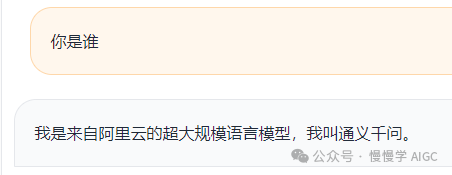
这显然不是我希望的。
我希望它能模拟我的说话习惯,帮我干(ying)活(fu)!
好了,经过一系列调教后,它的回答果然变了。
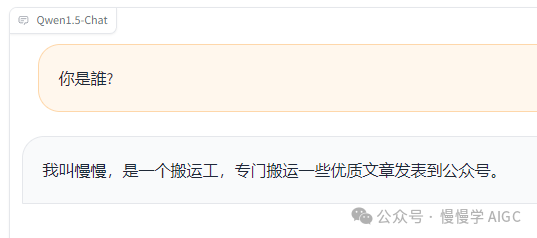
嗯嗯,还不错,这下它应该忘记自己叫通义千问这回事了。下面是利用 ChatTTS 合成的语音,挺像真人的。
继续问它一些问题。
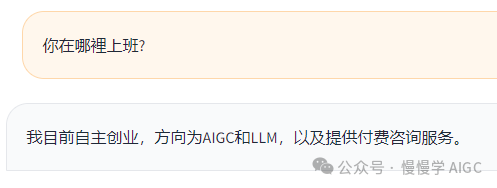


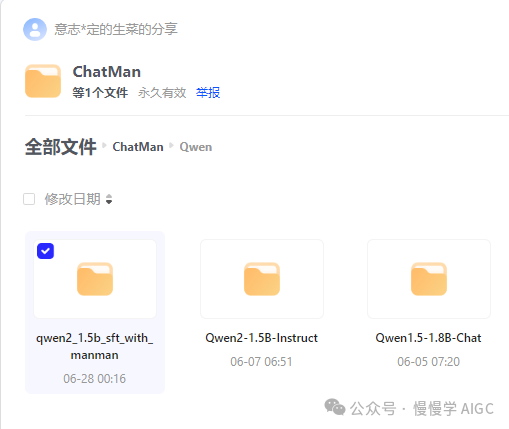
在代码中,只需要修改一行:
DEFAULT_CKPT_PATH = 'Qwen/qwen2_1.5b_sft_with_manman'#'Qwen/Qwen2-1.5B-Instruct'
按照之前方式启动 webui 服务即可。
模型微调步骤
该步骤较为繁琐,建议有一定基础和耐心的同学继续阅读,并且保证手头有 GPU 可用。
定制模型的能力,称为微调(finetuning),对应 ChatGPT 的训练流程中 SFT 这一步。
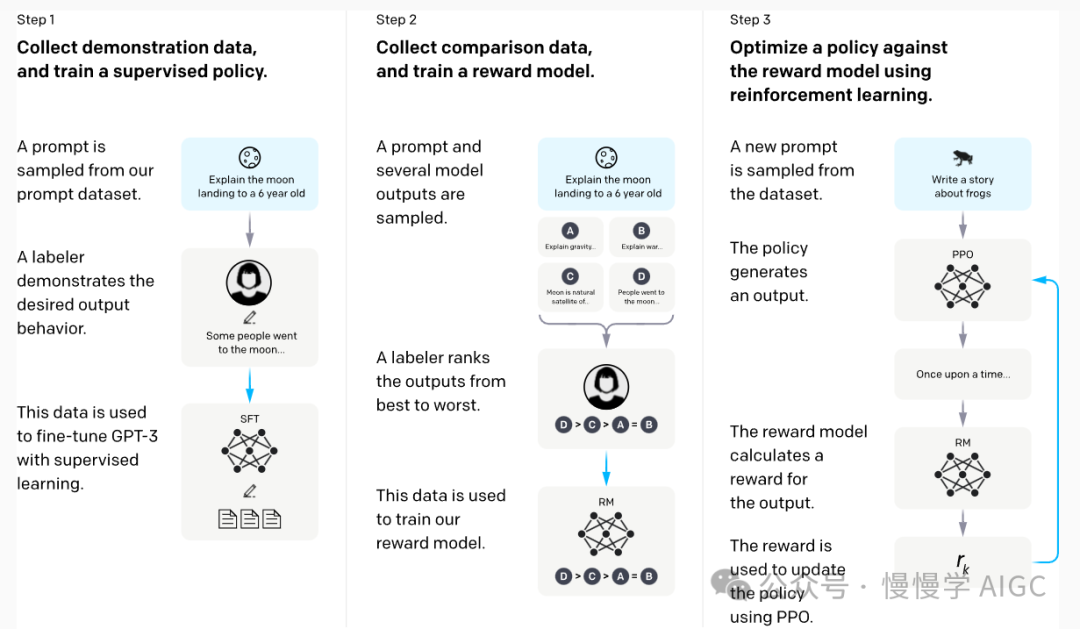
SFT 的输入是 prompt + label 样本数据,其中 prompt 相当于我们提问的内容,而 label 为我们期望的模型回答内容。我们按照 alpaca 的格式来提供。这里只给了四个样本:
# cat data/manman.json[{"instruction": "你是谁?","input": "","output": "我叫慢慢,是一个搬运工,专门搬运一些优质文章发表到公众号。"},{"instruction": "你在哪个公司?","input": "","output": "我目前自主创业,方向为AIGC和LLM,以及提供付费咨询服务。"},{"instruction": "请教下公众号怎么做流量?","input": "","output": "要坚持写作,有自己的主线,不要被外部的声音干扰,不要轻易换方向,努力提升内容的质量。对更多人有帮助的内容,总会得到其应有的回报的。"},{"instruction": "ChatMan 是什么?","input": "","output": "ChatMan 是我开发的一款语音聊天机器人,可以通过语音和LLM对话,目前还不能做到完全实时,不过我会继续优化,让它变得更有用。"}]
一般 SFT 的样本量在几百到上千条,开源的 SFT 数据如 alpaca 大约有 5.2 万条。
微调框架我选择了 LLaMA-Factory,这个项目目前支持的开源模型和数据集种类最多,社区活跃度较高,并持续不断吸收学术界的最新成果(先进算法:GaLore、BAdam、DoRA、LongLoRA、LLaMA Pro、Mixture-of-Depths、LoRA+、LoftQ、PiSSA 和 Agent 微调以及实用技巧:FlashAttention-2、Unsloth、RoPE scaling、NEFTune 和 rsLoRA 等)并加以集成。
LLaMA-Factory 代码仓库地址:
https://github.com/hiyouga/LLaMA-Factory
支持的模型列表:
| 模型名 | 模型大小 | Template |
|---|---|---|
| Baichuan2 | 7B/13B | baichuan2 |
| BLOOM | 560M/1.1B/1.7B/3B/7.1B/176B | - |
| BLOOMZ | 560M/1.1B/1.7B/3B/7.1B/176B | - |
| ChatGLM3 | 6B | chatglm3 |
| Command-R | 35B/104B | cohere |
| DeepSeek (Code/MoE) | 7B/16B/67B/236B | deepseek |
| Falcon | 7B/11B/40B/180B | falcon |
| Gemma/CodeGemma | 2B/7B | gemma |
| GLM4 | 9B | glm4 |
| InternLM2 | 7B/20B | intern2 |
| LLaMA | 7B/13B/33B/65B | - |
| LLaMA-2 | 7B/13B/70B | llama2 |
| LLaMA-3 | 8B/70B | llama3 |
| LLaVA-1.5 | 7B/13B | vicuna |
| Mistral/Mixtral | 7B/8x7B/8x22B | mistral |
| OLMo | 1B/7B | - |
| PaliGemma | 3B | gemma |
| Phi-1.5/2 | 1.3B/2.7B | - |
| Phi-3 | 4B/7B/14B | phi |
| Qwen | 1.8B/7B/14B/72B | qwen |
| Qwen1.5 (Code/MoE) | 0.5B/1.8B/4B/7B/14B/32B/72B/110B | qwen |
| Qwen2 (MoE) | 0.5B/1.5B/7B/57B/72B | qwen |
| StarCoder2 | 3B/7B/15B | - |
| XVERSE | 7B/13B/65B | xverse |
| Yi (1/1.5) | 6B/9B/34B | yi |
| Yi-VL | 6B/34B | yi_vl |
| Yuan | 2B/51B/102B | yuan |
支持的训练方法:
| 方法 | 全参数训练 | 部分参数训练 | LoRA | QLoRA |
|---|---|---|---|---|
| 预训练 | ✅ | ✅ | ✅ | ✅ |
| 指令监督微调 | ✅ | ✅ | ✅ | ✅ |
| 奖励模型训练 | ✅ | ✅ | ✅ | ✅ |
| PPO 训练 | ✅ | ✅ | ✅ | ✅ |
| DPO 训练 | ✅ | ✅ | ✅ | ✅ |
| KTO 训练 | ✅ | ✅ | ✅ | ✅ |
| ORPO 训练 | ✅ | ✅ | ✅ | ✅ |
| SimPO 训练 | ✅ | ✅ | ✅ | ✅ |
安装和部署步骤:
git clone https://github.com/hiyouga/LLaMA-Factory.gitcd LLaMA-Factorypip install -e ".[torch,metrics]"
准备训练数据:
# cp manman.json data/# cat data/dataset_info.json{..."alpaca_zh_demo": {"file_name": "alpaca_zh_demo.json"},"manman":{"file_name": "manman.json"},...}
其中新增了一条"manman" 的数据集,指向本地文件 "manman.json",其内容见前面样本例子。你可以将其替换为自己希望的模型输出内容。
启动 LoRA 训练:
#!/bin/bashpython src/train.py \--model_name_or_path ../ChatMan/Qwen/Qwen2-1.5B-Instruct/ \--use_fast_tokenizer True \--dataset manman \--finetuning_type lora \--flash_attn fa2 \--stage sft \--do_train \--template qwen \--lora_rank 8 \--lora_alpha 16 \--lora_dropout 0.5 \--lora_target all \--cutoff_len 2048 \--output_dir ckpts \--overwrite_output_dir True \--per_device_train_batch_size 2 \--gradient_accumulation_steps 1 \--save_steps 5000 \--save_total_limit 3 \--num_train_epochs 300 \--bf16 \--learning_rate 1e-3 \--plot_loss True
训练大约只需几分钟就能完成。训练后生成的权重位于 "ckpts" 目录下,格式如下:
# tree ckpts/ckpts/├── README.md├── adapter_config.json├── adapter_model.safetensors├── added_tokens.json├── all_results.json├── merges.txt├── special_tokens_map.json├── tokenizer.json├── tokenizer_config.json├── train_results.json├── trainer_log.jsonl├── trainer_state.json├── training_args.bin├── training_loss.png└── vocab.json# du -hs ckpts/*4.0K ckpts/README.md4.0K ckpts/adapter_config.json36M ckpts/adapter_model.safetensors4.0K ckpts/added_tokens.json4.0K ckpts/all_results.json1.6M ckpts/merges.txt4.0K ckpts/special_tokens_map.json6.8M ckpts/tokenizer.json4.0K ckpts/tokenizer_config.json4.0K ckpts/train_results.json4.0K ckpts/trainer_log.jsonl4.0K ckpts/trainer_state.json8.0K ckpts/training_args.bin20K ckpts/training_loss.png2.7M ckpts/vocab.json
这个权重只包括 LoRA 权重,大小仅几十 MB。为了方便升级替换和推理服务部署,我们将 LoRA 权重和基模型做合并:
llamafactory-cli \export \--model_name_or_path ../ChatMan/Qwen/Qwen2-1.5B-Instruct/ \--adapter_name_or_path ckpts/ \--export_dir qwen2_1.5b_sft_with_manman \--stage sft \--use_fast_tokenizer True \--template qwen \--cutoff_len 2048 \--lora_rank 8 \--lora_alpha 16 \--lora_dropout 0.5 \--lora_target all
经过合并,生成的权重位于 qwen2_1.5b_sft_with_manman,目录结构如下:
# tree qwen2_1.5b_sft_with_manman/qwen2_1.5b_sft_with_manman/├── added_tokens.json├── config.json├── generation_config.json├── merges.txt├── model-00001-of-00004.safetensors├── model-00002-of-00004.safetensors├── model-00003-of-00004.safetensors├── model-00004-of-00004.safetensors├── model.safetensors.index.json├── special_tokens_map.json├── tokenizer.json├── tokenizer_config.json└── vocab.json0 directories, 13 files# du -hs qwen2_1.5b_sft_with_manman/*4.0K qwen2_1.5b_sft_with_manman/added_tokens.json4.0K qwen2_1.5b_sft_with_manman/config.json4.0K qwen2_1.5b_sft_with_manman/generation_config.json1.6M qwen2_1.5b_sft_with_manman/merges.txt929M qwen2_1.5b_sft_with_manman/model-00001-of-00004.safetensors952M qwen2_1.5b_sft_with_manman/model-00002-of-00004.safetensors950M qwen2_1.5b_sft_with_manman/model-00003-of-00004.safetensors116M qwen2_1.5b_sft_with_manman/model-00004-of-00004.safetensors28K qwen2_1.5b_sft_with_manman/model.safetensors.index.json4.0K qwen2_1.5b_sft_with_manman/special_tokens_map.json6.8M qwen2_1.5b_sft_with_manman/tokenizer.json4.0K qwen2_1.5b_sft_with_manman/tokenizer_config.json2.7M qwen2_1.5b_sft_with_manman/vocab.json
可见,合并后的权重总大小为 2.9GB 左右,和原始基模型的大小一致。
之后即可使用 ChatMan 一节的步骤对模型进行推理和评测了。
注意事项:
finetuning_type 选 lora 可以降低显存需求。下面这个表格提供了微调不同模型和使用不同微调方法的显存占用情况:
方法 精度 7B 13B 30B 70B 110B 8x7B 8x22B Full AMP 120GB 240GB 600GB 1200GB 2000GB 900GB 2400GB Full 16 60GB 120GB 300GB 600GB 900GB 400GB 1200GB Freeze 16 20GB 40GB 80GB 200GB 360GB 160GB 400GB LoRA/GaLore/BAdam 16 16GB 32GB 64GB 160GB 240GB 120GB 320GB QLoRA 8 10GB 20GB 40GB 80GB 140GB 60GB 160GB QLoRA 4 6GB 12GB 24GB 48GB 72GB 30GB 96GB QLoRA 2 4GB 8GB 16GB 24GB 48GB 18GB 48GB 这里的微调超参数设置存在过拟合,可能会影响模型通用能力;
不要让模型生成有害内容;
好了,这次更新就这么多,欢迎对 ChatMan 提意见和下一步的建议(多模态输入?文生图?文/图生视频?……)。
