



点击下方卡片,关注“慢慢学AIGC”

续上一篇《利用 Whisper + DeepSeek + ChatTTS 构建语音对话机器人》。
不少同学反馈,调用 DeepSeek v2 API 太慢了,能否换成本地模型。
受 RTX 3060 12 GB 显存资源限制,笔者尝试了无数开源模型,要么中文效果不好(LLaMA 3),要么运行发生 OOM,最后瞄准了千问 1.5 系列模型中的 1.8B-Chat 这个模型,跑起来只需要 5.3 GB 显存。
开工!
环境
复用上一篇使用的环境。新增了几个包:
FlashAttention v2.4.1
版本:Windows 预编译版,Python 3.8 + Torch2.1 + CUDA 12.1
安装该包后,可以避免 Qwen 模型加载过程中出现 OOM。Flash Attention 能有效降低长序列(32K)情况下的显存占用。
下载地址
https://github.com/bdashore3/flash-attention/releases
选择
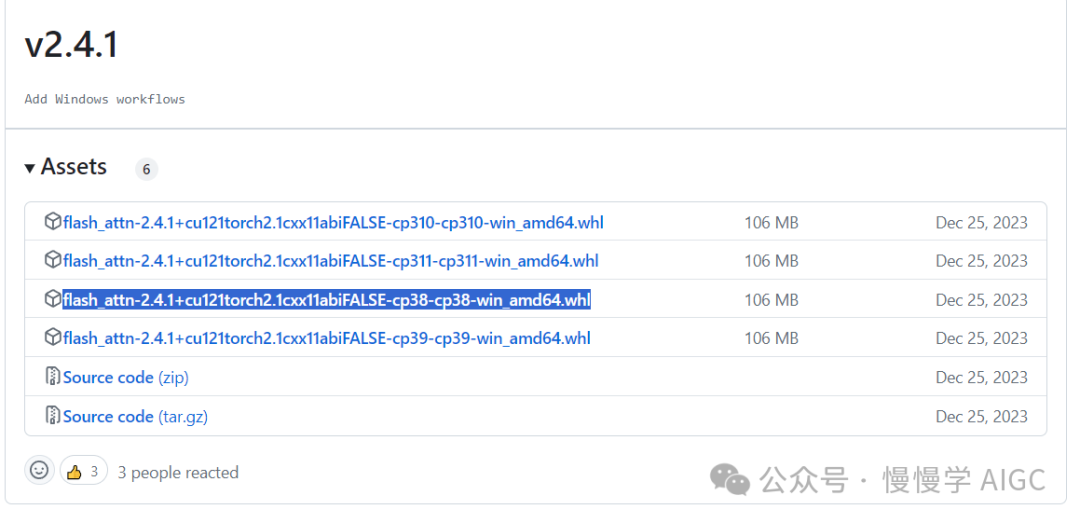
下载到本地后运行:
pip install "flash_attn-2.4.1+cu121torch2.1cxx11abiFALSE-cp38-cp38-win_amd64.whl"
ninja v1.11.1.1
直接 pip install ninja 即可。
WebUI 代码
# Copyright (c) Alibaba Cloud.## This source code is licensed under the license found in the# LICENSE file in the root directory of this source tree."""A simple web interactive chat demo based on gradio."""from argparse import ArgumentParserfrom threading import Threadimport gradio as grimport torchfrom transformers import AutoModelForCausalLM, AutoTokenizer, TextIteratorStreamerfrom transformers import pipelineimport numpy as npfrom ChatTTS.experimental.llm import llm_apiimport ChatTTSDEFAULT_CKPT_PATH = 'Qwen/Qwen1.5-1.8B-Chat'chat_tts = ChatTTS.Chat()chat_tts.load_models(compile=False)whisper_transcriber = pipeline("automatic-speech-recognition", model="openai/whisper-base")def asr(audio):sr, y = audioy = y.astype(np.float32)y = np.max(np.abs(y))user_question = whisper_transcriber({"sampling_rate": sr, "raw": y})["text"]print(user_question)return user_questiondef tts(text):print(text)wav = chat_tts.infer(text[-1][-1], use_decoder=True)audio_data = np.array(wav[0]).flatten()sample_rate = 24000return (sample_rate, audio_data)def _get_args():parser = ArgumentParser()parser.add_argument("-c", "--checkpoint-path", type=str, default=DEFAULT_CKPT_PATH,help="Checkpoint name or path, default to %(default)r")parser.add_argument("--cpu-only", action="store_true", help="Run demo with CPU only")parser.add_argument("--share", action="store_true", default=False,help="Create a publicly shareable link for the interface.")parser.add_argument("--inbrowser", action="store_true", default=False,help="Automatically launch the interface in a new tab on the default browser.")parser.add_argument("--server-port", type=int, default=8000,help="Demo server port.")parser.add_argument("--server-name", type=str, default="127.0.0.1",help="Demo server name.")args = parser.parse_args()return argsdef _load_model_tokenizer(args):tokenizer = AutoTokenizer.from_pretrained(args.checkpoint_path, resume_download=True,)if args.cpu_only:device_map = "cpu"else:device_map = "auto"model = AutoModelForCausalLM.from_pretrained(args.checkpoint_path,torch_dtype="auto",device_map=device_map,resume_download=True,).eval()model.generation_config.max_new_tokens = 2048 # For chat.return model, tokenizerdef _chat_stream(model, tokenizer, query, history):conversation = [{'role': 'system', 'content': 'You are a helpful assistant.'},]for query_h, response_h in history:conversation.append({'role': 'user', 'content': query_h})conversation.append({'role': 'assistant', 'content': response_h})conversation.append({'role': 'user', 'content': query})inputs = tokenizer.apply_chat_template(conversation,add_generation_prompt=True,return_tensors='pt',)inputs = inputs.to(model.device)streamer = TextIteratorStreamer(tokenizer=tokenizer, skip_prompt=True, timeout=60.0, skip_special_tokens=True)generation_kwargs = dict(input_ids=inputs,streamer=streamer,)thread = Thread(target=model.generate, kwargs=generation_kwargs)thread.start()for new_text in streamer:yield new_textdef _gc():import gcgc.collect()if torch.cuda.is_available():torch.cuda.empty_cache()def _launch_demo(args, model, tokenizer, chat_tts, whisper_transcriber):def predict(_query, _chatbot, _task_history):print(f"User: {_query}")_chatbot.append((_query, ""))full_response = ""response = ""for new_text in _chat_stream(model, tokenizer, _query, history=_task_history):response += new_text_chatbot[-1] = (_query, response)yield _chatbotfull_response = responseprint(f"History: {_task_history}")_task_history.append((_query, full_response))print(f"Qwen1.5-Chat: {full_response}")def regenerate(_chatbot, _task_history):if not _task_history:yield _chatbotreturnitem = _task_history.pop(-1)_chatbot.pop(-1)yield from predict(item[0], _chatbot, _task_history)def reset_user_input():return gr.update(value="")def reset_state(_chatbot, _task_history):_task_history.clear()_chatbot.clear()_gc()return _chatbotwith gr.Blocks() as demo:gr.Markdown("""\<p align="center"><img src="https://oss-emcsprod-public.modb.pro/image/auto/modb_20250214_4c066218-eab1-11ef-a653-fa163eb4f6be.png" style="height: 80px"/><p>""")gr.Markdown("""<center><font size=8>ChatMan with Whisper + Qwen 1.5-1.8B-Chat + ChatTTS </center>""")chatbot = gr.Chatbot(label='Qwen1.5-Chat', elem_classes="control-height")mic = gr.Audio(sources=["microphone"])audio = gr.Audio()query = gr.Textbox(lines=2, label='Input')task_history = gr.State([])with gr.Row():empty_btn = gr.Button("🧹 Clear History (清除历史)")submit_btn = gr.Button("🚀 Submit (发送)")regen_btn = gr.Button("🤔️ Regenerate (重试)")asr_btn = gr.Button("语音输入")tts_btn = gr.Button("语音播放")submit_btn.click(predict, [query, chatbot, task_history], [chatbot], show_progress=True)submit_btn.click(reset_user_input, [], [query])empty_btn.click(reset_state, [chatbot, task_history], outputs=[chatbot], show_progress=True)regen_btn.click(regenerate, [chatbot, task_history], [chatbot], show_progress=True)asr_btn.click(asr, [mic], outputs=[query], show_progress=True)tts_btn.click(tts, [chatbot], outputs=[audio], show_progress=True)demo.queue().launch(share=args.share,inbrowser=args.inbrowser,server_port=args.server_port,server_name=args.server_name,)def main():args = _get_args()model, tokenizer = _load_model_tokenizer(args)_launch_demo(args, model, tokenizer, chat_tts, whisper_transcriber)if __name__ == '__main__':main()
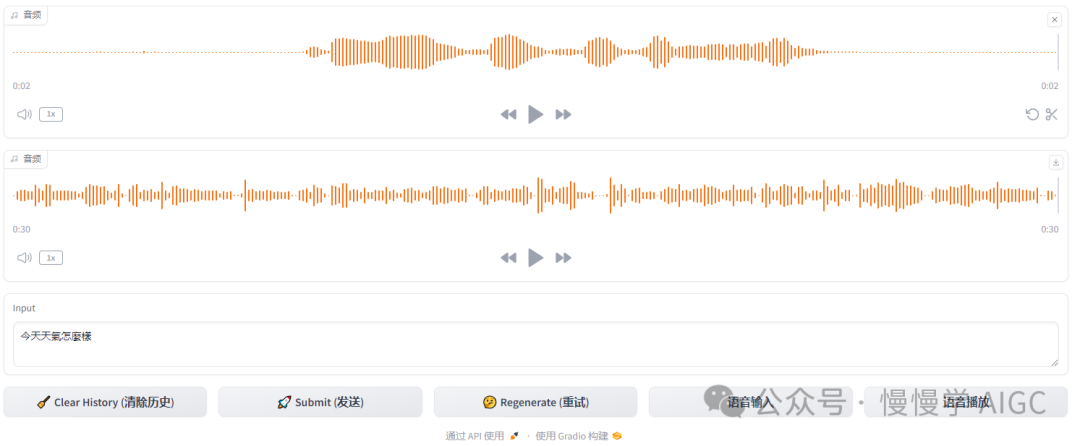
实际运行效果如下图:
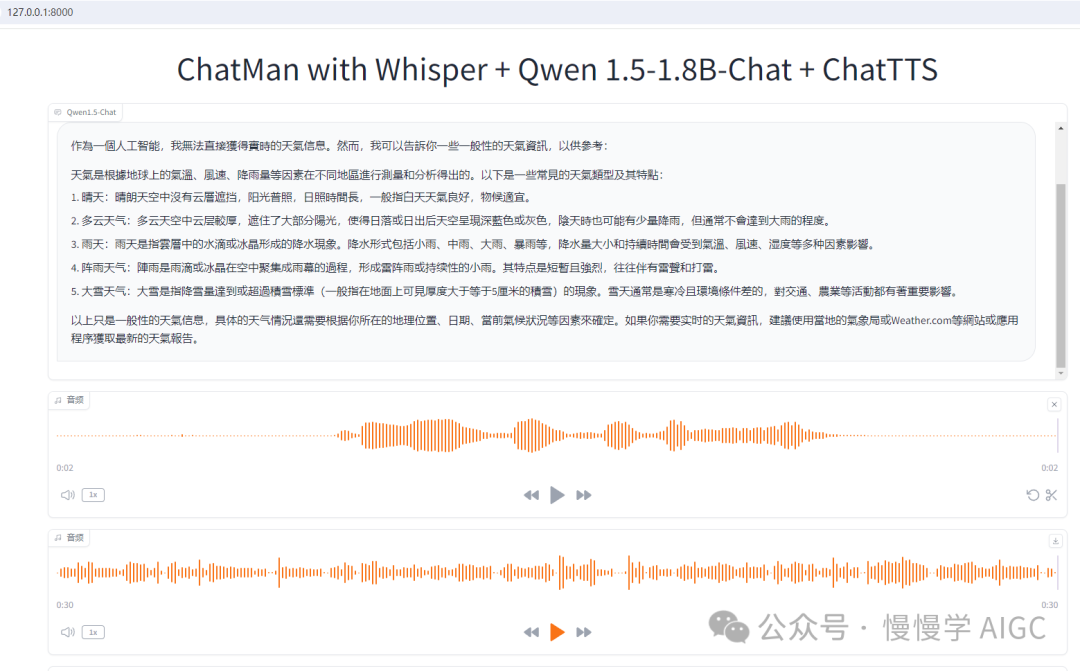
保留了纯文本对话功能
输入框手动打字,点击“发送”按钮,在对话框会出现 Qwen 的文字回应,实现纯文本聊天功能。
新增了语音输入输出功能
先录制音频,点击“语音输入”按钮,会自动将你的语音转文本后填充到输入框,你可以在这一步对内容做些许修改,避免语音识别错误。
再次点“发送”按钮同 Qwen 对话并显示在对话框;
点击“语音播放”按钮可以将 Qwen 对话框的最后一段回复内容转换为语音。
资源开销情况
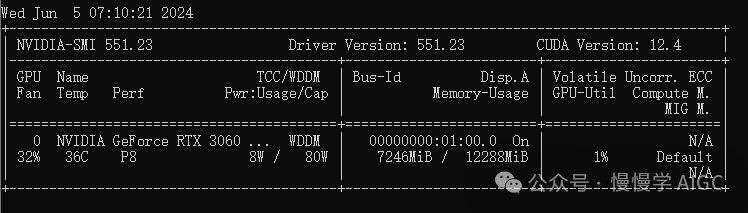
RTX 3060 显存占用情况,ASR + LLM + TTS 三个模型加起来只用了不到 7.3 GB。
点击下方卡片,关注“慢慢学AIGC”
