



点击下方卡片,关注“慢慢学AIGC”

引言
本博客将是模型量化的终极指南。我们将讨论使用 GPTQ、AWQ 和 Bitsandbytes 等多种方式对模型进行量化。我们将讨论每种方法(GPTQ vs AWQ vs Bitsandbytes)的利弊,最终使用量化权重进行高效的语言模型推理。
但在深入探讨之前,让我们先了解什么是量化,以及为什么需要量化。
量化
一个大型语言模型由一堆权重和激活值表示。这些值通常使用32位浮点数(float32)数据类型来表示。
位数告诉我们它可以表示多少个值。float32 可以表示 1.18e-38 到 3.4e38 之间的值,相当多的值!位数越低,它可以表示的值就越少。
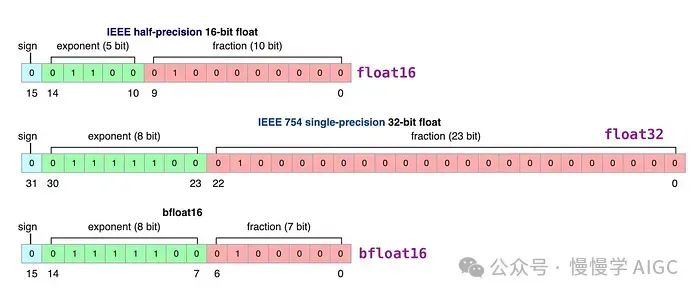
如你所料,如果我们选择较低的位数,那么模型的精度就会降低,但它也只需要表示较少的值,从而减小模型的大小和内存需求。
减小模型内存占用最有效的方法之一就是量化。你可以将量化视为 LLM 的压缩技术。在实践中,量化的主要目标是降低 LLM 权重的精度,通常从 16 位降低到 8 位、4 位甚至 3 位。然而,我们不仅仅是简单地使用较小的位变体,而是将较大的位表示映射到较小的位上,同时尽量不丢失太多信息。
量化技术
目前有三种流行的 LLM 量化方法,我们将简要讨论每一种,然后看看如何在代码中使用每种技术。
GPTQ
AWQ
Bitsandbytes NF4
GPTQ量化
GPTQ 是一种专注于 GPU 推理和性能的后训练量化(PTQ)方法。
后训练量化(PTQ)是一种量化方式,其中已训练模型的权重被转换为较低精度,而无需任何重新训练。这是一种可靠且易于实现的方法。
它基于一种近似二阶信息的一次性权重量化方法,该方法既高精度又高效。
GPTQ 算法使得将模型量化到 2 位成为可能!然而,这可能会带来严重的质量降级。目前,推荐的位数是 4 位,这似乎是 GPTQ 的一个很好的折中方案。
该方法背后的思想是,它将尝试通过最小化权重的均方误差来将所有权重压缩为 4 位量化。
用 GPTQ 量化模型
GTPQ 需要大量 GPU 显存。在这个实验中,我们使用的是 24 GB 显存的 Nvidia A10 GPU,我们正在量化 Llama 2-7B 模型,显存消耗峰值约为 16 GB。
使用 GPTQ 进行量化也很慢。在一个 A10 上花费了 35 分钟。4 位、3 位和 2 位精度的量化速度和显存/内存消耗是相同的。
虽然你无法在 Google Colab 免费实例上使用 GPTQ 量化 Llama 2。较小的模型(<4B 参数)可以在 colab 免费实例上量化。
我使用了 TheBloke(https://huggingface.co/TheBlokeAI)用于将 HF 模型量化为 GPTQ 的相同代码片段。你可以在这里(https://github.com/TheBlokeAI/AIScripts/blob/main/quant_autogptq.py)找到该脚本。
你可以使用下面的命令轻松使用 TheBloke 的同一个脚本(注:你需要先安装 transformers optimum accelerate auto-gptq 库)。
pip install transformers optimum accelerate auto-gptqpython ./quant_autogptq.py meta-llama/Llama-2-7b-chat-hf gptq_checkpoints c4 --bits 4 --group_size 128 --desc_act 1 --damp 0.1 --seqlen 4096
我将简化上面的脚本,使其更易于理解里面的内容。
from datasets import load_datasetimport osimport randomimport torchimport numpy as npfrom auto_gptq import AutoGPTQForCausalLM, BaseQuantizeConfigmodel_id = "meta-llama/Llama-2-7b-hf"tokenizer = AutoTokenizer.from_pretrained(model_id,use_fast=True,)def get_c4():traindata = load_dataset('allenai/c4', data_files={'train': 'en/c4-train.00000-of-01024.json.gz'}, split='train', use_auth_token=False)seqlen = 4096trainloader = []for _ in range(self.num_samples):while True:i = random.randint(0, len(traindata) - 1)trainenc = tokenizer(traindata[i]['text'], return_tensors='pt')if trainenc.input_ids.shape[1] >= self.seqlen:breaki = random.randint(0, trainenc.input_ids.shape[1] - self.seqlen - 1)j = i + seqleninp = trainenc.input_ids[:, i:j]attention_mask = torch.ones_like(inp)trainloader.append({'input_ids':inp,'attention_mask': attention_mask})return trainloader
它指定了预训练模型 ID("meta-llama/Llama-2-7b-hf")来加载分词器。
get_c4() 函数用于加载用于量化的数据集。
注意,TheBloke 没有使用整个相当大的 c4 数据集,因为它不适合 24 GB 的 A10 GPU(我尝试过,在量化时会导致内存不足或内存溢出错误),而是只使用了 c4 数据集的一小部分。
使用 Transformers 进行量化和序列化
quantize_config = BaseQuantizeConfig(bits=bits,group_size=group_size,desc_act=desc_act,damp_percent=damp)torch_dtype = torch.float16traindataset = get_c4()model = AutoGPTQForCausalLM.from_pretrained(model_id, quantize_config=quantize_config,low_cpu_mem_usage=True, torch_dtype=torch_dtype)model.quantize(traindataset, use_triton=self.use_triton, batch_size=self.batch_size, cache_examples_on_gpu=self.cache_examples)
它指定了将被加载和量化的预训练模型 ID ("meta-llama/Llama-2-7b-hf")。
它创建了一个 BaseQuantizeConfig 对象,用于配置 GPTQ 量化过程:
bits: 量化的精度。您可以设置 4、3 和 2。
group_size: 用于量化的组大小。推荐值为 128,-1 表示使用每列量化。
desc_act: 是否按激活值大小降序对列进行量化。将其设置为 False 可显著加快推理速度,但困惑度可能会略有变差。也称为 act-order。
保存量化后的模型
output_dir = 'Llama-2-7b-hf-gptq'model.save_quantized(output_dir, use_safetensors=True)tokenizer.save_pretrained(output_dir)
5. 最后提及您希望保存量化模型权重的路径,以及将从何处加载量化模型用于推理。
将量化模型推送到 Hub
您可以将量化后的语言模型上传(推送)到 Hugging Face Hub。然后,任何人都可以立即将其用于自己的工作。这对于开源社区的协作贡献也是非常好的。
from huggingface_hub import HfApiapi = HfApi()api.upload_folder(folder_path="Llama-2-7b-hf-gptq",repo_id="luv2261/Llama-2-7b-hf-gptq",repo_type="model",)
你可以在这里(https://huggingface.co/luv2261)查看我使用上述方法量化的模型,并随意将它们用于你自己的工作。
从🤗Hub加载和推理量化模型
from transformers import AutoTokenizer, AutoModelForCausalLMmodel_id = "luv2261/Llama-2-7b-hf-gptq"model = AutoModelForCausalLM.from_pretrained(model_id, device_map="auto")tokenizer = AutoTokenizer.from_pretrained(model_id)prompt = "<s>[INST] Write a tweet on future of AI [/INST]"inputs = tokenizer(prompt, return_tensors="pt").to(0)out = model.generate(**inputs, max_new_tokens=250, temperature = 0.6, top_p=0.95, tok_k=40)print(tokenizer.decode(out[0], skip_special_tokens=True))
AWQ 量化
AWQ(Activation-aware Weight Quantization)是一种类似于 GPTQ 的量化方法。AWQ 和 GPTQ 作为方法有几个区别,但最重要的一点是,AWQ 假设并非所有权重对 LLM 的性能同样重要。
换句话说,在量化过程中会跳过一小部分权重,这有助于减小量化损失。
因此,他们的论文提到,与 GPTQ 相比,AWQ 在保持类似(有时甚至更好)的性能的同时,显著加快了速度。
使用 AWQ 量化模型
AWQ 执行 4 位整数精度的零点量化。
AutoAWQ 与 Transformers 集成
注意:
某些模型如 Falcon 仅与组大小 64 兼容。
要使用 Marlin,您必须将零点指定为 False,版本指定为 Marlin。
from awq import AutoAWQForCausalLMfrom transformers import AutoTokenizermodel_path = 'meta-llama/Llama-2-7b-hf'quant_config = { "zero_point": True, "q_group_size": 128, "w_bit": 4, "version": "GEMM" }# Load modelmodel = AutoAWQForCausalLM.from_pretrained(model_path, **{"low_cpu_mem_usage": True, "use_cache": False})tokenizer = AutoTokenizer.from_pretrained(model_path, trust_remote_code=True)# Quantizemodel.quantize(tokenizer, quant_config=quant_config)
使其与 Transformers 兼容并保存量化模型
为了使其与 Transformers 兼容,我们需要修改配置文件,然后保存量化后的模型。
from transformers import AwqConfig, AutoConfigfrom huggingface_hub import HfApi# modify the config file so that it is compatible with transformers integrationquantization_config = AwqConfig(bits=quant_config["w_bit"],group_size=quant_config["q_group_size"],zero_point=quant_config["zero_point"],version=quant_config["version"].lower(),).to_dict()# the pretrained transformers model is stored in the model attribute + we need to pass a dictmodel.model.config.quantization_config = quantization_config# a second solution would be to use Autoconfig and push to hub (what we do at llm-awq)# Save quantized modelquant_path = 'Llama-2-7b-hf-awq'model.save_quantized(quant_path)tokenizer.save_pretrained(quant_path)print(f'Model is quantized and saved at "{quant_path}"')
将量化后的模型上传到 Hugging Face Hub 并从 Hub 加载模型的过程,与我针对 GPTQ 所解释的基本相同。
Bitsandbytes NF4
Bitsandbytes 是量化模型到 8 位和 4 位的最简单方式。
它分三个步骤进行:
归一化: 模型的权重被归一化,这样我们就期望权重落在一个特定范围内。这允许更有效地表示更常见的值。
量化: 权重被量化为 4 位。在 NF4 中,量化级别相对于归一化权重是均匀分布的,从而有效地表示原始 32 位权重。
反量化: 虽然权重以 4 位存储,但在计算过程中会进行反量化,从而在推理时获得性能提升。
它使用 4 位量化来表示权重,但在推理时使用 16 位。
如果您想了解更多关于这种量化方式的工作原理,我强烈建议您阅读这篇博客。
这是一种很好的技术,但似乎每次加载模型时都必须应用它,这有点浪费。
使用 Bitsandbytes 量化模型
使用 HuggingFace 进行此量化非常简单,我们只需为 Bitsandbytes 定义量化配置:
from transformers import BitsAndBytesConfigfrom torch import bfloat16# Our 4-bit configuration to load the LLM with less GPU memorybnb_config = BitsAndBytesConfig(load_in_4bit=True, # 4-bit quantizationbnb_4bit_quant_type='nf4', # Normalized float 4bnb_4bit_use_double_quant=True, # Second quantization after the firstbnb_4bit_compute_dtype=bfloat16 # Computation type)
这个配置让我们可以指定要使用哪个量化级别。一般来说,我们希望用 4 位量化来表示权重,但在推理时使用 16 位。
然后,在管道中加载模型就很直接了:
from transformers import AutoTokenizer, AutoModelForCausalLM, pipeline# Zephyr with BitsAndBytes Configurationtokenizer = AutoTokenizer.from_pretrained("HuggingFaceH4/zephyr-7b-alpha")model = AutoModelForCausalLM.from_pretrained("HuggingFaceH4/zephyr-7b-alpha",quantization_config=bnb_config,device_map='auto',)# Create a pipelinepipe = pipeline(model=model, tokenizer=tokenizer, task='text-generation')prompt = '''<|system|> \You are a friendly chatbot who always responds in the style of a pirate.\</s>\<|user|>\Write a tweet on future of AI. </s>\<|assistant|>'''outputs = pipe(prompt,max_new_tokens=256,do_sample=True,temperature=0.7,top_p=0.95)print(outputs[0]["generated_text"])
Bitsandbytes vs GPTQ vs AWQ
这里简要比较一下 Bitsandbytes、GPTQ 和 AWQ 量化方法,以便您可以根据使用案例选择使用哪种方法。
Bitsandbytes
这种方法使用 HF 权重量化模型,因此非常容易实现
比其他量化方法和 16 位 LLM 模型慢
这是一种很好的技术,但每次加载模型时都必须应用它,这似乎有些浪费
加载模型权重需要更长时间
GPTQ
比 Bitsandbytes 快得多
AutoGPTQ 会及时支持新的模型架构
挑战
需要预先将模型权重量化为 GPTQ 权重才能在生产中使用
量化模型的计算量很大
量化 7B 参数模型需要~16GB 的 GPU 显存
AWQ
论文提到,与 GPTQ 相比,AWQ 在保持类似(有时甚至更好)的性能的同时,显著加快了速度
限制
AWQ量化目前还不支持 Gemma 或 DeciLM 等新架构
总结
本文讨论了使用 GPTQ、AWQ 和 Bitsandbytes 等各种技术对模型进行量化。它探讨了每种方法的利弊(GPTQ vs AWQ vs Bitsandbytes),解释了使用这些方法对 Hugging Face 模型权重进行量化的过程,最后使用量化权重进行 LLM 推理。这些技术可以帮助您在现实世界应用中更有效地创建和使用大型语言模型。
扩展阅读
【1】Introduction to Weight Quantization:Large language model optimization using 8-bit quantization. Link: https://mlabonne.github.io/blog/posts/Introduction_to_Weight_Quantization.html
【3】在生产环境通过 TensorRT-LLM 部署 LLM
点击下方卡片,关注“慢慢学AIGC”
