



PPT制作,条目总结是核心挑战之一,高手通常通过以下方式展现出色表现:
1. 简洁明了
提炼核心:只保留关键信息,避免冗长。
使用短语:用简短的词语或句子表达,而非完整句子。
2. 逻辑清晰
结构化内容:按逻辑顺序组织,如时间、重要性或因果关系。
层次分明:通过标题、子标题和项目符号区分不同层级。
3. 视觉优化
一致性:保持字体、颜色和样式的统一。
留白:适当留白,避免页面过于拥挤。
4. 重点突出
强调关键点:通过加粗、颜色或图标突出重要信息。
视觉引导:使用箭头、线条等引导观众注意力。
01
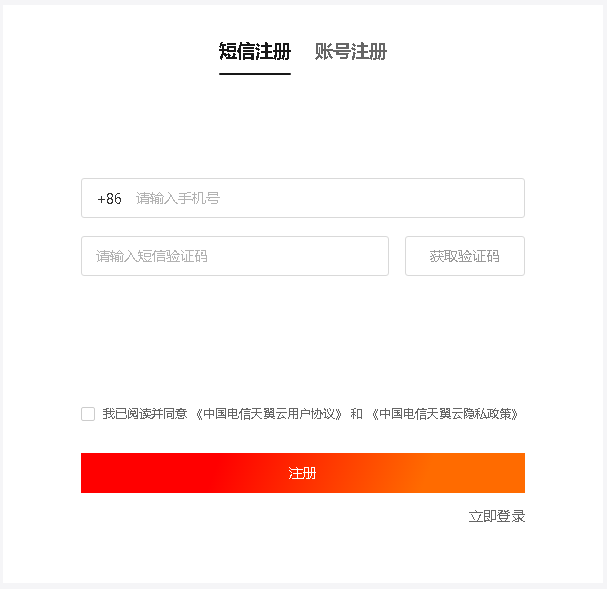
天翼云账号注册
打开官网https://www.ctyun.cn/,点击右上角免费注册
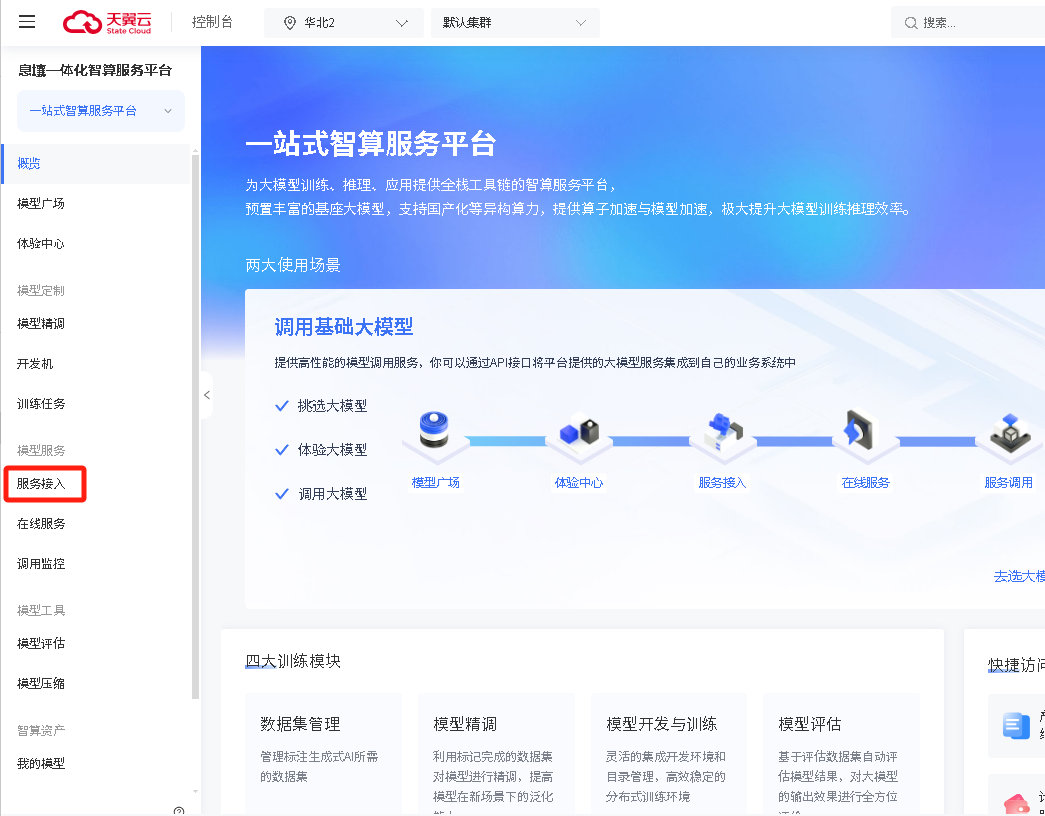
注册登录后,点击首页的如下图的立即体验,或输入网址https://huiju.ctyun.cn/experienceCenter/

进入如下界面,点击左侧菜单栏的服务接入
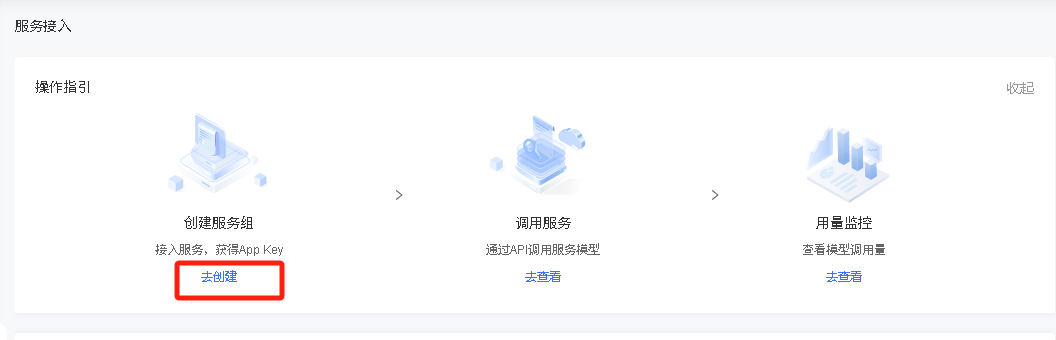
显示如下界面,点击去创建进行服务组创建
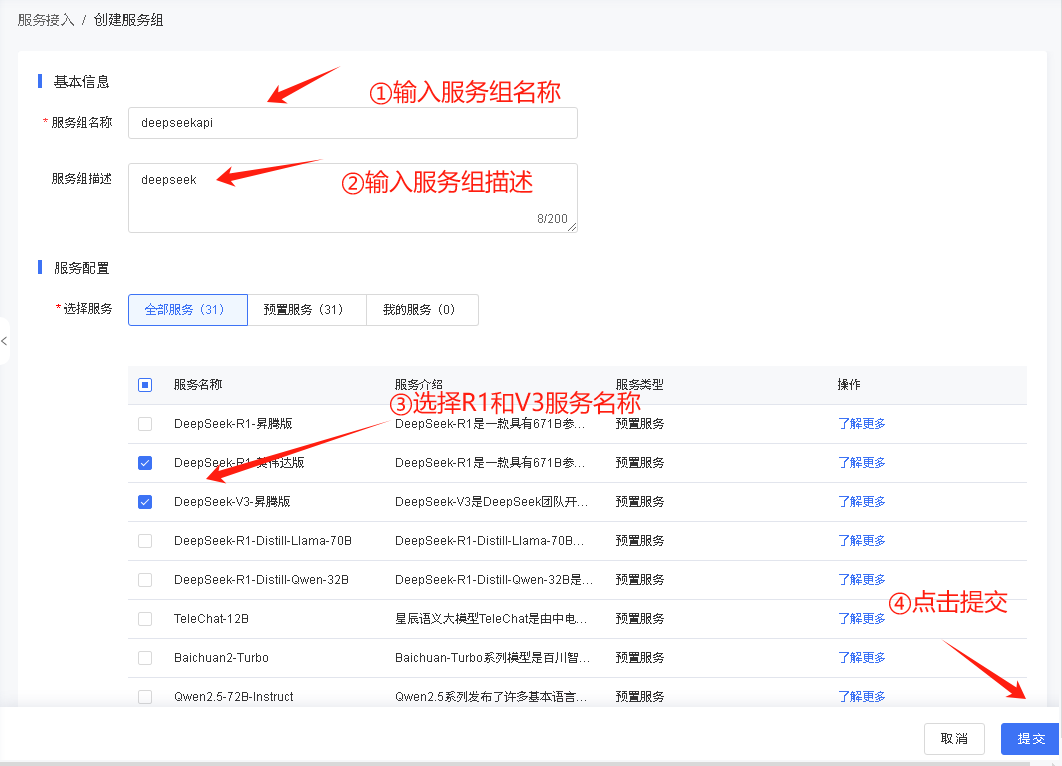
根据下图进行填写,填写完成后提交
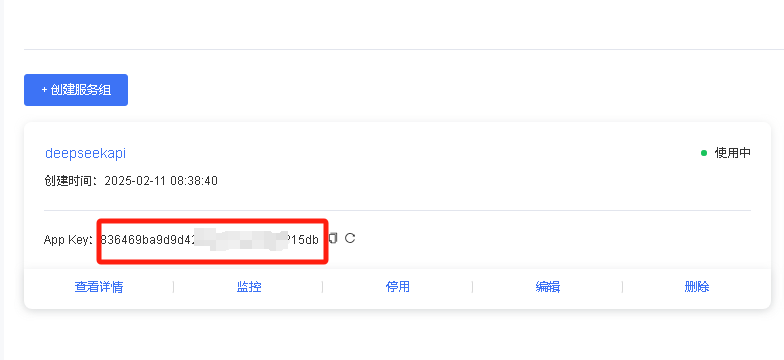
提交后下方显示创建信息,如图所示,获取apikey,填写到后面的vba脚本中
02
在PPT中添加deepseek的VBA脚本
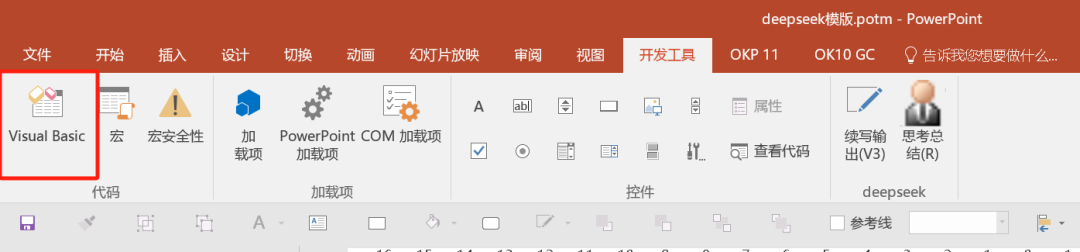
1.在开发工具中添加vba脚本,如果没有开发工具,可在文件-选项-自定义功能区中设置
2.在Normal的模块下右键新增模块,输入代码后保存
注意:需要将代码中的78行、141行的你的key更换为上面获取的apikey,也可以加群直接获取模块进行导入。Function CallDeepSeekAPI(api_key As String, inputText As String)Dim API As StringDim SendTxt As StringDim Http As ObjectDim status_code As IntegerDim response As StringMsgBox "开始调用Deepseek V3进行总结,耐心等待......"API = "https://wishub-x1.ctyun.cn/v1/chat/completions"SendTxt = "{""model"": ""9dc913a037774fc0b248376905c85da5"", ""messages"": [{""role"":""system"", ""content"":""你是PPT文案专家,善于总结,输出要总结为条目,每个条目不超过50字,前面总结4至8字,加冒号进行概要描述,总字数不超过200字""}, {""role"":""user"", ""content"":""" & inputText & """}], ""stream"": false}"Set Http = CreateObject("MSXML2.XMLHTTP")With Http.Open "POST", API, False.setRequestHeader "Content-Type", "application/json".setRequestHeader "Authorization", "Bearer " & api_key.send SendTxtstatus_code = .Statusresponse = .responseTextEnd WithIf status_code = 200 ThenCallDeepSeekAPI = responseElseCallDeepSeekAPI = "Error: " & status_code & " - " & responseEnd IfSet Http = NothingEnd FunctionFunction CallDeepSeekRAPI(api_key As String, inputText As String)Dim API As StringDim SendTxt As StringDim Http As ObjectDim status_code As IntegerDim response As StringMsgBox "开始调用Deepseek R1进行总结,耐心等待......"API = "https://wishub-x1.ctyun.cn/v1/chat/completions"SendTxt = "{""model"": ""7ba7726dad4c4ea4ab7f39c7741aea68"", ""messages"": [{""role"":""system"", ""content"":""你是PPT文案专家,善于总结,输出要总结为条目,每个条目不超过50字,前面总结4至8字,加冒号进行概要描述,总字数不超过200字""}, {""role"":""user"", ""content"":""" & inputText & """}], ""stream"": false}"Set Http = CreateObject("MSXML2.XMLHTTP")With Http.Open "POST", API, False.setRequestHeader "Content-Type", "application/json".setRequestHeader "Authorization", "Bearer " & api_key.send SendTxtstatus_code = .Statusresponse = .responseTextEnd WithIf status_code = 200 ThenCallDeepSeekRAPI = responseElseCallDeepSeekRAPI = "Error: " & status_code & " - " & responseEnd IfSet Http = NothingEnd FunctionSub DeepSeekV3()Dim selectedText As StringDim apikey As StringDim response As StringDim midString As StringDim ans As StringDim shp As ShapeDim slide As slideDim regex As ObjectDim matches As ObjectDim selectedShape As Shape' 检查是否有选中的对象If ActiveWindow.Selection.Type = ppSelectionShapes Then' 获取选中的形状Set selectedShape = ActiveWindow.Selection.ShapeRange(1)' 检查形状是否有文本If selectedShape.HasTextFrame ThenIf selectedShape.TextFrame.HasText ThenselectedText = selectedShape.TextFrame.TextRange.TextselectedText = Replace(selectedText, ChrW$(13), "")apikey = "你的key"response = CallDeepSeekAPI(apikey, selectedText)If Left(response, 5) <> "Error" ThenSet regex = CreateObject("VBScript.RegExp")With regex.Global = True.MultiLine = True.IgnoreCase = False.Pattern = """content"":""(.*?)"""End WithSet matches = regex.Execute(response)If matches.Count > 0 Thenresponse = matches(0).SubMatches(0)response = Replace(Replace(response, """", Chr(34)), """", Chr(34))response = Replace(response, "\n\n", "\n")response = Replace(response, "\n", vbCrLf)response = Replace(response, "*", "")response = Replace(response, "#", "")' 将结果插入到形状的文本中selectedShape.TextFrame.TextRange.Text = responseElseMsgBox "Failed to parse API response.", vbExclamationEnd IfElseMsgBox response, vbCriticalEnd IfElseMsgBox "选中的形状没有文本内容。"End IfElseMsgBox "选中的形状没有文本框。"End IfElseMsgBox "请选择一个形状。"End IfEnd SubSub DeepSeekR()Dim selectedText As StringDim apikey As StringDim response As StringDim midString As StringDim ans As StringDim shp As ShapeDim slide As slideDim regex As ObjectDim matches As ObjectDim selectedShape As Shape' 检查是否有选中的对象If ActiveWindow.Selection.Type = ppSelectionShapes Then' 获取选中的形状Set selectedShape = ActiveWindow.Selection.ShapeRange(1)' 检查形状是否有文本If selectedShape.HasTextFrame ThenIf selectedShape.TextFrame.HasText ThenselectedText = selectedShape.TextFrame.TextRange.TextselectedText = Replace(selectedText, ChrW$(13), "")apikey = "你的key"response = CallDeepSeekRAPI(apikey, selectedText)If Left(response, 5) <> "Error" ThenSet regex = CreateObject("VBScript.RegExp")With regex.Global = True.MultiLine = True.IgnoreCase = False.Pattern = """content"":""(.*?)"""End WithSet matches = regex.Execute(response)If matches.Count > 0 Thenresponse = matches(0).SubMatches(0)response = Replace(Replace(response, """", Chr(34)), """", Chr(34))response = Replace(response, "\n\n", "\n")response = Replace(response, "\n", vbCrLf)response = Replace(response, "*", "")response = Replace(response, "#", "")' 将结果插入到形状的文本中selectedShape.TextFrame.TextRange.Text = responseElseMsgBox "Failed to parse API response.", vbExclamationEnd IfElseMsgBox response, vbCriticalEnd IfElseMsgBox "选中的形状没有文本内容。"End IfElseMsgBox "选中的形状没有文本框。"End IfElseMsgBox "请选择一个形状。"End IfEnd Sub
03
生成功能配置
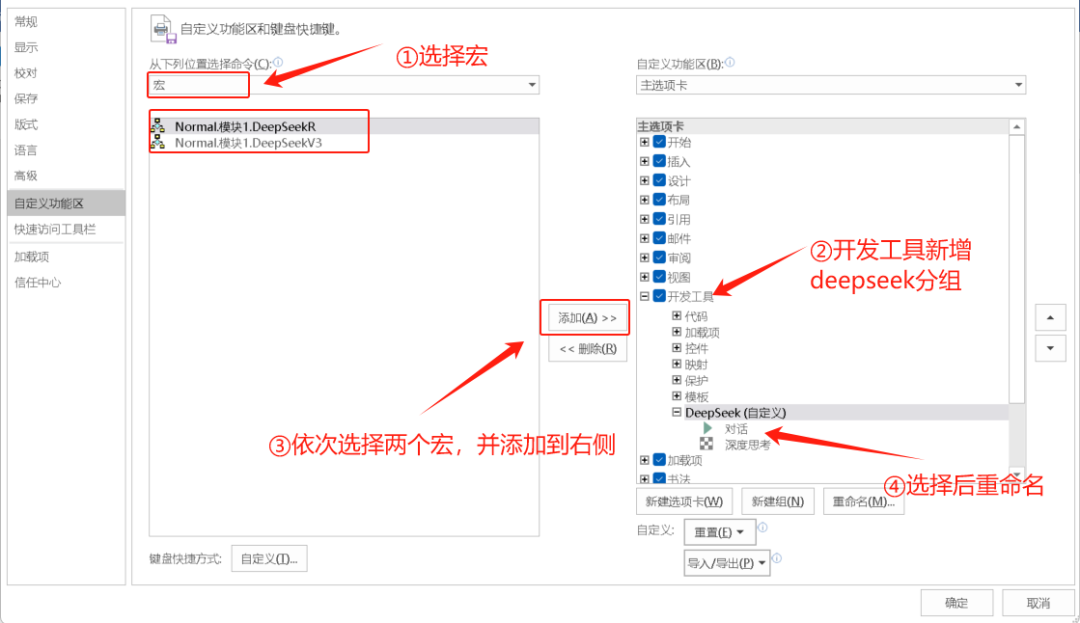
1.打开菜单文件-选项-自定义功能区,如下图进行设置
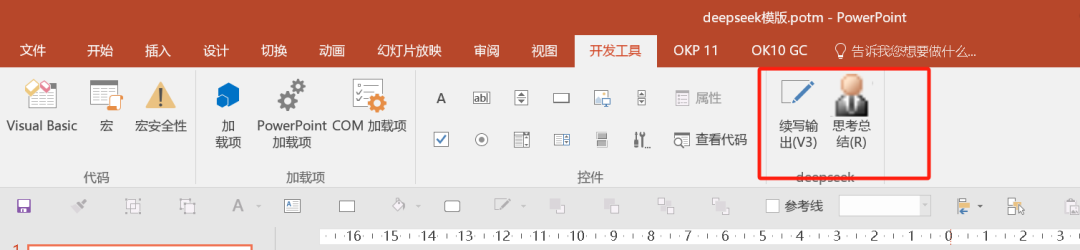
 设置完成后,菜单如图所示
04
功能测试
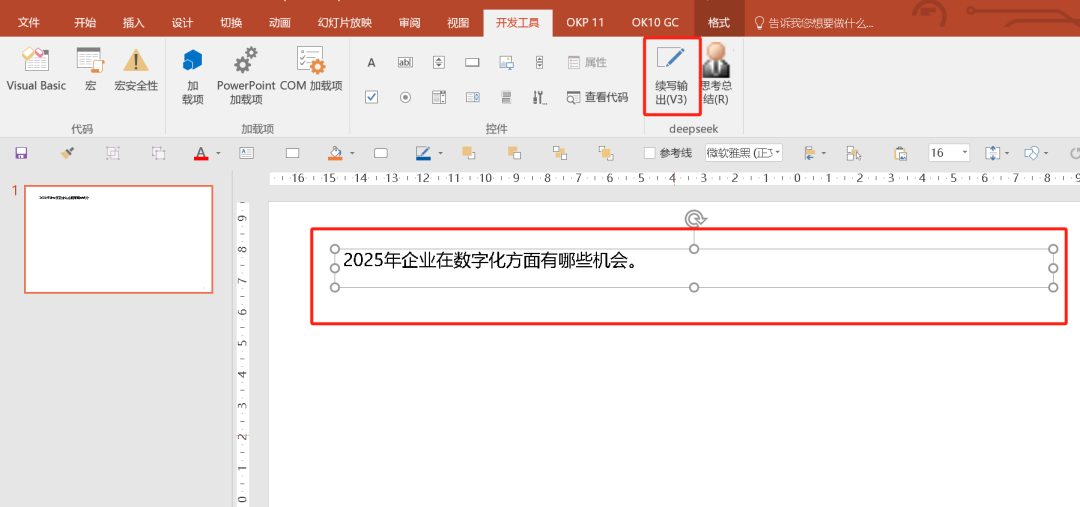
1.新建一页PPT,增加一个文本框,如下图,输入内容,文本框处于选中状态,点击续写输出。
如果你在配置过程中有任何问题,可扫码加群,和小伙伴一起探讨,如果扫码过期,也可以通过公众号加我,我拉你入群。
最后修改时间:2025-02-17 09:25:31
文章转载自数据库平台优化,如果涉嫌侵权,请发送邮件至:contact@modb.pro进行举报,并提供相关证据,一经查实,墨天轮将立刻删除相关内容。
