



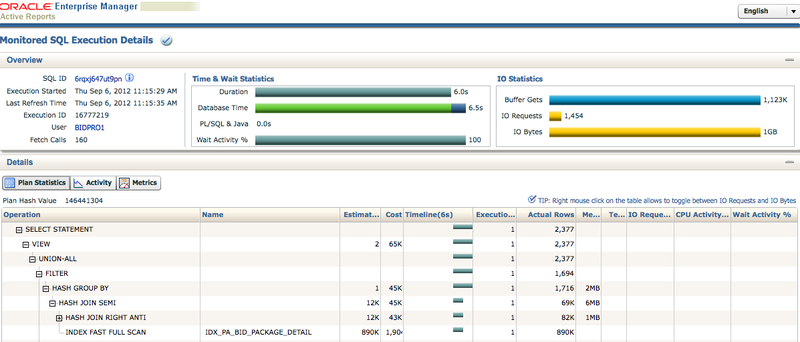
在Oracle Database 11g中,SQL Monitor Report新特性能够将SQL报告完美呈现出来,对比之前的形式,现在的报告可谓完美。基于Flash的展现,动态、图形画而又流畅,让SQL的执行过程赏心悦目的展示出来。
以下是最近优化的一个SQL执行展示:
这个报告会通过OTN获得展现的框架和JS脚本,如果不能连接到公网,你可以在本地构建相应的文件,我在自己的站点保存了这些脚本:
以下是最近优化的一个SQL执行展示:
这个报告会通过OTN获得展现的框架和JS脚本,如果不能连接到公网,你可以在本地构建相应的文件,我在自己的站点保存了这些脚本:
mkdir -p eygle.com/sqlmon
cd eygle.com/sqlmon
wget --mirror --no-host-directories --cut-dirs=1 http://download.oracle.com/otn_software/emviewers/scripts/flashver.js
wget --mirror --no-host-directories --cut-dirs=1 http://download.oracle.com/otn_software/emviewers/scripts/loadswf.js
wget --mirror --no-host-directories --cut-dirs=1 http://download.oracle.com/otn_software/emviewers/scripts/document.js
wget --mirror --no-host-directories --cut-dirs=1 http://download.oracle.com/otn_software/emviewers/sqlmonitor/11/sqlmonitor.swf
这样我在生成SQL报告时,就可以调用自己网站的脚本文件。
通过v$sql_monitor视图可以找到已经被记录的SQL_ID:
以上优化的SQL,优化之前的执行计划有184个步骤,非常复杂:
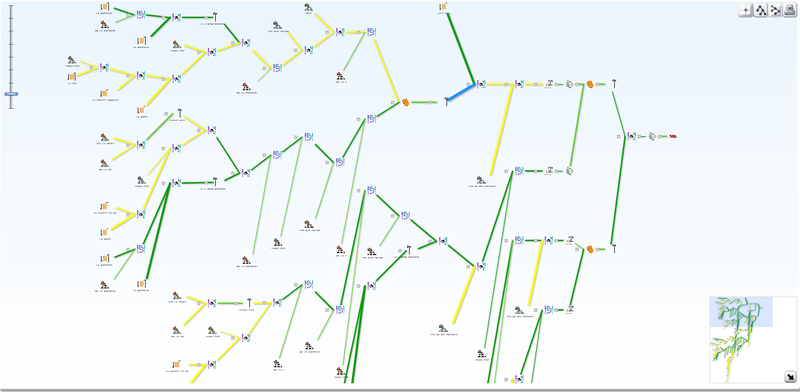
关于这个复杂SQL的演示,可以从以下链接获得:
http://www.eygle.com/sqlmon/report_sql_monitor_demo.htm
Kaya 在以前ACOUG的活动中曾经讲到过这个新特性,以下是2个来自Exadata中的测试SQL展现:
http://www.eygle.com/sqlmon/before.html
http://www.eygle.com/sqlmon/after.html
关于这个新特性的参考链接:
http://www.os2ora.com/use-sql-monitor-report-to-tune-and-diagnose-sql/
http://www.os2ora.com/fantastic-11gr2-sql-monitor-report/
http://www.oracle-base.com/articles/11g/real-time-sql-monitoring-11gr1.php
http://docs.oracle.com/cd/E11882_01/appdev.112/e16760/d_sqltun.htm
http://www.oracle.com/technetwork/database/focus-areas/manageability/sqlmonitor-084401.html
通过v$sql_monitor视图可以找到已经被记录的SQL_ID:
SQL> select sql_id from v$sql_monitor;以下是通过脚本调用,生成了一个报告:
SQL_ID
-------------
6rqxj647ut9pn
f4kcr0dn9rv6z
f6cz4n8y72xdc
[eygle@enmoteam2 ~]$ sqlplus "/ as sysdba" @eygle.sql在脚本 eygle.sql 中定义了SQL_ID ,通过这个SQL_ID 生成了ACTIVE REPORT:
SQL*Plus: Release 11.2.0.3.0 Production on Thu Sep 6 15:01:55 2012
Copyright (c) 1982, 2011, Oracle. All rights reserved.
Connected to:
Oracle Database 11g Enterprise Edition Release 11.2.0.3.0 - 64bit Production
With the Partitioning, OLAP, Data Mining and Real Application Testing options
SET LONG 1000000这样生成的报告较以前的SQL Report更为直观。
SET LONGCHUNKSIZE 1000000
SET LINESIZE 1000
SET PAGESIZE 0
SET TRIM ON
SET TRIMSPOOL ON
SET ECHO OFF
SET FEEDBACK OFF
SPOOL report_sql_monitor.htm
SELECT DBMS_SQLTUNE.report_sql_monitor(
sql_id => '6rqxj647ut9pn',
type => 'ACTIVE',
report_level => 'ALL',
base_path => 'http://www.eygle.com/sqlmon') AS report
FROM dual;
SPOOL OFF
以上优化的SQL,优化之前的执行计划有184个步骤,非常复杂:
关于这个复杂SQL的演示,可以从以下链接获得:
http://www.eygle.com/sqlmon/report_sql_monitor_demo.htm
Kaya 在以前ACOUG的活动中曾经讲到过这个新特性,以下是2个来自Exadata中的测试SQL展现:
http://www.eygle.com/sqlmon/before.html
http://www.eygle.com/sqlmon/after.html
关于这个新特性的参考链接:
http://www.os2ora.com/use-sql-monitor-report-to-tune-and-diagnose-sql/
http://www.os2ora.com/fantastic-11gr2-sql-monitor-report/
http://www.oracle-base.com/articles/11g/real-time-sql-monitoring-11gr1.php
http://docs.oracle.com/cd/E11882_01/appdev.112/e16760/d_sqltun.htm
http://www.oracle.com/technetwork/database/focus-areas/manageability/sqlmonitor-084401.html
「喜欢这篇文章,您的关注和赞赏是给作者最好的鼓励」
关注作者
【版权声明】本文为墨天轮用户原创内容,转载时必须标注文章的来源(墨天轮),文章链接,文章作者等基本信息,否则作者和墨天轮有权追究责任。如果您发现墨天轮中有涉嫌抄袭或者侵权的内容,欢迎发送邮件至:contact@modb.pro进行举报,并提供相关证据,一经查实,墨天轮将立刻删除相关内容。
