



大家好,这里是公众号 DBA学习之路,分享一些学习数据库路上的知识和经验。

目录
前言
前文 Oracle 19C RAC 集群起不来了,ora.storage 的锅? 说到集群起不来,分析完之后发现不是集群不是实例崩溃的根因,而且集群成功启动之后,数据库实例依然 hang 住无法成功启动。
为了解决问题,我往前追溯了最开始实例崩溃的情况,本文记录一下分析和处理过程!
问题描述
首先,回顾一下问题经过,19.22 RAC 两节点,其中实例 2,在 2025-02-18T21:36:47.953581+08:00 时实例异常崩溃,在 2025-02-18T21:46:24.224088+08:00 时又自动重启。
通过实例崩溃节点的 alert 日志可以发现, 最早第一次实例崩溃的日志如下:
2025-02-18T21:36:47.953581+08:00
PMON (ospid: 41879): terminating the instance due to ORA error 499
2025-02-18T21:36:47.953675+08:00
Cause - 'Instance is being terminated due to fatal process death (pid: 5, ospid: 41971, IPC0)'
自动重启后,再次发生实例崩溃,日志如下:
2025-02-18T21:38:18.289755+08:00
 Dwn-cvts replayed, VALBLKs dubious
 All grantable enqueues granted
2025-02-18T21:46:23.819853+08:00
Errors in file /u01/app/oracle/diag/rdbms/mesdb/mesdb2/trace/mesdb2_fenc_3353096.trc (incident=480559):
ORA-00600: internal error code, arguments: [kfmdPriRegRclient04], [], [], [], [], [], [], [], [], [], [], []
Incident details in: /u01/app/oracle/diag/rdbms/mesdb/mesdb2/incident/incdir_480559/mesdb2_fenc_3353096_i480559.trc
Use ADRCI or Support Workbench to package the incident.
See Note 411.1 at My Oracle Support for error and packaging details.
2025-02-18T21:46:24.224088+08:00
Errors in file /u01/app/oracle/diag/rdbms/mesdb/mesdb2/trace/mesdb2_fenc_3353096.trc:
ORA-00600: internal error code, arguments: [kfmdPriRegRclient04], [], [], [], [], [], [], [], [], [], [], []
FENC (ospid: 3353096): terminating the instance due to ORA error 854
通过上述日志可以发现,从 2025-02-18T21:38:18.289755+08:00 ~ 2025-02-18T21:46:23.819853+08:00,主要 hang 在 All grantable enqueues granted 阶段,等待了接近 8 分钟左右,然后报错 ORA-00600 [kfmdPriRegRclient04],实例再次异常 Crashed。
关于 ORA-00600 [kfmdPriRegRclient04] 报错,大概率可能是一个 BUG,在 MOS 上搜索后发现,在当前数据库版本 19.22 有 4 个已知问题:
- ORA-600 [kfmdPriRegRclient04] ( Doc ID 2795196.1 )
- Bug 34345080 ORA-600 [kfmdpriregrclient04] - kfmdpriregrclient
- 33898768 ORA-600 [kfmdpriregrclient04] -> regression fix for bug 33781900
- 33781900 ORA-600 [kfmdpriregrclient04] With Regression fixx Also
- Bug 35469192 Instance Crashes With ORA-600 [kfmdpriregrclient04] During Reconfiguration
4 个已知问题,前 3 个已经修复在当前的数据库版本中,只有最后一个 Bug 35469192 比较符合:
This bug is only relevant when using Real Application Clusters (RAC)
During instance start, it takes too long to complete FIXWRITE step and instance is
 killed and restarted when using Real Application Clusters (RAC)


REDISCOVERY INFORMATION:
    If ORA-600 [kfmdPriRegRclient04] is hit during instance start FIXWRITE step,
    then this bug is encountered.

Workaround
    NONE
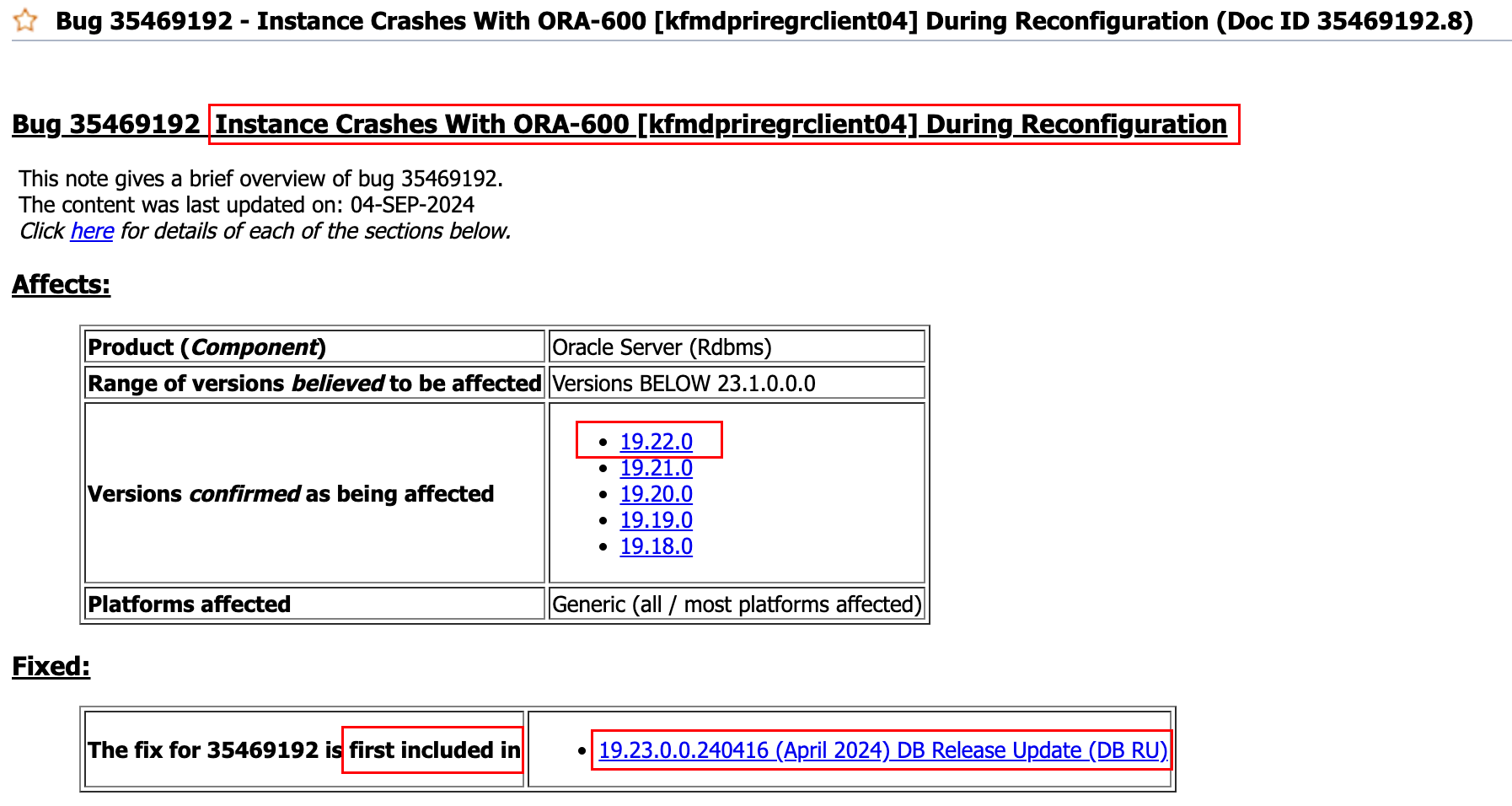
可以看到这个 BUG 的唯一解决方案就是 打补丁。
问题解决
补丁下载
在 MOS 上下载对应版本补丁:

正式安装补丁之前建议先阅读一下 README 文档:
- This patch is RAC Rolling Installable(注意:这是一个支持滚动安装的补丁,所以可以挨个节点进行安装).
- Ensure that 19 Release 19.22.0.0.240116DBRU Patch Set Update (PSU) 35943157 is already applied on the Oracle Database.
- Ensure that you have OPatch 19 Release 12.2.0.1.40 or higher.
- Ensure that you shut down all the services running from the Oracle home.
- For a RAC environment, shut down all the services (database, ASM, listeners, nodeapps, and CRS daemons) running from the Oracle home of the node you want to patch.
主要关注以上几条关键信息,确保符合条件之后就可以进行补丁安装。
补丁安装
由于节点 2 数据库实例处于宕机状态,所以先在节点 2 进行补丁安装。
打补丁前建议 disable crs,防止集群自启:
[root@mesdb2 ~]# /u01/app/19.3.0/grid/bin/crsctl disable crs
## 关闭集群
[root@mesdb2 ~]# /u01/app/19.3.0/grid/bin/crsctl stop crs -f
安装补丁前校验:
[oracle@mesdb2 35469192]$ opatch prereq CheckConflictAgainstOHWithDetail -ph ./
Oracle Interim Patch Installer version 12.2.0.1.41
Copyright (c) 2025, Oracle Corporation.  All rights reserved.

PREREQ session

Oracle Home       : /u01/app/oracle/product/19.3.0/db_1
Central Inventory : /u01/app/oraInventory
   from           : /u01/app/oracle/product/19.3.0/db_1/oraInst.loc
OPatch version    : 12.2.0.1.41
OUI version       : 12.2.0.7.0
Log file location : /u01/app/oracle/product/19.3.0/db_1/cfgtoollogs/opatch/opatch2025-02-19_01-26-47AM_1.log

Invoking prereq "checkconflictagainstohwithdetail"

Prereq "checkConflictAgainstOHWithDetail" passed.

OPatch succeeded.
[oracle@mesdb2 35469192]$
确保安装前校验成功,就可以正式打补丁了:
[oracle@mesdb2 35469192]$ opatch apply
Oracle Interim Patch Installer version 12.2.0.1.41
Copyright (c) 2025, Oracle Corporation.  All rights reserved.


Oracle Home       : /u01/app/oracle/product/19.3.0/db_1
Central Inventory : /u01/app/oraInventory
   from           : /u01/app/oracle/product/19.3.0/db_1/oraInst.loc
OPatch version    : 12.2.0.1.41
OUI version       : 12.2.0.7.0
Log file location : /u01/app/oracle/product/19.3.0/db_1/cfgtoollogs/opatch/opatch2025-02-19_01-38-43AM_1.log

Verifying environment and performing prerequisite checks...
OPatch continues with these patches:   35469192

Do you want to proceed? [y|n]
y
User Responded with: Y
All checks passed.

Please shutdown Oracle instances running out of this ORACLE_HOME on the local system.
(Oracle Home = '/u01/app/oracle/product/19.3.0/db_1')


Is the local system ready for patching? [y|n]
y
User Responded with: Y
Backing up files...
Applying interim patch '35469192' to OH '/u01/app/oracle/product/19.3.0/db_1'

Patching component oracle.rdbms, 19.0.0.0.0...
Patch 35469192 successfully applied.
Log file location: /u01/app/oracle/product/19.3.0/db_1/cfgtoollogs/opatch/opatch2025-02-19_01-38-43AM_1.log

OPatch succeeded.
补丁安装成功,启动集群和数据库实例:
[root@mesdb2 ~]# /u01/app/19.3.0/grid/bin/crsctl start crs
CRS-4123: Oracle High Availability Services has been started.
[root@mesdb2 ~]# /u01/app/19.3.0/grid/bin/crsctl enable crs
不幸的是,节点 2 数据库实例依然没有启动成功,一直 hang 在 All grantable enqueues granted 阶段,但是万幸的没有再报错 ORA-00600 [kfmdPriRegRclient04],实例也没有崩溃,说明这个 BUG 被解决了。
后续想着可能是一个节点打了一个节点没打的原因,所以在节点一上也打了补丁,结果依然是只能启动一个数据库实例:
- 节点 1 数据库实例启动成功,节点 2 数据库实例无法启动,一直 hang 在
All grantable enqueues granted阶段; - 节点 2 数据库实例启动成功,节点 1 数据库实例无法启动,一直 hang 在
All grantable enqueues granted阶段;
也就是说同时间只能启动一个数据库实例,这个问题又 hang 住了。
后续分析
基于现有信息,查了很多类似案例,基本上都是网络问题导致的。
后续查看了 OSW 问题时段的 netstat 输出中,发现了报包重组问题,比较严重:
mesdb2_netstat_25.02.18.2100.dat
129,1: IpReasmFails 8716296 0.0
596,1: IpReasmFails 8743012 0.0
.......

55235,1: IpReasmFails 10667734 0.0
55702,1: IpReasmFails 10725986 0.0

mesdb2_netstat_25.02.18.2200.dat
129,1: IpReasmFails 10784971 0.0
596,1: IpReasmFails 10843446 0.0
1063,1: IpReasmFails 10902467 0.0

.......

55298,1: IpReasmFails 15147120 0.0
55766,1: IpReasmFails 15200994 0.0
关于这个问题,在墨天轮找到一篇相关的文章:关于Oracle RAC调整网卡MTU值的问题。
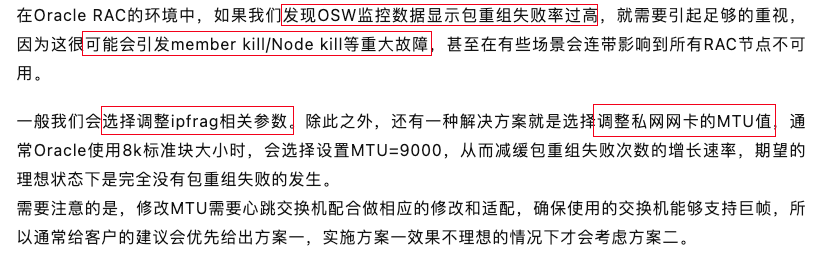
文章中给出的解决方案跟 Oracle MOS 给出的解决方案基本一致:
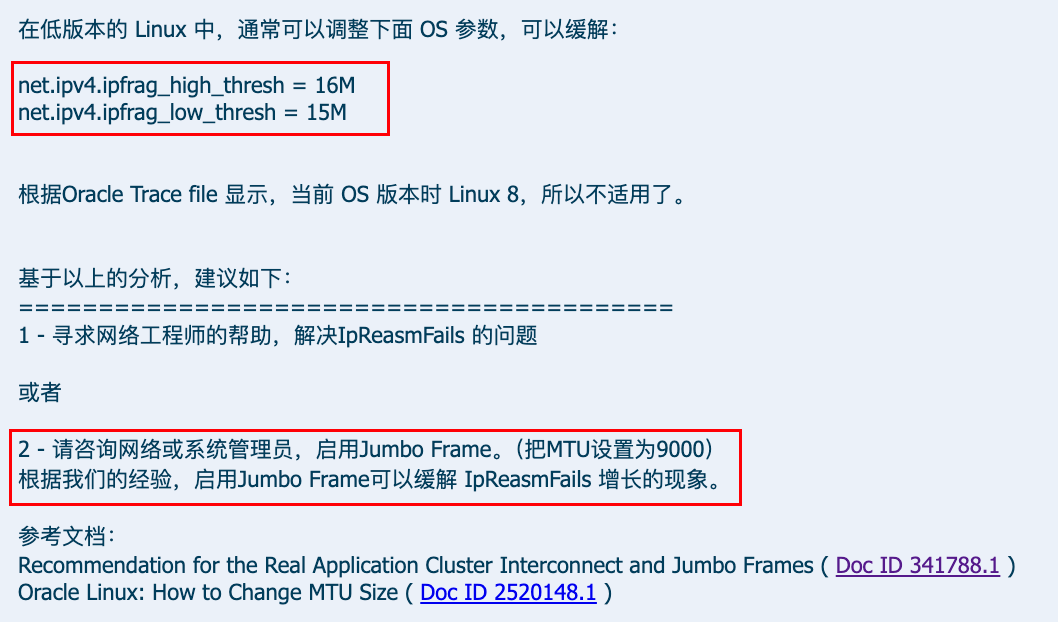
但是 Oracle 建议启用 Jumbo Frame,因为在 OS 版本为 Linux 8 的主机中,ipfrag 参数已经不适用。
修改 MTU
这个修改的官方主要依据:Recommendation for the Real Application Cluster Interconnect and Jumbo Frames (Doc ID 341788.1)
ifconfig 可以动态修改 MTU,但是如果 rac 想用上 mtu=9000 的话需要重启 crs(停机不可避免):
## 关闭 crs 集群(所有计算节点操作)
crsctl stop crs
crsctl disable crs


## 修改私有网卡 MTU 为 9000(所有节点操作)
ifconfig <网卡名称> mtu 9000

## 查看 MTU 是否更改成功
ifconfig <网卡名称>

## 修改私有网卡配置文件,添加 MTU=9000 的配置,以确保主机重启后 MTU=9000 不变
cat<<-EOF>>/etc/sysconfig/network-scripts/ifcfg-<网卡名称>
MTU=9000
EOF

## 主机重启(所有节点操作)
reboot

## 启动 crs 集群(所有计算节点操作)
crsctl start crs
crsctl enable crs

## 启动数据库实例
srvctl start database -d mesdb
当然了,这一步修改 MTU 的操作目前还没有在生产进行操作,等待后续修改之后,再来更新一下是否有效!
写在最后
本文仅记录问题分析过程以及解决方案,请大家根据实际情况进行分辨解决方案是否有效。
