1. all-components.yaml配置obagent和ocp-expres组件,配置及添加组件执行如下
[admin@observer example]$ cat all-components.yaml
obagent:
depends:
- oceanbase-ce
# The list of servers to be monitored. This list is consistent with the servers in oceanbase-ce.
servers:
- name: observer
ip: 192.168.45.143
global:
home_path: /home/admin/obagent
ocp-express:
depends:
- oceanbase-ce
- obproxy-ce
- obagent
servers:
- 192.168.45.143
global:
# The working directory for prometheus. prometheus is started under this directory. This is a required field.
home_path: /home/admin/ocp-express
# log_dir: /home/oceanbase/ocp-express/log # The log directory of ocp express server. The default value is {home_path}/log.
memory_size: 1G # The memory size of ocp-express server. The recommend value is 512MB * (expect node num + expect tenant num) * 60MB.
# logging_file_total_size_cap: 10G # The total log file size of ocp-express server
# logging_file_max_history: 1 # The maximum of retention days the log archive log files to keep. The default value is unlimited
[admin@observer example]$ obd cluster component add obtest -c all-components.yaml
Get local repositories and plugins ok
Open ssh connection ok
Package obagent-4.2.2-100000042024011120.el7 is available.
Package ocp-express-4.2.2-100000022024011120.el7 is available.
install obagent-4.2.2 for local ok
install ocp-express-4.2.2 for local ok
Get added repositories and plugins ok
Open ssh connection ok
Generate obagent configuration ok
Initializes obagent work home ok
Generate ocp express configuration ok
Connect to observer 192.168.45.143:2881 ok
Create tenant ocp_meta ok
Exec oceanbase-ce-4.3.5.0-100000202024123117.el7-48b61655aaa13e9b01b722928d1979c76b41937e import_time_zone_info.py x
[WARN] execute import_time_zone_info.py failed
Exec oceanbase-ce-4.3.5.0-100000202024123117.el7-48b61655aaa13e9b01b722928d1979c76b41937e import_srs_data.py x
[WARN] execute import_srs_data.py failed
obclient -h192.168.45.143 -P2881 -uroot@ocp_meta -Doceanbase -A
Initializes ocp-express work home ok
Remote obagent-4.2.2-100000042024011120.el7-19739a07a12eab736aff86ecf357b1ae660b554e repository install ok
Remote obagent-4.2.2-100000042024011120.el7-19739a07a12eab736aff86ecf357b1ae660b554e repository lib check ok
Remote ocp-express-4.2.2-100000022024011120.el7-09ffcf156d1df9318a78af52656f499d2315e3f7 repository install ok
Remote ocp-express-4.2.2-100000022024011120.el7-09ffcf156d1df9318a78af52656f499d2315e3f7 repository lib check ok
Connect to observer 192.168.45.143:2881 ok
Check before start obagent ok
Check before start ocp-express ok
[WARN] OBD-4302: (192.168.45.143) not enough memory. (Free: 155M, Need: 1G)
Start obagent ok
obagent program health check ok
Connect to observer 192.168.45.143:2881 ok
Start ocp-express ok
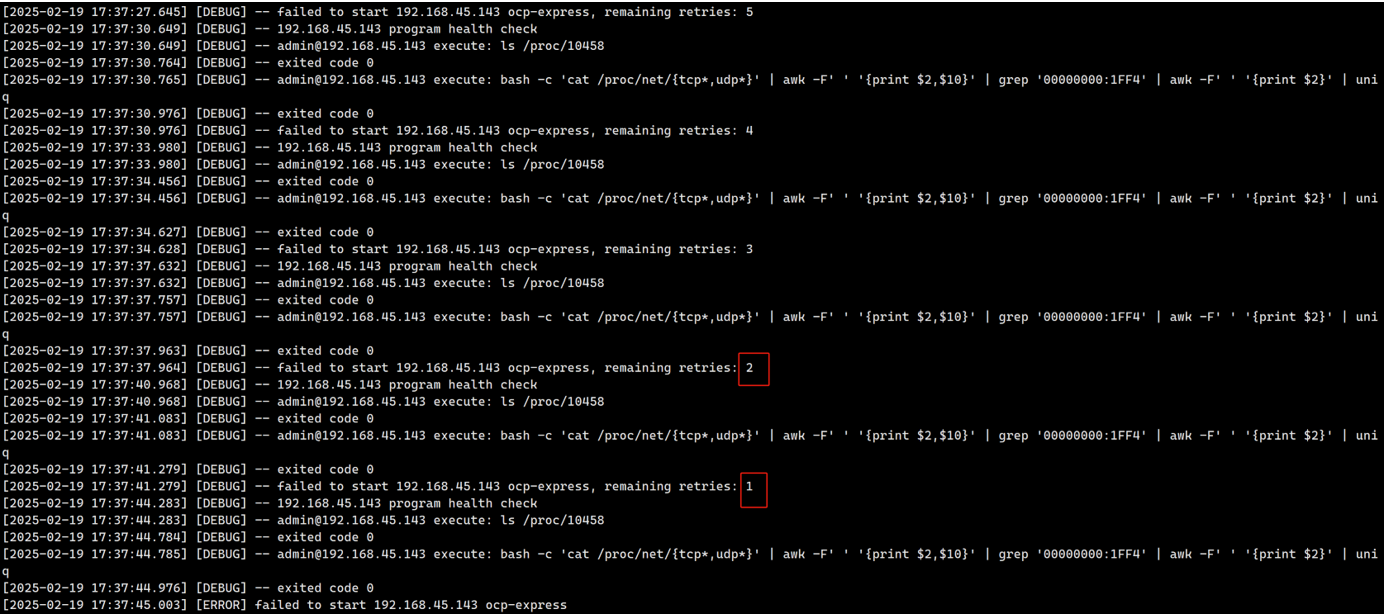
[ERROR] failed to start 192.168.45.143 ocp-express
See https://www.oceanbase.com/product/ob-deployer/error-codes .
Trace ID: 4228d178-eea2-11ef-aa25-000c297142dd
If you want to view detailed obd logs, please run: obd display-trace 4228d178-eea2-11ef-aa25-000c297142dd
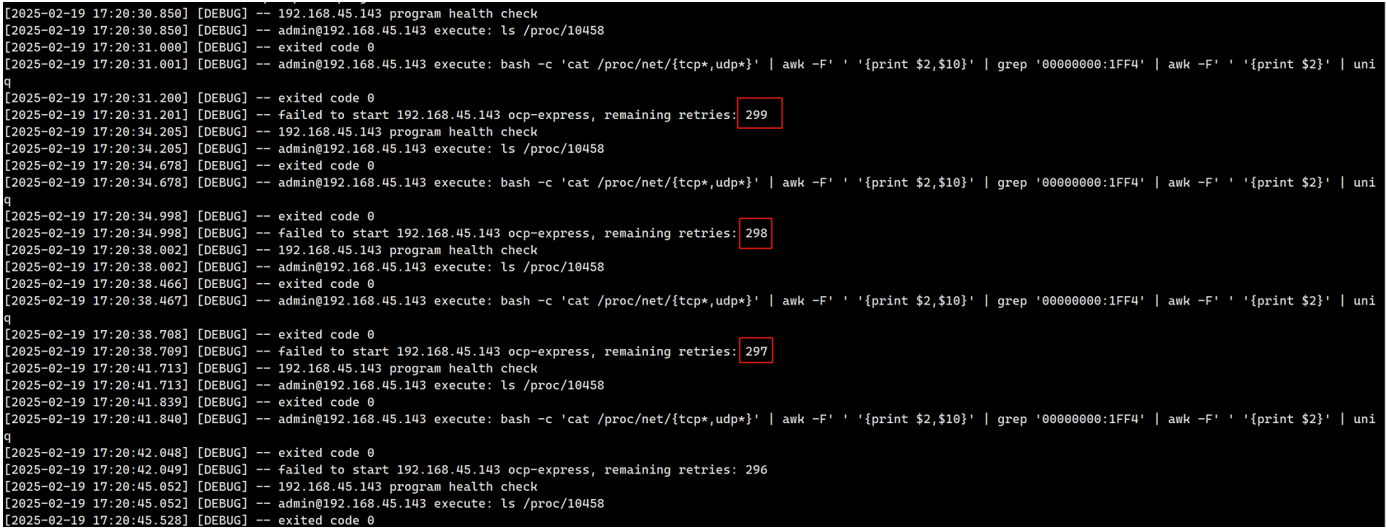
2. 日志里报错和尝试次数
[2025-02-19 17:20:30.846] [INFO] ocp-express program health check
[2025-02-19 17:20:30.850] [DEBUG] -- 192.168.45.143 program health check
[2025-02-19 17:20:30.850] [DEBUG] -- admin@192.168.45.143 execute: ls /proc/10458
[2025-02-19 17:20:31.000] [DEBUG] -- exited code 0
[2025-02-19 17:20:31.001] [DEBUG] -- admin@192.168.45.143 execute: bash -c 'cat /proc/net/{tcp*,udp*}' | awk -F' ' '{print $2,$10}' | grep '00000000:1FF4' | awk -F' ' '{print $2}' | uniq
[2025-02-19 17:20:31.200] [DEBUG] -- exited code 0
[2025-02-19 17:20:31.201] [DEBUG] -- failed to start 192.168.45.143 ocp-express, remaining retries: 299
[2025-02-19 17:20:34.205] [DEBUG] -- 192.168.45.143 program health check
[2025-02-19 17:20:34.205] [DEBUG] -- admin@192.168.45.143 execute: ls /proc/10458
[2025-02-19 17:20:34.678] [DEBUG] -- exited code 0
[2025-02-19 17:20:34.678] [DEBUG] -- admin@192.168.45.143 execute: bash -c 'cat /proc/net/{tcp*,udp*}' | awk -F' ' '{print $2,$10}' | grep '00000000:1FF4' | awk -F' ' '{print $2}' | uniq
3. 正确的all-components.yaml
[admin@observer example]$ cat all-components.yaml
obagent:
depends:
- oceanbase-ce
# The list of servers to be monitored. This list is consistent with the servers in oceanbase-ce.
servers:
- 192.168.45.143
global:
home_path: /home/admin/obagent
monagent_http_port: 8088
mgragent_http_port: 8089
ocp-express:
depends:
- oceanbase-ce
- obproxy-ce
- obagent
servers:
- 192.168.45.143
global:
# The working directory for prometheus. prometheus is started under this directory. This is a required field.
home_path: /home/admin/ocp-express
4. 顺利执行添加obagent和ocp-express
[admin@observer ~]$ cd /home/admin/.oceanbase-all-in-one/obd/usr/obd/example/
[admin@observer example]$ obd cluster component add obtest -c all-components.yaml
Get local repositories and plugins ok
Open ssh connection ok
Get added repositories and plugins ok
Generate obagent configuration ok
Initializes obagent work home ok
Generate ocp express configuration ok
Connect to observer 192.168.45.143:2881 ok
Initializes ocp-express work home ok
Remote obagent-4.2.2-100000042024011120.el7-19739a07a12eab736aff86ecf357b1ae660b554e repository install ok
Remote obagent-4.2.2-100000042024011120.el7-19739a07a12eab736aff86ecf357b1ae660b554e repository lib check ok
Remote ocp-express-4.2.2-100000022024011120.el7-09ffcf156d1df9318a78af52656f499d2315e3f7 repository install ok
Remote ocp-express-4.2.2-100000022024011120.el7-09ffcf156d1df9318a78af52656f499d2315e3f7 repository lib check ok
Connect to observer 192.168.45.143:2881 ok
Check before start obagent ok
Check before start ocp-express ok
Start obagent ok
obagent program health check ok
Connect to observer 192.168.45.143:2881 ok
Start ocp-express ok
ocp-express program health check ok
Connect to Obagent ok
+-------------------------------------------------------------------+
| obagent |
+----------------+--------------------+--------------------+--------+
| ip | mgragent_http_port | monagent_http_port | status |
+----------------+--------------------+--------------------+--------+
| 192.168.45.143 | 8089 | 8088 | active |
+----------------+--------------------+--------------------+--------+
Connect to ocp-express ok
+-------------------------------------------------------------------+
| ocp-express |
+----------------------------+----------+------------------+--------+
| url | username | initial password | status |
+----------------------------+----------+------------------+--------+
| http://192.168.45.143:8180 | admin | _jFm3G3_ | active |
+----------------------------+----------+------------------+--------+
Execute ` obd cluster display obtest ` to view the cluster status
Trace ID: 08f41596-eebd-11ef-bcc0-000c297142dd
If you want to view detailed obd logs, please run: obd display-trace 08f41596-eebd-11ef-bcc0-000c297142dd
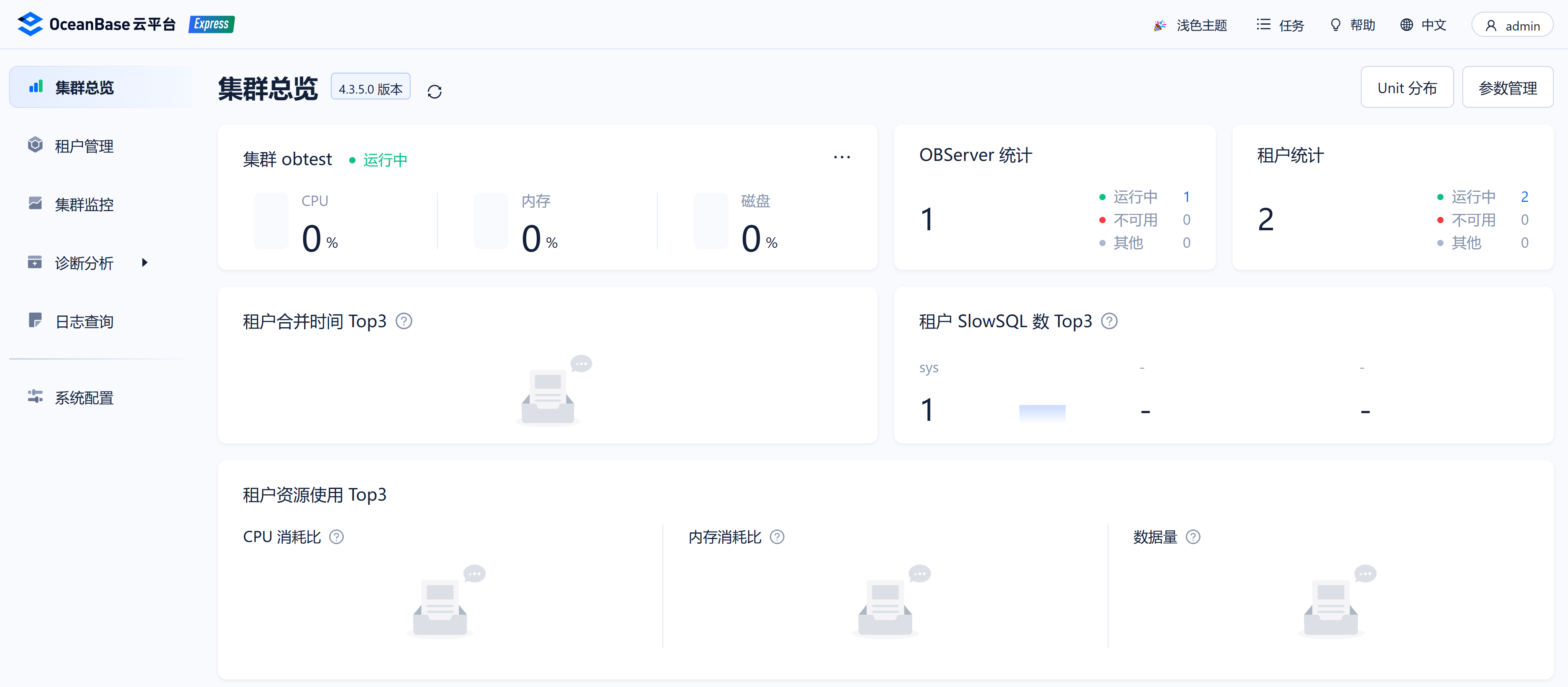
5. 访问http://192.168.45.143:8180
admin/_jFm3G3_