



摘要
{"name":"张三","userid":"user_821","amount":"7.219049934789908","sex":"男","create_date":"2021-03-12"}
/test/user_amount_info/+数据里面的时间(create_date)/系统文件名
调用PairRDDFunctions#saveAsHadoopFile
方法声明
def saveAsHadoopFile(path: String,keyClass: Class[_],valueClass: Class[_],outputFormatClass: Class[_ <: OutputFormat[_, _]],conf: JobConf = new JobConf(self.context.hadoopConfiguration),codec: Option[Class[_ <: CompressionCodec]] = None)
该API由PairRDDFunctions提供,想到将数据转换成(key,value)类型如
("2020-03-07",data),再提取对应的key拼接写出路径,在写出数据时将key写出的地方注释掉,仅写出Value部分及可
重写MultipleTextOutputFormat(拼接写出路径)
重写generateFileNameForKeyValue方法拼接路径
class RDDMultipleTextOutputFormat extends MultipleTextOutputFormat[String,String] {var theTextOutputFormat: TextOutputFormat[String, String] = nulloverride def generateFileNameForKeyValue(key: String, value: String, name: String): String = {// key 即为 数据(key,value)中的key// eg:/2021-03-06/part-00000key+File.separator+name}override def getBaseRecordWriter(fs: FileSystem, job: JobConf, name: String, arg3: Progressable): RecordWriter[String, String] = {if (theTextOutputFormat == null) theTextOutputFormat = new NoKeyTextOutPutFormat[String, String]()theTextOutputFormat.getRecordWriter(fs, job, name, arg3)}}
到此路径拼接完成
重写TextOutputFormat类
增加文件存在获取append流的代码
注释写出key的代码(write 方法中)
class NoKeyTextOutPutFormat[K,V] extends TextOutputFormat[String,String]{class LineRecordWriter[K,V] extends RecordWriter[String, String]{val utf8 = "UTF-8"val newline = "\n".getBytes(utf8)var out: DataOutputStream = nullvar keyValueSeparator:Array[Byte] = null//构造方法def this(out: DataOutputStream, keyValueSeparator: String){this()this.out=outthis.keyValueSeparator=keyValueSeparator.getBytes(utf8)}// key 和 value的分隔符def this(out: DataOutputStream){this(out,"\t")}@throws[IOException]private def writeObject(o: Any): Unit = {if (o.isInstanceOf[Text]) {val to = o.asInstanceOf[Text]out.write(to.getBytes, 0, to.getLength)}else out.write(o.toString.getBytes(utf8))}/*** 注释掉key 只写出value字段* @param key* @param value*/override def write(key: String, value: String): Unit = {val nullKey = key == null || key.isInstanceOf[NullWritable]val nullValue = value == null || value.isInstanceOf[NullWritable]if (nullKey && nullValue) return//if (!nullKey) writeObject(key)//if (!(nullKey || nullValue)) out.write(keyValueSeparator)if (!nullValue) writeObject(value)out.write(newline)}override def close(reporter: Reporter): Unit = {out.close()}}override def getRecordWriter(ignored: FileSystem,job: JobConf,name: String,progress: Progressable): LineRecordWriter[K, V] ={//是否开启压缩val isCompressed = FileOutputFormat.getCompressOutput(job)/// 默认key和value的分隔符val keyValueSeparator = job.get("mapreduce.output.textoutputformat.separator", "\t")if (!isCompressed) {val file = FileOutputFormat.getTaskOutputPath(job, name)val fs = file.getFileSystem(job)// 增加判断文件s会否存在逻辑 获取Append流var fileOut: FSDataOutputStream=null;if(fs.exists(file)){fileOut=fs.append(file)}else{fileOut = fs.create(file, progress)}//val fileOut = fs.create(file, progress)new LineRecordWriter[K, V](fileOut, keyValueSeparator)}else {val codecClass = FileOutputFormat.getOutputCompressorClass(job, classOf[GzipCodec])// create the named codecval codec = ReflectionUtils.newInstance(codecClass, job)// build the filename including the extensionval file = FileOutputFormat.getTaskOutputPath(job, name + codec.getDefaultExtension)val fs = file.getFileSystem(job)var fileOut: FSDataOutputStream=null;// 增加判断文件s会否存在逻辑 获取Append流if(fs.exists(file)){fileOut=fs.append(file)}else{fileOut = fs.create(file, progress)}//val fileOut = fs.create(file, progress)new LineRecordWriter[K, V](new DataOutputStream(codec.createOutputStream(fileOut)), keyValueSeparator)}}}
编写主类进行测试
object UserAmountInfoStreaming {def main(args: Array[String]): Unit = {val conf = new SparkConf().setMaster("local[3]").setAppName("UserAmountInfoStreaming").set("spark.streaming.backpressure.enabled", "true") // 开启被压.set("spark.streaming.kafka.maxRatePerPartition", "100")// 每秒拉取每个分区的消息数 100.set("spark.streaming.stopGracefullyOnShutdown", "true") //设置优雅关闭.set("spark.serializer", "org.apache.spark.serializer.KryoSerializer") //设置序列化方法.set("spark.streaming.kafka.allowNonConsecutiveOffsets","true")val ssc = new StreamingContext(conf,Seconds(5))//5秒一个批次System.setProperty("HADOOP_USER_NAME", "admin")System.setProperty("USER", "admin")val kafkaParams: Map[String, Object] = Map[String, Object]("bootstrap.servers" -> "bigdata01:9092","key.deserializer" -> classOf[StringDeserializer],"value.deserializer" -> classOf[StringDeserializer],"group.id" -> "it_test02","auto.offset.reset" -> "earliest", // earliest"enable.auto.commit" -> "false"// 设置手动提交offsit)val topics=Array("user_amount_info");val kafkaDstream = KafkaUtils.createDirectStream[String, String](ssc,LocationStrategies.PreferConsistent,ConsumerStrategies.Subscribe[String, String](topics, kafkaParams))// 转换数据结构val resultDf: DStream[(String, String)] = kafkaDstream.mapPartitions(it => {var list = List[(String, String)]()while (it.hasNext) {val consumerRecord = it.next()val str = consumerRecord.value()if(!str.isEmpty){//{"name":"藱皻ゃ芶","userid":"user_395","amount":"35.3578784689529","sex":"女","create_date":"2021-03-13"}//转换数据格式 提取数据时间list=(JSON.parseObject(str).getString("create_date"),str)::list}}list.iterator})//写出数据resultDf.foreachRDD(rdd=>{val conf: JobConf = new JobConf(rdd.context.hadoopConfiguration)conf.set("dfs.support.append","true")//conf.setMapOutputCompressorClass(classOf[GzipCodec])conf.set("mapreduce.output.fileoutputformat.compress.codec",classOf[GzipCodec].getName) //设置压缩类型conf.set("mapreduce.output.fileoutputformat.compress","true") // 设置开启压缩conf.set("set mapreduce.output.fileoutputformat.compress.type","BLOCK");// 设置压缩类型为blockconf.set("mapreduce.output.textoutputformat.separator","|") // 设置key value的分隔符conf.set("fs.defaultFS", "hdfs://bigdata01:8020")rdd.saveAsHadoopFile("/test/user_amount_info",classOf[String],classOf[String],classOf[RDDMultipleTextOutputFormat],conf)})//提交offetkafkaDstream.foreachRDD { rdd =>val offsetRanges = rdd.asInstanceOf[HasOffsetRanges].offsetRangeskafkaDstream.asInstanceOf[CanCommitOffsets].commitAsync(offsetRanges)}ssc.start()ssc.awaitTermination()}}
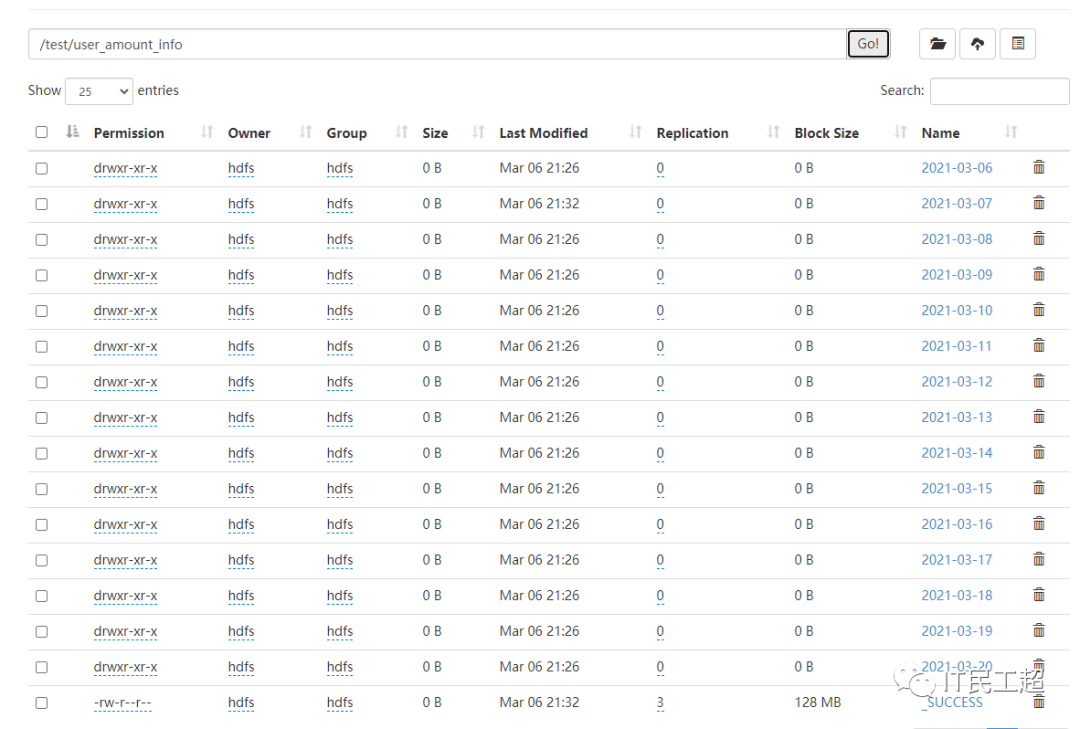
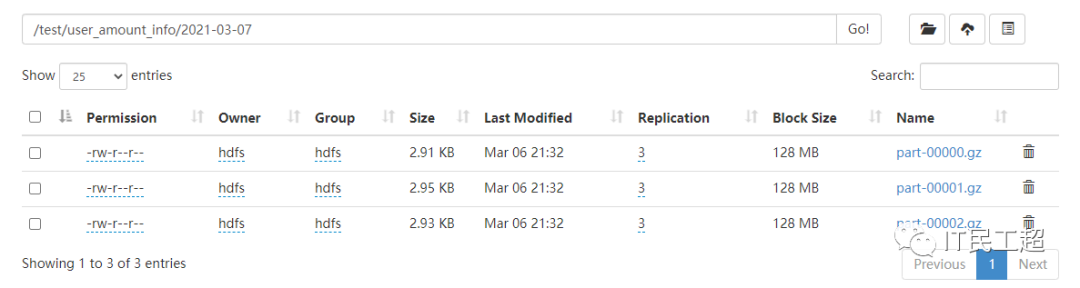
/test/user_amount_info/2021-03-07
总结
每批次消费数据条数计算:
创建topic时指定的分区数
kafka-topics --zookeeper bigdata01:2181 --create --replication-factor 3 --partitions 3 --topic user_amount_info
set("spark.streaming.kafka.maxRatePerPartition", "100")//每秒拉取对应分区的数据条数val ssc = new StreamingContext(conf,Seconds(5))//5秒一个批次一个批次处理的总消息条数为:100*5*3=1500spark.streaming.kafka.maxRatePerPartition*批次时间间隔*分区数
SparkStreaming的第一个Stage的分区数与Kafka主题分区数的关系
为什么要手动提交offsit
文章转载自趣说大数据,如果涉嫌侵权,请发送邮件至:contact@modb.pro进行举报,并提供相关证据,一经查实,墨天轮将立刻删除相关内容。
