




前言
由于客户的生产环境硬件已使用9年,为了运行稳定近期打算把核心系统迁移到公有云的ECS服务器上。但担心云上ECS自建的Oracle数据库性能不能满足当前业务系统。我们可以使用Oracle Real Application Testing (RAT) 的Database Replay(数据库回放)功能进行压力测试,捕获、回放和分析生产环境中的实际数据库工作负载,在测试或升级数据库系统能够准确其对性能评估。
环境准备
按下表安装天翼云环境,并把生产环境的数据迁移到天翼云上
| 位置 | 主机名 | IP地址 | 操作系统版本 | 数据库版本 | CPU | 磁盘空间 | 内存 |
|---|---|---|---|---|---|---|---|
| 本地机房(源端) | Gslz-cmsdb | 192.168.0.8 | Oracle Linux6.9 | Oracle 11.2.0.4 | E5-2620 v3 8c | 1.2T | 64G |
| 天翼云(目标端) | ecs-f0e9-1122743 | 10.104.6.2 | CentOS 7.9 | Oracle 11.2.0.4 | Gold 6266C 8c | 2T | 128G |
数据迁移上云
创建pfile
create pfile='/home/oracle/pfile.ora' from spfile;
cat pfile.ora
在目标端修改并创建 pfile 参数文件
vim $ORACLE_HOME/dbs/initcmsgan.ora
*.audit_file_dest='/u01/app/oracle/admin/cmsgan/adump'
*.audit_trail='db'
*.compatible='11.2.0.4.0'
*.control_files='/u01/app/oracle/oradata/cmsgan/control01.ctl','/u01/app/oracle/fast_recovery_area/cmsgan/control02.ctl'
*.db_block_size=8192
*.db_domain=''
*.db_name='cmsgan'
*.db_recovery_file_dest='/u01/app/oracle/fast_recovery_area'
*.db_recovery_file_dest_size=429496729600
*.deferred_segment_creation=FALSE
*.diagnostic_dest='/u01/app/oracle'
*.dispatchers='(PROTOCOL=TCP) (SERVICE=cmsganXDB)'
*.open_cursors=300
*.pga_aggregate_target=10G
*.processes=2000
*.remote_login_passwordfile='EXCLUSIVE'
*.sec_case_sensitive_logon=FALSE
*.sessions=885
*.sga_target=64G
*.standby_file_management='AUTO'
*.undo_tablespace='UNDOTBS1'
注意根据系统资源修改目标端sga_target和pga_aggregate_target内存大小
创建目标端目录和源端一样
mkdir -p /u01/app/oracle/admin/cmsgan/adump
mkdir -p /u01/app/oracle/oradata/cmsgan
mkdir -p /u01/app/oracle/fast_recovery_area/cmsgan
chown -R oracle:oinstall /u01/app/oracle/admin/cmsgan/adump
chown -R oracle:oinstall /u01/app/oracle/oradata/cmsgan
chown -R oracle:oinstall /u01/app/oracle/fast_recovery_area/cmsgan
将源端的密码文件拷贝至目标端
cd $ORACLE_HOME/dbs
scp orapwcmsgan oracle@10.104.6.2:$ORACLE_HOME/dbs
目标端开启到 nomount 模式
sqlplus / as sysdba
#创建spfile
create spfile from pfile;
#启动到nomount状态
startup nomount;
源端RMAN备份
rman target /
run {
allocate channel c1 device type disk;
crosscheck backup;
crosscheck archivelog all;
sql"alter system archive log current";
delete noprompt expired backup;
delete noprompt obsolete device type disk;
backup incremental level 0 database include current controlfile format '/backup/fulldb_lv0_%d_%T_%t_%s_%p.bak';
backup archivelog all delete input format '/backup/arch_%d_%T_%t_%s_%p.bak';
release channel c1;
}
为了节省上传到云上带宽压力,打包压缩备份文件
tar -zcvf /backup/rman.tar.gz /backup/*.bak
源端拷贝备份文件
scp /backup/rman.tar.gz oracle@10.104.6.2:/backup
#目标端解压备份文件
tar -zxvf /backup/rman.tar.gz
目标端rman恢复
rman target /
#恢复控制文件
restore controlfile from '/backup/fulldb_lv0_%d_%T_%t_%s_%p.bak';
#启动到mount状态
alter database mount;
#注册备份集
catalog start with '/backup/';
#恢复数据文件
restore database;
#介质恢复
recover database;
#目标端恢复到需要打开的状态
alter database open resetlogs;
注意: 一旦打开到 resetlogs 状态后,将无法继续 recover 归档日志,所以需要确认好数据之后再开启到 resetlogs 状态。
至此,RMAN 迁移上云恢复结束,可以测试连接目标端数据库进行测试
压力测试
生产数据库:用于workload_capture,即负载捕获
迁移数据库:用于workload_ preprocess和replay,即负载预处理和负载重放
wrc Replay client:用于发起workload的客户端进程
生产数据库
创建capture目录
[oracle@Gslz-cmsdb ~]$ mkdir -p /home/oracle/capdir
[oracle@Gslz-cmsdb ~]$ sqlplus / as sysdba

SQL*Plus: Release 11.2.0.4.0 Production on Thu Feb 20 15:09:45 2025

Copyright (c) 1982, 2013, Oracle.  All rights reserved.


Connected to:
Oracle Database 11g Enterprise Edition Release 11.2.0.4.0 - 64bit Production
With the Partitioning, OLAP, Data Mining and Real Application Testing options

SQL> create or replace directory capdir as '/home/oracle/capdir';

Directory created.

SQL>
创建过滤器
由于我们要捕获生产环境所有的负载,本步骤可以省略
exec dbms_workload_capture.add_filter( fname IN VARCHAR2, fattribute IN VARCHAR2,fvalueIN VARCHAR2);
fattribute:
INSTANCE_NUMBER - type NUMBER
USER - type STRING
MODULE - type STRING
ACTION - type STRING
PROGRAM - type STRING
SERVICE - type STRING
PDB - type STRING
#创建CMSGAN用户执行信息的过滤器
exec dbms_workload_capture.add_filter('filter_user1', 'USER', 'CMSGAN');
#创建emagent程序执行信息的过滤器
exec dbms_workload_capture.add_filter(fname=>'filter_prog2',fattribute=>'PROGRAM',fvalue=>'%emagent%');
查询过滤器
select * from dba_workload_filters;
删除过滤器
exec dbms_workload_capture.delete_filter('filter_user1');
运行capture捕获
我们在生产环境业务高峰时间端开启10分钟捕获
[oracle@Gslz-cmsdb ~]$ sqlplus / as sysdba

SQL*Plus: Release 11.2.0.4.0 Production on Thu Feb 20 15:09:45 2025

Copyright (c) 1982, 2013, Oracle.  All rights reserved.


Connected to:
Oracle Database 11g Enterprise Edition Release 11.2.0.4.0 - 64bit Production
With the Partitioning, OLAP, Data Mining and Real Application Testing options

SQL> create or replace directory capdir as '/home/oracle/capdir';

Directory created.

SQL> show parameter PRE_11G_ENABLE_CAPTURE;
SQL> select * from dba_workload_filters;

no rows selected

SQL> begin
  dbms_workload_capture.start_capture(name => 'test_capture_1', dir => 'CAPDIR', duration => 600);
end;
/  2    3

PL/SQL procedure successfully completed.

SQL>
10g数据库需要开启PRE_11G_ENABLE_CAPTURE,alter system set PRE_11G_ENABLE_CAPTURE=true;
duration单位为秒,设置为NULL时,则captureprocess 必须手工调用FINISH_CAPTURE 过程来结束
停止capture
如果capture捕获未指定duration时间捕获,查看捕获状态是否完成,也可以手动进行停止捕获
#查看捕获状态是否完成
SQL> select id, name, status,dir_path from dba_workload_captures;

        ID
----------
NAME
--------------------------------------------------------------------------------
STATUS
----------------------------------------
DIR_PATH
--------------------------------------------------------------------------------
         1
test_capture_1
COMPLETED
/home/oracle/capdir


SQL>
#手动停止捕获
exec dbms_workload_capture.finish_capture();
捕获生成文件
[oracle@Gslz-cmsdb cap]$ cd
[oracle@Gslz-cmsdb ~]$
[oracle@Gslz-cmsdb ~]$ cd capdir
[oracle@Gslz-cmsdb capdir]$ ll
total 8
drwxr-xr-x 2 oracle oinstall 4096 Feb 20 15:30 cap
drwxr-xr-x 3 oracle oinstall 4096 Feb 20 15:13 capfiles
[oracle@Gslz-cmsdb capdir]$ cd cap
[oracle@Gslz-cmsdb cap]$ ll
total 12208
-rw-r----- 1 oracle oinstall 11812864 Feb 20 15:30 wcr_ca.dmp
-rw-r--r-- 1 oracle oinstall    14826 Feb 20 15:30 wcr_ca.log
-rw-r----- 1 oracle oinstall    12288 Feb 20 15:30 wcr_cap_uc_graph.extb
-rw-r--r-- 1 oracle oinstall    73868 Feb 20 15:24 wcr_cr.html
-rw-r--r-- 1 oracle oinstall    24808 Feb 20 15:25 wcr_cr.text
-rw-r--r-- 1 oracle oinstall   539372 Feb 20 15:25 wcr_cr.xml
-rw-r--r-- 1 oracle oinstall      216 Feb 20 15:24 wcr_fcapture.wmd
-rw-r--r-- 1 oracle oinstall      104 Feb 20 15:13 wcr_scapture.wmd
[oracle@Gslz-cmsdb cap]$
导出awr报告
查询dba_workload_captures,导出的awr报告可以导入到目标库上,用来做对比,生成compare period report需要
SQL> select id, awr_begin_snap, awr_end_snap from dba_workload_captures;

        ID AWR_BEGIN_SNAP AWR_END_SNAP
---------- -------------- ------------
         1          69221        69222

SQL> exec dbms_workload_capture.export_awr (capture_id => 1);

PL/SQL procedure successfully completed.

SQL>
目标数据库
捕获文件上传到目标服务器/home/oracle/replay目录下
mkdir -p /home/oracle/replay
scp -r /home/oracle/capdir/* 10.104.6.2:/home/oracle/replay
创建replay目录
[oracle@ecs-f0e9-1122743 ~]$ sqlplus / as sysdba

SQL*Plus: Release 11.2.0.4.0 Production on Thu Feb 20 15:36:50 2025

Copyright (c) 1982, 2013, Oracle.  All rights reserved.


Connected to:
Oracle Database 11g Enterprise Edition Release 11.2.0.4.0 - 64bit Production
With the Partitioning, OLAP, Data Mining and Real Application Testing options

SQL> create or replace directory db_replay_capture_dir AS '/home/oracle/replay';

Directory created.

SQL>
创建过滤器
我们需要回放所有生产负载捕获内容,本步骤可以省略
exec dbms_workload_replay.add_filter (fname IN VARCHAR2,fattribute IN VARCHAR2,fvalue IN VARCHAR2);
fattribute可以使用如下:
USER
MODULE
ACTION
PROGRAM
SERVICE
CONNECTION_STRING
#创建CMSGAN用户执行信息的过滤器
exec dbms_workload_replay.add_filter ('replay_filter1','USER','CMSGAN');
加载capture日志
使用PROCESS_CAPTURE过程来准备capture logs
SQL> exec dbms_workload_replay.process_capture ('DB_REPLAY_CAPTURE_DIR');

PL/SQL procedure successfully completed.

SQL>

#执行完毕后,会生成wcr_process.wmd,wcr_login.pp, wcr_seq_data.extb, wcr_scn_order.extb , wcr_conn_data.extb等文件。
[oracle@ecs-f0e9-1122743 pp11.2.0.4.0]$ pwd
/home/oracle/replay/pp11.2.0.4.0
[oracle@ecs-f0e9-1122743 pp11.2.0.4.0]$ ls -lh
total 516K
-rw-r----- 1 oracle oinstall  12K Feb 20 15:38 wcr_commits.extb
-rw-r----- 1 oracle oinstall  24K Feb 20 15:38 wcr_conn_data.extb
-rw-r----- 1 oracle oinstall 332K Feb 20 15:38 wcr_data.extb
-rw-r----- 1 oracle oinstall  44K Feb 20 15:38 wcr_dep_graph.extb
-rw-r--r-- 1 oracle oinstall  15K Feb 20 15:38 wcr_login.pp
-rw-r--r-- 1 oracle oinstall   35 Feb 20 15:38 wcr_process.wmd
-rw-r----- 1 oracle oinstall  16K Feb 20 15:38 wcr_references.extb
-rw-r----- 1 oracle oinstall  28K Feb 20 15:38 wcr_scn_order.extb
-rw-r----- 1 oracle oinstall  40K Feb 20 15:38 wcr_seq_data.extb
[oracle@ecs-f0e9-1122743 pp11.2.0.4.0]$
初始化replay
#使用Initializing replay 装载metadata到tables里
SQL> exec dbms_workload_replay.initialize_replay (replay_name => 'replay',  replay_dir  => 'DB_REPLAY_CAPTURE_DIR');

PL/SQL procedure successfully completed.
#将数据改成PREPARE REPLAY 模式,默认synchronization参数TRUE,按commit数据的顺序在数据库里重新执行一遍sql。
SQL> exec dbms_workload_replay.prepare_replay();

PL/SQL procedure successfully completed.
#检查replay的状态
SQL> col name for a20
SQL> col status for a20
SQL> select name,status from dba_workload_replays;

NAME                 STATUS
-------------------- --------------------
replay               PREPARE

SQL>
启动重放客户端
执行wrc system/oracle mode=replay replaydir=/home/oracle/replay,此时wrc进入等待replay开始状态
#
[oracle@ecs-f0e9-1122743 ~]$ wrc system/oracle mode=replay replaydir=/home/oracle/replay

Workload Replay Client: Release 11.2.0.4.0 - Production on Thu Feb 20 15:41:03 2025

Copyright (c) 1982, 2011, Oracle and/or its affiliates.  All rights reserved.


Wait for the replay to start (15:41:03)
执行重放replay
新开启一个窗口用oracle用户登录,开始重放执行exec dbms_workload_replay.start_replay;
观察重放replay状态select id, name, status from dba_workload_replays;
初始状态:PREPARE
执行状态:IN PROGRESS
完成状态:COMPLETED
[oracle@ecs-f0e9-1122743 ~]$ sqlplus / as sysdba

SQL*Plus: Release 11.2.0.4.0 Production on Thu Feb 20 15:42:57 2025

Copyright (c) 1982, 2013, Oracle.  All rights reserved.


Connected to:
Oracle Database 11g Enterprise Edition Release 11.2.0.4.0 - 64bit Production
With the Partitioning, OLAP, Data Mining and Real Application Testing options

SQL> exec dbms_workload_replay.start_replay;

PL/SQL procedure successfully completed.

SQL> select id, name, status from dba_workload_replays;

        ID
----------
NAME
--------------------------------------------------------------------------------
STATUS
----------------------------------------
         1
replay
IN PROGRESS


SQL>
这时我们也可以通过观察oracle进程,看到大量oraclecmsgan (DESCRIPTION=(LOCAL=YES)(ADDRESS=(PROTOCOL=beq)))连接进程运行重放
[root@ecs-f0e9-1122743 ~]# ps -ef|grep ora
oracle     356     1  0 Feb17 ?        00:00:04 ora_smco_cmsgan
oracle    2139     1  1 14:46 ?        00:00:49 oraclecmsgan (LOCAL=NO)
oracle    2905     1  0 14:47 ?        00:00:01 oraclecmsgan (LOCAL=NO)
oracle    2907     1  0 14:47 ?        00:00:00 oraclecmsgan (LOCAL=NO)
root      5181  5051  0 15:38 pts/1    00:00:00 su - oracle
oracle    5183  5181  0 15:38 pts/1    00:00:00 -bash
oracle    5465     1  0 11:18 ?        00:01:30 oraclecmsgan (LOCAL=NO)
oracle    9059     1  0 15:40 ?        00:00:00 ora_w001_cmsgan
oracle    9355     1  0 Feb17 ?        00:00:00 oraclecmsgan (LOCAL=NO)
oracle   11137 31703  0 15:41 pts/5    00:00:01 wrc
oracle   11357  5183  0 15:41 pts/1    00:00:00 top
root     15248 12273  0 15:42 pts/6    00:00:00 su - oracle
oracle   15249 15248  0 15:42 pts/6    00:00:00 -bash
oracle   15377 15249  0 15:42 pts/6    00:00:00 sqlplus   as sysdba
oracle   15378 15377  1 15:42 ?        00:00:01 oraclecmsgan (DESCRIPTION=(LOCAL=YES)(ADDRESS=(PROTOCOL=beq)))
oracle   15923 11137  0 15:43 ?        00:00:00 oraclecmsgan (DESCRIPTION=(LOCAL=YES)(ADDRESS=(PROTOCOL=beq)))
oracle   15925 11137  0 15:43 ?        00:00:00 oraclecmsgan (DESCRIPTION=(LOCAL=YES)(ADDRESS=(PROTOCOL=beq)))
oracle   15927 11137  4 15:43 ?        00:00:03 oraclecmsgan (DESCRIPTION=(LOCAL=YES)(ADDRESS=(PROTOCOL=beq)))
oracle   15932 11137  1 15:43 ?        00:00:01 oraclecmsgan (DESCRIPTION=(LOCAL=YES)(ADDRESS=(PROTOCOL=beq)))
oracle   16039 11137  0 15:43 ?        00:00:00 oraclecmsgan (DESCRIPTION=(LOCAL=YES)(ADDRESS=(PROTOCOL=beq)))
oracle   16044 11137  0 15:43 ?        00:00:00 oraclecmsgan (DESCRIPTION=(LOCAL=YES)(ADDRESS=(PROTOCOL=beq)))
oracle   16046 11137  7 15:43 ?        00:00:05 oraclecmsgan (DESCRIPTION=(LOCAL=YES)(ADDRESS=(PROTOCOL=beq)))
oracle   16048 11137  7 15:43 ?        00:00:05 oraclecmsgan (DESCRIPTION=(LOCAL=YES)(ADDRESS=(PROTOCOL=beq)))
oracle   16050 11137  2 15:43 ?        00:00:01 oraclecmsgan (DESCRIPTION=(LOCAL=YES)(ADDRESS=(PROTOCOL=beq)))
oracle   16053 11137  0 15:43 ?        00:00:00 oraclecmsgan (DESCRIPTION=(LOCAL=YES)(ADDRESS=(PROTOCOL=beq)))
oracle   16055 11137  0 15:43 ?        00:00:00 oraclecmsgan (DESCRIPTION=(LOCAL=YES)(ADDRESS=(PROTOCOL=beq)))
oracle   16168 11137  0 15:43 ?        00:00:00 oraclecmsgan (DESCRIPTION=(LOCAL=YES)(ADDRESS=(PROTOCOL=beq)))
oracle   16281 11137  0 15:43 ?        00:00:00 oraclecmsgan (DESCRIPTION=(LOCAL=YES)(ADDRESS=(PROTOCOL=beq)))
oracle   16284 11137  0 15:43 ?        00:00:00 oraclecmsgan (DESCRIPTION=(LOCAL=YES)(ADDRESS=(PROTOCOL=beq)))
oracle   16286 11137  7 15:43 ?        00:00:04 oraclecmsgan (DESCRIPTION=(LOCAL=YES)(ADDRESS=(PROTOCOL=beq)))
oracle   16395 11137  0 15:43 ?        00:00:00 oraclecmsgan (DESCRIPTION=(LOCAL=YES)(ADDRESS=(PROTOCOL=beq)))
oracle   16401 11137  0 15:43 ?        00:00:00 oraclecmsgan (DESCRIPTION=(LOCAL=YES)(ADDRESS=(PROTOCOL=beq)))
oracle   16509 11137  0 15:43 ?        00:00:00 oraclecmsgan (DESCRIPTION=(LOCAL=YES)(ADDRESS=(PROTOCOL=beq)))
oracle   16515 11137  0 15:43 ?        00:00:00 oraclecmsgan (DESCRIPTION=(LOCAL=YES)(ADDRESS=(PROTOCOL=beq)))
oracle   16625 11137  0 15:43 ?        00:00:00 oraclecmsgan (DESCRIPTION=(LOCAL=YES)(ADDRESS=(PROTOCOL=beq)))
oracle   16627 11137  0 15:43 ?        00:00:00 oraclecmsgan (DESCRIPTION=(LOCAL=YES)(ADDRESS=(PROTOCOL=beq)))
oracle   16736 11137  0 15:43 ?        00:00:00 oraclecmsgan (DESCRIPTION=(LOCAL=YES)(ADDRESS=(PROTOCOL=beq)))
oracle   16742 11137  0 15:43 ?        00:00:00 oraclecmsgan (DESCRIPTION=(LOCAL=YES)(ADDRESS=(PROTOCOL=beq)))
oracle   16751 11137  0 15:43 ?        00:00:00 oraclecmsgan (DESCRIPTION=(LOCAL=YES)(ADDRESS=(PROTOCOL=beq)))
oracle   16860 11137  0 15:43 ?        00:00:00 oraclecmsgan (DESCRIPTION=(LOCAL=YES)(ADDRESS=(PROTOCOL=beq)))
oracle   16863 11137  0 15:43 ?        00:00:00 oraclecmsgan (DESCRIPTION=(LOCAL=YES)(ADDRESS=(PROTOCOL=beq)))
oracle   16865 11137  0 15:43 ?        00:00:00 oraclecmsgan (DESCRIPTION=(LOCAL=YES)(ADDRESS=(PROTOCOL=beq)))
oracle   16867 11137  0 15:43 ?        00:00:00 oraclecmsgan (DESCRIPTION=(LOCAL=YES)(ADDRESS=(PROTOCOL=beq)))
oracle   16869     1  0 15:43 ?        00:00:00 ora_w002_cmsgan
oracle   16874 11137  0 15:43 ?        00:00:00 oraclecmsgan (DESCRIPTION=(LOCAL=YES)(ADDRESS=(PROTOCOL=beq)))
oracle   16984     1  0 15:43 ?        00:00:00 ora_w003_cmsgan
oracle   16989 11137  0 15:43 ?        00:00:00 oraclecmsgan (DESCRIPTION=(LOCAL=YES)(ADDRESS=(PROTOCOL=beq)))
oracle   17097 11137  0 15:43 ?        00:00:00 oraclecmsgan (DESCRIPTION=(LOCAL=YES)(ADDRESS=(PROTOCOL=beq)))
oracle   17099 11137  0 15:43 ?        00:00:00 oraclecmsgan (DESCRIPTION=(LOCAL=YES)(ADDRESS=(PROTOCOL=beq)))
oracle   17101 11137  0 15:43 ?        00:00:00 oraclecmsgan (DESCRIPTION=(LOCAL=YES)(ADDRESS=(PROTOCOL=beq)))
oracle   17213 11137  2 15:43 ?        00:00:00 oraclecmsgan (DESCRIPTION=(LOCAL=YES)(ADDRESS=(PROTOCOL=beq)))
oracle   17322 11137  0 15:43 ?        00:00:00 oraclecmsgan (DESCRIPTION=(LOCAL=YES)(ADDRESS=(PROTOCOL=beq)))
oracle   17335 11137  0 15:43 ?        00:00:00 oraclecmsgan (DESCRIPTION=(LOCAL=YES)(ADDRESS=(PROTOCOL=beq)))
oracle   17453 11137  0 15:43 ?        00:00:00 oraclecmsgan (DESCRIPTION=(LOCAL=YES)(ADDRESS=(PROTOCOL=beq)))
oracle   17577     1  3 15:43 ?        00:00:01 ora_j000_cmsgan
oracle   17579     1  0 15:43 ?        00:00:00 ora_j001_cmsgan
oracle   17581     1  0 15:43 ?        00:00:00 ora_j002_cmsgan
oracle   17584 11137  0 15:43 ?        00:00:00 oraclecmsgan (DESCRIPTION=(LOCAL=YES)(ADDRESS=(PROTOCOL=beq)))
oracle   17810 11137  3 15:43 ?        00:00:00 oraclecmsgan (DESCRIPTION=(LOCAL=YES)(ADDRESS=(PROTOCOL=beq)))
oracle   17813 11137  0 15:44 ?        00:00:00 oraclecmsgan (DESCRIPTION=(LOCAL=YES)(ADDRESS=(PROTOCOL=beq)))
oracle   18359 11137  0 15:44 ?        00:00:00 oraclecmsgan (DESCRIPTION=(LOCAL=YES)(ADDRESS=(PROTOCOL=beq)))
oracle   18469 11137  0 15:44 ?        00:00:00 oraclecmsgan (DESCRIPTION=(LOCAL=YES)(ADDRESS=(PROTOCOL=beq)))
oracle   18522     1  0 10:03 ?        00:00:37 oraclecmsgan (LOCAL=NO)
oracle   18583 11137 49 15:44 ?        00:00:03 oraclecmsgan (DESCRIPTION=(LOCAL=YES)(ADDRESS=(PROTOCOL=beq)))
oracle   18694 11137 68 15:44 ?        00:00:04 oraclecmsgan (DESCRIPTION=(LOCAL=YES)(ADDRESS=(PROTOCOL=beq)))
oracle   18696 11137  0 15:44 ?        00:00:00 oraclecmsgan (DESCRIPTION=(LOCAL=YES)(ADDRESS=(PROTOCOL=beq)))
oracle   18698 11137  1 15:44 ?        00:00:00 oraclecmsgan (DESCRIPTION=(LOCAL=YES)(ADDRESS=(PROTOCOL=beq)))
root     18836 18705  0 15:44 pts/7    00:00:00 grep --color=auto ora
oracle   23961     1  0 Feb13 ?        00:00:12 /u01/app/oracle/product/11.2.0.4/db_1/bin/tnslsnr LISTENER -inherit
oracle   26337     1  0 Feb15 ?        00:00:50 ora_pmon_cmsgan
oracle   26339     1  0 Feb15 ?        00:00:32 ora_psp0_cmsgan
oracle   26341     1  0 Feb15 ?        00:35:28 ora_vktm_cmsgan
oracle   26346     1  0 Feb15 ?        00:00:06 ora_gen0_cmsgan
oracle   26348     1  0 Feb15 ?        00:00:10 ora_diag_cmsgan
oracle   26350     1  0 Feb15 ?        00:00:30 ora_dbrm_cmsgan
oracle   26352     1  0 Feb15 ?        00:14:04 ora_dia0_cmsgan
oracle   26354     1  0 Feb15 ?        00:00:10 ora_mman_cmsgan
oracle   26356     1  0 Feb15 ?        00:12:16 ora_dbw0_cmsgan
oracle   26358     1  0 Feb15 ?        00:12:14 ora_dbw1_cmsgan
oracle   26360     1  0 Feb15 ?        00:01:21 ora_lgwr_cmsgan
oracle   26362     1  0 Feb15 ?        00:01:20 ora_ckpt_cmsgan
oracle   26364     1  0 Feb15 ?        00:00:40 ora_smon_cmsgan
oracle   26366     1  0 Feb15 ?        00:00:02 ora_reco_cmsgan
oracle   26368     1  0 Feb15 ?        00:00:51 ora_mmon_cmsgan
oracle   26370     1  0 Feb15 ?        00:08:27 ora_mmnl_cmsgan
oracle   26372     1  0 Feb15 ?        00:00:03 ora_d000_cmsgan
oracle   26374     1  0 Feb15 ?        00:00:02 ora_s000_cmsgan
oracle   30072     1  0 15:20 ?        00:00:00 ora_w000_cmsgan
root     31702 13164  0 15:35 pts/5    00:00:00 su - oracle
oracle   31703 31702  0 15:35 pts/5    00:00:00 -bash
oracle   31808     1  0 13:29 ?        00:00:01 oraclecmsgan (LOCAL=NO)
oracle   32313     1  0 Feb17 ?        00:00:21 ora_arc0_cmsgan
oracle   32315     1  0 Feb17 ?        00:00:22 ora_arc1_cmsgan
oracle   32317     1  0 Feb17 ?        00:00:02 ora_arc2_cmsgan
oracle   32319     1  0 Feb17 ?        00:00:22 ora_arc3_cmsgan
oracle   32390     1  0 Feb17 ?        00:00:02 ora_qmnc_cmsgan
oracle   32410     1  0 Feb17 ?        00:00:22 ora_cjq0_cmsgan
oracle   32426     1  0 Feb17 ?        00:00:02 ora_q000_cmsgan
oracle   32428     1  0 Feb17 ?        00:00:03 ora_q001_cmsgan
oracle   32533     1  0 13:42 ?        00:00:09 oraclecmsgan (LOCAL=NO)
oracle   32600     1  0 13:43 ?        00:00:00 oraclecmsgan (LOCAL=NO)
oracle   32602     1  0 13:43 ?        00:00:00 oraclecmsgan (LOCAL=NO)
[root@ecs-f0e9-1122743 ~]#
经过10分钟和生产环境相同的捕获时间重放结束,并且wrc重放客户端进程也同样结束
[oracle@ecs-f0e9-1122743 ~]$ wrc system/oracle mode=replay replaydir=/home/oracle/replay

Workload Replay Client: Release 11.2.0.4.0 - Production on Thu Feb 20 15:41:03 2025

Copyright (c) 1982, 2011, Oracle and/or its affiliates.  All rights reserved.


Wait for the replay to start (15:41:03)
Replay client 1 started (15:43:13)
Replay client 1 finished (15:53:45)
[oracle@ecs-f0e9-1122743 ~]$
手动停止replay
如果希望在完成replay 前提前停止重放过程,可以调用CANCEL_REPLAY 过程
exec dbms_workload_replay.cancel_replay();
报告和分析
获取replay报告
先获取replay_id
select id, name, status from dba_workload_replays;
获取replay报告
set pagesize 0 long 30000000 longchunksize 2000
spool /home/oracle/replay_report.html
select dbms_workload_replay.report(replay_id => 1,format => 'HTML') from dual;
spool off
获取比较capture和replay报告
SQL> set long 100000000 longchunksize 100000000 linesize 200 head off feedback off echo off trimspool on trim on
var report_bind clob;
begin
dbms_workload_replay.compare_period_report (replay_id1 => 1, replay_id2=> NULL, format => 'HTML', result => :report_bind);
end;
/SQL> SQL>   2    3    4
BEGIN
*
ERROR at line 1:
ORA-27163: out of memory
ORA-06512: at "SYS.DBMS_WORKLOAD_REPLAY", line 14573
ORA-06512: at "SYS.DBMS_WORKLOAD_REPLAY", line 14801
ORA-06512: at "SYS.DBMS_WORKLOAD_REPLAY", line 14878
ORA-06512: at "SYS.DBMS_WORKLOAD_REPLAY", line 14886
ORA-06512: at "SYS.DBMS_WORKLOAD_REPLAY", line 15864
ORA-06512: at "SYS.DBMS_WORKLOAD_REPLAY", line 7098
ORA-06512: at line 2


SQL>
注意这里获取比较报告的时候会ORA-27163: out of memory报错,通过设置事件
[oracle@ecs-f0e9-1122743 ~]$ sqlplus / as sysdba

SQL*Plus: Release 11.2.0.4.0 Production on Thu Feb 20 17:00:33 2025

Copyright (c) 1982, 2013, Oracle.  All rights reserved.


Connected to:
Oracle Database 11g Enterprise Edition Release 11.2.0.4.0 - 64bit Production
With the Partitioning, OLAP, Data Mining and Real Application Testing options

SQL> alter session set events '31156 trace name context forever, level 0x400';

Session altered.

SQL> set long 100000000 longchunksize 100000000 linesize 200 head off feedback off echo off trimspool on trim on
var report_bind clob;
SQL> SQL> BEGIN
  2  dbms_workload_replay.compare_period_report (replay_id1 => 1, replay_id2=> NULL, format => 'HTML', result => :report_bind);
END;
/  3    4
SQL> spool /home/oracle/compare_report.html
print report_bind
spool off
SQL>
测试完成
在生产数据库删除capture
[oracle@Gslz-cmsdb ~]$ sqlplus / as sysdba

SQL*Plus: Release 11.2.0.4.0 Production on Sat Feb 22 23:54:22 2025

Copyright (c) 1982, 2013, Oracle.  All rights reserved.


Connected to:
Oracle Database 11g Enterprise Edition Release 11.2.0.4.0 - 64bit Production
With the Partitioning, OLAP, Data Mining and Real Application Testing options

SQL> select id,name from dba_workload_captures;

       ID
----------
NAME
--------------------------------------------------------------------------------
        1
test_capture_1


SQL> exec dbms_workload_capture.delete_capture_info(1);

PL/SQL procedure successfully completed.

SQL>
在目标数据库删除replay
[oracle@ecs-f0e9-1122743 ~]$ sqlplus / as sysdba

SQL*Plus: Release 11.2.0.4.0 Production on Sat Feb 22 23:56:32 2025

Copyright (c) 1982, 2013, Oracle.  All rights reserved.


Connected to:
Oracle Database 11g Enterprise Edition Release 11.2.0.4.0 - 64bit Production
With the Partitioning, OLAP, Data Mining and Real Application Testing options

SQL> SELECT id,name, start_time,end_time, duration_secs,status FROM dba_workload_replays order by start_time desc;

        ID
----------
NAME
--------------------------------------------------------------------------------
START_TIME          END_TIME            DURATION_SECS
------------------- ------------------- -------------
STATUS
----------------------------------------
         1
replay
2025-02-20 15:43:13 2025-02-20 15:53:16           603
COMPLETED


SQL> exec dbms_workload_replay.delete_replay_info(1);

PL/SQL procedure successfully completed.

SQL>
阅读报告
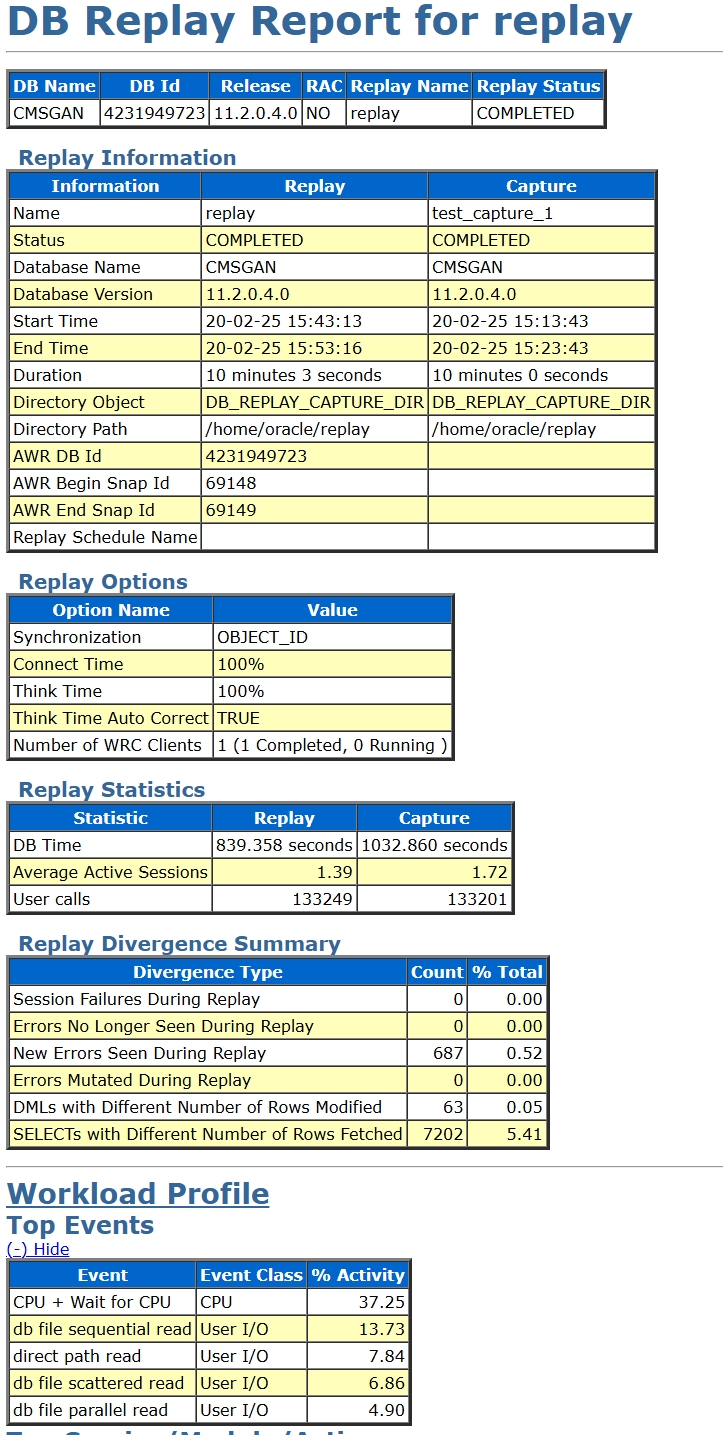
查看replay报告可以看到数据库压力捕获和重放时间,重放和捕获使用的DB Time等信息
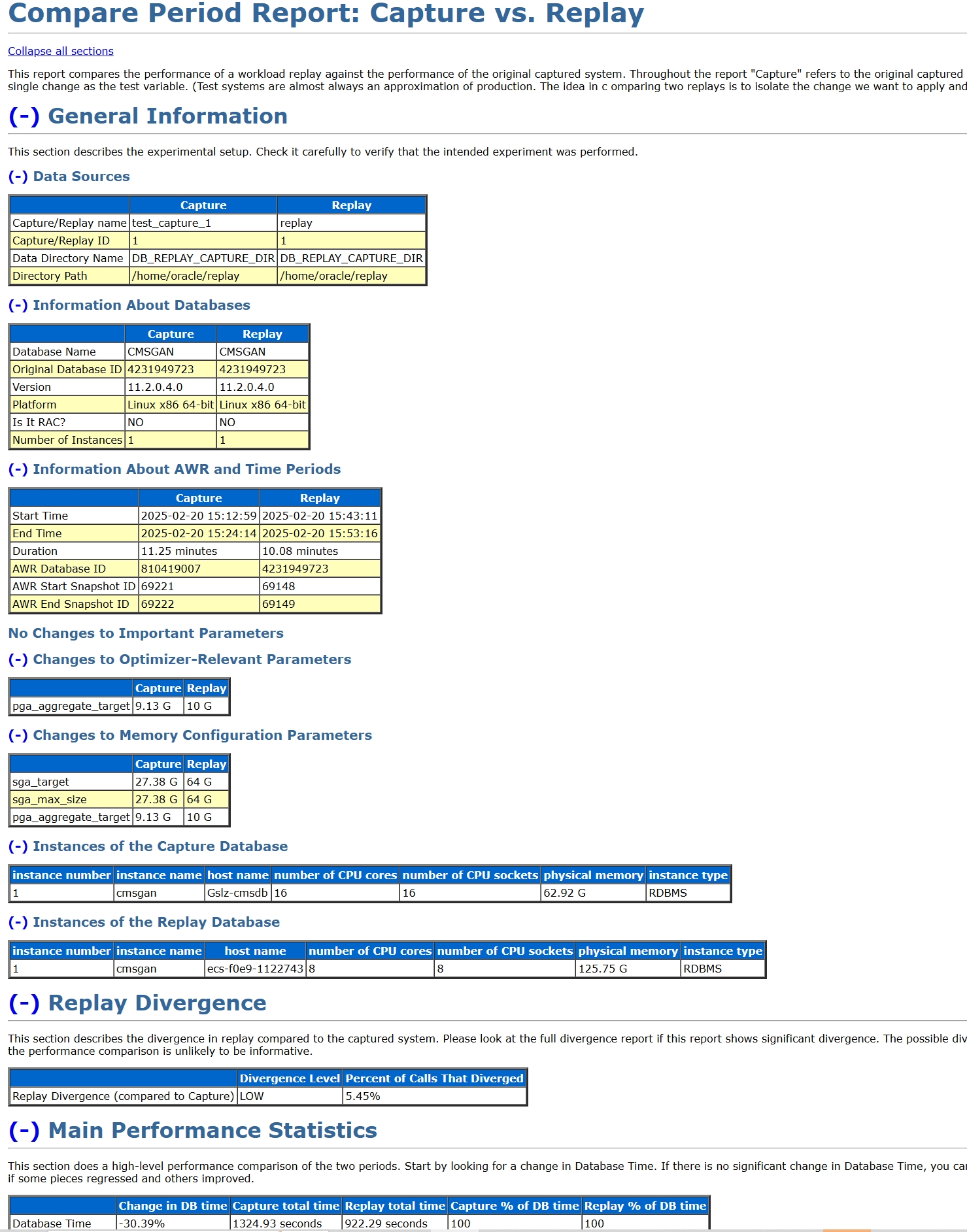
查看比较报告数据库时间云上比本地机房节省30%,由于硬件差别CPU时间上云上ECS主机比云下本地机房节省56.44%
总结
在数据库的迁移和升级场景中,我们可以使用Real Application Testing的Database Replay(数据库重放)功能,在生产数据库上“捕获”负载(workload capture),保存成一定格式的二进制文件。再将保存的负载文件复制到测试环境,在测试环境重放负载(workload replay),从而达到模拟真实压力,进行压力测试的目的,本文记录一次完整的压力测试过程,如有不正确的地方也请指正,希望能帮助到您😄
