



最近偶尔会接到客户反馈业务跑批过程中报错FALTA: sorry, too many clients already,本文结合实际情况对问题进行说明并提供一些处理建议。
【场景一】连接数超出上限
梧桐数据库的最大连接数受集群级guc参数max_connections限制,当业务并发数超过上限时,梧桐数据库不再允许新的请求并报错。这种情况下可以考虑适当调整max_connections参数提高数据库并发上限,或者降低业务并发。
实验环境降低max_connections为128,脚本内并发执行语句,可以看到业务并发超过限制后语句报错。
wutongdb=> show max_connections;
 max_connections
-----------------
 128
(1 row)


[root@9acd57b29a26 ~]$ for i in {1..129}
> do
>   psql -p 7000 -d postgres -c "select pg_sleep(5)" &
> done
psql: error: FATAL:  sorry, too many clients already
[129]+ Exit 1                  psql -p 7000 -d postgres -c "select pg_sleep(5);"
【场景二】计算节点连接数配置不合理
为了在查询执行期间实现最大的并行度,梧桐数据库将查询计划进行切分。Slice是计划中可以独立进行处理的部分,上一层slice会读取下一层各个slice并进行计算。每一个slice可以看作一个单独的连接,所以计算节点的连接数一般大于实际的活跃会话数。
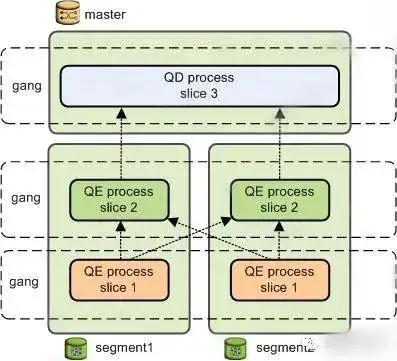
以一个简单查询为例,计划切分后被分发到4个vseg上进行计算,所以计算节点实际的连接数是1(slice数)X4(vseg数)。
wutongdb=> create table t1(a int, b int) distributed by (a);
CREATE TABLE
wutongdb=> explain select * from t1;
                                     QUERY PLAN
------------------------------------------------------------------------------------
 Gather Motion 4:1  (slice1; segments: 4)  (cost=0.00..1661.50 rows=109100 width=8)
   ->  Seq Scan on t1  (cost=0.00..297.75 rows=27275 width=8)
 Optimizer: Postgres-based planner
 NewExecutor: ON
(4 rows)
修改测试脚本,降低并发数为40,可以看到语句仍报错,但报错的节点变为了计算节点。在这种情况下,一般需要根据实际业务情况调大计算节点的max_segments数。
[root@9acd57b29a26 ~]$ for i in {1..40}
> do
>   psql -p 7000 -d postgres -c "select count(*), pg_sleep(5) from t1;" &
> done
ERROR:  error from proxy dispatcher 0-127.0.0.1:7002: FATAL:  sorry, too many clients already (cdbproxy.cc:272)
[40]+  Exit 1                  psql -p 7000 -d postgres -c "select count(*), pg_sleep(5) from t1;"
【场景三】复杂SQL
除了上述两种情况,有时SQL过于复杂或计划不合理也会导致资源消耗过大而连接超限,此时需要排查SQL占用资源过多是否合理并进行优化。
下面以一个join+agg的情况举例说明,可以看到当关闭ORCA优化器后语句生成的计划slice更多,需要占用更多的资源。
wutongdb=> explain  select *,pg_sleep(1) from t1,(select max(b) b from t1) s2 where t1.b=s2.b;
                                           QUERY PLAN
------------------------------------------------------------------------------------------------
 Hash Join  (cost=0.00..862.00 rows=1 width=12)
   Hash Cond: (t1.b = (max(t1_1.b)))
   ->  Gather Motion 4:1  (slice1; segments: 4)  (cost=0.00..431.00 rows=1 width=8)
         ->  Seq Scan on t1  (cost=0.00..431.00 rows=1 width=8)
   ->  Hash  (cost=431.00..431.00 rows=1 width=4)
         ->  Aggregate  (cost=0.00..431.00 rows=1 width=4)
               ->  Gather Motion 4:1  (slice2; segments: 4)  (cost=0.00..431.00 rows=1 width=4)
                     ->  Seq Scan on t1 t1_1  (cost=0.00..431.00 rows=1 width=4)
 Optimizer: GPORCA
(9 rows)

wutongdb=> set optimizer=off;
SET
wutongdb=> explain  select *,pg_sleep(1) from t1,(select max(b) b from t1) s2 where t1.b=s2.b;
                                                QUERY PLAN
----------------------------------------------------------------------------------------------------------
 Gather Motion 4:1  (slice1; segments: 4)  (cost=1.08..2.17 rows=3 width=16)
   ->  Hash Join  (cost=1.08..2.13 rows=1 width=16)
         Hash Cond: (t1.b = (max(t1_1.b)))
         ->  Redistribute Motion 4:4  (slice2; segments: 4)  (cost=0.00..1.03 rows=1 width=8)
               Hash Key: t1.b
               ->  Seq Scan on t1  (cost=0.00..1.01 rows=1 width=8)
         ->  Hash  (cost=1.07..1.07 rows=1 width=4)
               ->  Redistribute Motion 1:4  (slice3; segments: 1)  (cost=1.03..1.07 rows=1 width=4)
                     Hash Key: (max(t1_1.b))
                     ->  Aggregate  (cost=1.03..1.04 rows=1 width=4)
                           ->  Gather Motion 4:1  (slice4; segments: 4)  (cost=0.00..1.03 rows=1 width=4)
                                 ->  Seq Scan on t1 t1_1  (cost=0.00..1.01 rows=1 width=4)
 Optimizer: Postgres-based planner
(13 rows)
从实际测试结果也可以明显地看到同样并发数下计划更差的SQL执行会报错,而计划更优的语句可以正确执行。这种情况下需要结合实际情况进行SQL调优。
[root@9acd57b29a26 ~]$ for i in {1..15}
> do
>   psql -p 7000 -d postgres -c "set optimizer=on;select *, pg_sleep(5) from t1,(select max(b) b from t1) s2 where t1.b=s2.b;" &
> done
[1]   Done                    psql -p 7000 -d postgres -c "set optimizer=on;select *, pg_sleep(5) from t1,(select max(b) b from t1) s2 where t1.b=s2.b;"
[2]   Done                    psql -p 7000 -d postgres -c "set optimizer=on;select *, pg_sleep(5) from t1,(select max(b) b from t1) s2 where t1.b=s2.b;"
[3]   Done                    psql -p 7000 -d postgres -c "set optimizer=on;select *, pg_sleep(5) from t1,(select max(b) b from t1) s2 where t1.b=s2.b;"
[4]   Done                    psql -p 7000 -d postgres -c "set optimizer=on;select *, pg_sleep(5) from t1,(select max(b) b from t1) s2 where t1.b=s2.b;"
[5]   Done                    psql -p 7000 -d postgres -c "set optimizer=on;select *, pg_sleep(5) from t1,(select max(b) b from t1) s2 where t1.b=s2.b;"
[6]   Done                    psql -p 7000 -d postgres -c "set optimizer=on;select *, pg_sleep(5) from t1,(select max(b) b from t1) s2 where t1.b=s2.b;"
[7]   Done                    psql -p 7000 -d postgres -c "set optimizer=on;select *, pg_sleep(5) from t1,(select max(b) b from t1) s2 where t1.b=s2.b;"
[8]   Done                    psql -p 7000 -d postgres -c "set optimizer=on;select *, pg_sleep(5) from t1,(select max(b) b from t1) s2 where t1.b=s2.b;"
[9]   Done                    psql -p 7000 -d postgres -c "set optimizer=on;select *, pg_sleep(5) from t1,(select max(b) b from t1) s2 where t1.b=s2.b;"
[10]   Done                    psql -p 7000 -d postgres -c "set optimizer=on;select *, pg_sleep(5) from t1,(select max(b) b from t1) s2 where t1.b=s2.b;"
[11]   Done                    psql -p 7000 -d postgres -c "set optimizer=on;select *, pg_sleep(5) from t1,(select max(b) b from t1) s2 where t1.b=s2.b;"
[12]   Done                    psql -p 7000 -d postgres -c "set optimizer=on;select *, pg_sleep(5) from t1,(select max(b) b from t1) s2 where t1.b=s2.b;"
[13]   Done                    psql -p 7000 -d postgres -c "set optimizer=on;select *, pg_sleep(5) from t1,(select max(b) b from t1) s2 where t1.b=s2.b;"
[14]-  Done                    psql -p 7000 -d postgres -c "set optimizer=on;select *, pg_sleep(5) from t1,(select max(b) b from t1) s2 where t1.b=s2.b;"
[15]+  Done                    psql -p 7000 -d postgres -c "set optimizer=on;select *, pg_sleep(5) from t1,(select max(b) b from t1) s2 where t1.b=s2.b;"

[root@9acd57b29a26 ~]$ for i in {1..15}
> do
>   psql -p 7000 -d postgres -c "set optimizer=off;select *, pg_sleep(5) from t1,(select max(b) b from t1) s2 where t1.b=s2.b;" &
> done
...
ERROR:  error from proxy dispatcher 0-172.17.0.2:7002: FATAL:  sorry, too many clients already (cdbproxy.cc:272)
...
[1]   Done                    psql -p 7000 -d postgres -c "set optimizer=off;select *, pg_sleep(5) from t1,(select max(b) b from t1) s2 where t1.b=s2.b;"
[2]   Done                    psql -p 7000 -d postgres -c "set optimizer=off;select *, pg_sleep(5) from t1,(select max(b) b from t1) s2 where t1.b=s2.b;"
[3]   Done                    psql -p 7000 -d postgres -c "set optimizer=off;select *, pg_sleep(5) from t1,(select max(b) b from t1) s2 where t1.b=s2.b;"
[4]   Exit 1                  psql -p 7000 -d postgres -c "set optimizer=off;select *, pg_sleep(5) from t1,(select max(b) b from t1) s2 where t1.b=s2.b;"
[5]   Exit 1                  psql -p 7000 -d postgres -c "set optimizer=off;select *, pg_sleep(5) from t1,(select max(b) b from t1) s2 where t1.b=s2.b;"
[6]   Done                    psql -p 7000 -d postgres -c "set optimizer=off;select *, pg_sleep(5) from t1,(select max(b) b from t1) s2 where t1.b=s2.b;"
[7]   Done                    psql -p 7000 -d postgres -c "set optimizer=off;select *, pg_sleep(5) from t1,(select max(b) b from t1) s2 where t1.b=s2.b;"
[8]   Done                    psql -p 7000 -d postgres -c "set optimizer=off;select *, pg_sleep(5) from t1,(select max(b) b from t1) s2 where t1.b=s2.b;"
[9]   Exit 1                  psql -p 7000 -d postgres -c "set optimizer=off;select *, pg_sleep(5) from t1,(select max(b) b from t1) s2 where t1.b=s2.b;"
[10]   Done                    psql -p 7000 -d postgres -c "set optimizer=off;select *, pg_sleep(5) from t1,(select max(b) b from t1) s2 where t1.b=s2.b;"
[11]   Done                    psql -p 7000 -d postgres -c "set optimizer=off;select *, pg_sleep(5) from t1,(select max(b) b from t1) s2 where t1.b=s2.b;"
[12]   Done                    psql -p 7000 -d postgres -c "set optimizer=off;select *, pg_sleep(5) from t1,(select max(b) b from t1) s2 where t1.b=s2.b;"
[13]   Done                    psql -p 7000 -d postgres -c "set optimizer=off;select *, pg_sleep(5) from t1,(select max(b) b from t1) s2 where t1.b=s2.b;"
[14]-  Done                    psql -p 7000 -d postgres -c "set optimizer=off;select *, pg_sleep(5) from t1,(select max(b) b from t1) s2 where t1.b=s2.b;"
[15]+  Done                    psql -p 7000 -d postgres -c "set optimizer=off;select *, pg_sleep(5) from t1,(select max(b) b from t1) s2 where t1.b=s2.b;"
「喜欢这篇文章,您的关注和赞赏是给作者最好的鼓励」
关注作者
【版权声明】本文为墨天轮用户原创内容,转载时必须标注文章的来源(墨天轮),文章链接,文章作者等基本信息,否则作者和墨天轮有权追究责任。如果您发现墨天轮中有涉嫌抄袭或者侵权的内容,欢迎发送邮件至:contact@modb.pro进行举报,并提供相关证据,一经查实,墨天轮将立刻删除相关内容。
